

Best Tools for Virtual Assistants in 2026: The Complete Comparison Guide
This article contains affiliate links. If you purchase through them, VA Automation Lab earns a commission at no additional cost to you. All tools are evaluated independently.
A complete, function-by-function breakdown of the best tools for virtual assistants in 2026, with verified pricing, free tier limits, honest comparisons, and complete stacks for every experience level and VA type.
Most VA tool guides give you a list of forty apps and leave you to figure out which ones to actually use. That approach fails in practice: it creates decision paralysis, wastes money on overlapping subscriptions, and doesn’t account for the type of VA work you actually do.
This guide works differently. Every tool category maps to a specific VA business function (scheduling, CRM, automation, billing, contracts…) and for each function you get a clear winner, a realistic alternative, current pricing verified from official sources, and a direct answer to whether it’s worth paying for at your stage. Tools are organized into three coverage tiers so you can immediately see which ones deserve your attention first.
What this guide covers:
- Quick picks per business function, one table, every category
- 15 tool categories with verified pricing and VA-specific use cases
- Stacks by VA type: admin, social media, content, executive assistant, e-commerce
- Experience-level stacks for beginner, intermediate, and advanced VAs
- A master comparison table covering 30+ tools
- A framework for building your stack without overspending
This guide covers the best tools across every VA use case with direct recommendations. For a structured learning path that organizes these tools by skill level — from your first AI assistant to a fully automated multi-client system — see the VA resource hub.
For a complete overview of VA’s software, you can read the main guide: Tools for Virtual Assistants: The Complete AI Systems & Software Guide.
Want to Start Using AI Tools the Right Way?
If you’re a Virtual Assistant and feel confused by too many AI tools, this free starter toolkit shows you exactly where to begin, without tech overwhelm.
Ready-to-use prompts and workflow templates.
No research required: download it and start the first workflow today.
Table of Contents
1. Quick Picks: Best Tool Per VA Function
The best tools for virtual assistants in 2026, by function: Reclaim.ai for scheduling, Make for automation, ClickUp for project management, Folk for CRM, SaneBox for inbox triage, Jotform for client intake, Toggl Track for billable hours, and SocialBee for social media. A working VA stack spans 8–12 tools across 5–7 functions, and free tiers cover most of it at the 1–2 client stage.
VA Function | Top Pick | Free Tier | Paid From |
AI Assistant | ChatGPT | ✅ Limited | $20/mo |
AI Writing & Content | Rytr | ✅ 10K chars/mo | $7.50/mo |
Scheduling & Calendar | Reclaim.ai | ✅ Lite plan | $10/mo |
Time Tracking & Billable Hours | Toggl Track | ✅ Unlimited tracking | $9/mo |
Email & Inbox Management | SaneBox | ❌ 14-day trial | $6/mo |
Client Communication & VoIP | KrispCall | ❌ Demo only | $12/mo |
Project & Task Management | ClickUp | ✅ Unlimited tasks | $7/mo |
Automation & Workflows | Make | ✅ 1k credits, 2 scenarios | $9/mo |
Client Management & CRM | Folk | ❌ 14-day trial | $24/mo |
Forms & Client Intake | Jotform | ✅ 5 forms, 100 submissions/mo | $39/mo |
Contracts & E-Signatures | PandaDoc | ✅ 60 docs/year | $19/mo |
Invoicing & Payments | InvoiceNinja | ✅ Up to 5 clients | $12/mo |
Social Media Management | SocialBee | ❌ 14-day trial | $24/mo |
Analytics & Reporting | Databox | ✅ 3 data sources | $64/mo |
Password & Security | 1Password | ❌ 14-day trial | $3/mo |
2. How These Tools Were Evaluated
Every tool in this guide was measured against four criteria specific to freelance VA operations.
Business function coverage. Tools were selected to cover a specific, recurring VA workflow, not to fill out a list. Each category has one primary winner, up to two alternatives, and where relevant, a set of lighter-touch tools for specialist VA types.
Free tier honesty. The free tier quality matters more than the headline feature list. A free plan that produces useful output in the first session is worth more than a generous paid plan that requires a month of configuration.
Integration compatibility. VA work runs on multi-tool stacks. Integration depth with the most common VA platforms (Gmail, Google Calendar, Make, ClickUp) was factored into every pick.
Cost-to-output ratio. The test: at a standard VA billing rate of $25–$50/hour, does this tool save enough time per month to pay for itself? Tools that don’t pass this test at the entry tier are flagged accordingly.
3. AI Assistants
Winner: ChatGPT
VAs spend a significant share of their day on cognitive tasks that repeat across every client: drafting emails, summarizing long documents, researching topics, writing first-draft content, extracting action items from meeting notes. A general-purpose AI assistant handles each of these in seconds rather than minutes — not as a replacement for VA expertise, but as a first-pass accelerator that eliminates the blank-page problem and the research-tab-switching problem in one move.
ChatGPT is the most widely adopted AI assistant among VAs. The free tier handles the full range of common VA tasks: email drafting with client-specific context, document summarization, competitor research synthesis, tone adjustment across different client brand voices, and basic data analysis. The file upload feature lets you paste a client brief directly into the chat and extract structured action items, or upload a competitor’s content and get a feature comparison without leaving the interface.
For VAs on the Plus plan, Custom GPTs add a layer of persistent context: build a VA-specific assistant pre-configured with your brand voice guidelines, recurring prompt templates, and client-specific instructions, so you’re not re-explaining context at the start of every session. This is where ChatGPT becomes a repeatable workflow tool rather than a one-off assistant.
Pricing:
Plan | Price | Key Features |
Free | $0 | Daily usage limits, file uploads, web browsing, image generation |
Go | $8/mo | Advanced data analysis, longer memory |
Plus | $20/mo | GPT Thinking, higher limits, custom GPTs |
Pro | $100 – $200/mo | Extended thinking, unlimited usage, advanced reasoning tasks, unlimited image generations and uploads |
Business | $25/user/mo | Shared workspace, admin controls, unlimited usage |
Who needs to pay: Free covers most solo VA workflows. Plus at $20/month is the right upgrade when you’re hitting daily generation limits on complex tasks — long document analysis, back-to-back client research requests, or high-volume email drafting during a launch week. Custom GPT access alone makes Plus worth the cost once you’ve built a reliable prompt template library.
Full guide: ChatGPT for Virtual Assistants: Complete Guide to Use Cases, Prompts & Workflows
Alternatives
Claude — The strongest alternative to ChatGPT for long-document analysis, structured writing, and accuracy-sensitive tasks. The Projects feature organizes ongoing client work into persistent contexts, so Claude retains your preferences and background for each client without re-prompting. Free tier available; Pro at $20/month unlocks significantly higher usage limits and priority access. For VAs producing complex content deliverables — SOPs, in-depth reports, multi-section newsletters — Claude’s accuracy and extended context window are meaningful differentiators. Full guide: Claude AI for Virtual Assistants: Complete Guide to Use Cases, Prompts & Workflows 👉 Try Claude
Gemini — Best fit for VAs already operating within Google Workspace. Native Gmail, Docs, and Drive integration lets you summarize documents, draft replies, and search your Drive files directly from the interface without switching tabs. Free via any Gmail account; Gemini Advanced is included in Google One AI Premium at $20/month. Not as strong as ChatGPT or Claude for complex multi-step reasoning, but unmatched for Workspace-native tasks. 👉 Try Gemini
4. AI Writing & Content
Winner: Rytr
AI writing tools save VA time on first-draft production: client newsletters, social captions, email responses, blog outlines, and marketing copy. A first draft that takes 45 minutes manually takes 5–8 minutes to generate and edit.
Rytr covers the most common VA writing tasks (email drafts, product descriptions, social posts, SEO meta descriptions) with 40+ use-case templates and a tone selector that adapts output to different brand voices. At $7.50/month for unlimited generation, it’s the most accessible paid AI writing tool in the stack.
Pricing (annual billing):
Plan | Price | Key Features |
Free | $0 | 10K characters/month |
Unlimited | $7.50/mo | Unlimited generation, 1 tone match, 50 plagiarism checks/mo |
Premium | $24/mo | Multiple tone match profiles, 100 plagiarism checks/mo |
Full guide: Rytr for Virtual Assistants: Complete Guide, Features, Use Cases & AI Writing Workflows
Alternatives
Frase.io — SEO-focused content optimization. Starter at $39/month (10 AI-optimized articles, 50 audit pages). Positioned here for VAs managing client blog and SEO content programs. 👉 Start with Frase.io
TextExpander — Text snippet expansion that replaces repetitive typing with keyboard shortcuts. Individual at $3/month. Useful for VAs handling high-volume email responses, client communication templates, and recurring copy-paste tasks. 👉 Get Started with TextExpander
Grammarly — Essential for editing AI-generated and client content before delivery. Free tier covers grammar and spelling. Business plan adds brand tone guidelines. 👉 Try Grammarly
Canva — The default design tool for VAs producing visual client deliverables: social graphics, presentation decks, email headers, blog featured images, and branded reports. The free plan includes 250,000+ templates, 5GB storage, and the full template editor — sufficient for most VA design tasks without upgrading. Pro at $12/month adds the brand kit feature (custom fonts, colors, and logos per client), background removal, and premium template access. 👉 Try Canva
For a full AI writing tools comparison, see Best AI Writing Tools for Virtual Assistants, for specific tool guides, read Frase.io for VAs and TextExpander for VAs.
For workflows, brand voice management, and service packaging, read AI Writing & Content Creation for Virtual Assistants: The Complete Guide.
5. Scheduling & Calendar
Winner: Reclaim.ai
Calendar management is one of the highest-friction tasks in a VA’s week. Coordinating across multiple clients, protecting focus time, and handling the constant rescheduling that comes with managing 4–6 calendars consumes hours that should be billed.
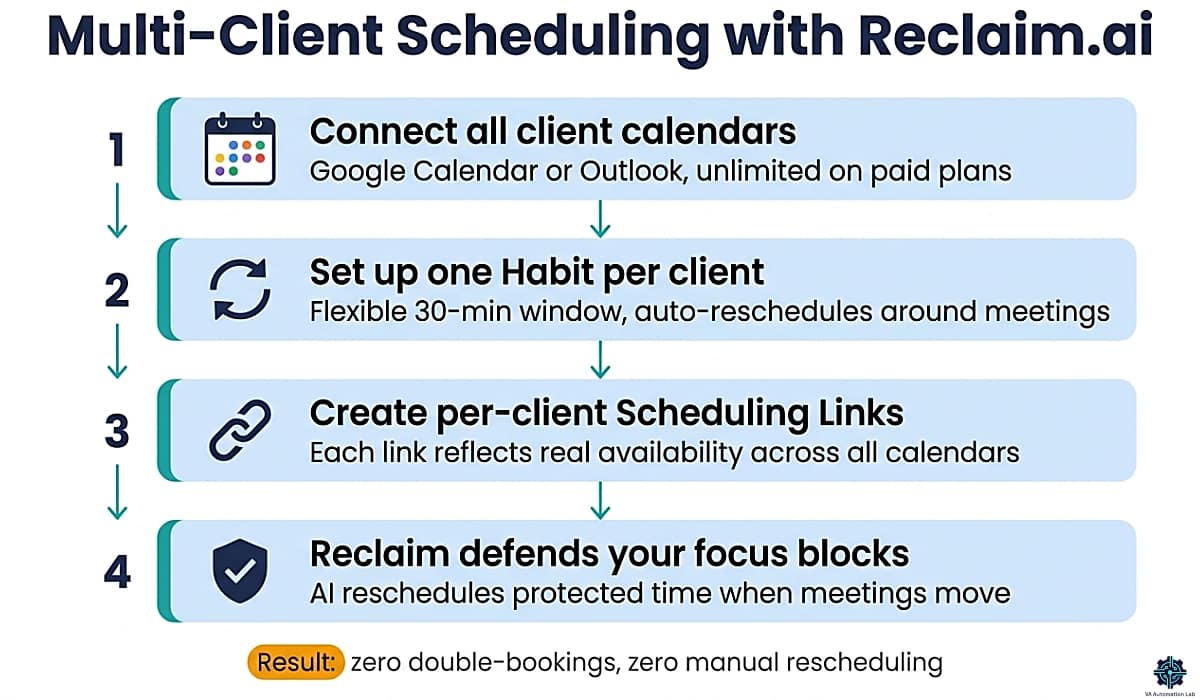
Reclaim.ai acts as an AI layer on top of your existing Google Calendar or Outlook. Rather than replacing your calendar app, it continuously analyzes your schedule and automatically defends time for tasks, habits, and focus blocks, rescheduling them intelligently when meetings move or priorities shift.
For VAs, the standout features are Habits (recurring time blocks that auto-reschedule around meetings), Scheduling Links (shareable availability links that reflect your real multi-calendar state), and Smart Meetings (which find optimal times for recurring client calls without back-and-forth email). On average, Reclaim users recover 7.6 hours per week through smarter scheduling, at $25/hour billing rate, that’s $190/week in recovered capacity for $10/month.
Pricing (annual billing):
Plan | Price | Key Features |
Lite | Free | 1 scheduling link, 1 habit, 1 calendar sync, 1-week range |
Starter | $10/user/mo | Unlimited habits, 3 scheduling links, 3 smart meetings, unlimited calendar sync |
Business | $15/user/mo | Unlimited scheduling links, unlimited smart meetings, delegated access, webhooks |
Enterprise | $22/user/mo | SSO, SCIM provisioning, advanced security |
Who needs to pay: The Lite plan works for testing or a single light calendar. Starter at $10/month is the right move once you’re managing 3+ client relationships and need unlimited habits and multi-calendar sync. Business is worth considering when you delegate calendar management to a client or need webhooks for Make integration.
Full guide: Reclaim.ai for Virtual Assistants: Complete Guide
Alternatives
SavvyCal — Cleaner scheduling-link UX with calendar overlay for recipients. Better fit if your primary need is external booking links rather than internal calendar protection. Free plan available (1 scheduling link, 1 calendar connection). Paid from $12/month. 👉 Explore SavvyCal
Simplybook.me — Purpose-built for VAs serving appointment-based clients (coaching, wellness, consulting). Better external booking page features than Reclaim, but no internal calendar defense. Free plan available (50 bookings/mo) Paid from $14/month. 👉 Start with Simplybook.me
Motion — AI scheduling + project management in one tool. No free plan. Paid from $29/month. 👉 Get Started with Motion
For a full comparison of AI scheduling tools for VAs, see Best AI Scheduling Tools for Virtual Assistants.
Your Calendar Is Making Decisions You Never Approved
Every meeting request that lands on an open slot is a decision about your week made by someone else. Reclaim.ai sits on top of the Google Calendar or Outlook you already use and defends focus blocks before meetings can fill them, reschedules protected time when a client moves a call, and prevents double-booking across every client calendar you manage.
The Lite plan is free with no card and no expiry — enough to see whether defended focus time survives contact with a real week.
Starter at $10/month is the upgrade when you connect a second client calendar, since Lite syncs only one.
6. Time Tracking & Billable Hours
Winner: Toggl Track
Accurate time tracking directly affects VA income. Without it, you underestimate hours on fixed-rate projects, lose track of billable time across simultaneous clients, and lack the data to price new projects accurately.
Toggl Track is the default choice for solo VAs because the free plan is genuinely functional: up to 5 users, unlimited projects and clients, one-click timer tracking on web, desktop, and mobile. For a VA managing 3–4 active clients, the free plan covers everything needed for accurate billing.
Pricing (annual billing):
Plan | Price | Key Addition |
Free | $0 | Unlimited tracking, unlimited projects/clients, basic reports |
Starter | $9/user/mo | Billable rates, project templates, revenue and productivity analysis |
Premium | $18/user/mo | Profitability analysis, timesheet approvals, fixed fee projects, SSO |
30-day trial on paid plans.
Who needs to pay: Free covers most solo VA billing workflows. Upgrade to Starter at $9/month when you need billable rate tracking per project, the feature that reveals which clients are profitable at your current rates.
Full guide: Toggl Track for Virtual Assistants: Complete Guide, Time Tracking & Productivity Workflows
Alternatives
Clockify — More generous free tier than Toggl (no user cap, includes billable rates and reports). Free plan covers unlimited tracking; Basic at $5/month, Standard at $6/month (adds invoicing and time approvals). Better choice if you occasionally work with subcontractors or need invoicing without a separate tool. 👉 Explore Clockify Free
InvoiceNinja — Free plan (5 clients) combines time tracking, project management, and invoicing in one tool. NinjaPro at $12/month removes all limits and adds custom branding. Useful if you want to avoid maintaining separate tracking and invoicing tools. 👉 Get Started with InvoiceNinja Free
7. Email & Inbox Management
Winner: SaneBox
Inbox management is the defining daily task for most VAs. SaneBox addresses the core problem, too much low-priority email competing with high-priority messages, by filtering intelligently inside your existing email client. No new interface. No migration. Gmail and Outlook look exactly the same, but low-priority messages route automatically to a SaneLater folder based on your behavioral patterns.
For VAs managing multiple accounts, SaneBox’s cross-account coverage eliminates the need to maintain separate filter rules per account as your client roster changes.
Pricing (annual billing):
Plan | Price | Accounts | Features |
Snack | $6/mo | 1 | 2 |
Lunch | $10/mo | 2 | 6 |
Dinner | $30/mo | 4 | All features |
14-day free trial available.
Who needs to pay: Single-account VAs start with Snack at $6/month, the most affordable AI-powered inbox triage available. Upgrade to Lunch at $10/month when you’re managing your inbox and at least one client inbox simultaneously.
Important limitation: SaneBox filters and sorts, it does not draft replies or extract tasks from email. It’s an organization layer, not an autonomous email assistant. AI-drafted responses remain a separate workflow (Claude or ChatGPT handle this well in combination with SaneBox).
Full guide: SaneBox for Virtual Assistants: Review & Setup Guide
Alternatives
Brevo — If your VA role includes email marketing for clients, Brevo’s free plan (300 emails/day, basic automation) covers starter use cases. Starter at $8/month (5,000 emails/mo). 👉 Try Brevo
For a full breakdown of AI email tools and workflows, see AI Email Management for Virtual Assistants.
Stop Losing Hours to Inbox Noise Every Day
SaneBox learns which emails actually need your attention and routes everything else out of your main inbox automatically, no new interface, no migration, works inside Gmail and Outlook as-is.
The 14-day free trial requires no credit card. Use the link below to get $15 off your first paid plan when you’re ready to commit.
8. Client Communication & VoIP
Winner: KrispCall
VAs taking client calls on behalf of their clients need a professional phone presence that isn’t their personal number, logs call notes automatically, and can be assigned per client without separate phone plans. KrispCall provides cloud VoIP with virtual numbers per client, AI-generated post-call notes, and CRM sync.
Pricing (annual billing):
Plan | Price | Users |
Essential | $12/mo | Up to 5 users |
Standard | $32/mo | Unlimited users |
Alternatives
Tidio — Live chat and AI agent for VAs managing client customer support channels. Free plan covers 50 billable conversations/month; Starter at $28/month raises that to 100 and adds basic automation. Best fit when a client has a website chat widget and needs a VA to monitor and respond. 👉 Start with Tidio Free
Timelines AI — WhatsApp CRM integration for VAs managing client WhatsApp communications. Connects WhatsApp Business to a CRM layer for contact tracking, broadcast messages, and team inbox management. CRM Integration plan at $25/month. 👉 Try Timelines AI
Essential Collaboration & File-Sharing Tools
VoIP handles your client phone presence, but a VA’s communication stack extends to text messaging, async video, and file collaboration. The three tools below appear in virtually every professional VA’s setup — not because they’re specialized VA tools, but because the clients who hire VAs already rely on them and expect VAs to operate inside their environments.
Slack — The default async messaging layer for startup, tech, and agency clients. Many clients will require you to operate inside their Slack workspace rather than via email, which means understanding channels, threads, status settings, and Slack etiquette is part of the job. For your own VA business, a free Slack workspace (90-day message history, 10 app integrations) covers internal organization. If a client invites you to their paid workspace, usage is covered by their plan. 👉 Try Slack
Google Drive — The default file storage and collaboration layer for any VA handling documents, spreadsheets, or presentations. 15GB of free storage comes with any Google account and is sufficient for most solo VA operations. Shared client Drive folders are where most file handoffs happen in practice, regardless of which tools each party uses on their end. 👉 Try Google Drive
Loom — Async video and screen recording for VA deliverables that are faster to show than describe. Free plan covers 25 videos up to 5 minutes each — enough for recording client training walkthroughs, delivering screenshare-based task reviews, and sending async status updates that would require 10 back-and-forth emails to communicate in text. Business plan removes both caps at $18/user/month. 👉 Try Loom
9. Project & Task Management
Winner: ClickUp
Project management for a VA serves two purposes: organizing your own task list across multiple clients, and managing client project work inside a shared workspace. ClickUp handles both from a single free plan.
The free tier includes unlimited tasks and members, multiple views (list, board, calendar), and 100 automations per month — enough for most solo VA workflows at the 1–3 client stage. The ability to create separate Spaces per client, each with its own templates and task statuses, eliminates the context-switching cost of managing one undifferentiated task list across multiple clients.
Pricing (annual billing):
Plan | Price | Key Features |
Free | $0 | Unlimited tasks, 100 automations/mo, 5 spaces |
Unlimited | $7/user/mo | Unlimited spaces, integrations, storage, Gantt charts, time tracking |
Business | $12/user/mo | Dashboards, 5K automations/mo, mind mapping, Sprint reports |
Full guide: ClickUp for Virtual Assistants: Setup Guide, Templates & Workflows
Alternatives
Notion — The strongest alternative for VAs who use their project management tool as a knowledge base as well as a task tracker. Where ClickUp organizes tasks, Notion organizes information — client SOPs, process documentation, content calendars, research notes, and internal wikis all live naturally in Notion’s block-based editor. Free plan covers unlimited pages and 10 guests. Plus at $10/user/month (annual billing) adds unlimited file uploads and 30-day version history; Business at $20/user/month adds full AI features and advanced analytics. Best fit when client deliverables are document-heavy rather than task-heavy. 👉 Get Started with Notion
Monday.com — Free for up to 3 boards; Basic at $10.50/user/month. Strong visual interface, popular with clients in marketing and agency environments, useful to know if you manage projects inside a client’s Monday.com workspace. 👉 Try Monday.com
The Notion vs ClickUp for Virtual Assistants Comparison Guide shows how each platform fits into a complete VA system depending on whether you prioritize task execution or knowledge management. For the complete Notion guide, read Notion AI for Virtual Assistants: Use Cases, Workflows & Automation Stack.
10. Automation & Workflows
Winner: Make
Repetitive cross-app data movement is where VA hours disappear each week. Moving form submissions into a CRM, routing onboarding data into project templates, generating client reports, these workflows are the definition of high-volume, low-value work. Make eliminates them.
Make is a visual automation builder connecting 3,000+ apps through a drag-and-drop canvas. You build scenarios, flowcharts where data moves automatically between apps when a trigger fires. The key advantage over simpler tools is conditional routing: data takes different paths based on what it contains. If a form response says “urgent,” one workflow runs; if “standard,” another does.
Note on billing: One credit equals one module action in a scenario. A 5-step workflow running 100 times/month consumes 500 credits, well within the Core plan’s 10,000 monthly allocation.
Pricing (annual billing):
Plan | Price | Credits/mo | Key Features |
Free | $0 | 1,000 | 2 active scenarios, 15-min intervals |
Core | $9/mo | 10,000 | Unlimited scenarios, 1-min intervals, API access |
Pro | $16/mo | 10,000 | Priority execution, custom variables, full execution logs |
Teams | $29/mo | 10,000 | Team roles, shared scenario templates |
Who needs to pay: The free plan handles 1–2 simple automations. Core at $9/month covers most VA workloads, 10,000 credits supports approximately 2,000 five-step workflow runs per month.
Full guide: Make for Virtual Assistants: The Beginner Setup Guide
Alternatives
n8n — Open-source automation. Self-hosted is free with unlimited workflows (requires a server). Cloud plans: Starter $23/month (2,500 executions), Pro $58/month (10,000 executions). 14-day trial available. Steeper learning curve than Make; more powerful for advanced workflows. 👉 Explore n8n
Pabbly Connect — Free plan includes 100 tasks/month and unlimited workflows, making it genuinely functional for light automation without paying. Standard at $16/month (10,000 tasks/mo). Lifetime access option at $349 for high-volume users. 👉 Try Pabbly Connect
If you’re evaluating automation platforms in more detail, the Zapier vs Make for Virtual Assistants Complete Comparison Guide breaks down when to choose Make’s advanced workflows over Zapier’s simplicity based on your technical level and client needs. Want more flexibility than Make or Zapier? Learn how n8n automates complex workflows with AI, self-hosting, and 500+ integrations, in n8n for Virtual Assistants: Complete Guide, AI Workflows & Automation.
Automate the Tasks That Eat Your Billable Hours
Make‘s free plan gives you 1,000 credits/month across 2 active scenarios — enough to run two real workflows, say client onboarding and monthly reporting, and watch them work without you.
The third one is where it stops. And it arrives sooner than you’d expect: most VAs end up building a variant per client rather than one scenario that serves all of them, so the ceiling is client count more than workflow count.
Core at $9/month unlocks unlimited scenarios and raises the runtime cap from 5 minutes to 40.
11. Client Management & CRM
Winner: Folk
A CRM for a solo VA has different requirements than a CRM for a sales team. You need clean contact records, conversation history that syncs without manual logging, and an easy way to stay on top of where each client relationship stands.
Folk is built around this use case. Its Chrome extension (folkX) captures LinkedIn contacts in one click with email, title, and company auto-populated. Email and calendar sync happens in the background. The interface is significantly faster to configure than enterprise CRMs, most VAs are operational within an hour.
Pricing (annual billing):
Plan | Price | Key Features |
Standard | $24/user/mo | Unlimited contacts, pipelines, folkX, AI enrichment, email campaigns, calendar sync |
Premium | $48/user/mo | Email sequences, dashboards, API access, full interaction history, custom objects |
Custom | From $80/user/mo | Enterprise security, dedicated support |
14-day free trial — no credit card required.
Who needs to pay: Solo VAs managing 5 or fewer clients can often manage with Google Contacts plus a well-maintained spreadsheet. Folk Standard at $24/month makes sense when you’re actively prospecting via LinkedIn and need contact enrichment to stay relevant.
What Standard doesn’t include: email sequences, dashboards, and API access are Premium-only. For most solo VAs, Standard is sufficient.
Full guide: Folk CRM for Virtual Assistants: Complete Setup Guide
Alternatives
Dubsado — Best fit when your VA practice includes proposals, contracts, invoicing, and client portals in one place. Starter plan at $28/month covers the essentials; Premier at $44/month adds scheduling, automated workflows, and Zapier integration. 21-day free trial. More setup time than Folk; strong fit for full client lifecycle management. 👉 Start with Dubsado
Zoho CRM — Free forever plan for up to 3 users covers leads, deals, workflows, and reports. Standard at $16/month. Best for VAs who manage client CRMs on their behalf and need their own free tool that mirrors what clients use. 👉 Explore Zoho CRM Free
Pipedrive — Sales-first CRM with visual pipeline management. Lite at $16/month. Better fit for VAs supporting sales teams than for managing their own client relationships. 👉 Get Started with Pipedrive
Bonsai — All-in-one freelancer platform combining CRM, invoicing, contracts, time tracking, and forms. Basic at $9/month; Essentials at $19/month adds invoices, proposals, contracts, scheduling, and client portal. Worth considering if you want a single tool that replaces Folk + PandaDoc + Toggl Track at a lower combined cost. 7-day free trial.
For a comprehensive CRM comparison, see Best CRM for Virtual Assistants.
Build the Client History Before You Need It
Most VAs add a CRM after client relationships have already become hard to track. By then you’re migrating history instead of building it — and the migration is the part nobody does.
Folk takes under two hours to configure, enriches contacts automatically from an email address, and shows every active client relationship in one pipeline view.
There’s no free plan, but the 14-day trial is enough to import your current clients and see whether the structure holds. Standard is $24/month; Premium at $48 is the upgrade when you need email sequences and deal tracking rather than contact management.
12. Forms & Client Intake
Winner: Jotform
A well-built intake form replaces 20–30 minutes of back-and-forth email per new client. The question is which tool gets you there fastest, and Jotform wins on the two things that matter at the point of setup: templates and integrations.
The AI form builder generates a complete, styled form from a text description — describe what you need from a new client and you have a working form in under two minutes. Behind that sits a library of 10,000+ templates covering effectively every VA use case, so the common forms (client intake, project brief, feedback survey, content request) start from something rather than from blank.
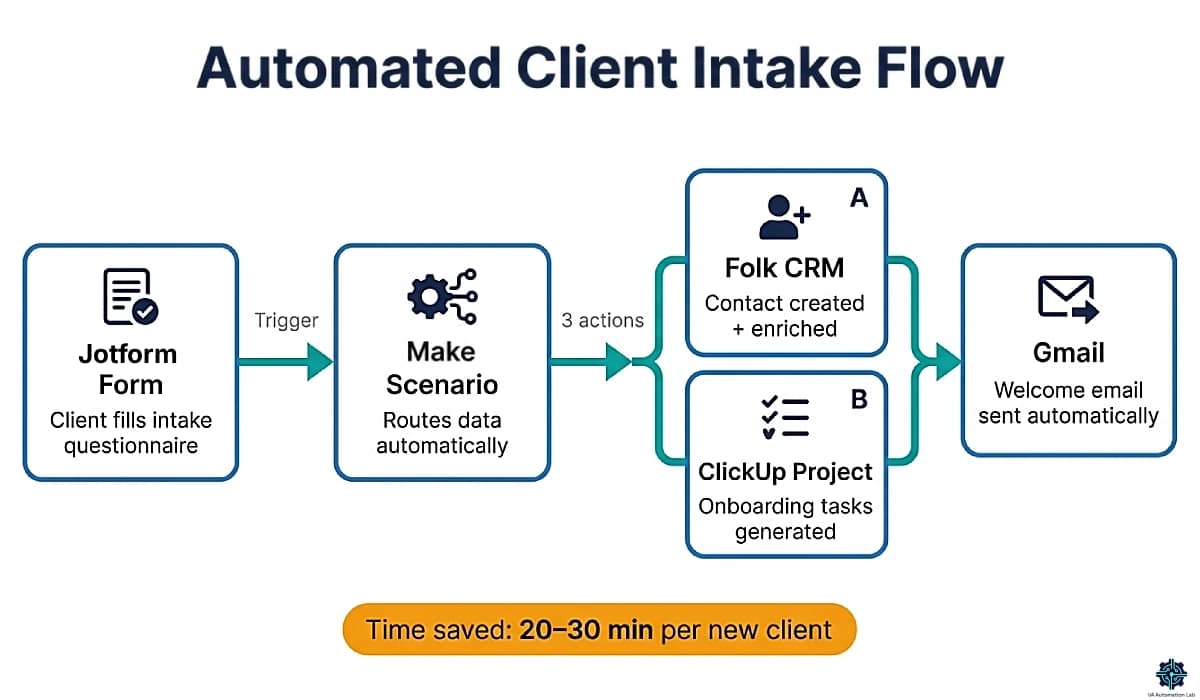
Native integrations with Make, Zapier, Google Sheets and most CRMs are what make it a stack component rather than a form tool. A submission can create a Folk contact, open a ClickUp space and fire a welcome email without you opening the response.
The free tier is the most usable in this category: 5 forms and 100 submissions per month covers a solo VA’s real intake volume, not a trial-sized slice of it.
Pricing (annual billing):
Plan | Price | Forms | Monthly Submissions |
Starter | $0 | 5 | 100 |
Bronze | $39/mo | 25 | 1,000 |
Silver | $45/mo | 50 | 2,500 |
Gold | $115/mo | 100 | 10,000 |
Bronze and above remove Jotform branding — the point at which client-facing forms start looking like yours rather than a free tool’s.
Who needs to pay: Starter covers most solo VAs indefinitely; 100 submissions a month is a lot of client intake. Bronze at $39/month is justified by branding removal and payment-enabled forms rather than by volume, which means it’s a positioning decision more than a capacity one.
Full guide: Jotform for Virtual Assistants: Intake & Onboarding
Alternatives
Involve.me — Free plan covers 50 submissions or 500 visits/month; Starter at $29/month adds 5 live funnels, email automations and conditional logic. Where Jotform builds forms, Involve.me builds funnels: multi-step flows where the questions change based on previous answers, and an outcome calculation that shows a custom result at the end. That makes it the better tool for service-tier finders, scope calculators and lead qualification — anywhere the form is doing selling as well as collecting. Pro at $59/month removes branding and adds funnel analytics. 👉 Get Started with Involve.me
For a full client onboarding automation walkthrough, see How to Automate Client Onboarding for Virtual Assistants. For a complete client‑acquisition pipeline, see our guide How to Get Clients as a Virtual Assistant Using AI.
Stop Rewriting the Same Intake Email
Every new client starts with the same 20–30 minutes of back-and-forth: what access do you need, what are the deadlines, who signs off.
Jotform‘s AI builder turns that conversation into a working form in under two minutes, and the free plan covers 5 forms and 100 submissions a month.
Bronze at $39/month is the upgrade at your fifth form — one intake form per client plus a feedback survey and the free tier is full. It also removes Jotform’s branding, which starts to matter once a form carries your client’s name rather than yours.
13. Contracts & E-Signatures
Winner: PandaDoc
Sending contracts as email attachments creates three problems: no visibility into whether the client read the document, no version control, and dependency on the client printing and scanning. PandaDoc replaces that workflow with browser-based document creation, real-time open/read tracking, and legally binding e-signatures.
For VAs, the most used features are the template library (1,000+ templates including service agreements and NDAs), real-time notifications when clients open specific sections, and document analytics that show which pricing or scope sections receive the most attention.
Pricing (annual billing):
Plan | Price | Key Features |
Free | $0 | 60 docs/year (5/mo), unlimited e-signatures, basic templates |
Starter | $19/user/mo | Unlimited document uploads and e-signatures, real-time tracking |
Business | $49/user/mo | CRM integrations, custom branding, approval workflows, deal rooms |
14-day free trial available.
Who needs to pay: Free works at 1–5 documents/month. Upgrade to Starter at $19/month once you’re sending 6+ documents monthly. Business is unnecessary for most solo VAs, it targets sales teams needing CRM-connected document pipelines.
Recent change to note: CRM integrations (HubSpot, Salesforce, Pipedrive) and web forms are now Business-tier only. If CRM-connected document workflows are part of your service, the Business plan is required.
Full guide: PandaDoc for Virtual Assistants: Contracts & Onboarding
Alternatives
Signeasy — Lightweight e‑signature tool with mobile‑first convenience and solid security. Personal plan at $10/month (annual billing) with unlimited signing and 5 sends/month — ideal for solo VAs who need simple, reliable contract execution. Business plans from $20/seat unlock unlimited sends, team templates, AI contract summaries, cloud sync, and 2FA. Business Pro at $30/seat adds advanced roles, permissions, SMS sends, and priority support. Free plan available. 👉 Start with Signeasy Free
Oneflow — European alternative with GDPR-native compliance and a clean interface for service agreements. Business plan starts at $292/month for 5 users, suitable for small teams or agencies rather than solo VAs. 14-day trial. 👉 Try Oneflow
For a complete contract and e-signature tools comparison, see Best Contract Tools for Virtual Assistants.
14. Invoicing & Payments
Winner: InvoiceNinja
InvoiceNinja covers the full billing cycle without accounting-suite overhead: professional templates, recurring invoices that send themselves on a fixed date, online payment acceptance, expense tracking, and a client portal where invoice and payment history live so “have you sent that yet” stops arriving by email.
The free tier is unusually complete for this category — five clients with unlimited invoicing, which covers most VAs through their first year. The paid tier is where it joins the rest of the stack: automatic payment reminders, and API access so a project marked complete in ClickUp can trigger an invoice through Make without you touching it.
Pricing (annual billing):
Plan | Price | Key Features |
Free | $0 | 5 clients, unlimited invoicing, 4 templates, online payments, recurring invoices, client portal |
NinjaPro | $12/mo | Unlimited clients, 11 templates, custom designs, auto-reminders, API access, branded URL, e-signature on invoices |
Enterprise | $15/mo | Up to 100 users with permissions, file attachments, branded client portal, bank sync, e-invoicing |
Who needs to pay: Free covers you to five clients, which for most VAs is 12–18 months. NinjaPro at $12/month is worth it the moment automatic reminders replace you remembering to chase — that single feature usually pays for the year in one recovered late payment.
Alternatives
Clockify — If you already track time in Clockify, invoicing arrives at the Standard tier for $6/month, generated directly from tracked hours. The cheapest path to “hours become an invoice” if you don’t want a second tool at all. 👉 Explore Clockify
Dubsado — Starter at $28/month, Premier at $44/month. Invoicing inside a full client operations platform: proposals, contracts, payment plans and workflows in one place. The right shape if you’d rather run one system than assemble four. 21-day free trial. 👉 Start with Dubsado
Bonsai — Basic at $9/month, Essentials at $19/month adds invoices, proposals, contracts, scheduling and a client portal. Similar consolidation logic to Dubsado at a lower entry price, with less depth in workflow automation. 7-day trial.
15. Social Media Management
Winner: SocialBee
For VAs managing social media on behalf of clients, the core problem isn’t the posting, it’s the structure. Without an organizing system, content calendars become reactive: you schedule whatever’s ready rather than maintaining a deliberate mix of content types. SocialBee solves this with category-based scheduling, where you define content categories (educational, promotional, curated, evergreen) and assign posting frequencies per category. The tool enforces content variety automatically, so client accounts don’t default to 80% promotional posts when the content pipeline gets thin.
For VAs managing 2+ client accounts, the workspace structure matters as much as the scheduling logic. SocialBee gives each client a separate workspace with its own social profiles, content library, and calendar, preventing cross-contamination between client content and making it easy to hand off access or reporting to a client without exposing other accounts.
The AI content generation included on all plans handles first-draft captions across formats, which pairs well with Rytr for longer-form social copy. Evergreen content recycling, automatically re-queuing high-performing posts, is the feature most VAs cite as the biggest time saver once a client’s content library reaches a meaningful size.
Pricing (annual billing):
Plan | Price | Profiles | Key Features |
Bootstrap | $24/mo | 5 | 1 workspace, 10 content categories, unlimited AI generation, 3-month analytics |
Accelerate | $40/mo | 10 | 50 categories, bulk editor, CSV upload, hashtag organizer, 2-year analytics |
Pro | $82/mo | 25 | 5 workspaces, 3 users/workspace, export analytics reports |
14-day free trial available.
Who needs to pay: Bootstrap at $24/month covers most solo VAs managing up to 5 client accounts across platforms. Accelerate makes sense when you’re managing 6–10 accounts or need bulk post editing and advanced analytics as a recurring client deliverable. Pro is justified at 4–5 clients with multi-account social contracts.
Full guide: SocialBee for Virtual Assistants: Review, Setup & Workflows
Alternatives
Later — Stronger visual planning interface with a content calendar view that works particularly well for Instagram and TikTok-heavy accounts. Starter at $19/month (1 social set, 8 profiles, 30 posts/profile). Growth at $37.50/month adds collaboration, approvals, and scheduling up to 180 posts/profile. Better fit when visual content is the primary deliverable and clients want to review posts before they go out. 👉 Start with Later
Buffer — The simplest and cheapest entry point. Free plan covers 10 scheduled posts per channel across multiple accounts. Essential at $5/month removes that cap entirely with unlimited scheduling per channel. No content category logic, no advanced analytics, but if you’re managing 1–2 client accounts with straightforward scheduling needs, it covers the job at minimal cost. 👉 Explore Buffer Free
For full social media automation workflows including Make integration, see How to Automate Social Media as a Virtual Assistant.
A Content Calendar That Doesn’t Empty
The problem with client social isn’t scheduling. It’s week six, when the batch runs out and the feed goes quiet until you build another one.
SocialBee runs on content categories with a fixed posting mix, and recycles evergreen posts back into the queue after they publish. The calendar refills itself from a library you already built.
No free plan, but 14 days is enough to load one client’s content and watch a full rotation. Bootstrap at $24/month covers 5 profiles in one workspace; Accelerate at $40 is the upgrade at your second client, when workspaces stop being optional.
16. Analytics & Reporting
Winner: Databox
VAs handling content, social media, or marketing operations are routinely asked to report on performance — website traffic trends, email campaign results, social engagement, lead flow. Without a reporting platform, this means logging into multiple tools, pulling numbers manually, and formatting a report from scratch. At scale, this costs 2–3 billable hours per client every month.
Databox removes the manual assembly. You connect a client’s data sources once, build a dashboard with the KPIs that matter, and Databox keeps everything updated automatically (daily, hourly, or every 15 minutes depending on plan). Clients access their dashboard through a shareable link, reducing “How did we do last month?” messages and increasing transparency without extra VA time. For written summaries, the AI Analyst feature generates narrative performance insights directly from dashboard data — a first draft in seconds.
The Free plan’s 3 data sources cover the most common VA reporting setup: GA4 for website traffic, one social platform, and one additional source such as Google Ads or Mailchimp. This handles basic reporting for a single client at no cost.
Pricing (annual billing):
Plan | Price | Data Sources Included | Key Features |
Free | $0 | 3 | 1 dashboard, 50 AI credits/mo, 10 custom metrics, daily sync |
Analyst | $64/mo | 5 | Full BI features, 500 AI credits/mo, datasets, MCP server & API, hourly sync |
Pro | $159/mo | 3 + $5.60/mo each additional | Unlimited users, 1,500 AI credits/mo, sharing & notifications, all integrations |
Growth | $399/mo | 3 + $5.60/mo per additional | 4,000 AI credits/mo, 15‑min sync, forecasting, datasets, sub‑accounts, dedicated CSM |
Add‑ons: white‑labeling ($200/mo), 15‑min sync per source ($14/mo), fiscal calendar ($40/mo), advanced security ($80/mo), OKRs ($160/mo). 14‑day free trial available.
Data source cost note: Additional sources beyond the included quota cost $5.60/month each. Example: GA4 + Instagram + Facebook Ads + Google Search Console = 4 sources → $159 + $5.60 = $164.60/month on Pro.
Who needs to pay: Free is ideal for single‑client reporting with up to 3 data sources — perfect for VAs adding basic reporting to their services. Analyst fits VAs who need datasets, BI features, and hourly sync without agency‑level pricing. Pro becomes cost‑effective when managing 3+ clients, needing more than 3 data sources per client, or requiring scheduled reports + AI‑generated narratives. Growth is built for agency‑level operations: faster sync, forecasting, sub‑accounts, and higher AI credit volume.
Alternatives
Metricool — The stronger choice for VAs whose client reporting is social-media-specific. Free plan (1 brand, 20 scheduled posts/month, 30-day analytics history); Starter at $20/month adds unlimited scheduled posts, unlimited analytics history, and branded PDF and PPT report exports per client. When a client wants a monthly Instagram and LinkedIn performance deck in a shareable format, Metricool generates polished reports in minutes — at one-eighth the cost of Databox Pro. 👉 Get Started with Metricool Free
Google Data Studio — Fully free. Connects natively to Google Analytics, Google Ads, Search Console, Google Sheets, and BigQuery. Best choice for VAs already operating in Google Workspace who want a zero-cost reporting layer without additional subscriptions. Setup requires more configuration time than Databox, and the output is less visually polished out of the box — but at $0/month it is the right starting point for VAs with the patience to build their first template. 👉 Try Data Studio
For an end-to-end client reporting automation workflow, see How to Automate Client Reporting as a Virtual Assistant.
The Report That Writes Itself Every Monday
A manually compiled client report takes two to four hours: log into four platforms, export, format, present. Do that for three clients and it’s most of a working day, every month, and none of it is billable at your real rate.
Databox pulls live data from 100+ sources into one dashboard and delivers it on a schedule. The free plan covers 3 data connections and one dashboard — enough to build a real one for a single client and show it to them.
Analyst at $64/month is the upgrade when a second client wants the same thing, since scheduled delivery and additional sources both sit above the free tier.
17. Password & Security
Winner: 1Password
VAs routinely access client accounts. Sharing passwords via email or Slack creates security liability for both parties. 1Password’s encrypted vaults let you share credentials without exposing the actual password — clients can update their vault without sending passwords in plaintext, and you maintain a separate vault for your own VA business logins.
Pricing (annual billing):
Plan | Price | Key Features |
Individual | $3/mo | Unlimited password storage, autofill, all devices, security alerts |
Business | $9/user/mo | SSO integrations, advanced security |
Team Starter | $25/mo | Up to 10 users, role-based permissions |
14-day free trial.
Full guide: 1Password for Virtual Assistants: Manage Client Logins
18. Best Tools by VA Type
Different VA specializations have different tool priorities. These minimal stacks focus on the 4–5 tools that deliver the most value for each VA type at the intermediate stage (3–5 active clients).

Administrative VA
Core work: inbox management, calendar coordination, data entry, client communication, file organization.
Function | Tool | Cost |
Scheduling | Reclaim.ai Starter | $10/mo |
SaneBox Snack | $6/mo | |
Automation | Make Core | $9/mo |
Time Tracking | Toggl Track Free | Free |
Project Management | ClickUp Free | Free |
Monthly cost: $25/mo.
Focus: inbox triage and calendar defense deliver the most immediate value. Add Make automations for data-entry workflows as client volume grows.
Social Media VA
Core work: content scheduling, caption writing, analytics reporting, community management.
Function | Tool | Cost |
Social Scheduling | SocialBee Bootstrap | $24/mo |
Content Creation | Rytr Unlimited | $7.50/mo |
Automation | Make Free | Free |
Time Tracking | Toggl Track Free | Free |
Analytics | Metricool Starter | $20/mo |
Monthly cost: $51.50/mo.
Focus: SocialBee for scheduling structure, Rytr for caption and post drafts. Metricool delivers client analytics reports in PDF and PPT, a recurring deliverable that justifies the subscription.
Content / Writing VA
Core work: blog posts, newsletters, email copy, social content, SEO articles.
Function | Tool | Cost |
AI Writing | Rytr Unlimited | $7.50/mo |
SEO & Content Optimization | Frase.io Starter | $39/mo |
Project Management | ClickUp Free | Free |
Contracts | PandaDoc Free | Free |
CRM | Folk Standard | $24/mo |
Monthly cost: $70.50/mo.
Focus: Frase.io is the significant investment here, only justified if you’re managing 3+ client content programs with SEO requirements. Drop it if content optimization isn’t a core deliverable and use Rytr standalone.
Executive Assistant VA
Core work: calendar management, meeting coordination, travel planning, high-volume client communication, document drafting.
Function | Tool | Cost |
Scheduling | Reclaim.ai Starter | $10/mo |
SaneBox Lunch | $10/mo | |
Meetings | Fireflies.ai Pro | $10/mo |
Password Security | 1Password Individual | $3/mo |
Contracts | PandaDoc Starter | $19/mo |
Monthly cost: $52/mo.
Focus: The high-value combination for EAs is Reclaim + SaneBox + Fireflies: calendar is managed intelligently, inbox noise is filtered, and every meeting produces automatic action items, eliminating the three biggest time drains in executive support work.
E-Commerce VA
Core work: order processing, customer support, product listing management, inventory tracking, client reporting.
Function | Tool | Cost |
Automation | Make Core | $9/mo |
CRM | Zoho CRM Free | Free |
Forms & Intake | Jotform Free | Free |
Analytics / Reporting | Databox Free | Free |
Time Tracking | Clockify Free | Free |
Monthly cost: $9/mo.
Focus: E-commerce VA work is automation-heavy, Make Core is the essential paid tool. Most other functions are covered by free tiers (Zoho CRM free handles 3 users, Databox free handles 3 data sources for basic client dashboards).
19. Complete VA Stack by Experience Level
Beginner Stack (0–2 clients)
Function | Tool | Cost |
Scheduling | Reclaim.ai Lite | Free |
Automation | Make Free | Free |
Gmail native | Free | |
CRM | Google Contacts + Notion | Free |
Time Tracking | Toggl Track Free | Free |
Contracts | PandaDoc Free | Free |
Project Management | ClickUp Free | Free |
Monthly cost: $0. Add SaneBox Snack ($6/mo) and Make Core ($9/mo) when you sign client #3. Those two eliminate the inbox noise and manual data-entry tasks that disproportionately consume time at that client volume. Notion’s free plan functions as a lightweight contact database and client task tracker, suitable until Folk Standard ($24/month) becomes justified at the 3-client stage.
Intermediate Stack (3–5 clients)
Function | Tool | Cost |
Scheduling | Reclaim.ai Starter | $10/mo |
Automation | Make Core | $9/mo |
SaneBox Snack | $6/mo | |
CRM | Folk Standard | $24/mo |
Time Tracking | Toggl Track Starter | $9/mo |
Contracts | PandaDoc Starter | $19/mo |
Forms | Jotform Starter | Free |
Project Management | ClickUp Free | Free |
Monthly cost: $77/mo. This stack represents ~4% of income. If the tools collectively save 12+ hours/week, the ROI is strongly positive at any billing rate above $10/hour.
Advanced Stack (6+ clients)
Function | Tool | Cost |
Scheduling | Reclaim.ai Business | $15/mo |
Automation | Make Pro | $16/mo |
SaneBox Lunch | $10/mo | |
CRM | Folk Premium | $48/mo |
Time Tracking | Toggl Track Starter | $9/mo |
Contracts | PandaDoc Starter | $19/mo |
Reporting | Databox Free | $0/mo |
Project Management | ClickUp Unlimited | $7/mo |
Security | 1Password Individual | $3/mo |
Monthly cost: $127/mo. This stack represents ~3% of income. At the 6+ client stage, Reclaim.ai Business adds delegated access (useful when clients manage your calendar), Folk Premium adds email sequences for proactive client outreach, and Databox Free connects your first three client data sources for automated reporting dashboards.
20. Master Comparison Table
Tool | Category | Free Plan | Paid From |
Reclaim.ai | Scheduling | ✅ | $10/u/mo |
Make | Automation | ✅ | $9/mo |
SaneBox | ❌ trial | $6/mo | |
Folk | CRM | ❌ trial | $24/u/mo |
Toggl Track | Time Tracking | ✅ | $9/u/mo |
PandaDoc | Contracts | ✅ | $19/u/mo |
ClickUp | Project Management | ✅ | $7/u/mo |
Notion | Project Management | ✅ | $10/mo |
SavvyCal | Scheduling | ✅ | $12/mo |
Simplybook.me | Booking | ✅ | $14/mo |
n8n | Automation | ✅ (self-hosted) | $23/mo |
Pabbly Connect | Automation | ✅ | $16/mo |
Dubsado | CRM/Client Management | ❌ trial | $28/mo |
Bonsai | CRM/Invoicing | ❌ trial | $9/mo |
Zoho CRM | CRM | ✅ 3 users | $16/u/mo |
Pipedrive | CRM | ❌ trial | $16/mo |
Clockify | Time Tracking | ✅ | $5/mo |
Involve.me | Forms | ✅ | $29/mo |
Jotform | Forms | ✅ | $39/mo |
KrispCall | VoIP | ❌ | $12/mo |
1Password | Security | ❌ trial | $3/mo |
Databox | Reporting | ✅ | $64/mo |
ChatGPT | AI Assistant | ✅ | $20/mo |
Claude | AI Assistant | ✅ | $20/mo |
Gemini | AI Assistant | ✅ | $20/mo |
Rytr | AI Writing | ✅ | $7.50/mo |
Canva | Design | ✅ | $12/mo |
Brevo | Email Marketing | ✅ | $8/mo |
SocialBee | Social Media | ❌ trial | $24/mo |
Later | Social Media | ❌ trial | $19/mo |
Buffer | Social Media | ✅ | $5/mo |
Metricool | Social Analytics | ✅ | $20/mo |
Frase.io | SEO Content | ❌ trial | $39/mo |
Tidio | Live Chat | ✅ | $28/mo |
Monday.com | Project Management | ✅ | $10.50/u/mo |
Moosend | Email Marketing | ❌ trial | $7/mo |
InvoiceNinja | Invoicing | ✅ | $12/mo |
TextExpander | Productivity | ❌ trial | $3/mo |
Timelines AI | WhatsApp CRM | ❌ trial | $25/mo |
21. How to Build Your Stack Without Overspending
Three principles prevent the most common mistake: building a stack for the business you want rather than the business you have.
Start with the problem, not the tool.
Before adding any paid subscription, identify the specific task consuming time you should be billing. If you can’t name the 3 hours per week you’re losing to a specific problem, you’re not ready to pay for a solution.
Free tiers last longer than you expect.
Make free covers 1,000 credits/month — enough for approximately 200 five-step workflow runs per month. Toggl Track free covers 5 users with unlimited tracking. ClickUp free covers unlimited tasks. PandaDoc free covers 5 contracts per month, enough for the 0–2 client stage. Most VAs can operate entirely on free tools until their third or fourth client.
Upgrade when you hit a specific constraint, not on a schedule:
– Add Make Core when you need a third active scenario
– Add Toggl Track Starter when you need billable rate tracking per project
– Add PandaDoc Starter when you’re sending more than 5 documents per month
– Add SaneBox Snack when inbox triage consumes 30+ minutes per day
– Add Reclaim.ai Starter when calendar coordination across clients takes more than 1 hour per week
Audit for overlap every quarter.
The most common waste in VA stacks: paying for time tracking inside a CRM when Toggl Track Free handles it at no cost; paying for scheduling inside a project management tool when you already have dedicated scheduling software. The stacks in Section 19 are designed to eliminate overlap, deviate from them deliberately, not by accident.
For a deeper framework, see the AI-Powered Productivity System for Virtual Assistants and the Productivity Systems for Virtual Assistants complete guide.
22. Conclusion
The VA tool market has reached a level of maturity where free tiers alone can run a functional 1–2 client practice. Reclaim.ai Lite, Make Free, Toggl Track Free, PandaDoc Free, and ClickUp Free are all genuinely useful without spending a cent, and connecting them through Make automations eliminates enough manual work to make this zero-cost combination more productive than paid alternatives from three years ago.
The upgrade path is proportional to what you’re managing. At 3 clients, SaneBox Snack at $6/month and Make Core at $9/month eliminate the two biggest time drains. At 5 clients, Folk Standard at $24/month and Reclaim.ai Starter at $10/month add the CRM structure and calendar intelligence that prevent things from falling through the cracks. At 6+ clients, the full advanced stack at $127/month represents ~3% of monthly revenue.
Start with the Quick Picks table in Section 1. Match your VA type to the stack in Section 18. Then follow the constraint-based upgrade triggers in Section 21. Build the stack the business actually needs, not the stack you think it should have.
Frequently Asked Questions About the Best Tools for Virtual Assistants
What are the best free tools for virtual assistants?
The strongest free VA tool combination in 2026 covers every operational function without spending a dollar: Reclaim.ai Lite (calendar management), Make Free (automation, 1,000 credits/month), Toggl Track Free (time tracking, up to 5 users), PandaDoc Free (5 contracts/month), ClickUp Free (unlimited tasks and projects), and Zoho CRM Free (up to 3 users). These six tools together handle scheduling, automation, time tracking, contracts, project management, and CRM, the complete operational foundation for a VA at the 1–2 client stage.
How many tools does a solo VA actually need?
At the 1–2 client stage, 4–5 tools cover everything: a time tracker, a contract/e-signature tool, a project management app, a scheduling tool, and a basic automation layer. Total cost at this stage: $0–$14/month using free tiers. At 3–5 clients, 7–9 tools become useful as specific functions (email management, CRM, forms) justify their cost. At 6+ clients, a full 10–12 tool stack is appropriate and typically costs 2–4% of monthly revenue. More tools than this rarely adds productivity, it usually adds subscription overhead and context-switching without proportional time savings.
Which tools are best for managing multiple clients?
The three tools that address multi-client complexity most directly are: Reclaim.ai (prevents double-booking and calendar chaos across multiple client-connected calendars), Folk (keeps client contact history and communication organized without manual logging), and Toggl Track (tracks billable time accurately across simultaneous client projects). Make adds value at 3+ clients by automating the cross-app data transfer that multiplies with each new client relationship, a new client form submission triggers CRM creation, project setup, and welcome communication automatically.
For a full guide on this topic, see How to Manage Multiple Clients as a Virtual Assistant Using AI.
How much should a virtual assistant spend on tools?
At the 1–3 client stage: $0–$25/month (most functions covered by free tiers). At 3–5 clients: $50–$120/month represents a healthy budget delivering measurable time savings well in excess of the cost. At 6+ clients: $125–$200/month is justified when each subscription reduces manual work by at least 2–3 hours per month. The test is simple: if a $10/month tool saves you 30 minutes per week of billable time at $25/hour, it pays for itself in the first session.
What is the best CRM for a solo virtual assistant?
Folk is the best CRM for solo VAs who source clients through LinkedIn or manage relationship-based client work, the folkX Chrome extension and AI contact enrichment make it significantly faster to maintain than alternatives. Dubsado is the better choice if your workflow includes proposals, contracts, invoicing, and client portals together, it replaces several tools simultaneously at a higher monthly cost. Zoho CRM‘s free plan (up to 3 users) is the right answer if you want zero cost for basic contact and pipeline management.
Do virtual assistants need automation tools?
Yes, and the data supports it clearly. VAs using automation platforms consistently report significantly higher productivity compared to manual workflows. The practical value is in eliminating cross-app data transfer: moving form submissions into CRMs, creating client project files from onboarding triggers, generating reports from connected data sources. At the 3+ client stage, these manual tasks consume 3–5 hours per week that Make Core at $9/month covers completely. The free tier (1,000 credits/month) is enough to automate 1–2 high-frequency workflows before committing to paid.
What tools should a virtual assistant use for client reporting?
For basic reporting, Databox‘s free plan connects 3 data sources and generates 1 dashboard, enough for straightforward client metric summaries. The Pro plan at $159/month connects unlimited sources and adds scheduled report delivery. For VAs handling content or social media clients, Metricool (Starter $20/month) generates PDF and PPT analytics reports per brand. Toggl Track‘s Starter plan ($10/month) generates detailed time reports per client that double as billing documentation and productivity transparency.
For an end-to-end client reporting workflow, see How to Automate Client Reporting as a Virtual Assistant.
Glossary
API (Application Programming Interface): A protocol allowing two software applications to communicate. Relevant to VAs when connecting tools without native integrations, Make’s HTTP module lets you connect to any API without code.
Conditional Logic (forms): A form feature that shows or hides questions based on previous answers. Used in Involve.me and Jotform to route clients through different intake paths based on their service needs.
Credit (Make): The billing unit Make adopts. Each module action in a scenario consumes one credit. A 5-step scenario running 100 times/month consumes 500 credits.
CRM (Customer Relationship Management): Software for managing contact records, communication history, and client pipelines. For VAs, a CRM tracks client relationships rather than traditional sales funnels.
E-signature: A legally binding digital signature collected via software. Under the ESIGN Act (US) and eIDAS (EU), e-signatures carry the same legal weight as handwritten signatures when collected with appropriate audit trails.
Freemium: A pricing model offering a permanently free tier with feature or usage limits, with paid plans unlocking additional functionality. Most tools in this guide use freemium models.
Habit (Reclaim.ai): A recurring time block that auto-reschedules around meetings rather than being overwritten by them. Used to protect time for recurring client tasks and personal routines.
Scenario (Make): An automated workflow consisting of a trigger event and one or more actions. Equivalent to a “Zap” in Zapier.
SaneLater: A smart folder created by SaneBox that receives email the AI determines is low-priority based on your engagement history, for batch review rather than real-time processing.
Webhook: A method for one application to send real-time data to another when a specific event occurs, more efficient than polling because it fires only when something actually happens.
About the Author
Alex Stratton has spent the better part of a decade working at the intersection of virtual assistance and operational systems, first as a VA supporting founders and small business owners, then as a workflow consultant helping remote teams reduce the manual overhead that accumulates when businesses grow faster than their processes. The tools and workflows here reflect decisions made repeatedly in real client contexts, where the wrong choice costs hours, not minutes. Learn more about VA Automation Lab → About.