
AI Writing & Content Creation for Virtual Assistants: The Complete Guide (2026)

Disclosure: This article contains affiliate links. If you purchase through them, VA Automation Lab may earn a commission at no additional cost to you. All tools are reviewed for their usefulness to VA workflows, affiliate relationships do not influence editorial recommendations.
Learn how to use AI writing tools to produce client-ready content faster, improve quality, and scale your VA services without adding more hours to your workload.
Every virtual assistant reaches the same wall eventually. The client list grows, the deliverables stack up, and the hours needed to produce quality written content — emails, blog posts, social captions, proposals — start to exceed what a single workday can hold. More clients means more writing. More writing means more hours. And more hours without higher rates means less profit per client.
AI writing has changed that equation for virtual assistants who know how to use it. The right AI writing tools let you produce first-draft quality output in minutes, adapt it to each client’s specific voice, and scale your content services without scaling your time proportionally.
This guide covers every major writing task a virtual assistant handles: client email communication, social media content, long-form blog posts, SEO writing, proposals, SOPs, and client reports. You will find step-by-step workflows for each, tool recommendations organized by your VA service type and budget, and a complete framework for turning AI writing into a billable service you can package and sell.
Whether you are new to AI tools or already using them for occasional tasks, this guide gives you the system to make AI writing a core part of how you deliver value to clients every day.
For a complete view of every AI tool category relevant to your VA business — scheduling, automation, client management, and writing — the Complete Guide to AI Tools for Virtual Assistants covers the full landscape.
Quick Answer: AI Writing for Virtual Assistants
AI writing tools help virtual assistants produce client content — emails, blogs, social captions, proposals — in minutes instead of hours. The two tools purpose-built for VA workflows are Rytr (short-form content + brand voice profiles, from $7.50/month) and Frase.io (SEO blog writing + SERP research, from $39/month). Both are used within repeatable prompt workflows that maintain each client’s individual voice across sessions.
Key Takeaways
- Purpose-built AI writing tools (Rytr, Frase.io) outperform general AI assistants for VA production workflows because they save tone profiles, use content templates, and integrate with SEO and CMS platforms.
- The five content types VAs most commonly produce with AI are: client emails, social media captions, blog posts, proposals/SOPs, and client reports — each with a dedicated workflow in this guide.
- Multi-client brand voice management requires a structured Voice Profile per client, stored in Notion or ClickUp and deployed via TextExpander — not manual re-prompting every session.
- AI writing quality control has two mandatory layers before delivery: an accuracy fact-check (6-point checklist) and a voice consistency review (5-point checklist).
- VAs who shift from hourly billing to value-based pricing — output-based packages — unlock scalable income from AI writing services.
Free AI Toolkit for Virtual Assistants
Get the exact tools, prompts, and workflow templates I use to run an AI-powered VA business. Free — delivered to your inbox.
Table of Contents
1. What AI Writing Does for Virtual Assistants
AI writing uses artificial intelligence to help virtual assistants generate, edit, and optimize written content for clients. The right AI writing tools — such as Rytr for short-form and Frase.io for SEO content — let VAs produce email drafts, social captions, blog posts, and proposals in minutes while maintaining each client’s individual voice.
That definition matters because of what it leaves out. AI writing is not about removing the VA from the process. It is about compressing the time between blank page and usable draft so that the VA’s actual contribution — judgment, client knowledge, accuracy review, and editorial shaping — becomes the primary work rather than the typing.
AI writing vs. general AI assistants: why the distinction matters for VAs
Many VAs start experimenting with ChatGPT or Claude for long-form content and research and quickly hit a practical ceiling. These general-purpose AI assistants are excellent for brainstorming, research, and conversational interaction, but they were not designed for the specific production workflow a VA runs day to day. Every session starts from scratch. There are no built-in templates for the content types VAs produce most often. Maintaining tone consistency across multiple sessions requires careful manual prompting every time. And there is no native integration with the content calendar, publishing tools, or CMS platforms most VAs already use.
Purpose-built AI writing tools approach the problem differently. Rytr includes a template library organized by content type — email subject lines, social captions, blog intros, product descriptions, SEO meta tags — so you can generate the right format from the first click, without rebuilding the structure from a blank prompt. Tone Match profiles let you save a client’s specific voice settings and apply them consistently session after session. Frase.io is built specifically for SEO content workflows, with SERP research, content briefs, and optimization scoring built directly into the writing interface.
For marketing teams and agencies managing high-volume content operations, Jasper is a well-known platform with collaborative features and advanced brand voice training — but its pricing ($59/month) and team-first architecture make it better suited to multi-seat agency workflows than to the solo freelance VA managing a personal client roster.
General AI Assistants | Purpose-Built AI Writing Tools | |
Session memory | Resets between sessions | Tone Match profiles persist across sessions |
Templates | None — blank prompt every time | 40+ content-type templates built in |
SEO integration | None | Frase.io: live SERP research and optimization score |
Multi-client voice | Manual re-prompting required each session | Saved tone profiles per client |
CMS integration | None native | WordPress, Shopify, Contentful (AltText.ai) |
Best for VAs | Brainstorming, research, one-off tasks | Daily client content production at volume |
The practical distinction: a general AI assistant is a talented colleague who will help you write anything but needs full context every time. A purpose-built AI writing tool is a specialist who already knows the format, the client, and the output standard.
For a side-by-side comparison of specific AI writing tools including features and pricing breakdowns, see the guide to the Best AI Writing Tools for Virtual Assistants.
The five content types VAs create with AI every day
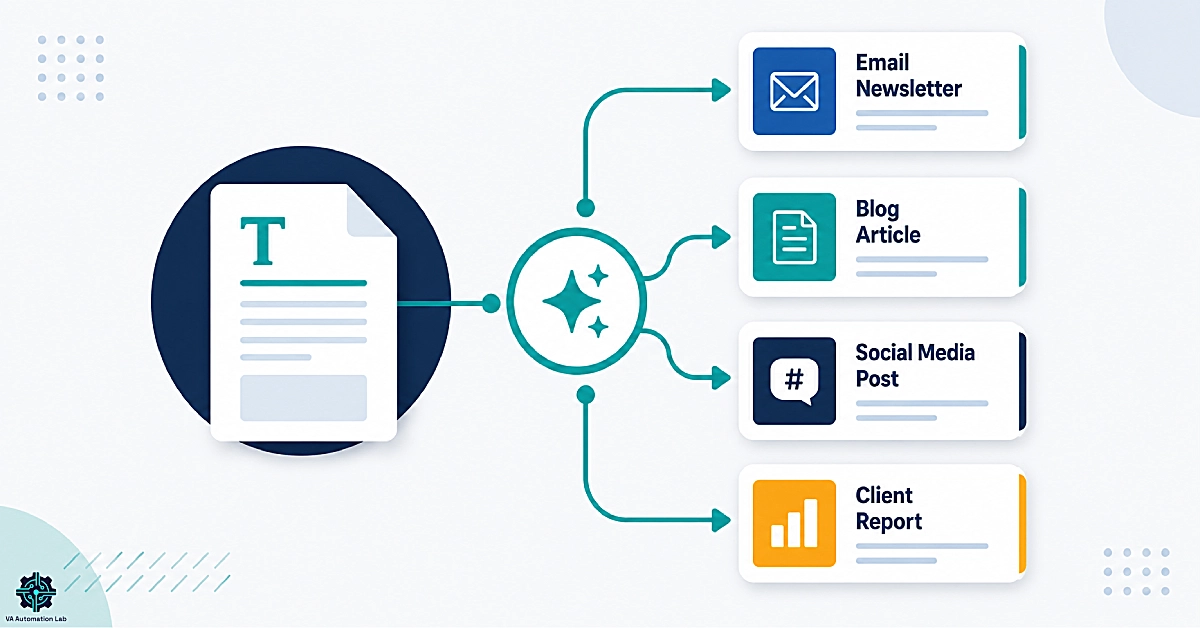
AI writing covers a wide surface area for virtual assistants. The five most common output types are:
Client emails and professional communication. The highest-frequency writing task for most VAs — drafting replies, following up on invoices, responding to project updates, or writing on behalf of executives and business owners.
Social media captions and post series. Platform-specific short-form content across LinkedIn, Instagram, X, and Facebook, often produced in batches for scheduling one to four weeks in advance.
Blog posts and long-form content. Articles that require research, SEO optimization, and multiple revision rounds before publication. The most time-intensive content type, and the one where AI writing tools deliver the largest time savings.
Proposals, contracts, and SOPs. Structured business documents where clarity and precision matter more than creativity. AI copywriting tools handle the format reliably; the VA applies judgment to the specifics.
Client reports and status updates. Recurring deliverables summarizing campaign results, project progress, or data analysis in a format the client can read in under five minutes.
Each of these content types has a different AI writing workflow, a different set of tools, and a different quality control standard. The sections that follow cover each one in detail.
Want to go deeper into general-purpose AI assistants for virtual assistants? Explore our complete guides to Claude Workflows for VAs and Advanced ChatGPT Prompts, and Automations.
2. How to Build Your AI Writing Stack as a Virtual Assistant
Building an AI writing stack is not about collecting as many tools as possible. It is about matching the right tools to your service type, staying within a sensible budget, and building a system you will use consistently. The VA who uses two or three tools deeply and deliberately will outperform the one who has subscriptions to ten tools, none of which are fully configured.
Matching your AI writing tools to your VA service type
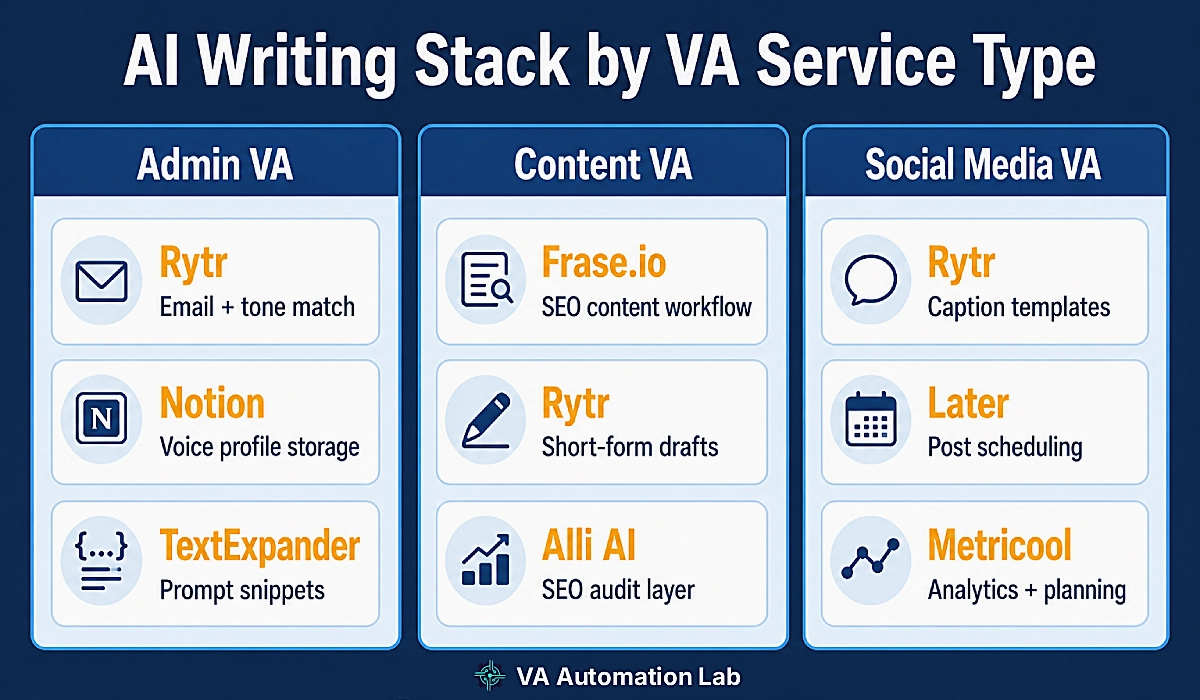
Your ideal stack depends on the services you provide. Three common VA profiles, and the tool combinations that serve each one best:
VA Service Type | Primary AI Writing Tool | Secondary Tools | Supporting Tools |
Admin VA (email drafts, reports, SOPs) | Rytr (templates + Tone Match) | Notion (voice profile storage) | TextExpander (prompt snippets) |
Content VA (blogs, SEO articles, long-form) | Frase.io (SERP briefs + AI writer) | Rytr (short-form drafts) | Alli AI (SEO audit layer) · AltText.ai (image alt text) |
Social Media VA (captions, content series) | Rytr (social caption templates) | Later or SocialBee (scheduling) | Metricool (analytics + content planning) |
This table is a starting point, not a fixed prescription. A content VA who also manages client email will benefit from Rytr alongside Frase.io. A social media VA who produces monthly blog posts for clients will find Frase.io worth adding as a second tool. The key is to start with the tool that directly serves your primary deliverable and expand only when that tool is fully operational.
Free vs. paid AI writing tools: what each budget tier gets you
Not every VA starts with a full software budget, and the free tier of several AI writing tools is usable at the beginning. Here is what to expect at each tier:
Free tier — Rytr‘s free plan gives you 10,000 characters per month and access to its full template library. For occasional drafts and workflow testing, this is sufficient to validate whether the tool fits your process. Most other purpose-built AI writing tools either lack a true free plan or severely limit outputs to the point of being non-functional for real client work.
Entry paid tier ($7.50–$24.16/month) — Rytr‘s Unlimited plan at $7.50/month removes character limits entirely and adds one Tone Match profile, meaning you can save one client voice and generate unlimited content in that voice. This is the most cost-efficient entry point for a VA handling one or two long-term clients. Rytr’s Premium plan at $24.16/month adds multiple Tone Match profiles and 100 plagiarism checks per month — the right tier when you are managing a full client roster with individualized voice standards.
Professional tier ($39–$50/month) — Frase.io‘s Starter plan at $39/month is designed specifically for VAs offering SEO content services. Ten AI-optimized articles per month, SERP research on every piece, one domain monitored, and one brand voice profile — enough for a VA serving one or two content-focused clients.
The gap between free and entry paid is not incremental. It is the difference between testing the concept and building a real production workflow.
Full guide: Rytr for Virtual Assistants: Complete Guide, Features, Use Cases & AI Writing Workflows
3. AI Writing for Client Emails and Professional Communication
Email is where most virtual assistants spend the largest portion of their writing time each day. The volume is high, the turnaround is fast, and the stakes are real — an email sent under a client’s name reflects on both of you. AI writing tools have become useful for email production, particularly for the high-frequency, repeatable communication types that follow a predictable structure.
Drafting client-facing emails with AI: a repeatable prompt workflow
The most common mistake VAs make when using AI for email drafting is starting with a vague input. “Write a follow-up email” produces generic output that still requires significant rewriting. A structured prompt framework consistently produces usable first drafts with five to ten minutes of editing rather than a complete rewrite.
Email Drafting Prompt Framework — Workflow 1:
- Define the communication type. Is this a follow-up, a proposal delivery, a project status update, an invoice reminder, or cold outreach? Name it specifically.
- State the sender and audience. Who is this email from, and who receives it? “My client is a marketing director at a B2B SaaS company; this email goes to a prospective partner agency.”
- Specify the goal. What single action should the email produce? “The goal is to confirm a discovery call time.”
- Set the tone and constraints. “Professional but warm, not formal. Direct. Under 150 words.”
- List three to five key points. Bullet the content the email must address.
- Add negative constraints. “Do not use the phrase ‘I hope this email finds you well.’ Start with the main point.”
The difference in output quality between a vague prompt and this structured one is significant enough to make the framework worth saving as a TextExpander snippet you can trigger in any app.
Before/after example:
Without framework prompt: “Write a follow-up email about the proposal we sent.”
Result: A generic three-paragraph email with placeholder language, vague tone, and no specificity. Requires full rewriting.
With framework prompt: “Write a follow-up email. My client is a creative agency owner. The email goes to a prospect who received our branding proposal three days ago. Goal: prompt them to schedule a 30-minute review call. Tone: confident, direct, conversational. Under 120 words. Key points: proposal is ready to review, two time slots are available this week, response requires minimal effort. Do not use ‘just checking in.'”
Result: A 110-word email with a clear opener, two specific time references, and a frictionless CTA. Needs five minutes of light editing. Completely deliverable.
Writing on behalf of multiple clients without losing their individual voice
The brand voice challenge is the most common reason VAs struggle with AI writing for client email work. A tool that generates polished content in a generic professional tone is useful at the start. A tool that generates content that sounds like a specific person — consistent across dozens of emails over months — is valuable and defensible as a service differentiator.
Rytr‘s Tone Match feature addresses this at the tool level. You create a tone profile for each client by providing sample text — five to ten emails the client has written themselves work best. Rytr analyzes the samples and applies those stylistic patterns to every piece of content it generates for that client. The profile is saved and reusable across every session.
For storage and systematic access, keep one Notion document per client containing:
- Tone adjectives (three to five words describing their voice)
- Vocabulary preferences (words they use regularly; words that do not sound like them)
- Three example sentences written in their voice
- Phrases or openers to avoid
This document becomes the context block you paste into any AI writing prompt for that client, regardless of which tool you are using in a given session.
Start Writing Client Emails 10× Faster
Rytr‘s Tone Match saves your client’s unique voice and applies it to every email, caption, and draft you generate — unlimited content from $7.50/month.
4. AI Content Creation for Social Media Management Services
Social media content production is one of the highest-volume writing tasks a VA handles. A single active client across LinkedIn, Instagram, and X needs anywhere from 30 to 90 pieces of short-form content per month. AI writing tools have made batch content production viable for solo VAs — not by replacing creative judgment, but by collapsing the time between idea and usable draft.
Creating social media captions and post series with AI writing tools
Platform-specific prompt structures produce dramatically better results than generic social media requests. Each platform has its own format expectations, character limits, and audience engagement patterns that the AI output needs to reflect.
LinkedIn (thought leadership format):
Write a LinkedIn post for a [client's industry] professional with an engaged audience.
Topic: [topic].
Tone: authoritative but approachable, first-person.
Format: hook in the first line, three to four short paragraphs, one CTA at the end.
Under 250 words. No hashtag spam.
Instagram (caption + hashtags):
Write an Instagram caption for a [niche] brand. The post shows [describe the visual].
Tone: warm, conversational, aspirational.
Format: strong opening hook on the first line, two short paragraphs, five relevant hashtags at the end.
Under 180 words.
X / Twitter (single tweet):
Write a tweet for a [industry] professional.
Core point: [key insight].
Tone: direct, slightly provocative, no hashtags.
Under 240 characters.
With these structures, Rytr‘s social caption template library produces platform-ready first drafts in under two minutes. The VA’s role shifts from writing to editing — checking brand voice, updating specific details the AI does not have, and adding real context the AI cannot generate from a prompt alone.
How to repurpose one piece of content across platforms using AI
Content repurposing delivers AI writing’s clearest return on time. A single blog post or newsletter contains enough material for a full week of social content across multiple platforms. One well-executed repurposing session multiplies the value of content the client has already invested in producing.
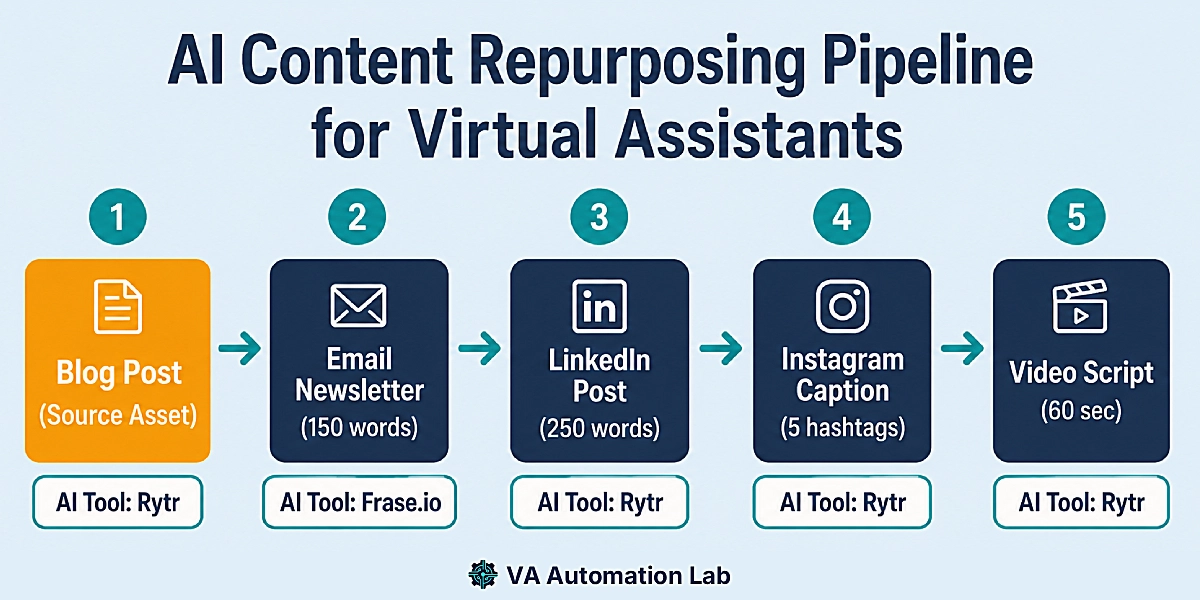
Content Repurposing Pipeline — Workflow 2:
- Start with the source asset. A blog post, a newsletter, or a client interview transcript.
- Extract three to five key insights. Paste the source content and prompt: “List the five most shareable insights from this content as single declarative sentences.”
- Generate LinkedIn posts. Use each insight as the hook for a standalone LinkedIn post using the format above.
- Generate Instagram captions. Use the same insights, rewritten in a warmer, shorter format with appropriate hashtags.
- Generate an email digest. Prompt: “Write a 150-word email summarizing this article for a professional audience. Include one CTA to read the full post.”
- Generate a short video script. Prompt: “Write a 60-second talking-head script summarizing this article. Conversational tone, no jargon, direct to camera.”
One article becomes six to eight pieces of platform-native content in 30–45 minutes. For clients who maintain active social profiles, this workflow alone can justify an AI writing retainer at the Starter or Standard service tier.
For scheduling the output across platforms, Later‘s Starter plan at $18.75/month billed annually handles up to 30 posts per profile per month across eight profiles — sufficient for most single-client social media engagements.
For VAs who manage the full social media workflow beyond content creation, the guide to Automating Social Media Workflows as a Virtual Assistant covers scheduling, repurposing, and analytics automation in detail.
5. AI Blog Writing and Long-Form Content Creation for VA Clients
Long-form content is where AI writing becomes essential for VAs offering content services. A standard 1,500-word SEO blog post without AI assistance takes two to four hours from brief to publishable draft, depending on research depth and revision requirements. With a structured AI writing workflow, that time drops to 45–90 minutes — and the output is often more consistent because the AI enforces format discipline across every section.
Using AI for research, outlines, and first drafts: a step-by-step workflow
AI writing tools used without clear context produce generic content that does not perform in search. The workflow below assumes you have the topic and target keyword confirmed with the client before starting.
Long-Form Content Workflow — Workflow 3:
- Research the topic. Use ChatGPT for ideation and subtopic mapping — prompt: “List the ten most important subtopics a reader wants covered in a comprehensive guide about [topic].”
- Build a content brief. Frase.io generates a data-driven brief by analyzing the top-ranking articles for your target keyword, showing which subtopics competitors cover, which ones they miss, and what your article needs to include to be competitive.
- Generate the outline. In Frase.io’s editor, use the AI outline tool to create an H2/H3 structure based on the brief. Review and adjust for the client’s specific angle and audience.
- Write section by section. Use Frase.io’s AI writer to draft each section within the content brief context. This grounds the AI in the keyword and topic rather than producing from generic training data alone.
- Optimize for SEO. Frase.io’s optimization score tracks which entities and subtopics your article covers versus competitors. Target a score above 70 before considering the draft ready for the next stage.
- Human editing pass. Review for accuracy, voice, and any claims that need verification. Add client-specific examples, data, and insights the AI cannot generate.
- Deliver in the agreed format. A formatted, optimized article ready for the client’s CMS — or upload it yourself if CMS management is within your scope.
With this workflow, a VA can realistically produce two to three optimized blog posts per working day at a consistent quality standard.
SEO writing with AI: how to use Frase.io to write content that ranks
Frase.io is purpose-built for the specific challenge of writing content that performs in search — not just content that reads well. The distinction is meaningful for any VA offering blog writing, content marketing, or SEO services to clients who care about organic traffic.
Content brief generation. Enter your target keyword. Frase.io pulls the top 20 SERP results, analyzes their structure, entity coverage, and average word count, and assembles a brief showing what a competitive article needs to cover. This replaces 30–45 minutes of manual competitor research per article.
Real-time optimization score. As you write, Frase.io tracks which topics and entities from the brief appear in your draft and gives you a live optimization score. Optimization becomes an in-writing process rather than a post-writing audit — a fundamental shift in how efficiently you can reach a competitive SEO standard.
AI writer with brief context. When you prompt Frase.io’s AI writer to draft a section, it generates content informed by what the top-ranking competitors have covered, not from generic training data alone. The output is more targeted and more likely to address the specific angles that matter for that keyword.
AI Visibility tracking. Frase.io Starter monitors your content’s visibility across two AI platforms — relevant as a growing share of search queries now surface AI-generated answers rather than blue links.
Frase.io’s Starter plan at $39/month covers 10 AI-optimized articles per month, one user seat, one domain, and one brand voice profile. The Professional plan at $103/month supports three seats and 40 articles per month, making it appropriate for VAs managing content for multiple clients under one subscription. 7-day trial available.
Full guide: Frase.io for Virtual Assistants: Complete Guide, Features, Pricing & Review
For VAs who manage the broader SEO strategy rather than just content production, Alli AI‘s Business plan at $249/month adds keyword tracking, link building, and site speed optimization across five sites — a meaningful upgrade for comprehensive SEO service packages.
Write SEO Blog Content Clients Rank For
Frase.io builds the research brief, optimizes as you write, and tracks your content’s AI search visibility — all in one workflow. Starter plan from $39/month. 7-day free trial.
6. AI Copywriting for Client Deliverables: Proposals, SOPs, and Reports
AI copywriting serves a different purpose from AI writing for content marketing. Where content writing prioritizes engagement and discoverability, AI copywriting for client deliverables — proposals, service agreements, standard operating procedures, recurring status reports — prioritizes clarity, structure, and precision. The stakes are higher in a concrete sense: a poorly worded proposal loses a contract. A vague SOP creates operational confusion that takes weeks to resolve.
AI copywriting tools handle these formats reliably because the input requirements are predictable and the output structure is consistent. The result is that AI can compress 60–80% of the drafting time on standard business documents while the VA’s judgment handles the specifics: scope, pricing, terms, and accuracy.
Writing project proposals and service agreements with AI
A strong proposal follows a predictable structure: problem statement, proposed solution, scope of work, timeline, pricing, and next steps. This structure maps directly to a reusable AI prompt framework.
Proposal Prompt Framework:
Write a professional service proposal.
Client: a [industry] business.
Project type: [project type].
Client challenge: [current problem the project solves].
Proposed solution: [approach].
Scope: [specific deliverables].
Timeline: [estimated duration].
Tone: professional, client-focused, confident.
Format: clear section headers, under 500 words excluding pricing table. No jargon.
The output is a structured first draft with every section present. The VA then adds specific pricing, adjusts scope language to match agreed terms, and reviews for accuracy. Total editing time: 10–20 minutes versus 60–90 minutes from scratch.
TextExpander makes this framework instantly reusable. Save the prompt as an expandable snippet — type a short abbreviation like ;;proposal — and the full framework appears wherever your cursor is, in any application, ready to customize for the specific client. The same approach applies to SOPs: create snippet templates for your most common SOP types (client onboarding, content review process, monthly reporting) and deploy them in seconds.
👉 Get Started with TextExpander — Pro plan at $5/month per user, billed annually
Automating recurring client reports and status updates with AI
Monthly reports are one of the most time-consuming recurring deliverables a VA produces. The data exists in analytics dashboards, spreadsheets, or project management tools, but transforming it into a clear narrative summary still requires significant writing effort each time. AI copywriting tools can take structured data inputs and generate formatted report copy in minutes.
Recurring Report Workflow:
- Collect the month’s key metrics. Pull data from the relevant sources — social analytics, website traffic reports, campaign performance dashboards.
- Build the prompt with structured data. “Write a professional monthly performance summary. Client: [name]. Period: [month/year]. Key metrics: [paste data]. Tone: clear, professional, candid where results need attention. Format: executive summary (50 words), three to five highlights, one to two areas for improvement, recommended next steps. Under 300 words.”
- Review and add context. The AI produces a formatted narrative. The VA adds contextual insight — why a metric moved, what external factors affected performance, what the plan is for next month — that the data alone cannot explain.
- Deliver in the agreed format. Paste into a Google Doc, PDF template, or directly into the client’s project management tool.
For the complete reporting automation stack — connecting data sources to delivery workflows — the guide on Automating Client Reports as a Virtual Assistant covers the full system.
7. Managing Brand Voice Across Multiple Clients Using AI Writing Tools
Managing brand voice is what separates VAs who use AI writing tools casually from those who use them systematically. Every client communicates differently — formal or casual, technical or accessible, authoritative or conversational. When a VA writes on behalf of multiple clients in a single session, the risk of voice bleed is real. Content that reads like Client A but goes out under Client B’s name is a trust issue that is difficult to undo and easy to avoid with the right system.
Building a brand voice profile for each client (template included)
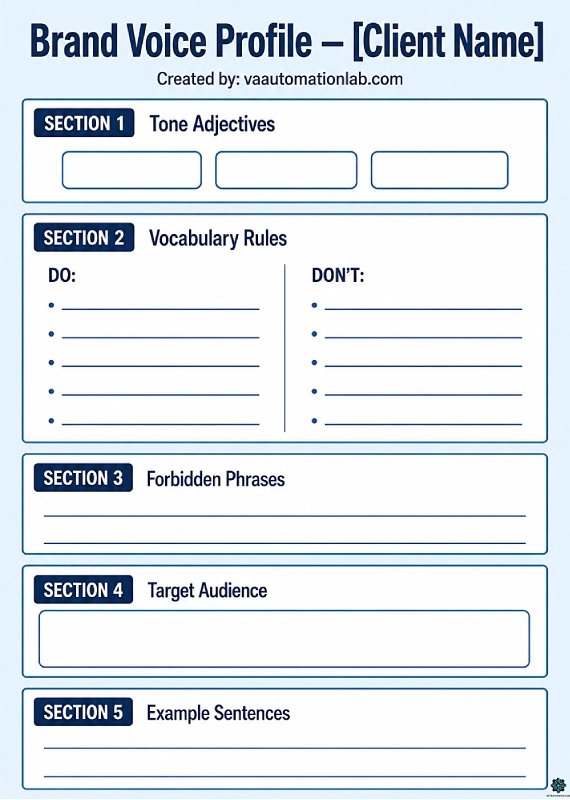
A brand voice profile is a structured document that gives an AI writing tool everything it needs to generate client-accurate content consistently. Build one during client onboarding, before you start producing deliverables.
Brand Voice Profile Setup — Workflow 4:
- Collect voice samples. Ask the client for five to ten examples of writing they have done themselves — emails, social posts, or articles. If they do not have samples, their website copy is a usable starting point.
- Identify tone attributes. Read the samples and identify three to five adjectives that describe the voice: “Direct, warm, expertise-forward, slightly informal, never corporate.”
- Document vocabulary preferences. Note words and phrases the client uses regularly. Note words or phrases that do not sound like them and should be avoided.
- Write three example sentences. Craft three sentences in the client’s voice that you can paste into any prompt as a style reference.
- Create the one-page profile. Store it in Notion or ClickUp, one document per client, accessible from any device during a writing session.
- Apply it to every AI session. At the start of any content generation for that client, paste the key tone attributes and one example sentence into the prompt as context before asking the AI to write.
Notion‘s Plus plan at $10/month provides unlimited collaborative blocks and file uploads — sufficient for storing voice profiles, example content, and client-specific prompts across your full client roster. For VAs building a comprehensive business toolkit, the 3-month Business trial gives you access to Notion Agent, AI Meeting Notes, and enterprise search alongside the core workspace features.
👉 Try Notion — 3-month Business trial
For VAs who prefer a task-based organizational structure, ClickUp‘s Unlimited plan at $7/month supports unlimited custom fields and spaces — allowing a dedicated client folder system with voice profiles stored as documents alongside active project tasks and SOPs.
Using TextExpander to save and deploy brand voice snippets instantly
Copying and pasting a voice profile into every AI prompt is functional but slow — particularly across a session where you are moving between Rytr, Frase.io, a general AI assistant, and your email client. TextExpander eliminates that friction by turning each brand voice profile into an expandable snippet. Type a short abbreviation — ;;clientname_voice — and TextExpander inserts the full voice context block wherever your cursor is, in any application, instantly.
TextExpander snippet setup for brand voice:
- Create a snippet group called “Client Voice Profiles.”
- For each client, create a snippet with a memorable abbreviation (
;;[initials]voiceworks well). - The snippet content: tone adjectives, three example sentences, vocabulary notes, phrases to avoid — the same content as the Notion document, condensed into a prompt-ready format.
- Apply the snippet at the start of every AI writing session for that client.
TextExpander‘s Pro plan at $5/month per user, billed annually, is one of the most cost-efficient tools in the VA tech stack relative to the time it saves across a full client roster.
8. AI Writing Quality Control for VAs
A VA who delivers AI writing output without a quality control layer will eventually damage a client relationship. AI writing tools generate confident, fluent prose that can contain factual errors, outdated information, or subtle voice inconsistencies — none of which are obvious at a quick read-through. Building a review protocol into your workflow is not optional. It is the professional standard that justifies charging for AI-assisted work and keeps client relationships intact.
AI-assisted content that consistently meets Google’s E-E-A-T framework — expertise, experience, authoritativeness, and trustworthiness — is content where the VA’s judgment is visible in every paragraph, not just the first draft. Quality control is how you demonstrate that judgment before delivery.
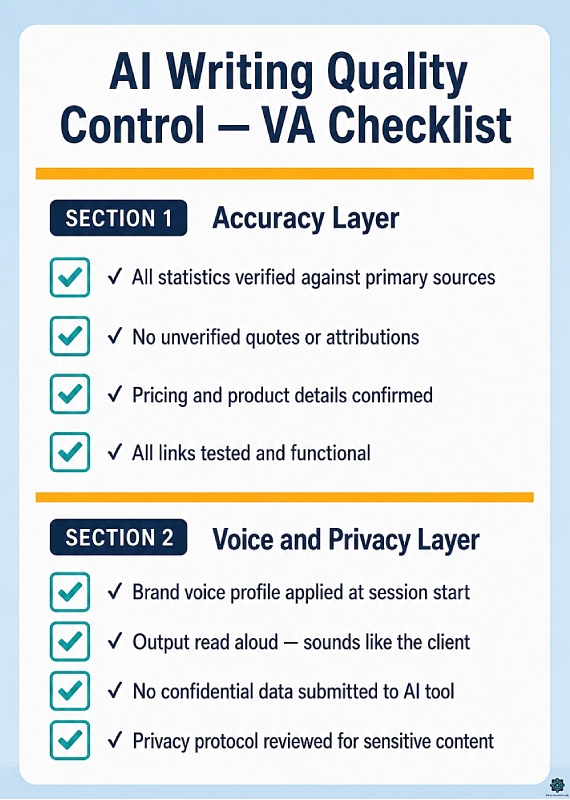
Accuracy and Fact-Checking
AI writing tools generate plausible content, not necessarily accurate content. The industry term for this failure mode is hallucination — the AI produces a fact, statistic, quote, or claim that sounds correct but is wrong, outdated, or fabricated. For a personal blog, this is an editorial problem. For a client-facing piece — a proposal, a LinkedIn article, a case study — it is a professional liability.
A practical fact-checking protocol for AI-generated client content:
Accuracy Checklist — Workflow 5:
- □ Every numerical claim (statistics, percentages, dates) verified against a primary source
- □ No quotes attributed to real people unless directly confirmed
- □ Product names, pricing, and feature descriptions match current official sources
- □ Company names and roles are accurate as of the publication date
- □ Any claim the AI presents as established fact is cross-checked before delivery
- □ URLs and links included in the content are tested and functional
Verification does not need to slow the workflow significantly. Keep a browser tab open to the primary source category relevant to the client’s industry — official websites, recent reports, the client’s own documentation — and check claims as you read the draft. A 1,500-word article takes 10–15 minutes to fact-check with this method.
A grammar and style checker like Grammarly handles surface-level errors — spelling, punctuation, passive voice — before your editorial review covers the deeper layers of accuracy and voice. It is a useful first pass, not a replacement for the fact-checking protocol above.
AI content detection tools are improving rapidly in 2026. The professional safeguard is not trying to evade them — it is producing content that is accurate, well-edited, and useful enough that detection is irrelevant. Quality is the answer to detection risk, not concealment.
For blog posts and content-heavy deliverables that include images, AltText.ai automates alt text generation across WordPress, Shopify, and most major CMS platforms. The Bronze plan starts at $5/month for 100 credits. This removes a step from the publishing workflow that VAs often skip under time pressure, while improving both image accessibility and image SEO simultaneously — two outcomes clients increasingly expect from a content VA.
Voice Consistency and Privacy
Voice consistency across multiple AI sessions is a quality issue, not just a stylistic preference. If the first email in a client sequence sounds direct and confident and the fifth sounds formal and cautious, the inconsistency reflects on the VA’s professional standard — even if each individual email reads well in isolation. The brand voice profile system from the previous section is the structural solution; the quality control layer is the check that confirms it is working.
Voice Consistency Checklist:
- □ The brand voice profile was applied at the start of the AI session
- □ The output is read aloud to test whether it sounds like the client
- □ Sentence length and paragraph rhythm match the client’s typical patterns
- □ The vocabulary used aligns with the vocabulary notes in the voice profile
- □ Phrases the client would never use are absent from the final draft
Privacy protocol for AI writing tools:
When you input client content into an AI writing tool, that content passes through a third-party system. For most routine writing tasks, this does not create a meaningful risk. For certain content types, it warrants deliberate handling:
- Do not paste confidential financial data, unreleased product details, or personally identifiable information into any public AI writing tool.
- Review the data retention policy of every tool in your stack. Most reputable AI writing platforms allow users to opt out of having inputs used for model training — confirm this for every tool before using it for sensitive client content.
- When handling clients in regulated industries (healthcare, legal, financial services), inform them proactively that their content will be processed through AI writing tools, and document this in the service agreement.
- Use templated prompts with [PLACEHOLDER] fields rather than live client data wherever possible. Fill in the specifics manually after the AI generates the framework.
Building these protocols into your standard client onboarding documentation — a one-paragraph clause covering AI tool usage and data handling — sets expectations clearly before any deliverables are produced.
9. How to Offer AI Writing as a Billable VA Service
The operational case for AI writing is clear: you produce more output in less time, without a proportional time increase. The business case is distinct and equally important: AI writing creates a new category of service you can package, price, and sell as a defined deliverable rather than an hourly effort.
Most VAs who adopt AI writing tools use them to complete the same tasks faster at the same hourly rate. That improves their output but does not change their income ceiling. The VAs who build scalable income from AI writing are the ones who adopt value-based pricing — output-based packages where the client buys a defined deliverable, not an hour of their time.
For the client management systems that make multi-client service delivery sustainable at scale, the guide on Managing Multiple Clients as a Virtual Assistant Using AI covers the full operations framework.
Packaging AI writing into your VA service tiers and pricing
The core principle: the client buys an output, not an hour. They do not need to know how long it takes you to produce twelve social captions. They need to know what twelve social captions cost and what quality standard to expect. Output-based packaging also protects your margins as your AI writing workflow becomes faster — the package price stays the same while your production time decreases.
Package | Deliverables | AI Tools Used | Suggested Price Range |
Starter | 8 social captions/month · 4 email templates · 1 monthly performance summary | Rytr · TextExpander | $300–$500/month |
Standard | 16 social captions · 2 blog posts (800–1,200 words) · 8 email drafts · 1 monthly report | Rytr · Frase.io · TextExpander | $700–$1,200/month |
Premium | 30+ social captions · 4 SEO blog posts (1,500–2,500 words) · 15+ email drafts · 2 client reports · 1 SOP or proposal template/month | Rytr · Frase.io · Alli AI · TextExpander | $1,500–$2,500/month |
Price ranges reflect the 2026 market for AI-assisted content services from a solo VA. At the Premium tier, the VA using the workflows in this guide is realistically producing those deliverables in 30–40 hours per month per client — a workload that allows managing two to three clients at this tier simultaneously without overextension.
These are frameworks, not mandates. Adjust based on your market, client industry, and the time your specific workflows require.
AI transparency and client disclosure: what to tell clients (and what not to)
Proactive transparency is the better business decision. Clients who discover AI use without being told feel misled, even when the output quality is excellent. Clients who are informed from the start have already accepted it as part of the service.
What to say to clients:
“I use AI writing tools as part of my production workflow. All content is reviewed, edited, and verified by me before delivery. The AI handles the first draft — I handle the judgment, the accuracy, and the voice consistency. This is why I can deliver the volume I do, at the quality level I guarantee.”
This framing positions AI as a professional tool — similar to how a researcher uses databases, a designer uses templates, or an accountant uses automated bookkeeping software. The client is buying the VA’s expertise, editorial judgment, and accountability. The tool that produces the first draft is a means to that end, not the product being sold.
What clients care about: quality, accuracy, and whether the content sounds like the client. When your track record demonstrates all three consistently, the production method is largely irrelevant to the client relationship.
Where disclosure becomes a contractual matter: Some clients in regulated industries have explicit policies about AI-generated content. Review these policies during onboarding and document any restrictions in the service agreement before beginning content production.
10. Conclusion
AI writing is not a replacement for the judgment, client relationships, and editorial standards that make a virtual assistant valuable. It is the infrastructure that lets you deliver more of that value in less time and at a scale that was previously unavailable to a solo professional.
The writing tools for virtual assistants covered in this guide are built around one principle: your expertise is the asset, and AI is the multiplier. The VAs who build sustainable AI writing workflows — systematic brand voice management, structured quality control, defined service packages — are building a professional capability that grows stronger with every client and every project. Every brand voice profile you create, every prompt framework you refine, every workflow you build makes the next deliverable faster and the next client engagement more consistent.
In 2026, content that performs means content that ranks in traditional search and appears in AI-generated responses. The workflows in this guide are designed for both — SEO-structured long-form content through Frase.io, and consistently high-quality, E-E-A-T-aligned output across every content type.
Start with the tool that matches your primary service type. Build your first brand voice profile this week. Run your first batch of content through the quality control checklist before delivery. The productivity gain in the first week is modest. By month three, it is structural.
Ready to Build Your AI Writing Stack?
Rytr is the fastest way to start — templates for every content type, unlimited output, and Tone Match to keep every client’s voice consistent. Free plan available. Upgrade to Unlimited for $7.50/month.
FAQ — AI Writing for Virtual Assistants
What AI writing tools are best for virtual assistants?
The best AI writing tools for virtual assistants depend on your service type. For email, social media, and short-form content, Rytr is the most accessible entry point, with plans starting at $7.50/month. For VAs offering SEO blog content, Frase.io at $39/month provides a complete research-to-draft workflow with SERP-based optimization. Content VAs who need both will find the two tools complement each other across different production tasks.
What is the difference between AI writing and AI copywriting for VAs?
AI writing is the broader category — it covers any form of written content production, including blog posts, emails, social captions, and reports. AI copywriting specifically refers to persuasive, conversion-oriented writing: proposals, sales emails, landing page copy, and ad copy. Both use similar AI writing tools, but with different template types, prompting strategies, and quality criteria based on the commercial intent of the output.
Is Rytr worth it for a freelance VA?
Yes, at the Unlimited plan ($7.50/month), Rytr is one of the most cost-efficient AI writing tools for VA use. For VAs who produce regular content for clients — email drafts, social posts, short reports — the tool pays for itself within the first hour of use each month. The Tone Match feature is the primary differentiator: saving a client’s voice profile and applying it consistently across sessions is what makes Rytr useful for multi-client VA work, not just occasional one-off drafts.
How do I use Frase.io as a virtual assistant offering SEO services?
Start with the content brief feature. Enter the target keyword for your client’s article, and Frase.io generates a brief based on the top-ranking SERP results — covering which subtopics to address, which entities to include, and what average word count competitors use. Write each section inside the brief using Frase.io’s AI writer and track your optimization score as you go. The 7-day free trial gives you enough time to complete two to three full articles and evaluate whether the workflow fits your client load.
Can AI write emails that sound like my client?
Yes, with proper setup. The key is a brand voice profile — a document capturing your client’s tone attributes, preferred vocabulary, and example sentences. Feed this context into Rytr‘s Tone Match or any AI writing tool’s prompt at the start of each session. With a well-built profile, the AI produces emails that need five to ten minutes of editing rather than a complete rewrite. The setup investment is front-loaded; every session after the profile is built benefits immediately.
How many clients can I handle if I use AI writing tools?
There is no fixed number — it depends on your service packages and the content volume per client. A reasonable benchmark for 2026: a solo VA using AI writing tools across email, social media, and blog content can manage three to five clients on content retainers ($700–$2,000/month each) within standard business hours. Without AI tools, that number is typically one to two. The productivity gain compounds only when brand voice management and quality control are systematic — not when AI is used ad hoc for individual tasks.
What is the best free AI writing tool for VAs?
Rytr‘s free plan, which provides 10,000 characters per month and access to the full template library, is the most functional free tier for VA-specific writing tasks. For context, 10,000 characters covers roughly ten short social captions or three to four short emails per month — enough to test the workflow, not enough for a full client workload. For consistent client production, the Unlimited plan at $7.50/month is the practical entry point.
Should I disclose AI use to my clients?
Yes, proactively. The professional framing: you use AI tools as part of your production workflow, all content is reviewed and verified by you before delivery, and the quality standard is your responsibility. Most clients accept this without issue when framed as a professional efficiency practice. For clients in regulated industries, confirm their content policies during onboarding and document any AI-related restrictions in the service agreement before beginning work.
How long does it take to learn AI writing tools as a VA?
Basic proficiency with Rytr or a similar purpose-built AI writing tool takes two to four hours of hands-on use across your most common content types. Developing the prompt frameworks, brand voice profiles, and quality control workflows described in this guide takes a focused implementation week. Full workflow integration — where AI writing is a natural part of every client deliverables session — typically solidifies within 30 days of consistent use.
How do I manage brand voice for multiple clients using AI?
The system: one brand voice profile document per client (stored in Notion or ClickUp), containing tone adjectives, vocabulary notes, three example sentences, and phrases to avoid. At the start of every AI writing session for a client, paste the key voice context into the prompt. Use TextExpander snippets to deploy these profiles instantly without manual copy-paste across sessions. Review every AI output against the profile before delivery.
What are the risks of using AI for client copywriting?
The three primary risks are accuracy (AI hallucination producing incorrect facts or claims), voice inconsistency (output that does not match the client’s established voice), and privacy (sensitive client data submitted as AI prompt input). All three are manageable with the quality control and privacy protocols in this guide. The reputational risk of delivering inaccurate or off-voice content to a client is real; the operational discipline to prevent it is straightforward to build.
Can I offer AI writing as a standalone VA service?
Yes, and it is increasingly common in 2026. The most effective positioning is output-based: you sell a defined deliverable package — content volume, turnaround time, quality standard — rather than hours. Clients who buy AI-assisted content packages are buying the outcome: polished, on-brand content delivered on schedule. The production workflow is your proprietary method, not the product being sold. The service tier framework in this guide provides a starting point you can adapt to your existing client relationships and market.
Can AI writing tools learn my writing style over time?
Some can. Rytr‘s Tone Match builds a style profile from samples you provide and applies it across every session for that client. General AI assistants like ChatGPT and Claude adapt within a single conversation but reset between sessions without manual re-prompting — meaning you need to paste your brand voice context into every new session. Purpose-built tone training is currently Rytr’s primary differentiator for multi-client VA work where consistency across dozens of sessions is non-negotiable.
What is the best AI content workflow for social media VAs?
The most effective system combines three layers: Rytr for platform-specific caption generation (LinkedIn, Instagram, X templates), the content repurposing pipeline in this guide to turn one source asset into six to eight platform-native pieces, and a scheduling tool like Later at $18.75/month billed annually to handle distribution across profiles. This three-layer workflow covers content creation, repurposing, and scheduling without manual rebuilding for each platform — the combination that makes a social media VA’s output scalable to three or more active clients.
Glossary — AI Writing & Content Creation Terms for Virtual Assistants
AI writing — The use of artificial intelligence to generate, edit, and optimize written content. In a VA context, AI writing encompasses tools and workflows that help produce emails, blog posts, social captions, proposals, and reports faster and at a consistent quality standard.
Large Language Model (LLM) — The technology powering most AI writing tools. An LLM is a type of AI trained on large volumes of text data, enabling it to generate coherent, contextually appropriate written content in response to structured prompts. ChatGPT, Claude AI, and Rytr’s writing engine are all built on LLMs.
Prompt — The instruction or input you give to an AI writing tool. The quality of the prompt directly determines the quality of the output. A structured prompt includes context, tone, format, goals, and constraints — each element making the AI’s output more accurate and more immediately usable.
Brand voice — The consistent communication style, tone, and vocabulary that defines how a person or business expresses itself in writing. For VAs managing multiple clients, maintaining distinct brand voices is the professional standard that prevents AI-generated content from sounding generic or misaligned with the client’s identity.
Content brief — A structured document that defines what a piece of content needs to cover before writing begins. In SEO contexts, a content brief includes the target keyword, analysis of competing articles, required subtopics, and entity coverage. Frase.io generates data-driven content briefs automatically from SERP analysis.
SEO content — Written content optimized to appear in search engine results pages for a target keyword. SEO content requires both quality writing and strategic entity coverage, internal linking, and alignment with search intent — all of which purpose-built AI writing tools like Frase.io are designed to support.
AI hallucination — The tendency of AI writing tools to generate plausible-sounding but factually incorrect information. Hallucinations can include fabricated statistics, misattributed quotes, or outdated product details. Fact-checking every AI output against primary sources before client delivery is the standard safeguard.
Content repurposing — The process of taking one piece of content and adapting it for multiple platforms or formats. A blog post repurposed into LinkedIn posts, an email digest, Instagram captions, and a short video script is a classic repurposing pipeline. AI writing tools reduce the time required for each adaptation without requiring a new creative brief for every output.
Tone profile — A saved set of voice attributes, vocabulary notes, and example sentences that defines how a specific client communicates. In tools like Rytr, a tone profile is applied to every content generation session for that client, ensuring consistent voice across all deliverables regardless of content type.
AI copywriting — A subset of AI writing focused specifically on persuasive, conversion-oriented content: proposals, sales emails, landing page copy, and ad copy. AI copywriting tools and general AI writing tools often overlap in functionality, but the prompting approach and quality criteria differ based on the commercial intent of the output being produced.
About the Author
Alex Stratton has spent the better part of a decade working at the intersection of virtual assistance and operational systems, first as a VA supporting founders and small business owners, then as a workflow consultant helping remote teams reduce the manual overhead that accumulates when businesses grow faster than their processes. The tools and workflows here reflect decisions made repeatedly in real client contexts, where the wrong choice costs hours, not minutes. Learn more about VA Automation Lab → About.