
AI Email Management for Virtual Assistants: Best Tools and Workflows (2026)
Disclosure: This article contains affiliate links. If you purchase through these links, VA Automation Lab earns a commission at no extra cost to you. We only recommend tools we’ve evaluated for VA-specific workflows.
The complete guide to AI email management for virtual assistants: best tools by use case, email automation workflows, AI inbox management systems, and a practical approach for managing multiple client inboxes without email running your day.
Email is the highest-volume task in most VA operations. For a VA managing three clients across different time zones, the average professional’s 100+ daily emails can easily become 300+, distributed across multiple accounts, inboxes, and communication styles. Without a system, that volume expands to fill every available hour.
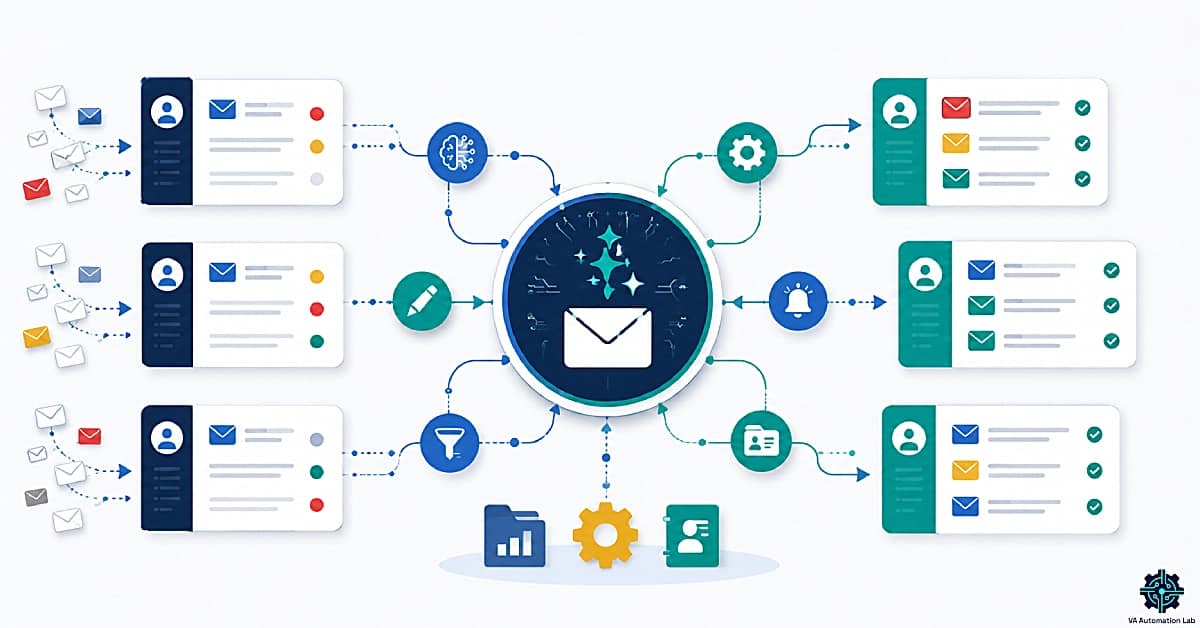
AI email management for virtual assistants is the use of artificial intelligence tools to handle inbox filtering, thread summarization, reply drafting, follow-up automation, and outreach — covering the mechanical layers of email so professional judgment is applied only where it creates value. The core system: SaneBox filters the inbox, Claude or Rytr drafts replies, Make automates follow-ups, and Folk tracks every client interaction. These tools aren’t optional add-ons; they are the operational layer that makes scaling a multi-client practice sustainable.
What this guide covers:
- How to choose the right AI email tool before buying anything
- The best AI email tools for virtual assistants, compared by use case, free tier, and workflow fit
- A recommended stack for every stage of your VA practice
- How to use AI for summaries, drafting, follow-ups, and sorting
- A step-by-step system for managing multiple client inboxes
- Real workflow examples with copy-paste prompts
- How to price email management as a VA service
- A quick start guide that takes under 40 minutes to implement
👉 Tools for Virtual Assistants: The Complete AI Systems & Software Guide — the full reference for every AI tool category in VA work.
Get the Free AI Toolkit for Virtual Assistants
This guide covers the email tools, the AI Toolkit gives you the full VA setup: prompt libraries, automation templates, and tool recommendations across every workflow category.
Free to download, no fluff.
Table of Contents
1. Why Email Management Is the Highest-ROI Starting Point for AI
Of all the tasks where AI produces measurable results for virtual assistants, email management delivers the fastest return. The reason is simple: email is high-frequency, structurally predictable, and almost entirely composed of text, exactly the conditions where AI tools perform best.
The numbers are consistent across studies. According to research, professionals who use AI email tools save an average of 4 hours per week, equivalent to more than one full workday per month recovered from inbox work alone. For a VA managing multiple clients, each with separate inboxes and different communication styles, the compound saving is proportionally larger.
Email also fails in predictable ways for VAs specifically:
Volume scales with client count. Each new client adds not just their emails but the context-switching cost of moving between inboxes, accounts, and communication styles. A VA managing four clients in Gmail and Outlook simultaneously faces a cognitive overhead that no amount of manual organization fully resolves.
Follow-ups fall through the cracks. The most common client complaint about VA communication is not quality, it is timing. A reply that arrives 48 hours late, a follow-up that was never sent, a task buried in thread 47 of a 60-message chain. These are not attention failures. They are system failures, and AI email management for virtual assistants resolves them systematically.
Drafting takes disproportionate time. A professional email reply takes 15-25 minutes to write from scratch when the message requires nuance, accuracy, and the right tone for the specific client relationship. AI reduces that to 3-5 minutes of review and editing. Applied to 10 emails per day across three clients, the saving is 2-3 hours daily.
This is why AI email management for virtual assistants is not an optional upgrade, it is the single most impactful place to start if you want to reduce working hours without reducing output quality.
2. How Much Time Can You Save with AI Email Management?
The time savings from AI email management are not uniform, they depend on which workflow you automate first and how many client accounts you manage. These benchmarks reflect consistent patterns across real VA implementations.
Email Task | Manual Time | With AI | Daily Saving |
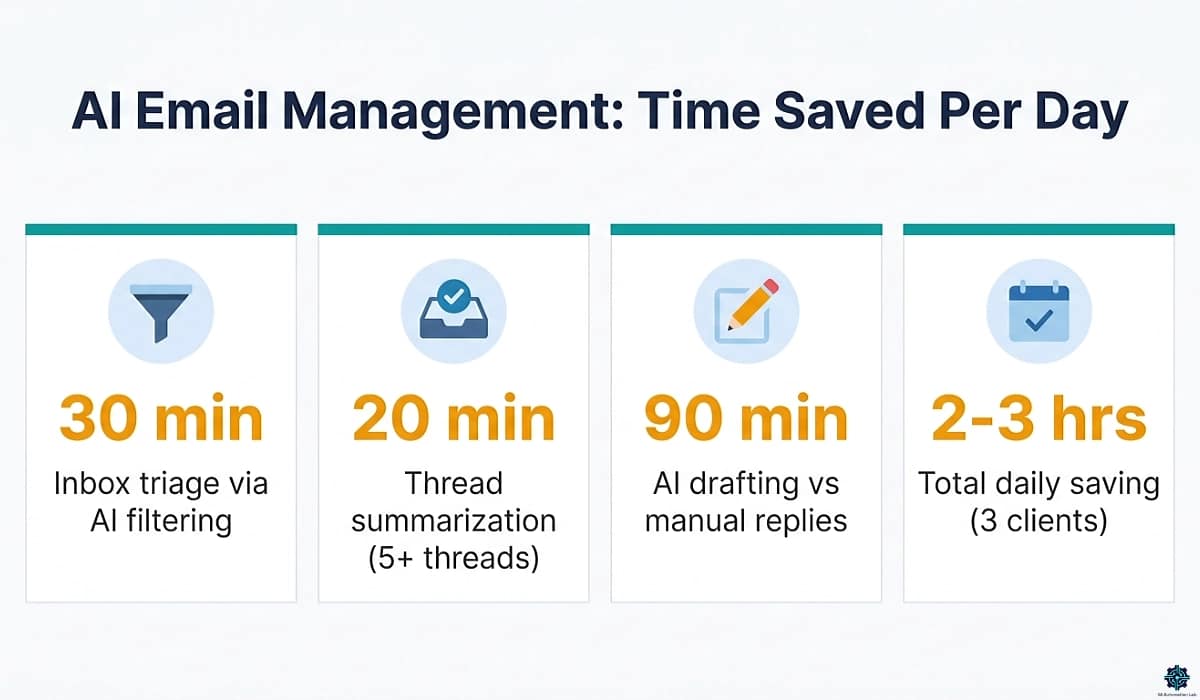
Inbox triage & sorting | 30–45 min | 5–10 min | ~30 min |
Thread summarization (5+ threads) | 20–30 min | 3–5 min | ~20 min |
Drafting replies (10 emails) | 90–150 min | 20–35 min | ~90 min |
Follow-up tracking | 20–30 min | Near zero | ~25 min |
Total (3-client VA) | 3–4 hrs | 45–60 min | 2–3 hrs/day |
For a VA managing three clients, a full AI email workflow typically recovers 2–3 hours per day, the equivalent of one full workday returned to higher-value work every week. Applied at a VA’s hourly rate over a month, that saving pays for every tool in this guide many times over.
The fastest individual wins:
- AI summarization (Gemini, Copilot, or Claude): 15–20 minutes/day recovered, zero setup
- SaneBox filtering: 25–30 minutes/day recovered, 5-minute setup
- AI drafting templates: 60–90 minutes/day recovered, 20-minute setup once
The compound effect of all three running together is what produces the 2–3 hour figure, not any single tool alone.
3. How to Choose the Right AI Email Tool for Your VA Practice
With over fifteen tools across nine use case categories in this guide, picking one requires a framework — not a features list. Three variables determine fit: your primary email problem, your clients’ email providers, and your technical comfort level. Identify these first, and the right tool becomes obvious.
Start with your primary email problem:
Problem: My inbox is unmanageable — too much volume, hard to prioritize → Start with SaneBox. It handles the filtering layer for any email provider with no configuration complexity. Everything else becomes easier once the inbox is under control.
Problem: Drafting replies takes too long → Start with Claude (free tier) + a prompt template document. Build 3–5 reusable templates for your most frequent email types. Use Rytr for a guided, template-driven approach — select your tone, describe the context in one sentence, and get a complete draft without writing prompts from scratch. Add TextExpander when you want to expand those templates with a single shortcut.
Problem: Follow-ups fall through the cracks → Start with SaneBox SaneReminders (included in any plan) for zero-configuration follow-up tracking. Upgrade to Make when you need conditional automation logic or multi-tool integration.
Problem: I need to track relationship context alongside email → Start with Folk (Standard plan). It connects to Gmail or Outlook and auto-logs every interaction against the right contact record, replacing inbox + spreadsheet with a single view.
Problem: My client wants cold email outreach → Start with WarmupInbox (3–4 weeks before the first send), then build the campaign in Lemlist. For smaller volumes, Woodpecker.co is the budget alternative.
Problem: My client needs automated email sequences and nurturing → ActiveCampaign for workflow-heavy setups (behavioral triggers, lead scoring, CRM integration). Brevo for lighter requirements with a free starting tier. Moosend if your client needs a clean, beginner-friendly interface.
Budget decision matrix:
Monthly budget | Recommended start | Primary win |
$0 | Claude/ChatGPT + Gemini or Copilot | Drafting & summarization |
$5–10/month | Add SaneBox | Inbox triage eliminated |
$15–20/month | Add Rytr | Guided AI drafting for all email types |
$30–45/month | Add Folk | Email + relationship tracking |
$80–100/month | Add Make + TextExpander | Full email automation |
$130+/month | Add Lemlist + WarmupInbox | Client outreach services |
4. Best AI Email Tools for Virtual Assistants
The tools below are organized by use case — the same categories as the decision framework above. Each section covers the best tool for that job, its pricing, and how it fits a real VA workflow.
Inbox Organization & Filtering
SaneBox is the most effective AI inbox management tool for VAs. It sits on top of any email provider (Gmail, Outlook, Apple Mail, or any IMAP account) and automatically separates what requires attention from everything else, before you open the inbox.
Key features for VA work:
- SaneLater: moves low-priority email out of the main inbox into a review folder, checked once daily instead of interrupting the workday
- SaneReminders: moves a sent email back to your inbox if no reply arrives within a set window, no manual follow-up tracking required
- SaneBlackHole: permanent one-click unsubscribe from any sender
- Snooze: removes emails from view until they’re relevant
SaneBox works with any client’s email provider, requires no client adoption, and the 5-minute setup is genuinely 5 minutes.
Pricing (annual): Snack $6/month (1 account, 2 features) | Lunch $10/month (2 accounts, 6 features) | Dinner $30/month (4 accounts, all features) | 14-day free trial
👉 Try SaneBox with $15 free credit
For VAs whose clients use Google Workspace or Microsoft 365, Gemini for Gmail and Copilot for Outlook provide native AI inbox management at zero additional cost within existing subscriptions. These are the right starting point for VAs entering AI email management without adding a new tool to the stack.
Learn how SaneBox helps virtual assistants automate email management and organize multiple client inboxes — SaneBox for Virtual Assistants: Review & Setup Guide
AI Drafting & Smart Replies
For email drafting, two approaches serve different VA workflow styles: guided template tools and flexible prompt-based tools.
Rytr is the primary recommendation for VAs managing high-frequency, templated email workflows. Its built-in “Email” use case removes the need to write prompts from scratch: select your tone (formal, casual, convincing), describe the context in one sentence, and receive a complete draft with two variants in seconds. For the most common VA email types — follow-ups, weekly client updates, proposal responses, check-ins — Rytr’s structured approach is faster and more consistent than a blank-prompt workflow. It’s the better starting point for VAs new to AI writing tools, and a time-saver even for experienced ones.
Pricing (annual): Free (10,000 characters/month) | Unlimited $7.50/month (unlimited AI content generation, 1 tone match)| Premium $24/month (multiple tone match, 100 plagiarism checks per month)
Claude and ChatGPT are the flexible alternatives. They work with any email provider via copy-paste and handle summarization, reply drafting, tone adjustment, and content generation without additional setup. The practical approach is a reusable prompt template library (covered in Section 6). Both have generous free tiers that cover most VA drafting needs — and Claude in particular excels at capturing nuanced relationship tone when given sufficient context.
TextExpander complements AI drafting by turning AI-generated templates into keyboard shortcuts. Type .followup and get a full follow-up email template expanded instantly. For VAs who send the same types of emails repeatedly (meeting confirmations, weekly updates, proposal follow-ups), this removes the last layer of friction from AI-assisted drafting.
Pricing (annual): Individual from $3/month | Business $8/month | 30-day free trial
Email Automation & Follow-Ups
Make is the primary tool for building email automation workflows without code. Common VA applications: automatically log incoming client emails to a project management tool, trigger follow-up sequences based on reply status, route emails from specific senders to the right labels and notify the right people.
Make’s visual workflow builder connects Gmail, Outlook, Slack, ClickUp, Notion, CRMs, and hundreds of other tools in any combination. The free plan covers 1,000 credits/month, sufficient for basic email routing. The Core plan at $9/month handles most multi-client VA setups.
Pricing (annual): Free (1,000 credits/month); Core $9/month; Pro $16/month
n8n is the technical alternative to Make. The Community Edition is free and self-hosted with unlimited executions — a meaningful cost advantage at scale. n8n is the better choice for VAs with technical comfort who manage high-volume automation or need custom logic beyond Make’s visual builder.
Pricing (annual): Free (self-hosted); Cloud Starter $23/month; Pro $58/month | 14-day free trial
Email + CRM
Folk is the strongest tool at this intersection for VA workflows. It combines contact management with email tracking, pipeline views, and one-click contact capture from LinkedIn and Gmail via the folkX Chrome extension. Every email interaction is automatically logged to the relevant contact record, no manual data entry.
For VAs managing relationships on behalf of clients — prospecting, partnerships, recruiting, sales follow-up — Folk replaces the disconnected inbox + spreadsheet combination with a single, self-updating interface.
Pricing (annual): Standard $24/month | Premium $48/month | Custom from $80/month | 14-day free trial | No free plan
Pipedrive is the alternative for VAs who need a sales-pipeline CRM with email integration. The Lite plan at $16/month (annual) covers lead management and email activity tracking. The Growth plan at $46/month adds full email sync with open and click tracking, automations, and meeting scheduler.
Zoho CRM has a free tier for up to 3 users and a Standard plan at $16/month, the budget entry point for VAs just starting with CRM.
For a full CRM comparison tailored to VA work, see Best CRM for Virtual Assistants.
Email Sequences & Nurturing
ActiveCampaign is the tool for multi-step email sequences, onboarding flows, drip campaigns, re-engagement sequences for clients who need automated nurturing. The Starter plan at $15/month (1,000 contacts, annual) covers basic automation. The Plus plan at $37/month adds CRM, landing pages, and deeper workflow logic.
Brevo is the more accessible entry point. The free plan allows 300 emails per day with up to 2,000 contacts, genuinely useful for VAs running small-scale sequences. The Starter plan at $8/month (annual) increases email volume to 5,000/month with the same contact limit. The Standard plan at $16/month adds full marketing automation and A/B testing.
Moosend is the recommended alternative for VAs managing email campaigns on behalf of smaller clients. Compared to ActiveCampaign, Moosend’s interface is cleaner and less steep to learn — making it a better fit when clients want automation without onboarding complexity. It includes automation workflows, list segmentation, landing pages, and a drag-and-drop email editor. For VAs offering email marketing as a service to non-technical clients, Moosend is often the more manageable handover tool. Pro plan at $7/month (annual) for 500 contacts, with unlimited email campaigns. 30-day free trial.
Cold Email Outreach
Lemlist is the most capable cold email platform for VAs managing outreach on behalf of clients. Standout features: dynamic image personalization (automatically embeds the prospect’s name or company logo in email images), multichannel sequences combining email + LinkedIn + calls, and a built-in deliverability warmup tool in all plans.
For VA use: the Email Pro plan handles email-only outreach campaigns; the Multichannel Expert plan adds LinkedIn automation and WhatsApp as an add-on. The 14-day free trial gives full access to the Expert plan.
Pricing (annual): Email Pro $73/month; Multichannel Expert $101/month | 14-day free trial
Woodpecker.co is the budget-friendly cold email alternative for smaller outreach volumes. Pricing starts from $20/month per sending slot with unlimited email accounts, built-in warmup, and basic sequence automation. The better choice when outreach volume is under 500 prospects per month and multichannel automation isn’t required.
Salesflow is worth evaluating for VAs whose clients need combined LinkedIn + email outreach in a single platform, with dedicated LinkedIn automation running alongside the email sequence. Basic plan at $99/month.
Deliverability & Inbox Warmup
WarmupInbox is the dedicated deliverability tool for VAs running cold email campaigns. Before launching outreach from a new domain or email address, WarmupInbox gradually builds sender reputation within its 30,000+ inbox network.
Pricing (annual): Basic $15/month per inbox (75 warmup emails/day); Pro $49/month (250/day); Max $79/month (1,000/day)
Collaborative Inbox
Missive is the tool for VAs who need to co-manage a client’s email inbox in real time. Unlike individual inbox tools, Missive creates a shared inbox environment where the VA drafts replies and the client approves before sending — maintaining client control while capturing the VA’s drafting efficiency. Starter plan at $14/month, Productive at $24/month (automation, integrations, analytics and reporting).
WhatsApp + Email
Timelines AI is worth evaluating for VAs whose clients use WhatsApp as a primary communication channel alongside email. It centralizes WhatsApp conversations with CRM-style organization and integrates with Pipedrive, HubSpot, Zoho, and Make.
Pricing (annual): CRM Integration $25/month | Shared Inbox $40/month | Mass Messaging $60/month | 10-day free trial
Best Tool by Use Case
Use Case | Best Tool | Starting Price |
AI inbox management & filtering | SaneBox | $6/month |
AI email drafting (guided/templates) | Rytr | Free / $7.50/month |
AI email drafting (flexible/prompt-based) | Claude | Free |
Email template shortcuts | TextExpander | $3/month |
Email automation & workflows | Make | Free / $9/month |
High-volume automation (technical) | n8n | Free / $23/month |
Email + CRM (relationship tracking) | Folk | $24/month |
Email sequences & nurturing | ActiveCampaign | $15/month |
Email marketing & campaigns | Brevo | Free / $8/month |
Email marketing (simpler UI) | Moosend | $7/month |
Cold email outreach | Lemlist | $73/month |
Cold email (budget) | Woodpecker.co | $20/month |
LinkedIn + email outreach | Salesflow | $99/month |
Deliverability & warmup | WarmupInbox | $15/month |
Collaborative inbox (client approval flow) | Missive | $14/month |
WhatsApp + email + CRM | Timelines AI | $25/month |
Try SaneBox Free for 14 Days — $15 Off Your First Plan
SaneBox connects to Gmail, Outlook, or any IMAP account in under 5 minutes and starts separating what needs your attention from what doesn’t, automatically, from day one.
The 14-day free trial requires no credit card. Use the link below to get $15 off your first paid plan when you’re ready to commit.
5. Best AI Email Stack for Virtual Assistants (By Budget)
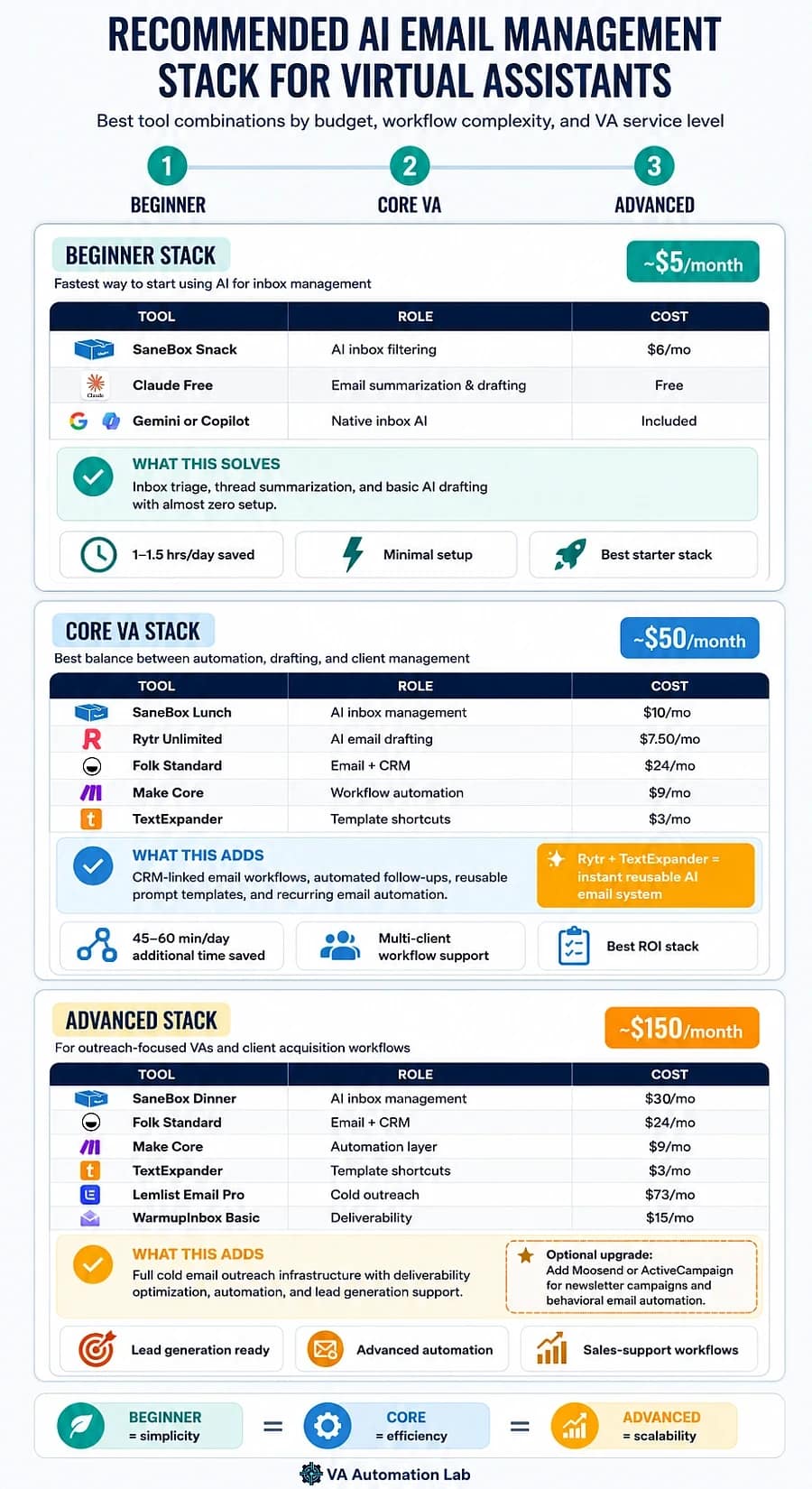
The right tool stack for managing emails with AI depends on the level of your VA practice. Adding all tools simultaneously is expensive and creates configuration overhead before results are visible. Build in layers — add the next tool only when the current one is producing consistent results.
Beginner Stack
Total cost: $6/month
Tool | Role | Cost |
SaneBox Snack | AI inbox management & filtering | $6/month |
Claude Free | Summarization + drafting | Free |
Gemini for Gmail or Copilot for Outlook | Native AI | Included |
What this solves: inbox triage, thread summarization, basic AI drafting. Recovers 1–1.5 hours/day with minimal setup.
Core VA Stack
Total cost: ~$50/month
Tool | Role | Cost |
SaneBox Lunch | AI inbox management | $10/month |
Rytr Unlimited | Guided AI drafting | $7.50/month |
Folk Standard | Email + CRM | $24/month |
Make Core | Email automation | $9/month |
TextExpander Individual | Template shortcuts | $3/month |
What this adds: CRM-connected email tracking, automated follow-ups, and template expansion across all recurring email types. Recovers an additional 45–60 min/day. The Rytr + TextExpander combination is the core drafting engine: Rytr generates the draft, TextExpander stores the refined version as an instant shortcut.
Advanced Stack
Total cost: ~$150/month
Tool | Role | Cost |
SaneBox Dinner | AI inbox management | $30/month |
Folk Standard | Email + CRM | $24/month |
Make Core | Full automation layer | $9/month |
TextExpander Individual | Template shortcuts | $3/month |
Lemlist Email Pro | Cold email outreach | $73/month |
WarmupInbox Basic | Deliverability | $15/month |
What this adds: full outreach capability with deliverability infrastructure. Designed for VAs offering lead generation, sales support, or business development as part of their service offer.
Add Moosend or ActiveCampaign to any stack when a client needs ongoing email marketing campaigns — Moosend for simpler setups, ActiveCampaign for behavioral automation and lead scoring.
6. Email Automation for Virtual Assistants: How to Use AI for Every Workflow Stage
Email automation for virtual assistants covers four distinct workflow categories. Each uses different tools and produces a different type of time saving.
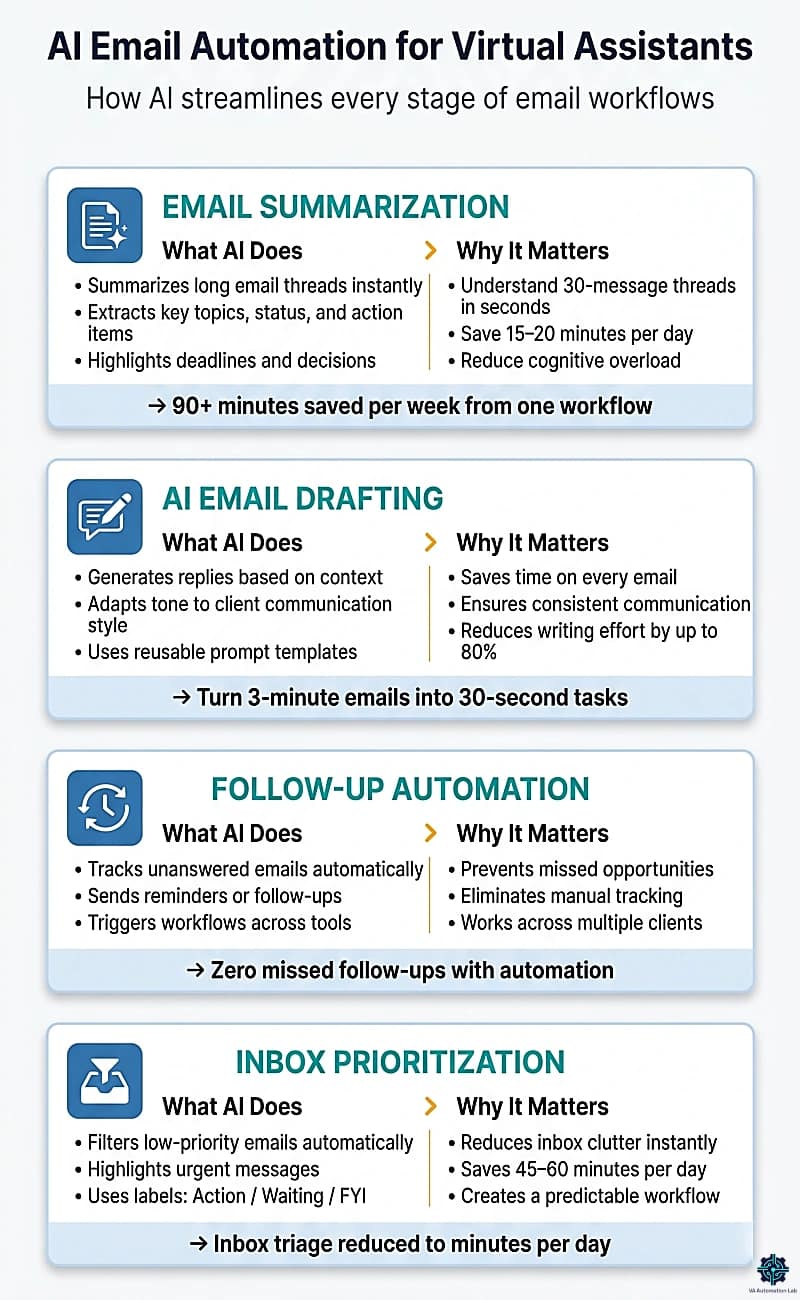
Email Summarization
The use case with the fastest visible result. A VA processing 80 emails per day spends 20-30 seconds per message reading context before responding. For threaded conversations with 15+ messages, that time multiplies.
With Gemini or Copilot: open any thread → click “Summarize” → receive a 3-4 sentence summary with the key question, relevant decisions, and any pending action items. The full thread takes 2 seconds to understand instead of 3 minutes.
With Claude or ChatGPT (for any provider): paste the full thread text with this prompt:
Summarize this email thread. Output:
- Main topic (1 sentence)
- Current status (1 sentence)
- What requires action from me (bullet list)
- Any deadlines mentioned

Thread: [PASTE THREAD]
Time saving benchmark: 15-20 minutes per day for a VA handling 5+ threaded conversations. Applied consistently, this alone recovers 90+ minutes per week.
AI Email Drafting
Drafting is the highest-time-investment email task — and the one where AI produces the most dramatic saving per message.
The four-step drafting workflow:
- Read the incoming email. Write one sentence describing what the reply needs to accomplish.
- Build a specific prompt: who is the sender, what did they ask, what does the reply need to communicate, required tone, any constraints.
- Review the output against the client’s communication style. Edit tone if needed.
- Send, or queue for client approval.
With Rytr (guided approach): select the “Email” use case, pick your tone from the dropdown, paste one line of context (“follow-up on proposal sent three days ago, no reply yet”), and click Generate. Rytr produces a full draft with two variants in seconds. Best for recurring email types where structure is predictable — follow-ups, check-ins, update emails, confirmation requests.
Post-meeting summary prompt template (for Claude or ChatGPT):
Write a professional meeting summary email.
Client: [CLIENT NAME]
Meeting date: [DATE]
Meeting type: [onboarding / check-in / project review]
Topics covered: [BRIEF LIST]
Key decisions: [LIST]
Action items: [WHO does WHAT by WHEN]
Next meeting: [DATE or TBD]
Tone: professional and warm
Length: under 200 words
Format: intro paragraph + bullet summary + next steps
Save this in Notion or a Google Doc labeled “Email Workflow Templates.” Prompt writing time drops from 3 minutes to 30 seconds per recurring task.
TextExpander takes this further: store the filled prompt template as a snippet (e.g., .meetingsummary) and expand it instantly in any text field, no switching between documents.
Follow-Up Automation
Manual follow-up tracking is one of the most common failure points in multi-client VA operations. Two tools solve it at different levels of complexity:
SaneBox SaneReminders (no-code): when you send an email that needs a reply, BCC 2days@sanebox.com (or 1week@sanebox.com). If no reply arrives, the sent email reappears in your inbox on that schedule, zero configuration required.
Make (automated workflows): build a scenario that monitors a Gmail or Outlook label for “Awaiting Reply” messages older than 48 hours and:
- Sends an automatic follow-up email with a pre-written template
- Creates a task in ClickUp or Notion with the follow-up details
- Posts a Slack notification to the relevant client channel
This Make workflow takes about 20 minutes to set up and runs indefinitely. For a VA managing 3+ clients with active project email threads, it prevents every missed follow-up without mental overhead.
For a full walkthrough of Make automation setup, see the Make for Virtual Assistants: Beginner Setup Guide.
Inbox Organization & Prioritization
Inbox triage (sorting, labeling, and deciding what to act on) is the invisible time drain in most VA email workflows. For a VA checking three inboxes across Gmail and Outlook, this can consume 45–60 minutes daily before any actual work happens.
The three-layer approach:
Layer 1 — AI filtering (SaneBox): automatically moves newsletters, notifications, and low-priority email to SaneLater. Main inbox contains only emails that genuinely require attention.
Layer 2 — Native AI prioritization: Gemini for Gmail and Copilot for Outlook both surface “important” emails based on sender patterns and content signals. Enable this and check the AI-prioritized view first.
Layer 3 — Label architecture: create three labels per client inbox: Action Required, Waiting on Reply, and FYI/Archive. When processing remaining main-inbox emails, assign one label per message. This takes 15 seconds per email and makes the daily routine predictable.
For a complete walkthrough of how these layers connect across all VA workflows, not just email, see Automation for Virtual Assistants: The Complete Guide.
Automate Email Follow-Ups with Make — Free to Start
Make’s free plan (1,000 credits/month) is enough to build a working follow-up automation in 20 minutes.
Connect Gmail or Outlook to Slack, ClickUp, or any tool in your stack, no code required.
Scales to multi-client complexity as your workflows grow.
7. How to Manage Multiple Client Inboxes with AI
The challenge of managing multiple client inboxes isn’t tool selection, it’s architecture. Adding AI to a disorganized multi-inbox setup produces faster chaos, not organized efficiency. Managing multiple client inboxes with AI requires the structure to exist before the tools are layered on.
For a complete overview of managing multiple clients with AI across all workflow areas — not just email — see How to Manage Multiple Clients as a Virtual Assistant Using AI.
Building Your Multi-Inbox Architecture
The four-part setup (one-time, 15 minutes per client):
- Separate labels per client in Gmail (or folders in Outlook):
[ClientA] Action Required,[ClientA] Waiting,[ClientA] FYI. Never mix clients in the same label. - SaneBox per account: if managing client accounts directly, install SaneBox on each. The SaneLater folder cuts primary inbox volume by 40–60% immediately.
- Morning scan order: process clients in fixed sequence, same order daily. Context-switching cost drops when the sequence is predictable.
- One daily review block, not continuous monitoring: set a morning block (20–30 min) and end-of-day block (15 min) for inbox review. Checking email continuously multiplies cognitive overhead without improving response speed.
The Client Context System
The most common AI email failure for VAs: generating a professionally written reply that doesn’t match the specific client relationship. The fix is a Client Context Sheet, one document per client that you reference before drafting any non-standard reply.
Client Context Sheet template:
CLIENT CONTEXT SHEET — [CLIENT NAME]
Email provider: [Gmail / Outlook / Other]
Communication style: [e.g., "formal, concise, no small talk"]
Key contacts to know: [Name — Role — relationship notes]
Active projects (brief): [project name — current status]
Sensitive topics to avoid: [list]
Standard sign-off: [e.g., "Best, [Client's name]"]
Recent decisions or context: [running list, updated monthly]
When drafting an AI reply for a client, paste 2–3 lines from this sheet into the prompt. Output quality improves measurably and consistently.
Email Response SLAs: Setting and Communicating Expectations
Unstated response time expectations are one of the most common friction points between VAs and clients. Before managing any client inbox, agree on and document an email SLA — a simple agreement that defines how quickly emails are handled by category.
SLA template:
EMAIL RESPONSE SLA — [CLIENT NAME]
Priority / time-sensitive (flagged by client): same business day
Standard client/partner emails: within 24 hours
Newsletters, subscriptions, FYI threads: reviewed weekly (batch)
Exceptions requiring client approval: [LIST TYPES]
This 5-minute conversation at onboarding prevents the majority of email-related client complaints. It also makes AI-assisted triage more accurate: SaneBox and label rules can be configured against a documented priority framework rather than guesswork.
Email + CRM System
Managing email without a CRM means relationship context lives entirely in your inbox, fragile, unsearchable, and invisible to the client. For VAs managing ongoing client relationships or running outreach on behalf of clients, connecting email to a CRM is the upgrade that makes everything else more effective.
Folk + Gmail/Outlook: every email exchange automatically logs to the relevant contact record in Folk. The folkX Chrome extension captures contacts from LinkedIn, Gmail, and any website in one click. The Standard plan ($24/month annual) covers unlimited contacts with pipeline views and basic email sequences.
The Folk + email workflow for client communication:
- Create a Folk pipeline called “Active Clients” with stages: Prospect → Onboarding → Active → Renewal
- Connect Gmail or Outlook to Folk — all email exchanges auto-log against the contact
- Use Folk’s follow-up reminders (set per contact) instead of managing follow-ups manually in the inbox
- Review the “Needs Follow-Up” view each morning as part of the daily routine above
For VAs managing more complex sales pipelines on behalf of clients, Pipedrive Lite at $16/month (annual) includes email activity tracking. The Growth plan at $46/month adds full email sync with open and click tracking plus automations. Zoho CRM is the budget alternative with a free tier for up to 3 users and a Standard plan at $16/month.
For a full comparison of CRM options for VAs, see Best CRM for Virtual Assistants (2026).
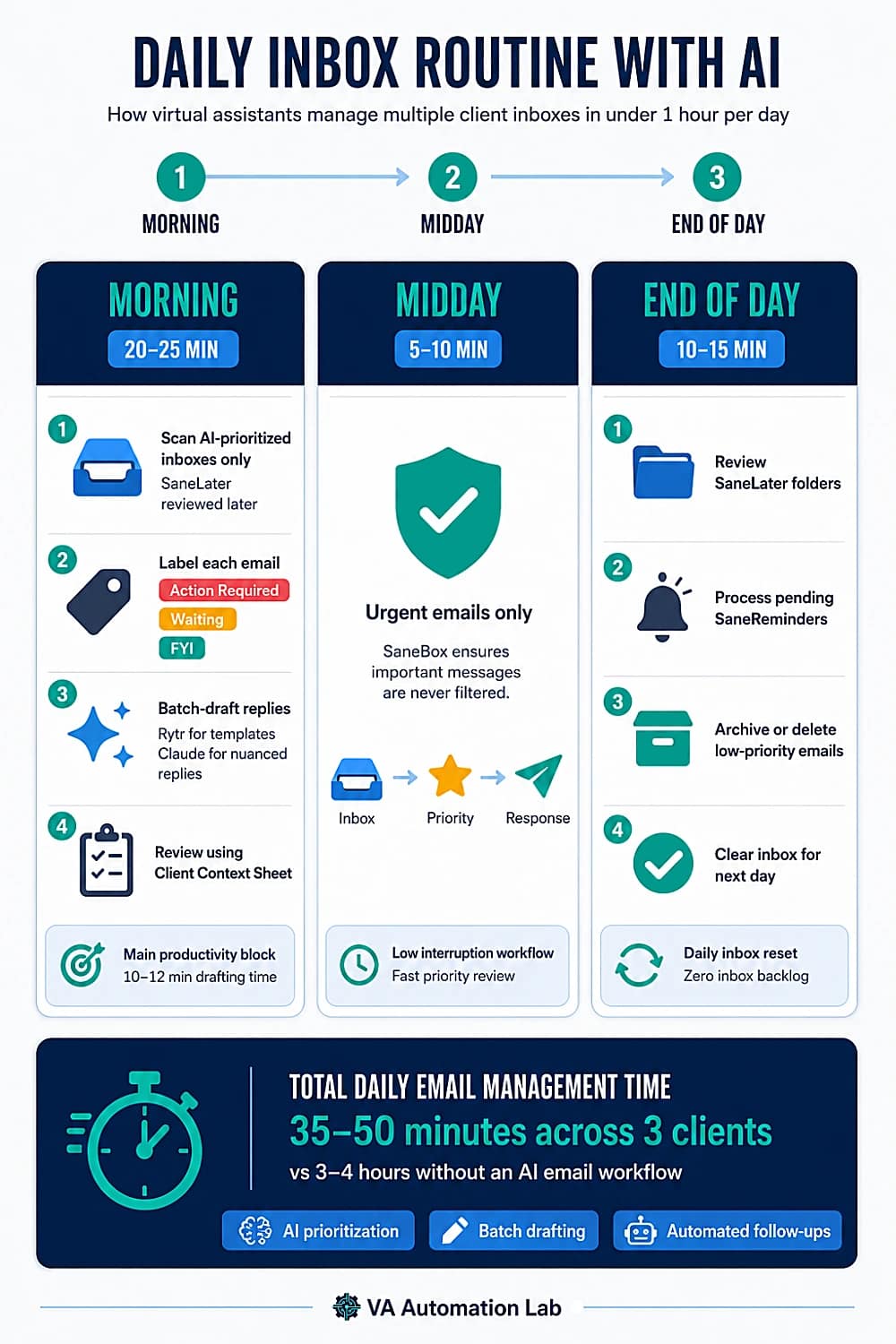
Daily Inbox Routine with AI
Morning block (20–25 minutes total across all clients):
- Open each client inbox in sequence. Scan AI-prioritized main inbox only — SaneLater checked at end of day.
- Label each main-inbox email: Action Required, Waiting, or FYI. Do not reply yet.
- Batch-draft replies (10–12 min). Use Rytr for templated email types; use Claude for messages requiring contextual nuance. Reference the Client Context Sheet. Review and edit each output, 2–3 min per reply.
Midday check (5–10 minutes): urgent emails only. SaneBox ensures nothing genuinely urgent was filtered.
End-of-day block (10–15 minutes): review SaneLater folders, process pending SaneReminders, archive or delete.
Total daily email management time: 35–50 minutes across three clients versus 3–4 hours without an AI email workflow.
For how this routine fits into a complete productivity system, see AI-Powered Productivity System for Virtual Assistants: 5-Layer Framework.
Track Every Client Email Interaction Automatically — with Folk
Folk connects to Gmail and Outlook and logs every email to the right contact record automatically — no manual data entry.
Set up your first pipeline in 10 minutes.
✔ Auto-logs all email interactions per contact
✔ Built-in follow-up reminders per prospect or client
✔ folkX Chrome extension captures contacts from Gmail and LinkedIn in one click
✔ 14-day free trial — no credit card required
8. Cold Email Outreach for Virtual Assistants: Tools & Workflow
For VAs who manage prospecting and business development on behalf of clients, email outreach is a distinct workflow from inbox management. It has different tools, different metrics, and different failure modes.
Cold Email with AI
AI’s role in cold email is primarily in message personalization, subject line generation, and sequence copy, not in mass sending. The tools handle the sending, deliverability, and automation layers.
Lemlist is the most capable cold email platform for VA-managed outreach:
- Dynamic personalization: automatically insert prospect-specific images, company logos, or website screenshots into every email — the feature that consistently improves reply rates vs. text-only campaigns
- Multichannel sequences: combine email + LinkedIn connection requests + call steps in one workflow (Multichannel Expert plan)
- Built-in deliverability warmup: included in all plans — critical for maintaining sender reputation during active campaigns
- CRM integrations: native connections to Pipedrive, HubSpot, Salesforce — outreach data flows directly into the client’s CRM
AI prompt for cold email copy:
Write a 3-email cold outreach sequence for:
Target: [JOB TITLE] at [COMPANY TYPE]
Offer: [WHAT THE CLIENT OFFERS — 1 sentence]
Pain point to address: [SPECIFIC PROBLEM]
Tone: direct, peer-to-peer, not salesy
Email 1: introduce the problem and offer (under 100 words)
Email 2: follow-up, add a case study or social proof point (under 80 words)
Email 3: final follow-up with a clear ask (under 60 words)
Subject lines: 3 options per email, no clickbait
For smaller outreach volumes or a lower entry price, Woodpecker.co starts from $20/month per sending slot with unlimited email accounts, built-in warmup, and condition-based follow-ups.
Automated Follow-Up Sequences
The follow-up is where most cold email campaigns fail, not the first message.
Using Lemlist sequences: set reply detection on. When a prospect replies, Lemlist automatically stops the sequence and flags the contact as “replied”, no manual intervention required. Configure each sequence with 3–5 steps at 3–5 day intervals.
Using Make for custom follow-up logic: for VAs who need conditional follow-up triggers (e.g., “send follow-up only if contact opened email but didn’t click the link”), Make’s Gmail/Outlook + Lemlist/Woodpecker integrations allow conditional automation. A simple sequence handler takes 15–20 minutes to build.
Using ActiveCampaign for nurturing sequences: once a cold contact converts to a warm lead, ActiveCampaign handles longer-term nurturing automation, drip sequences, behavior-triggered emails, and lead scoring. The Starter plan at $15/month covers basic automation for up to 1,000 contacts.
For a full overview of automation strategies VAs can build for clients, see Best Automation Workflows for Virtual Assistants: Beginner to Advanced.
Deliverability & Inbox Placement
A cold email campaign with poor deliverability is invisible, sent but not received. Two factors determine deliverability: sender reputation and technical configuration.
Sender reputation — WarmupInbox: before launching any cold email campaign from a new domain or email address, run a 2–4 week warmup. The Basic plan ($15/month annual per inbox) covers 75 warmup emails per day, sufficient for solo VA outreach.
Technical configuration checklist (before any campaign):
☐ SPF record configured for sending domain
☐ DKIM record enabled
☐ DMARC policy set (p=quarantine minimum)
☐ Custom tracking domain configured (not shared)
☐ Sending from aged domain (60+ days old)
☐ Volume ramped gradually (start: 20-30 emails/day, increase 10%/week)
WarmupInbox’s Max plan ($79/month annual) includes SPF, DKIM, and DMARC verification, useful if you’re setting up technical infrastructure for a client from scratch.
Run Personalized Cold Email Campaigns for Your Clients with Lemlist
Lemlist handles email personalization, multichannel sequences, and inbox warmup in one platform.
The 14-day free trial gives full access to the Multichannel Expert plan — no credit card required.
The Email Pro plan ($73/month annual) covers email-only outreach for most VA-managed campaigns.
9. AI Email Management Use Cases: Onboarding, Updates & Sales
Client Onboarding Emails
Client onboarding typically generates 5–10 emails in the first week: welcome, questionnaire, contract follow-up, access credentials, and kickoff confirmation. AI handles all of these efficiently when given the right context.
The onboarding email sequence prompt:
Write a 4-email onboarding sequence for a new client.
Service: [VA service type]
Client name: [NAME]
Email 1 (Welcome, day 1): warm, professional, confirms engagement start, includes next steps
Email 2 (Questionnaire reminder, day 3): brief, non-pushy, link to form
Email 3 (Kickoff confirmation, day 5): confirms kickoff call details, sets agenda expectations
Email 4 (Week 1 check-in, day 7): brief progress note, asks one clarifying question
Tone: professional and approachable. Length: 100-150 words each.
For the full system behind client onboarding automation, see How to Automate Client Onboarding for Virtual Assistants.
Weekly Client Updates
Weekly updates are the highest-frequency templated email in most VA practices — sent once per client per week, requiring specific project details each time. This is the ideal workflow for Rytr combined with TextExpander.
With Rytr: select the “Email” use case, set tone to “professional,” and paste one line describing this week’s status. Rytr generates a clean, structured update email in seconds. For high-volume weeks with multiple clients, this removes the cognitive effort of re-drafting the same structure every time.
Weekly update prompt template (for Claude or ChatGPT):
Write a weekly update email to my client.
Client name: [NAME]
Week of: [DATE RANGE]
Completed this week: [LIST 3-5 items]
In progress: [LIST 1-3 items with status]
Blocked or needs input: [DESCRIBE or "none"]
Priority for next week: [LIST 2-3 items]
Tone: concise, professional, results-focused
Format: short intro (1 sentence) + 3 labeled sections + 1 closing line
Length: under 150 words
Set this up as a TextExpander snippet (.weeklyupdate). Fill in the brackets, paste into Claude, copy the output, done. Total time: under 2 minutes per client update.
Customer Support Replies
For VAs managing client customer-facing inboxes, AI drafting with tone control is the highest-value application. The key is separating straightforward support requests (AI handles first draft) from sensitive complaints (AI provides structure only, VA writes the critical sentences).
Support reply prompt — standard request:
Draft a customer support reply.
Request type: [return / billing question / feature question / other]
Customer tone: [frustrated / neutral / positive]
Company policy on this issue: [PASTE RELEVANT POLICY]
Outcome: [what the customer will receive]
Tone: empathetic, clear, not defensive
Include: acknowledgment (if relevant), clear resolution statement, next step
Length: under 120 words
Support reply prompt — complaint (structure only):
Provide an outline structure for a difficult customer complaint reply.
Issue: [DESCRIBE]
Output: 4-point structure with one sentence describing what each paragraph should accomplish.
Do not write the full email — structure only.
Sales Communication
For VAs supporting clients in sales roles, AI email management extends to proposal follow-ups, meeting booking sequences, and post-demo nurturing. The Folk + email combination is particularly effective here: every sales email automatically logs to the relevant contact in Folk with follow-up reminders set per prospect.
Post-demo follow-up prompt:
Write a post-demo follow-up email.
Prospect name: [NAME], [TITLE] at [COMPANY]
Demo date: [DATE]
Key interest points mentioned: [LIST]
Next step discussed: [e.g., "send pricing proposal by Friday"]
Tone: confident, not pushy
Length: under 100 words
Include: reference to one specific point from the conversation
For VAs whose clients use email marketing alongside sales communication, Moosend is worth evaluating for post-demo nurturing sequences — its automation builder handles simple drip flows for clients who don’t need the full complexity of ActiveCampaign.
Timelines AI is worth evaluating for VAs whose clients use WhatsApp as a primary sales channel alongside email, it centralizes WhatsApp with CRM-style organization and integrates natively with Pipedrive, Zoho, and Make (CRM Integration plan from $25/month annual).
For meeting scheduling connected directly to sales email workflows, see Best AI Scheduling Tools for Virtual Assistants.
10. Virtual Assistant Email Management: The Complete System
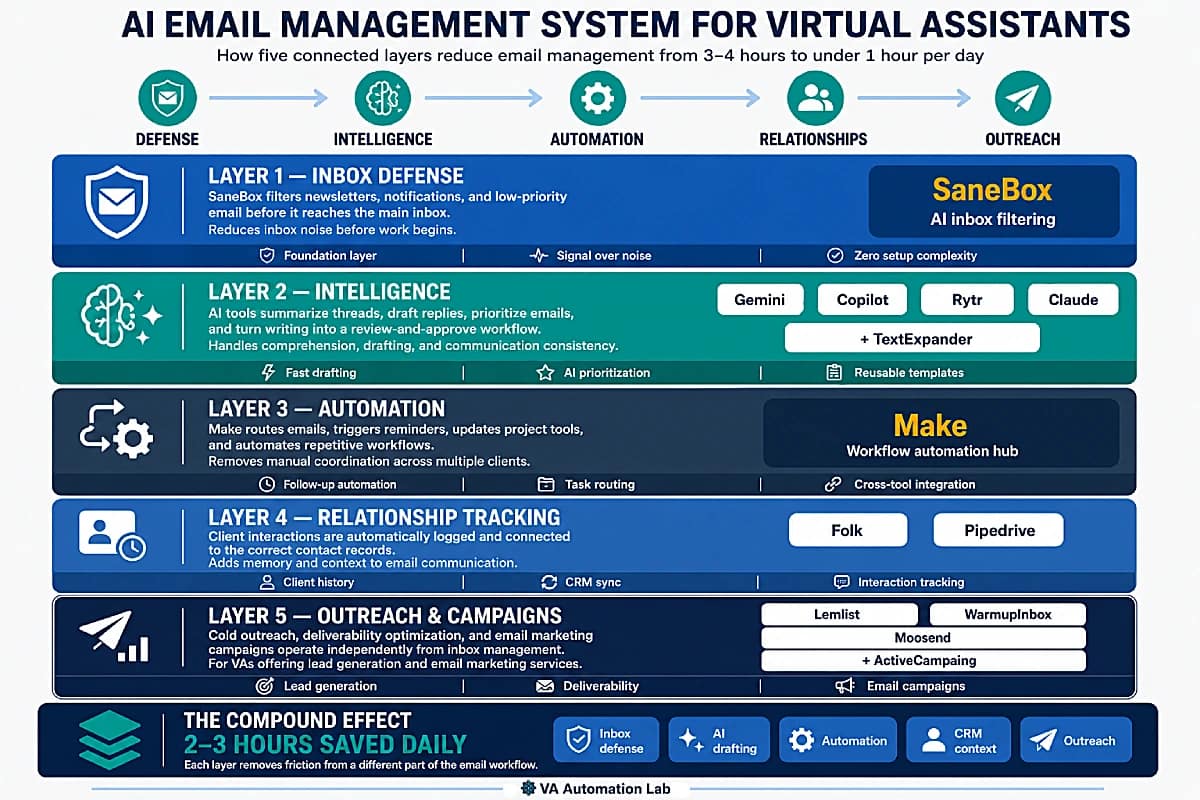
Understanding how to manage emails as a virtual assistant at scale means moving beyond individual tools and thinking in terms of a connected system. Each tool covers one layer; the compound effect of all layers working together is what produces the 2–3 hour daily saving.
The complete VA email management system has five layers:
Layer 1 — Inbox Defense (SaneBox) Everything starts with reducing what reaches you. SaneBox filters out noise before you see it, so the inbox you open each morning contains only what genuinely requires action. Without this layer, every other tool operates on a signal-to-noise problem that compounds with each new client.
Layer 2 — Intelligence (Gemini / Copilot / Rytr / Claude): Once the inbox is filtered, the intelligence layer handles comprehension and drafting. Native AI tools (Gemini, Copilot) work inside your client’s existing email environment. Rytr handles guided drafting for templated email types — follow-ups, updates, confirmations — with no prompt engineering required. Claude handles nuanced, context-heavy replies. TextExpander stores refined templates as instant-access shortcuts. This layer converts email from a writing task to a review-and-approve task.
Layer 3 — Automation (Make) The automation layer handles everything that doesn’t require human judgment: routing emails to the right labels, triggering follow-up reminders, logging interactions to project management tools, sending notifications. Make connects all tools in this stack. The free plan covers basic routing; the Core plan at $9/month handles multi-client complexity.
Layer 4 — Relationship Tracking (Folk / Pipedrive) Email without context is email without memory. Folk connects to Gmail and Outlook and auto-logs every interaction against the right contact record. This layer is what makes AI inbox management genuinely useful for client relationships rather than just task throughput.
Layer 5 — Outreach & Campaigns (Lemlist / WarmupInbox / Moosend): For VAs whose services include prospecting or email marketing, this layer runs independently of inbox management. WarmupInbox builds sender reputation before campaigns launch. Lemlist handles personalized cold outreach at scale. Moosend or ActiveCampaign handle nurturing campaigns and email marketing for clients who need ongoing communication programs.
What a morning looks like when all five layers are running:
A VA managing three clients opens Slack at 8:05 AM. One Make notification reads: “Client B — email from Acme Corp in Action Required, 24h SaneReminder triggered.” The VA opens Folk, checks the Acme Corp contact record — last three interactions all logged automatically — pulls the relevant context, opens Rytr, selects “Email / professional tone,” pastes one line of context, and reviews the draft in 90 seconds. Total time from notification to sent reply: 4 minutes. Without the system: locate the email, read the thread, search two spreadsheets and three email folders for prior context, write the reply from scratch — 20+ minutes.
This system is how to manage emails as a virtual assistant across multiple clients without losing relationship context, missing follow-ups, or spending more than an hour a day on email mechanics. You don’t need all five layers from day one. Build them in order, starting with Layer 1, and add the next layer only when the current one is stable.
Email is just one part of a larger system. To see how communication tools fit into a complete setup, this guide on Client Management Systems for Virtual Assistants explains how to structure your entire workflow.
11. AI Email Management Quick Start: Live in 40 Minutes
Getting a functional AI email workflow live in one session:
Step 1 — Connect SaneBox (5 minutes)
Sign up at SaneBox and connect your primary email account. Within 24 hours, SaneBox will have filtered your inbox and created SaneLater and SaneBlackHole folders. Review SaneLater at end of day, move any misclassified emails back to inbox and SaneBox learns the correction.
Step 2 — Set up your first prompt template (10 minutes)
IIdentify the email type you send most frequently — weekly update, follow-up, meeting confirmation. Open Rytr, select the “Email” use case, and test it on three real instances. Refine the output and save the best version in Notion or Google Docs as your first “Email Workflow Template.” Then store it as a TextExpander shortcut (e.g., .weeklyupdate) so it’s accessible from any app.
Step 3 — Build one Make automation (15 minutes)
Sign up for Make‘s free plan. Build one scenario: when an email arrives in a specific Gmail label (e.g., [ClientA] Action Required) with no reply in 48 hours, send a reminder notification to Slack. The Make template library includes Gmail + Slack scenarios you can copy and modify without any code.
Step 4 — Connect Folk and link your email (10 minutes)
Create a Folk workspace, connect Gmail or Outlook, and install the folkX Chrome extension. Create your first pipeline. For each active client, create a Folk contact record. Within 24 hours, all email interactions start logging automatically. This step can wait until the first three are stable.
Step 5 — Run the first week
Use the daily routine from Section 7. After five working days, measure how long email management actually takes. The real saving, not an estimate, is the data you use to decide which tools to add next.
Total setup time: under 40 minutes. Results visible within the first working day.
12. Email Management as a VA Service: What to Offer and How to Price It
Email management is one of the most consistently in-demand VA services. Clients hire VAs for email specifically because inbox volume is high, cognitive overhead is real, and the cost of a missed or poorly handled email compounds over time. The tools in this guide form the operational foundation for delivering this service at a professional level.
What the Service Includes
A professional VA email management service covers some or all of the following:
- Inbox triage and labeling: sorting incoming email by priority and category, ensuring nothing important is missed
- Reply drafting: preparing responses for client review and approval, or sending directly once trust is established
- Follow-up management: tracking sent emails that need replies, sending follow-ups on schedule
- Inbox filtering setup: configuring SaneBox or native filters to reduce noise before the client sees it
- Newsletter and subscription management: unsubscribing from unwanted senders, consolidating digests
- CRM logging: ensuring email interactions are logged to Folk, Pipedrive, or the client’s existing CRM
- Email marketing campaign management: running campaigns in Moosend, Brevo, or ActiveCampaign on behalf of the client — from list management and template creation to scheduling and basic reporting
- Cold email campaign management: running outreach campaigns in Lemlist or Woodpecker with full deliverability infrastructure
Define scope clearly in the contract. Ambiguous email management engagements are one of the most common sources of scope creep in VA work.
How to Price Email Management as a VA
Email management is typically priced one of two ways: as a monthly retainer based on inbox volume, or as an hourly rate for lighter, ad-hoc needs.
Volume-based retainer (recommended):
Inbox Volume | Scope | Suggested Range |
Light (under 50 emails/day, 1 inbox) | Triage + drafts for review | $200–$400/month |
Standard (50–150 emails/day, 1–2 inboxes) | Full management + follow-ups | $400–$800/month |
High-volume (150+ emails/day or 3+ inboxes) | Full management + CRM + automation | $800–$1,500+/month |
Email marketing campaign management | Template creation, scheduling, reporting | $300–$700/month |
Cold email campaign management | Outreach setup + ongoing management | $500–$1,200/month |
These ranges reflect 2026 market rates for experienced VAs in English-speaking markets. Adjust based on your experience level, client complexity, and whether tool costs are part of your operating expenses.
Access Setup for Client Inboxes
Before managing any client inbox, establish a secure access protocol:
- Google Workspace clients: client grants access via Google Workspace admin → add the VA as a delegated inbox manager on the relevant account
- Microsoft 365 clients: inbox delegation via Exchange/Outlook settings, or shared mailbox configuration
- Credential sharing: use 1Password for secure credential sharing when direct delegation isn’t available — never accept passwords via email or chat
- Contracts: document inbox access scope, data handling policy, and offboarding procedures in the engagement contract — PandaDoc makes this straightforward to send and e-sign
For VAs who want to maintain client visibility without full sending access, Missive‘s collaborative inbox model allows the VA to draft and the client to approve before any reply is sent — a lower-trust starting configuration that often builds toward full delegation.
13. Common Mistakes That Reduce AI Email Efficiency
Using AI Without Client Context
The most common mistake in AI email management for virtual assistants: drafting a reply with a generic prompt and sending it without checking whether the tone and content match the specific client relationship. AI produces professional, confident text, but professional and confident is not always appropriate. Some clients expect casual and brief. Others require formal and detailed.
The fix: always include 1–2 sentences of client-specific context in the prompt. Reference the Client Context Sheet before drafting any non-standard reply. In Rytr, use the tone selector per email type and save the preferred setting for each client category.
Skipping Factual Review Before Sending
AI generates plausible text. It cannot verify facts it wasn’t given in the prompt. A meeting summary with the wrong date, or a follow-up citing the wrong project status, damages client trust immediately.
The factual review checklist (30 seconds before sending):
☐ Correct client name
☐ Correct date(s)
☐ Correct project status
☐ Correct action items and owners
☐ Tone appropriate for this specific relationship
Managing Multiple Inboxes Without Architecture
Connecting AI tools to a disorganized multi-inbox setup produces faster chaos. The multi-inbox architecture from Section 6 must exist before any AI tool is connected.
The fix: spend 15 minutes on label architecture and review schedule before connecting any AI tool. The three-layer inbox management approach (filter → prioritize → label) must be working manually before automation is added.
Using AI for Sensitive Communications
AI handles standard professional email well. It handles sensitive communication — payment disputes, scope conflict, client dissatisfaction — poorly. The output tends toward generic professionalism that misreads the emotional register.
The fix: use AI for structure only on sensitive emails. Write the critical sentences manually. Skip AI entirely when relationship nuance is the primary variable.
Launching Cold Email Without Deliverability Infrastructure
Starting a cold email campaign from a new domain without warmup typically results in landing in spam within the first week. The campaign is invisible before it starts.
The fix: connect WarmupInbox 3–4 weeks before the first campaign launches. Configure SPF, DKIM, and DMARC first. Start at under 30 emails per day and ramp gradually.
14. Conclusion
AI email management for virtual assistants in 2026 is a layered system, not a single tool. SaneBox handles the inbox so only what matters reaches you. Rytr and Claude handle drafting so professional replies take minutes. Make automates the follow-up layer so nothing slips. Folk tracks every interaction so relationship context is always accessible. Moosend or ActiveCampaign handle email marketing campaigns for clients who need ongoing communication programs. Lemlist and WarmupInbox cover outreach infrastructure when services extend to lead generation.
The practical path is additive: start with the Beginner Stack ($6/month), build the daily routine until it’s stable, then add one layer at a time. The compound effect of a stable multi-tool system is the result that changes what a VA practice can deliver — and what it can charge for.
The right starting point: connect SaneBox today. The inbox clarity it creates in the first 24 hours makes every subsequent email decision faster, and the 14-day trial requires no commitment.
Take Control of Your Inbox in Minutes
If your biggest bottleneck is email overload, start here.
SaneBox automatically filters low-priority emails, highlights what actually matters, and ensures you never miss important messages again.
✔ Works with Gmail, Outlook, and any email provider
✔ Reduces inbox noise from day one
✔ No setup complexity
Frequently Asked Questions About AI Email Management for Virtual Assistants
What is email management for a virtual assistant?
Email management for a virtual assistant is the practice of handling all or part of a client’s inbox on their behalf, including sorting and prioritizing incoming messages, drafting and sending replies, managing follow-ups, filtering out noise, and maintaining communication with the client’s contacts. In 2026, this service is almost always delivered with AI email tools handling the mechanical layers (filtering, summarizing, drafting standard replies) while the VA provides professional judgment for anything requiring context, nuance, or relationship awareness. For clients, hiring a VA for email management means reclaiming hours they were spending on inbox triage and routine correspondence.
What is the best AI email tool for virtual assistants managing multiple clients?
For multi-client AI inbox management, SaneBox is the most universally applicable choice, it works with any email provider, requires no client-side adoption, and the filtering effect is visible within hours. For guided AI drafting without prompt engineering, Rytr is the fastest way to get consistent, professional outputs across all standard email types. For CRM-connected tracking, Folk covers both inbox organization and relationship context in a single workflow. The best tool depends on your primary problem: inbox volume (SaneBox), guided drafting (Rytr), email automation (Make), or cold outreach (Lemlist).
How do I manage emails as a VA across multiple clients?
Managing emails as a VA across multiple clients requires three things working together: a clear inbox architecture (separate labels per client, defined triage rules), a filtering tool to reduce volume before you engage with it, and a set of reusable drafting tools so AI-assisted replies stay fast and consistent. The practical system is in Section 7: SaneBox handles filtering, Rytr or Claude handles drafting with the Client Context Sheet for per-client accuracy, and the daily routine keeps total email time under one hour across three accounts.
How much time can AI realistically save on email management as a virtual assistant?
Studies consistently show professionals using AI email tools save an average of 4 hours per week. For a VA managing three clients, a full AI email workflow typically recovers 2–3 hours per day compared to fully manual management — the equivalent of one full workday per week. AI filtering and summarization recover 30–40 minutes per day. AI-assisted drafting (via Rytr or Claude) reduces per-reply time from 15–25 minutes to 3–5 minutes of review. The task-by-task benchmarks are detailed in Section 2.
Which AI tools work for VAs managing both Gmail and Outlook clients simultaneously?
SaneBox is provider-agnostic and works with both. Folk connects to both Gmail and Outlook. Make integrates with both platforms in the same automation. Rytr works with any provider via copy-paste. For native AI features, you need separate tools per platform — Gemini for Google Workspace clients, Copilot for Microsoft 365 clients. This is the main reason provider-agnostic tools like SaneBox, Folk, and Rytr are preferable for VAs managing cross-platform inboxes.
How do I outsource email management as a virtual assistant?
If you’re a VA positioning email management as a service, the tools in this guide form the operational foundation. The core service involves setting up SaneBox on the client’s account, building a prompt template library using Rytr for their most frequent email types, implementing Make for follow-up automation, and optionally connecting email to Folk or the client’s existing CRM. For clients who want visibility without full delegation, Missive‘s collaborative inbox model allows the VA to draft while the client approves before sending. Clients must grant inbox access via Google Workspace or Microsoft 365 admin settings, or via secure credential sharing through 1Password. Pricing guidance is in Section 12.
How should I price email management as a VA service?
Email management is most effectively priced as a monthly retainer based on inbox volume and scope. Light management (under 50 emails/day, one inbox, triage + drafts for review) typically runs $200–$400/month. Standard management (50–150 emails/day, 1–2 inboxes, full management + follow-ups) runs $400–$800/month. High-volume or multi-inbox setups with CRM and automation start at $800–$1,500+/month. Email marketing campaign management (Moosend, Brevo, or ActiveCampaign) is typically priced at $300–$700/month. Cold email campaign management runs $500–$1,200/month. A full pricing framework is in Section 12.
Do I need technical skills to set up an AI email workflow?
No. The Beginner Stack requires zero technical setup. SaneBox takes 5 minutes to connect. Rytr requires only the ability to describe what you want in one sentence — no prompt engineering. Make has a free plan with visual workflow templates that require no code. The only tool with meaningful configuration complexity is n8n, which requires self-hosting comfort — but n8n is the advanced option, not the starting point.
Is cold email legal and safe to run as a VA service?
Cold email is legal in most jurisdictions when it complies with applicable regulations. In the US, CAN-SPAM applies. In the EU, GDPR and ePrivacy apply. Key requirements: include a physical address, provide an unsubscribe mechanism, honor unsubscribe requests within 10 days (CAN-SPAM), and have a legitimate basis for contacting the prospect. Lemlist includes unsubscribe link functionality in all plans. Before running cold email for any client, verify the regulations applicable to their jurisdiction and industry — this is legal guidance the client needs to provide or obtain independently.
Can I use Make to connect my email tools into a unified workflow?
Yes — and it’s the most common advanced email automation use case for VAs. Make connects Gmail, Outlook, SaneBox, Folk, Pipedrive, Lemlist, Woodpecker, ActiveCampaign, Moosend, Slack, ClickUp, Notion, and most tools in the VA stack. Example workflows: when a Lemlist prospect replies, auto-create a contact in Folk and assign a follow-up task in ClickUp; when a signed PandaDoc contract arrives in Gmail, trigger the onboarding email sequence in Brevo; when SaneBox flags an email as awaiting reply, create a Notion task. Make’s free plan (1,000 credits/month) covers basic routing. The Core plan ($9/month) handles multi-client automation comfortably.
What should I do when AI email output doesn’t match a client’s tone?
Two fixes. Immediate fix: add a tone-correction follow-up prompt: “Rewrite this in a more casual tone, as if the sender has worked with this client for two years.” Systematic fix: update the Client Context Sheet with a more specific tone description and include it in the base prompt. After two or three iterations, AI output for that client will consistently match the expected register. In Rytr, use the tone selector dropdown and save the preferred setting per client type — this eliminates tone-correction rounds entirely for recurring email types.
How does WarmupInbox work and when do I need it?
WarmupInbox builds sender reputation for new or inactive email addresses by generating authentic-looking email activity within its 30,000+ inbox network — sending and receiving on your behalf to establish a history that inbox providers recognize as legitimate. You need it specifically for cold email outreach. If a client wants you to run a cold email campaign and the sending domain is new (under 60 days old) or has had deliverability problems, run 3–4 weeks of warmup before launching. The Basic plan at $15/month (annual) handles one inbox at 75 warmup emails per day.
Glossary: Key Email and AI Terms for Virtual Assistants
AI Email Management: The use of artificial intelligence to handle inbox organization, thread summarization, reply drafting, follow-up scheduling, and outreach automation, reducing the mechanical overhead of email so professional judgment can be applied where it creates value.
AI Inbox Management: The specific application of AI tools to the inbox layer (filtering, prioritization, and noise reduction) before a message requires human attention. SaneBox is the primary AI inbox management tool for VAs; Gemini for Gmail and Copilot for Outlook provide native inbox management within Google Workspace and Microsoft 365.
Thread Summarization: AI-generated condensation of a multi-message email conversation into a brief summary of key points, decisions, and pending action items. Available natively in Gemini for Gmail and Copilot for Outlook; accessible in any provider via Claude or ChatGPT with a paste-and-prompt workflow.
Inbox Triage: The process of reviewing incoming emails and categorizing them by urgency and required action. AI automates the first layer of triage, surfacing only what genuinely requires human attention.
Smart Reply: An AI-generated email response based on the content and context of the received message, editable before sending. Distinguished from a full AI draft by brevity, typically 1–3 sentences for standard acknowledgments.
Email Automation: The use of no-code workflow tools (primarily Make and N8n) to automate recurring email tasks (routing, follow-up triggers, notifications, and cross-tool data syncing) without requiring manual intervention at each step.
Email Response SLA: A service-level agreement defining response time commitments per email category. Documented at onboarding; used to configure SaneBox filtering rules and client expectations simultaneously.
Follow-Up Automation: AI or rule-based systems that schedule follow-up reminders when a sent email receives no reply within a defined window. Implemented via SaneBox SaneReminders (no-code) or Make (customizable logic).
Sender Reputation: A score assigned by inbox providers (Gmail, Outlook, etc.) to an email address or sending domain based on engagement metrics, open rates, reply rates, bounce rates, and spam complaints. Cold email deliverability depends on maintaining a positive sender reputation before and during campaigns.
Email Warmup: The process of gradually building sender reputation for a new or inactive email address by generating authentic email activity. WarmupInbox automates this by connecting to real inbox networks that send and receive on your behalf.
Cold Email: Unsolicited outreach email sent to prospects who have not previously expressed interest. Distinct from spam by relevance, personalization, and compliance with anti-spam regulations (CAN-SPAM, GDPR).
Multichannel Outreach: Email campaigns that combine multiple contact channels (email, LinkedIn messages, phone calls) in a coordinated sequence. Lemlist’s Multichannel Expert plan supports this natively.
Prompt Template: A reusable prompt structure with bracketed placeholders (e.g., [CLIENT NAME], [MEETING DATE]) that a VA fills in for each instance of a recurring email task, the foundation of a consistent AI email drafting workflow.
Client Context Sheet: A one-document reference per client containing communication style preferences, key contacts, current project status, and sensitive topics, used to provide AI tools with client-specific context rather than generic output.
DKIM (DomainKeys Identified Mail): A technical email authentication method that adds a digital signature to outgoing emails, verifying to receiving servers that the email was sent by an authorized sender. Required for strong deliverability on cold email campaigns.
SPF (Sender Policy Framework): A DNS record that specifies which mail servers are authorized to send email from a domain. Misconfigured SPF is one of the most common reasons cold emails land in spam.
DMARC: A policy that tells receiving email servers what to do with emails that fail SPF and DKIM checks. Setting a DMARC policy is a baseline requirement before launching any cold email campaign.
Make Scenario: A visual automation workflow in Make that connects two or more apps and executes a defined sequence of actions when triggered. Each operation (module execution) counts against the monthly plan limit.
About the Author
Alex Stratton has spent the better part of a decade working at the intersection of virtual assistance and operational systems, first as a VA supporting founders and small business owners, then as a workflow consultant helping remote teams reduce the manual overhead that accumulates when businesses grow faster than their processes. The tools and workflows here reflect decisions made repeatedly in real client contexts, where the wrong choice costs hours, not minutes. Learn more about VA Automation Lab → About.