
PandaDoc for Virtual Assistants: Contracts & Onboarding (2026)
Disclosure: This article contains affiliate links. If you sign up through them, VA Automation Lab earns a commission at no extra cost to you. Recommendations are based on our evaluation of tool fit for VA workflows.
PandaDoc is an all-in-one document platform that lets virtual assistants create branded client contracts, collect legally binding e-signatures (and deposits) in minutes, and run a smooth onboarding process — with a useful free plan and paid plans starting at $19/month.
Every virtual assistant hits the same wall eventually. A client says “sounds great, let’s start” — and you’re suddenly staring at a blank document, trying to look professional while you cobble together a contract in Google Docs. You send a PDF. They forget to sign it. Two weeks later the work is done and you still haven’t been paid.
That is exactly the problem PandaDoc solves. In this guide, you’ll learn what PandaDoc does for a VA business, what it really costs, and how to set it up. Then you’ll build two workflows that pay for the tool many times over: a client contract flow and a client onboarding flow. You’ll also get a look at its limits and the cheaper alternatives, so you can decide with confidence. For the wider picture, see our Complete Guide to AI tools for Virtual Assistants and our pillar on Client Management Systems for Virtual Assistants.
PandaDoc at a Glance
What it is | Document automation and e-signature platform for proposals, contracts, quotes, and forms |
Best for VAs | Sending branded client contracts, collecting signatures and deposits, and onboarding new clients |
Free plan | Yes — up to 5 documents and 5 e-signatures per month (60 documents/year) |
Paid plans (annual) | Starter $19/user/mo · Business $49/user/mo |
Free trial | 14 days, no credit card required |
E-signatures | Legally binding (ESIGN, UETA, eIDAS), with an audit trail and signature certificate |
Get paid | Collect deposits at signature via Stripe, PayPal, or ACH |
Integrations | Salesforce, HubSpot, Pipedrive, Make, Zapier, Google Drive (CRM sync on Business) |
Watch out for | Per-seat pricing; CRM, branding, and content library are Business-only |
Our verdict | The best free e-signature plan around, plus real document automation — ideal for client-facing VAs who send contracts regularly |
Get the Free AI Toolkit for Virtual Assistants
The exact templates, tools, and workflows we use to run client work on autopilot — including the contract and
onboarding setup from this guide.
Free, straight to your inbox.
Table of Contents
1. What Is PandaDoc?
PandaDoc is document automation software with built-in electronic signatures. It lets you build proposals, contracts, quotes, and forms from reusable templates, send them to clients, track when they’re opened, and collect legally binding signatures — and even payments — all in one place. For a virtual assistant, it turns a slow, error-prone paperwork process into a few clicks.
That “one place” part matters more than it sounds. Most VAs stitch together a document editor, a separate signing tool, and a payment link. PandaDoc folds all three into a single workspace, so a contract moves from draft to signed to paid without you ever switching tabs.
From Draft to Signature to Payment: the Document Lifecycle
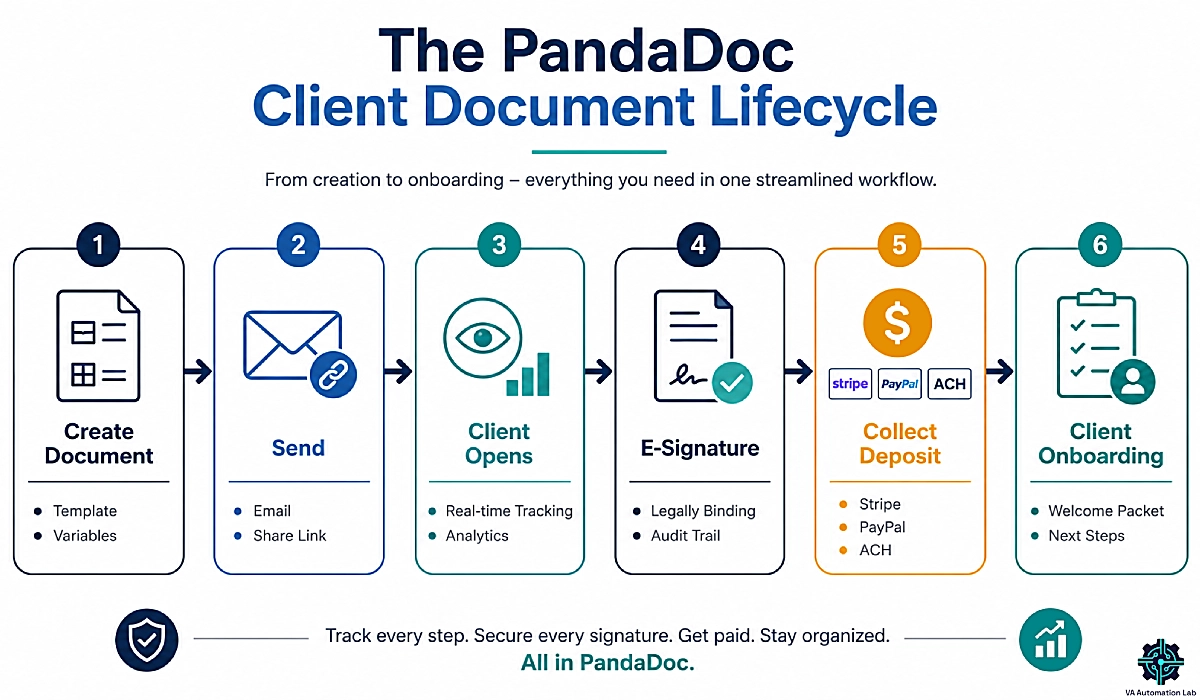
Think of PandaDoc as covering the full life of a client document. You create a document from a branded template and send it by email or share link. You track it in real time — you see the moment a client opens it. Then you collect a legally binding e-signature and get paid through a built-in payment gateway. Every completed document comes with an audit trail and a signature certificate, so you have proof the agreement is valid.
For a VA, that lifecycle maps neatly onto real jobs to be done: sending a service agreement before you start, getting a retainer signed each month, or moving a new client through onboarding. Because each step lives in the same tool, nothing slips through the cracks — no chasing signatures across email threads, no wondering whether a client saw your proposal.
Who PandaDoc is really built for
PandaDoc was designed for sales and revenue teams, and some of its features — deal rooms, CPQ, bulk send — will never touch your day. But its free e-signature plan and drag-and-drop editor make it viable for a solo VA or a small VA agency that sends contracts and onboarding docs regularly. If you send one contract a year, you don’t need this. If client paperwork is a weekly reality, it earns its place.
2. Why Virtual Assistants Use PandaDoc for Contracts and Client Onboarding
The Three Problems a VA Contract Solves
A contract isn’t red tape — it’s the cheapest insurance a VA can buy, and it solves three specific problems.
- Scope creep: “can you also just handle this?” turns a 10-hour retainer into 15 hours of unpaid work unless the scope is written down.
- Late or non-payment: one of the most common headaches freelancers face; clear payment terms and an upfront deposit reduce it sharply.
- Disputes: when expectations are documented and signed, “I thought that was included” stops being your problem.
PandaDoc makes acting on all three effortless. You define scope, deliverables, and payment terms once in a template, then reuse it for every client in minutes. The signature is binding, the deposit clears on signing, and the audit trail settles any “did we agree to that?” question later. The tool doesn’t just store your contract — it makes the professional version the easy version.
Where Onboarding Breaks Down Without a System
Winning the client is only half the job. The first week sets the tone, and it’s where a lot of VAs lose credibility without realizing it. Without a system, onboarding becomes a scramble: you email for logins, ask the same intake questions twice, and forget to send details you meant to include. The client’s first impression becomes “disorganized.”
A repeatable onboarding flow fixes that. PandaDoc lets you turn a freshly signed contract into a polished welcome packet, gather what you need in a structured way, and give the client a clear next step — every time. Pair it with our guide on How to Automate Client Onboarding and the first week runs itself.
What PandaDoc replaces in your toolkit
For many VAs, adopting PandaDoc means retiring three tools at once: the separate e-signature app, the “email a PDF and hope” habit, and the manual payment request. Combining everything isn’t just tidier. It means fewer tools, fewer logins, and fewer places for a client agreement to get lost.
3. PandaDoc Features That Matter for a Virtual Assistant Business
You don’t need every PandaDoc feature — just the handful that move the needle on client paperwork. These are the ones worth your attention.
Templates and the Drag-and-Drop Editor
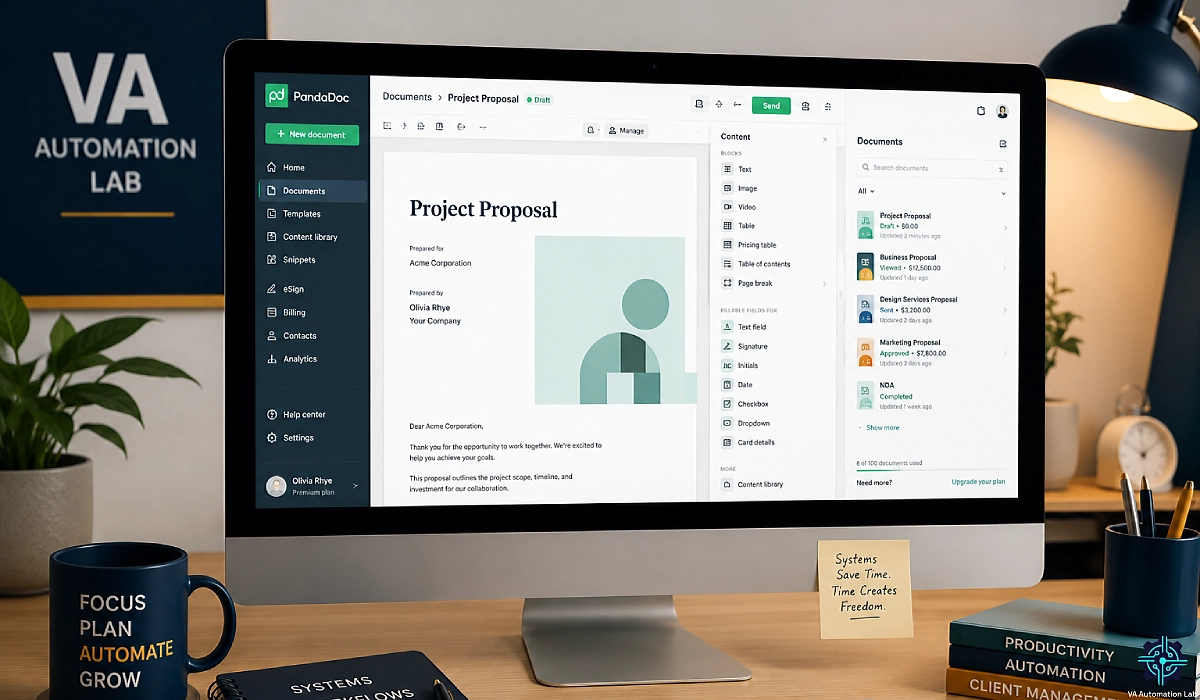
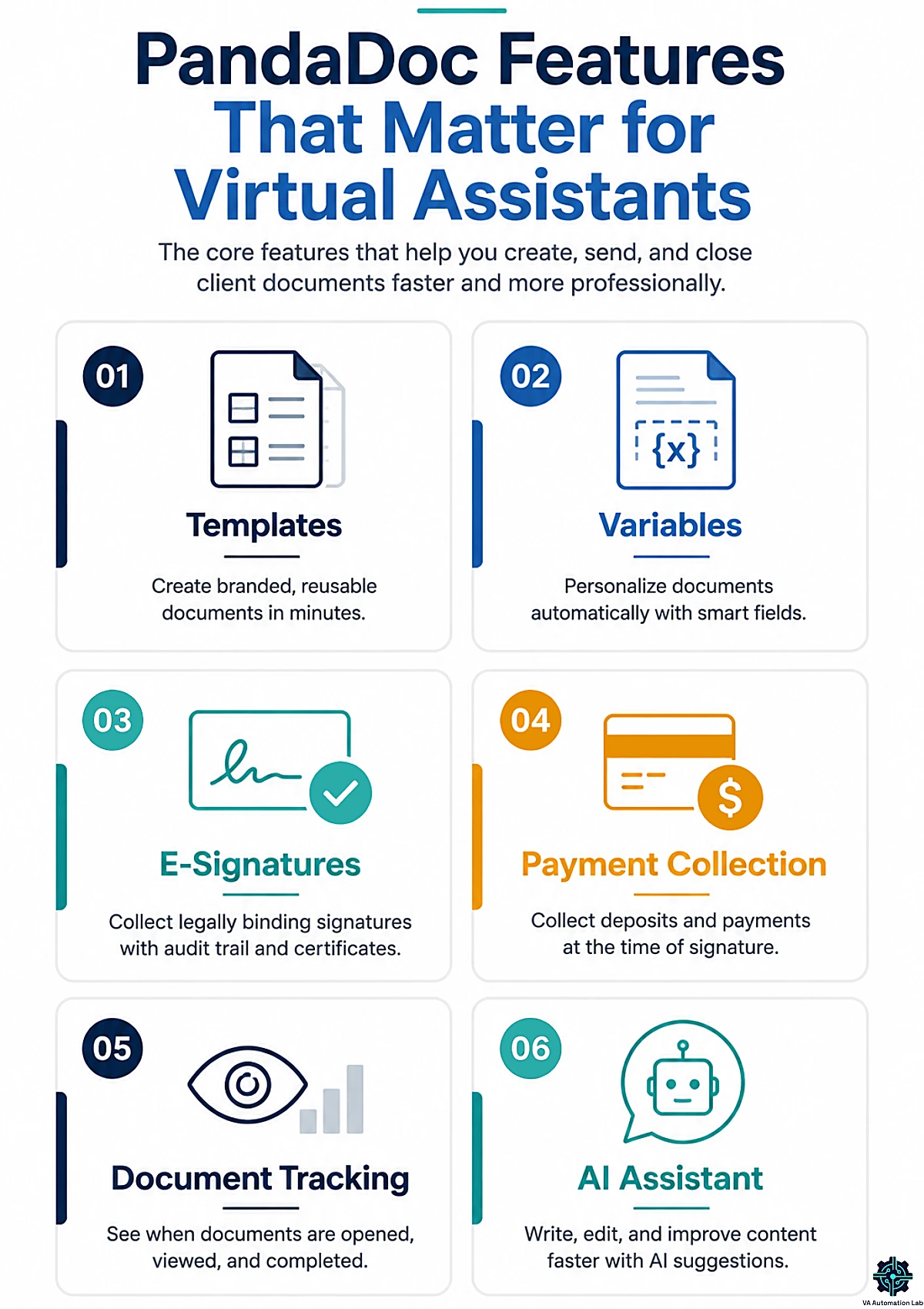
This is the feature that saves you the most time. PandaDoc’s drag-and-drop editor lets you build a document — contract, proposal, welcome packet — and save it as a reusable template with variables (merge fields) for the details that change, like client name, rate, and dates. Next time you onboard a client, you duplicate the template, swap the variables, and send in minutes instead of rebuilding from scratch.
PandaDoc also ships with a large library of pre-built templates, including a free virtual assistant agreement template you can adapt to your services. Starting from a proven structure means you’re less likely to miss a clause, and the finished document looks designed rather than thrown together. For a VA managing multiple clients, that mix of speed and polish is the whole point.
→ How to Manage Multiple Clients as a Virtual Assistant Using AI: Complete Framework
Legally Binding E-signatures, Audit Trails, and Compliance
An e-signature is only useful if it holds up. PandaDoc’s signatures are legally binding under the major frameworks: the ESIGN Act and UETA in the US, and eIDAS in the EU. These cover almost all the client work a VA will ever do. In plain terms, a signed PandaDoc document is a real, enforceable agreement.
Every completed document includes an audit trail (a record of who did what, and when) and a signature certificate. That’s your proof if a client ever questions whether they agreed. PandaDoc is also SOC 2 Type II certified, which speaks to how it handles data security. For a VA handling sensitive client information, being able to point to that compliance is a quiet trust-builder.
Real-time Tracking and Document Analytics
Here’s an edge you don’t get from emailing a PDF: PandaDoc tells you the moment a client opens your document and how long they spend on it. No more wondering whether your contract landed in spam or got buried — you can see it was viewed, then follow up at exactly the right time.
That visibility changes your follow-up game. If a client opened the agreement twice but didn’t sign, that’s your cue to send a friendly nudge within a day or two, while it’s still top of mind. Real-time tracking turns follow-up from guesswork into timing — often the difference between a signed contract this week and a stalled one next month.
Built-in payments and the AI assistant
Two smaller features deserve a mention. PandaDoc can collect payment at the moment of signature through Stripe, PayPal, or ACH, so your deposit clears on day one instead of net-30. Its AI document assistant can also summarize long agreements or answer quick questions about terms. That’s handy when a client asks “what does clause 4 mean?” And there’s a mobile app for signing on the go.
4. PandaDoc Pricing for Virtual Assistants: Which Plan Do You Need?
Let’s talk real numbers. PandaDoc pricing is per user, and all figures below reflect annual billing (monthly billing costs more). Here’s how the plans compare for a VA.
PandaDoc pricing (annual billing)
Plan | Price (billed annually) | What you get | Best for a VA who… |
Free | $0 | Up to 5 documents and 5 e-signatures per month (60/year), drag-and-drop editor, real-time tracking, 24/7 email and chat support | Signs the occasional contract and wants $0 e-signatures |
Starter | $19/user/mo | Unlimited document uploads and e-signatures, drag-and-drop editor, real-time tracking, 24/7 support | Sends contracts regularly and needs unlimited signing |
Business | $49/user/mo | Everything in Starter, plus custom quotes and sales agreements, CRM integrations, custom branding, content library, deal rooms, approval workflows, web forms, and bulk send | Wants CRM sync, custom branding, and reusable content |
PandaDoc also offers custom Enterprise pricing for larger teams, but a solo VA won’t need it. A 14-day free trial of the Business plan is available with no credit card.
The Free eSign Plan: What it Really Includes (and its limits)
PandaDoc’s free plan is one of the most generous in the e-signature market, and for a light-volume VA it may be all you need. You get up to five documents and five signatures per month (a 60-document annual cap), the full drag-and-drop editor, real-time tracking, and round-the-clock support. That’s a real tool, not a crippled demo.
The catch is the volume cap. Five documents a month is fine if you sign one contract per new client and don’t onboard often. But the moment you’re sending weekly agreements, monthly retainer renewals, and onboarding packets, you’ll hit the ceiling fast. When that happens, the free plan has done its job — it proved the workflow — and it’s time to move up.
Starter vs. Business: Where the Real Upgrade Line Sits
For most working VAs, Starter at $19/month is the sweet spot. It removes the document cap entirely: unlimited uploads and unlimited e-signatures, plus the editor, tracking, and support. If your core need is “send professional contracts and get them signed, without limits,” Starter delivers exactly that — and nothing you won’t use.
You only need Business at $49/month when you want what Starter deliberately leaves out: CRM integrations (syncing with Salesforce, HubSpot, or Pipedrive), custom branding, a reusable content library, approval workflows, web forms, and bulk send. For a solo VA, that’s often overkill — but if you run a small agency or manage documents for a client’s sales team, those features justify the jump.
A note on hidden costs
Two things to keep in mind. PandaDoc is priced per seat, so every person who needs access adds another subscription — fine for a solo VA, less so if you bring on a subcontractor. And a few advanced integrations and features can involve add-ons on top of the base plan. For a one-person VA business, though, the Free or Starter tier covers the job cleanly.
5. How to Set Up PandaDoc as a Virtual Assistant (Step-by-Step)
Getting started takes less time than reading this section, and it’s what makes every future contract fast.
Step 1 — Create your account and set your brand
Sign up and go straight to your workspace settings. Add your logo, brand colors, and sender details so every document looks like your business, not a stock template. This one-time step is what makes clients take a solo VA seriously.
Step 2 — Build your first reusable template
This is the highest-leverage move in the whole tool. Take your existing service agreement (or start from PandaDoc’s free VA agreement template), then replace every client-specific detail — name, rate, dates, scope — with a variable. Save it as a template. From now on, a new contract is a duplicate-and-swap job, not a rewrite.
Step 3 — Add signature fields and a signing order
Drop signature and date fields where each party signs, assign recipient roles (you and the client), and set the signing order so the document flows correctly. For higher-stakes agreements, you can require passcode or SMS verification before signing. Send yourself a test copy to see exactly what the client will experience.
That’s the foundation. With a branded template and clean signature fields saved once, every client contract afterward takes minutes. For deeper client-ops setup, our pillar on Client Management Systems for Virtual Assistants shows how PandaDoc fits the bigger picture.
Build Your Branded VA Contract in Minutes
Add your logo, save one reusable template, and every future contract takes minutes.
Try the full Business plan free for 14 days — no credit card required — and see how fast polished paperwork can be.
6. Building a Client Contract Workflow in PandaDoc
With your template ready, here’s the repeatable flow that gets a contract signed and a deposit paid — usually within a day.
Anatomy of a VA service agreement (what to include)
A strong VA contract doesn’t need dense legalese; it needs clarity. Include the scope of work (exactly what you will and won’t do), deliverables, payment terms (rate, schedule, deposit, late fees), a revisions or hours policy, communication expectations, and a termination clause. Those sections are what stop scope creep and payment disputes before they start.
Build each one into your template once, using variables for the numbers that change per client. When a new client says yes, you fill in their scope and rate, and the rest of the agreement is already airtight. If you’d rather not draft from a blank page, PandaDoc’s free virtual assistant agreement template gives you a solid starting structure to adapt.
Send, track, and countersign
Once the document is personalized, hit Send and choose email or a share link. Then watch the tracking. The moment the client opens it, you’ll know — and if they read it without signing, you can send a light, well-timed nudge instead of an anxious “did you get this?” email. When they sign, you countersign, and both parties receive the completed, certified document automatically.
Handling changes after signing
If terms need to change later, don’t edit a signed document. Send a short contract amendment that spells out what’s changing, and have both parties sign it. Keeping that trail clean protects you if there’s ever a question about which version is in force.
Collecting a deposit at signature
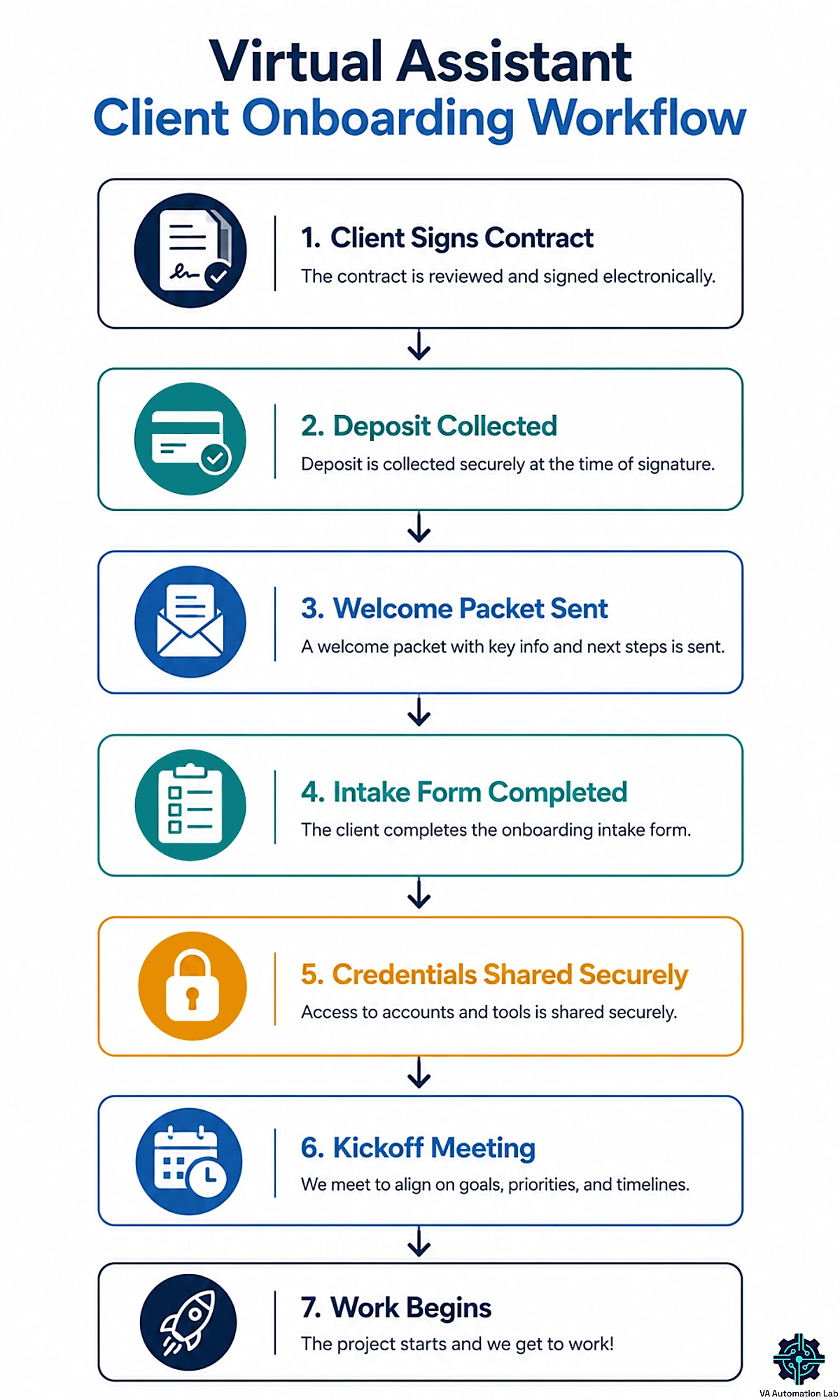
This is the feature that most directly protects your income. Attach a payment field to the contract so the client pays a deposit — or the first month’s retainer — the moment they sign, via Stripe, PayPal, or ACH. Instead of finishing the work and hoping an invoice gets paid, you start with money in the bank and a signed agreement behind it. For a VA, that single change removes most late-payment stress.
7. Building a Client Onboarding Workflow in PandaDoc
The contract is signed. Now make the first week feel effortless and professional — the part that turns a new client into a long-term one.
From signed contract to welcome packet
The instant a contract is signed, your onboarding clock starts. Use PandaDoc to send a branded welcome packet: a short document that confirms scope, lays out how you’ll work together, sets communication norms, and gives the client a clear first step. Because it’s another reusable template, you can send a polished welcome to every client without writing it fresh each time.
A good welcome packet does more than inform — it reassures. A client who just paid a deposit wants to feel they made the right call. A tidy, on-brand document that says “here’s exactly what happens next” delivers that reassurance and sets you apart from VAs who go quiet after the contract.
Capturing client details with an intake form
Onboarding lives or dies on getting the right information up front: brand assets, tool logins, preferences, key contacts. PandaDoc has basic web forms, but for a proper intake experience — conditional questions, file uploads, a branded look — a dedicated form tool like Jotform is the better fit. You send one clean intake link, the client fills it once, and you stop chasing details over email.
Feed those intake answers into your PandaDoc welcome packet and onboarding becomes a two-step, self-serve flow: client completes the form, client receives the packet. For the full automated version, see How to Automate Client Onboarding for Virtual Assistants.
Onboarding checklist and kickoff
Finish with a simple, repeatable kickoff: confirm access is working, schedule a short kickoff call or send a kickoff message, and set the date for your first deliverable. Turn this into a checklist you run for every client, and onboarding stays consistent no matter how busy you get.
Collect Every Client Detail Without the Back-and-Forth
Send one clean intake link and let clients hand over brand assets, logins, and preferences in a single branded form.
Jotform‘s free plan feeds straight into your onboarding — no more chasing details over email.
8. The Virtual Assistant Tool Stack to Build Around PandaDoc
A contract is one moment in a client’s journey, not the whole thing. PandaDoc owns that moment. But to run a smooth, profitable VA business, you need a stack around it. Here’s the system you sould build — eight tools that carry a client from first contact to signed, onboarded, and paid. Each does one job and feeds the next.
The VA client-operations stack
Stage | Job to be done | Tool |
Track leads and clients | CRM / pipeline | |
Contract and get paid | E-signature + deposit | |
Collect client details | Intake forms | |
Share access safely | Password manager | |
Track billable time | Time tracking | |
Invoice ongoing work | Invoicing / billing | |
Document everything | Client hub and SOPs | |
Connect the whole stack | Automation |
Before the Contract: your CRM and Pipeline
Every client starts as a lead, and leads need a home. On the business plan, PandaDoc syncs natively with CRMs like Salesforce, HubSpot, and Pipedrive. A CRM tracks each prospect, stores the details, and reminds you who to follow up with, so nothing slips. The smart pick here is Pipedrive, because it plugs straight into PandaDoc. Deal data flows from Pipedrive into your contracts, and the signed status flows back. That two-way sync is what makes this a real system instead of a pile of disconnected apps.
→ Want something lighter to start? Our Best CRM for Virtual Assistants roundup and Folk Review & Setup Guide cover the alternatives.
Onboarding and Delivery: Intake, Credentials, Time, and Billing
Once PandaDoc has the signature and the deposit, onboarding begins — and a few tools make it effortless. First, capture what you need with a proper intake form. Jotform collects brand assets, logins, and preferences through one branded link, so you stop chasing details over email.
Next, handle the client’s logins the safe way. Emailing passwords is a liability. A password manager like 1Password lets you store and share access without ever exposing the credentials. Then, the moment work starts, track it. A time tracker like Clockify, or Toggl Track, shows you whether each retainer is profitable, and gives you receipts when scope creeps.
Those tracked hours then become invoices. After the upfront deposit, you still bill retainers and extra work each month — and InvoiceNinja turns your logged time into professional, recurring invoices, free for your first clients.
Scaling the system: documentation and automation
Two tools turn this collection of apps into a machine that runs itself. First, give every process a home. Notion becomes your client hub: SOPs, wikis, and a shared onboarding space that keeps each workflow documented and repeatable as you grow. Our Notion Guide for Virtual Assistants shows how to build the hub.
Then connect the pieces. Make is the automation glue. It can create a PandaDoc contract when a Pipedrive deal is won, update the CRM when the client signs, copy their details into Notion, and even kick off that first invoice. Read the full workflow in the Make Setup Guide and the broader automation framework in Automation for Virtual Assistants: The Complete Guide to Tools & Workflows. With every tool talking to the next, you have a complete, hands-off client operation — with PandaDoc at its core.
9. Is PandaDoc Worth It? The ROI for a Virtual Assistant Business
Price is only half the equation. The real question is what PandaDoc returns — and for a VA who sends contracts regularly, the math is favorable.
Time Saved and Clients Retained
Start with time. PandaDoc reports that its users create and send a document in under four minutes. Multiply the minutes you currently lose formatting contracts, chasing signatures, and re-sending “did you get this?” emails, and the tool pays for itself in reclaimed hours alone. A branded, trackable document also looks more professional, which helps you win and keep clients — the gap between a “maybe” and a signed retainer is often just a polished first impression.
Then there’s the payment side, where the ROI gets concrete. Collecting a deposit at signature means you’re paid on day one instead of waiting (and hoping). For a VA, avoiding a single late or missed payment can be worth more than a year of the subscription.
A quick illustration
Say you’re on the Starter plan at $19/month — about $228 a year. Say a solid contract and an upfront deposit help you land or keep just one extra client on a $500/month retainer. Or they save you from one client who would otherwise have ghosted an invoice. Either way, the tool has paid for itself several times over. For a client-facing VA, that’s not a hard case to make.
10. PandaDoc vs. the Alternatives for Virtual Assistants
PandaDoc isn’t the only option, and for some VAs it’s more than they need. Here’s how to choose.
Which document tool fits which VA
If you… | Best fit | Why |
Send contracts and want branded docs, tracking, and payments in one place | All-in-one document lifecycle with the best free e-sign plan | |
Only need to get documents signed, simply and cheaply | Lightweight, fast e-signatures without the extra features | |
Want contracts, invoicing, scheduling, and workflows in one client hub | All-in-one client management built for service providers | |
Run a larger team needing advanced contract controls | Team-focused (priced for 5+ seats), not solo VAs |
When a Signing-only Tool is the Smarter Choice
If you don’t send proposals, don’t need branded document design, and just want a client to sign on the dotted line, PandaDoc’s document-automation muscle is wasted on you. A signing-only tool like Signeasy does exactly one job — fast, legally binding e-signatures — at a lower price and with less to learn. For many solo VAs whose only real need is a signature, that’s the more sensible pick.
The all-in-one crowd has options too. Dubsado bundles contracts, invoicing, scheduling, and workflows into a single client-management hub. It suits VAs who want one tool for the whole client relationship, rather than a document specialist plus a stack around it.
Meanwhile, established e-signature tools like DocuSign and Dropbox Sign handle signing well, but they can’t create documents the way PandaDoc does. You’d still need a separate tool to build the proposal. The right answer depends entirely on whether you value the all-in-one document workflow or just the signature.
Read the full contract software comparison in Best Contract Tools for Virtual Assistants. For a wider view across every category of VA software, see our Best Tools for Virtual Assistants Guide.
Only Need Signatures? Signeasy Keeps It Simple
If you don’t send proposals and just need clients to sign, skip the extras.
Signeasy delivers fast, legally binding e-signatures at a lower price, with almost nothing to learn.
11. PandaDoc Pros and Cons for Virtual Assistants
No tool is perfect. Here’s the balanced view before you commit.
What PandaDoc does well for VAs
The wins are real. The free plan is the most generous e-signature offering around — unlimited signatures on paid tiers, and a usable free tier most competitors can’t match. The template library and drag-and-drop editor make professional contracts fast. Real-time tracking gives you follow-up timing competitors don’t. Built-in payments get your deposit in the bank on day one. And legal compliance (ESIGN, UETA, eIDAS) plus a mobile app mean your agreements are enforceable and portable. For a client-facing VA, that’s a strong package.
Where it falls short for solo VAs
The limits matter too. Pricing is per seat, so costs climb if you add team members. The free plan’s document cap (five a month) is tight for anyone onboarding regularly. CRM integrations, custom branding, and the content library are Business-only ($49/month), so the features many VAs want sit behind the higher tier. Users also note occasional editing and formatting quirks — copied text sometimes loses its font, and complex tables can be fiddly. And because PandaDoc is built for sales teams, a solo VA who only needs signatures may find it’s simply more tool than the job requires. Know your volume and your must-have features, and the decision gets easy.
12. Is PandaDoc the Right Contract Tool for Your VA Business?
Here’s the bottom line. Choose PandaDoc if you send client contracts regularly, want branded documents, real-time tracking, and deposits collected at signature — and you’d rather run contracts and onboarding from one professional workspace. Start on the free plan, prove the workflow, and move to Starter ($19/month) the moment you outgrow the five-document cap. Step up to Business ($49/month) only when you need CRM sync, custom branding, or a content library.
Skip it if your only real need is a quick signature. A lighter tool like Signeasy will cost less and do that one job well. And if you’d prefer a single all-in-one client hub, look at Dubsado instead. But for most VAs whose weeks include real client paperwork, PandaDoc turns the most tedious part of the job into a few clicks and gets you paid faster.
Start Running Contracts and Onboarding the Professional Way
You’ve seen the whole system: branded contracts signed in minutes, deposits collected on day one, and onboarding that runs like clockwork.
PandaDoc‘s free plan lets you build it today — no credit card, no risk.
Send your first professional contract this week, and upgrade to Starter only once the workflow has proven itself.
Frequently Asked Questions About PandaDoc for Virtual Assistants
Is PandaDoc free for virtual assistants?
Yes. PandaDoc has a free plan that includes up to 5 documents and 5 legally binding e-signatures per month (a 60-document annual cap), plus the drag-and-drop editor and real-time tracking. It’s ideal for VAs who sign the occasional contract, though regular senders will hit the cap and need a paid plan.
How much does PandaDoc cost?
On annual billing, PandaDoc’s Starter plan is $19/user/month (annual billing) and the Business plan is $49/user/month (annual). There’s also a free plan and a 14-day free trial of Business with no credit card. Monthly billing costs more, Starter is $35/user/mo and Business is $65/user/mo.
Are PandaDoc signatures legally binding?
Yes. PandaDoc’s electronic signatures comply with the ESIGN Act and UETA in the US and eIDAS in the EU, which covers almost all client agreements. Every signed document includes an audit trail and a signature certificate as proof the agreement is valid and enforceable.
Is PandaDoc secure?
Yes. PandaDoc is SOC 2 Type II certified and provides an audit trail for every document, recording who accessed and signed it and when. For a VA handling sensitive client data, that compliance and traceability offer solid protection — and a point of trust you can share with clients.
Can PandaDoc collect client payments?
Yes. You can attach a payment field to a contract or invoice so clients pay the moment they sign, using Stripe, PayPal, or ACH. For VAs, this means collecting a deposit or first retainer payment up front instead of waiting on an invoice after the work is done.
Does PandaDoc integrate with CRMs?
Does PandaDoc have a virtual assistant contract template?
Yes. PandaDoc offers a free virtual assistant agreement template you can customize to your services, along with a large library of contract, proposal, and NDA templates. You can adapt one to your business, save it with variables, and reuse it for every client in minutes.
PandaDoc vs. DocuSign — which is better for a VA?
It depends on your needs. DocuSign is excellent at pure e-signatures but doesn’t create documents. PandaDoc builds proposals and contracts, collects payments, and tracks engagement in addition to signing. If you only need signatures, DocuSign or a tool like Signeasy is enough; if you want the full document workflow, PandaDoc wins.
Can you edit PDFs in PandaDoc?
Not fully. PandaDoc has a drag-and-drop document editor and can add fields to uploaded files, but it isn’t a full PDF editor for tasks like redaction or page manipulation. If you need heavy PDF editing, use a dedicated PDF tool alongside PandaDoc rather than relying on it for that job.
Glossary: Key Terms for PandaDoc
E-signature (electronic signature): A legally recognized way to sign a document online, valid under laws like ESIGN, UETA, and eIDAS.
ESIGN Act / UETA: US laws that make electronic signatures legally binding and enforceable — the same as ink signatures in most cases.
eIDAS: The EU regulation governing electronic signatures and their legal validity across member states.
Audit trail: A time-stamped record of who opened, viewed, and signed a document, used as proof an agreement is valid.
Variable (merge field): A placeholder in a template (like client name or rate) that you swap out per client, so one template serves every contract.
Scope of work (SOW): The part of a contract that defines exactly what you will and won’t do — your main defense against scope creep.
About the Author
Alex Stratton has spent the better part of a decade working at the intersection of virtual assistance and operational systems, first as a VA supporting founders and small business owners, then as a workflow consultant helping remote teams reduce the manual overhead that accumulates when businesses grow faster than their processes. The tools and workflows here reflect decisions made repeatedly in real client contexts, where the wrong choice costs hours, not minutes. Learn more about VA Automation Lab → About.