
Best CRM for Virtual Assistants (2026)
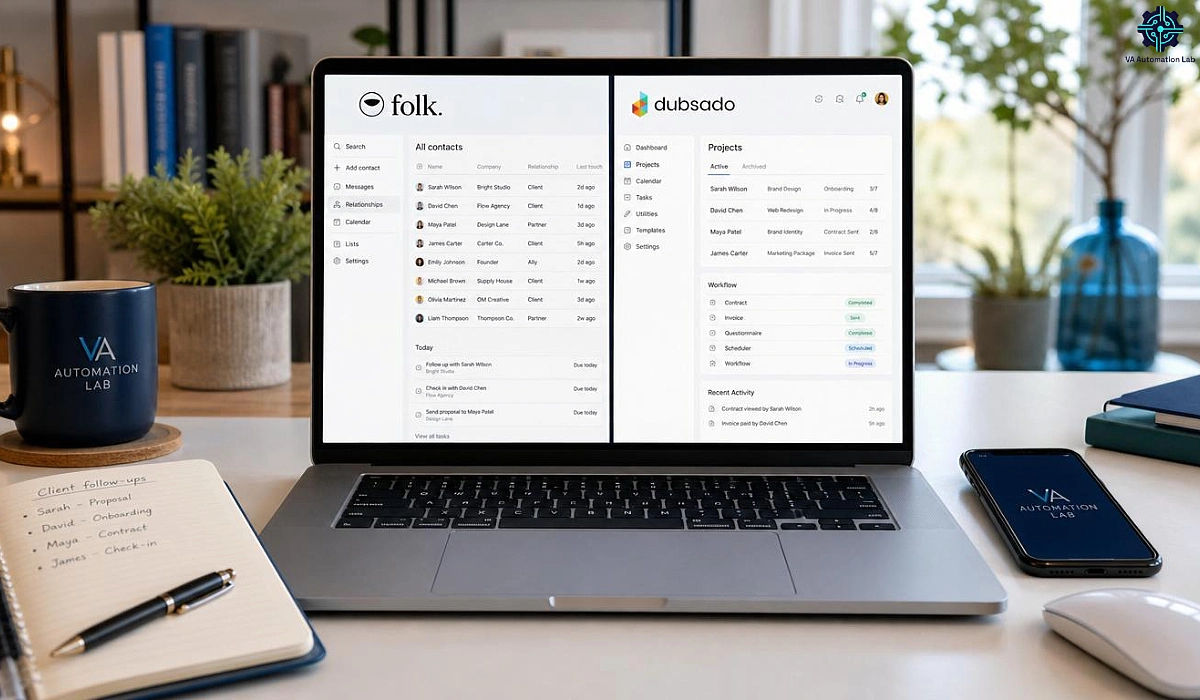
Disclosure: This article contains affiliate links. If you purchase through them, VA Automation Lab earns a commission at no additional cost to you. All tools are evaluated independently.
The right CRM for a virtual assistant is not the same as the right CRM for a sales team. Here’s how to tell the difference, and which tool fits your work.
Most CRM guides for virtual assistants are lists of tools built for sales teams, dressed up with VA-adjacent language. They recommend HubSpot because it has a free plan, Salesforce because it’s well-known, or whichever tool paid for placement. What they don’t do is distinguish between the two fundamentally different problems a VA might be solving with a CRM: managing their own clients, or managing CRM work on behalf of a client.
That distinction determines everything. The wrong tool for the wrong problem wastes setup time, subscription budget, and creates friction rather than removing it.
This guide cuts through that. It covers the best CRM options for virtual assistants based on what the work requires, with assessments, verified pricing, and specific use-case recommendations.
Quick answer: The best CRM for most virtual assistants is Folk — a lightweight, relationship-first CRM that keeps client contacts, follow-ups, and communication history organized without weekly maintenance. VAs who need full client operations (contracts, invoices, automated onboarding) are better served by Dubsado; VAs managing a client’s sales pipeline should know Pipedrive or Zoho CRM; and Brevo’s free plan is the best zero-cost starting point.
If you’re building a complete system around your CRM, this guide on Client Management Systems for Virtual Assistants breaks down how each tool fits into a structured workflow.
For a complete overview of the best AI tools for Virtual Assistants, you can read the main guide: AI Tools for Virtual Assistants: The Complete Practical Guide
Get the Free AI Toolkit for Virtual Assistants
Choosing the right CRM is one part of building an efficient VA practice, this free toolkit covers the full picture: the AI tools, automation workflows, and setup order that work for solo VAs.
Includes curated tool picks and first-workflow guides, ready to use.
Table of Contents
1. What Virtual Assistants Need from a CRM
A CRM (Customer Relationship Management tool) is a software that tracks interactions, stores client information, and organizes follow-ups. Choosing the right CRM for virtual assistants is harder than it looks, because that definition is broad enough to cover tools ranging from a simple contact database to a full business automation suite. The problem is that most CRM software is designed for sales teams tracking deal pipelines: leads come in, move through stages, and close or don’t.
A solo VA managing five active retainer clients has a completely different operational reality. There is no funnel to track. There are active service relationships to maintain, each with its own communication preferences, project scope, deadline rhythm, and history of decisions. The CRM that serves this work well needs to do specific things:
Store client context, not just contact data. A phone number and company name aren’t useful if you can’t attach notes, communication history, and project details to the same record. When a client emails mid-project about a change they mentioned three weeks ago, the CRM should surface that context instantly.
Handle ongoing relationships, not one-time transactions. VA work is recurring. The CRM needs to support ongoing communication management, follow-up scheduling, and retainer tracking, not just “did this deal close?”
Track retainer balances and hours, not just activity. A large share of VA work is sold in monthly retainers or prepaid hour packages, and the fastest way to lose money — or a client’s trust — is to lose track of how many hours remain on each agreement. The strongest VA CRMs surface that balance next to the contact and project record, so “how many hours does this client have left?” becomes a glance rather than an inbox excavation. Relationship-first tools like Folk don’t track hours natively, so VAs who bill hourly often pair their CRM with a dedicated time-tracker — worth knowing before assuming one tool covers everything.
Stay simple enough to maintain without a dedicated admin. A five-person sales team can assign someone to keep the CRM clean. A solo VA cannot. Any CRM that requires significant weekly maintenance overhead defeats its own purpose.
Integrate with the tools already in the workflow. Email, calendar, project management. A CRM that lives in isolation becomes another platform to manually update, which means it won’t be updated.
For some VAs, also handle client operations. Contracts, proposals, invoices, and scheduler links all have to live somewhere. Some VAs want a CRM that handles these too. Others prefer to keep operations separate from contact management.
That last point is where CRM selection becomes strategic rather than just a product comparison.
2. Two Types of CRM Every VA Should Know
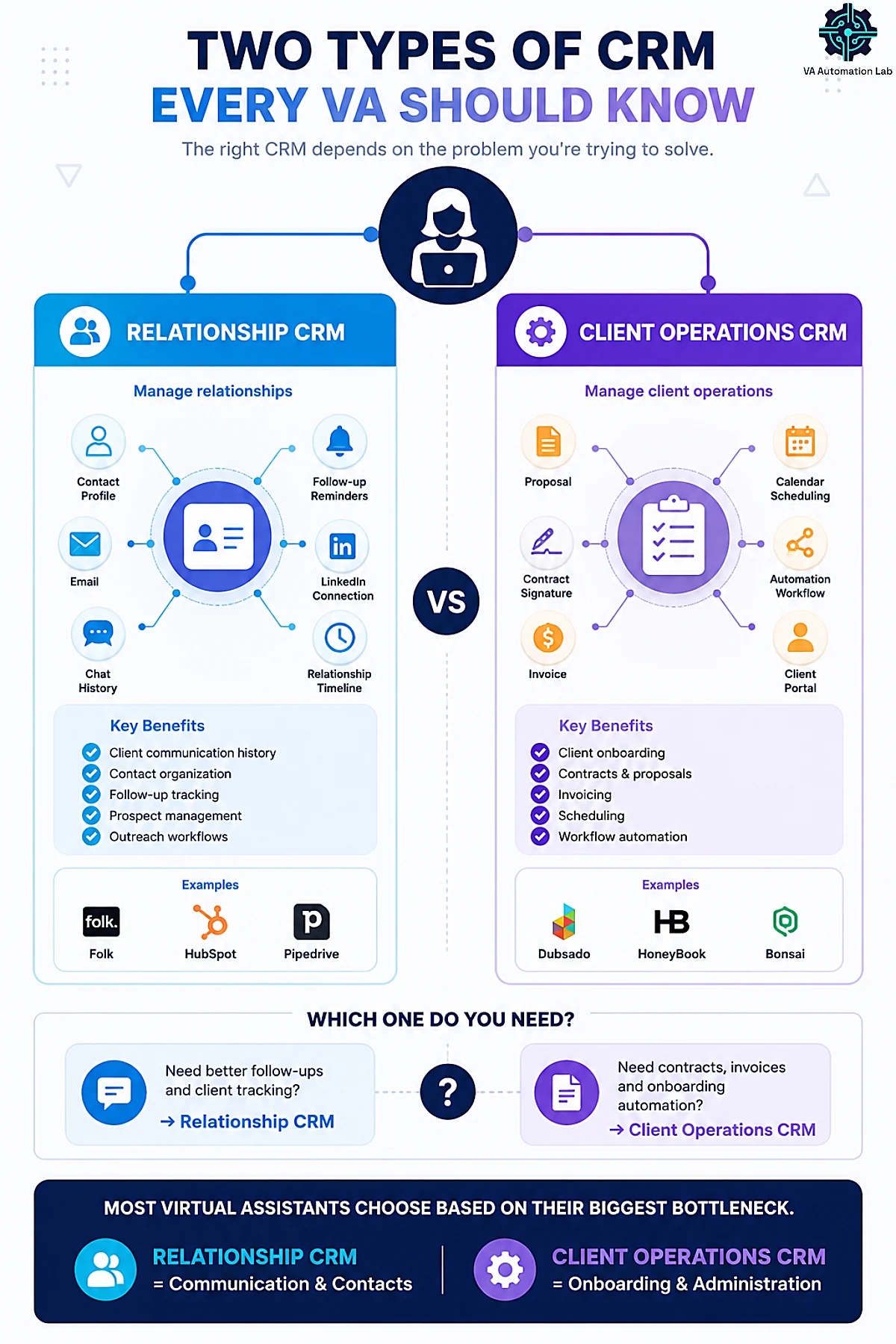
The most useful framework for choosing a VA CRM is understanding that there are two functionally different tools often called by the same name:
Type 1 — Relationship CRM Designed for managing contacts, communication history, and follow-up sequences. Strength: lightweight, fast to set up, easy to maintain. Examples: Folk, HubSpot (free tier), Pipedrive.
Best for VAs whose primary bottleneck is: tracking who needs a follow-up, keeping client profiles clean and searchable, managing communication history across multiple clients, or handling outreach (new client prospecting, partnership outreach on behalf of a client).
Type 2 — Client Operations CRM Designed for managing the full lifecycle of a client engagement: proposals, contracts, invoices, scheduling, and project workflows inside one platform. This type of CRM software for freelancers goes well beyond contact management, it replaces four or five separate tools with one integrated system. Strength: consolidates multiple tools into one system. Examples: Dubsado, HoneyBook, Bonsai.
Best for VAs whose primary bottleneck is: sending contracts and invoices professionally, automating client onboarding sequences, managing multiple active projects within a single client relationship, or reducing the number of separate tools in the stack.
Before evaluating any specific tool, identify which type matches your current operational bottleneck. That single distinction will narrow your shortlist from eight tools to two.
3. Best CRM for Virtual Assistants: The Shortlist
This shortlist spans both jobs a VA hires a CRM to do: managing your own client relationships (Folk, Dubsado, Brevo, ClickUp) and managing a client’s CRM on their behalf (Pipedrive, Zoho CRM, ActiveCampaign). The two-types framework above tells you which group to read first — match the tool to the problem you’re solving, not to its feature count.
Folk — Best Relationship CRM for Solo VAs
Best for: VAs managing 4–10+ active clients who need clean contact management, follow-up tracking, and a LinkedIn-integrated workflow without the complexity of a full sales CRM.
Folk CRM is the clearest recommendation for virtual assistants in the relationship management category, lightweight, modern, and built around contacts rather than sales pipelines. Where most CRMs feel like deal-tracking software that contacts happen to live in, Folk feels like a contact-first tool that happens to have pipeline views available. That orientation makes a meaningful difference in day-to-day use.
The interface is spreadsheet-style, contacts are displayed in a table you can filter, sort, and add custom fields to without any configuration complexity. If you’ve used Notion or Airtable, the learning curve is close to zero. Setup, from account creation to a working contact view, takes under an hour.
What works well for VAs specifically:
The folkX Chrome extension lets you capture contacts directly from LinkedIn, Gmail, or any website with one click. For VAs who onboard new clients through LinkedIn conversations or manage client prospecting, this eliminates manual data entry entirely. Every field you pull becomes a structured record inside Folk, with the original context attached.
AI Assistants (included on all plans) handle background tasks: enriching contact data, drafting follow-up suggestions, surfacing contacts who haven’t been touched recently. For a solo VA managing a growing roster of clients, this passive organization keeps the CRM useful without requiring weekly manual cleanup.
Email campaigns and sequences are built in, which matters if you handle outreach for clients. You can build multi-step email sequences with tracking (opens, clicks, replies) without adding a separate outreach tool.
Pipeline management gives you visual deal boards when you need them. A VA managing client renewals, project milestones, or new client proposals can use this without it being the default view for everything.
Integrations connect Folk to 5,000+ tools via Zapier and Make, plus native connectors for Gmail, Outlook, WhatsApp, and calendar tools.
What to watch:
Folk is not a client operations tool. It does not handle contracts, invoices, or scheduling. If you need those alongside contact management, Folk works best paired with a separate tool for operations (Dubsado, PandaDoc for contracts, SavvyCal for scheduling). It’s a deliberate focus, not a gap, Folk does one thing well.
Pricing (billed annually):
Plan | Price (billed annually) | Key features |
Standard | $24/member/month | Pipeline management, email campaigns, contact enrichment, AI Assistants, Magic fields, folkX LinkedIn extension, email/calendar/WhatsApp sync, and 5,000+ integrations |
Premium | $48/member/month | Email sequences, dashboards, custom objects, API access, and advanced roles |
Enterprise | from $80/member/month | Custom limits for enrichments, messages, account sync, AI fields |
14-day free trial, full access, no credit card required. The Standard plan covers all core CRM features for a solo VA: pipeline management, email campaigns, contact enrichment, AI Assistants, Magic fields, folkX LinkedIn extension, email/calendar/WhatsApp sync, and 5,000+ integrations. The Premium plan adds email sequences, dashboards, custom objects, API access, and advanced roles, relevant when managing a small VA team or complex multi-client operations.
Verdict: Folk is the clearest recommendation for VAs whose primary need is a maintained, intelligent contact database, one that stays useful without requiring constant manual attention. For solo VAs with 5+ active client relationships, it recovers the organizational overhead that typically lives in inboxes, spreadsheets, or nowhere.
Full Guide: Folk CRM for Virtual Assistants: Complete Setup Guide
Dubsado — Best Client Operations CRM for Freelance VAs
Best for: VAs who want to manage the entire client lifecycle in one place: proposals, contracts, invoices, scheduling, and project workflows, without cobbling together five separate tools.
Dubsado occupies a different category than Folk. It is less “CRM” in the traditional sense and more “client management system”, a platform that handles everything that happens after a client says yes, from the contract signature to the final invoice. For VAs who currently manage this across multiple disconnected tools, consolidating into Dubsado removes significant operational friction.
What works well for VAs:
Automated workflows are Dubsado’s strongest feature. You can build multi-step client sequences that trigger automatically based on actions: when a proposal is accepted, send the contract; when the contract is signed, send the welcome questionnaire; when that’s submitted, schedule the kickoff call. Once configured, client onboarding runs without manual intervention on your end. For a VA managing 5+ active clients, this level of automation compounds, each new client benefits from the same reliable process rather than a new manual sequence.
For a complete breakdown of automating client onboarding, see the Guide to Automating Client Onboarding for Virtual Assistants.
Client portals give each client a branded, private space to view their invoices, contracts, and communications. This is a professional experience that spreadsheets and email chains cannot replicate, and for VAs who want to position themselves above the average freelancer, it signals operational maturity.
Invoicing and payment processing (Stripe, Square, PayPal) are integrated. You can set up recurring invoices, payment plans, and automatic payment reminders without touching a separate billing tool.
Public proposals (Premier plan) let clients browse and select your services directly from a branded page, a cleaner intake experience than a back-and-forth email thread.
Scheduling is included in the Premier plan. You can create scheduler links, connect your calendar, and set different availability windows per service type.
Multiple brands are supported as an add-on ($10/month per additional brand), relevant for VAs who operate more than one service business from the same account.
Team access includes 3 additional users at no extra cost. Beyond that: 4–10 users at $25/month, 11–20 at $45/month, 21–30 at $60/month.
Where Dubsado requires investment:
Setup takes longer than Folk. Building useful workflow automations requires thinking through your processes in advance, which is good practice regardless, but it means the first few weeks involve configuration work rather than immediate productivity gains. The payoff is significant, but it is not a one-hour setup.
The interface is functional but dated in places. Some users report that form design and scheduling feel clunky compared to newer tools. These are workflow annoyances, not blockers.
Pricing:
Plan | Monthly | Annual | Includes |
Starter | $35/month | $335/year | Unlimited clients & projects, invoicing, forms & email templates |
Premier | $55/month | $525/year | Everything in Starter + scheduling, automated workflows, public proposals, Zapier |
Add-ons: additional brand $10/month | extra users: 3 included free, then $25/month (4–10 users).
21-day free trial — full Premier access, no credit card auto-charge at end. No permanent free plan.
Choosing annual billing saves the equivalent of 2 months versus monthly.
The link below includes a 20% discount on your first subscription payment (monthly or annual).
Verdict: Dubsado makes the most sense for VAs who are running their freelance practice as a proper business and want their client process to feel like one, from first contact to final payment. It’s the highest-complexity tool in this guide and the highest-return for VAs whose operational bottleneck is managing client paperwork and onboarding. The 21-day free trial gives you full Premier access to build and test your workflows before committing.
Full guide: Dubsado for Virtual Assistants: Review & Setup Guide
Pipedrive — Best for VAs Who Manage Sales Operations for Clients
Best for: VAs embedded in a client’s sales team, managing their CRM, maintaining pipelines, and coordinating deal workflows, not primarily for managing the VA’s own client relationships.
Pipedrive is a sales-focused CRM. That distinction is not a criticism, it is clarity about fit. If your VA work involves managing a client’s CRM, maintaining their deal pipeline, tracking outreach sequences, or supporting their sales operations, Pipedrive is an excellent platform to work inside. It is not the most practical choice for a VA who just needs to manage their own client list.
Why it appears here: Many VAs manage CRM platforms on behalf of clients, and Pipedrive is one of the most common client-side CRMs in small and mid-market businesses. Understanding Pipedrive well is a marketable VA skill, and some VAs use it for their own practice if they’re already fluent in the platform.
What works well — by plan:
The Lite plan covers the core of what a VA needs to operate inside a client’s pipeline: lead, calendar, and pipeline management in one view, a real-time sales feed for tracking follow-ups and overdue tasks, AI-powered report creation, and 500+ integrations including Zapier, Zoom, and Lemlist. Personalized onboarding is also included, useful for a VA setting up Pipedrive for a client from scratch.
The Growth plan adds the features most relevant to VAs actively running client sales operations: full email sync with open and click tracking, automations and nurturing sequences, a meeting scheduler with full contacts timeline, and live chat support. This is the plan to recommend to a client who needs their VA to manage outreach sequences and deal follow-ups end to end.
The Premium plan steps into territory most solo VAs won’t need for themselves but may be asked to configure for clients: AI-powered multi-email tools, lead generation and routing, contracts and e-signatures via Smart Docs, and enhanced permissions, relevant when managing a multi-rep sales team on a client’s behalf.
The Ultimate plan adds account security controls, sandbox testing (useful for VA-managed setups), extended phone support, and partnership discounts including 20% off PandaDoc and CloudTalk.
Pricing (billed annually):
Plan | Price | Key features |
Lite | $14/month | Lead, calendar, and pipeline management, real-time sales feed, AI-powered report creation, and 500+ integrations |
Growth | $39/month | Email sync with open and click tracking, automations and nurturing sequences, meeting scheduler with full contacts timeline |
Premium | $59/month | AI-powered multi-email tools, lead generation and routing, contracts and e-signatures via Smart Docs |
Ultimate | $79/month | Account security controls, sandbox testing, extended phone support, and partnership discounts |
Add-ons available: LeadBooster, Projects, Campaigns, Web Visitors, Smart Docs, each priced separately from $7/month.
14-day free trial, no credit card required. No permanent free plan.
Verdict: If your VA work involves managing sales CRM systems for clients, Pipedrive is worth learning, and the Lite plan at $14/month gives you a complete environment to operate in. For managing your own client relationships as a VA, Folk or Dubsado is a better fit. Both problems are real; this is about matching tool to problem.
Zoho CRM — Best Budget Full-Feature CRM (and for Clients Already on Zoho)
Best for: VAs who want a feature-complete sales CRM at the lowest credible price point, or who manage CRM work for a client already running on Zoho.
Zoho CRM sits in the same “sales-oriented CRM” category as Pipedrive, but competes on price and breadth. Where Folk is contact-first and Dubsado is operations-first, Zoho is a conventional deal-and-pipeline CRM that happens to be unusually affordable — and free for very small setups.
Why it appears here: Zoho is one of the most widely deployed CRMs in small and mid-market businesses, so fluency in it is a marketable VA skill. It’s also a viable option for a VA’s own practice if you want pipeline reporting, workflow automation, and a mobile app without a premium price.
What works well for VAs:
Free plan for up to 3 users covers leads, deals, workflows, reports, and the mobile app — enough for a solo VA managing a modest client list at zero cost.
Workflow automation and assignment rules (from the Standard plan) let you trigger follow-ups and route records automatically, reducing manual upkeep.
Reports and dashboards give pipeline visibility that lightweight relationship CRMs don’t, useful when a client wants weekly sales reporting.
Integrations connect Zoho to email, Google Workspace, and the wider Zoho suite (Books, Desk), plus Zapier and Make for cross-tool automation.
What to watch:
Zoho’s interface is denser than Folk’s and carries the usual trade-off of a full sales CRM: more power, more configuration. For a VA whose only need is clean contact management, it’s more tool than the job requires — Folk gets you there faster. Zoho earns its place when you want real pipeline reporting on a budget, or when a client is already on the platform.
Pricing (billed annually):
Plan | Price | Best for |
Free | $0 (up to 3 users) | Solo VAs, basic pipeline |
Standard | Per user | Workflow automation, reporting |
Professional | Per user | Process automation, inventory |
15-day free trial on paid plans. The Free plan is permanently free for up to 3 users.
Verdict: Zoho CRM is the value pick for VAs who want a full sales CRM’s reporting and automation without Pipedrive’s price — and an essential platform to know if you support clients who already run on it. For pure relationship management, Folk remains the simpler day-to-day choice.
ActiveCampaign — Best for VAs Managing Email Marketing + CRM Together
Best for: VAs whose client work involves email marketing (automations, audience segmentation, campaign management) and who want contact and deal management inside the same platform.
ActiveCampaign is primarily a marketing automation platform. Its CRM features are functional, but they’re designed to support the marketing workflow rather than serve as the organizing layer for client relationships. The reason it appears in this list: many VAs who handle email marketing for clients use ActiveCampaign as their clients’ primary tool, and understanding it well is a marketable service skill.
What works well for VAs:
Contact and deal views let you track leads and client conversations within the same interface where you’re managing email automations. Automation triggers can cross CRM and marketing functions, a new client added to a CRM stage can trigger a welcome sequence without manual action.
The upgrade path is clear for VAs managing growing client lists. The Starter plan at $15/month covers basic email marketing and automation for a single user, functional for VAs managing one client’s list. The Plus plan at $49/month removes the 5-action automation limit, adds landing pages and standard segmentation, and is the realistic starting point for VAs running meaningful automation workflows for clients. The Pro plan at $79/month adds advanced segmentation, predictive content, and attribution tracking, relevant when a client’s email program is mature enough to need performance measurement.
Important pricing note: all plans are priced for fewer than 1,000 contacts and billed annually. Prices increase as the contact list grows, relevant for VAs managing large client databases. Check the current pricing page before quoting a client on platform costs.
ActiveCampaign also offers WhatsApp marketing plans (from $99/month) and combined Email + WhatsApp bundles (from $112/month), worth knowing if a client’s audience is primarily on WhatsApp.
What to know:
ActiveCampaign is more complex to configure than Folk or Dubsado for basic contact management. Its strength is in marketing automation depth, and using it solely as a contact database underutilizes the tool and overcomplicates the workflow. It belongs in a VA’s stack when the service offering includes email marketing, not as a general-purpose client CRM.
Pricing (Email plans, billed annually, under 1,000 contacts):
Plan | Price | Users | Key capability |
Starter | $15/month | 1 | Email marketing, basic automation (5 actions/flow) |
Plus | $49/month | 1 | Unlimited automation actions, landing pages |
Pro | $79/month | 3 | Advanced segmentation, predictive content, attribution |
Enterprise | $145/month | 5 | Custom objects, SSO, dedicated account team |
Free trial available. No permanent free plan.
Verdict: ActiveCampaign belongs in a VA’s tool stack when the service offering includes email marketing management. For contact management alone, it’s more tool than the job requires.
Brevo — Best Free Starting Point (Email Marketing + CRM)
Best for: VAs who need basic contact management at zero cost, or who manage email marketing for clients and want CRM functionality bundled in the same platform.
One important clarification upfront: Brevo is an email marketing platform. Its CRM is a module included across all plans, not a standalone product. If you’re evaluating Brevo specifically as a CRM, what you’re evaluating is an email marketing tool with contact management built in. That distinction matters for setting the right expectations.
For VAs, this creates two distinct use cases:
Use case 1 — Zero-cost contact management. The free plan allows up to 300 emails/day and includes the CRM module with contact records, deal pipelines, notes, and task management. For a VA with two or three active clients who needs somewhere to centralize client contacts without any subscription cost, this is a functional starting point. The setup is fast, the interface is accessible, and the cost is zero.
Use case 2 — Managing email marketing for clients. If your VA services include running email campaigns, automations, or list management for a client already on Brevo, you’re operating inside a platform with a solid feature set. The Starter plan at $8.08/month (for up to 5,000 emails/month), billed annually, includes AI content generation, advanced segmentation, and basic analytics. The Standard plan at $16.17/month for 5,000 emails, billed annually, adds marketing automation, A/B testing, heatmaps, AI send time optimization, web tracking, and landing pages, the realistic working environment for a VA managing a client’s active email program.
What to know before recommending it as a CRM:
Brevo’s CRM module is secondary to its email platform. Contact records, pipelines, and task tracking work, but the interface is built around email campaigns, not relationship management. For a VA whose primary need is organized client follow-ups and communication history, Folk’s purpose-built design produces a more usable day-to-day system. Brevo makes sense as a zero-cost entry point, or when the client’s workflow is already email-marketing-first.
Pricing (billed annually):
Plan | Price | Key features |
Free | $0/month | 300 emails/day, CRM module, basic forms |
Starter | $8.08/month | From 5,000 emails/mo, AI content generator, advanced segmentation, email support |
Standard | $16.17/month (5k emails) | Everything in Starter + automation, A/B testing, heatmaps, AI send time, landing pages |
Professional | $449.08/month | 150,000+ emails/mo, WhatsApp, 10 seats, AI segmentation, phone support |
Enterprise | Custom | Multi-account, custom objects, SSO, dedicated IP, CSM support |
Prices are based on email volume and increase with larger contact lists.
Verdict: Brevo works as a zero-cost starting point when all you need is basic contact organization and you’re not ready to commit to a paid CRM subscription. It also belongs in the stack when a client’s operations are email-marketing-led and they’re already on the platform. For dedicated contact and relationship management, upgrade to Folk once you have 3+ active retainer clients.
👉 Start with Brevo Free — CRM module included in all plans.
ClickUp — If You’re Already in the Ecosystem
Best for: VAs already using ClickUp for project management who want to use its CRM view without adding a separate tool subscription.
ClickUp is not a CRM. It is a project management and productivity platform that can be configured to behave like a lightweight CRM, contacts as records, pipelines as list views, custom fields for client data. For VAs already running their client work in ClickUp, adding a dedicated CRM view is a lower-friction option than switching to a new tool.
The limitation is the reverse of every other tool on this list: ClickUp is complex for simple contact management. Setting up a usable CRM view requires configuration that a dedicated CRM tool handles out of the box. It’s worth the effort only if ClickUp is already central to your workflow.
For a full ClickUp setup guide for VAs, see the ClickUp for Virtual Assistants guide.
Pricing: Free plan available. Paid plans from $7/user/month.
Other relationship CRMs worth knowing
A few simpler contact-first tools come up often in VA circles — Capsule and Less Annoying CRM chief among them. Both are clean, affordable, and quick to learn, and either can hold client contacts, notes, and a basic pipeline. What they don’t offer is Folk’s AI enrichment, one-click LinkedIn capture, or built-in email sequences, which is why Folk stays the recommendation here for VAs who want the relationship layer to maintain itself. If your needs are minimal and budget is the only deciding factor, they’re worth a look.
Folk: Best Relationship-First CRM for Virtual Assistants
Folk’s Standard plan includes pipeline management, email campaigns, contact enrichment, AI Assistants, Magic fields, folkX LinkedIn extension, and email/calendar/WhatsApp sync, everything a solo VA needs to stay organized across multiple client relationships.
The 14-day trial gives you full access, no credit card required.
4. Quick Comparison Table
Tool | Type | Best For | Free Option | Starting Price |
Folk | Relationship CRM | Contact management, follow-up tracking | 14-day trial | $24/month |
Dubsado | Client Operations CRM | Full client lifecycle, contracts, invoices | 21-day trial | $27.92/month billed annually |
Pipedrive | Sales CRM | Managing clients’ sales pipelines | 14-day trial | $14/month |
Zoho CRM | Sales CRM (budget) | Full-feature CRM on a budget; clients on Zoho | ✅ (3 users) | Standard (per user) |
ActiveCampaign | Marketing + CRM | Email marketing + contact management | 14-day trial | $15/month |
Brevo | Email Marketing + CRM module | Zero-cost start, email-marketing-led clients | ✅ | $8.08/mo (5k emails), billed annually |
ClickUp | PM with CRM views | Already ClickUp users | ✅ | $7/month |
This CRM shortlist is part of our wider roundup of the Best Tools for Virtual Assistants — see that guide for the full stack across every category.
5. How to Choose the Right CRM as a Virtual Assistant
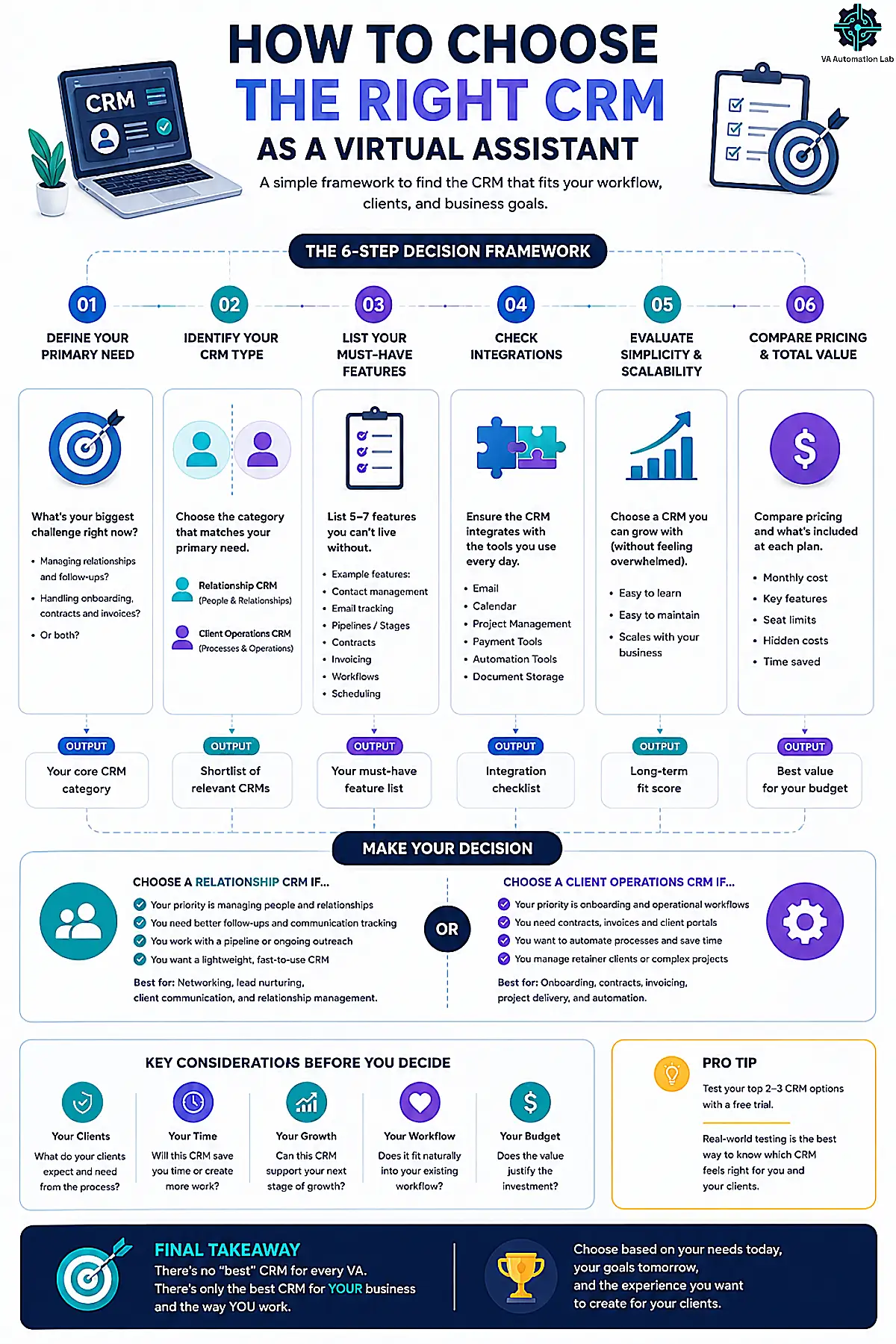
Most VAs overthink this decision by evaluating features before identifying the problem. The right client management tools for virtual assistants are not the ones with the most features, they’re the ones that solve the specific operational bottleneck first. The tool evaluation phase should take one hour, not two weeks. Four questions simplify the decision:
What is your actual operational bottleneck?
If you frequently can’t find a client’s communication history, forget to follow up, or lose track of where you left off with a client, the bottleneck is contact management. Start with Folk or Brevo (free plan — 1 pipeline).
If you spend significant time manually sending contracts, chasing invoices, or rebuilding the same onboarding sequence for each new client, the bottleneck is client operations. Start with Dubsado.
If you manage CRM work for a client as part of your service offering, the bottleneck is fluency in their platform. Evaluate whatever they use, with Pipedrive being the most common for small business clients.
How many active clients do you have?
Under 3 active clients: Brevo’s free plan covers basic contact organization at zero cost (1 pipeline, sufficient for a small early-stage roster). Dubsado’s 21-day full-access trial gives you enough runway to build and test your workflows before committing to a paid plan. No subscription is necessary yet.
3–6 active clients: a paid CRM subscription recovers its cost within the first week through time saved on client administration. Folk’s Standard plan at $24/month is the clearest value at this stage.
6+ active clients: both a relationship CRM (Folk) and a client operations system (Dubsado) may serve distinct functions in your workflow. They don’t overlap, Folk manages contacts and follow-ups, Dubsado manages the project and billing lifecycle.
For the systems and AI workflows that keep a high client count manageable across both tools, see our guide to Managing Multiple Clients as a VA Using AI.
Is the tool learnable in your first session?
If setup requires more than two hours before you get useful output, it’s not the right starting tool. Folk produces a working contact view in under an hour. Dubsado requires more upfront configuration, but its 21-day free trial gives you time to build that foundation without financial pressure.
What tools does it need to connect to?
Folk integrates with Gmail, Outlook, Google Calendar, WhatsApp, and 5,000+ tools via Zapier. Dubsado integrates with Google Calendar, Zoom, QuickBooks, Xero, and Zapier. If specific integrations are required for your workflow, verify them before committing.
For the complete framework on building a multi-tool VA productivity system, see the AI-powered productivity system for virtual assistants.
Run Your Entire VA Business from One Platform
Dubsado handles client intake, contracts, invoicing, scheduling, and automated workflows in a single workspace, so you stop re-entering data between tools and start delivering consistently.
The 21-day free trial gives you full Premier access.
6. Common CRM Mistakes VAs Make
Setting up a CRM before defining the workflow it needs to support
A CRM is a tool that organizes a process. If the process isn’t defined, the CRM becomes a place to dump disorganized information, which is worse than no CRM, because it creates a false sense of having the problem solved. Before setting up any CRM, document: what information you need per client, what triggers a follow-up, and what the lifecycle of a typical client engagement looks like. That documentation takes thirty minutes and determines which CRM is the right fit.
Choosing the most feature-rich tool rather than the most appropriate one
HubSpot has a free plan with an extensive feature set. It also has enough menus, tabs, and configuration options to consume an entire afternoon of setup without producing a single useful client record. For a solo VA managing eight clients, Folk’s simpler interface produces a working system faster and maintains it with less effort. More features are not an advantage when they create maintenance overhead.
Treating the CRM as a data entry task rather than a workflow layer
A CRM that requires manual updates after every client interaction will not be updated consistently. The CRMs that stick in VA workflows are the ones that update themselves: Folk pulls contact data from LinkedIn automatically, Dubsado logs communications from connected email. Build habits around tools that reduce manual input, not increase it.
Storing client passwords and logins inside the CRM
A CRM note field is a tempting place to paste a client’s login — and a real liability. CRM notes aren’t a credential vault: they’re searchable, frequently synced across integrations, and visible to anyone with access to the account. If a client’s credentials leak through your CRM, the exposure is theirs and the responsibility is yours. Keep logins out of contact records entirely and use a dedicated password manager like 1Password instead — it stores and shares credentials in an encrypted vault, and lets you grant or revoke a client’s access without ever exposing the password in plain text.
Starting with multiple CRM tools simultaneously
Testing Folk and Dubsado and Pipedrive at the same time produces no useful signal about any of them. Each tool requires consistent daily use over two to three weeks before it shows its real operational value. Pick one, use it for everything, and evaluate it after a full month before considering alternatives.
7. Conclusion
The best CRM for virtual assistants is the one that solves the right problem, which means the selection process starts with understanding the problem clearly.
For VAs who need organized, intelligent contact management that stays useful without weekly maintenance: Folk is the clearest starting point. Lightweight, fast to set up, and built for relationship-first workflows.
For VAs who want to run their client practice as a professional operation, contracts, proposals, invoicing, and automated onboarding in one platform: Dubsado delivers more per dollar than the alternative of cobbling together five separate tools.
For VAs managing CRM systems on behalf of clients in sales environments: Pipedrive is the platform to know.
For VAs just starting out with no budget committed: Brevo‘s free plan covers basic contact organization with zero subscription cost, the CRM module is included (1 pipeline, sufficient for VAs just starting out). Dubsado‘s 21-day trial gives full Premier access, enough time to build and test your entire client workflow before committing.
The next step is simpler than most guides make it: pick the one that matches your current bottleneck, use it every day for a month, and let the results guide the next decision.
A CRM is one component of a complete client management system. For a full map of tools covering every other area of a VA practice — automation, scheduling, productivity, and AI writing — the VA resource hub organizes them by use case with direct guide links.
Start Organizing Your Client Relationships with Folk
Folk’s Standard plan covers the full relationship management layer for solo VAs: pipeline management, email campaigns, contact enrichment, AI Assistants, Magic fields, and folkX LinkedIn extension.
14-day free trial, no credit card required. Setup takes under an hour.
Frequently Asked Questions About CRM for Virtual Assistants
What is the best CRM for virtual assistants?
It depends on the specific problem you’re solving. For contact management and follow-up tracking, Folk is the strongest fit for solo VAs, lightweight, fast to set up, and relationship-first in its design. For managing the full client lifecycle (contracts, invoices, onboarding workflows), Dubsado is the better choice. Among client management tools for virtual assistants, most VA articles default to recommending HubSpot because it has a free plan, but HubSpot’s complexity is better suited to marketing teams than solo VAs managing 5–8 client relationships.
Do virtual assistants need a CRM?
If you’re managing three or more active clients simultaneously, yes, but the need may not look like what you expect. You need a place where each client’s contact information, communication history, and follow-up status live together in one place. That’s what a CRM provides. Without it, that information lives in your inbox, in separate notes, and in your memory, which doesn’t scale past a certain client volume and creates inconsistencies that affect the quality of your work.
What is the difference between Folk and Dubsado for virtual assistants?
Folk is a relationship CRM: it organizes contacts, tracks communication history, and surfaces follow-ups. Dubsado is a client operations system: it manages proposals, contracts, invoices, and automated workflows. They solve different problems and can work together in the same VA stack. Folk is the right starting point if your bottleneck is staying organized across multiple client relationships. Dubsado is right if your bottleneck is the operational paperwork of running a freelance practice.
Is HubSpot a good CRM for virtual assistants?
HubSpot’s free plan is often the first recommendation in generic CRM guides, and it’s a legitimate option, particularly if you’re already familiar with it or if a client requires it. Its limitation for solo VAs is complexity: HubSpot is built for marketing and sales teams, and its interface reflects that. For a VA who just needs clean contact management, Folk produces a usable system faster and maintains it with less effort. HubSpot makes more sense as a tool VAs learn to manage on behalf of clients than as their own practice management system.
How much should a virtual assistant spend on a CRM?
This depends on your client volume and what you need the CRM to do. At zero to three active clients, Brevo’s free plan covers basic contact needs at zero cost (1 pipeline, which works for VAs with a small active client list). Dubsado’s 21-day full-access trial gives enough runway to test workflows before committing. At three to six clients, a paid CRM subscription ($24–$45/month) typically recovers its cost within the first week through time saved. At six or more active clients, both a relationship CRM and a client operations platform may serve distinct functions in your workflow. The practical ceiling for most solo VA stacks is ~$52–68/month across both tools (Folk Standard plus Dubsado Starter or Premier, billed annually).
Can ClickUp be used as a CRM for virtual assistants?
Yes, with configuration, but it’s not ClickUp’s primary function. You can build client records, pipeline views, and relationship tracking inside ClickUp using custom fields and list views. For VAs who already use ClickUp as their central project management tool, this is a lower-friction option than adopting a dedicated CRM. For VAs who don’t already use ClickUp, the configuration overhead makes it a more complex path to simple contact management than Folk or Brevo (free plan). See the full ClickUp for virtual assistants guide for setup details.
What’s the easiest CRM for a virtual assistant to set up?
Folk. Account creation, email connection, and a working contact view take under an hour. The Chrome extension (folkX) imports contacts from LinkedIn or Gmail with one click, which eliminates the manual data entry that makes most CRM setups feel like work before the tool becomes useful. Brevo’s free plan is similarly fast to set up, the CRM module requires no configuration, though the free tier caps you at 1 pipeline, but Folk’s interface and AI features make it a significantly more capable tool for ongoing relationship management.
Is Zoho CRM good for virtual assistants?
Zoho CRM is a strong budget option if you want a full sales CRM — pipelines, workflow automation, and reporting — at the lowest credible price, with a free plan for up to 3 users. It’s denser than Folk and aimed at sales workflows, so for simple contact management Folk is faster to live with. Zoho makes the most sense for VAs who need real pipeline reporting on a budget, or who manage CRM work for a client already on the platform.
Glossary: Key Terms for CRM
CRM (Customer Relationship Management): Software that stores contact information, tracks communication history, and manages follow-ups with clients, leads, or partners. In VA work, CRM typically refers to either the tool a VA uses to manage their own client relationships, or a platform a VA manages on behalf of a client.
Client Portal: A branded, private online space where a client can view their invoices, contracts, and project communications. Included in Dubsado’s platform; improves the client experience without requiring manual updates from the VA.
Pipeline Management: A visual system for tracking contacts or deals through defined stages. In a sales context, stages are typically Lead → Qualified → Proposal → Closed. In a VA context, stages might track onboarding → active → renewal → offboarding.
Automated Workflow: A sequence of actions that triggers automatically based on a specific event, for example, sending a welcome email when a client signs a contract. Dubsado and ActiveCampaign both support multi-step automated workflows natively.
Contact Enrichment: The automatic addition of professional data (job title, company, LinkedIn profile) to a contact record based on available information. Folk’s enrichment feature populates contact profiles without manual research.
Chrome Extension (folkX): Folk’s browser extension that allows one-click contact import from LinkedIn, Gmail, or any website directly into the CRM. Eliminates manual data entry during prospecting or client onboarding.
Recurring Invoice: An invoice set to generate and send automatically on a fixed schedule. Available in Dubsado and relevant for VAs billing clients on retainer.
Deal Pipeline: A visual board showing active opportunities in different stages of progress. In Folk and Pipedrive, deal pipelines can be customized to reflect any VA-relevant workflow, not just sales.
Retainer: A recurring agreement in which a client pays for a set block of a VA’s time or services each month — for example, 20 hours or a fixed monthly scope. Tracking how much of each retainer has been used is a core operational need: some CRMs surface the remaining balance alongside the contact record, while others require a connected time-tracking tool.
About the Author
Alex Stratton has spent the better part of a decade working at the intersection of virtual assistance and operational systems, first as a VA supporting founders and small business owners, then as a workflow consultant helping remote teams reduce the manual overhead that accumulates when businesses grow faster than their processes. The tools and workflows here reflect decisions made repeatedly in real client contexts, where the wrong choice costs hours, not minutes. Learn more about VA Automation Lab → About.