
Client Management Systems for Virtual Assistants: The Complete Guide (2026)

This article contains affiliate links. If you purchase through them, VA Automation Lab may earn a commission at no additional cost to you. All tools are reviewed for genuine usefulness to VA workflows, affiliate relationships do not influence editorial recommendations.
Most virtual assistants don’t have a client management system. They have a collection of habits.
A contract in Google Drive. Invoices going out from one platform. Client notes scattered across email threads. CRM data entered manually after every call. The tools exist, but they aren’t connected, and the system doesn’t actually function as one.
This guide builds the system. It covers every layer of a complete client management system for virtual assistants: what each layer does, which tools belong in it, how they connect, and how to build the stack without spending more than you’re recovering in time.
This is not a CRM comparison. It’s an architecture guide for VAs who manage three or more active clients and need an operation that runs consistently regardless of how many more they take on.
For a complete overview of the best AI tools for virtual assistants, you can read the main guide Tools for Virtual Assistants: The Complete AI Systems & Software Guide.
Get the Free AI Toolkit for Virtual Assistants
The toolkit includes a VA client management starter checklist that maps the right tools to each layer of your client operations, from first contact through offboarding.
It also covers the exact automation templates used in real VA workflows.
Table of Contents
1. Best Client Management Systems for Virtual Assistants (Quick Picks)
If you don’t want to read the full guide, here are the best client management systems for virtual assistants based on real use cases:
- Best all-in-one system: Dubsado — ideal for automating onboarding, contracts, invoicing, and client workflows in one place
- Best CRM for relationship management: Folk — perfect for managing ongoing client relationships and tracking interactions
- Best pipeline CRM: Pipedrive — great for VAs actively acquiring new clients and managing sales pipelines
- Best free option: Zoho CRM — powerful features with no upfront cost (requires configuration)
- Best automation tool: Make — connects your entire client management system and eliminates repetitive tasks
⚠️ If you’re managing more than 3–4 clients, combining a CRM with automation is usually the most efficient setup. Keep reading to understand how each tool fits into a complete client management system for virtual assistants.
2. What Is a Client Management System for Virtual Assistants?
A client management system for virtual assistants is an integrated set of tools and processes that handles every stage of a client relationship — from first inquiry through onboarding, service delivery, billing, communication, and offboarding — reducing manual overhead while keeping professional quality consistent across every client.
The critical word is system. A single CRM tool is not a client management system. Neither is a contract template or an invoicing app in isolation. A system is the combination of multiple layers, connected so that information flows between them without requiring manual intervention at every transition.
The practical result is measurable: VAs with a functioning client management system recover hours every week that currently go to re-entering data, chasing contracts, manually sending recurring invoices, and locating information that should already be accessible in one place.
3. The 6 Layers of a Client Management System for Virtual Assistants
A complete client management system for virtual assistants is built from six functional layers. Each layer addresses a specific operational need. Together, they cover the full client lifecycle.
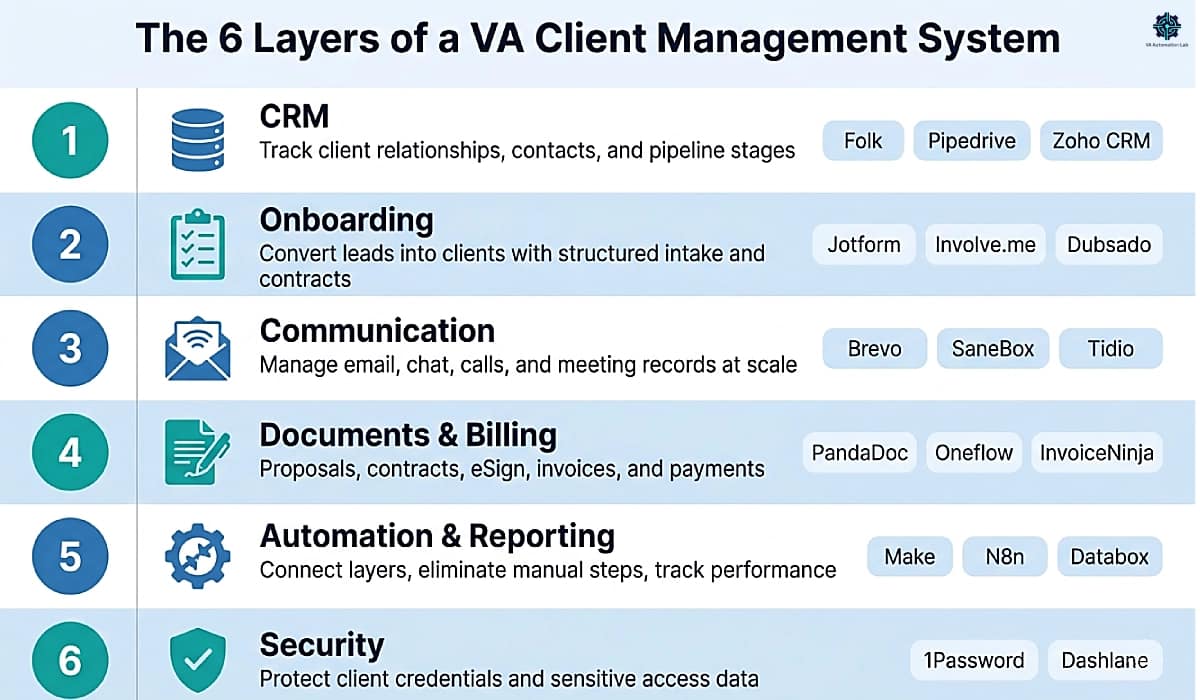
Layer 1 — CRM: Organizes client contacts, relationship history, and pipeline stages.
Layer 2 — Onboarding: Converts leads into active clients through structured intake, contracts, and welcome sequences.
Layer 3 — Communication: Manages email, chat, calls, and meeting records at scale across multiple clients.
Layer 4 — Documents & Billing: Handles proposals, contracts, eSignatures, invoices, and payments.
Layer 5 — Automation & Reporting: Connects layers, eliminates manual data transfer, and tracks client and business performance.
Layer 6 — Security: Protects client credentials, access data, and sensitive information.
The sections that follow cover each layer, the tools that perform best within it, and how to configure each one for a freelance VA practice.
4. CRM Layer: Managing Client Relationships and Pipelines
The CRM layer is the foundation of the entire system. It stores every client’s contact data, tracks the status of each relationship, logs communication history, and gives you a single place to find what you know about a client without opening their email thread.
For freelance VAs, the evaluation criteria are different from enterprise sales teams. A VA’s CRM needs to track ongoing service relationships, not one-time deals, and must remain usable at volume without becoming a full-time data entry job. HubSpot is the default name most people reach for, but its free tier is built around sales-team pipelines and marketing automation, overhead a solo VA managing service retainers doesn’t need and won’t use.
If you want a deeper breakdown of the best tools, features, and use cases, check out this complete guide on Best CRM for Virtual Assistants, where each platform is analyzed in detail based on different workflows and client types.
Folk — Best Relationship-First CRM for Virtual Assistants
Best for: VAs managing ongoing service retainers who need organized relationship context more than a sales pipeline
Folk’s design philosophy maps directly onto how VA client relationships work: long-term, multi-touch service engagements where relationship depth, not deal speed, determines client retention. Folk organizes contacts around communication history, engagement gaps, and relationship strength, rather than deal stage progression.
The Group views let VAs segment clients by retainer type, service category, or engagement level. The email enrichment feature builds out contact profiles from public data without manual entry. The built-in email composer lets you send personalized messages directly from the CRM without switching tools.
Practical use case: create groups for Active Clients, Warm Leads, and Past Clients. Each group shows last interaction date and engagement gaps, a morning review surfaces any relationship that’s gone quiet before the client notices the silence.
Not ideal if: you need robust pipeline automation, revenue forecasting, or deep integration with project management tools. For those use cases, Pipedrive is the stronger choice.
Cost (annual): Standard $24/month (AI assistant, 5k+ integrations). Premium $48/month (API access, Email sequences). 14-day trial available.
Full guide: Folk CRM for Virtual Assistants: Complete Setup Guide
Pipedrive — Best Pipeline CRM for Freelance Virtual Assistants
Best for: VAs actively acquiring new clients and managing a structured sales pipeline alongside existing accounts
Pipedrive’s visual pipeline is the most intuitive deal-stage CRM for solo operators. For VAs running a pipeline from first inquiry through to signed contract, the drag-and-drop board and activity-based reminders prevent any lead from stalling without follow-up action.
The Lite plan at $16/user/month (billed annually) gives solo VAs a functional pipeline, email sync, and a reliable mobile app. The Growth plan ($46/user/month, annual) adds email automation sequences and meeting scheduler, worth considering when follow-up sequences for inbound leads consume more than two hours per week.
Practical use case: create pipeline stages matching your sales cycle — Inquiry → Discovery Call → Proposal Sent → Contract Signed → Active Client → Offboarded. Pipedrive sends an automatic reminder when a deal has been in one stage without activity for a configured number of days, eliminating the most common reason leads go cold.
Not ideal if: you primarily need ongoing relationship management rather than active pipeline tracking. For that use case, Folk‘s model is a better fit.
Cost (annual): Lite $16/month (AI-powered report creation, 500+ integrations). Growth $46/month (email sync, automations). Premium $69/month (lead generation, contracts, e-signatures). Ultimate $92/month (advanced security, partnership discounts). 14-day trial available.
Zoho CRM — Most Feature-Rich Free Option
Best for: VAs who want automation capabilities at zero monthly cost and are comfortable with initial configuration
Zoho CRM’s free plan supports up to three users and includes lead management, basic workflow automation, and a rule-based automation builder, capabilities absent from most free CRM tiers. For a solo VA comfortable with setup overhead, it delivers a full free CRM with automation at no monthly cost.
Practical use case: build a workflow that automatically assigns a follow-up task and sends a template email when a new lead is created. On the free plan, this replaces what would otherwise be a manual two-step process repeated for every inbound inquiry.
Not ideal if: you need fast setup or want a clean interface from day one. Zoho’s configuration depth is its strength and its obstacle, the interface rewards time investment but does not onboard quickly.
Cost (annual): Free (up to 3 users, leads, deals, basic workflows). Standard $16/month (AI agents, reports). Professional $27/month (Email intelligence, widgets). Enterprise $47/month (AI sales assistant, custom functions). Ultimate $61/month (Custom AI/ML, consulting).
CRM Comparison Table
Tool | Free Plan | Starting Paid Price (annual) | Best For |
Folk | ❌ Trial | $24/mo | Ongoing retainer relationships |
Pipedrive | ❌ Trial | $16/mo | Active sales pipeline |
Zoho CRM | ✅ Up to 3 users | $16/mo | Free automation depth |
Recommendation: Choose Folk for ongoing service management. Choose Pipedrive if you’re actively growing your client base. Use Zoho CRM if cost is the binding constraint and you have time to configure it properly.
5. Client Onboarding Layer: Turning Leads into Active Clients
Client onboarding is where a confirmed agreement becomes a working relationship. Without a structured onboarding system, every new client requires a fresh round of manual setup: collecting information by email, sending forms individually, tracking which contract version is current. A structured onboarding layer makes this process identical and automatic for every new client.
Standard VA onboarding flow:
- Intake form submitted by prospect
- Discovery call scheduled automatically
- Scoped proposal sent
- Contract signed via eSign
- Onboarding questionnaire sent (credentials, brand guidelines, preferences)
- Welcome email sequence initiated
- Project workspace created
👉 How to Automate Client Onboarding as a Virtual Assistant — the full step-by-step automation sequence. For the complete comparison of the tools in this category, see Best Contract Tools for Virtual Assistants.
Jotform — Best for Intake Forms
Best for: VAs who need highly customizable intake forms with conditional logic and wide integration support
Jotform is a dedicated form builder that generates intake, questionnaire, and data collection forms with conditional logic, questions that appear or disappear based on previous answers. For VAs whose intake process varies by service type or client category, Jotform handles conditional branching more cleanly than most built-in CRM form tools. It connects natively to hundreds of tools and to Make for more complex automation.
Practical use case: build a single intake form that serves multiple service types. A client selecting “social media management” sees questions about platforms and brand voice. A client selecting “inbox management” sees questions about email volume and priority rules. One form, zero irrelevant questions per client.
Not ideal if: you need interactive, multi-step sequences that adapt dynamically to responses rather than static conditional fields. For that use case, Involve.me produces a higher-quality client experience.
Cost (annual): Free (5 forms, 100 submissions/month). Bronze $34/month (25 forms, 1k submissions). Silver $39/month (50 forms, 2,5k submissions). Gold $99/month (100 forms, 10k submissions).
Full guide: Jotform for Virtual Assistants: Intake & Onboarding
Involve.me — Best for Interactive Client Onboarding
Best for: VAs who want higher-quality data collection through interactive, adaptive onboarding sequences
Involve.me builds multi-step interactive client experiences that go beyond static forms. Onboarding sequences adapt to responses in real time, collecting more structured and accurate information because the next question is informed by the previous answer. The result is a better first impression of the working relationship and more usable intake data for the VA.
For VAs supporting coaching, consulting, or marketing clients, an Involve.me onboarding sequence can replace a lengthy discovery call while capturing more organized data in a fraction of the time.
Practical use case: replace a 60-minute discovery call with a 10-minute interactive onboarding sequence. The sequence adapts to the client’s business type, collects brand guidelines, preferred communication style, and project priorities, and exports structured data directly into the CRM via Make integration.
Not ideal if: you need simple static forms with basic conditional logic. Involve.me’s strength is interactive experience design, using it as a basic form builder underutilizes the platform and overcomplicates what Jotform handles more efficiently.
Cost (annual): Free (50 submissions or 500 visits per month). Starter $29/month (5 live funnels, conditional logic, 30+ integrations). Pro $59/month (15 funnels, remove branding, detailed analytics). Business $129/month (A/B testing, custom CSS, webhooks).
Onboarding Layer Comparison
Tool | Conditional Logic | Integrations | Interactive |
Jotform | ✅ | ✅ Wide | ❌ |
Involve.me | ✅ | ✅ | ✅ Adaptive |
VA Onboarding Checklist (copy-paste ready):
PRE-ONBOARDING
☐ Intake form sent (Jotform or Involve.me)
☐ Discovery call scheduled
☐ Scoped proposal sent (PandaDoc or Dubsado)

ONBOARDING
☐ Contract signed (PandaDoc or Oneflow)
☐ First invoice or deposit sent
☐ Onboarding questionnaire completed
☐ Welcome email sequence triggered
☐ Project workspace created
☐ Access credentials collected via 1Password (never via email)

FIRST 2 WEEKS
☐ Day 3 check-in message sent
☐ Day 10 progress update sent
☐ First deliverable reviewed with client
Stop Collecting Client Info by Email
A conditional intake form replaces the back-and-forth of “wait, what platform do you need help with?” with one form that asks the right questions automatically based on what the client selects.
Jotform is free for up to 5 forms, no setup cost to test it on your next intake.
6. Communication Layer: Managing Client Interactions at Scale
The communication layer handles structured, recurring client interaction: email sequencing, inbox management, chat support, call handling, meeting records, and outreach. It operates differently from one-on-one ad hoc messaging, these are tools that manage communication volume and consistency across multiple clients simultaneously.
Email is still the core of client communication for most virtual assistants. If you’re looking to streamline your inbox and automate responses, this guide on AI Email Management for Virtual Assistants explores the best tools and workflows to reduce manual work.
Brevo — Best for Structured Client Email
Best for: VAs who need to send scheduled, automated email sequences to their own clients, welcome series, project updates, monthly reports
Brevo handles transactional and marketing email from a single platform. Its automation workflows cover multi-step sequences triggered by events (form submission, tag applied, date reached), which makes it the right tool for VAs who need recurring outgoing communication to flow without manual send every time. The free plan at 300 emails/day covers most early-stage VA communication volumes.
Practical use case: set up a 5-email welcome sequence for new clients, Day 1 welcome, Day 3 onboarding reminder, Day 7 first check-in, Day 14 progress update, Day 30 review invitation. Sequence triggers automatically when a new client tag is applied in the CRM via Make.
Not ideal if: you’re managing a client’s full email marketing program with advanced segmentation and behavior triggers. For that scope, ActiveCampaign is the appropriate tool.
Cost (annual): Free (300 emails/day). Starter $8/month (up to 100k emails monthly). Standard $16/month (up to 1M emails monthly). Professional $449/month (up to 10M emails monthly).
SaneBox — Best for Inbox Triage at Volume
Best for: VAs managing multiple inboxes simultaneously who need automated prioritization without manual folder rules
SaneBox filters incoming email across all connected inboxes, surfacing high-priority threads first and deferring everything else to SaneLater automatically. The AI learns which senders require immediate attention and which can be safely batched, without requiring manual configuration per sender.
Practical use case: a VA managing their own inbox plus two client inboxes processes 150+ emails per day. SaneBox reduces active inbox volume by 60–70%, only genuinely urgent threads appear at the top. The rest batch into SaneLater for scheduled review, eliminating constant context switching.
Not ideal if: you manage only one inbox with low daily volume. The time savings compound with inbox count and email volume, at low volume, simpler Gmail filters achieve a comparable result at zero cost.
Cost (annual): Snack $6/month (1 Email account, 2 SaneBox features). Lunch $10/month (2 Email accounts, 6 SaneBox features). Dinner $30/month (4 Email accounts, all SaneBox features). 14 days free trial available.
Full guide: SaneBox for Virtual Assistants: Review & Setup Guide
Tidio — Best for Live Chat and Client Support
Best for: VAs managing customer-facing support for clients who need a chat and AI bot layer on their website or client portal
Tidio provides live chat and an AI-powered chatbot (Lyro at $38/month) for a client’s website. A VA can manage chat queries from the Tidio dashboard across multiple client accounts simultaneously, each account’s chat appears in a unified inbox. Lyro handles common queries automatically and escalates to the VA when the complexity exceeds the bot’s scope.
Practical use case: a VA supporting an e-commerce client installs Tidio on the client’s website. Lyro handles 60–70% of incoming queries (order status, return policy, shipping times) automatically. The VA handles the remaining 30–40% from the Tidio dashboard, without being on the client’s website or logging into their backend.
Not ideal if: your clients don’t have a direct customer-facing component. Tidio adds no value for a VA whose work is entirely back-office or content-based.
Cost (annual): Free (50 billable conversations/month). Starter $28/month (100 conversations). Growth $57/month (up to 2,000 conversations). Plus $870/month (Custom branding, ticketing automations, open API). Lyro AI Agent Integration $38/month. 7 days free trial available.
KrispCall — Best for Multi-Client Call Management
Best for: VAs making or receiving calls on behalf of multiple clients who need separate phone identities per client
KrispCall provides virtual phone lines, local numbers in 100+ countries, allowing a VA to maintain a distinct call identity for each client. Three client accounts means three local numbers, all forwarding to one app, with call logs, recordings, and voicemails organized per number.
Practical use case: a VA supporting a US client and a UK client runs two KrispCall lines, one US local number, one UK local number. Both route to the VA’s single app. Calls to the UK number show the client’s UK presence. Call logs are separated automatically.
Not ideal if: you handle no outbound calls on behalf of clients and your communication is entirely async (email, messaging, chat). For async-only VAs, KrispCall adds no operational benefit.
Cost (annual): Essential $12/month (up to 5 users). Standard $32/month (unlimited users).
Fireflies.ai — Best for Meeting Transcription and Notes
Best for: VAs attending multiple client calls per week who need automatic transcription and action item extraction
Fireflies.ai joins client calls (Google Meet, Zoom, Teams) automatically, transcribes in real time, and produces a post-call summary with tagged action items, speaker attribution, and a searchable archive. For VAs who currently take manual notes during client calls, Fireflies recovers the full cognitive bandwidth that note-taking consumes.
Practical use case: after a 45-minute client strategy call, Fireflies delivers a structured summary within minutes, action items assigned by speaker, key decisions highlighted, and a full transcript available for later reference. The VA sends the summary to the client as a professional follow-up without additional work.
Not ideal if: you attend very few meetings and the per-month cost doesn’t justify the frequency. The free plan’s limited transcription minutes cover occasional use before a paid tier is necessary.
Cost (annual): Free (recording limit 2 hours, 800 min storage). Pro $10/month (8,000 min storage, AI summaries, action items). Business $19/month (video recording, unlimited storage). Enterprise $39/month (Private storage, custom data retention).
ActiveCampaign — Best for Managing Client Email Marketing Programs
Best for: VAs running email marketing on behalf of clients, not for VA-to-client communication
ActiveCampaign’s behavior-triggered automation, multi-step sequences, and advanced segmentation are appropriate when a VA is managing a client’s full email marketing operation. The distinction from Brevo is scope: Brevo handles a VA’s own client communication; ActiveCampaign handles the email marketing programs a VA runs for their clients.
Practical use case: a VA managing marketing for a SaaS client builds a 12-email drip campaign in ActiveCampaign. Contacts are segmented by signup source, email behavior triggers the next step, and a re-engagement sequence fires automatically for contacts who haven’t opened in 30 days, all without the VA touching the sequence after the initial build.
Not ideal if: you only need basic email sequences for your own client communication. Brevo covers that use case at a lower cost and simpler interface.
Cost (annual/1000 contacts): Starter $15/month. Plus $37/month. Pro $79/month. Enterprise $145/month.
Lemlist — Best for Cold Email Outreach
Best for: VAs running lead generation or partnership outreach campaigns on behalf of clients
Lemlist builds personalized cold email sequences with image and text personalization at scale. For VAs managing client outreach, it handles sequence logic, follow-up timing, unsubscribe management, and deliverability settings in one tool.
Practical use case: a VA running partnership outreach for a client sends a 4-step sequence to 200 contacts per week. Each email includes personalized first-name and company-name variables. Lemlist auto-pauses contacts who reply, stopping the sequence immediately when engagement is detected.
Not ideal if: you’re managing warm client communication or newsletters, Lemlist is built for cold outreach, not ongoing relationship email.
Cost (annual): Email Pro $73/month (3 email senders, 200 enrichment credits, 600M+ leads database). Multichannel Expert $101/month (LinkedIn automation, WhatsApp, built-in dialer). 14 days free trial available.
WarmupInbox — Best for Email Deliverability
Best for: VAs managing cold outreach campaigns who need to maintain healthy email sending reputation across multiple client accounts
WarmupInbox keeps email domains and inboxes warm by simulating real email activity, sending and engaging with emails from a network of real mailboxes. For VAs managing new or low-activity email accounts used for outreach, WarmupInbox prevents campaigns from landing in spam before they reach their audience.
Practical use case: a client launches a new sales domain for outbound prospecting. The VA connects it to WarmupInbox for 3–4 weeks before any cold outreach begins. The account builds sending reputation progressively, inbox placement rates are significantly higher from day one of the campaign.
Not ideal if: you manage high-volume warm email communication only (newsletters, transactional). WarmupInbox addresses cold email deliverability, it adds no value for established domains with healthy sending history.
Cost (annual): Basic $15/month (75 warm-up messages/day). Pro $49/month (250 messages/day). Max $79/month (1,000 messages/day).
Timelines AI — Best for WhatsApp Business Management
Best for: VAs managing WhatsApp Business communication on behalf of clients who need CRM integration, automation, and team inbox capabilities in one platform
Timelines AI goes beyond a simple WhatsApp dashboard. It connects WhatsApp Business accounts to CRM platforms (Pipedrive, HubSpot, Zoho CRM, monday.com, Salesforce) and automation tools (Make, Zapier) via native integrations, allowing client conversations to be logged, routed, and responded to within the VA’s existing system. The ChatGPT integration enables AI-assisted responses. The workflow builder handles auto-response rules, message routing, and contact labeling without manual configuration per conversation.
Multiple WhatsApp accounts are managed from a single shared inbox, with the ability to assign conversations to team members, label chats by status or client type, and access the full message history across all accounts.
Practical use case: a VA managing two clients who both use WhatsApp Business for customer support connects both accounts to Timelines AI. Incoming conversations are automatically labeled and assigned by account. Automated responses handle FAQs. The VA routes complex queries to the right client contact without switching between phone apps or accounts. CRM records in Pipedrive update when a conversation closes.
Not ideal if: your clients don’t use WhatsApp Business as a customer communication channel, or if they operate exclusively through email and live chat. At $25/month minimum, the tool adds no value for VA practices without a WhatsApp component.
Cost (annual): CRM Integration $25/month (API + Webhooks, auto-response and AI). Shared Inbox $40/month (unlimited chat history access). Mass Messaging $60/month (2,000 mass messaging credits per seat). 10 days free trial available.
Moosend — Best for Client Newsletter Programs
Best for: VAs managing client newsletter programs who need reliable email deliverability, automation, and cost-effective pricing
Moosend covers the full newsletter operation: list management, automation sequences, landing pages for subscriber capture, and detailed campaign analytics. Its pricing ($7/month for 500 contacts) is significantly more accessible than Mailchimp and ActiveCampaign at comparable send volumes, the right choice when a VA is managing a client’s newsletter as a deliverable and needs a tool the client can afford long-term.
Practical use case: a VA sets up a monthly newsletter system for a consultant client, a subscribe landing page, a 3-email welcome sequence for new subscribers, and a monthly broadcast template. The VA manages content and scheduling; the client sees their subscriber list grow and engagement reports without accessing the tool directly.
Not ideal if: you need highly sophisticated behavioral automation (cart abandonment, deep segmentation, predictive sending). For advanced email marketing automation, ActiveCampaign is the stronger platform. Moosend’s strength is reliable newsletter delivery at a competitive price, not complex logic.
Cost (annual): Pro $7/month (500 contacts). 30 days free trial available.
Communication Layer Comparison
Tool | Function | Free Plan | Starting Price (annual) |
Brevo | Email sequences | ✅ 300/day | $8/mo |
ActiveCampaign | Email marketing automation | ❌ Trial | $15/mo (1k contacts) |
SaneBox | Inbox triage | ❌ Trial | $6/mo |
Moosend | Newsletter programs | ❌ 30-day trial | $7/mo (500 contacts) |
Tidio | Live chat + AI bot | ✅ Limited | $28/mo |
KrispCall | Virtual phone lines | ❌ | $12/mo |
Fireflies.ai | Meeting transcription | ✅ Limited | $10/mo |
Lemlist | Cold email outreach | ❌ Trial | $73/mo |
WarmupInbox | Email deliverability | ❌ | $15/mo |
Timelines AI | WhatsApp management | ❌ Trial | $25/mo |
7. Documents & Billing Layer: Contracts, Proposals, and Payments
The documents and billing layer handles the professional back-end of every client relationship: proposals, contracts, eSignatures, invoices, and payment collection. VAs using an all-in-one platform like Dubsado Premier already have this layer covered, a dedicated document tool adds value when a standalone setup is preferred or the all-in-one’s document capabilities don’t cover the required use case.
Managing contracts, invoices, and client communication becomes even more powerful when combined with AI-driven workflows. If you want to see how to handle multiple clients more efficiently, this guide on How to Manage Multiple Clients as a Virtual Assistant Using AI breaks down a complete system you can implement step by step.
PandaDoc — Best for Proposals and Contracts
Best for: VAs who need professional proposal and contract creation with eSign, document tracking, and template-driven workflows
PandaDoc covers the full document lifecycle: proposal creation from branded templates, contract generation with variable fields, electronic signature collection, and real-time tracking of who opened each document and when. The template library is where VAs recover most time, one proposal template, one service agreement template, one NDA. Each new client gets a populated version of the template in under five minutes.
Practical use case: a VA receives a confirmed inquiry on Monday. By Monday afternoon, a branded proposal with the client’s name, selected service package, and pricing is sent via PandaDoc. The VA sees when the prospect opens the document and can time their follow-up precisely. The signed contract is returned the same day. Total time spent on paperwork: under 10 minutes.
Not ideal if: you need live contract negotiation with back-and-forth edits before signing.
Cost (annual): Free (60 docs/year, 5 eSignatures/month). Starter $19/month (unlimited uploads and eSignatures). Business $49/month (CRM integrations, custom branding, approval workflows). 14 days free trial available.
Full guide: PandaDoc for Virtual Assistants: Contracts & Onboarding
InvoiceNinja — Best for Invoicing
Best for: VAs who need professional invoicing with time tracking, recurring billing, and client portals without an all-in-one subscription
InvoiceNinja handles the complete billing workflow: branded invoice creation, time tracking conversion into invoice line items, recurring invoice automation for retainer clients, client portals where clients view and pay directly, and multi-currency support. The self-hosted version is entirely free and fully featured, the right choice for any VA comfortable with a one-time installation. The Pro cloud-hosted plan covers those who want managed hosting.
Practical use case: set up one recurring invoice template per active retainer client. InvoiceNinja sends the invoice automatically on the configured billing cycle, emails a payment reminder at 7 days overdue, and marks it paid when the client settles, without any manual intervention after initial setup. A VA with six retainer clients automates six monthly invoicing cycles from a single configuration session.
Not ideal if: you’re already using Dubsado Premier, its built-in invoicing covers standard VA billing needs. A separate invoicing tool adds cost and complexity without incremental benefit when the all-in-one already handles it.
Cost (annual): Free (5 clients). NinjaPro $12/month (unlimited clients). Enterprise $15/month (up to 100 users).
Documents & Billing Layer Comparison
Tool | Proposals | Contracts | eSign | Invoicing | Time Tracking |
PandaDoc | ✅ | ✅ | ✅ | ❌ | ❌ |
InvoiceNinja | ❌ | ❌ | ❌ | ✅ | ✅ |
Send Professional VA Contracts in Under 5 Minutes
PandaDoc lets you build reusable proposal and contract templates, send for eSign, and track exactly when clients open each document.
The free plan covers up to 60 documents per year; the Starter plan ($19/month) unlocks unlimited documents and eSignatures.
No more chasing signatures through email.
8. Automation & Reporting Layer: Connecting and Scaling Your System
The automation layer is what transforms a collection of individual tools into a functioning system. Without it, information doesn’t flow between layers: an intake form submission doesn’t create a CRM record, a signed contract doesn’t trigger an invoice, a paid invoice doesn’t update the project status. Automation closes those gaps, a trigger in one tool initiates an action in another, without manual intervention.
The reporting sub-layer provides visibility into how the system is performing: client activity, deliverable status, email metrics, and social media performance for VAs managing content on behalf of clients.
Client reporting is one of the most time-consuming tasks for virtual assistants. If you want to automate dashboards, reports, and data collection, this guide on How to Automate Client Reporting as a Virtual Assistant shows exactly how to set it up.
Make — Best Automation Platform
Best for: VAs connecting 3+ tools and building multi-step client management workflows without code
Make’s visual scenario builder makes complex automation accessible without technical knowledge. Scenarios are built by connecting modules (each representing an action in a specific tool) on a visual canvas, setting trigger conditions, transforming data, and routing it to the right destination.
The free tier at 1,000 credits/month handles most early VA automation workflows. The Core plan ($9/month, annual) provides unlimited active scenarios, ideal for a VA managing 5–8 active clients with multiple concurrent automations.
Practical use case: four automations cover the majority of a VA’s recurring manual data transfer. Build these first, in order:
Automation 1 — New Client Intake → CRM + Workspace
Trigger: New Jotform or Involve.me submission
→ Create Folk or Pipedrive contact + deal
→ Create Google Drive folder [Client Name — Year]
→ Send welcome email via Brevo
→ Create Dubsado client record
Automation 2 — Contract Signed → Onboarding Sequence
Trigger: PandaDoc document signed
→ Update Pipedrive deal stage → Active Client
→ Create project workspace (Notion or ClickUp)
→ Add to ActiveCampaign onboarding sequence
→ Send Slack notification: New client onboarded
Automation 3 — Invoice Paid → Status Update
Trigger: InvoiceNinja invoice marked paid
→ Update Pipedrive deal → Payment Received
→ Update Dubsado project status
→ Send client thank-you email via Brevo
→ Log to Google Sheets billing tracker
Automation 4 — Weekly Report Trigger
Trigger: Every Monday 8:00 AM
→ Pull last week's time data from Toggl Track
→ Format into client report
→ Send via Brevo with PDF attachment
→ Log delivery in Databox
Not ideal if: you only need simple one-step automations between two tools. For basic single-trigger workflows, Pabbly Connect‘s one-time pricing model is more cost-effective. Make’s value justifies its cost at the point where multi-step, multi-tool workflows become the norm.
Cost (annual): Free (1,000 credits/month, 15-min minimum interval). Core $9/month (unlimited active scenarios, scheduled runs, increased data transfer). Pro $16/month (priority execution, custom variables). Teams $29/month (team roles, shared templates).
Full guide: Make for Virtual Assistants: The Beginner Setup Guide
n8n — Advanced Automation Alternative
Best for: Technically capable VAs who need complex conditional workflows or want enterprise-grade automation at near-zero cost
N8n’s node-based structure supports advanced conditional logic, loops, and data transformation beyond what Make’s standard plans handle. For VAs with a technical background, n8n is the most powerful automation option in the category.
Practical use case: a VA builds a workflow that processes incoming client project briefs, extracts structured data fields via an AI node, creates a task structure in ClickUp, sends a confirmation email, and logs the project to a Google Sheet, all in a single scenario with conditional branching based on project type.
Not ideal if: you’re new to automation or want a visual, guided builder that produces results in the first session. N8n’s interface assumes comfort with workflow logic. Start with Make and consider N8n only after you’ve built and maintained several Make scenarios.
Cost (annual): Starter $23/month (2,500 executions, 1 shared project, unlimited users). Pro $58/month (10,000 executions, 3 projects, workflow history, global variables). 14 days free trial available.
Full guide: n8n for Virtual Assistants: Complete Guide, AI Workflows & Automation
Pabbly Connect — Low-Cost Automation Alternative
Best for: VAs who need a budget-friendly automation platform with a functional free tier and unlimited multi-step workflows from entry level
Pabbly Connect’s pricing model is straightforward: a free plan with 100 tasks/month covering unlimited workflows, multi-step automations, formatters, routers, and filters, features that are locked behind paid tiers on competing platforms. The Standard plan at $16/month provides 10,000 tasks/month, which covers most intermediate VA automation volumes. Unlike Make, which charges per operation, Pabbly counts only trigger events as tasks, internal operations within a workflow don’t consume quota.
Practical use case: a VA on a budget sets up three automations on Pabbly’s free plan: new form submission → CRM contact creation, invoice sent → Slack notification, and new CRM contact → welcome email trigger. All three run within the 100 free tasks/month. When client volume grows, upgrading to $16/month for 10,000 tasks covers a full intermediate VA workflow.
Not ideal if: you need advanced data transformation, AI-powered nodes, or priority execution for time-sensitive workflows. Make’s visual builder and logic depth are stronger for complex multi-branch scenarios. Pabbly’s free and Standard plans are the right choice when cost is the binding constraint and workflow complexity is moderate.
Cost (annual): Free (100 tasks/month, unlimited workflows). Standard $16/month (10,000 tasks). Unlimited $69/month.
Rytr — AI Writing for Client Reports and Communication
Best for: VAs producing recurring client-facing written content who need AI drafting assistance integrated within the automation workflow
Rytr is an AI writing tool that connects to Make and Zapier as an automation step, allowing it to generate first-draft written content triggered by data inputs, for example, drafting a weekly client report from logged time entries before the report is sent automatically.
Practical use case: a Make workflow runs every Monday morning: pulls last week’s time data from Toggl Track, passes the structured data to Rytr which generates a formatted weekly summary, then Brevo delivers the report to the client. The VA reviews and approves in under 5 minutes. Without Rytr, the drafting step alone takes 20–30 minutes per client per week.
Not ideal if: you need deep, context-specific writing that requires nuanced knowledge of a client’s business. Rytr produces competent first drafts for structured formats (reports, update emails, proposal sections), it does not replace strategic or nuanced client communication.
Cost (annual): Free (10k chars/month). Unlimited $7.5/month (unlimited generation, 1 tone match). Premium $24/month (multiple tone match, 100 plagiarism checks/month).
Full guide: Rytr for Virtual Assistants: Complete Guide, Features, Use Cases & AI Writing Workflows
Buffer — Best for Simple Multi-Client Social Scheduling
Best for: VAs managing social media accounts for 1–3 clients who need clean, straightforward scheduling without unnecessary complexity
Buffer is the simplest social media scheduling tool for multi-client management. VAs can manage multiple client social accounts from one dashboard, schedule posts across platforms, and pull basic analytics reports. The interface is fast to learn and produces results in the first session.
Practical use case: a VA managing social for two clients schedules a week of posts for both accounts on Monday morning. Buffer queues the posts, delivers them at optimal times, and sends a basic engagement summary at week end, without the VA logging into any client’s social account directly.
Not ideal if: you manage clients with high-volume content calendars that include recycled evergreen content. For that use case, SocialBee‘s category queue system is more efficient.
Cost (annual): Free (3 channels, 10 scheduled posts/channel, 1 user, basic analytics). Essential $5/month (unlimited posts, advanced analytics, hashtag manager). Teams $10/month (unlimited team members, content approval workflows). 14-day free trial available.
SocialBee — Best for Category-Based Content Scheduling
Best for: VAs managing clients with structured content calendars who need content recycling, category queues, and deeper analytics
SocialBee adds category-based scheduling and content recycling to the social management workflow. Content is organized by category (educational, promotional, curated, evergreen) and queued to post in rotation, keeping channels active without requiring daily manual scheduling.
Practical use case: a VA sets up a SocialBee queue for a client with 40 evergreen posts in 4 categories. Each category posts at defined slots throughout the week. When a post has been used, it cycles back to the bottom of the queue. The client’s social presence stays consistent without the VA creating new content every week.
Not ideal if: you manage clients who primarily post time-sensitive or news-based content that can’t be recycled. Category queues add the most value for evergreen content strategies, for high-frequency original posting, Buffer‘s simpler scheduling is sufficient.
Cost (annual): Bootstrap $24/month (5 social profiles, 1 workspace, 10 categories). Accelerate $40/month (10 profiles, advanced analytics, bulk editor, CSV uploads). Pro $82/month (25 profiles, 5 workspaces, 3 users, export analytics). 14-day free trial available.
Full guide: SocialBee for Virtual Assistants: Review, Setup & Workflows
Later — Best for Visual Multi-Platform Social Scheduling
Best for: VAs managing social media for visually-focused clients across multiple platforms who need a visual content calendar, collaboration tools, and platform analytics
Later is a full multi-platform social media scheduling tool covering Instagram, TikTok, Facebook, Twitter/X, LinkedIn, Pinterest, and YouTube from a single dashboard. Its visual content calendar, drag-and-drop post scheduling, and AI content tools make it the strongest option for VAs managing content-heavy client accounts. The link-in-bio tool (Linkin.bio) converts any profile link into a clickable landing page, useful for clients who need to track traffic from social posts.
The Growth and Scale plans add collaboration features (internal approvals, external client review workflows, custom roles) that allow a VA to submit content for client approval before publishing, all within the platform, without email attachment chains.
Practical use case: a VA manages social media for two clients across four platforms each. Later’s visual calendar shows the full posting schedule for all accounts in a single view. The VA drafts posts using Later’s AI content tools, submits them for client review via the approval workflow, and schedules approved content in batches, eliminating daily manual publishing and reducing client feedback cycles to in-platform comments.
Not ideal if: your clients primarily need text-heavy content strategies on LinkedIn or Twitter, where scheduling depth matters more than visual planning. For pure scheduling without the visual layer, Buffer‘s simpler interface may be more efficient at a lower price point.
Cost (annual): Starter $19/month (1 social set, 30 posts/profile). Growth $37.50/month (2 social sets, collaboration features). Scale $82.50/month (6 social sets). 14-day free trial available.
Databox — Best for Client Performance Dashboards
Best for: VAs managing multiple clients who need a single dashboard showing performance metrics across all accounts
Databox pulls data from across the VA’s tool stack (CRM pipeline, time tracked, invoices paid, email open rates, social performance) and displays it in customizable dashboards. The free plan (3 data sources) covers a solo VA’s own business metrics. Paid tiers connect additional sources for client-facing reporting.
Practical use case: a VA builds a Databox dashboard for each client showing: tasks completed, hours logged, emails sent, and social engagement for the week. The dashboard auto-updates and is shared with the client as a live link, eliminating manual weekly report assembly.
Not ideal if: you manage clients without measurable, data-driven deliverables (e.g., admin-only retainers). Databox’s value is data visualization, if there’s no structured data to pull, the tool has no applicable use case.
Cost (annual): Free (3 data sources, daily data refresh, 1 dashboard, 3 users). Pro $159/month (AI Analyst, hourly refresh, unlimited dashboards, reports, goals). Growth $399/month (datasets, raw data export, forecast modeling, anomaly detection). Premium $799/month (50 data sources, reporting specialist, advanced security, fiscal calendar).
Metricool — Best for Social and Content Analytics Reporting
Best for: VAs with social media or content marketing deliverables who need client-ready reports without manual data assembly
Metricool aggregates social media, website, and advertising data into automated client-facing reports. White-label PDF reports export with the VA’s or client’s branding, useful for VAs who bill social media management as a retainer service and need professional monthly reporting as part of the deliverable.
Practical use case: at the end of each month, a VA triggers a Metricool report export for each social media client. The report pulls from all connected platforms, formats the data into a branded PDF, and is sent to the client, replacing 2–3 hours of manual report assembly per client per month.
Not ideal if: your clients don’t need social or content performance reporting, or if they already have analytics tools in place that produce adequate reports internally.
Cost (annual): Free (1 brand, 20 posts/month, 30-day analytics). Starter $20/month (10 brands, unlimited publishing, PDF/PPT reports, LinkedIn, unlimited analytics history). Advanced $53/month (50 brands, team management, post approval, custom report templates).
TextExpander — Snippet Library for Consistent Client Communication
Best for: VAs who send high volumes of similar client communication and need standardized text snippets across all their tools
TextExpander stores reusable text snippets (contract clauses, standard email responses, SOP steps, proposal sections) that expand with a short abbreviation in any application. For VAs managing multiple clients with similar but distinct communication needs, a snippet library eliminates copy-paste overhead and the risk of sending one client’s boilerplate to another.
Practical use case: a VA types ;followup and TextExpander expands it into a full personalized follow-up email template with placeholder fields for the client name, deliverable, and deadline. Across 20 recurring communications per day, snippet expansion saves 10–15 minutes of repetitive typing and formatting.
Not ideal if: you send low volumes of communication or your client interactions are highly varied and non-repeatable. TextExpander’s value compounds with volume and repetition, at low frequency, native clipboard managers or saved Gmail templates achieve a comparable result at zero cost.
Cost (annual): Individual $3/month. Business $8/month. Growth $11/month. 30 days free trial available.
Full guide: TextExpander for Virtual Assistants: Complete Guide to Templates, Snippets & Productivity Workflows
Automation & Reporting Layer Comparison
Tool | Category | Free Plan | Starting Price |
Make | Automation | ✅ 1,000 credits/mo | $9/mo |
n8n | Automation | ❌ Trial | $23/mo |
Pabbly Connect | Automation | ✅ Limited | $16/mo |
Rytr | AI writing | ✅ 10K chars | $7.5/mo |
Buffer | Social scheduling | ✅ 3 channels | $5/mo |
SocialBee | Social scheduling | ❌ Trial | $24/mo |
Later | Social scheduling | ❌ Trial | $19/mo |
Databox | Reporting | ✅ 3 sources | $159/mo |
Metricool | Social analytics | ✅ 1 brand | $20/mo |
TextExpander | Text snippets | ❌ Trial | $3/mo |
Automation is what turns a basic setup into a scalable system. If you want to go deeper, this complete guide on Automation for Virtual Assistants covers tools, workflows, and real use cases in detail.
Connect Your Entire VA Stack with Make
Make‘s visual automation builder connects your CRM, onboarding tools, email platform, and billing system without code.
The free plan covers 1,000 credits/month, enough to run three to four fully automated client workflows simultaneously before needing to upgrade.
9. Security Layer: Protecting Client Data and Access
Security is the most consistently overlooked layer in a VA client management stack, and the highest-risk gap. A VA managing multiple client accounts simultaneously holds credentials for several businesses in a single practice. One compromised password creates cascading access across every connected account.
The security layer addresses this through credential management, vault isolation, and data handling protocols.
1Password — Best Credential Manager for VA Operations
Best for: Every VA managing login credentials for more than one client account
1Password stores credentials in encrypted vaults with end-to-end encryption and a zero-knowledge architecture, meaning 1Password itself cannot access vault contents. The Team plan allows separate vaults per client, so credentials for Client A are never visible when working in Client B’s vault. Specific vault items can be shared with clients or contractors without exposing the full vault.
Practical use case: a VA creates one vault per client in 1Password. Client A’s social media passwords, CRM access, and tool logins live in Vault A. Client B’s in Vault B. When the VA offboards Client A, they revoke access to Vault A in one step, without any risk of accidentally retaining or exposing Client A’s credentials. Onboarding a new client takes 10 minutes: create a vault, add a shared item for the client to contribute their credentials, and all access is organized from day one.
Not ideal if: you manage only one client with very few tools. At that scale, the cost and setup overhead may not be proportionate to the benefit. As client count grows past two, the risk calculus changes immediately.
Cost (annual): Individual $3/month. Business $9/month (SSO integrations, advanced permissions). Families $4.50/month (up to 5 members). Team Starter Pack $25/month (up to 10 users). 14 days free trial available.
Dashlane and LastPass are the two names that come up most alongside 1Password. Dashlane adds a built-in VPN, useful mainly for VAs working from shared networks, but its business tiers run $4–$8/user/month — more than 1Password for a feature most VAs logging in from a home office will never touch. LastPass covers basic shared-folder access at a lower entry price, but its history of security incidents makes it a harder recommendation for a VA holding credentials across multiple client businesses.
Zoho Vault is worth a look if you’re already inside the Zoho ecosystem — its free plan covers unlimited passwords with audit trails, and Standard at $0.90/user/month adds secure sharing and one-time links with third parties, the client-facing features most free password managers skip.
For the full breakdown — which 1Password plan to buy, how to structure a vault per client, the four ways a client can grant you access, and how to offboard cleanly — see 1Password for Virtual Assistants: Manage Client Logins.
Three non-negotiable security practices for VAs:
- Authenticator app for 2FA on every client account — use Google Authenticator or Authy, not SMS-based 2FA (SMS is vulnerable to SIM-swapping attacks).
- Dedicated VA business email as account anchor — never use a personal email as the recovery address for client platforms.
- Offboarding protocol within 48 hours — when a client relationship ends, remove VA access from every connected tool and update all shared credentials in 1Password before closing the project.
10. All-in-One Client Management Platforms for Virtual Assistants
All-in-one platforms consolidate the CRM, onboarding, document, and billing layers into a single tool, eliminating the data transfer overhead that accumulates when these layers operate separately. For VAs whose primary client operations are service-delivery relationships rather than high-volume sales pipelines, an all-in-one often replaces the need for four or five separate tools.
The tradeoff: individual layers in an all-in-one are less configurable than best-in-class single-purpose tools. Use an all-in-one when operational simplicity and workflow automation matter more than maximum feature depth in each layer.
HoneyBook and Plutio cover similar ground, intake, contracts, invoicing, and client portals in one workspace, and are worth knowing about if you’ve researched this category before. Dubsado and Bonsai are the two compared below because they map most directly onto the freelance-VA workflow and price point covered in this guide.
Dubsado — Best All-in-One for VA Business Operations
Best for: Established freelance VAs ready to systemize their entire client workflow, from lead capture to offboarding, in a single platform
Dubsado covers the full client workflow in one environment: intake forms, proposals, contracts, scheduling, invoicing, payment collection, branded client portals, and automated workflow sequences. The Premier plan’s automation is where the platform delivers its real value, a workflow triggered by a form submission can send a welcome email, assign a setup task, send a contract, trigger a deposit invoice, and log the project, all without any manual step after the initial configuration.
What distinguishes Dubsado for freelance VAs:
- Client portals — branded workspace where clients access contracts, invoices, and project documents
- Canned emails — saved email templates that populate automatically at each workflow trigger
- Scheduler — booking integrated with Google Calendar, includable in onboarding workflows
- QuickBooks and Xero integration — billing records sync to accounting tools without manual export
- Lead capture forms — embeddable forms that create contact records and trigger onboarding workflows on submission
Practical use case: a VA onboards three new clients in a single week. Each submits the lead capture form on Monday. By Tuesday, all three have received a scoped proposal, signed a contract, paid a deposit, and been added to the project dashboard, without the VA sending a single manual email or creating a single manual record. Total VA time per client: under 10 minutes.
Not ideal if: you’re in the first 6 months of your VA practice with fewer than three regular clients. The setup investment in Dubsado (building forms, workflow sequences, and templates) requires a client volume that justifies the time. Bonsai‘s faster setup is a better starting point at that stage.
Cost (annual): Starter $28/month (unlimited clients, invoicing, forms, email templates). Premier $44/month (scheduling, automated workflows, public proposals, Zapier integration). 21 days free trial available (full Premier access).
⚠️ Starter plan excludes automated workflows and the scheduler, the two features that justify Dubsado for a busy VA. Premier is the plan worth evaluating.
Full guide: Dubsado for Virtual Assistants: Review & Setup Guide
Bonsai — Best for Freelancers Starting Out
Best for: VAs in their first year, managing 1–4 clients, who want clean all-in-one functionality at a lower entry price and faster setup
Bonsai covers proposals, contracts, time tracking, invoicing, and project tracking in a clean interface with a faster initial setup than Dubsado. A new VA can have professional contracts and branded invoices operational within a few hours. The tradeoff is automation depth: Bonsai does not offer the workflow automation that Dubsado Premier provides.
Practical use case: a VA signs their first two clients in the same week. Within an afternoon, they have Bonsai configured with a service agreement template, a branded invoice, and a project board for each client. The setup overhead is minimal, Bonsai’s onboarding is guided, not self-configured.
Not ideal if: you’re managing 4+ active clients simultaneously, or if onboarding new clients is a recurring time cost you need to automate. At that volume, Dubsado Premier’s workflow automation pays back its higher cost within the first month.
Cost (annual): Basic $9/month (time tracking, CRM, unlimited projects/clients). Essentials $19/month (invoicing, proposals, contracts, forms, scheduling, client portal). Premium $29/month (project insights, Gantt, deals pipeline, integrations with QuickBooks/Zapier/Calendly). Elite $49/month (custom permissions, Xero integration). 7 days free trial available.
All-in-One Platforms Comparison
Tool | CRM | Contracts | Invoicing | Automation | Starting Price |
Dubsado | ✅ | ✅ | ✅ | ✅ Premier | $28/mo |
Bonsai | ✅ | ✅ | ✅ | Limited | $9/mo |
Decision rule: Start with Bonsai Basic ($9/month) if you need CRM and project tracking only, then upgrade to Essentials ($19/month) when you need invoicing and contracts. Switch to Dubsado Premier when onboarding a new client takes more than 30 minutes of manual work, the automation workflows pay back the higher monthly cost within the first month of use.
Run Your Entire VA Business from One Platform
Dubsado handles client intake, contracts, invoicing, scheduling, and automated workflows in a single workspace, so you stop re-entering data between tools and start delivering consistently.
The 21-day free trial gives you full Premier access.
11. How to Build a Client Management System (Step-by-Step)
Building a client management system is a layering process, not a one-time setup. Each step adds one functional layer, with the previous layer stable before the next is added.
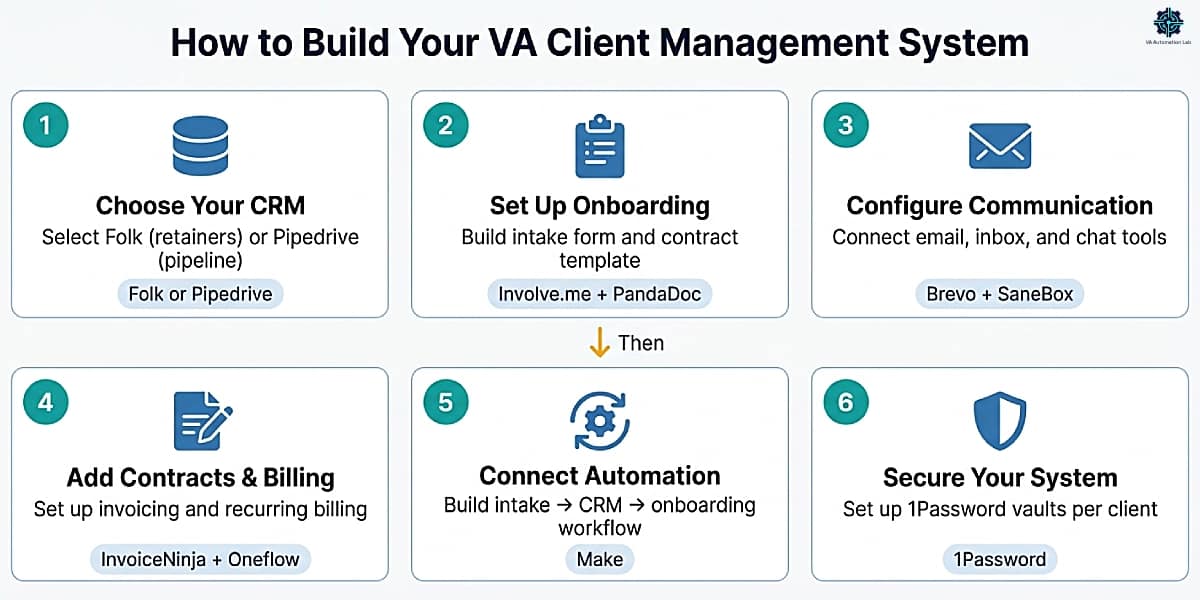
Step 1: Choose Your CRM
Step 2: Set Up Onboarding
Build one intake form (Jotform or Involve.me) and one contract template (PandaDoc or Dubsado). Run one real client through the new flow before automating it. Document every step before connecting automation.
Time to first useful output: 4–6 hours.
Step 3: Configure Communication Tools
Connect Brevo to the CRM for outgoing email sequences. Set up SaneBox on your primary inbox. Add Tidio to any client-facing website you manage. Install Fireflies.ai for meeting recording.
Time to first useful output: 2–4 hours.
Step 4: Add Contracts and Billing
Set up InvoiceNinja with one recurring invoice template per active retainer client. Configure PandaDoc with your service agreement and NDA templates. Test the full flow — proposal → contract → invoice — with one real client before deploying broadly.
Time to first useful output: 3–5 hours.
Step 5: Connect Automation
Build the three most valuable Make workflows first: new client intake → CRM, contract signed → onboarding sequence, invoice paid → status update. Add one workflow per week after the first three are stable.
Time to first useful output: 2 hours per workflow.
Step 6: Secure Your System
Set up 1Password with one vault per client. Migrate all stored credentials from browser saved passwords or spreadsheets. Enable authenticator-app 2FA on every client account. Document the offboarding credential protocol.
Time to first useful output: 3–4 hours (one-time).
A client management system starts before the contract is signed — the acquisition stage is where the pipeline is built, and our complete guide to How to Get Clients as a Virtual Assistant Using AI covers the five stages that feed everything below.
12. Example Client Management System for Virtual Assistants
To make this concrete, here’s what a fully implemented client management system for virtual assistants looks like in practice:
- CRM: Folk — manage client relationships, track interactions, and organize contacts by engagement type
- Onboarding: Involve.me + Dubsado — collect structured client data and trigger automated onboarding workflows
- Contracts & Proposals: PandaDoc — send proposals, contracts, and collect eSignatures from branded templates
- Billing: InvoiceNinja — create invoices, track payments, and manage recurring retainer billing
- Communication: Brevo + SaneBox — manage outgoing client email sequences and triage incoming inbox at volume
- Automation: Make — connect all tools and automate the intake → CRM → onboarding → billing workflow
- Reporting: Databox — track pipeline, payment, and deliverable performance across all clients
- Security: 1Password — securely store client credentials in isolated per-client vaults
This stack ensures every stage of the client lifecycle, from first contact to long-term retention, is handled systematically, without relying on manual processes at each transition.
You don’t need to implement everything at once. Start with a CRM and invoicing, then layer automation as your client load increases. The system compounds: each layer added reduces the manual overhead in the layers below it.
👉 Productivity Systems for Virtual Assistants: The Complete Guide — covers the broader framework.
13. How Much Does a Client Management System Cost?
Setup | Tools Included | Monthly Cost |
Basic (1–3 clients) | Zoho CRM (free), Jotform (free), PandaDoc (free), Brevo (free), 1Password (Individual $3) | $3/month |
Standard (3–6 clients) | Folk (Standard $24) or Pipedrive (Lite $16), PandaDoc (Starter $19), InvoiceNinja (NinjaPro $12), Make (Core $9), Brevo (Starter $8), SaneBox (Snack $6), 1Password (Business $8) | < $90/month |
Advanced (6+ clients) | Dubsado (Premier $44), Folk (Premium $48) or Pipedrive (Growth $46), Make (Pro $16), PandaDoc (Starter $19), Brevo (Standard $16), SaneBox (Snack $6), KrispCall (Essential $12), DataBox (free) ,1Password (Business $8) | < $170/month |
The ROI calculation at Advanced level: At first, a full client management system may seem expensive. In reality, it quickly pays for itself. A $170/month tool stack that recovers 6–8 hours of administrative work per month pays for itself in the first hours of recovered billable time. The real cost isn’t the tools. It’s managing clients without a system.
The Basic setup runs on free tiers almost entirely, the only recurring cost is 1Password, which is the one layer that should not be deferred regardless of client volume.
14. Which Client Management System Should You Choose?
Choosing the right client management system for virtual assistants depends on your current stage, workload, and how much time you’re spending on repetitive tasks.
If you’re just starting out (1–3 clients):
Start simple. Use a free or low-cost setup that helps you look professional without adding complexity.
Your goal at this stage is not automation, it’s clarity and organization.
If you’re managing multiple clients (3–6 clients):
At this stage, your workload increases and manual processes start to slow you down.
- CRM: Folk or Pipedrive
- Contracts: PandaDoc
- Billing: InvoiceNinja
- Communication: Brevo (+ SaneBox for inbox management)
This setup gives you clear separation between layers, making your system easier to manage and scale.
If you’re scaling your VA business (6+ clients):
Once you reach this level, efficiency becomes critical. Repeating the same onboarding, follow-ups, and admin tasks manually is no longer sustainable.
- Core system: Dubsado
- Communication: Brevo (optional tools depending on your workflow)
- Reporting: Databox (start with the free plan)
Dubsado replaces multiple tools and automates key workflows, saving hours every month that can be reinvested into higher-value work or additional clients.
If you’re overwhelmed by repetitive tasks:
No matter your stage, this is the signal that you need automation.
Add Make to your stack to connect your tools and automate transitions between layers:
- send invoices after contracts are signed
- trigger onboarding emails from form submissions
- update your CRM when payments are received
Even simple automations can eliminate hours of manual work each month.
The highest-performing setup, in most cases, combines:
- A CRM (Folk or Pipedrive)
- An all-in-one system (Dubsado)
- An automation layer (Make)
This combination gives you structure, scalability, and time savings, without unnecessary complexity.
Every additional tool should solve a specific, measurable problem, not just add more features.
Client management is one piece of the stack. For a side-by-side view of every category, CRM, automation, scheduling, writing, and more, see the full Best Tools for Virtual Assistants in 2026: The Complete Comparison Guide.

15. Conclusion
A client management system is an operational decision. The technology is the implementation. VAs who build the system early, before the client volume makes it painful not to have one, are the VAs who scale their practice without scaling the hours proportionally.
The architecture is consistent across every stage: start with a CRM and professional documents, add an all-in-one platform when onboarding overhead becomes measurable, connect the automation layer when manual data transfer starts consuming billable time, and add reporting and security as the practice grows.
The tools exist. The stack is documented. The first implementation takes an afternoon. What remains is the decision to start (with one layer, one tool, one workflow) and the patience to let the first results determine the next step.
For tools and guides covering the other operational areas of your VA business — automation workflows, productivity systems, AI tools, and comparisons — the VA resource hub organizes everything by category and skill level in one place.
Start With the One Layer Every System Needs First
Every client management system in this guide starts at the same place: a CRM that actually tracks the relationship, not just the contact.
Folk organizes your clients by engagement and retainer type from day one, so the rest of the stack has something solid to connect to.
14-day trial, no credit card required.
Frequently Asked Questions About Client Management Systems for Virtual Assistants
What is the best client management system for virtual assistants?
The best system depends on your current client volume. For 1–3 clients: Zoho CRM free + PandaDoc Free + InvoiceNinja Free + 1Password (Individual $3/month) delivers a professional foundation at just $3/month. For 3–6 clients: Dubsado Premier ($44/month) consolidates the workflow into one platform with automation. For 6+ clients: a multi-tool stack combining Pipedrive ($46/month), Dubsado Premier ($44/month), and Make ($9–16/month) covers the full operation at approximately $170/month depending on which additional layers you need. The right choice is the one that addresses your current bottleneck, not the most feature-complete option available.
What is the best CRM for freelance virtual assistants?
For VAs managing ongoing service retainers: Folk‘s relationship-first model organizes contacts around communication history and engagement gaps, the most natural fit for a service-delivery practice. For VAs actively building a client pipeline: Pipedrive‘s visual deal board and activity reminders prevent leads from stalling, and the Lite plan at $16/month (annual) is the most cost-effective paid entry point. For a free option with automation: Zoho CRM‘s free plan (up to 3 users) is the only tool in this group that includes workflow automation at zero cost. Full comparison: Best CRM for Virtual Assistants.
What are the best client onboarding tools for virtual assistants?
For intake forms: Jotform (conditional logic, high customization) or Involve.me (interactive sequences, higher engagement). For contracts: PandaDoc (template-driven, fast to deploy) or Dubsado Premier (integrated into the full onboarding workflow). For automation connecting intake to CRM to email: Make. The most efficient combination for an intermediate VA: Involve.me for intake → PandaDoc for contracts → Make to connect them → Brevo for the welcome sequence.
How do I set up client onboarding as a virtual assistant?
The standard flow: intake form → discovery call confirmation → proposal → signed contract → onboarding questionnaire → welcome email sequence → project workspace setup. Build each step individually before connecting automation. The critical rule: document the manual process completely before automating any part of it. Automating an undocumented process produces automations that break unpredictably. Full walkthrough: How to Automate Client Onboarding as a Virtual Assistant.
How much does virtual assistant business management software cost?
The range is wide. A functional baseline stack (Zoho CRM, PandaDoc Free, InvoiceNinja Free, 1Password) costs just $3/month, only 1Password has a recurring cost. A standard intermediate stack (Dubsado Premier $44 + Make Core $9 + Brevo Starter $8 + 1Password $8) costs approximately $70/month. A full advanced multi-tool stack costs approximately $170/month. At the intermediate level, a VA billing $40/hour recovers the full stack cost in under 2 hours of saved administrative work each month.
Do virtual assistants need a separate CRM and an all-in-one platform?
Not necessarily at the early stage. Dubsado‘s contact management, project tracking, and communication history cover CRM requirements for most VAs managing 1–6 active clients. A separate CRM (Folk or Pipedrive) becomes worth adding when the pipeline management layer, tracking leads from inquiry through signing, requires more visibility and activity tracking than Dubsado provides. Most VAs at the intermediate stage use Dubsado for active client management and Folk or Pipedrive for lead pipeline management simultaneously.
How do virtual assistants keep client data secure and confidential?
The security layer is non-negotiable for any VA holding credentials for multiple businesses. Three practices cover the baseline: a dedicated password manager with one isolated vault per client (1Password), authenticator-app 2FA on every client account (never SMS), and a documented offboarding protocol that revokes access within 48 hours of a relationship ending. A VA business email — never a personal address — should anchor every client platform as the recovery contact.
Glossary: Client Management Terms for Virtual Assistants
All-in-One Platform: A business management tool that combines CRM, contract management, invoicing, scheduling, and workflow automation in a single product, eliminating the need for multiple separate tools in a VA’s client management stack.
Automation Trigger: An event in one tool that initiates an automatic action in another, for example, a signed PandaDoc contract triggering a new client record in Pipedrive.
Client Portal: A secure, branded workspace where clients access their contracts, invoices, project updates, and documents without email, included in tools like Dubsado and InvoiceNinja.
CRM (Customer Relationship Management): A tool that organizes client contact data, tracks communication history, and manages the stage of each client relationship, from first inquiry through active engagement.
eSign: Electronic signature capability that allows contracts and agreements to be signed digitally without printing, scanning, or in-person meetings. Covered by PandaDoc, Oneflow, Dubsado, and Bonsai.
Intake Form: A structured questionnaire sent to prospective or new clients to collect the information needed before beginning a project — typically created in Jotform, Involve.me, or a platform’s built-in form builder.
Lead Capture Form: An intake form made publicly available (on a website or linked in outreach) that creates a new contact record in the CRM when submitted, distinct from an onboarding questionnaire, which is sent after a client relationship is confirmed.
No-Code Automation: A workflow automation built using a visual interface (Make, Zapier, Pabbly Connect) rather than written code, accessible to VAs without technical development backgrounds.
Scenario (Make): A visual automation workflow in Make that connects two or more tools via a trigger-and-action logic structure. Equivalent to a “Zap” in Zapier.
Webhook: A real-time data transfer method where one tool sends a notification to another when a specific event occurs, faster than scheduled polling, and required for automations that need to trigger within seconds of an event.
Workflow (Dubsado): A pre-built automation sequence in Dubsado that triggers a series of actions (emails, tasks, contract sends, invoice triggers) based on a defined event such as a lead form submission or project creation.
About the Author
Alex Stratton has spent the better part of a decade working at the intersection of virtual assistance and operational systems, first as a VA supporting founders and small business owners, then as a workflow consultant helping remote teams reduce the manual overhead that accumulates when businesses grow faster than their processes. The tools and workflows here reflect decisions made repeatedly in real client contexts, where the wrong choice costs hours, not minutes. Learn more about VA Automation Lab → About.