
Best Contract Tools for Virtual Assistants (2026)
Disclosure: This article contains affiliate links. If you sign up through them, VA Automation Lab earns a commission at no extra cost to you. Recommendations are based on our evaluation of tool fit for VA workflows.
The best contract tools for virtual assistants create, send, sign, and store client agreements with legally binding e-signatures — and the strongest ones connect a signed contract straight into onboarding, your CRM, and invoicing, so the terms you sign become the work you deliver instead of a file lost in your inbox.
Most virtual assistants learn the hard way that a friendly email is not a contract. Scope creeps, an invoice sits unpaid, and there is nothing signed to point to. The right contract tool fixes that in minutes: you send a professional agreement, your client signs from any device, and the executed copy lands somewhere you can find it again.
But “contract tools for virtual assistants” covers three very different things — simple e-signature apps, full contract management platforms, and all-in-one client suites — and picking the wrong one wastes money or leaves gaps. This guide compares the best options for 2026 by what a VA needs day to day: legally binding e-signatures, reusable templates, sane pricing, and a clean handoff into onboarding — a foundational piece of the Client Management Systems every VA business runs on.
You will get four standout picks, a clear look at the big-name standards, a side-by-side comparison, and a done-for-you workflow that turns a signed contract into an active project without manual setup. By the end, you will know which tool fits how you work — and where each one stops. New to building your stack? Start with our Tools for Virtual Assistants: The Complete AI Systems & Software Guide.
Get the Free AI Toolkit for Virtual Assistants
Join the VA Automation Lab newsletter and grab our free toolkit of AI prompts, templates, and workflows to run a leaner virtual assistant business.
No fluff, no tech overwhelm. Free, straight to your inbox.
Table of Contents
1. What Contract Tools Do for Virtual Assistants
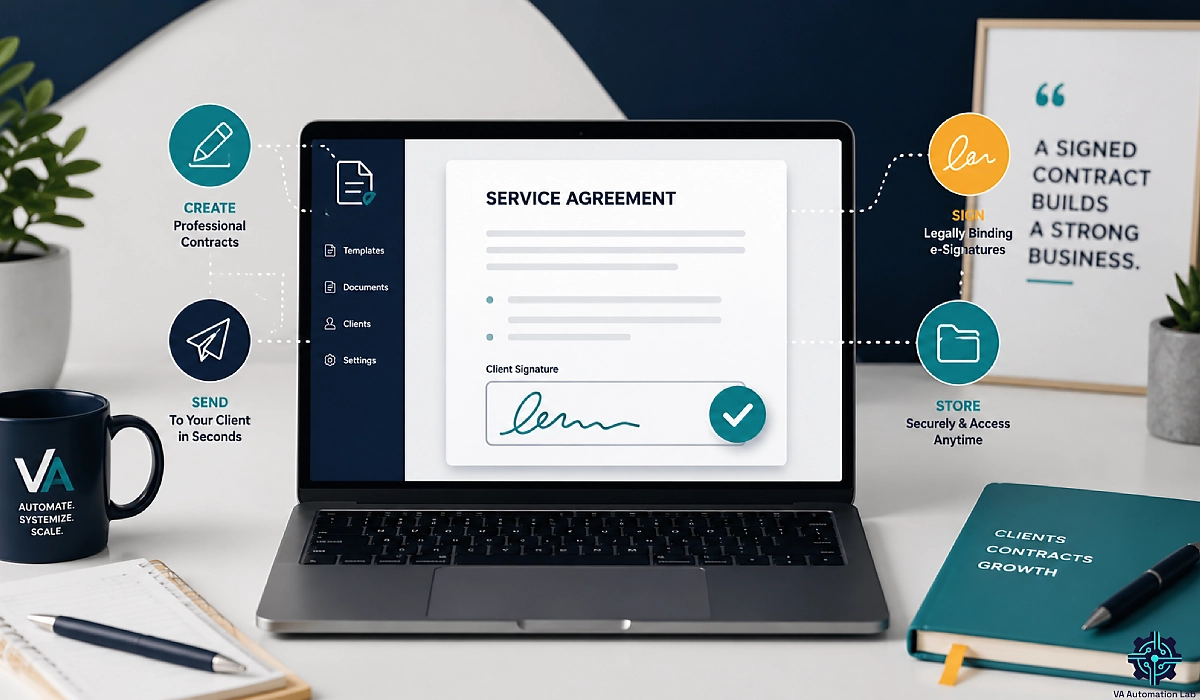
Contract tools for virtual assistants create, send, sign, and store client agreements with legally binding e-signatures. The best options pair reusable templates and audit trails with onboarding, CRM, and invoicing, so a signed contract moves straight into active client work instead of stalling in a separate app.
In practice, a contract tool built for VA work handles a short, specific list of jobs:
- Reusable templates for your common agreements — retainers, project contracts, NDAs, and service agreements — branded once and reused in a few clicks.
- Legally binding e-signatures your client can add from a phone or laptop, with no printing or scanning.
- Status tracking so you can see which contracts are drafted, sent, viewed, and signed.
- Automatic reminders that nudge unsigned agreements without you writing follow-up emails.
- Signed-contract storage that keeps the executed copy where you can pull it up months later during a scope dispute.
The tools that pull ahead do one more thing: they connect the agreement to the rest of your workflow, so accepted terms flow into a project, a first invoice, and a client record.
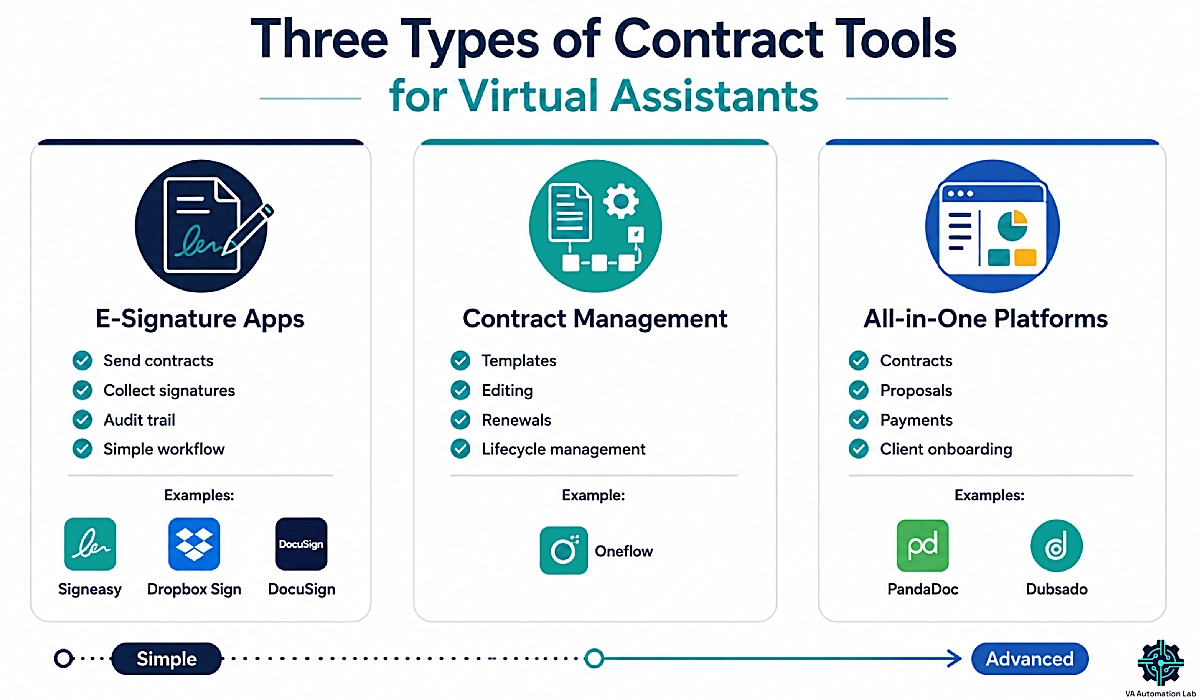
E-signature vs Contract Management vs All-in-one: the Three Categories
Almost every “contract tool” falls into one of three buckets, and knowing which you need saves you from overpaying or under-buying.
E-signature apps are the signing layer only. You upload a document, drop in signature fields, and send. Signeasy, Dropbox Sign, and DocuSign live here. They are fast and affordable, but the signature is where the tool’s job ends — onboarding, invoicing, and storage happen elsewhere.
Contract management platforms handle the full contract lifecycle: creation from templates, approval routing, editing after send, renewals, and organized storage. Oneflow sits here. This suits VAs who manage renewals or a growing library of client agreements.
All-in-one client suites fold contracts into a wider platform that also does proposals, invoicing, forms, and a client portal. Dubsado and PandaDoc lean this way. One login covers most of your client operations, at the cost of a steeper setup.
There is no single “best category.” A solo VA signing two contracts a month has different needs from an online business manager (OBM) running structured onboarding for eight clients.
Why Generic e-signature Apps Fall Short for VA Workflows
Search “best e-signature software” and you get enterprise-focused lists built for sales teams closing deals. They rank tools on signing speed and compliance certifications — useful, but not the whole job for a VA.
Virtual assistant work has needs generic signers miss. You handle client passwords and sensitive data, so confidentiality clauses matter. You work on ongoing retainers where scope can expand without warning, so clear service boundaries matter. You often work across time zones and currencies, so a tool that signs cleanly on mobile and holds up across borders matters.
A generic signer stops at the signed PDF. It does not know what you quoted, which project the client hired you for, or where the executed copy should live. That gap — between “contract signed” and “work started” — is exactly where onboarding stalls, and it is the reason this guide judges every tool on more than the signature. We will build a workflow that closes that gap later in the article.
2. Do Virtual Assistants Need Contract Software?
Short answer: yes. A written, signed agreement is the simplest proof that a client asked you to do work, agreed to pay for it, and accepted the terms. Verbal agreements exist in law, but they are hard to prove when a payment goes missing or scope balloons.
Contract software does not just make you look professional. It removes the friction that makes VAs skip contracts in the first place — the copy-pasting, the printing, the “I’ll send it later” that turns into never. When signing takes your client 60 seconds on their phone, you stop starting work on a handshake.
Are Electronically Signed VA Contracts Legally Binding?
In most of the world, yes. A virtual assistant contract signed electronically is legally binding when both parties consent to sign digitally and the platform keeps an audit trail. In the United States, the ESIGN Act and state-level UETA give electronic signatures the same legal weight as ink. In the European Union, eIDAS does the same. Similar recognition exists across the UK, Canada, Australia, and many other countries.
What makes an e-signed contract stand up is not the signature image — it is the record behind it. A proper e-signature tool captures a timestamp, the signer’s IP address, and a certificate that ties the signature to the document, then locks the file so later edits are detectable. That audit trail is stronger evidence than a scanned PDF with a typed name.
A few practical points for VAs: you generally do not need a witness or a notary for a standard service agreement; both sides should keep a copy of the executed file; and changes to rates or scope should be re-signed as an amendment, not agreed in a quick email. Cross-border work is fine — an e-signed contract between a VA in one country and a client in another is enforceable when the terms are clear and both consented. When in doubt about specific clauses, have a professional review your template; this guide is not legal advice.
The Real Cost of Onboarding a Client Without a Signed Contract
The bill for skipping a contract almost never arrives on day one. It shows up in month three, when the “quick extra task” has grown into ten hours a week, or when an invoice goes 45 days past due and you have nothing that states your late-payment terms.
Without a signed agreement, three things get expensive fast. Scope creep has no boundary to point to, so every new request feels like it might be included. Payment disputes become arguments instead of a clause you can cite. And offboarding — who owns the deliverables, what happens to client access — turns into a negotiation instead of a documented process.
A signed contract, stored where you can find it, converts each of those from a conflict into a reference. That is the entire value of client onboarding done right: the terms you agreed to are the terms you work under. If you want the full sequence around the paperwork, see our guide to Automating Client Onboarding for Virtual Assistants.
3. How to Choose the Best Contract Software as a Virtual Assistant
Before the tool list, here is the framework we score each option against. Four criteria separate a contract tool that fits VA work from one that looks good in a demo and drains your budget.
Legally Binding E-signatures and Audit Trails
This is the non-negotiable baseline. Every tool worth considering should produce signatures that comply with the ESIGN Act, UETA, and eIDAS, backed by an audit trail that records the timestamp, IP address, and signer actions. Look for tamper-evident sealing so a signed file cannot be altered without leaving a trace. If a tool cannot show you the audit certificate for a signed document, it is not protecting you — it is just collecting a signature.
Every tool in this guide clears this bar, so the real decision happens on the next three criteria.
Reusable Templates for Retainers, NDAs, and Service Agreements
Templates are the biggest time-saver for a VA. You should be able to build a master retainer agreement once — with your scope language, revision limits, payment schedule, and confidentiality clause — then apply it to a new client in a few clicks and tweak the details.
This matters more for VAs than most buyers realize, because a social media manager’s contract looks nothing like an executive assistant’s. The scope, deliverables, and boundaries differ by specialty. Without templates for your service types, you either copy-paste between documents (and eventually paste the wrong clause) or skip customization entirely. A tool with a real template library and reusable clauses pays for itself in saved hours.
Flat-rate vs Envelope Caps: the Hidden Pricing Trap
Here is where VAs lose money without noticing. Many e-signature tools charge by the envelope — each document you send counts against a monthly cap, and going over triggers per-document fees. Enterprise buyers barely feel it. A VA who sends proposals and contracts to a steady stream of prospects hits the cap fast, and metered pricing punishes exactly the behavior that protects you: sending contracts often.
The alternative is flat-rate pricing (a fixed monthly or annual fee, sometimes with unlimited documents) or per-user pricing that does not meter documents. For most solo and small-team VAs, a flat or unlimited plan is more predictable and usually cheaper once you send more than a handful of contracts a month. When you compare plans, look past the sticker price to the send limit — a “cheap” plan with a low envelope cap can cost more than an unlimited plan by your third client.
Does it Connect to Onboarding, CRM, and Invoicing?
The last criterion is what separates a signing app from a client-operations tool. Ask: when a contract is signed, what happens next? Does the signed agreement trigger a project, activate a client portal, or generate a first invoice — or does someone (you) manually copy data between apps?
Two paths get you there. An all-in-one platform like Dubsado or PandaDoc bundles the connection natively. Or you keep a focused signer and automate the handoff yourself with a tool like Make, which links your contract app to your project board, invoicing, and CRM. Both work; the right one depends on how much you want to build versus buy. We cover the automation path in detail below, and it is where a VA-specific stack beats a generic tool.
4. PandaDoc: Best Overall Contract and E-signature Tool for VAs
If you want one tool that carries a client from proposal to signed contract to first invoice, PandaDoc is the strongest all-round pick for virtual assistants. It combines a document editor, reusable templates, legally binding e-signatures, payment collection, and real-time tracking in a single platform — and it complies with UETA, the ESIGN Act, and eIDAS, so signatures hold up across US and EU clients.
The reason it tops this list for VAs is workflow, not just signing. You can build a proposal and contract as one document, so your client reviews pricing, scope, and terms together and signs in the same sitting. That compresses the gap between “yes” and “signed” — the exact place onboarding usually stalls.
Key Features for VA Contracts
PandaDoc gives a VA the full contract job in one place: a template library for retainers, project agreements, and NDAs; a content library so you reuse approved clauses instead of rewriting them; drag-and-drop fields for signatures, dates, and initials; and status tracking that tells you when a client opens a document so you can follow up at the right moment. Automatic reminders chase unsigned agreements for you. Its built-in AI assistant can summarize a document, answer questions about terms, and speed up drafting — handy when you manage contracts for several clients with different scopes.
Free Plan vs Paid: What You Get
PandaDoc‘s free plan lets you upload a document, add fields, and collect legally binding signatures — but it caps you at five signatures and five sent documents a month, so it fits only very light use. The Starter tier lifts that to unlimited signing, and the Business tier adds the content library, CRM integrations, custom branding, and approval workflows that make it a full client-document platform.
PandaDoc pricing (billed annually): The free plan covers up to 5 signed documents a month. Paid plans are per user — Starter at $19/user/month for unlimited documents and e-signatures, and Business at $49/user/month for the content library, CRM integrations, and approval workflows. A 14-day free trial is available.
Best for and Limitations
Best for: VAs who send proposals and contracts together, manage several clients, and want signing, payments, and tracking under one login.
Limitations: PandaDoc is heavier than a pure signer. If all you ever do is send a lawyer-drafted contract for one signature, it is more platform than you need, and the paid tiers price per user. There is a short learning curve to set templates up well — but that setup is a one-time cost that pays back on every client after.
Want the deep dive, including a full template setup? See our complete PandaDoc guide for virtual assistants.
Send your First Professional Client Contract Today
PandaDoc bundles proposals, contracts, legally binding e-signatures, and payments in one editor, with a free plan to start.
Build a reusable retainer template once and reuse it for every client.
5. Dubsado: Best All-in-one for Onboarding-heavy VA Businesses
If contracts are one step in a bigger onboarding sequence you run again and again, Dubsado is built for you. It is a full client-management platform — proposals, contracts with e-signatures, forms, invoicing, scheduling, and a client portal — priced as a flat fee rather than per user. For a VA or OBM running structured intake for multiple clients, that combination is hard to beat.
Where PandaDoc leans document-first, Dubsado leans workflow-first. You can chain a lead-capture form, a proposal, a contract, and a first invoice into an automated sequence, so a new client moves through onboarding with far less manual work from you.
Contracts Inside a Full Client-management Workflow
Dubsado treats the contract as a node in the client relationship, not a standalone file. An accepted proposal can generate the contract; the signed contract can trigger the first invoice and the welcome sequence; and the executed agreement stays attached to the client’s record in the portal. When a client questions a deliverable in month four, the signed terms and the approval history sit together in one place. That connected view is the “client management” backbone.
Flat-fee Pricing and Who it Pays off for
Dubsado’s flat-fee model is its biggest advantage for VAs. You are not metered on documents or charged per seat, so sending contracts and running onboarding for many clients does not scale your cost. That makes it especially cost-effective once you pass a couple of active clients.
Dubsado pricing (billed annually): Flat fees, not per user — Starter at $335/year covers unlimited projects, clients, invoicing, and templates, while Premier at $525/year adds the scheduling, automated workflows, and public proposals that power hands-off onboarding. A 21-day free trial is available.
Best for and Limitations
Best for: VAs and OBMs with a repeatable onboarding process, several concurrent clients, and a preference for one platform over a stack of separate tools.
Limitations: Dubsado’s depth comes with a learning curve — building workflows well takes an afternoon or two up front. If you only need to sign the occasional document, it is more than you need. And because it aims to run your whole client operation, it overlaps with tools you may already use for scheduling or invoicing, so plan the migration rather than bolting it on.
For the deep-dive guide, see Dubsado for Virtual Assistants: Review & Setup Guide.
Turn Onboarding into a Workflow, Not a to-do List
Dubsado runs proposals, contracts, forms, and invoicing on one flat-fee platform, so a signed contract kicks off the whole client sequence automatically.
Build it once, reuse it for every client.
The 21-day free trial gives you full Premier access.
6. DocuSign, Dropbox Sign, and Other Signature Standards Worth Knowing
Not every VA needs an all-in-one, and some clients will expect a specific brand on the signature line. These tools are the recognized standards. We are not affiliated with them — they are here because a complete comparison should include the names your clients already trust, and because knowing their tradeoffs helps you choose well.
DocuSign — the Name Enterprise Clients Recognize
DocuSign is the signature brand corporate procurement teams know on sight. If your client is a large company with a formal legal review, a DocuSign envelope sails through where an unfamiliar tool might get questioned. It is reliable, globally recognized, and legally solid.
The catch for VAs is pricing and scope. DocuSign’s entry tiers are envelope-based, and the cheapest plan (Personal, $11/month billed annually) caps how many documents you can send each month — the exact trap we flagged earlier for anyone who sends contracts often. It is an e-signature tool, built for the signature step. Choose it when a client requires it, not as your default.
Dropbox Sign (formerly HelloSign) — Clean and Lightweight
Dropbox Sign is a fast, no-friction signer with a clean interface and reusable templates. If you already store client files in Dropbox, it fits naturally into where your documents live. It handles the signing job well and keeps a solid audit trail.
Its limits are the flip side of its simplicity: you generally cannot edit a document while it is out for signature, template editing is basic, and like DocuSign it stops at the signature. It is a good pick for a VA who wants straightforward signing and nothing more.
Free and Budget Options: SignWell, Xodo Sign, and Zoho Sign
If budget is the deciding factor, three names come up repeatedly. SignWell offers simple e-signing with detailed audit trails on an affordable plan. Xodo Sign (formerly eversign) is freelancer-friendly with no per-envelope fees on paid tiers and a usable free plan for occasional signing. Zoho Sign is inexpensive and a natural fit if you already run other Zoho apps, since it ties into the Zoho ecosystem and its CRM.
All three produce legally binding signatures under ESIGN, UETA, and eIDAS. The tradeoff at the budget end is thinner workflow automation, tighter free-plan caps, and fewer VA-specific features. They are solid for a VA whose only job is to get a clean, low-cost signature.
7. Signeasy: best focused e-signature tool for mobile-first VAs
When you want signing done simply — fast, mobile, and affordable — without buying a whole client-operations platform, Signeasy is the pick. It is a focused e-signature and light contract tool that lets you create, send, sign, track, and store documents, with support for 25-plus document types and AI features that summarize agreements. It is ESIGN- and eIDAS-compliant and priced per user, so it stays lean.
For VAs, its strengths are practical: a clean mobile experience and a smooth signing flow for clients, which matters when you and your client are in different countries and half your signatures happen on a phone.
Mobile Signing and Cross-border Client Flow
A large share of VA contracts get signed on mobile, often across time zones and borders. Signeasy is built for that reality — clients open a link, sign on their phone, and you both get a legally binding copy with an audit trail in minutes. There is no account required for the signer, which removes the most common reason a contract sits unsigned. For VAs working with international clients, this reduces the “I’ll do it later” delay that stalls onboarding.
Templates, Reminders, and Audit Trail
Signeasy clears the legal baseline cleanly. You get reusable templates for your standard agreements, automatic reminders for unsigned documents, and a complete audit trail with timestamps and signer details on every completed contract. Its AI can generate quick document summaries, which is useful when you are reviewing a client’s own contract before signing it.
Signeasy pricing (billed annually): The Personal plan at $10/month lets you sign unlimited documents but caps you at 5 contracts sent for signature a month — so a busy VA will want Business at $20/seat/month, which unlocks unlimited sending, team templates, and AI contract summaries. Business Pro is $30/seat/month.
Best for and Limitations
Best for: VAs who want simple, affordable, mobile-first signing with clean templates — especially those with international clients.
Limitations: Signeasy focuses on the signature and document layer. It is not a full client-management suite — invoicing, proposals, and a client portal live elsewhere — so if you want onboarding automation built in, an all-in-one fits better. For pure, fast signing, that focus is a feature, not a flaw.
Get Contracts Signed on any Phone, Anywhere
Signeasy makes legally binding e-signatures fast and mobile, with templates and audit trails built in — ideal for VAs working with clients across time zones.
Start with a free trial.
8. Oneflow: Best for Contract Lifecycle and International Clients
If your contracts are living documents — edited after sending, renewed, and managed over time — Oneflow is the strongest fit. It is a contract management platform with e-signatures built in, designed around the full lifecycle rather than a one-shot signature. For VAs who manage renewals or work heavily with EU-based clients, its eIDAS strength and lifecycle features stand out.
Oneflow’s angle is that a contract is not “done” when it is signed. It keeps agreements interactive and organized, which suits ongoing retainers and clients whose terms change over time.
Living Contracts, Editing after Send, and Renewals
Most signers lock a document the moment you send it, so a small change means starting over. Oneflow lets contracts stay editable and interactive within the workflow, and it tracks versions and renewals so nothing lapses silently. For a VA managing a book of retainer clients, that means fewer “the contract technically expired” gray areas and a clear view of what is active, pending, or up for renewal.
eIDAS and GDPR Fit for EU-based Clients
For VAs with European clients, compliance is a selling point you can pass along. Oneflow’s e-signatures are eIDAS-compliant and built with EU data expectations in mind, which reassures clients who care about GDPR and cross-border validity. If a meaningful share of your clients sit in the EU, that alignment is worth more than a marginally cheaper signer.
Oneflow pricing (billed annually): Oneflow’s Business plan includes 5 users — a clear step up from the other tools here. It is priced for established VAs, OBMs, or small agencies that manage contract lifecycles and EU compliance at volume, not for solo beginners. eID signatures are a paid add-on, and a 14-day free trial is available.
Best for and Limitations
Best for: VAs who manage renewals, keep a growing library of client agreements, or work with EU clients who value eIDAS and GDPR alignment.
Limitations: Lifecycle management is more than a brand-new solo VA needs for a couple of simple contracts. If your agreements are one-and-done, a focused signer is simpler and cheaper. Oneflow earns its place once contract volume and renewals become part of your week.
→ Explore Oneflow — If you manage EU contracts, renewals, and lifecycles at volume, its 14-day trial lets you test the lifecycle features before committing.
9. Contract Tools for Virtual Assistants: Feature and Pricing Comparison
Here is how the picks stack up side by side. Use it to shortlist, then read the section for your top two. For the wider toolkit beyond contracts, our Best Tools for Virtual Assistants comparison covers the full stack.
Side-by-side Feature Comparison
Tool | Category | E-sign + audit trail | Templates | Signed-contract storage | Onboarding / invoicing built in | Mobile signing | Free plan |
PandaDoc | All-in-one (doc-first) | Yes (ESIGN/UETA/eIDAS) | Yes (library) | Yes | Yes (proposals, payments) | Yes | Yes (e-sign) |
Dubsado | All-in-one (workflow-first) | Yes | Yes | Yes (client record) | Yes (full onboarding) | Yes | 21-day trial |
Signeasy | E-signature (focused) | Yes | Yes | Yes | No | Yes (mobile-first) | No |
Oneflow | Contract management | Yes (eIDAS strong) | Yes | Yes (lifecycle) | Partial (contract flow) | Yes | 14-day trial |
DocuSign | E-signature (enterprise) | Yes | Basic | Yes | No | Yes | No (entry is paid, capped) |
Dropbox Sign | E-signature (lightweight) | Yes | Basic | Yes | No | Yes | No (free trial) |
Pricing at a glance: flat-rate vs metered
The pricing model matters as much as the number. Flat and per-user plans stay predictable as you add clients; envelope-based plans can spike when you send more contracts.
Tool | Pricing model | Price (per month, billed annually) | Watch for |
PandaDoc | Free plan + per-user paid | Free · Starter $19 · Business $49 (per user) | Content library + CRM integrations on Business |
Dubsado | Flat fee (not per user) | Starter $27.92 · Premier $43.75 | Automation + proposals need Premier |
Signeasy | Per seat | Personal $10 · Business $20/seat | Personal caps sends at 5/month |
Oneflow | Team plan (5 users included) | Business | Priced for teams, not solo VAs |
DocuSign | Per user (envelope-capped entry) | Personal $11 · Standard $30 · Business Pro $45 | Low monthly envelope cap on Personal |
Dropbox Sign | Per user | Essentials · Standard | No free plan (free trial) |
10. Building a Contract-to-onboarding Workflow
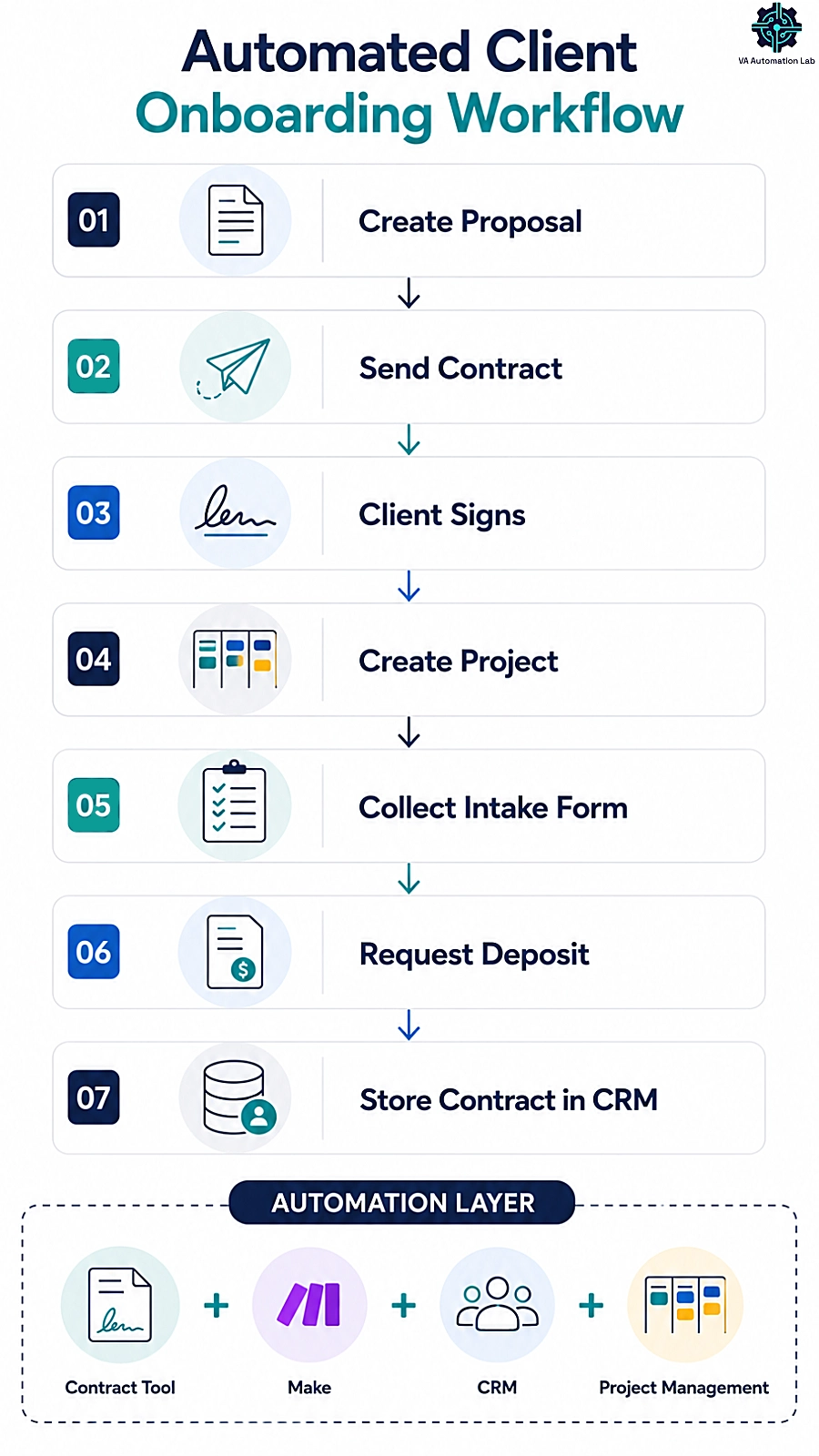
Here is the part almost no contract guide covers, and the reason integrations matter as much as signatures. A signed contract should not be a finish line — it should be the trigger that starts onboarding. Connect your contract tool to the rest of your stack, and the signature itself creates the project, requests the deposit, and files the agreement, with no manual setup in between.
You can build this two ways. If you run an all-in-one like Dubsado, much of it is built in. If you use a focused signer, you connect the pieces with an automation platform. Here is the sequence, stage by stage. This section is a small tool stack working together — a contract tool, an automation layer, a form, and a CRM — so it names a few tools by design.
From Signed Contract to Active Project: the Automation Trigger
The first stage turns “contract signed” into an event other tools can react to. An automation platform like Make watches your signing tool and fires the moment a client signs — no manual check-in required. That trigger can create a project or client folder in your project tool, notify you, and send the client a welcome message with next steps. The onboarding that used to be a manual checklist now happens the instant the ink is dry.
This is where a focused signer plus automation matches what the pricier “connected” platforms sell as a built-in feature — except you keep your own choice of contract tool, CRM, and form. If you are new to building scenarios, our Make guide for Virtual Assistants walks through your first one step by step.
→ Automate the handoff with Make.
Pairing Contracts with Intake Forms and Deposits
The second stage gathers what you need to start and collects the deposit in the same motion. Pair the contract with an intake form so client details, brand assets, and access requests arrive together — and route logins to a password manager, never the form itself. A tool like Jotform builds the intake form and, with Jotform Sign, can even capture a signature on simpler agreements, so the signed contract and the first payment land together instead of in two separate chases.
Tie a deposit request to the same step and you remove the most common reason a “signed” client still has not paid: the deposit ask that never got sent. For a VA, this is the difference between an onboarding you push through by hand and one that runs on rails.
→ Build the intake and deposit form with Jotform.
Storing Signed Contracts in your CRM
The final stage files the executed copy where you will look for it later — your CRM, not your inbox. A dedicated client record keeps the signed agreement, the approval trail, and the client’s history together, so a scope question in month four becomes a two-click lookup instead of an email dig.
A VA-friendly CRM like Folk ties documents and notes to each client record cleanly, and you can weigh the full field in our roundup of the Best CRM for Virtual Assistants. Decide on a storage home before you sign your next contract, so nothing lands somewhere you will forget to check. Built this way — a signer, Make, a form, and a CRM — your contract-to-onboarding flow stays fully yours, with no single vendor’s all-in-one required to make the pieces talk.
→ Keep signed contracts on the client record with Folk.
11. Which Contract Tool Should You Choose?
Skip the paralysis. Here is the straight recommendation by the kind of VA you are.
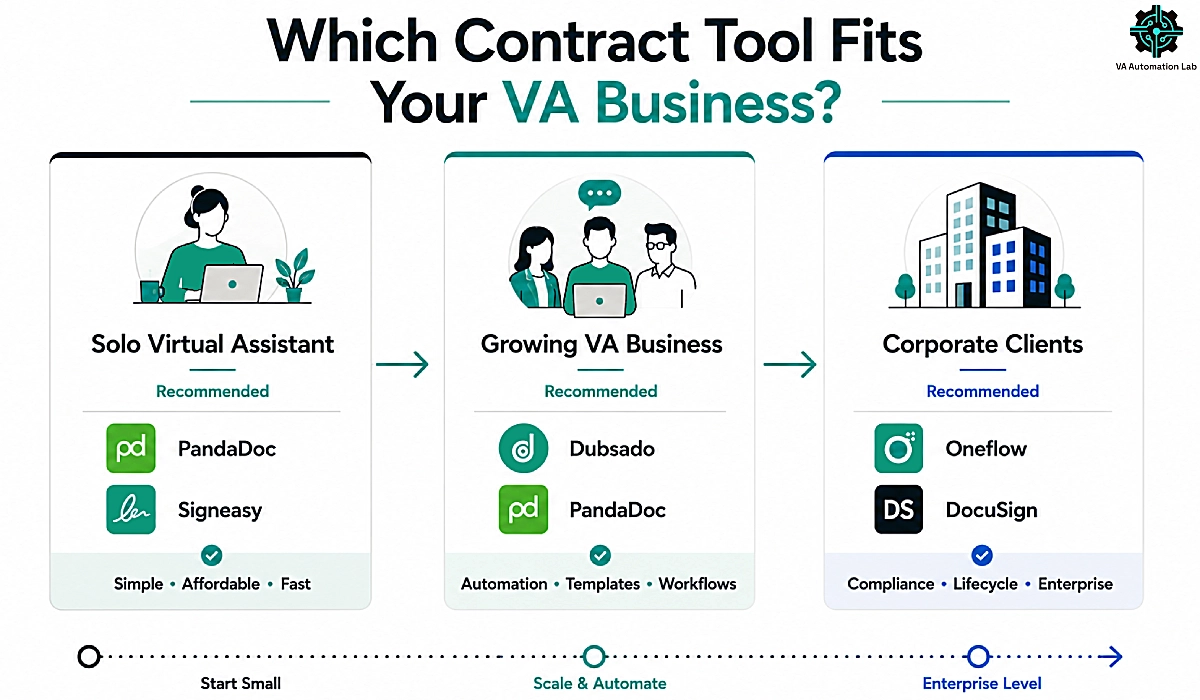
Best for solo VAs just Getting Started
If you are early, keep it simple and cheap. Start with PandaDoc‘s free e-signature tier or Signeasy‘s affordable entry plan — both give you legally binding signatures, templates, and audit trails without a heavy setup. Get one solid retainer template signed and stored, then upgrade only when your volume justifies it. Do not buy an all-in-one before you have the client base to fill it; at this stage the goal is a signed contract on every client, not a perfect system.
Best for OBMs and VAs with Subcontractors
If you run structured onboarding across several clients — or delegate to a small team — invest in a system, not a signer. Dubsado is the pick: it puts contracts inside a full client workflow with proposals, invoicing, and portals, so your paperwork scales with your practice. PandaDoc‘s paid tier is the strong alternative when you want proposals and payments bundled with the contract but a lighter setup than a full all-in-one. Either way, the flat-fee or per-document math should drive the call once you are running multiple retainers.
Best for VAs whose Clients Are Large Companies
If your clients are corporations with legal and procurement teams, recognition and lifecycle control matter most. Lead with DocuSign when a client insists on a name their legal department already trusts. Consider Oneflow when you manage renewals, negotiated terms, or EU-based contracts that need eIDAS-grade compliance. In this lane, the smoothest signature is the one your client’s reviewer does not question — so match the tool to the client’s expectations, not only your own.
12. Contract Mistakes Virtual Assistants Make (and how tools prevent them)
Even with the right tool, a few habits sink VAs. Each is avoidable, and the right setup makes avoiding it the default.
Starting work before the contract is signed
This is the most expensive mistake in the freelance playbook, and the most common. It is tempting to start on a friendly referral before the paperwork clears — and it is exactly how VAs end up unpaid. The fix is process, not willpower: make “signed contract” the gate that unlocks your calendar. Tools that send automatic reminders on unsigned documents and show real-time signing status make it easy to hold the line, because you can see who has and has not signed before you commit a single hour.
Relying on scanned PDFs with no audit trail
A typed name on a scanned PDF feels official but proves little. If a dispute reaches a serious stage, what protects you is the audit trail — the timestamped, IP-logged, tamper-evident record a proper e-signature tool produces automatically. Signing through a dedicated tool instead of emailing a PDF back and forth is the difference between “I think they agreed” and “here is exactly when and where they signed.” Treat the audit trail as the real product you are paying for, not a nice-to-have.
Reinventing every contract instead of using templates
Writing a fresh contract for every client wastes hours and breeds inconsistency — a missing clause here, a softer payment term there — until your protection varies by client. Build a small library of templates for your service types once, and store client credentials in a dedicated password manager like 1Password rather than in the contract or a CRM note field, which is not a security boundary. Reuse tight, consistent language every time. And when a client pushes back on a clause, treat it as a negotiation, not a verdict — a professional client respects a contract, and one who refuses to sign any agreement is telling you something worth hearing.
13. Conclusion
Contracts are the least glamorous part of running a VA business and the one that most reliably saves it. The best contract tools for virtual assistants do more than collect a signature — they templatize your agreements, prove they are binding, store them where you can find them, and hand the signed document to the rest of your workflow so onboarding runs itself. Match the tool to your stage: a clean signer when you are starting, an all-in-one when you are scaling, lifecycle management when your clients and renewals grow complex.
If you want one tool that covers the most ground for the most VAs, start with PandaDoc — proposals, contracts, e-signatures, and payments in a single flow, with a free tier to test before you commit.
→ Get started with PandaDoc and get your next client signed the right way.
Frequently Asked Questions About Contract Tools
Is a virtual assistant contract legally binding if signed electronically?
Yes. In most countries, a virtual assistant contract signed with a reputable e-signature tool is as legally binding as one signed in ink. In the United States, the ESIGN Act and UETA give electronic signatures legal standing; in the European Union, eIDAS does the same; the UK, Canada, Australia, the Philippines, and many other countries have equivalent laws.
Enforceability rests on a few conditions: both parties consent to sign electronically, each signer’s intent to sign is clear, and the platform keeps an audit trail — a timestamped record of who signed, when, and from which IP address. That audit trail is what makes an e-signed contract stronger evidence than a scanned PDF with a typed name; it is timestamped, IP-logged, and tamper-evident.
A standard service agreement does not need a notary or a witness to be valid, and cross-border contracts between a VA and an overseas client are enforceable when the terms are clear and both sides consented. This is general information, not legal advice — for questions about specific clauses or your jurisdiction, consult a qualified attorney.
What is the difference between an e-signature and a digital signature?
They are often used interchangeably, but they are not the same. An electronic signature (e-signature) is the broad legal category: any electronic indication of intent to sign — typing your name, clicking “I agree,” or drawing a signature — that is legally binding under laws like the ESIGN Act and eIDAS. A digital signature is a specific, more secure type of e-signature that uses cryptographic technology to verify the signer’s identity and seal the document against tampering. Every digital signature is an e-signature, but not every e-signature uses cryptographic digital-signature technology.
For most VA contracts — retainers, NDAs, service agreements — a standard e-signature from a reputable tool is legally sufficient. Cryptographic digital signatures matter most for high-value or heavily regulated cross-border agreements, which is why EU-focused tools built around eIDAS emphasize them. In practice, every tool in this guide gives you signatures that hold up for typical VA work, so you can choose on features and price rather than signature type.
What is the best free contract tool for VAs?
PandaDoc offers a fully usable free e-signature tier for legally binding signatures, and Signeasy, SignWell, and Xodo Sign offer free or low-cost signing for occasional use. Free plans usually cap monthly volume and limit templates, so they suit VAs signing a few contracts a month rather than a busy multi-client practice.
What if a client will not sign my contract?
Treat clause questions as normal negotiation, but a client who refuses to sign any agreement is a red flag. A professional client expects paperwork; one who resists it entirely is often the one who later disputes scope or payment. Hold your ground, and do not start work until the contract is signed.
Do I need contract software if I already use a CRM?
Sometimes your CRM covers it — all-in-one platforms like Dubsado include contracts and e-signatures. But many CRMs do not, and a CRM note field is not a legal record. If your CRM lacks legally binding e-signatures with audit trails, pair it with a dedicated contract tool and store the signed copy on the client record.
Can I sign my client’s contract instead of using my own?
You can, but only if the terms protect you. Client contracts are written to protect the client, so read every clause — especially payment, IP, and termination — and negotiate or add your own agreement where needed rather than signing blind.
Glossary
E-signature (electronic signature): Any legally binding electronic indication of intent to sign a document, valid under laws such as the ESIGN Act (US) and eIDAS (EU).
Digital signature: A cryptographically secured type of e-signature that verifies the signer’s identity and seals the document against tampering.
Audit trail: The timestamped record a signing tool keeps of every action on a document — who signed, when, and from which IP address — used to prove a contract’s authenticity.
ESIGN Act / UETA: US laws that make electronic signatures legally binding and enforceable.
eIDAS: The EU regulation governing electronic signatures and their legal validity across member states.
Envelope-based pricing: A metered model that charges per document sent, usually with a monthly cap and overage fees — a common hidden cost for high-volume senders.
Contract lifecycle management (CLM): Managing a contract across its whole life — creation, negotiation, signing, renewal, and storage — not just the one-time signature.
Client onboarding: The process of bringing a new client into your workflow after they sign — setting up projects, collecting details, taking a deposit, and granting access.
About the Author
Alex Stratton has spent the better part of a decade working at the intersection of virtual assistance and operational systems, first as a VA supporting founders and small business owners, then as a workflow consultant helping remote teams reduce the manual overhead that accumulates when businesses grow faster than their processes. The tools and workflows here reflect decisions made repeatedly in real client contexts, where the wrong choice costs hours, not minutes. Learn more about VA Automation Lab → About.