
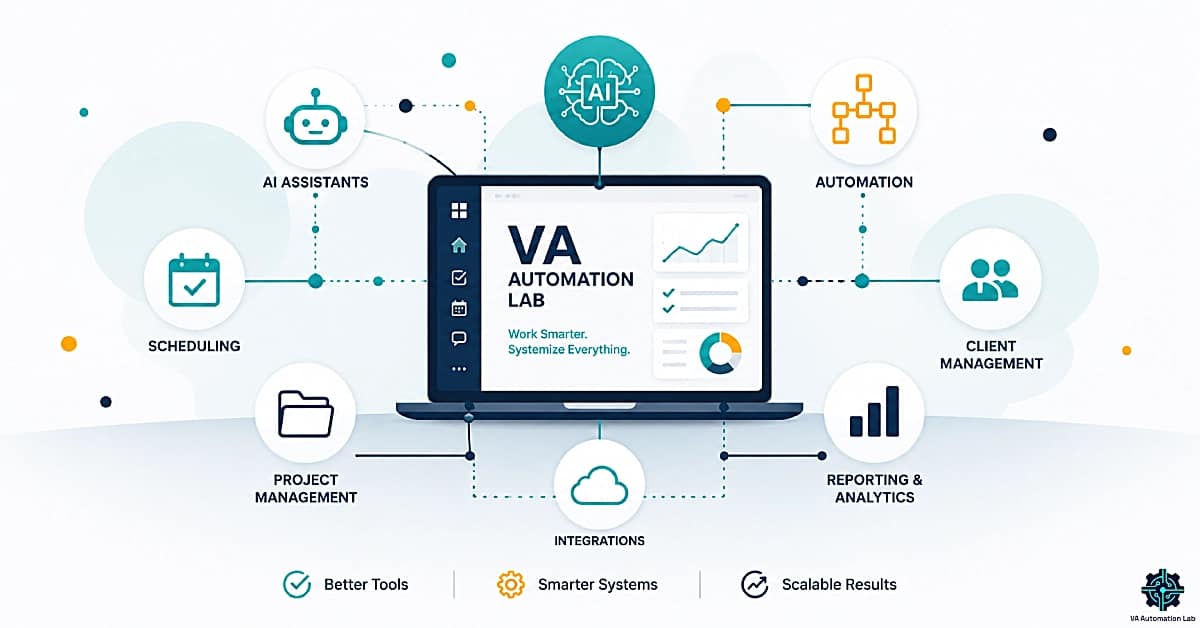
Virtual Assistant Resources: Tools, Guides & Workflows for Every Stage of Your VA Business
A complete library of free virtual assistant resources covering AI basics, essential tools, and fully automated workflows.
Explore 25+ guides organized by category and skill level, all updated for 2026.
This is the central resource hub for VA Automation Lab. Everything here — in-depth guides, a skill-level learning path, and a full tool quick-reference — exists to help you make faster, better decisions about the tools and systems that run your VA business. The guides cover every core operational area: AI assistants, email management, scheduling, task automation, project management, CRM, social media, client onboarding, reporting, and productivity systems. Resources are organized so that a VA starting their first client and a VA scaling to ten clients can both find exactly what’s most relevant to where they are right now. No paywalls. No account required. Browse freely.
On this Page
Your VA Learning Path: Start Here Based on Where You Are Now
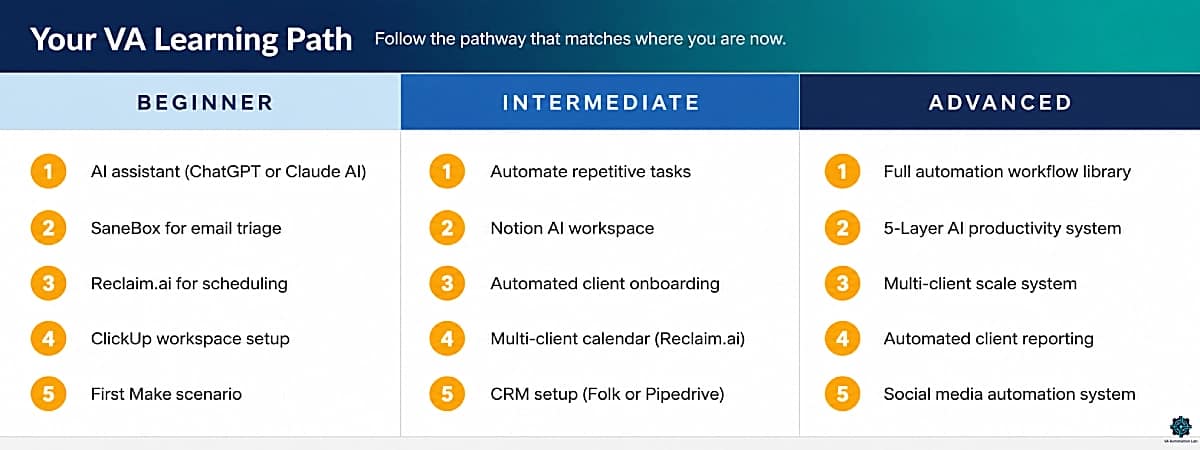
Not sure which guide to read first? Use this section as your entry point. The three pathways below map a logical progression through the VA tool stack — from your first AI assistant to a fully automated multi-client system. Each step builds on the previous one and solves a specific bottleneck in sequence. Pick the pathway that matches your current situation and follow it in order.
Beginner: Your First Five Tools
Best for: VAs new to AI tools, currently working manually, or starting their first 1–2 client relationships.
The beginner pathway focuses on the five tools that deliver the fastest, most visible return for a VA who hasn’t yet built a technology stack. Each step solves one specific daily friction point — inbox overwhelm, scheduling back-and-forth, task disorganization — before moving to the next. No step requires technical experience. The sequence is deliberate: confidence with simpler tools makes the automation step in Step 5 significantly easier.
Step | Guide | What It Solves |
1 | Framework for integrating AI without a technical background | |
2 | Client inbox overload and manual triage time | |
3 | Scheduling back-and-forth across multiple clients | |
4 | Tracking deliverables and deadlines across clients | |
5 | Your first automated workflow — built from scratch |
Intermediate: Building Repeatable Systems
Best for: VAs actively serving 2–5 clients, already using at least one AI tool, and hitting capacity or operational friction that’s costing them hours each week.
The intermediate pathway shifts from individual tools to integrated systems — connecting your tools into workflows that run without constant manual intervention. Client onboarding, calendar management across multiple clients, and relationship tracking are the three areas where intermediate VAs most consistently lose time. This pathway addresses them in sequence, then adds the productivity framework needed to sustain a growing roster without working more hours.
Step | Guide | What It Solves |
1 | Systematic audit of where your hours are going | |
2 | Documentation, SOPs, and client knowledge bases | |
3 | Manual onboarding steps that consume 2–4 hours per new client | |
4 | Calendar conflicts and eroded focus time across multiple clients | |
5 | Client relationship tracking falling through the cracks |
Advanced: Full Automation and Multi-Client Scale
Best for: VAs managing 5+ clients, already running automations, and focused on maximizing revenue per hour, delivery consistency, and sustainable business growth.
The advanced pathway is about compounding the systems you’ve already built — layering a unified productivity framework over your tool stack, automating the client-facing deliverables that currently still require manual assembly, and building the reporting and social media infrastructure that lets you serve more clients without adding proportional working hours.
Step | Guide | What It Solves |
1 | Gaps in your current automation coverage | |
2 | Fragmented AI tools not working as a unified system | |
3 | Capacity limits and operational friction at 5+ clients | |
4 | Manual data collection and report assembly each cycle | |
5 | Social media delivery that still requires heavy manual effort |
Tool Quick Reference: The Right Tool for Every VA Use Case
Use this table to make fast tool decisions without reading a full guide. Each row maps a specific VA use case to a primary recommendation and an alternative, the skill level required to get started, and a link to the in-depth guide where the tool is covered in context. Primary recommendations reflect the tool with the best combination of power, usability, and value at the freelance VA scale — not the most popular or highest-rated tool in the general market.
VA Use Case | Primary Tool | Alternative | Skill Level | Deep Dive |
Inbox triage & AI sorting | SaneBox | Gmail filters + labels | Beginner | |
AI scheduling & time-blocking | Reclaim.ai | SavvyCal | Beginner | |
Multi-step workflow automation | Make | n8n | Beginner–Advanced | |
Project & task management | ClickUp | Notion | Beginner | |
Knowledge base & documentation | Notion | ClickUp Docs | Beginner | |
AI assistant (writing & research) | ChatGPT | Claude | Beginner | |
CRM — retainer client management | Folk | Pipedrive | Beginner | |
Time tracking & billing | Toggl Track | Clockify | Beginner | |
Social media scheduling | Later | SocialBee | Beginner | |
AI writing & content drafting | Rytr | Frase.io | Beginner | |
Proposals & e-signatures | PandaDoc | Oneflow | Beginner | |
Client intake forms | Jotform | Involve.me | Beginner | |
Client reporting & dashboards | Databox | Manual + Make | Intermediate | |
Client email marketing | ActiveCampaign | Brevo | Beginner | |
Password & credential management | 1Password | Dashlane | Beginner |
Below, you’ll find all guides organized into six core categories that cover a complete VA operational system. Each section includes an overview of what the guides cover and the type of VA they’re most relevant to — so you can explore exactly what you need, without digging through the entire blog.
AI Tools for Virtual Assistants
The AI tools category covers the full software stack modern virtual assistants use to deliver faster, higher-quality work across every service type. This includes conversational AI assistants like ChatGPT and Claude, email management systems, AI-powered scheduling, and project management platforms with native AI features. The guides are organized to take you from your first AI tool to a complete integrated AI workflow — regardless of your technical background or current tool configuration. Each guide is built around real VA use cases and multi-client working conditions, not generic software reviews or enterprise team scenarios.
Pillar Guide
Tools for Virtual Assistants: The Complete AI Systems & Software Guide (2026)
The definitive reference for every AI tool and software system a modern VA relies on — organized by use case, skill level, budget, and service niche. If you only read one guide in this category, read this one first.
How to Start Using AI as a Virtual Assistant (Without Technical Skills)
A beginner-friendly walkthrough for VAs integrating AI into their daily work for the first time. Covers which tools to start with, how to frame the learning curve, and the five use cases where VAs see the fastest return.
Best AI Scheduling Tools for Virtual Assistants (2026)
The top AI scheduling tools compared and reviewed for VA-specific use cases — with a clear recommendation for each budget level and client volume.
AI Email Management for Virtual Assistants: Best Tools and Workflows (2026)
How to triage, draft, and manage client email inboxes at scale using AI — covering SaneBox, ChatGPT and Claude email drafting, and the workflow architecture that lets one VA manage multiple active inboxes simultaneously.
ChatGPT for Virtual Assistants: Complete Guide to Use Cases, Prompts & Workflows (2026)
Practical prompts and real-world workflows for using ChatGPT as your primary AI assistant — organized by VA service category with ready-to-use prompt templates.
Claude for Virtual Assistants: The Complete Guide (2026)
How VAs are using Claude for long-form writing, research, client communication, document review, and AI-powered workflow support — with a comparison to ChatGPT for common VA tasks.
Automation & Workflows
Automation is the highest-leverage skill a virtual assistant can develop. A single well-built workflow can recover 5–10 hours per week that currently goes to manual, repetitive tasks — freeing capacity for higher-value work or additional clients without proportional time increases. This section covers automation from first principles through advanced multi-app workflow architecture, with a focus on Make as the platform that gives VAs the best power-to-complexity ratio at the freelance scale. Guides are sequenced from beginner entry points through full client delivery system automation — covering onboarding, social media, reporting, and multi-tool pipeline design.
Pillar Guide
Automation for Virtual Assistants: The Complete Guide (2026)
The full-stack automation reference for VAs — covering strategy, tool selection, and ready-to-use workflow blueprints from beginner through advanced. The definitive starting point for building an automated VA practice.
How to Automate Repetitive Tasks as a Virtual Assistant (2026 Guide)
A systematic approach to identifying and eliminating the time-draining tasks that don’t require your direct attention — and replacing them with automations that run reliably in the background.
Make.com for Virtual Assistants: The Beginner Setup Guide (2026)
Step-by-step Make setup guide for VAs with no prior automation experience. Builds your first working scenario from scratch and explains the core concepts needed to expand your automation stack confidently.
Best Automation Workflows for Virtual Assistants: Beginner to Advanced (2026)
A curated library of VA automation workflows organized by use case and complexity level — from simple one-step triggers to multi-branch delivery pipelines.
How to Automate Client Onboarding for Virtual Assistants (2026)
Build a complete automated onboarding sequence — from contract signature through kickoff call — that runs without manual intervention. Covers PandaDoc, Jotform, Reclaim.ai, ClickUp, and Make.com working as an integrated system.
Social Media Automation for Virtual Assistants: Tools, Workflows & Complete System (2026)
Build a complete social media management system for clients that runs on autopilot — covering scheduling, client approval workflows, cross-posting, and automated performance reporting.
How to Automate Client Reporting as a Virtual Assistant (2026)
Set up a reporting system that collects data, assembles reports, and delivers them to clients on a fixed schedule — without manual data gathering or formatting each cycle.
Productivity Systems & Time Management
Running a multi-client VA business without a structured productivity system is the fastest path to missed deadlines, client churn, and burnout. This section covers how to build a VA operating system that manages your time, organizes deliverables, and scales with your client load without requiring more hours. The pillar guide provides the complete framework; the supporting articles cover the specific tools and system designs that operationalize it — ClickUp for task management, Reclaim.ai for intelligent calendar management, and a five-layer AI framework for compounding output systematically across an active client roster.
Pillar Guide
Productivity Systems for Virtual Assistants: The Complete Guide (2026)
The complete framework for structuring your VA workday, managing time and capacity across multiple clients, and building the operational infrastructure that lets your practice scale without requiring more hours.
ClickUp for Virtual Assistants: Setup Guide, Templates & Workflows (2026)
Full setup guide for using ClickUp as your VA command center — including client workspace templates, custom views, built-in time tracking configuration, and the automation rules that keep deliverables organized across every active client.
AI-Powered Productivity System for Virtual Assistants: 5-Layer Framework
A structured five-layer framework that systematically layers AI tools on top of your existing productivity stack — designed for VAs who already use AI but haven’t unified their tools into a cohesive, compounding system.
Notion for Virtual Assistants: Complete Guide (2026)
Notion to manage projects, build client knowledge bases, write SOPs, and run AI-assisted documentation workflows — with full workspace setup guidance included.
Reclaim.ai for Virtual Assistants: Complete Guide & Setup (2026)
How to use Reclaim.ai’s AI scheduling engine to auto-schedule tasks, protect focus blocks, sync across multiple client calendars, and eliminate the cognitive overhead of manual calendar management.
Client Management & Operations
Professional client management is the operational layer that separates a VA constantly battling scope creep, late payments, and communication chaos from one running a smooth, scalable, and profitable practice. This section covers the systems that make client relationships sustainable at scale: CRM tools for tracking relationships and follow-ups, and the contract and proposal infrastructure that sets the right professional tone from the first client interaction. The pillar guide covers the complete client management framework; the CRM guide delivers direct tool comparisons with a clear recommendation for each service model.
Pillar Guide
Client Management Systems for Virtual Assistants: The Complete Guide (2026)
The definitive reference for building a professional, scalable client management operation — from the tools that run it to the communication frameworks and workflows that keep clients satisfied and retained.
Best CRM for Virtual Assistants (2026)
A hands-on comparison of the best CRM options for VAs at different stages and service models — with a clear recommendation for each use case and a frank assessment of what most VAs actually need versus what enterprise CRM marketing tells you that you need.
How to Manage Multiple Clients as a Virtual Assistant Using AI (2026)
The operational system for scaling to a full client roster — covering client segmentation, AI-assisted communication workflows, capacity management, and proactive check-in systems that prevent scope creep and missed deadlines.
AI Writing & Content Tools
Content creation is one of the most in-demand VA service offerings — and AI writing tools have changed what a single VA can produce for clients in a given week. Not all AI writing tools are built for the realities of freelance work: switching rapidly between content formats, handling multiple client brand voices simultaneously, and producing first drafts fast enough to stay profitable at standard VA rates. This section evaluates the tools that actually fit VA working conditions, with reviews focused on output quality for common VA content types, multi-client workflow compatibility, and pricing structures calibrated for the freelance scale rather than agency or enterprise teams.
Pillar Guide
AI Writing & Content Creation for Virtual Assistants: The Complete Guide (2026)
Complete guide to AI writing and content creation for virtual assistants — covering AI email workflows, SEO blog writing, social media content repurposing, brand voice systems, and the best AI writing tools for VAs including Rytr, Frase.io, Notion, and Later. Includes practical workflows, automation strategies, and service packaging examples by VA type and budget.
Best AI Writing Tools for Virtual Assistants (2026)
In-depth review of the top AI writing assistants for VAs — covering Rytr, Frase.io, and other tools across content creation, email drafting, copywriting, and client communication workflows. With a direct recommendation by use case and budget.
Comparisons & Best Tools
The comparisons section exists to answer the question that comes up before every tool decision: which platform is actually better for VA-specific workflows, and what is the shortest path to a clear answer? These are not generic feature-list comparisons. They are structured analyses built around real VA working conditions, service delivery requirements, and budget realities at the freelance scale. Each guide ends with a direct recommendation — not “it depends” — grounded in how VAs actually use these tools, not how enterprise teams do. Use this section when you are evaluating two competing platforms and want a verdict rather than a summary.
Pillar Guide
Best Tools for Virtual Assistants in 2026: The Complete Comparison Guide
A complete comparison of the best tools for virtual assistants — covering all workflow categories: AI software, automation, productivity, scheduling, content drafting, client management, and communication — divided in practical stacks by skills and budget.
Zapier vs Make for Virtual Assistants: The Complete Comparison Guide (2026)
A detailed breakdown of the two leading automation platforms across pricing, workflow complexity, integration depth, error handling, and learning curve — with a direct verdict for VAs at different experience levels.
Notion vs ClickUp for Virtual Assistants: The Complete Comparison Guide (2026)
Side-by-side comparison of the two most popular VA project management tools — with a recommendation that accounts for working style, client volume, documentation requirements, and team size.
Not Sure Where to Start?
Download the Free AI Toolkit for Virtual Assistants, a curated starter pack with the best tools, prompt templates, and workflow blueprints for VAs at every level.
Frequently Asked Questions
What are the best AI tools for virtual assistants in 2026?
The best AI tools for virtual assistants in 2026 fall into five non-negotiable categories. For AI assistance and writing: ChatGPT and Claude AI handle drafting, research, summarization, and communication workflows across all content types. For email management: SaneBox sorts and prioritizes client inboxes automatically without manual rule configuration. For scheduling: Reclaim.ai blocks focus time and manages meeting requests across multiple client calendars. For project management: ClickUp and Notion both offer AI-native features — ClickUp suits task-and-deadline workflows, Notion suits documentation-heavy practices. For automation: Make.com connects your entire tool stack through visual, no-code scenario building. The combination that works best depends on your service niche, but these five categories define the floor for a sustainable multi-client VA practice. The Complete AI Tools Guide covers every category in full depth.
What does a complete VA tech stack look like?
A complete VA tech stack in 2026 covers eight functional areas: email management (SaneBox), calendar and scheduling (Reclaim.ai or SavvyCal), workflow automation (Make), project and task management (ClickUp), client relationship management (Folk for retainer clients, Pipedrive for pipeline-focused services), time tracking and billing (Toggl Track), AI writing and content drafting (Claude/ChatGPT or Rytr), proposals (PandaDoc) and client intake (Jotform). VAs offering social media services add Later or SocialBee. The goal is not to deploy all of these at once — it is to add tools in sequence as each workflow area becomes a measurable bottleneck. The Tool Quick Reference on this page maps every use case to a primary recommendation.
How much time can automation save a virtual assistant?
Time savings from automation scale with implementation depth and client volume. VAs who build basic automations — client onboarding sequences, social media scheduling, automated weekly report delivery — typically recover 8 to 12 hours per week across their full client roster. VAs running more complete stacks that also cover email triage, invoice generation, and content repurposing report saving 15 to 20 or more hours weekly. At the beginner level, a single Make scenario automating one recurring task — a weekly client status email assembled from a ClickUp data export, for example — can return 2 to 3 hours per week immediately. The leverage compounds: each automation you add reduces the time cost of running your practice, creating capacity for more clients or fewer working hours. The Automation for Virtual Assistants pillar covers the full calculation with use-case examples.
What is the best automation platform for virtual assistants — Zapier or Make?
For most virtual assistants, Make is the better choice. It offers significantly more workflow logic — conditional branching, iteration, error handling, data transformation — at a lower price point than Zapier, and its visual scenario builder makes complex multi-step automations easier to build and troubleshoot without code. Zapier‘s advantages are a simpler interface for basic two-step automations and a marginally larger app library. For VAs serving clients with real operational complexity, those advantages do not justify the cost difference. Make’s free plan gives 1,000 credits per month — enough to build, test, and run one or two active automations at typical VA volumes. The practical exception: if a specific app a client requires is only on Zapier, use Zapier for that integration and Make for everything else. The full comparison with a direct verdict is in the Zapier vs Make guide.
Which CRM should a virtual assistant use?
The right CRM depends on your client relationship model. For VAs managing ongoing retainer relationships — the most common VA business model — Folk is the strongest fit: lightweight, Gmail-synced, includes AI-powered email drafting, and does not require a sales workflow background to configure. For VAs who manage sales pipelines for clients or provide business development services as part of their offering, Pipedrive offers more structured pipeline visibility and reporting. Zoho CRM is the best free-tier option for VAs who need basic contact and follow-up tracking without a monthly tool budget. The Best CRM for VAs guide walks through each option with a recommendation organized by service model.
Can I run a VA business with free tools only?
Yes, at least in the early stage. Make (1,000 credits per month), ClickUp (unlimited tasks and projects), Toggl Track (unlimited time tracking and client projects), Jotform (5 active forms, 100 monthly submissions), and Notion (unlimited pages for individual users) all have free plans that cover the core workflow of a 1–2 client VA practice. The limitations appear as you scale: Make’s free operation limit exhausts quickly when automating across three or more clients simultaneously, and Jotform’s submission cap becomes restrictive with active onboarding workflows. The practical approach is to start free, identify which two or three tools you use daily and which create friction, then upgrade only those — typically Make and your primary project management platform — once your client revenue comfortably covers the cost.
How do I start using AI as a virtual assistant with no technical background?
The lowest-friction entry point is a conversational AI assistant — ChatGPT or Claude — applied to one specific daily task: drafting a client email, summarizing a meeting recording, or generating first-draft social captions from a brief. No setup, no integrations, no prior experience required. Once you are comfortable with a conversational AI tool, the next logical step is SaneBox for email management, which connects to your email account and starts sorting immediately with no rules to configure. From there, Reclaim.ai connects to Google Calendar in under 10 minutes and begins blocking focus time automatically. Make is the first true automation step — the beginner setup guide on this site is written specifically for VAs with no automation background and builds your first working scenario from scratch. Progress is sequential: one tool per bottleneck, built on confidence from the previous step. The Starting with AI guide maps this progression in full.
What is the best project management tool for virtual assistants?
ClickUp is the strongest overall project management tool for multi-client VA practices. Its workspace architecture supports a separate client space per active client — complete with task lists, timelines, docs, and custom fields — without requiring complex configuration. The template library includes VA-specific setups duplicable per client in under five minutes, and built-in time tracking eliminates the need for a separate billing tool at the beginner stage. Notion is the better choice for VAs whose work is documentation-heavy — building SOPs, client wikis, and process templates — and who prefer a flexible, database-driven environment over a structured task manager. The decision typically reflects working style: ClickUp for VAs who think in tasks and deadlines, Notion for VAs who think in documents and knowledge systems. The Notion vs ClickUp comparison covers both in detail with a direct recommendation.
How do virtual assistants manage multiple clients without burning out?
Managing multiple clients without burning out requires three operational foundations working together. First, a single source of truth for all client work — ClickUp or Notion — so that every deliverable, deadline, and client note lives in one system rather than distributed across email threads, browser tabs, and memory. Second, intelligent time-blocking with Reclaim.ai, which schedules your tasks around existing meetings and creates real, durable protection for deep-work time across all client calendars simultaneously. Third, communication systems that prevent reactive working patterns: SaneBox to automatically prioritize inboxes by importance, and defined response windows communicated to clients from the start of the relationship. The multi-client management guide covers the full system design — including client workspace separation, weekly review cadence, and proactive communication frameworks.
What is the difference between an AI-assisted VA and a traditional VA?
An AI-assisted VA uses a combination of AI tools, automation platforms, and structured workflows to deliver higher output per hour than a traditional VA working manually across the same tasks. In concrete terms: a traditional VA manually managing one client inbox handles roughly 80 to 100 emails per day at full capacity. An AI-assisted VA using SaneBox for automatic triage and an AI assistant for draft generation can manage two or three client inboxes at the same time investment. The same leverage applies across content creation, scheduling, social media management, client reporting, and onboarding. For clients, the visible outcome is faster turnaround and more consistent delivery. For the VA, the difference is a higher income ceiling — the capacity to serve more clients without proportional increases in working hours. The AI layer does not replace editorial judgment, client relationships, or service expertise; it eliminates the manual execution work that constrains how much of those things one VA can deliver.
How do I automate client onboarding as a virtual assistant?
A fully automated VA onboarding sequence covers five stages, each triggered by the previous one. The sequence begins with contract delivery and e-signature via PandaDoc. On signature confirmation, a Make automation fires simultaneously: it sends the client an onboarding questionnaire via Jotform, creates a new client workspace in ClickUp or Notion from a duplicated template, adds the client to a welcome email sequence in ActiveCampaign or Brevo, and sends a booking link for the kickoff call via Reclaim.ai or SavvyCal. The client experiences a seamless, professional sequence. You experience zero manual work between the signed contract and the scheduled kickoff call. The complete Make scenario configuration — module by module — is in the client onboarding automation guide.
What is the best time tracking tool for virtual assistants?
Toggl Track is the freelance standard for three practical reasons: the free plan includes unlimited projects, clients, and time entries covering everything most VAs need; the one-click browser extension starts tracking from any web app without a context switch; and the report exports are clean enough to share directly with clients as billing records without reformatting. Clockify is the best alternative for VAs who work with subcontractors or manage a small VA team, as it has more team-oriented features at the same zero cost. Both integrate with Make for automated time report generation and delivery. One important note: use a standalone time tracking tool — Toggl Track or Clockify — rather than the built-in tracking inside ClickUp or Notion. Standalone tools produce more reliable, portable billing records and cleaner client-facing exports.
How do I build an automated client reporting system as a virtual assistant?
An automated client reporting system has three layers: data collection, report assembly, and scheduled delivery. Data collection is handled by Databox, which aggregates metrics from 70+ platforms — social media, ad accounts, website analytics — into a single dashboard without manual exports. Report assembly uses either a live Databox dashboard shared with clients via a direct link, or a templated document (Google Slides or Docs) populated automatically by a Make scenario at the start of each reporting cycle. Delivery happens on a fixed weekly or monthly schedule via an automated email from ActiveCampaign or Brevo, with the report linked or attached. Once built and tested, the system runs without manual intervention: you review the output, it delivers. The full setup — including Make configuration and Databox integration — is in the client reporting automation guide.