
How to Get Clients as a Virtual Assistant Using AI (2026)
Disclosure: This article contains affiliate links. If you sign up through them, VA Automation Lab earns a commission at no extra cost to you. Recommendations are based on our evaluation of tool fit for VA workflows.
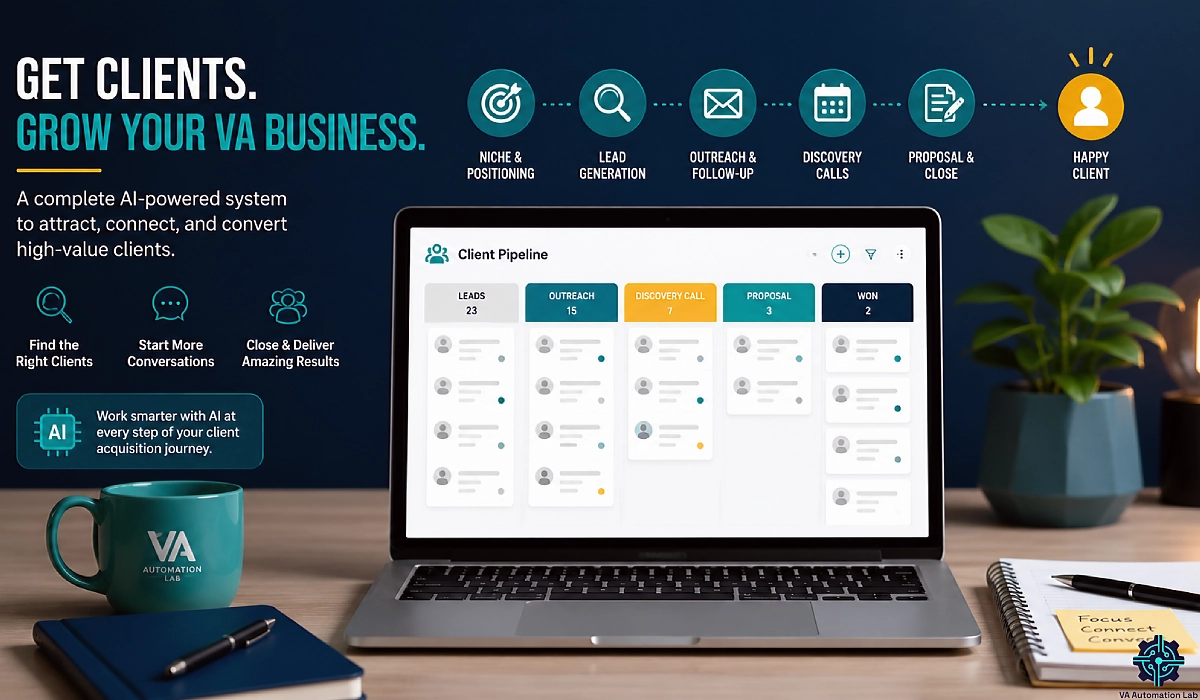
A complete, data-backed system to get clients as a virtual assistant using AI — from niche and offer to cold outreach, discovery calls, signed contracts, and a pipeline you can measure.
Most advice on how to get clients as a virtual assistant hands you a list of places. Upwork. LinkedIn. Facebook groups. Referrals.
The list is not wrong. It is just not a system. It tells you where to stand, and nothing about what to do once you are standing there.
This guide is the system. Five stages, in order, with the numbers that tell you which stage is broken when nothing works. AI runs through all five — not as a magic client machine, but as the thing that turns a week of research, writing, and follow-up into an afternoon.
One point before we start. Clients are not hiring you in spite of AI. Increasingly they hire you because you can use it. Upwork’s In-Demand Skills report for 2026 found that skills tied to applying AI inside an existing role grew 109% year over year, against 23% for other high-demand skills. The method you use to win the client is the proof of the skill you are selling.
For the tool reference behind every stage, start with our Tools for Virtual Assistants: The Complete AI Systems & Software Guide. For the wider picture about client management, read Client Management Systems for Virtual Assistants: The Complete Guide, which is where the work goes once the signature lands.
Key takeaways
- Client acquisition for a virtual assistant is a five-stage pipeline: positioning, assets, pipeline, outreach, conversion. Skip one stage and the whole thing stalls.
- One signed client per 50 well-qualified prospects is a working outreach system. Instantly’s 2026 benchmark report puts the average cold email reply rate at 3.43%, with top performers clearing 10%.
- Personalization is the biggest single lever. Generic templates report reply rates of 1–3%. Outreach built on a buying signal reports 15–25%.
- Do not automate LinkedIn outreach. A Northlight.ai analysis of Q1 2026 found roughly 40% of accounts using non-compliant automation tools were restricted between January and March.
- The stack that wins your first three clients costs under $40 a month. Everything above that is a purchase you have not earned yet.
Get the Free AI Toolkit for Virtual Assistants
No clients yet, or a pipeline that keeps stalling?
The free toolkit gives you the outreach prompt chain, the Delegation Audit questions, the discovery call frame, the one-page proposal template, and the pipeline tracker used in this guide.
No fluff, no tech overwhelm. Free, straight to your inbox.
Table of Contents
1. How to Get Clients as a Virtual Assistant: The Five-Stage System
To get clients as a virtual assistant, run one system instead of a scattered search. Choose a niche, package your services as outcomes, then work one outbound channel and one inbound channel at the same time. AI compresses research, personalization, and follow-up. The pipeline produces the client — not the tool.
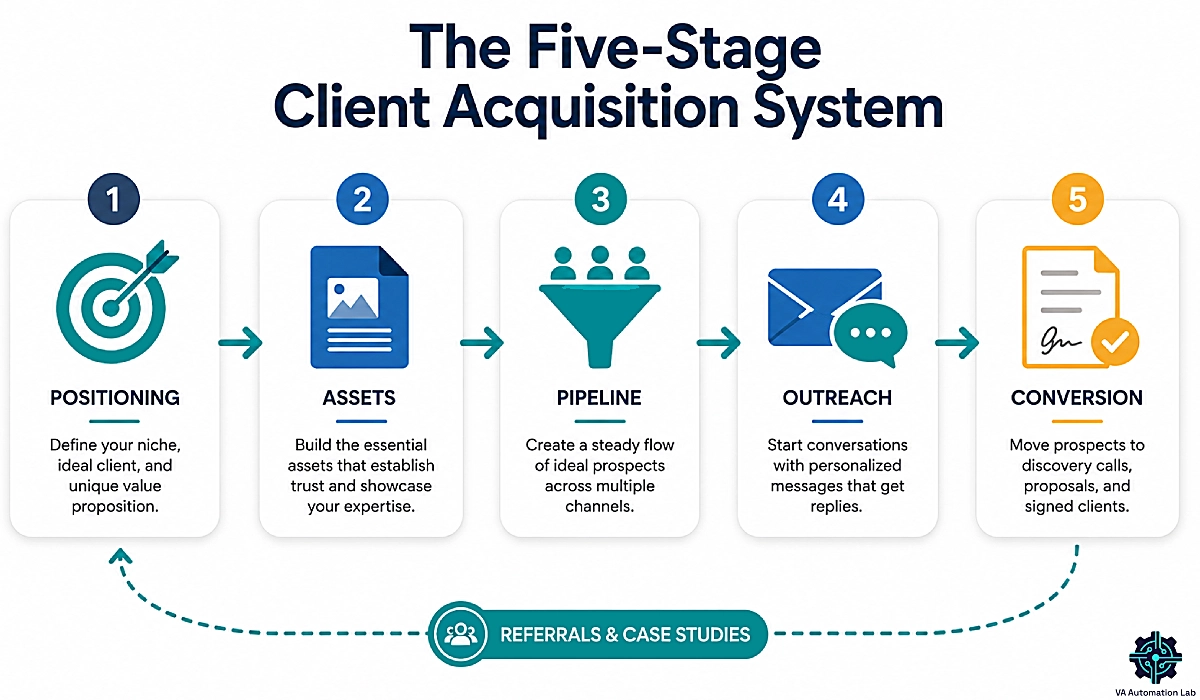
The Five Stages of a Virtual Assistant Client Acquisition System
A client acquisition system is a repeatable sequence that turns a stranger into a signed client, with a measurable conversion rate at every step. That definition matters, because it is what separates a system from a habit of applying to job posts.
Stage 1 — Positioning. Who you help, what you fix, what it costs.
Stage 2 — Assets. The four things a buyer checks before they reply to you.
Stage 3 — Pipeline. Two channels, and a list of named people who could hire you, sourced on evidence rather than hope.
Stage 4 — Outreach. The message that starts a conversation, sent enough times to matter.
Stage 5 — Conversion. Reply to call, call to proposal, proposal to signature.
Then the loop: a signed client becomes your case study and your referral source, which feeds Stage 3 again.
Most virtual assistants live in Stage 4 and never do Stage 1. They send pitches from a position nobody understands, to people who were never qualified, and conclude that outreach does not work. The pitch was fine. The three stages before it were missing.
What AI Changes in Client Acquisition — and What it Does Not
In this system, AI compresses research, first drafts, and follow-up. It cannot buy you trust, judgment, or a track record — and pretending otherwise is what gets an outreach campaign ignored.
On the first three: sourcing and reading 50 prospects drops from a day to an hour, service pages and proposals go from blank page to first draft in minutes, and the boring loop — sequences, reminders, pipeline updates — finally gets run instead of skipped. That last one matters more than it sounds: the follow-up you skip when you are tired is exactly the follow-up that produces a client.
The limits are just as real. AI cannot build trust, because a person decides to hire you. It cannot judge which client to walk away from. It cannot manufacture a track record. And a prospect who senses your outreach was generated rather than written will not reply.
Why AI Fluency Is the Fastest Positioning Shortcut you Have
The role is not disappearing. It is being repriced — and AI fluency is what decides which side of the repricing you land on.
The same Upwork data that shows AI skills climbing also shows demand for foundational human skills, including general virtual assistance, holding steady. Virtual admin assistance entered Upwork’s top ten most in-demand freelance skills in December 2025, with SMB demand up 18% that month.
Read those facts together. A VA who says “I run your inbox, and I automate the parts that do not need a human” is selling something an hourly generalist cannot match.
Treat the louder claims with care. Some surveys report AI-enabled freelancers earning around 40% more per hour; other analyses report platform rates for generic VA work being compressed. Both are probably true, and they describe different people. Generic gets cheaper. Specific gets more expensive.
2. Use AI to Choose a Niche and Build an Offer Clients Will Pay For
Stage 1 — Positioning. This is not branding: it decides your reply rate, your price, and how long a sales conversation takes.
Get it right and every stage below gets easier. Get it wrong and no amount of outreach volume saves you.
Prompt-driven Niche Research: Find the Segments with Budget and Urgency
A niche is worth choosing when three things are true: the segment has money, the pain repeats every week, and they are already hiring for it.
Run this in ChatGPT or Claude and you have a shortlist in twenty minutes.
Prompt 1 — Segment mapping
I am a virtual assistant with experience in [your skills]. List 12 business types that hire VAs. For each, give the three tasks they most often delegate, how often that pain occurs, and their typical monthly spend on support. Table format.Prompt 2 — Pressure test
From that table, pick the four segments where the pain is weekly rather than occasional and the buyer is a solo owner or a team under ten. Explain why the other eight are weaker.Prompt 3 — Language extraction
For the top two segments, list the exact phrases those owners use to describe the problem. Not marketing language. Theirs.The third prompt is the one that matters: the words your prospect uses for their own problem are the words that belong in your outreach. Verify them against real job posts before you trust them — the model is guessing, and you can check. Our ChatGPT guide for virtual assistants covers prompt structures in depth.
Turn your Service List into Outcomes, then Price it
Nobody buys “inbox management.” They buy “I stop losing leads in my inbox.”
Apply the so that test to every service. I manage your inbox so that nothing from a client sits unanswered for more than four hours. The half of the sentence after so that is the half your buyer pays for.
Then choose a pricing model, because you get one.
Hourly is easiest to sell and hardest to grow: you are paid for time, so getting faster with AI pays you less. That is the trap. Project pricing works for defined jobs — an inbox cleanup, a CRM migration, an onboarding build — and suits a first engagement.
Retainer is the only model that compounds. A retainer is a fixed monthly fee for a defined scope of work, which makes your income predictable and turns every hour AI saves you into profit instead of a lost invoice.
New VAs on freelance marketplaces commonly start between $10 and $20 an hour. That is an entry point, not a ceiling. Packaging is how you leave it.
3. Build the Four Client-Facing Assets AI Can Draft in a Weekend
Stage 2 — Assets. Before you contact anyone, a buyer needs somewhere to land: four assets, two days. AI drafts all of them and you edit every word.
A Portfolio with Zero Clients
The “I have no experience” problem is a proof problem, and proof can be built without lying.
Mock projects
Pick three businesses in your niche and build what you would build for them: an inbox triage system, an onboarding checklist, a content calendar. Add a short note explaining the reasoning.
Teardowns
Take a real company’s public process — their booking flow, their newsletter, their onboarding email — and write a one-page audit of what you would change. This shows judgment, which is rarer than skill.
Process artifacts
Screenshot your own systems: the automation you built in Make, the tracker you use, the SOP you wrote. Running your own business well is evidence you can run someone else’s.
Three of these beat a résumé, because they answer the buyer’s only question: can this person solve my problem?
The Service Page, the Inquiry Form, and the Proposal Template
The service page
One page. Who you help, the three problems you fix, what it costs to start, and one clear next step. Not your life story. Our Guide to AI Writing for Virtual Assistants covers the drafting workflow, and Rytr handles short-form pages well on its free plan. If you want the page to rank, Frase shows you what your buyers are searching for first.
The inquiry form
Do not publish a bare email address. A form captures what makes your first reply useful: what they need, when they need it, and what they have budgeted. Jotform‘s Starter plan is free and covers 5 forms and 100 submissions a month, which is more than a solo VA needs. Bronze is $34 per month billed annually if you outgrow it.
The proposal template
Build it now, while you are not under pressure. Stage 5 will use it.
The case study
You will have this after your first client. Leave the slot open.
4. Map the Six Channels Where Virtual Assistant Clients Come From
Stage 3 — Pipeline. Every competitor lists these channels; none tell you how to choose — and choosing is the whole game, because a VA running six channels badly loses to a VA running two channels well.
The Six channels, Ranked by Speed and Ceiling
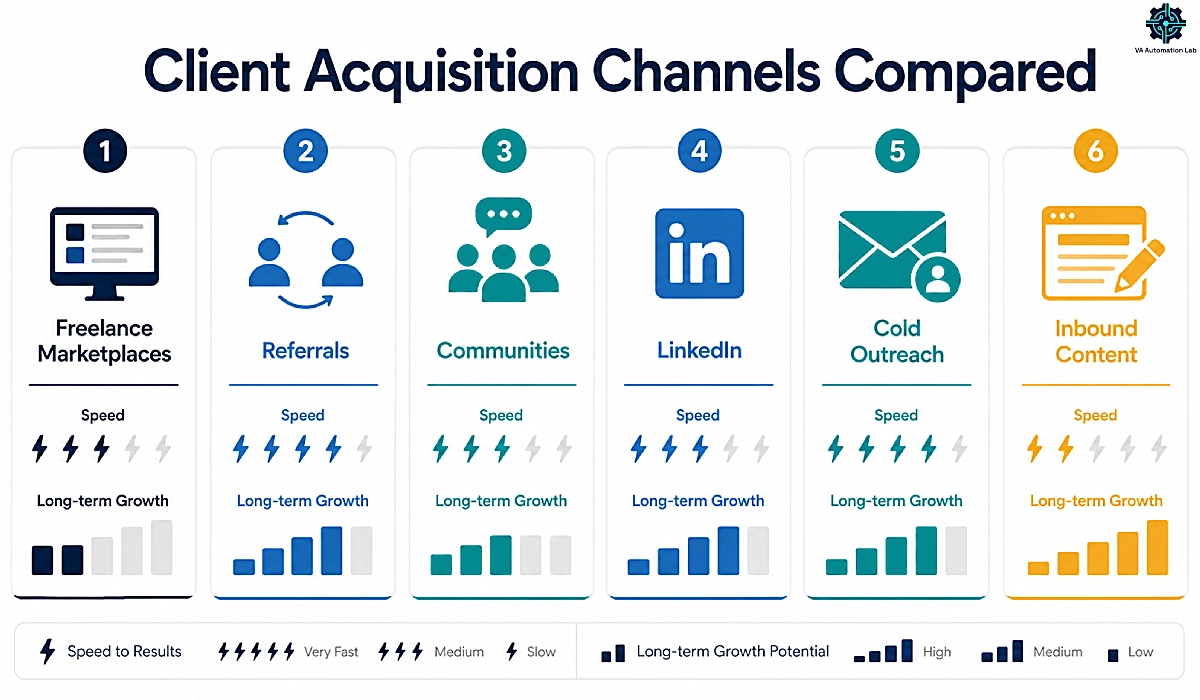
Channel | Time to first client | Long-term ceiling | Effort per client | Best for |
Freelance marketplaces | Fast (2–6 weeks) | Low | Low | Your first client and first review |
Referrals | Medium | Medium | Very low | Any VA with one happy client |
Communities | Medium (4–8 weeks) | Medium | Medium | VAs willing to be useful in public |
Medium (4–10 weeks) | High | Medium | VAs building a long-term brand | |
Cold outreach | Medium (3–8 weeks) | High | High | VAs who want control over volume |
Inbound content | Slow (3–9 months) | Highest | Low, after setup | VAs playing a two-year game |
Marketplaces get a bad reputation from VAs who treat them like a job board. Used deliberately they do one job better than anything else: they produce a paying client and a public review fast, which is the raw material every other channel needs. Take the first one. Do not build a career there.
The distinction that matters is rented versus owned attention. Upwork, Fiverr, and Facebook groups are rented — the platform can change the rules tomorrow. Your list, your site, and your reputation are owned. Start on rented ground because it is faster; move to owned ground because it lasts.
Pick Two Channels and Ignore the Rest
Choose one channel that produces a client this quarter and one that produces clients in a year.
Zero clients: marketplaces plus cold outreach. Speed now, control later.
One or two clients: referrals plus LinkedIn. You have proof, so use it, and start building the asset that outlives every platform.
A full roster, wanting better clients: inbound content plus referrals. You can afford to play slow, and slow is where the highest-paying clients live.
That is the whole decision. Write your two channels down. Everything else is a distraction for ninety days.
5. Lead Generation Without Guesswork: Build a Qualified List With AI
Stage 3, continued. Most VA outreach fails before a word is written, because the list is wrong. A hundred names is not a pipeline. Twenty qualified prospects is.
Source on Buying Signals, not on Job Titles
A buying signal is public evidence that a business needs help right now. It is the difference between a lead and a guess.
They are hiring. A job post for an assistant or an ops coordinator means the pain is funded and a budget is already approved.
They just launched or raised. Growth creates admin the founder did not plan for.
They are visibly drowning. Unanswered comments. A booking page three weeks out. A newsletter that stopped in March. An owner posting at 11pm about their inbox.
They already work with a VA. Rosters change. Being second in line costs nothing.
Where to look: niche job boards, LinkedIn posts from the last 14 days, community threads where owners complain, podcast guest lists, local directories. Twenty signals beat two hundred names.
Research and Score 50 Prospects in an Hour
An ideal client profile is the specific business you are targeting, defined by size, industry, budget, and the problem you fix. Build it before you build the list.
Step 1 — Build the sheet
Columns: name, company, role, signal, signal date, source URL, personalization hook, fit score, status, next action, next action date.
Step 2 — Enrich with AI
Paste each prospect’s homepage and About page into ChatGPT or Claude:
Here is a company's website copy. In three bullets: what they sell, who they sell to, and one specific operational bottleneck a virtual assistant could remove. Then write one sentence I could open a cold email with that proves I read this. No compliments. No flattery.Step 3 — Score fit, 1 to 5
Budget signal, pain frequency, decision-maker access, niche match, timing. Anything under 4 gets deleted. Deleting leads feels wrong and is the highest-leverage thing on this page.
Step 4 — Verify
The model will get things wrong. Check the signal, the name, the email. One wrong personalization line does more damage than none at all.
Track this in a spreadsheet until the volume hurts, then move it into a CRM. We compare the options in our guide to the Best CRM for Virtual Assistants.
6. Client Outreach: AI-Personalized Cold Email That Gets Replies
Stage 4 — Outreach. This is where most virtual assistants quit: usually four days in, usually right before the follow-up that would have worked.
So let’s start with the arithmetic, because the arithmetic is why people quit.
What the 2026 Reply-rate Benchmarks Mean for a Solo VA
Reply rate is replies divided by delivered emails. It is the most useful number in outreach, because it tells you whether your targeting works before you blame your writing.
Instantly’s 2026 cold email benchmark report, built on billions of sends, puts the platform-wide average reply rate at 3.43%. Top performers clear 10%. A 5% reply rate is a solid baseline.
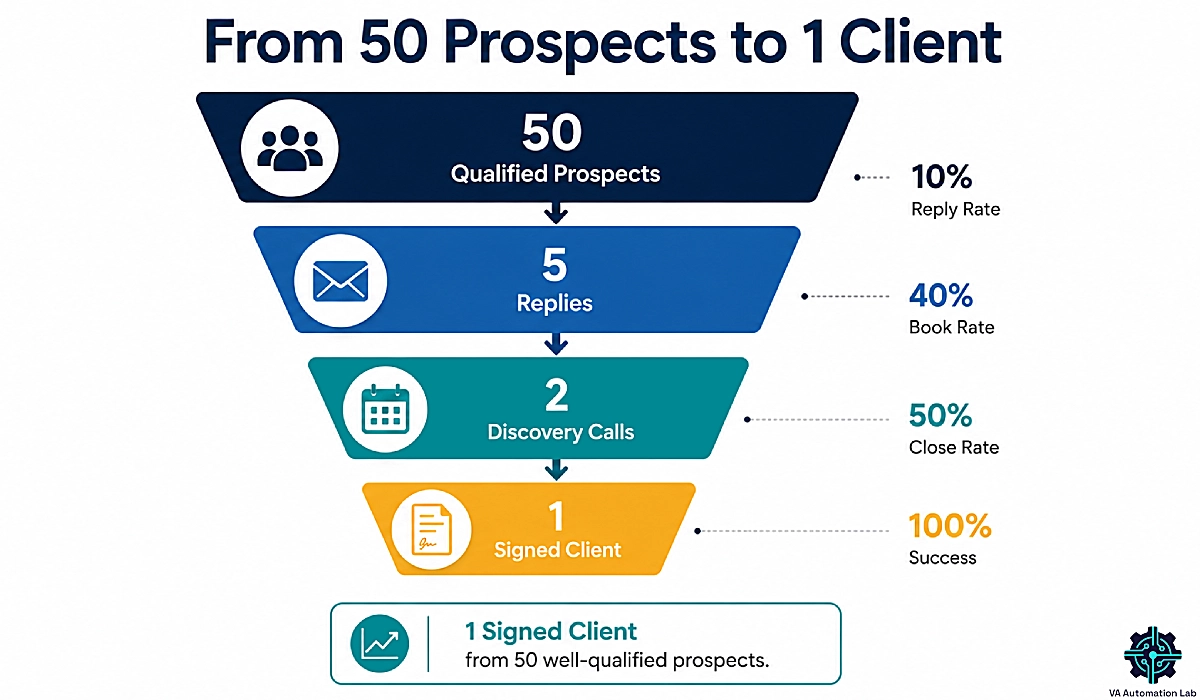
Here is what that means with a small list. Send to 50 qualified prospects at a 10% reply rate and you get 5 replies. Perhaps 3 are positive, 2 book a call, 1 signs. One client per 50 well-chosen prospects is a working system — a completely different mental model from “I emailed twelve people and nobody cared.”
The lever is personalization, and the effect is not small.
Personalization level | What it looks like | Reported reply rate |
None | The same email to everyone | 1–3% |
Basic | First name, company name | 5–9% |
Advanced | Their industry, their specific pain | 9–15% |
Signal-based | A trigger event plus a tailored offer | 15–25% |
Ranges aggregated from published vendor benchmark reports (Instantly, Belkins, Martal). Directional, not a promise.
Every rung roughly doubles your reply rate. Signal-based outreach to 20 people beats generic blasting to 500, and it takes less of your day.
The Anatomy of a VA Cold Email: One Problem, One Proof, One Ask
The benchmark data is unusually clear about format. The emails that win are short — under 80 words — with a single call to action.
Four lines. That is the whole email.
Line 1 — The signal. "Saw you're hiring an ops coordinator for the client onboarding backlog."
Line 2 — The problem, in their words. "That role usually exists because onboarding is eating the founder's week."
Line 3 — The proof. "I build onboarding systems for [niche] — here's a 90-second walkthrough of one."
Line 4 — One low-friction ask. "Worth a 15-minute call Thursday?"
No résumé. No list of twelve services. No “I hope this email finds you well.”
Where AI helps, and where it produces slop
Use AI to research and draft. Never to send. The tells are obvious to a buyer: the opening compliment about their “impressive work,” the tidy three-part structure, the paragraph that could describe any company. Read every email aloud. If it sounds like a person who did their homework, send it. If it sounds like software, rewrite it. Replies land in the inbox you already struggle to keep clear — our guide to AI Email Management for Virtual Assistants covers that.
The Follow-up Sequence, and the Benchmark Nobody Agrees on
Send four emails, not one. Space them across roughly two weeks: day 1, day 4, day 9, day 15. Each adds something new — a resource, a second angle, a short case study. Never “just bumping this.”
Now a disagreement in the data you should know about, because you will see both numbers quoted as fact.
Instantly’s 2026 report finds that 58% of replies arrive on the first email. Woodpecker’s and InboxKit’s benchmark data finds 55–65% of replies arrive on the follow-ups. Those cannot both describe your campaign.
What survives the contradiction: a meaningful share of your replies will arrive after the first email, and VAs who send once and stop never see them. Send four. Stop at four. Then leave that prospect alone for six months.
Run the Sequence Instead of Remembering It
Personalization is what lifts a 3% reply rate into double digits — and the follow-ups are what most VAs never send.
Lemlist runs the four-step sequence for you, personalizes at the prospect level, and includes a deliverability hub and warm-up booster, so you do not need a separate warm-up subscription.
The Email plan is $55 per month for 50,000 emails, billed annually. The 14-day free trial gives full access to the Multichannel plan, without in-app calling.
7. Send Safely: Deliverability and the Cold Email Rules That Apply to You
Still Stage 4. No competitor in this niche writes this section, and it is why a lot of good outreach fails silently: your email was not rejected, it never arrived.
Why your Outreach Lands in Spam
Three records decide whether a stranger’s inbox trusts you.
SPF tells the receiving server which services may send mail using your domain. DKIM adds a cryptographic signature proving the message was not tampered with. DMARC tells the server what to do when a message fails those checks. Set up all three in your domain’s DNS before you send anything. It takes an afternoon and it is free.
Then respect the thresholds. Since the major providers tightened their bulk sender requirements in 2024, the spam complaint rate that gets you throttled sits at 0.3%, with a safe target under 0.1%. Keep bounces under 2%. Cap sends at 50 to 100 per mailbox per day — as a solo VA, twenty a day is plenty.
Do you need a warm-up tool? Probably not yet. Domain warm-up means gradually increasing sending volume from a new domain so mailbox providers learn to trust it. If you send 15 to 20 emails a day from an established business mailbox, warm-up software solves a problem you do not have. If you are launching a brand-new sending domain, it earns its place. WarmupInbox Starter is $15 per inbox per month, billed annually.
One caveat that saves you money: Lemlist’s Email plan already includes a deliverability hub and warm-up booster. If you go with Lemlist, skip the separate warm-up subscription.
→ Try WarmupInbox — only if you are sending from a new domain.
Cold Email Rules by Jurisdiction
This is a summary, not legal advice. If you run outreach at volume, speak to a lawyer in your market.
Where they are | Can you cold email a business contact? | What every message must include |
United States (CAN-SPAM) | Yes. No prior consent required. | Real sender details, a truthful subject line, a physical postal address, a working opt-out |
EU (GDPR + ePrivacy) | Yes for B2B, under “legitimate interest.” Rules vary by country — Germany is strict, Poland stricter. | Your identity, why you are writing, an opt-out, a privacy policy link, and a documented legitimate interest assessment |
UK (UK GDPR + PECR) | Yes to corporate subscribers. Sole traders count as individuals — treat them as consumers. | Identity, opt-out, postal address |
Canada (CASL) | Only with express or implied consent. The strictest of the group. | Identity, opt-out, and a record of why consent applies |
Australia (Spam Act) | Yes, if the address was published in a business context and your message fits their role. | Identity, plus an opt-out honored within five business days |
Legitimate interest is the legal basis under GDPR that allows B2B cold email in the EU and UK without prior consent, provided the message is relevant to the recipient’s job and includes a working opt-out.
The practical version: email people at their work address, about their job, for a reason obvious in the first line, and give them one click to make you stop. Do that and you are compliant almost everywhere.
8. How to Get Clients as a Virtual Assistant on LinkedIn Without Risking Your Account
Your LinkedIn account is not a marketing channel. It is your shopfront, your portfolio, and your professional reputation in one login — which is why this section carries no product recommendation at all.
Your Profile is a Landing Page, not a Résumé
A buyer who gets your email will look you up before replying. That look decides everything.
Headline. Not “Virtual Assistant.” Try: “I run inbox and onboarding systems for coaching businesses — so founders stop losing leads.” Problem, outcome, who.
About. Three short paragraphs, first person: the problem you fix, how you fix it, and what to do next.
Featured. Pin the assets from Stage 2. The teardown, the mock project, the case study. Proof beats claims.
Content. Post twice a week from the work you already do — the checklist you built, the automation that saved a client four hours, the mistake you fixed. That is what visibility buys: not applause, but the buyer who reads three posts and sends the message you never had to send. Our Social Media System for Virtual Assistants keeps that cadence from eating your week.
The 2026 Safe Limits, and Why Automation Is a Bad Trade
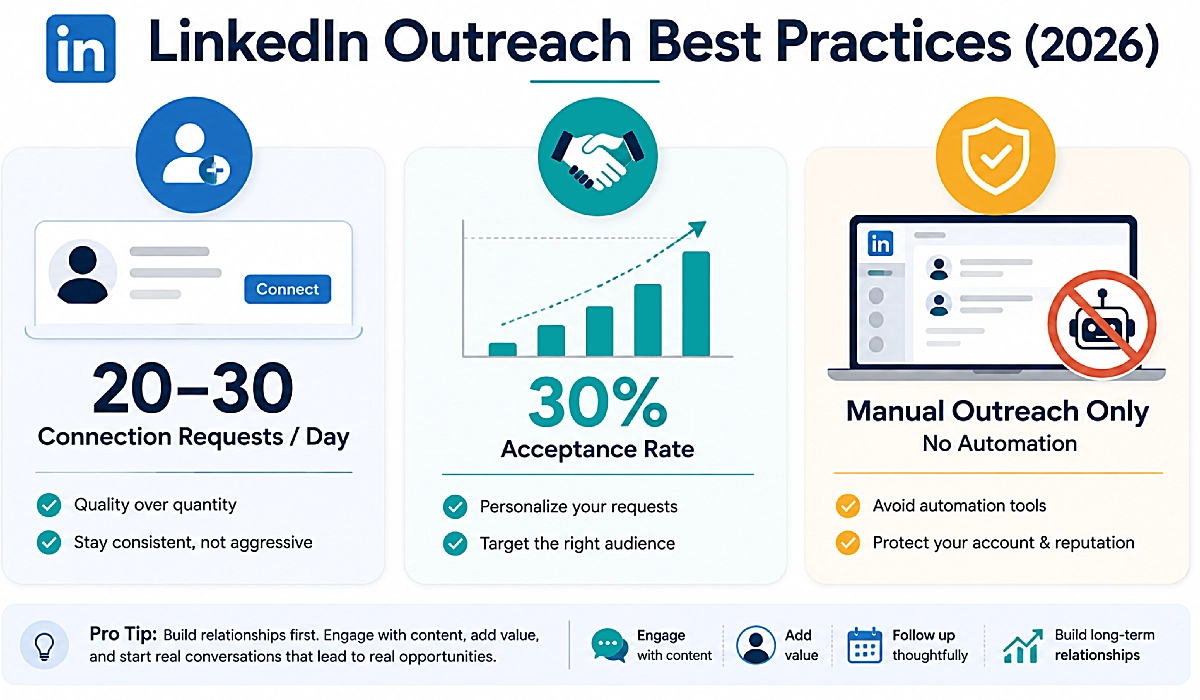
Manual outreach on LinkedIn works. These are the guardrails practitioners converge on for 2026: 20 to 30 connection requests a day, roughly 100 a week. New accounts should start near 10 to 15 and ramp slowly.
The number that governs your risk is not volume. It is acceptance rate. Above 30% you look like a professional. Below 15% LinkedIn’s systems treat you like a spammer, however few requests you sent. Personalize the request or do not send it.
Now the part nobody in this niche will tell you, because the affiliate commissions on LinkedIn automation tools are excellent.
Do not automate LinkedIn outreach
Enforcement changed sharply in 2026. A Northlight.ai analysis of Q1 2026 found roughly 40% of accounts using non-compliant automation tools received some form of restriction between January and March. In March 2026, LinkedIn permanently removed the company page and founder profile of one of the best-known automation vendors — from the platform their product was built to automate.
Run the trade. You save a few hours a week. You risk the account carrying your professional reputation, your connections, and your inbound leads. For a virtual assistant that is a terrible bet.
This applies to the tools we recommend, too. If you use Lemlist, stay on the email-only Email plan and skip the LinkedIn automation features on the higher tier.
9. Virtual Assistant Marketing: Build the Inbound Engine That Works While You Sleep
Outreach stops when you stop. An inbound engine keeps producing conversations while you deliver client work — which is the only way virtual assistant marketing survives a full roster.
The Delegation Audit: a Lead Magnet that Qualifies the Client for You
Most VAs offer a PDF checklist nobody downloads. Build something better: an interactive Delegation Audit that tells a business owner what their admin chaos is costing them.
Six questions:
- How many hours a week do you spend on admin you do not enjoy?
- What is one hour of your time worth?
- How long does an inquiry sit before you reply?
- How many tools do you use to run client work?
- What breaks first when you get busy?
- What would you do with ten hours back?
At the end it gives them a number: “You are losing roughly 11 hours and $2,200 a month to work you should not be doing.”
Look at what that quiz handed you. Their pain. Their urgency. Their hourly value, which is their budget. You know more about this prospect than a 30-minute call would tell you — and they came to you.
Involve.me is the tool that builds it. The free tier is enough to find out whether the audit converts before you spend anything.
The List and the 90-day Nurture Sequence
Most people who take your audit will not hire you this week. They will be ready in three months, and by then they will have forgotten you — unless you stay in front of them.
Send five emails over 90 days. Not a newsletter — a sequence with a job:
Email 1 (day 0): their audit result, plus one change they can make today without hiring anyone.
Email 2 (day 7): a short case study from your niche.
Email 3 (day 21): a teardown of a mistake you see constantly.
Email 4 (day 45): a free resource — the checklist, the template, the SOP.
Email 5 (day 90): a direct, unapologetic offer.
Moosend runs this for $7 per month on Pro (500 contacts), with a 30-day trial. If you expect to grow into segmentation — or to manage email for clients as a paid service, which is a smart upsell — ActiveCampaign‘s Starter plan is $15 per month. Both are in the stack table below.
Keep it cheap to feed: one asset becomes a post, a newsletter, and a carousel. Metricool‘s free plan schedules and measures it, and SocialBee handles recycling once the cadence gets serious.
Build the Delegation Audit in an Afternoon
A checklist gets downloaded and forgotten. An interactive audit hands you the prospect’s pain, their urgency, and their hourly value — which is their budget — before you ever speak to them.
Involve.me builds it with conditional logic and scoring, and the free plan covers 50 submissions a month, so you can test whether the audit converts before you pay anything. Start is $29 per month billed annually.
10. Qualify Before You Pitch: The Intake Questions That Filter Out Bad Clients
Stage 5 — Conversion. Every guide teaches you how to get a client; almost none teach you how to reject one — which is backwards, because a bad client costs you more billable hours than a slow month ever will.
Five Questions that Reveal Budget, Urgency, and Fit
Put these in your inquiry form, before you offer a call. They take the prospect two minutes and save you two hours.
- What is the single task you would hand over tomorrow if you could? A vague answer means they have not thought about it. Not a client yet.
- How long has this been a problem? Six months of pain means budget. Six days means they are shopping.
- What have you tried already? “I hired a VA before” is not a red flag. “I’ve hired five” is.
- What is the budget range for this? Ask it. In writing. Before the call. The prospects who refuse to answer are the prospects who will haggle.
- When do you want this handled? “As soon as possible” is a buying signal. “Sometime this year” is not.
Red Flags, and How to Say No and Stay Referable
The unpaid test. A short paid trial is reasonable. Free “sample work” is not. Decline it.
The quick task. “Just a small thing” is how scope creep introduces itself. Price it or pass.
The rate haggle. Someone who negotiates you down before you start will renegotiate every invoice after.
The five previous VAs. Sometimes the problem was the VAs. Often the problem is the client.
When you decline, decline well:
Thanks for the detail — from what you've described, this needs someone who specializes in [X], and that isn't where I'd do my best work for you. Happy to point you toward someone who does. And if things change on the [Y] side, my door is open.You just lost nothing and gained a referral source. Half the clients you say no to will send you someone else. None of the ones you disappoint will.
11. Turn Replies Into Booked Discovery Calls
A positive reply is not a client. It is a two-day window before their attention moves on — and most virtual assistants lose the deal inside that window, not in the pitch.
The Ten-minute Reply-to-call Handoff
Reply within an hour if you can. Speed reads as competence, and competence is what they are buying.
Send three things and nothing else:
- One sentence of confirmation. “Yes — that’s exactly the kind of onboarding backlog I unblock.”
- One line of proof. A link to the relevant case study or teardown. Not your whole portfolio.
- One booking link. Not “what times work for you?” That question starts a five-email negotiation across two time zones and dies in three days.
A booking link removes the friction that kills the deal. SavvyCal’s free plan gives you one, and it takes ten minutes to set up.
If client work keeps eating the space around these calls, our Guide to AI Scheduling Tools for Virtual Assistants covers how to protect it.
The Discovery Call Frame that Ends in a Decision
Twenty-five minutes. Four parts. You talk for about a fifth of it.
Minutes 0–3 — Frame it. “I’ve got 25 minutes. I’d like to understand what’s breaking, tell you whether I can fix it, and if I can, agree what happens next. Fair?”
Minutes 3–15 — Ask, then be quiet. What is the task, what does it cost them, what have they tried, what does success look like in 90 days. Take notes. Do not pitch.
Minutes 15–22 — Say what you would do. Three steps, plainly. Then the price range, out loud. Flinching here is what gets you underpaid.
Minutes 22–25 — Get a decision. Not “let me think about it.” Either “I’ll send a proposal today, and you’ll come back to me by Friday,” or “I don’t think I’m the right fit — here’s who is.” Both are wins. A maybe is not.
Prep any call in ten minutes. Paste their site into ChatGPT:
Summarize this business in five bullets. Then give me the three most likely operational bottlenecks for a company like this, and three questions that would make me sound like I understand their industry.Stop Losing Warm Replies to Calendar Ping-pong
“What times work for you?” starts a five-email negotiation across two time zones, and warm leads go cold inside it. A booking link ends it.
SavvyCal shows the prospect their own calendar overlaid on yours, so booking takes one click.
The free plan gives you one scheduling link, which is all you need to start. Basic is $10 per month billed annually for unlimited links and calendars.
12. Close the Deal: Proposal, Pricing, and Contract Without the Back-and-Forth
A proposal is not a document that explains you. It is a document that makes saying yes the easiest thing on their to-do list.
The One-page Proposal that Gets Signed
Five blocks, in this order, on one page:
- The problem, in their words. Quote the call back to them. If they said “I’m losing leads in my inbox,” write that — not “inbox optimization.”
- The outcome. What is different in 90 days, stated as a result.
- The scope. What you do, and what you do not do. This paragraph is your defense against scope creep.
- The price. Three options, never one number.
- The next step. One button. One date.
Three options beat one number, because a single price is a yes-or-no question and three prices are a which-one question. Offer a lean package, a core package, and one with more than they need. Most people take the middle. The expensive option is not there to be sold — it is there to make the middle look reasonable.
Contracts, Deposits, and the 48-hour Rule
Never start on a handshake. You need a contract covering scope, rate, payment terms, revisions, and how either side ends it. Take a deposit — 50% for projects, first month up front for retainers. A client who will not pay a deposit will not pay an invoice.
Send, track, and e-sign it on PandaDoc‘s free plan, which covers 60 documents a year; Starter is $19 per month for unlimited signatures. To run proposals, contracts, and invoicing from one place, Dubsado starts at $335 per year.
The 48-hour rule
Proposals go quiet. That is normal, and it is not rejection. Follow up 48 hours after sending, again after five days, once more after two weeks. Most VAs send a proposal, wait, and decide the client “wasn’t interested.” The client was busy.
When they sign, acquisition hands off to delivery. Do not improvise that part: client onboarding is where the first impression is won or lost, and our guide to Automating Client Onboarding covers the handoff step by step.
13. Run the System: Pipeline, Follow-Up, and the Four Numbers That Predict Your Next Client
Everything above is a campaign. This is what turns it into a machine you can diagnose instead of guess about.
A Pipeline for a Solo VA: Six Columns, Not Fifty Fields
You do not need a sales department. You need six columns and one discipline.
Sourced → Contacted → Replied → Call booked → Proposal sent → Signed.
The discipline: every lead in the pipeline has a next action and a date. No exceptions. A lead with no next action is not a lead. It is a memory.
Start in a spreadsheet. Move to a CRM when you pass roughly 30 active leads and start dropping follow-ups — which you will, and which is the most expensive habit in this business.
Pipedrive is built around the pipeline view rather than the contact record, which is the shape a solo VA needs. Lite is $14 per month; Growth is $39 and adds full email sync and nurturing sequences.
If you would rather work from a contact-first tool, Folk starts at $24 per month and we cover the setup in detail.
The Four Metrics that Tell You Which Stage Is Broken
When outreach is not working, “try harder” is not a diagnosis. These four numbers are.
Metric | How to calculate it | Working range | If it is low, fix this |
Reply rate | replies ÷ delivered emails | 5%+ | Targeting first, then personalization, then deliverability |
Call-booked rate | calls booked ÷ positive replies | 40%+ | Your reply speed and your booking friction |
Close rate | signed ÷ calls held | 20–30% | Your qualification and your proposal |
Time to client | days from first send to signature | 21–45 days | Your follow-up cadence — you are stopping too early |
The 5% reply-rate baseline comes from published 2026 benchmark reports. The other three are planning targets for a solo VA pipeline, not industry data. Track your own numbers for 90 days and they become the only benchmark that matters.
Read the table diagnostically. A low reply rate means your list is wrong, not your copy. A good reply rate with no calls means your handoff is slow. Good calls with no signatures means you are pitching people you should have disqualified.
Automate the Pipeline with Make or n8n, then Scale
Three automations, in this order. Build them once.
- Reply lands in the CRM. A new reply creates or updates a deal and sets a next action for tomorrow.
- Booking updates the deal. A booked call moves the deal to “call booked” and drops the AI prep brief into your notes.
- Proposal triggers the follow-up. Sending a proposal creates three follow-up tasks — 48 hours, 5 days, 14 days — so the 48-hour rule runs itself.
Make Core at $9/month billed annually, which includes 10,000 credits a month, handles all three; our Beginner Setup Guide for Make walks through the build. To self-host and go deeper, n8n starts at €20 per month for 2,500 executions, billed annually (n8n prices in euros). The wider picture is in our Complete Guide to Automation for Virtual Assistants.
What changes when you scale
At three or four retainer clients, acquisition has to slow down or delivery breaks. Raise rates rather than volume, and move everyone onto retainers. Business growth for a solo VA is not more clients — it is better ones. Our guide to Managing Multiple Clients with AI covers what changes there.
The Follow-up You Forget Is the Client You Lose
“Deals rarely die from rejection. They die from silence — a proposal nobody chased, a reply nobody logged.
Pipedrive keeps every lead visible with a dated next action, and it integrates natively with Lemlist, so replies from your outreach land in the pipeline without you copying anything across.
Lite is $14 per month billed annually, with a 14-day free trial.
14. The AI Client Acquisition Stack: What to Use at Each Stage
You do not need all of this. You need one tool per job, and only when the job starts hurting. Every price is per month, billed annually.
The Starter Stack and the Growth Stack
Stage | The job | Start free with | Step up to | Price |
Positioning | Research, prompts, drafting | ChatGPT / Claude | — | Free |
Assets | Service page and pitch copy | Rytr Free | Rytr Unlimited | $7.5/mo |
Assets | Inquiry and intake form | Jotform Starter | Jotform Bronze | $34/mo billed annually |
Lead gen | Lead tracker | Pipedrive Lite | $14/mo | |
Outreach | Cold email sequences | — | Woodpecker / Lemlist Email | $24/mo (500 prospects) · $55/mo (50k emails) |
Outreach | Deliverability | SPF, DKIM, DMARC | WarmupInbox Starter | $15/mo |
Inbound | Qualifying lead magnet | Involve.me Free | Involve.me Start | $29/mo |
Inbound | Email list and nurture | — | Moosend Pro / ActiveCampaign Starter | $7 – $15/mo |
Visibility | Publishing and analytics | Metricool Free | Metricool Starter | $20/mo |
Conversion | Discovery call booking | Savvycal Free | Savvycal Basic | $10/mo |
Close | Proposals and contracts | PandaDoc Free | PandaDoc Starter | $19/mo |
Close | All-in-one alternative | — | Dubsado Starter | $27.92/mo billed annually |
Pipeline | CRM | — | $14 – $24/mo | |
Automation | Connect the stack | Make Free | $9/mo · €20/mo |
For the full picture across every category, see our Complete Tool Comparison for Virtual Assistants.
What You Do Not Need Yet
A paid CRM before 30 active leads. A spreadsheet is a CRM with better manners.
A $55 outreach platform for 50,000 emails a month before your first client. Start with Woodpecker at $24/month for 500 contacted prospects, or send by hand. Lemlist earns its price when you run sequences every week, not when you are testing whether outreach works at all.
A warm-up subscription on an established mailbox. Covered above. Skip it.
A LinkedIn automation tool. Covered above. Skip it permanently.
A business intelligence dashboard. You have four metrics. They fit in a spreadsheet.
The stack that wins your first three clients costs under $40 a month. Anyone selling you more than that before you have revenue is selling you something.
15. Mistakes That Stop Virtual Assistants From Getting Clients
Four failures account for almost every stalled pipeline, and each maps back to a stage you can fix.
Sending AI-written outreach without a human pass
The fastest way to destroy a reply rate in 2026. Buyers have now read thousands of AI-written emails and they recognize the shape instantly: the generic compliment, the tidy structure, the paragraph that fits any company. Draft with AI. Send as a human. Every time. (Fix: Stage 4 — Outreach.)
Running six channels badly instead of two well
A VA posting on Instagram, bidding on Upwork, lurking in three Facebook groups, and sending four cold emails a week is doing nothing well enough to work. Two channels, ninety days, then judge. If the problem is that outreach keeps getting squeezed out of your week, that is a scheduling failure, not a sales one — our Productivity Systems for Virtual Assistants fix that. (Fix: Stage 3 — Pipeline.)
Competing on price instead of outcome
When you cannot articulate what you fix, the only thing left to discuss is your rate — and there is always someone cheaper. Underpricing is rarely a market problem. It is a positioning problem wearing a market problem’s coat. (Fix: Stage 1 — Positioning.)
Stopping after one follow-up
A large share of replies arrive after the first email. VAs who send once and move on never see them, then conclude cold outreach is dead. It is not dead. It is further away than one email. (Fix: Stage 4 — Outreach.)
16. Your First 30 Days: The Only Plan You Need
Five stages is the theory. Here is the calendar version — four weeks, in order, that turn it into a signed client.
Week 1 — Positioning and assets
Pick one niche. Write the offer as an outcome. Build the service page, the inquiry form, the mock project, and the proposal template.
Week 2 — Pipeline
Choose two channels. Source 50 prospects on buying signals. Score them. Delete anything below a 4.
Week 3 — Outreach
Set up SPF, DKIM, and DMARC. Send 15 personalized emails a day on a four-step sequence. Rewrite your LinkedIn profile. Post twice.
Week 4 — Conversion
Reply within the hour. Book with a link. Run the 25-minute call frame. Send one-page proposals with three options. Follow up at 48 hours.
Then read your four numbers and fix the one stage that is broken. That is the whole job.
Getting clients as a virtual assistant is not a talent. It is a pipeline you either run or you do not. Build it once and it keeps producing while you do the work you are paid for.
Frequently Asked Questions About Client Acquisition
How do I get my first client as a virtual assistant with no experience?
Build proof instead of waiting for it. Create three mock projects or teardowns in your niche, put them on a one-page service page, then take your first paying client from a freelance marketplace to earn a public review. That review unlocks every other channel.
Where do virtual assistants find clients in 2026?
Six channels: freelance marketplaces, referrals, online communities, LinkedIn, cold outreach, and inbound content. Do not run all six. Pick one that produces a client this quarter and one that produces clients in a year, then ignore the rest for 90 days.
How long does it take to get your first client?
It depends on volume, not luck. Contacting 50 qualified prospects with a four-step sequence, most VAs sign their first client within three to eight weeks. Fewer than 20 prospects contacted is not a test — it is a coin flip.
Is the virtual assistant market saturated?
Generic virtual assistance is crowded. Specialized, AI-fluent virtual assistance is not. Upwork’s data shows virtual admin assistance entering the top ten in-demand freelance skills in December 2025, with SMB demand up 18%. Saturation is a positioning problem, not a market problem.
Will AI replace virtual assistants?
No — but a VA who uses AI will replace one who does not. AI absorbs routine execution. It does not absorb judgment, accountability, or client relationships. The VAs losing work are the ones selling hours of manual admin rather than outcomes.
How much should a beginner virtual assistant charge?
Beginners on freelance marketplaces commonly start between $10 and $20 an hour. Treat that as an entry point, not a rate. Move to project pricing after your first testimonial, and to a monthly retainer as soon as the work is recurring.
Do I need a niche to get clients as a VA?
Yes, and the reason is mechanical. Industry-specific outreach reports reply rates several times higher than generic outreach. You cannot personalize at scale without a niche, because you would be researching a new industry for every email.
Do I need a website to get clients as a virtual assistant?
Not to start. A strong LinkedIn profile plus a one-page service page carries you to your first few clients. You need a real site once you start building inbound content, because that is the asset the content points at.
Is it legal to cold email potential clients?
Yes in most markets, with conditions. The US permits it with an opt-out and a postal address. The EU and UK permit B2B under legitimate interest. Canada is strictest and needs consent. Email people at work, about their job, with a working opt-out. This is not legal advice.
Should I use Upwork or reach out to clients directly?
Both, for the first 90 days. Marketplaces buy you speed and a public review. Direct outreach buys you margin and control. Marketplaces are rented attention — take the first client, then build somewhere you own.
How many cold emails should a virtual assistant send per day?
Fifteen to twenty personalized emails a day is plenty for a solo VA, and well inside safe sending limits. Volume is not the lever. At a 10% reply rate, 50 well-chosen prospects produce roughly one signed client.
What is a good cold email reply rate?
The platform-wide average is 3.43% according to Instantly’s 2026 benchmark report. A 5% reply rate is a solid baseline, and 8–10% is strong for a targeted campaign. Below 2%, check deliverability before you rewrite your copy.
How many clients can a virtual assistant handle?
Most solo VAs manage three to five retainer clients before quality drops. The limit is not hours — it is context switching between different tools and expectations. We cover the systems that raise that ceiling in our guide to Managing Multiple Clients with AI.
Do I need certifications to become a virtual assistant?
No. Buyers check your portfolio, your proposal quality, and how fast you reply. A certificate signals effort; a teardown of their onboarding flow signals competence. If you have a spare weekend, build the teardown.
What should I say in a cold pitch to a potential client?
Four lines, under 80 words: the signal you noticed, the problem in their language, one piece of proof, one low-friction ask. No résumé, no service list, no “hope this finds you well.” One problem, one proof, one ask.
Glossary
Ideal client profile (ICP): The specific type of business you target, defined by size, industry, budget, and the problem you fix. Not a demographic — a decision-making unit.
Buying signal: Public evidence that a business needs help now. A job post, a funding round, a launch, or an owner visibly struggling in public.
Reply rate: Replies divided by delivered emails, as a percentage. The most useful number in outreach, because it tells you whether your targeting works.
SPF, DKIM, DMARC: Three DNS records that prove your email is really from you. Without them, mailbox providers treat your messages as suspicious and route them to spam.
Domain warm-up: Gradually increasing sending volume from a new domain so mailbox providers learn to trust it. Only needed on a new sending domain.
Legitimate interest: The legal basis under GDPR that allows B2B cold email in the EU and UK without prior consent, provided the message is relevant to the recipient’s job and includes an opt-out.
Retainer: A fixed monthly fee for a defined scope of work. The only pricing model where getting faster with AI increases your profit instead of shrinking your invoice.
About the Author
Alex Stratton has spent the better part of a decade working at the intersection of virtual assistance and operational systems, first as a VA supporting founders and small business owners, then as a workflow consultant helping remote teams reduce the manual overhead that accumulates when businesses grow faster than their processes. The tools and workflows here reflect decisions made repeatedly in real client contexts, where the wrong choice costs hours, not minutes. Learn more about VA Automation Lab → About.