
AI Tools for Virtual Assistants: The Complete Practical Guide
A clear, actionable roadmap to choosing, using, and integrating the best AI tools for Virtual Assistants, even if you’re not technical.
Virtual assistants today manage communication, scheduling, documentation, research, and client operations across multiple platforms simultaneously. The workload keeps increasing. The available time doesn’t.
The right AI tools change that equation, not by replacing VA expertise, but by eliminating the repetitive, low-value tasks that consume hours disproportionate to their output. This guide covers everything you need to make that shift: which tools to use, in what order, for which tasks, and how to avoid the mistakes that waste time and money before results appear.
No technical background required. No developer knowledge needed. Every tool and workflow covered here is designed for operational use in a real VA practice.
What this guide covers:
- The best AI tools for virtual assistants organized by workflow category
- How to evaluate and choose tools for your specific client work
- A beginner roadmap from first tool to functional AI workflow
- The most common mistakes VAs make with AI, and how to avoid them
- Internal links to dedicated deep-dive guides for every major tool
👉 Download the Free AI Starter Toolkit — curated tools, prompts, and workflows. No research required.
👉 Start From Zero — if you’re new to AI entirely, start here first.
Table of Contents
1. What Are AI Tools for Virtual Assistants?
AI tools for virtual assistants are software applications that use artificial intelligence to automate, simplify, or accelerate the tasks that make up daily VA work: email management, scheduling, documentation, content creation, workflow automation, and client communication.
What makes modern AI tools different from traditional software is their ability to understand natural language, adapt to patterns, and generate output (drafts, summaries, structured documents) rather than simply storing or organizing information. A VA doesn’t instruct these tools step by step. They describe what’s needed, and the tool produces a usable starting point.
The practical result for virtual assistant AI tools: tasks that previously required twenty to thirty minutes of focused work, drafting a professional email, summarizing a long thread, creating a client report template, take two to five minutes. Applied consistently across a full work week, the time recovered is measured in hours, not minutes.
None of this requires technical skills. The tools covered in this guide are designed for operational users, people who manage client work, not people who build software.
2. Why Virtual Assistants Need AI Tools in 2026
The role of the virtual assistant has shifted. Clients who once needed someone to handle tasks now need someone to manage systems, to ensure that communication flows, deadlines are met, and operations run without requiring constant oversight. That shift raises the standard for what competent VA work looks like, and it raises it faster than most manual processes can keep up with.
AI automation for virtual assistants is the practical response to that shift. Not because AI is trendy, but because the volume and complexity of VA work has grown beyond what manual processes handle efficiently. A VA managing three clients simultaneously, each with their own inbox, calendar, project tracker, and communication preferences, cannot do that work at a consistent level without systems that reduce repetitive overhead.
The VAs who adopt AI tools early operate faster, take on more clients without proportionally increasing hours, and deliver a more consistent quality of work. The advantage isn’t technological enthusiasm, it’s operational efficiency applied to a role that runs on efficiency.
The most important clarification: AI doesn’t replace virtual assistants. It replaces the inefficient workflows that currently limit them. Client relationships, judgment, communication, and strategic thinking remain entirely human work. AI handles the repetition.
👉 How Virtual Assistants Can Start Using AI Without Technical Skills — the beginner’s guide to understanding AI and applying it immediately.
3. How AI Solves the Core Problems in VA Work
Most of the friction in VA work comes from three recurring sources, not from the complexity of individual tasks, but from the overhead that accumulates around them.
Repetitive admin tasks are the most visible. Email sorting, scheduling coordination, data entry between tools, status updates, report formatting; these tasks are not difficult, but they are time-consuming and cognitively draining when they occur constantly throughout the day. AI tools address this directly: ChatGPT or Claude draft emails in seconds rather than minutes. Zapier or Make move data between platforms automatically. Calendly eliminates the back-and-forth of scheduling. The individual time savings are small. The compounded daily savings are substantial.
Tool fragmentation creates a second layer of overhead. A VA managing four clients might operate across eight to ten different platforms (email, calendar, task manager, CRM, Slack, Google Drive, and more) switching context dozens of times per day. Each switch has a cognitive cost. AI tools reduce this through integration: Notion AI operates inside the workspace where tasks and documentation already live. Zapier connects tools so information moves without manual intervention. The goal isn’t fewer tools, it’s fewer manual transitions between them.
Inconsistent output quality is the third problem, particularly for VAs managing high volumes of written communication. Grammarly catches errors before they reach clients. Claude and ChatGPT produce professional-quality drafts that require editing rather than writing from scratch. Consistent output quality under variable time pressure is one of the measurable benefits of a well-configured AI tools for VA workflow.
The underlying principle across all three: AI handles the predictable and repeatable parts of VA work so that human attention goes to the parts that require judgment, relationship management, and adaptability.
👉 How to Automate Repetitive Tasks as a Virtual Assistant — practical examples of real automations that save hours every week.
4. Categories of AI Tools for Virtual Assistants
Understanding how AI tools are organized by function prevents the most common early mistake: adopting multiple tools that solve the same problem while leaving other workflow areas completely unaddressed.
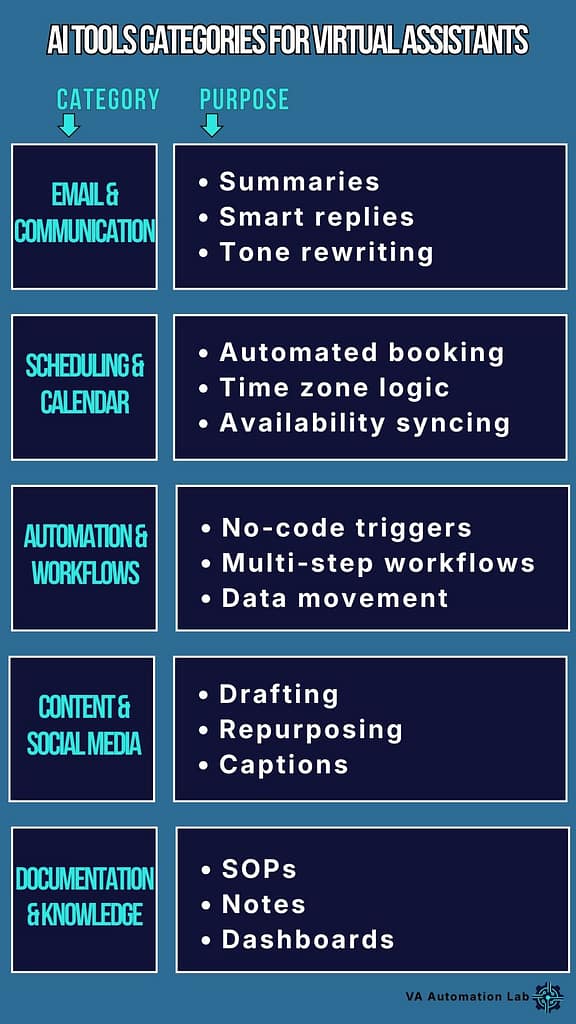
There are five functional categories. Most VAs need one or two tools per category, not five or ten across the entire stack.
Email & Client Communication
The highest-volume written communication in VA work happens in email. AI tools in this category (Claude, ChatGPT, Gmail AI features) reduce drafting time, improve tone consistency, and help manage multiple client communication styles without losing professional quality. Best for VAs handling customer support, inbox management, or high-volume written communication across clients.
👉 Best AI Tools for Managing Emails as a Virtual Assistant
👉 ChatGPT for Virtual Assistants: Complete Guide to Use Cases, Prompts & Workflows
Scheduling & Calendar Management
Scheduling looks simple until you’re coordinating multiple time zones, recurring meetings, and last-minute changes across three or four clients simultaneously. AI-powered scheduling tools (Calendly, Reclaim.ai, Motion) automate booking, sync availability, and eliminate the back-and-forth that consumes disproportionate time relative to its value.
Task & Workflow Automation
This is where AI creates the largest compounded time savings. No-code automation platforms (Zapier and Make) connect tools and trigger actions automatically: when a form is submitted, a task is created, a confirmation is sent, a CRM is updated. Without a single manual step. The setup investment is front-loaded. The return is permanent and scales with every new client.
👉 Zapier vs Make for Virtual Assistants: The Complete Comparison
Workspace, Documentation & SOPs
Notion AI and ClickUp AI operate inside the workspace where tasks and documentation already live, generating SOP drafts, summarizing project status, organizing client information, and maintaining the knowledge base that makes multi-client management sustainable. For VAs managing complex operations, this category is as important as the writing tools.
👉 Notion AI for Virtual Assistants: Complete Guide
👉 ClickUp for Virtual Assistants: Setup Guide & Templates
Both Notion and ClickUp appear consistently at the top of every VA tool stack, but they solve different operational problems and the choice between them has significant consequences for how your daily workflow is structured. For the complete feature comparison, pricing breakdown, and the decision framework that matches each tool to your specific VA service type, 👉 Notion vs ClickUp for Virtual Assistants: Complete Comparison Guide.
Content & Social Media
VAs supporting clients with content creation, social media management, or marketing operations use AI tools (Claude, ChatGPT, Jasper) to generate first drafts, adapt content across formats, and reduce the time spent on the production layer of content work. These tools don’t replace creative judgment, they remove the blank-page friction that slows production.
Category | Best Tools | Best For | Difficulty Level |
Email & Communication | Claude, ChatGPT, Gmail AI | VAs managing multiple inboxes | Easy |
Scheduling & Calendar | Calendly, Reclaim.ai, Motion | VAs coordinating meetings | Easy |
Task & Workflow Automation | Zapier, Make | VAs with repetitive multi-tool workflows | Medium |
Workspace & Documentation | Notion AI, ClickUp AI | VAs managing projects and SOPs | Easy–Medium |
Content & Social Media | Claude, ChatGPT, Jasper | VAs supporting creators or businesses | Easy |
5. Best AI Tools for Virtual Assistants (Tested & Practical)
The tools below were selected against one criterion: do they make a solo VA’s daily work measurably more effective? Tools that appear frequently in competitor roundups but don’t pass that test are excluded regardless of marketing visibility or search volume.
Claude (Anthropic) — AI Writing & Documentation
Best for: client-facing writing, SOP generation, complex summarization, documentation that requires nuance and professional tone
Claude is the AI writing tool to reach for when output quality is the priority. Its particular strength in a VA context is documentation, given a rough description of a workflow or a meeting transcript, it produces structured, professional output that requires minimal editing before delivery to a client.
For VAs whose time is limited, the difference between AI that produces first-draft quality and AI that produces near-publish-ready quality is a meaningful operational difference.
Practical use cases:
- Drafting SOPs from workflow descriptions or Loom transcripts
- Summarizing long client briefs into clear action points
- Writing client-facing documents (onboarding guides, proposals, status reports) in the client’s preferred tone
- Generating first drafts of recurring reports from data or notes
Not ideal if: you need very fast, iterative brainstorming, ChatGPT’s response speed is better suited for rapid generation tasks.
Cost: free tier available. Claude Pro at $20/month
ChatGPT (OpenAI) — The Versatile AI Assistant
Best for: drafting, summarizing, brainstorming, structured list generation, quick research
ChatGPT excels where speed and breadth matter more than depth, generating options quickly, creating structured frameworks, answering unfamiliar questions before a client call. For VAs, its strongest productivity application is checklist and template generation: given a workflow description, it produces a comprehensive structured output in under thirty seconds that would take fifteen minutes to write manually.
Practical use cases:
- Generating SOPs in checklist format
- Drafting email templates for recurring client communication
- Summarizing meeting notes into action items
- Brainstorming service packages, pricing structures, process improvements
- Creating structured agendas before client calls
Cost: free tier available. ChatGPT Plus at $20/month
👉 ChatGPT for Virtual Assistants: Complete Guide to Use Cases, Prompts & Workflows
Notion AI — Smart Workspace for Tasks & Documentation
Best for: project management, SOP libraries, client dashboards, knowledge management
Notion AI operates inside the workspace where VA tasks and documentation already live, which is its primary advantage over standalone AI tools. You don’t switch between a writing tool and a task manager. The AI is embedded in the environment where the output will be used.
Practical use cases:
- Summarizing task lists and project status for client updates
- Generating SOP drafts from rough descriptions inside the workspace
- Turning meeting notes into structured action items
- Maintaining clean documentation across multiple clients
Cost: free tier covers solo VA essentials. Notion AI at $10/month
Zapier & Make — No‑Code Automation
Best for: connecting tools, automating repetitive multi-step processes, eliminating manual data entry
These two platforms cover the automation layer that transforms a collection of individual tools into an integrated VA workflow. Zapier is the right starting point, simpler interface, faster setup, lower learning curve. Make is the upgrade path when workflow complexity exceeds what Zapier handles efficiently.
Practical use cases:
- New client form → CRM record → folder creation → welcome email
- Task status change → client notification → calendar update
- Weekly time data → formatted report → automatic delivery
Cost: Zapier free tier at 100 tasks/month. Make free at 1,000 operations/month. Paid plans from $9-$20/month.
👉 Zapier vs Make for Virtual Assistants: The Complete Comparison
Grammarly — Writing Quality & Professional Polish
Best for: final-pass editing on client-facing communication, maintaining consistent professional tone across high-volume output
Grammarly works as a layer on top of any AI-drafted content, catching what the generative tools miss, particularly tone inconsistencies and subtle grammar errors in documents that have been lightly edited from AI output. For VAs producing high volumes of written content, it reduces the cognitive load of self-editing to a scan.
Cost: free tier covers essential grammar and spelling. Premium at approximately $12/month.
Calendly — Scheduling Automation
Best for: eliminating scheduling back-and-forth, client onboarding calls, recurring meetings across multiple clients
Calendly removes the email exchange that currently precedes every meeting, clients book directly from availability, time zones are handled automatically, and confirmations go out without manual intervention. For VAs who manage calls or meetings for multiple clients, it is one of the highest-return tools relative to setup cost.
Cost: free tier covers core scheduling. Premium from $10/month.
Key Takeaway
Most virtual assistant AI tools stacks that produce real results contain three to four tools, not ten. One AI writing tool (Claude or ChatGPT), one automation platform (Zapier or Make), one workspace tool (Notion),
and Grammarly as a passive quality layer cover the majority of daily VA workflow needs.
Tool | Best For | Free Tier | Recommendation |
Claude | Client-facing writing, SOPs, documentation | ✅ Available | Start here for output quality |
ChatGPT | Drafting, templates, brainstorming | ✅ Available | Add for speed and versatility |
Notion AI | Workspace, projects, documentation | ✅ Core features | Add when Notion is your workspace |
Zapier | Simple automations, beginner-friendly | ✅ 100 tasks/mo | Start here for automation |
Make | Complex workflows, higher volume | ✅ 1,000 ops/mo | Upgrade path from Zapier |
Grammarly | Writing polish, professional tone | ✅ Basic features | Always active, every document |
Calendly | Scheduling, meeting coordination | ✅ Core features | Start immediately if you manage calls |
👉 Get the Free AI Starter Toolkit — the specific tools, setup order, and first workflow to build.
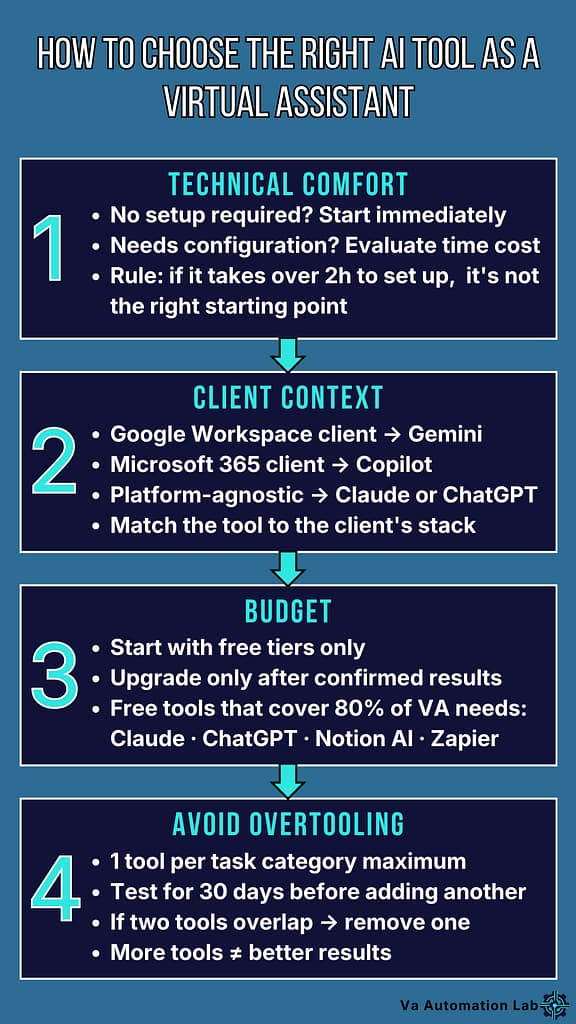
6. How to Choose the Right AI Tool as a Virtual Assistant
The wrong selection process for how to use AI as a virtual assistant leads to tool-hopping, spending time evaluating and setting up platforms that get abandoned after two weeks. Four criteria prevent it.
Technical comfort level. If a tool requires complex initial configuration to produce its first useful output, it’s not the right starting point. The tools that stick are the ones that work in the first session. Prioritize tools with interfaces that match your existing digital fluency: visual, intuitive, and operational within the first hour of use.
Client context. The tools that serve your work best are the ones that integrate with what your clients already use. A VA whose clients operate in ClickUp needs ClickUp-compatible tools. A VA supporting content creators needs tools that fit a content production workflow. The best AI tools for VA workflow are not universal, they’re context-specific.
Budget discipline. Evaluate each tool against one question: does this save me enough time to justify its monthly cost? A $20/month tool that saves five hours of client work pays for itself in the first week of use. A $20/month tool that saves twenty minutes per week does not. Avoid stacking subscriptions before the return on each one is clear.
Overtooling risk. The most consistent mistake is adopting multiple tools that solve the same problem. If Claude and ChatGPT are both in your stack, they should serve clearly different use cases, not compete for the same workflow. Review your tool stack every sixty days and eliminate anything without a defined, active role.
👉 AI-Powered Productivity System for Virtual Assistants — how to build a complete, scalable system around these tools.
7. Common Mistakes VAs Make with AI Tools
AI can significantly elevate how Virtual Assistants work, but only when the technology is used with clarity and intention. Many VAs adopt AI tools for virtual assistants too quickly, testing multiple platforms at once, copying complex setups, or automating tasks without a solid foundation. Instead of saving time, this often leads to confusion, inconsistent results, and unnecessary complexity.
To help you get the most out of AI automation for virtual assistants, avoid overwhelm, and choose the best AI tools for virtual assistants, including simple, accessible AI tools for beginners and other easy AI tools for virtual assistants, here are the most common mistakes VAs make and how to prevent them.
Mistake 1 — Using Too Many Tools at Once
The most common entry point into AI is also the most counterproductive: testing multiple platforms simultaneously. The result is a stack of half-learned tools, none of which are used consistently enough to produce meaningful results. One AI writing tool and one automation tool cover the majority of daily VA workflow needs. Expand the stack only when the first tools are producing consistent, measurable output.
Mistake 2 — Automating Without a Documented Process
Automation only works reliably when the underlying process is already stable and documented. VAs who try to automate a workflow they haven’t yet fully defined produce automations that break unpredictably, often at the worst possible moment, mid-client-delivery. The correct sequence is: do the task manually → document it step by step → identify the repeatable parts → automate only those parts.
👉 How to Automate Client Onboarding for Virtual Assistants — the right sequence applied to the highest-value VA automation.
Mistake 3 — Copying Stacks Built for Different Roles
AI setups designed for marketing agencies, developers, or enterprise teams look impressive and perform poorly in a solo VA context. The tools are too technical, the integrations too complex, and the maintenance overhead too high for a one-person operation. Choose tools designed for operational users, evaluated against what actually works in daily VA work, not what generates engagement in AI tool roundups.
Key Takeaway
Fewer tools, used consistently, produce better results than comprehensive stacks managed poorly. The VAs who see the fastest return from AI tools are the ones who master two tools completely before adding a third.
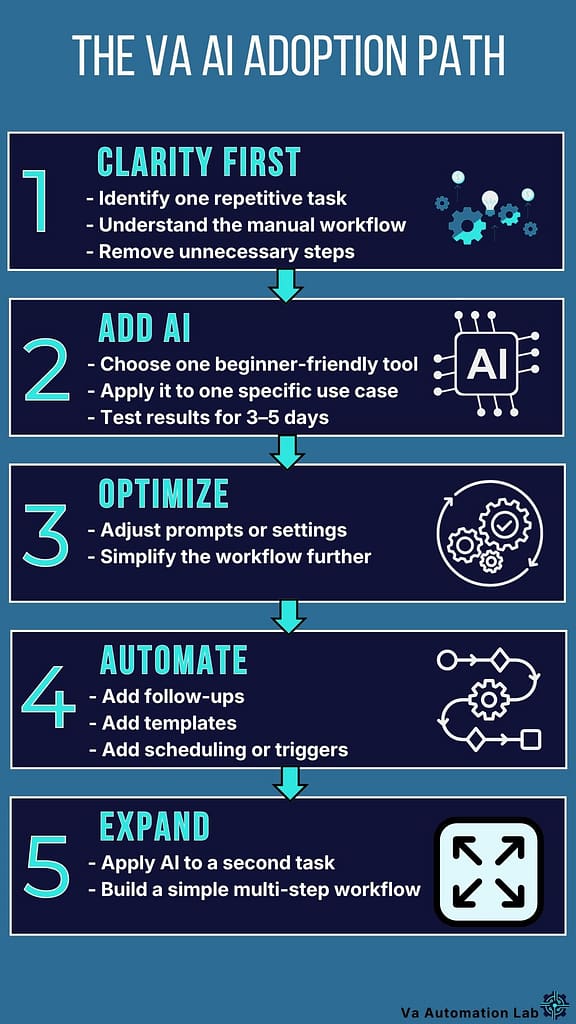
8. Beginner Roadmap: How to Start Using AI as a Virtual Assistant
The fastest path to productive AI use is not the most comprehensive one. It is the most focused one: one task, one tool, one workflow, until the first results are clear enough to guide the next step.
Step 1 — Identify One Repetitive Task
Start with a task that consumes disproportionate time relative to its complexity, email drafting, meeting scheduling, document formatting, status updates. This is the task where AI produces the fastest, most visible win. The right first task is not the most complex one. It is the one you do most often.
Step 2 — Choose One Tool for That Task
Match the task to the simplest available tool:
– Email drafting → Claude or ChatGPT
– Scheduling → Calendly
– Documentation → Notion AI
– Repetitive multi-step process → Zapier
One tool. One task. Do not evaluate alternatives at this stage. The evaluation phase is what delays results indefinitely. Choose the tool most frequently recommended for your specific task and use it for two weeks before forming an opinion on whether it works.
Step 3 — Apply It to One Use Case Only
Limit the first implementation to a single, specific use case. If you chose Claude for email drafting, use it only for drafting follow-up emails to clients, not for SOPs, not for reports, not for anything else.
This constraint accelerates the learning curve by eliminating the cognitive overhead of applying a new tool across multiple contexts simultaneously. Fluency in one use case transfers quickly to adjacent ones. Trying to learn all use cases at once transfers to none of them.
Step 4 — Keep the Workflow Simple
If a tool requires more than two hours of setup to produce its first useful output, it is not the right tool for this stage. The tools that produce early results have interfaces that match your existing workflow and integrate with the platforms you already use. Complexity can be added later. Simplicity at the start is what determines whether the habit forms.
Step 5 — Expand Only After Seeing Clear Results
The signal to add a second tool or a second use case is specific: the first workflow runs without active management, produces consistent output, and has recovered enough time to create capacity for the next implementation. That signal usually arrives between two and four weeks of daily use. If it hasn’t arrived after four weeks, the problem is not the tool, it is the frequency of use.
Roadmap summary: One repetitive task → one tool → one use case → simple workflow → consistent daily use → clear time savings → expand.
👉 How Virtual Assistants Can Start Using AI Without Technical Skills
👉 How to Manage Multiple Clients as a Virtual Assistant Using AI
9. Conclusion: AI Tools as a Competitive Advantage
The VAs who integrate AI tools into their daily work early are not doing so because AI is new or because clients are asking for it. They are doing so because the operational math is straightforward: less time on repetitive tasks means more capacity for client work, more clients without proportionally more hours, and a higher quality of output sustained under variable pressure.
The tools exist. The workflows are documented. The learning curve for the right tools is measured in days, not months. What remains is the decision to start, with one tool, one task, and the patience to let the first results guide the next step.
If you are starting today: Pick one tool from section 5. Apply it to one task from your current workflow. Use it every day for two weeks before evaluating results. Then add one more.
That approach produces better long-term results than any comprehensive strategy planned but never fully implemented.
Ready to Work Smarter as a Virtual Assistant?
Get the free AI Starter Toolkit and learn how to use simple AI tools and workflows to save time and deliver more value to your clients.
Frequently Asked Questions About AI Tools for Virtual Assistants
What are the best AI tools for virtual assistants?
The most consistently effective stack for solo VA work covers four functions: one AI writing tool (Claude for client-facing output, ChatGPT for internal drafting and brainstorming), one automation platform (Zapier to start, Make when complexity increases), one workspace tool (Notion AI), and Grammarly as a passive writing quality layer. All have free tiers sufficient for initial implementation. Total cost at paid tiers: approximately $50-60/month for a complete functional stack.
How do I start using AI as a virtual assistant with no technical skills?
Start with Claude or ChatGPT, both require zero setup and produce useful output in the first session. Open the tool, describe a task you do regularly (draft a follow-up email to a client who missed a deadline), and evaluate the output. Edit what needs editing. Use it again tomorrow for the same type of task. Fluency builds through repetition, not through research. The full beginner roadmap is in section 8 of this guide.
Can AI tools replace virtual assistants?
No, and the concern, while understandable, misidentifies what AI actually automates. AI tools automate the predictable and repeatable parts of VA work: drafting similar emails, formatting documents, moving data between tools, scheduling
coordination. The parts of VA work that drive client retention (judgment, communication quality, relationship management, adaptability to unexpected situations) remain entirely human. VAs who use AI tools handle more clients with better output quality. They are not being replaced. They are being amplified.
How much do AI tools cost for a virtual assistant?
Most tools have functional free tiers that cover solo VA needs for the first three to six months. Claude and ChatGPT are both free with usage limits. Zapier’s free tier covers 100 automated tasks per month. Notion’s free tier covers full workspace functionality for solo users. Grammarly’s free tier covers essential grammar and clarity. A complete paid stack (Claude Pro, Zapier Starter, Notion Plus) costs approximately $50-60/month and typically recovers that cost within the first week of use through time savings on billable work.
What is the difference between Zapier and Make for VA work?
Zapier is the right starting point, simpler interface, faster initial setup, lower learning curve, and sufficient for most beginner and intermediate VA automations. Make is the right upgrade when workflow complexity exceeds what Zapier handles efficiently: conditional logic, multi-step data transformation, higher task volumes at lower cost. Most VAs start on Zapier and migrate specific complex workflows to Make over time rather than switching entirely. 👉 Full comparison: Zapier vs Make for Virtual Assistants
How do I know which AI tool is right for my VA workflow?
Match the tool to the task category and your current client context (see section 6). If your primary bottleneck is written communication, start with Claude or ChatGPT. If your bottleneck is repetitive multi-step processes between tools, start with Zapier. If your bottleneck is project organization across multiple clients, start with Notion AI. The right tool is the one that addresses your most time-consuming recurring problem, not the one with the most features or the highest search volume in tool roundups.
Glossary: Essential AI & Automation Terms for Virtual Assistants
AI Tool
Software that uses artificial intelligence to assist with tasks such as writing, organizing, analyzing, or automating workflows.
AI Automation
The use of AI to complete tasks or workflows automatically, reducing manual effort and improving efficiency.
AI Assistant
A digital assistant powered by artificial intelligence that can draft content, summarize information, answer questions, or support daily operations.
AI Tools for Beginners
Simple, intuitive AI tools designed for users with no technical background, ideal for Virtual Assistants starting with AI.
AI Workflow
A sequence of tasks supported or executed by AI to streamline processes and reduce repetitive work.
AI Triage
AI‑powered prioritization of incoming information (emails, messages, tasks) based on urgency, intent, or relevance.
Automation Platform
A tool (like Zapier or Make) that connects apps and automates multi‑step workflows without coding.
Clarity Mapping
The process of documenting and simplifying a workflow before introducing AI or automation.
Cross‑Tool Integration
Connecting multiple apps so information flows automatically between them (e.g., email → CRM → task manager).
Data Extraction
AI’s ability to identify and pull key information (tasks, dates, names, decisions) from emails, documents, or messages.
Intent Detection
AI’s ability to understand the purpose of a message, such as a request, question, complaint, or task.
Knowledge Base
A structured collection of information (SOPs, FAQs, templates) that AI can reference to provide accurate answers or generate content.
Machine Learning (ML)
A branch of AI where systems learn from data and improve over time without being explicitly programmed.
Natural Language Processing (NLP)
The AI technology that allows tools to understand, interpret, and generate human language.
No‑Code Tool
A platform that allows users to build automations or workflows without writing code, ideal for Virtual Assistants.
Process Documentation
Writing down each step of a workflow to clarify how it works and identify opportunities for improvement or automation.
Repetitive Task
A recurring activity that requires manual effort, such as email sorting, scheduling, or updating spreadsheets.
Smart Replies
AI‑generated email or message responses based on context, tone, and previous communication patterns.
Task Automation
Using AI or no‑code tools to complete small, repetitive tasks automatically.
Thread Summarization
AI‑generated summaries of long email or chat threads, allowing VAs to understand context quickly.
Unified Inbox
A single dashboard that consolidates multiple email accounts or communication channels for easier management.
Workflow Automation
A multi‑step automation that connects several tasks or tools to run a process end‑to‑end without manual intervention.
About the Author
Alex Stratton has spent the better part of a decade working at the intersection of virtual assistance and operational systems, first as a VA supporting founders and small business owners, then as a workflow consultant helping remote teams reduce the manual overhead that accumulates when businesses grow faster than their processes. The tools and workflows here reflect decisions made repeatedly in real client contexts, where the wrong choice costs hours, not minutes. Learn more about VA Automation Lab → About.