
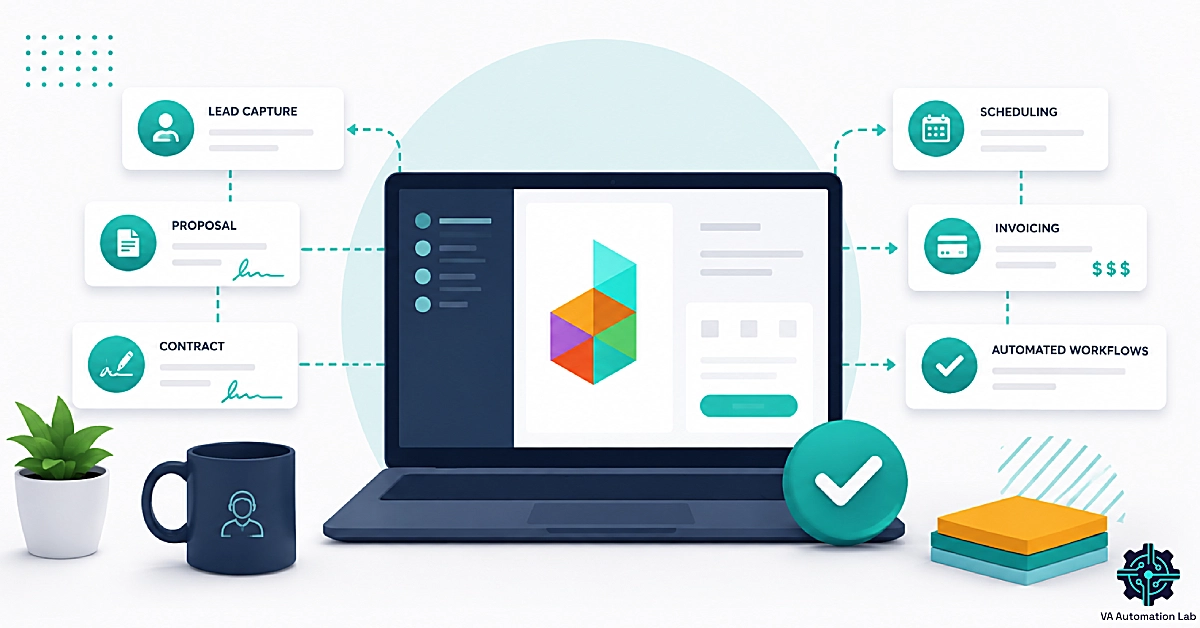
Dubsado for Virtual Assistants: Review & Setup Guide (2026)

Disclosure: This article contains affiliate links. If you sign up through them, VA Automation Lab earns a commission at no extra cost to you. Recommendations are based on our evaluation of tool fit for VA workflows.
Dubsado for virtual assistants turns the repetitive half of client work — proposals, contracts, invoices, onboarding, and retainer billing — into a sequence that runs itself once you have built it.
If you are managing four retainer clients out of a Gmail folder, a Google Docs contract template, and a spreadsheet you have stopped trusting, Dubsado is one of the tools people will point you toward. It sits in the client operations layer of a VA business, alongside the tools covered in Client Management Systems for Virtual Assistants and within the wider stack mapped in AI Tools for Virtual Assistants.
This guide covers what Dubsado does for a VA specifically, what it costs, what changed in the 3.0 rebuild, how to configure it during the free trial, three workflows worth building, and the points where it stops being the right answer.
Dubsado at a Glance
Best for | VAs with 3+ retainer clients and a repeatable onboarding process |
Pricing (annual) | Starter $335/yr · Premier $525/yr |
Free trial | 21 days, full Premier access, no credit card — Try It Free |
Standout feature | Public proposals — package choice, contract and invoice in one client link |
Main limitation | Automation, scheduling and proposals are Premier-only |
Not a replacement for | Project management, sales CRM, email marketing |
Setup time | 1–2 weeks (vendor) · 2–4 weeks (independent reviews) |
Multi-brand | $10/mo per extra brand · 3 additional users free |
Get the Free AI Toolkit for Virtual Assistants
The tools, workflows, and templates we use to run a VA business on automation.
Delivered free, no fluff.
Table of Contents
1. What Dubsado Does for a Virtual Assistant Business
Dubsado runs the client relationship — proposals through payment. It does not run the client work itself.
Dubsado is a client management platform that handles the business side of a virtual assistant practice: proposals, contracts, invoices, scheduling, and automated client workflows. It suits VAs who serve several retainer clients and want one branded system from inquiry to payment. Automation and scheduling require the Premier plan at $525 per year.
Founded in 2015 by Jake and Becca Berg and still self-funded, Dubsado has been used by more than 120,000 business owners, with around 30,000 currently paying. Its core audience is creative service providers: photographers, wedding planners, designers, coaches. Virtual assistants and OBMs are a named segment, and the company publishes a case study of a VA who scaled to serving 300-plus clients across 45 industries on the platform.
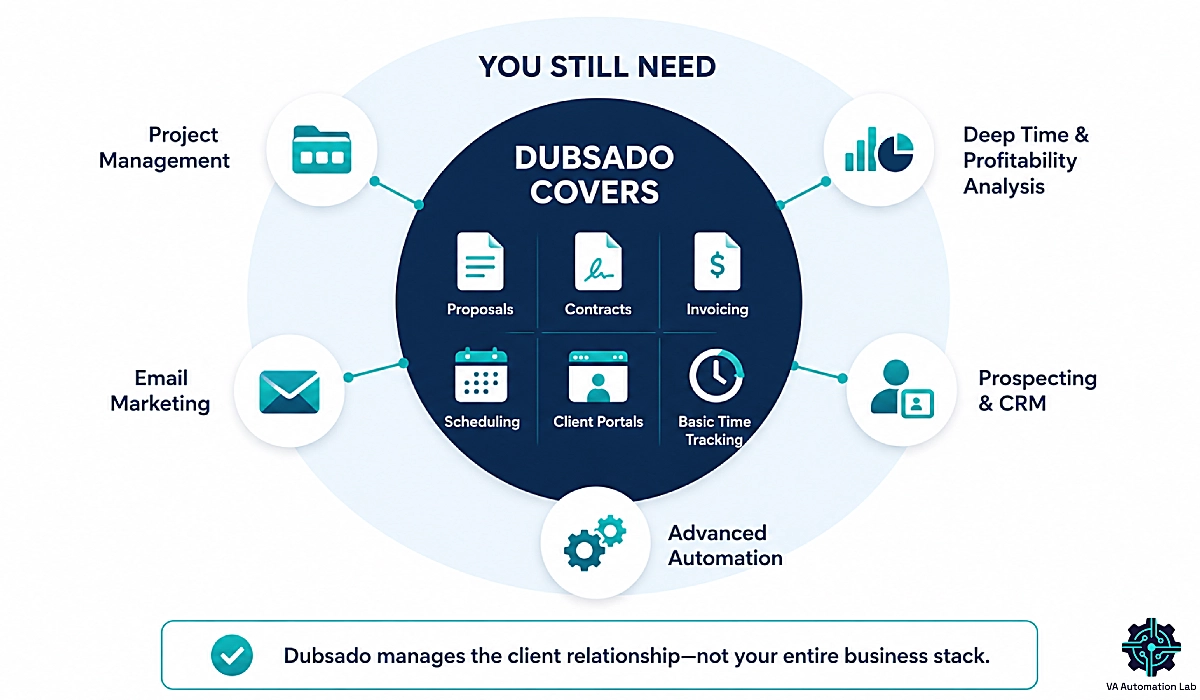
The mental model that makes Dubsado click: it manages the client relationship, not the client work. Everything a prospect sees and signs and pays lives in Dubsado. Everything you produce for them afterward lives somewhere else. Hold that line and the platform stops looking like it has gaps.
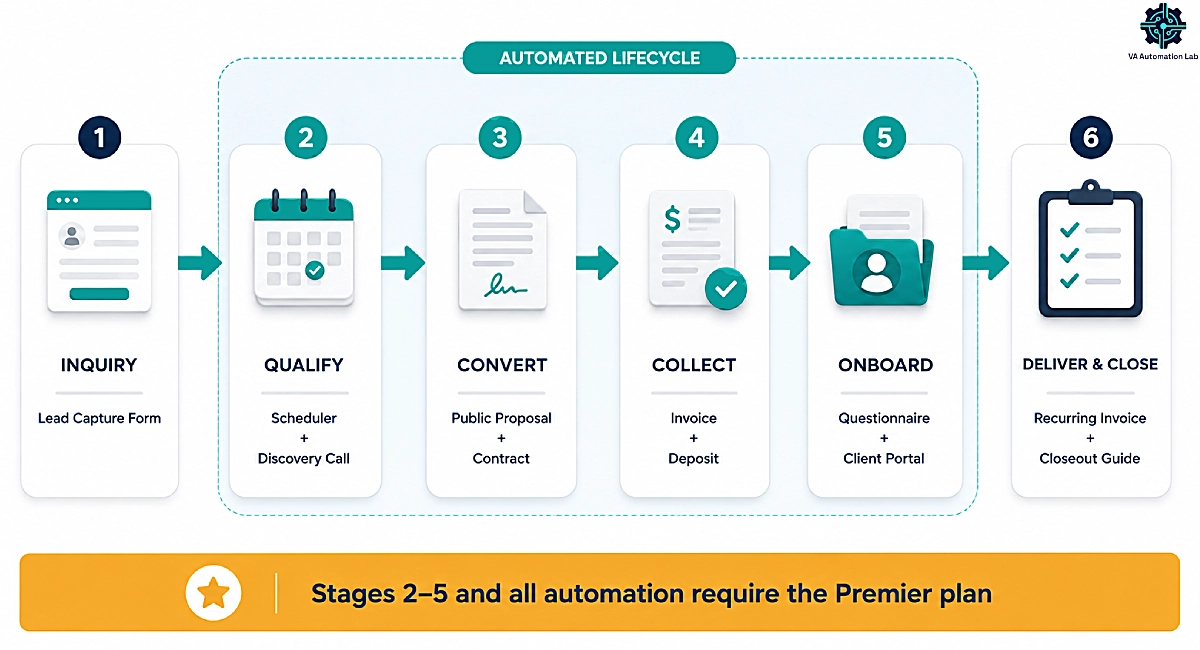
For a VA, that translates into a specific set of jobs: capturing an inquiry from your website, qualifying it on a discovery call, sending a proposal the client can sign and pay in one sitting, onboarding them without ten back-and-forth emails, and billing a retainer on the same date every month without you remembering to.
What Dubsado Is Not
Dubsado publishes its own boundaries — more than most platforms do — and they are worth taking at face value.
It is not a sales CRM. There is no prospecting database, no contact enrichment, no outbound pipeline. Dubsado starts working after a lead reaches you. If your bottleneck is finding clients rather than managing them, a tool from the Best CRM for Virtual Assistants roundup will serve you better.
It is not project management. Dubsado includes task lists and task boards, but no dependencies, no Gantt view, no milestones. The company itself recommends pairing it with Notion, ClickUp, Asana, or Trello.
It is not email marketing. The email tools are transactional — contracts, invoices, onboarding sequences, project updates. Newsletters and nurture campaigns belong in a dedicated platform.
2. Dubsado Pricing for Virtual Assistants: Starter vs Premier
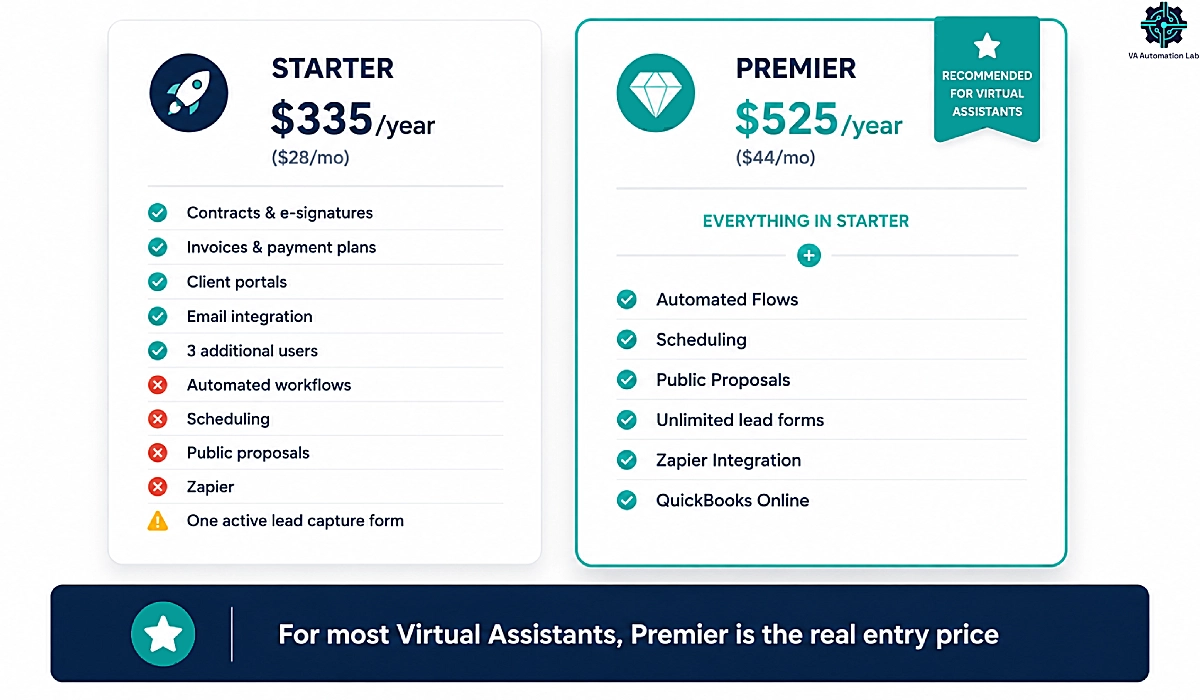
Premier at $525 a year is the working plan for a VA. Starter cannot automate anything.
Plan | Billed annually | Billed monthly | What it covers |
Starter | $335/yr | $35/mo | Contracts, invoices, forms, client portals, email integration, 1 active lead capture form |
Premier | $525/yr | $55/mo | Everything above, plus Flows, scheduling, public proposals, unlimited lead forms, Zapier, QuickBooks Online |
Additional brand | $10/mo | $10/mo | Separate logo, colors, templates, email settings |
Users 4–10 | $25/mo | $25/mo | First 3 additional users are free on both plans |
Annual billing saves roughly two months against paying monthly on either plan.
What the Starter Plan Leaves Out — and Why It Matters for VAs
Starter has no automated workflows, no scheduling, no public proposals, no Zapier integration, and exactly one active lead capture form. Strip those out and what remains is a system for manually sending branded documents and collecting payment for them. That is a real improvement over Google Docs plus PayPal. It is not the reason a VA buys client management software.
The pitch that draws virtual assistants to Dubsado — a contract that signs itself into an invoice, which triggers an onboarding sequence, which books the kickoff call — is entirely a Premier feature set. If you are evaluating this platform to reclaim admin hours, Premier at $525 per year is the real entry price. Budget for it from the start rather than starting on Starter, outgrowing it in six weeks, and paying twice.
The single lead form limit deserves its own note. Many VAs run separate intake forms per service — one for inbox management, one for podcast support, one for general inquiries. On Starter you get one live at a time.
Add-On Costs: Brands, Users, and Payment Processing
Both plans include up to three additional users at no cost, which is unusually generous at this price point and covers most VAs who subcontract. Beyond that, 4–10 users cost $25 per month as a block, 11–20 cost $45, and 21–30 cost $60.
Additional brands run $10 per month each. For a VA operating one service business and one adjacent brand — a course, a template shop, an agency identity — that is $120 a year for full separation of logos, colors, email settings, and templates.
Card and bank payments run through Dubsado Payments, powered by Stripe. Processing fees sit outside your subscription and vary by country, so check current Stripe rates for your region before you price your packages. PayPal and Square can be connected directly as alternatives.
How the 21-Day Free Trial Works
The trial runs 21 days with full Premier access and no credit card. Twenty-one days is enough to build a working system and not much more, so treat it as a build sprint rather than a browsing window. The setup walkthrough further down is written to be followed inside the trial: by day 21 you should have a signed test contract, a paid test invoice, and one live Flow.
Try Dubsado Free for 21 Days — Full Premier Access
No credit card required, and the trial unlocks every Premier feature: Flows, scheduling, public proposals, and unlimited lead forms.
Build the workflows in this guide before you decide whether to pay for them — and get 20% off your first month or year when you do.
3. Dubsado 3.0: What Changed and What It Means for Your Setup
The November 2025 rebuild added Flows, Kanban boards, and time tracking.
Dubsado 3.0 launched in November 2025 and is a full platform rebuild, not a visual refresh. That matters while you research. A large share of the reviews you will find describe 2.0 and are wrong about the current product in specific, checkable ways.
Flows replaced workflows. Automations now use a node-based builder that renders each trigger and action as a connected step you can see end to end. The old interface listed actions in sequence with branching that was difficult to trace. For a VA building a multi-branch onboarding sequence, this is the difference between a system you can debug and one you rebuild from scratch when it misfires. Older help articles and most third-party guides still call these Dubsado workflows — the job they do is the same, the builder is not.
Task boards moved to Kanban. Internal task management was previously an afterthought. You can now toggle between a table and a board view.
Time tracking is now native and global. Several comparison pages published in 2026 still claim Dubsado has no time tracking. It does — 3.0 shipped a global time tracker that runs against projects.
AI arrived in a limited form. Dubsado documents AI-generated email thread summaries and a meeting notetaker that records client calls and produces transcripts, summaries, and video recordings. Comparison pages asserting the platform has no AI capability are out of date. This is not a general-purpose AI assistant — for that layer, see Claude AI for Virtual Assistants.
Dubsado 2.0 is scheduled for sunset sometime in 2026 with advance notice. Data transfers automatically between versions, and existing paid users received 3.0 at no additional cost. If you are signing up now, you are building in 3.0 and this transition does not affect you.
4. The Dubsado Features That Matter Most for Virtual Assistants
Six features a VA touches weekly, and the point where each one stops short of a dedicated tool.
Lead Capture Forms and Public Proposals
The lead capture form is an embeddable intake form for your website. A submission creates a project in Dubsado and can trigger a Flow — an auto-reply, a scheduler link, a task on your board.
Public proposals are the platform’s strongest asset and a Premier feature. A proposal presents your packages as selectable options; the client picks one, and the contract and invoice chain behind it in the same link. They choose, sign, and pay in a single sitting without three separate emails from you.
For a VA quoting a monthly retainer with an optional onboarding project fee, this is the difference between a two-week sales cycle and a two-day one. It also removes the most common leak in a VA sales process: the prospect who agrees on the call, then goes quiet while your contract sits unsigned in their inbox. Public proposals sit on Premier, and the 21-day trial unlocks them in full — build one against a real package before you decide whether the plan is worth it.
Contracts, E-Signatures, and Sub-Agreements
Contracts are legally binding with e-signature and populate through smart fields — dynamic variables that pull client name, project dates, package details, and invoice totals into the document automatically. You build the template once.
Applying a contract to a project creates an editable copy, so you can adjust terms for one client without touching the master. This sounds minor until you have twelve active templates and one client who needed a modified notice period.
Sub-agreements handle mid-engagement scope changes: a client on a 10-hour retainer who needs a one-off launch project gets a signed addendum rather than an informal Slack agreement you cannot invoice against. For VAs, scope creep is the most expensive recurring problem in the business, and a two-minute sub-agreement is the cheapest available fix. If contracts are the only thing you need, compare against the dedicated options in Best Contract Tools for Virtual Assistants.
Invoicing, Payment Plans, and Retainer Billing
Invoices support line items, packages, discounts, payment plans, recurring schedules, and autopay. Clients can pay by card, debit, or ACH bank transfer through Dubsado Payments, with Klarna and Affirm available and Tap to Pay for in-person work.
Automatic payment reminders run without you, which removes the least pleasant recurring task in a VA business. You can edit invoice details without breaking a scheduled payment plan.
One limitation worth knowing before you commit: recurring invoices are not true subscription billing. Dubsado generates and sends the invoice on schedule, and autopay can charge a stored card, but the underlying model is a series of invoices rather than a subscription with its own lifecycle. For most VA retainers this distinction never surfaces. If you run tiered plans with mid-cycle upgrades and prorated adjustments, it will.
Client Portals and Multi-Brand Management
Each client gets a branded, password-protected portal holding their contracts, invoices, forms, and project information. Connect a custom domain and the portal shows your URL rather than Dubsado’s. Everything the client sees carries your brand, with no platform badge.
Multi-brand is the most VA-specific feature Dubsado offers and the one competitor articles consistently skip. At $10 per month, each additional brand gets its own logo, colors, templates, and email settings under a single login and a single subscription.
Two situations where this earns its cost. First, the VA running a service business and a second identity — a template shop, a course, a small agency — who would otherwise pay for two accounts. Second, the OBM who operates under a client’s brand for specific engagements and needs client-facing documents to carry that identity rather than their own. Managing several client relationships at once is covered more broadly in How to Manage Multiple Clients as a Virtual Assistant Using AI.
Scheduling and the Meeting Notetaker
Scheduling is Premier-only, with availability windows, recurring availability, two-way calendar sync against Google or Outlook, and automated confirmations and reminders.
Dubsado’s scheduler does one thing dedicated tools cannot: attach a form to a booking. A discovery call slot can require an intake questionnaire before the appointment confirms, so you arrive at the call already knowing the client’s tools, team size, and budget range. Calendly and its peers book the time; Dubsado books the time and collects the context.
Where it falls behind is depth. There is no round-robin, no meeting polls, and none of the AI-driven rescheduling covered in Best AI Scheduling Tools for Virtual Assistants. If your scheduling needs are complex, expect to keep a dedicated tool alongside Dubsado.
The meeting notetaker records client calls and generates transcripts, summaries, and video recordings. For a VA who runs weekly check-ins across five retainer clients, that displaces a separate transcription subscription.
Time Tracking and Task Boards
The 3.0 global time tracker runs against projects and feeds billable hours toward invoicing. Task boards give you a Kanban view of internal work per project.
Both are adequate rather than deep. You can answer “how many hours did I bill this client in July?” You cannot easily answer “which of my service packages is least profitable per hour?” — tracking runs at project level rather than task level, and the reporting does not slice that way. VAs who price by package instead of by hour tend to hit this limit within a quarter, which is where a dedicated tracker earns its place.
5. How to Set Up Dubsado for Virtual Assistants: Step by Step
A six-step build you can finish inside the 21-day trial, ordered by dependency.
Follow this inside the 21-day trial, in order. Each step depends on the one before it.
Step 1 — Set up your brand and connect email and calendar
Upload your logo, set brand colors, and connect Gmail or Outlook plus your calendar. Two-way email integration means client correspondence threads into the project rather than scattering across your inbox. Do this first: templates built before your brand is configured inherit defaults you will have to redo.
Step 2 — Build your four core templates
A service agreement, an invoice, an onboarding questionnaire, and a set of canned emails. For the canned emails, write your five most repeated messages: inquiry acknowledgment, proposal follow-up, onboarding welcome, monthly check-in, and payment reminder. Use smart fields for every client-specific detail so nothing needs manual editing later. This step takes the longest and delivers the most.
Step 3 — Package your services into proposal-ready line items
Build each retainer tier and each one-off service as a package with a fixed price and a description a client can evaluate without a call. Vague packages force a conversation before every sale, which defeats the purpose of a public proposal.
Step 4 — Build your first Flow
Start with inquiry-to-proposal, the simplest useful sequence: lead form submitted, auto-reply sent, scheduler delivered, internal task created. Get one Flow working end to end before building a second. The most common setup failure is designing four elaborate automations simultaneously and being unable to trace which one misfired.
Step 5 — Test with a dummy project before a real client sees it
Create a project using a personal email address, run the full sequence, sign the contract, and pay a $1 invoice. Every configuration error you will make surfaces here rather than in front of a paying client.
Step 6 — Migrate your existing clients
Dubsado offers a free 10-form migration service and bulk client data import. Move active clients first and leave dormant ones in your old system — migrating everything is how a two-week setup becomes a two-month one.
How long this takes
Dubsado says most users are running with core templates and workflows within one to two weeks. Independent reviewers, including several who have configured it for clients, put it closer to two to four weeks for a system with multiple branching workflows. Both figures assume you set aside dedicated time rather than working on it between client tasks.
The certification worth knowing about
Dubsado trains and certifies specialists who operate as independent businesses rather than employees, and you can hire one if you would rather not configure the platform yourself. The more interesting move for a VA runs the other way: become one. Dubsado setup is a service clients pay for, it commands project rates rather than hourly ones, and it puts you inside the systems of businesses that then need ongoing support. Several VAs have built a specialist practice off the back of learning the platform for their own use — including the VA in Dubsado’s own case study, who moved from virtual assistance into systems work serving hundreds of clients.
6. Three Dubsado Workflows Every Virtual Assistant Should Build
Inquiry to signature, deposit to onboarded, and the retainer that invoices itself every month.
The Inquiry-to-Signed-Client Flow
Trigger: Lead capture form submitted on your website.
Actions: Send an acknowledgment email within the minute confirming receipt and setting a response expectation. Attach your discovery call scheduler, with the qualifying questionnaire required before the booking confirms. Create an internal task to review responses before the call. After the call, send the public proposal with your packages, the service agreement, and the deposit invoice chained behind it.
What the client sees: One link, one sitting, three completed steps — select a package, sign, pay.
What stays manual: The discovery call, and the judgment about which packages to put in front of this prospect. Both should.
The measurable gain is speed to signature. A prospect who signs on the call is a client. A prospect who receives a contract two days later is a lead, and leads go cold.
The New Client Onboarding Flow
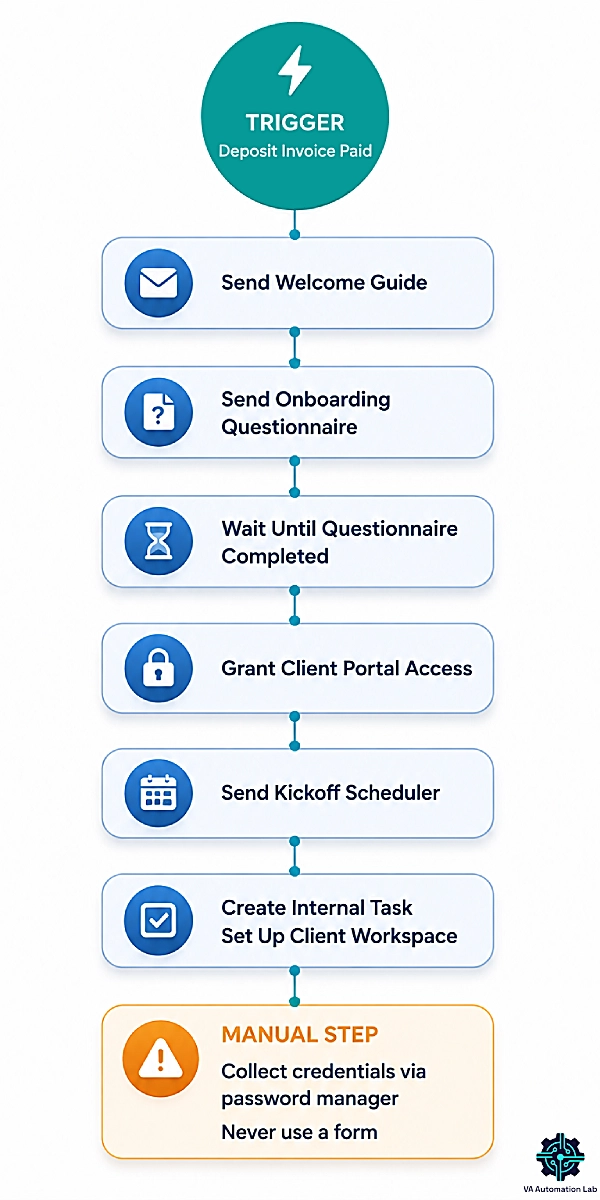
Trigger: Deposit invoice marked paid.
Actions: Send the welcome guide covering communication channels, response times, and working hours. Send the onboarding questionnaire collecting tools, team contacts, brand assets, and priorities. Wait until the questionnaire completes, then grant client portal access and send the kickoff call scheduler. Create an internal task to build the client’s workspace in your project management tool.
What the client sees: A sequence that arrives as they complete each step, rather than a single overwhelming email with six attachments.
What stays manual — and must: Credential collection. Do not build a Dubsado form that asks a client to type passwords. Send a 1Password shared vault invitation instead. A form submission stores credentials in plain text inside a system that was not designed to hold them, and the liability is entirely yours.
The tool-agnostic version of this process, including the parts that live outside Dubsado, is covered in How to Automate Client Onboarding for Virtual Assistants.
The Monthly Retainer and Invoicing Flow
Trigger: Recurring invoice date.
Actions: Generate and send the retainer invoice. Charge the stored card if the client is on autopay, or run the reminder sequence at three days before due, on the due date, and three days after. Send the hours summary if you bill against a tracked allocation. Create an internal task for your monthly client check-in.
What stays manual: Overage billing. If a client used 14 hours against a 10-hour retainer, Dubsado will not calculate and append the difference. You add the line item.
For most VAs this Flow removes the two recurring tasks that cause the most friction: remembering to invoice, and chasing payment. Neither requires you again once configured.
Build it during the trial and it runs from your first paid month.
7. What Dubsado Does Not Do — and the Tools That Fill the Gaps
Five category gaps Dubsado leaves open, and the specific tool that closes each one.
Dubsado handles the client-facing layer well and makes no claim to be an all-in-one business system. Five gaps, and what to pair with each.
Project management. Task boards manage your work; they do not manage a content calendar, a multi-client editorial pipeline, or anything with dependencies. Pair with ClickUp from $7 per month for structured multi-client work, or Notion from $10 per month if you prefer building your own system. Setup detail for the first is in ClickUp for Virtual Assistants.
Time and profitability analysis. Dubsado tracks hours against projects. It will not tell you which service package earns least per hour. Toggl Track at $9 per month adds task-level tracking with profitability reporting, and Clockify covers the basics from $5.49. See Toggl Track for Virtual Assistants.
Email marketing. Dubsado’s email is transactional. Newsletters, lead magnets, and nurture sequences need a dedicated platform — Moosend starts at $7 per month for 500 contacts.
Prospecting and pipeline. Dubsado begins working when a lead arrives. Everything before that — outreach lists, follow-up sequences, deal stages — needs a sales CRM. Folk at $24 per month handles this without enterprise complexity, and the wider approach is covered in How to Get Clients as a Virtual Assistant Using AI.
Automation beyond native integrations. Zapier is the documented integration and requires Premier. Dubsado also fires outbound webhooks, which means platforms that consume webhooks can extend it — Make from $9 per month on Core, which includes 10,000 credits, can catch a “contract signed” event and drive downstream steps Dubsado cannot. Options are compared in 4 Best Zapier Alternatives for Virtual Assistants and the wider discipline in Automation for Virtual Assistants.
8. Dubsado’s Real Limitations for Virtual Assistants
Setup burden, plan gating, no documented API, and switching costs that compound over time.
The gaps above are category boundaries. These are friction points inside the product.
The learning curve is real and front-loaded. Dubsado’s flexibility comes from configuring it yourself, and the setup investment lands well before any of the payoff does. Expect one to two weeks by the company’s estimate, two to four by most independent accounts, before it earns anything back. If you need a system running by Friday, this is the wrong tool this week.
Automation is gated behind the higher plan. Flows, scheduling, public proposals, and Zapier all sit on Premier. Competitors gate similar features, but for a solo VA the gap between $335 and $525 a year is a real decision, and the cheaper plan does not deliver the outcome the platform is marketed on.
There is no documented developer API. Dubsado publishes no developer API documentation, no developer portal, and no self-serve keys. The automation seams it does expose are outbound webhooks and the Zapier integration on Premier. Both are useful and both are event-driven — they fire when something happens. Neither lets an external system query your Dubsado data on demand. If you were planning to connect an AI assistant that reads project status or updates records directly, that path is closed.
The mobile app is a companion, not the platform. Available for iOS and Android, it covers invoices, project emails, sending schedulers and forms, viewing leads and tasks, and push notifications, with contactless payment through Tap to Pay. Building templates and Flows requires desktop.
Switching costs compound. This appears repeatedly in user reviews and deserves weight. Once your contracts, forms, schedulers, and workflows live in Dubsado, and your website embeds its forms, migrating means rebuilding across every connected surface. Reviewers describe feeling stuck after investing months of configuration.
That is not a criticism of Dubsado specifically — it is true of any deeply configured client system. It does mean the decision to adopt is more consequential than the monthly price suggests. Run the trial properly.
9. Dubsado vs HoneyBook and Other Alternatives for Virtual Assistants
HoneyBook trades automation depth for setup speed. An assembled stack runs $71 a month.
HoneyBook is the comparison most VAs reach for, and the trade-off is stable: customization against speed.
Dubsado | HoneyBook | |
Entry price (annual billing) | $27.92/mo Starter · $43.75/mo Premier | $29/mo Starter · $49/mo Essentials · $109/mo Premium |
Automation depth | Deeper, multi-step Flows with granular triggers | Lighter, faster to configure, less granular |
Setup burden | Weeks; you build the process | Days; templated setup with less control |
HoneyBook offers a 30-day trial against Dubsado’s 21. Automation, though, sits on Essentials at $49 per month against Dubsado’s $43.75 for Premier, both billed annually. Custom branding and a custom domain on client-facing documents remain a Dubsado strength.
The recurring pattern reported by people who have run both: freelancers start on HoneyBook for the smooth onboarding, and a meaningful share migrate to Dubsado within a year once they hit the automation ceiling. Choosing on setup speed alone tends to mean choosing twice.
HoneyBook is not the only comparison worth knowing. Dubsado names three others as its closest category peers, and each suits a different VA. 17hats bundles native bookkeeping, where Dubsado integrates with QuickBooks Online and Xero instead. Moxie targets solo freelancers who want lighter tooling and a faster start, trading away automation depth. Bonsai starts at $9 per month and folds in project management and accounting features Dubsado leaves to other tools, though its client portal and proposal builder are shallower.
When an Assembled Stack Beats an All-in-One
The question that matters more for a VA is whether to buy one platform or assemble four cheaper tools. Priced out on annual billing:
The assembled stack costs more than Dubsado Premier, and each piece is more specialized than Dubsado’s equivalent. Signeasy at $10 per month brings the contract layer down if you need signing without proposal building.
The trade-off is not price — it is integration. Four tools mean four logins, four client-facing brand experiences, and no automatic chaining from signature to invoice to onboarding unless you build it in Zapier or Make. Choose the stack when one component is critical and Dubsado’s version would not survive contact with your workload. Choose Dubsado when the sequence connecting those steps matters more than any individual step. Details on the individual pieces are in PandaDoc for Virtual Assistants and Jotform for Virtual Assistants.
10. Is Dubsado Worth It for Virtual Assistants?
Buy it with three or more retainer clients and a settled process. Wait or skip otherwise.
Buy it if you have three or more retainer clients, a repeatable onboarding process, and you are losing several hours a week to proposals, contracts, invoicing, and client chasing. Dubsado for virtual assistants pays back fastest when the same sequence runs every time a client signs — which is exactly the shape of a VA business. Multi-brand support at $10 per month makes it stronger still if you run more than one identity.
Wait if you have one or two clients and no settled process. Configuring Dubsado requires knowing your own workflow, and you cannot automate a process you have not run enough times to define. Work manually for another quarter, document what repeats, then come back. The setup will take half as long.
Skip it if your bottleneck is finding clients rather than serving them, if you need real project management more than client management, or if you know you will resist a two-to-four-week configuration. A fully built HoneyBook beats a half-built Dubsado, and a half-built Dubsado at $525 a year is the worst available outcome.
The 21-day trial gives you full Premier access with no card required, which is enough to build the inquiry Flow and the onboarding Flow and see whether the system fits how you work. That test costs nothing and answers the question better than any review.
Build Your Client System in 21 Days
If the “buy it” case above describes your business, the trial is the cheapest way to test it.
Full Premier access, no card, enough time to build the inquiry Flow and the onboarding Flow and see whether it fits.
Signing up through this link takes 20% off your first month or year.
Frequently Asked Questions About Dubsado for Virtual Assistants
How much does Dubsado cost for a virtual assistant?
Dubsado costs $335 per year on Starter or $525 per year on Premier, billed annually. Most virtual assistants need Premier, because Starter carries no automated workflows, no scheduling, and no public proposals. Additional brands cost $10 per month each, and the first three additional users are free on both plans.
Does Dubsado have a free plan?
No. Dubsado offers a 21-day free trial with full access to Premier features and no credit card required, after which a paid plan is required. Older articles describing free access until you have worked with three clients refer to a retired model.
Can Dubsado replace Calendly?
For most virtual assistants, yes — on the Premier plan. Dubsado’s scheduler handles availability windows, two-way calendar sync, and reminders, and can require a form before a booking confirms. It has no round-robin or meeting polls, so complex scheduling still needs a dedicated tool.
Is Dubsado a CRM?
Not in the sales sense. Dubsado manages clients after they reach you: proposals, contracts, invoicing, onboarding, and delivery. It has no prospecting database, contact enrichment, or outbound pipeline. If you need to manage leads before they inquire, pair it with a sales CRM.
Can I manage multiple clients’ businesses in Dubsado?
Yes, through multi-brand at $10 per month per additional brand. Each brand carries its own logo, colors, templates, and email settings under one login and one subscription. This suits VAs and OBMs who operate under more than one client-facing identity.
Does Dubsado integrate with Zapier?
Yes, on the Premier plan only. Dubsado also fires outbound webhooks, so platforms that consume webhooks can extend it. QuickBooks Online and Xero are supported for bookkeeping, and payments connect through Dubsado Payments, PayPal, or Square.
Does Dubsado have a mobile app?
Yes, on iOS and Android, included with any paid subscription. It covers invoices, project emails, sending forms and schedulers, viewing leads and tasks, and push notifications, plus contactless payments through Tap to Pay. Building templates and workflows requires the desktop app.
How long does Dubsado take to set up?
Dubsado says most users have core templates and workflows running within one to two weeks. Independent reviewers report two to four weeks for a system with multiple branching workflows. Both estimates assume dedicated setup time rather than working on it between client tasks.
Does Dubsado work outside the US?
Yes. Dubsado serves business owners internationally, though currency options and available payment methods vary by region. Payment processing runs through Stripe, so check which methods are supported in your country before committing.
I have four retainer clients — is Dubsado overkill for a VA my size?
No. Four retainer clients is roughly where the manual version of this work stops scaling: four onboarding sequences, four invoice dates, four sets of follow-ups. Dubsado’s payback comes from repetition, so a small but steady client base is closer to the ideal case than a large chaotic one.
Can I use Dubsado to manage my clients’ businesses, or only my own?
Both, within limits. Dubsado is built to run your own client relationships, and multi-brand at $10 per month lets you operate under a separate identity for a client engagement. It is not designed for managing several unrelated client accounts as an agency dashboard.
Do I still need Zapier or Make if I am on Dubsado Premier?
Often yes. Dubsado Flows automate steps inside Dubsado. Zapier or Make connect Dubsado to everything outside it — creating a project workspace, posting to Slack, updating a spreadsheet. Premier includes the Zapier integration, and Dubsado’s outbound webhooks let other platforms listen for events.
Is it worth learning Dubsado well enough to offer setup as a service?
For many VAs, yes. Dubsado certifies specialists who work as independent businesses, and setup is billed as a project rather than by the hour. Learning the platform for your own practice and then selling that skill is a common path from virtual assistance into systems work.
Glossary
Dubsado — A client management platform for service-based small businesses, founded in 2015. It combines proposals, contracts, invoicing, scheduling, client portals, and automated workflows in one system, and manages the client relationship rather than the client work.
Flow — Dubsado’s automated workflow, renamed from “workflow” in version 3.0. A sequence of triggers and actions built in a node-based visual editor. Premier plan only.
Smart field — A dynamic variable inserted into an email or document that auto-populates with project data, such as client name, project date, or invoice total.
Canned email — A reusable email template stored in Dubsado and sent manually or by a Flow.
Lead capture form — An embeddable form on your website that creates a Dubsado project when submitted. Starter allows one active form; Premier allows unlimited.
Public proposal — A client-facing page presenting selectable service packages, with contract and invoice chained behind the selection. Premier plan only.
Sub-agreement — A supplementary signed document that modifies an existing contract, used for mid-engagement scope changes.
Client portal — A branded, password-protected area where a client accesses their contracts, invoices, forms, and project information.
Webhook — An automated message sent from Dubsado to an external system when an event occurs, such as a contract being signed. Used to extend Dubsado into platforms it does not natively integrate with.
Zapier trigger — The event in Dubsado that starts an automation in Zapier, such as a form submission or a payment received.
Payment plan — An invoice split into scheduled installments with individual due dates, rather than a single payment.
Autopay — Automatic charging of a client’s stored payment method when an invoice becomes due.
About the Author
Alex Stratton has spent the better part of a decade working at the intersection of virtual assistance and operational systems, first as a VA supporting founders and small business owners, then as a workflow consultant helping remote teams reduce the manual overhead that accumulates when businesses grow faster than their processes. The tools and workflows here reflect decisions made repeatedly in real client contexts, where the wrong choice costs hours, not minutes. Learn more about VA Automation Lab → About.