
AI Powered Productivity System for Virtual Assistants: The Complete 5-Layer Framework (2026)

Disclosure: This article contains affiliate links. If you purchase a tool through a link on this page, VA Automation Lab may earn a commission at no additional cost to you. All recommendations are based on genuine usefulness for virtual assistants.
The complete guide to building an AI powered productivity system for virtual assistants: the 5-layer framework that organizes every part of your operation, the exact tools for each layer with verified pricing, prompt templates you can copy immediately, and an expanded implementation sequence that tells you which tool to open, what to build, and how to verify each step works before moving to the next.
The productivity challenge for a growing VA business is not a lack of time, it is a structural problem. Tasks are scattered across tools that do not talk to each other. Communication requires starting from a blank page for every email, every update, every follow-up. Reporting is manual, inconsistent, and consumes hours that should be billable. Onboarding a new client means rebuilding the same folder structure and task list that was built for the last client.
None of these problems require more hours to solve. They require a system, an AI workflow that connects task management, communication, documentation, client operations, and strategic planning into a single, coherent framework where AI handles the mechanical layer and the VA’s attention goes to the work that requires judgment.
This guide covers the complete build: how to use AI to boost productivity as a virtual assistant across all five operational layers, with the specific prompts, tool configurations, and workflow connections that make each layer functional, not just theoretical.
What this guide covers:
- Why AI productivity requires a system, not just tools
- The 5 core principles of AI-driven productivity
- The 5-layer framework with tools specified per layer
- Prompt templates for each layer (copy-paste ready)
- 4 real AI workflows with full tool configurations
- The complete tool stack with verified pricing
- How to pick the right tools for your budget
- How to measure and track system ROI
- Common mistakes that break AI productivity systems
- A 6-week HowTo implementation sequence with per-step tool lists and success criteria
👉 Productivity Systems for Virtual Assistants: The Complete Guide — for a complete framework on building a scalable VA operating system, including the 7 core components, tool stack architecture, and a step-by-step 4-week implementation plan.
👉 AI Tools for Virtual Assistants: The Complete Practical Guide — the full reference for every AI tool category in VA work.
Want to Start Using AI Tools the Right Way?
Building an AI productivity system starts with having the right prompt templates and workflow blueprints in one place.
This free toolkit includes prompt libraries, tool recommendations, and setup guides for all 5 layers covered in this article.
Table of Contents
1. Why AI Productivity Requires a System, Not Just Tools
The most common way VAs start using AI is tool-by-tool: ChatGPT for email drafts, Notion AI for SOPs, ClickUp AI for task lists. Each tool produces value in isolation. But the result is not a system, it is a collection of disconnected AI interactions that still require the VA to manually transfer outputs between tools, remember which prompt works for which use case, and rebuild the same interaction from scratch every time a similar task appears.
A true AI productivity system for virtual assistants is architecturally different. It connects the tools into a flow: the intake form populates the CRM, which triggers the AI summary, which creates the ClickUp brief, which generates the onboarding email draft, which sends automatically. The VA’s involvement is the review and refinement layer, not the execution layer.
The distinction matters economically. A VA using AI tools without a system saves 20-30 minutes per day, enough to notice, not enough to change capacity. A VA who has built a complete virtual assistant AI workflow that connects all five operational layers saves 8-15 hours per month. That difference is the gap between using AI as a writing assistant and using AI as an operational infrastructure. The productivity effect is well documented: a National Bureau of Economic Research study of customer support agents found that access to generative AI raised output by an average of 14%, with the largest gains among less-experienced workers.
The five-layer framework in this guide closes that gap. Each layer addresses a distinct operational function; each layer integrates with the others; and the system as a whole produces compound productivity gains that individual tool use does not. That is the core purpose of an AI powered productivity system for virtual assistants.
2. The 5 Core Principles of AI-Driven Productivity
These five principles determine whether an AI powered productivity system for virtual assistants produces compounding returns or requires constant maintenance. They are architectural decisions, not preferences.
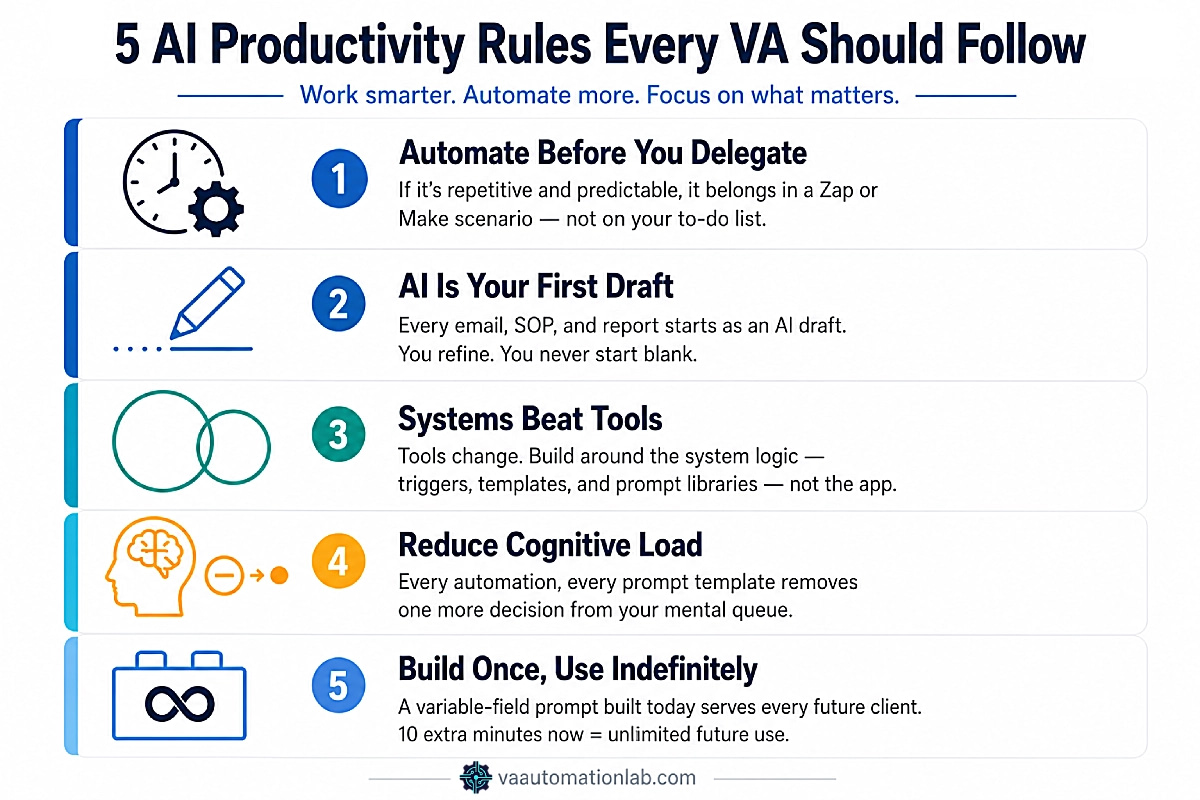
Automate Before You Delegate
If a task follows a predictable pattern (same trigger, same action, same output) it belongs in automation, not in delegation. AI and automation platforms (Make, n8n) execute rule-based work with perfect consistency at zero marginal cost per repetition. Manual delegation, even to a capable person, introduces variability and requires oversight. The highest-leverage use of VA time is work that automation cannot do: judgment, relationship, strategy.
AI Is Your First Draft, Not Your Final Output
Every AI output in this system is a starting point, not a deliverable. The AI-generated welcome email is reviewed and personalized. The AI-generated weekly plan is adjusted for context the AI does not have. The AI-generated SOP is verified against the actual process.
This principle prevents two failure modes: over-reliance (sending AI output without review) and under-use (not using AI because the output is not perfect). The correct mode is use-and-refine, faster than starting from scratch, more accurate than sending without review.
Systems Beat Tools
Tools change. Platforms update their APIs, pricing models shift, features are deprecated. The virtual assistant AI workflow that survives tool changes is the one built around the system logic (the trigger-action connections, the prompt libraries, the template structures) not the specific tool that executes it. When a tool is replaced, the system logic migrates to the new tool.
Reduce Cognitive Load
The measure of an effective AI productivity system is not how many tasks it completes, it is how much mental energy the VA does not spend on mechanical decisions. Every automation that eliminates a manual step reduces cognitive load. Every prompt template that eliminates a blank page reduces cognitive load. Cumulative cognitive load reduction is the mechanism by which AI tools for VA productivity translate into sustained capacity increase.
Build Once, Use Indefinitely
Every prompt template, every automation configuration, every SOP, every ClickUp template created as part of this system should be designed to handle any instance of its use case, not just the specific instance that prompted its creation. A welcome email prompt built with variable fields for client name, service type, and primary goal is reusable indefinitely. The difference in build time versus a single-use version is 10 minutes. The difference in ongoing value is compounding.
3. The 5-Layer AI Powered Productivity System — Overview
An AI powered productivity system for virtual assistants is a connected framework that links task management, communication, documentation, client operations, and planning into one operation, where AI handles the mechanical work and automation moves outputs between tools. It replaces disconnected AI tools with a single system that compounds time savings as it scales.
The system is organized into five layers, each addressing a distinct operational function. The layers are designed to be built sequentially, each layer is more powerful with the previous one in place, but each also produces value independently.
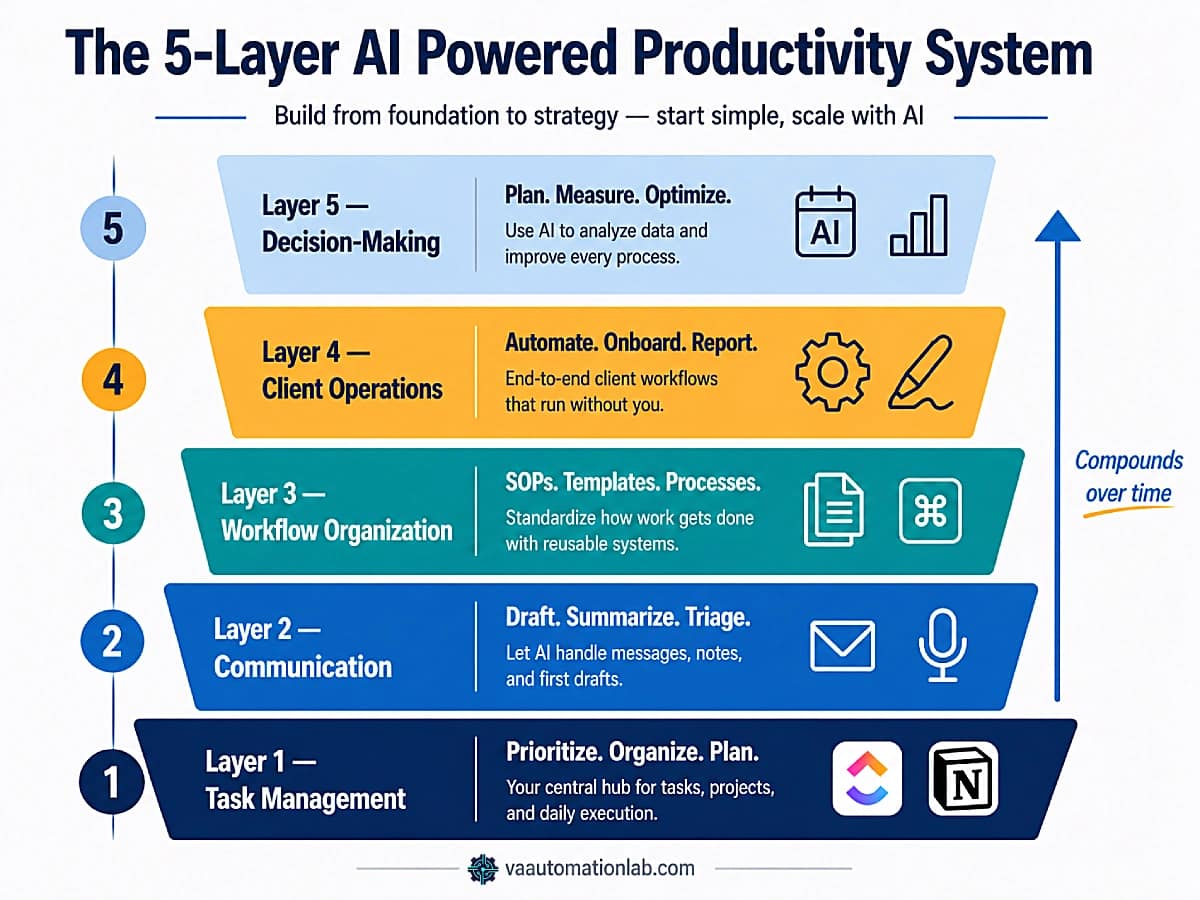
How the Layers Connect:
- Layer 1 (Task Management) captures and organizes work.
- Layer 2 (Communication) handles the client-facing output of that work.
- Layer 3 (Workflow Organization) documents and systematizes the processes that produce the work.
- Layer 4 (Client Operations) automates the recurring execution of those processes.
- Layer 5 (Decision-Making) uses the data and patterns generated by layers 1-4 to support strategic planning.
A VA who has implemented all five layers operates a self-reinforcing system: tasks are captured automatically, communication is drafted by AI, processes are documented and reusable, client operations run on automation, and strategic decisions are informed by system-generated data.
Layer | Name | What It Improves | Primary AI Use | Key Tools |
1 | Task Management | Prioritization, clarity | Task lists, subtasks, time estimation | ClickUp, Notion, Claude |
2 | Communication | Speed, consistency | Email drafts, meeting summaries | Claude, ChatGPT, Fireflies.ai, SaneBox |
3 | Workflow Organization | Structure, documentation | SOPs, project plans, workflow maps | Notion, ClickUp Docs, TextExpander |
4 | Client Operations | Delivery, efficiency | Onboarding, reporting, scheduling, contracts | Make, n8n, PandaDoc, Jotform |
5 | Decision-Making | Strategy, planning | Weekly plans, analytics insights, optimization | Reclaim.ai, Databox, Toggl Track |
Each layer of the AI powered productivity system for virtual assistants builds on the previous and feeds the next.
👉 Best Automation Workflows for Virtual Assistants — the complete automation workflow library that powers Layers 4 and 5.
4. Layer 1: AI-Powered Task Management
Task management is the foundation of the AI powered productivity system. A disorganized task layer means every subsequent layer (communication, documentation, client operations) inherits the disorganization. AI resolves the three most expensive task management problems for VAs: starting a task list from scratch for every new project, manually prioritizing across multiple clients with competing deadlines, and underestimating time requirements consistently.
Primary tools: ClickUp (Unlimited plan, $7/month billed annually) or Notion (Plus plan, $10/month billed annually). Both have native AI. ClickUp AI is the stronger choice for task automation and priority management; Notion AI is stronger for documentation-heavy operations.
Prompt Library — Task Management
AI-Generated Task List from Client Brief:
Create a complete task list for the following client project.
Organize tasks by category (Admin Setup, Client Communication, Deliverables, Recurring Tasks). Include estimated time for each task in minutes. Flag any task that requires client input before it can begin.

Project brief: [PASTE CLIENT BRIEF OR INTAKE FORM]
Service type: [SOCIAL MEDIA / ADMIN / EXECUTIVE / OTHER]
Start date: [DATE]
Contract duration: [WEEKS/MONTHS]
AI-Powered Weekly Prioritization:
Review this task list and create a prioritized weekly plan.
Apply this logic:
- Urgent + Important: schedule first, morning slots
- Important + Not Urgent: schedule in afternoon blocks
- Recurring: assign to fixed daily/weekly slots
- Delegatable or automatable: flag with [AUTOMATE] or [DELEGATE]

Output format:
Monday through Friday with time blocks.
Include total estimated hours per day.
Flag any day where estimated hours exceed 6.

Task list: [PASTE ALL ACTIVE TASKS WITH DUE DATES]
AI-Generated Subtask Breakdown:
Break this project into a detailed subtask list.
For each subtask include:
- Action verb + specific deliverable
- Estimated time in minutes
- Dependencies (what must be done first)
- Owner: VA or Client

Project: [PROJECT NAME AND BRIEF DESCRIPTION]
Deadline: [DATE]
AI Time Estimation Audit:
Review this completed task log and identify patterns in time estimation accuracy.

For each task category, tell me:
- Average actual time vs estimated time
- Which categories I consistently under/over-estimate
- 3 specific recommendations to improve accuracy

Task log: [PASTE LAST 2 WEEKS OF COMPLETED TASKS WITH ESTIMATED AND ACTUAL TIME]
👉 How to Automate Repetitive Tasks as a Virtual Assistant — connecting Layer 1 task management to the automation layer.
Manage Every Client in One Organized Workspace
ClickUp Unlimited gives you unlimited Spaces (one per client), native time tracking, recurring task automation, and AI task generation, all on one $7/month plan.
The Brain AI Add-On connects ClickUp directly to Claude and ChatGPT if you want AI assistance without switching tabs.
Start on the free plan and upgrade when you’re ready to automate.
5. Layer 2: AI-Enhanced Communication
Communication is the highest-frequency manual task in VA operations, and the one where AI tools for VA productivity deliver the most immediate, measurable time saving. The average VA managing 3-4 clients spends 60-90 minutes per day writing, rewriting, and organizing messages. Layer 2 reduces that to 15-20 minutes of review and refinement.
The operational shift is from blank-page writing to AI-first drafting: every client email, every meeting summary, every weekly update starts as an AI draft that the VA refines rather than a blank document that the VA fills.
Primary tools: Claude or ChatGPT for drafting. SaneBox (Snack plan, $6/month) for intelligent inbox filtering, it learns which senders matter and automatically routes low-priority email away from the primary inbox. Fireflies.ai (Free plan covers most solo VA use cases; Pro at $10/month for unlimited transcription) for automated meeting transcription and AI-generated summaries.
Prompt Library — Communication
AI-Drafted Client Email (Generic):
Write a professional email for the following situation.

Tone: [warm and professional / direct / empathetic]
Sender: virtual assistant
Recipient: client
Context: [DESCRIBE THE SITUATION IN 2-3 SENTENCES]

Requirements:
- Subject line included
- Under 150 words
- Clear next action or request in the last sentence
- No filler phrases like "I hope this email finds you well"
AI Weekly Client Update:
Write a weekly update email for a client based on this task list. Format:

Subject line: include client name + week dates
Opening: 1 sentence referencing their primary goal
Accomplished this week: bullet list (max 5 items)
In progress: bullet list (max 3 items)
Coming up next week: bullet list (max 3 items)
Items needing your input: bullet list or NONE
Closing: 1 sentence + next touchpoint

Tone: professional and direct. Under 200 words.

Completed tasks: [PASTE TASK LIST]
Client primary goal: [FROM INTAKE FORM OR CRM]
AI Meeting Summary:
Summarize these meeting notes into a structured follow-up document. Include:

1. Meeting overview (date, attendees, purpose) — 2 sentences
2. Key decisions made — numbered list
3. Action items — table format: | Action | Owner | Deadline |
4. Open questions — bullet list or NONE
5. Next meeting — date and agenda preview

Tone: professional and clear.

Meeting notes/transcript: [PASTE NOTES OR FIREFLIES TRANSCRIPT]
AI Inbox Triage:
Categorize each email in this list into exactly one of these categories:
- URGENT (requires action today)
- CLIENT (client request or update — action within 24h)
- ADMIN (internal task — action within 48h)
- WAITING (pending someone else — no action needed)
- FYI (information only — no action needed)
- NEWSLETTER (unsubscribe candidate)

For URGENT and CLIENT emails, add a 1-line recommended action.

Email list: [PASTE EMAIL SUBJECTS + SENDERS]
👉 Best AI Writing Tools for Virtual Assistants — a full breakdown of which “AI writing tools for the communication layer” to use for each specific task type, with verified pricing and a task routing table. For the full inbox workflow, see AI Email Management for Virtual Assistants.
6. Layer 3: AI-Driven Workflow Organization
Workflow organization is the layer that determines whether a VA business scales or stalls. Without documented processes, every recurring task requires the same mental effort as the first time it was executed. Every new client requires building systems from scratch. Every time a process changes, the knowledge lives only in the VA’s memory.
Layer 3 uses AI to transform the undocumented, improvised processes that most VAs operate from into structured SOPs, reusable templates, and documented workflows that scale independently of the VA’s memory.
Primary tools: Notion (Plus plan, $10/month) for the documentation and knowledge base layer. ClickUp Docs (included in all plans) for process documentation linked directly to recurring tasks. TextExpander (Individual plan, $3/month) for expanding prompt shortcuts and standard phrases, type a 5-character abbreviation and it expands to a 500-word SOP template or full email draft. Used alongside the prompt library, TextExpander eliminates the need to locate, open, and copy from a separate document.
Prompt Library — Workflow Organization
AI SOP Generator:
Convert these process notes into a professional Standard Operating Procedure. Use this structure:

SOP TITLE: [process name]
PURPOSE: What this process accomplishes (1-2 sentences)
WHEN TO USE: Specific triggers or conditions
TOOLS REQUIRED: List with links if applicable
PREREQUISITES: What must be in place before starting

STEPS:
1. [Action — specific, include tool name and location]
2. [Action — specific, include tool name and location]
3. [continue until process is complete]

QUALITY CHECK: How to verify correct execution
TROUBLESHOOTING: 2-3 common issues + solutions

Process notes: [PASTE ROUGH NOTES, VOICE MEMO TRANSCRIPT, OR STEP DESCRIPTION]
AI Project Plan Generator:
Create a detailed project plan for the following client engagement. Include:

- Project overview (1 paragraph)
- Weekly milestones with specific deliverables
- Task list per milestone with time estimates
- Dependencies between milestones
- Client input required at each stage
- Risk factors and mitigation notes

Output as a structured document I can copy directly into Notion or ClickUp.

Client type: [NICHE/INDUSTRY]
Service: [SERVICE TYPE]
Duration: [WEEKS/MONTHS]
Key deliverables: [LIST FROM CONTRACT]
AI Workflow Map from Process Description:
I will describe a process I run manually. Convert it into a structured workflow with the following format for each step:

Step number | Action | Tool | Input | Output | Time

Then identify:
- Which steps can be automated (flag with [AUTO])
- Which steps require my judgment (flag with [MANUAL])
- Which steps are unnecessary (flag with [REMOVE])

My process: [DESCRIBE STEP BY STEP IN ANY FORMAT]
AI File Organization Structure:
Suggest a Google Drive folder structure for a virtual assistant managing the following client engagement. Create a clean hierarchy with main folders and subfolders.

Include a naming convention recommendation for files in each folder.

Client type: [DESCRIBE CLIENT BUSINESS]
Service type: [SOCIAL MEDIA / ADMIN / CONTENT / OTHER]
Deliverable types: [LIST MAIN DELIVERABLES]
Reporting cadence: [WEEKLY / MONTHLY / BOTH]
Build Your SOP Library and Prompt Archive in Notion
Notion Plus gives you unlimited file uploads, unlimited collaborative blocks, custom forms, and Notion AI for drafting and querying your documentation, all at $10/month.
Use it as the documentation hub for Layer 3: SOPs, project plans, and the prompt library all live here, linked directly to your ClickUp workflows.
Start free, upgrade when your documentation layer is in place.
7. Layer 4: AI-Automated Client Operations
Layer 4 is where the AI powered productivity system becomes operationally transformative. The first three layers organized, communicated, and documented. Layer 4 automates, connecting AI-generated outputs directly to the tools that execute them, without the VA as the manual transfer layer.
The critical architectural shift in Layer 4 is that AI is no longer generating content for the VA to copy-paste into a tool. AI is embedded inside automation scenarios as a module that receives input from one tool, generates output, and passes that output directly to the next tool. The VA receives the final result, not the intermediate steps.
Primary automation tools: Make (Core plan, $9/month billed annually, handles unlimited active scenarios and API access for Claude/ChatGPT calls). n8n (Starter plan, $23/month, better choice if you prefer self-hosted options or need more workflow execution control; 2,500 executions per month, unlimited users). For simpler one-step automations, Zapier‘s Professional plan ($20/month) covers multi-step Zaps with AI integration.
Contract and proposal tools: PandaDoc (Starter plan, $19/month, unlimited document uploads, e-signatures, real-time tracking) handles contracts inside the onboarding workflow without requiring the VA to manually create, send, and chase signatures. Jotform (Free plan: 5 forms, 100 submissions/month; Bronze: $39/month for 25 forms) powers the intake form that triggers the entire onboarding scenario.
CRM tools: Folk (Standard plan, $24/month, pipeline management, email campaigns, AI assistants, LinkedIn extension, 5,000+ integrations) or Pipedrive (Lite plan, $16/month) for lead-to-client tracking. Zoho CRM (free for up to 3 users) is a viable entry-level option that integrates with Make and Zapier natively.
Content Scheduling tools: Buffer (Essential plan, $5/month per channel). For multi-client social operations, Later (Growth plan, $37.50/month for 2 social sets and approval workflows) or SocialBee (Accelerate plan, $40/month for 10 profiles) are stronger alternatives.
Layer 4 Use Cases — Operational Detail
Automated Client Onboarding (Make + Claude): Jotform intake submission → Make pulls all form fields → HTTP module calls Claude API with intake summary prompt → Claude generates client brief + welcome email opening → Make creates ClickUp client list from template + Google Drive folder + sends welcome email with personalized AI-generated opening → PandaDoc creates and sends contract for signature.
👉 How to Automate Client Onboarding for Virtual Assistants — automated intake forms, folder creation, ClickUp templates, welcome emails, and full onboarding workflows powered by AI.
Automated Weekly Reporting (Make + Claude): Make scheduler triggers every Friday 4PM → pulls completed ClickUp tasks for the week → Iterator aggregates task list → HTTP module calls Claude API with reporting prompt → Claude generates narrative insights → Gmail sends formatted report to client → Google Sheets logs metrics.
👉 How to Automate Reporting for Virtual Assistants — the complete step-by-step build for this workflow, including 4-layer architecture, Looker Studio dashboard setup, and AI prompt template.
Automated Content Scheduling (Make + Buffer): ClickUp status changes to “Approved” → Make triggers → Buffer schedules post across platforms → Gmail notifies client → ClickUp creates analytics follow-up task for +7 days.
👉 How to Automate Social Media as a Virtual Assistant — the complete automation system.
Automated CRM Updates (Make + Folk/Pipedrive): New email from lead → Make identifies lead in CRM → updates Last Contacted field → creates follow-up task in ClickUp → sends automated response from Gmail template.
👉 Best CRM for Virtual Assistants — one of the most under-addressed gaps in VA productivity stacks, the dedicated guide covers which tool fits which use case.
8. Layer 5: AI-Supported Decision‑Making & Planning
Layer 5 is the highest level of the AI productivity system for virtual assistants, the layer where AI stops processing tasks and starts supporting decisions. The outputs of layers 1-4 (task data, communication patterns, workflow logs, client operation metrics) become the input for Layer 5 analysis.
A VA who has implemented all five layers has access to more operational data than most small service businesses: which tasks consistently exceed time estimates, which clients generate the most reactive work, which workflows produce the most bottlenecks, which services have the highest delivery cost. Layer 5 uses AI to interpret that data and convert it into actionable planning inputs.
Primary tools for Layer 5:
Reclaim.ai (Starter plan, $10/month), AI calendar management that automatically schedules focus time, habits, and buffer time around fixed commitments. It’s the active Layer 5 tool that operationalizes the weekly plans generated by Claude by actually blocking time in Google Calendar before meetings and urgent tasks compress it.
Toggl Track (Starter plan, $10/month billed annually, billable rates, project estimates, revenue analysis) or Clockify (Standard plan, $6/month billed annually, invoicing, approval, manager role) for time tracking data that feeds the AI analysis prompts in this layer. Without time tracking data, the capacity planning and bottleneck detection prompts operate on estimates rather than actuals.
Databox Free plan (3 data sources, daily updates, 1 dashboard) connects Google Analytics, Search Console, social platforms, and Google Sheets into a single automated client‑facing dashboard. The Analyst plan ($64/month) adds BI features, datasets, MCP server/API access, and hourly updates for deeper reporting needs. The Pro plan ($159/month) includes unlimited users, 1,500 AI credits/month, all integrations, sharing and notifications, and hourly sync, making it appropriate once you are managing reporting for 5+ clients or require more than 3 data sources per client. For a focused alternative, Insightful tracks productivity at the task and project level with automatic time mapping.
Prompt Library — Decision-Making & Planning
AI Weekly Planning:
Create a structured weekly plan based on this task list and availability. Apply this logic:

Priority rules:
- Client deadlines take precedence over internal tasks
- Deep work (writing, analysis) in morning blocks
- Administrative tasks in afternoon blocks
- Maximum 3 client-facing calls per day
- One 90-minute focus block per day — protect it

Output:
- Day-by-day schedule with time blocks
- Total estimated hours per day (flag if over 7)
- Top 3 priorities for the week (bold)
- Tasks deferred to next week with reason

My tasks: [PASTE FULL TASK LIST WITH DUE DATES]
My available hours this week: [NUMBER]
Fixed commitments: [LIST CALLS, MEETINGS]
AI Bottleneck Detection:
Analyze this work log and identify my top 3 productivity bottlenecks. For each bottleneck:

1. Name and describe the pattern
2. Estimate weekly hours lost to this bottleneck
3. Root cause (in one sentence)
4. Recommended fix — be specific:
   - If automatable: describe the automation
   - If a workflow problem: describe the fix
   - If a capacity problem: describe the boundary

Work log: [PASTE 2-4 WEEKS OF TASK LOG WITH ESTIMATED AND ACTUAL TIMES — export from Toggl Track or Clockify]
AI Monthly Strategic Review:
Review this month's completed work and help me prepare for next month. Analyze:

1. PERFORMANCE SUMMARY
   - Total tasks completed vs planned
   - Average time accuracy (estimated vs actual)
   - Client with highest and lowest task volume

2. SYSTEM HEALTH
   - Which automations saved the most time?
   - Which processes still require too much manual effort?
   - Any recurring errors or rework patterns?

3. NEXT MONTH PRIORITIES
   - Top 3 system improvements to implement
   - Any clients needing more attention
   - One thing to automate this month

Monthly task log: [PASTE COMPLETED TASKS + METRICS]
Active clients: [LIST WITH SERVICE TYPE]
AI Capacity Planning:
Based on my current client commitments and average task volumes, help me assess capacity for a potential new client.

Tell me:
1. Current weekly hours committed (estimated)
2. Hours available for new work (based on 35h week)
3. Whether I can take on the new client as described
4. If yes: what would need to change in my system
5. If no: what capacity I should free up first

Current clients: [LIST WITH SERVICE TYPE AND CONTRACTED HOURS/DELIVERABLES]
Potential new client: [DESCRIBE SERVICE SCOPE]
9. Real AI Workflows for Virtual Assistants
The four workflows below are the highest-value implementation examples of the system, combining the AI prompt layer with the automation platform layer for end-to-end execution without manual transfer.
Workflow 1 — AI + Make: Inbox to Task Pipeline
This workflow converts incoming emails into structured tasks automatically, eliminating manual inbox triage and reducing cognitive load in the task management layer. Instead of reading, interpreting, and manually creating tasks from each message, the system extracts the required action, assigns priority, and routes the task to the correct list inside your workspace.
Tools required: Gmail + Make Free or Core ($9/month) + ClickUp Unlimited ($7/month) + Claude or ChatGPT API
Time to build: 20–30 minutes.
Time saved: 15-25 minutes per day.
Make Scenario:
TRIGGER: Gmail — Watch emails

Search query:
subject:(action OR urgent OR approval OR invoice OR feedback)
AND -from:newsletter

MODULE 1 — AI Email Analysis (HTTP → Claude / OpenAI)
Use the HTTP module to send the email body to Claude or ChatGPT and return structured output.

Prompt:
Extract the following from this email and return in JSON format:

{
  "action": "1 sentence describing the required task",
  "deadline": "ISO date if mentioned, otherwise null",
  "category": "Client Request | Admin | Finance | Other",
  "priority": "High | Medium | Low"
}

Email: [Gmail body]

Why JSON matters:
Structured output allows direct mapping into ClickUp fields without manual formatting.

MODULE 2 — JSON PARSE
Parse the AI response into usable variables:

- action
- deadline
- category
- priority

MODULE 3 — ROUTER (Category-Based Routing)
Create branches based on:

- Client Request
- Admin
- Finance
- Other

Each route sends the task to a different ClickUp List.

MODULE 4 — ClickUp: Create Task
Name: [action]
Description: [Gmail body]
Priority: [priority]
Due date: [deadline OR today +1]
List: [based on Router path]

Optional:
Add tags (email, inbox, client)
Assign to yourself or team member

MODULE 5 — Slack Notification
Message:
"New task from email: [action]
Priority: [priority]
Due: [due date]"
Why This Workflow Is High-ROI
This is one of the highest-leverage entry points into the system:
- removes repetitive inbox processing
- standardizes task creation
- ensures nothing is missed
- creates a clean input layer for all downstream workflows
It also acts as the bridge between Layer 2 (Communication) and Layer 1 (Task Management) in your system architecture.
Optimization Tips:
- Start with one AI call only (avoid over-engineering)
- Test with 10–15 real emails before going live
- Adjust priority logic if AI over/under-classifies
- Add a fallback route for unclear categories
Pro Tip:
If you want to improve accuracy over time, log all AI outputs in a Google Sheet and review patterns weekly. This allows you to refine the prompt and gradually increase classification precision.
Workflow 2 — AI + Make: Client Onboarding Pipeline
This workflow automates the entire client onboarding process, from form submission to fully configured workspace, signed contract, and welcome communication. Instead of manually creating folders, setting up projects, drafting emails, and updating your CRM, the system executes every step automatically. The VA’s role shifts from execution to review, ensuring accuracy while the system handles setup. This is one of the highest-impact implementations in the framework, directly improving delivery speed, consistency, and client experience.
Tools required: Jotform (Free or Bronze, $39/month) + Make Core ($9/month) + Claude API + Google Drive + ClickUp Unlimited ($7/month) + PandaDoc Starter ($19/month) + Gmail + Folk Standard ($24/month) or Pipedrive Lite ($16/month)
Time to build: 3-4 hours.
Time saved: 2-3 hours per new client.
Make Scenario:
TRIGGER: Jotform — New submission

MODULE 1 — AI Intake Processing (HTTP → Claude)
Generate a structured client brief and a personalized email opening.

Prompt:
Analyze this client intake form and return in JSON format:

{
  "brief": "structured summary of client needs, goals, and scope",
  "email_opening": "personalized 2–3 sentence welcome email opening"
}

Form data: [Jotform fields]

MODULE 2 — Google Drive: Create Client Workspace
Copy folder template
Rename: /Clients/[client name]/

MODULE 3 — ClickUp: Create Client Workspace
Create list from template

Name: [client name]
Custom fields: populated from form data

MODULE 4 — PandaDoc: Generate & Send Contract
Create document from template

Populate fields:
- Client name
- Services
- Pricing
- Timeline

Action: send for signature

MODULE 5 — Wait for Signature (Webhook)
Wait until PandaDoc status = completed

MODULE 6 — Gmail: Send Welcome Email
Opening: [AI email_opening]
Body: standard onboarding template
Include:
- workspace access link
- next steps
- onboarding form (if needed)

MODULE 7 — CRM Update (Folk / Pipedrive)
Create or update contact

Status: Lead → Active Client
Add tags: onboarding, active

MODULE 8 — Slack Notification
Message:
"[Client Name] fully onboarded"
Why This Workflow Is High-ROI:
- eliminates repetitive onboarding setup
- ensures consistent client experience
- reduces setup errors and missing steps
- accelerates time-to-delivery
- standardizes operations across all clients
This workflow is the core of Layer 4 (Client Operations) and connects directly with Layer 3 (SOPs) and Layer 2 (Communication).
Optimization Tips:
- Test the full flow with a dummy client before going live
- Keep contract templates standardized to avoid mapping errors
- Use required fields in Jotform to prevent incomplete data
- Add fallback handling if AI output is missing fields
- Store generated briefs in ClickUp or Google Drive for reference
Pro Tip:
Add a Google Sheet logging every onboarding execution (client name, date, status, errors). After 5–10 runs, review patterns and refine both your intake form and AI prompt for higher accuracy and smoother automation.
Workflow 3 — AI + Make: Weekly Planning System
This workflow automates weekly planning by converting your active task list into a structured, prioritized schedule every Monday morning. Instead of manually reviewing tasks, estimating workload, and deciding what to focus on, the system generates a complete weekly plan based on deadlines, priorities, and workload distribution. The VA’s role becomes reviewing and refining the plan, not building it from scratch. This workflow is the operational core of Layer 5 (Decision-Making & Planning) and transforms raw task data into actionable strategy.
Tools required: Make Core ($9/month) + ClickUp Unlimited ($7/month) + Claude API + Reclaim.ai Starter ($10/month) + Slack
Time to build: 30-45 minutes.
Time saved: 20-30 minutes per week.
Make Scenario:
TRIGGER: Make Scheduler — Every Monday 8:00 AM

MODULE 1 — ClickUp: Retrieve Active Tasks
Get all tasks

Filters:
- Status ≠ Done
- Due date ≤ this Friday
- All active client lists

MODULE 2 — AI Weekly Planning (HTTP → Claude)
Generate a structured weekly plan based on task data.

Prompt: (use your Layer 1 / Layer 5 prioritization prompt)

Input: all tasks from ClickUp

Output:
- Day-by-day schedule
- Time blocks
- Top 3 priorities
- Total hours per day
- Overload warnings

MODULE 3 — ClickUp: Create Weekly Plan Task
Name: "Weekly Plan — [current week dates]"
List: Admin & Operations
Description: [AI-generated weekly plan]
Due date: this Friday

MODULE 4 — Calendar Blocking (Reclaim.ai — manual assist)
After reviewing the plan:
Import top 3 priorities as protected focus blocks in Google Calendar

MODULE 5 — Slack Notification
Channel: #planning
Message:
"Weekly plan ready — [ClickUp link]"
Why This Workflow Is High-ROI:
- eliminates manual weekly planning
- improves prioritization accuracy
- prevents overbooking and burnout
- creates consistent planning habits
- aligns execution with deadlines and capacity
It turns your task system into a decision-making engine, not just a task list.
Optimization Tips:
- Run the workflow manually the first 2–3 weeks to validate output
- Refine the prompt if time estimates feel unrealistic
- Limit task input to avoid overloading the AI (filter aggressively)
- Adjust priority logic based on your client mix
- Keep one consistent ClickUp list for weekly plans
Pro Tip:
Track planned vs actual execution each week. After 3–4 weeks, use that data to refine your prompt and improve planning accuracy. This creates a feedback loop that continuously upgrades your system performance.
Workflow 4 — AI + Google Workspace: Automated Reporting Pipeline
This workflow automates the entire reporting process, transforming completed tasks and performance data into structured, client-ready reports without manual writing. Instead of collecting data, interpreting metrics, and drafting updates every week or month, the system aggregates all inputs and uses AI to generate a clear narrative report. The VA reviews and sends, rather than builds from scratch. This is one of the highest-leverage workflows in the system, turning operational data into client-facing insights at scale.
Tools required: Make Core ($9/month) + ClickUp Unlimited ($7/month) + Claude API + Google Analytics or social platform APIs + Google Sheets + Databox Free (optional, for dashboard) + Gmail
Time to build: 2-3 hours.
Time saved: 4-8 hours per month per client.
Make Scenario:
TRIGGER: Make Scheduler — Friday 4:00 PM

MODULE 1 — ClickUp: Retrieve Completed Tasks
Get tasks

Filters:
- Status = Done
- Completed this week
- [specific client list]

MODULE 2 — Data Collection (Analytics / Social APIs)
Pull performance data for the same period:
- Website analytics (Google Analytics)
- Social media metrics (if applicable)
- Campaign performance data

MODULE 3 — Iterator (Task Processing)
Extract for each task:
- Task name
- Completion date
- Time tracked (if available)

MODULE 4 — Aggregator (Data Structuring)
Compile:
- Full task list
- Total tasks completed
- Total time tracked

MODULE 5 — AI Report Generation (HTTP → Claude)
Generate a narrative report combining tasks and metrics.

Prompt: (use your Layer 5 reporting prompt)

Input:
- Task list
- Performance metrics

Output:
- Summary of work completed
- Key insights and trends
- Highlights and wins
- Recommendations (if applicable)

MODULE 6 — Gmail: Send Client Report
To: [client email]

Subject: "Weekly Update — [Client Name] — [dates]"

Body: [AI-generated report]

+ Appendix:
- Task list
- Key metrics

MODULE 7 — Google Sheets: Log Data
Add row:
- Client name
- Date range
- Tasks completed
- Total time
- Key metrics
Why This Workflow Is High-ROI:
- eliminates manual report writing
- standardizes reporting quality across clients
- combines qualitative and quantitative insights
- reduces human error in data handling
- scales reporting without increasing workload
It transforms reporting from a time-consuming task into a repeatable, system-driven output.
Optimization Tips:
- Standardize reporting periods (weekly or monthly only)
- Keep metrics consistent across clients for easier automation
- Validate AI outputs before sending (especially insights)
- Use templates for report structure consistency
- Start with one client before scaling to all
Pro Tip:
Connect your Google Sheets log to Databox to build real-time dashboards. Over time, this turns your reporting system into a strategic asset, not just a delivery requirement.
Difficulty | Workflow | Tools | Time Saved | Guide |
Beginner | Inbox → Task Automation | Make + Claude | 15-25 min/day | Workflow 1 above |
Beginner | AI‑Drafted Emails | Claude / ChatGPT | 30-60 min/day | Layer 2 prompts |
Intermediate | Client Onboarding | Make + ClickUp + PandaDoc + Claude | 2-3 hrs/client | Workflow 2 above |
Intermediate | Content Scheduling | Make + Buffer/Later + ClickUp | 3–5 hours/week | Layer 4 |
Advanced | AI Reporting System | Make + Claude + Databox + Gmail | 4-8 hrs/month | Workflow 4 above |
Advanced | Full Client Management | Make + ClickUp + Folk + Claude | 10+ hrs/month | Layer 4 + 5 |
Make Is the Automation Layer This System Runs On
Every workflow in this framework runs in Make.
The HTTP module is what connects Make to Claude and ChatGPT directly inside your automation scenarios, without manual copy-paste between tools.
Start on the free plan to test your first scenario.
Core at $9/month handles a full multi-client operation.
10. The Complete AI Tools Stack for VA Productivity
Every AI powered productivity system runs on a core tool stack organized by the layer each tool primarily serves. The goal is a minimal, connected stack, not the maximum number of AI tools, but the right set that covers all five layers without creating tool overlap or maintenance overhead.
Core AI Generation Layer
Claude (Anthropic) — primary AI for long-form outputs: SOPs, project plans, detailed client briefs, meeting summaries, weekly reports with narrative structure. Superior to ChatGPT for following complex structured prompts with multiple output requirements. Use as the default AI for all prompt-based workflows and all Make HTTP module calls.
ChatGPT (OpenAI) — primary AI for conversational refinement and quick drafts. Use for email drafts, quick triage analysis, and any use case where back-and-forth iteration produces better results than a single detailed prompt.
Recommended split: Claude for production outputs embedded in automation scenarios; ChatGPT for interactive session work. If you already work inside a specific ecosystem, Microsoft Copilot (Microsoft 365) and Google Gemini (Google Workspace) are viable substitutes for these drafting tasks, though neither matches Claude’s consistency on long, structured prompts.
Workspace AI Layer
Notion (Plus $10/month, Business $20/month), AI integrated directly into the documentation workspace. Best for SOP generation, content drafting, meeting note summarization, and Ask Notion queries across the knowledge base. The Business plan adds Notion Agent, AI Meeting Notes, and Enterprise Search.
ClickUp (Unlimited $7/month, Business $12/month), AI integrated directly into the task management workspace. Best for Layer 1 task management, project planning, and Layer 4 automation triggers. The Brain AI Add-On ($9/month) adds unlimited AI assistant access and Claude/ChatGPT integration inside ClickUp.
The complete breakdown of which tool fits which VA service type: Notion vs ClickUp for Virtual Assistants: Complete Comparison Guide.
Automation + AI Integration Layer
Make — Free plan (1,000 credits/month, 15-min execution interval) for testing. Core plan ($9/month billed annually) for a full multi-client operation, unlimited active scenarios, API access, down-to-the-minute scheduling. The HTTP module is the component that calls Claude or ChatGPT directly inside Make scenarios.
n8n (Starter $23/month, Pro $58/month) — workflow automation with stronger developer extensibility than Make, better choice if you are managing complex conditional logic, need Python/JavaScript execution inside workflows, or prefer to keep workflow data on a self-hosted instance. 14-day free trial.
Time Tracking Layer
Toggl Track (Starter $10/month) — billable rates, project time estimates, revenue and productivity analysis. Best for VAs billing hourly who need exportable time logs that feed the Layer 5 AI analysis prompts.
Clockify (Standard $6/month) — invoicing, approval workflows, manager role, attendance tracking. Stronger invoicing integration than Toggl; better fit for VAs who also handle client invoicing through the same tool.
Analytics Layer
Databox — Free plan (3 data sources, 1 dashboard, daily updates) connects Google Analytics, Search Console, social platforms, and Google Sheets into automated dashboards. The Analyst plan ($64/month) adds BI features, datasets, MCP server/API access, and hourly syncing — a strong middle tier for VAs who need deeper reporting without agency‑level pricing. The Pro plan ($159/month) includes unlimited users, 1,500 AI credits/month, all integrations, sharing and notifications, and hourly sync, making it appropriate for VAs managing reporting for 5+ clients or requiring more than 3 data sources per client.
Insightful — Workforce Analytics ($8/seat/month), maps actual computer activity to projects and clients automatically, generating real-time productivity data without manual time entry. Where Toggl Track and Clockify require the VA to start and stop timers, Insightful captures the data passively and maps it to the correct client or project. Most useful for VAs managing a small team or for those who want to audit their own time allocation without behavioral change.
Calendar & Scheduling Layer
Reclaim.ai (Starter $10/month, Business $15/month) — AI calendar management that automatically schedules focus time, habits, and buffer time around fixed commitments. Starter covers up to 10 seats with unlimited habits, unlimited tasks, and 3 scheduling links, sufficient for a solo VA managing 2–4 clients. Business adds delegated access and webhooks, relevant if you are scheduling on behalf of a client or executive. The key differentiator from standard scheduling tools: Reclaim actively moves your protected blocks when meetings are booked, rather than requiring manual rescheduling. It operates as the active execution arm of the Layer 5 weekly planning prompt, Claude generates the plan, Reclaim defends the time in the calendar.
Motion (Business AI $29/month) is a comparable alternative that combines AI task management with automatic time-blocking in one tool, rebuilding your schedule as priorities shift. Reclaim is the better fit when you want AI scheduling layered on top of Google Calendar rather than a separate all-in-one workspace.
Communication Support Layer
SaneBox (Snack $6/month, Lunch $10/month, Dinner $30/month) — AI email filtering that learns which senders and threads matter to you and automatically routes low-priority messages away from the primary inbox into SaneLater, SaneNews, and SaneBlackhole folders. The Snack plan covers 1 email account with 2 SaneBox features, the minimum useful configuration for a solo VA. Lunch adds a second email account and 4 additional features including SaneReminders (automated follow-up nudges). Unlike Gmail filters, which operate on fixed rules, SaneBox adapts to behavior over time, improving accuracy without requiring manual rule maintenance.
Fireflies.ai (Free — unlimited transcription with 800 minutes storage; Pro $10/month — 8,000 minutes and downloadable transcripts) — automated meeting transcription and AI-generated summaries integrated directly with Google Meet, Zoom, and Teams via a bot that joins calls automatically. The Free plan covers the typical solo VA use case: transcription in 100+ languages, real-time notes, meeting search, and the AskFred AI assistant for querying past meeting content. The Pro plan adds downloadable transcripts and summaries, action item tracking, and unlimited integrations, useful when Fireflies transcripts are being passed into Make scenarios as inputs for the Claude meeting summary prompt in Layer 2.
Documentation & Efficiency Layer
TextExpander (Individual $3/month, Business $8/month) — snippet expansion tool that converts short abbreviations into full-length text, prompt templates, or structured documents. The Individual plan covers unlimited snippets across all apps and browsers, type ;email and the full AI-drafted email prompt from Section 5 expands in place, no copy-paste from Notion required. Applied to the prompt library from Sections 4–8, TextExpander reduces prompt access time from 30–60 seconds (locate document, open, copy) to under 3 seconds per use. At $3/month, this is the highest ROI-to-cost tool in the stack relative to daily time recovered.
Client Intake & Contracts Layer
Jotform (Starter — free, 5 forms, 100 submissions/month; Bronze $39/month, 25 forms, 1,000 submissions/month) — the intake form tool that triggers the Layer 4 onboarding automation. The Starter plan is sufficient for a VA onboarding fewer than 4–5 new clients per month. Jotform connects natively to Make as a trigger, populates all form fields as mapped variables, and supports conditional logic for routing different service types to different onboarding scenario branches. The AI Agents feature (available on all plans) enables conversational intake forms that ask follow-up questions based on previous answers, useful for VAs offering multiple service types from a single intake entry point.
PandaDoc (Free — 60 documents/year, 5 e-signatures/month; Starter $19/month — unlimited uploads and e-signatures; Business $49/month — CRM integrations, approval workflows, bulk send) — document creation and e-signature platform that handles the contract step in the Layer 4 onboarding pipeline. The Starter plan is the correct entry point for solo VAs: unlimited document uploads, e-signatures, real-time tracking, and 24/7 support. The Make integration works via webhook, when PandaDoc detects a signature event, it triggers the next module in the onboarding scenario, eliminating the need to check contract status manually. The Business plan adds CRM integrations (Folk, Pipedrive, HubSpot) that enable contract data to sync back to the CRM automatically.
CRM Layer
Folk (Standard $24/month — pipeline management, email campaigns, AI assistants, LinkedIn extension, contact enrichment, 5,000+ integrations; Premium $48/month — custom objects, email sequences, API access) — the CRM that sits inside the Layer 4 client operations workflow. Folk’s distinguishing feature for VAs is the LinkedIn extension, which captures lead and contact data from LinkedIn profiles directly into the CRM without manual data entry. The Magic Fields AI feature automatically enriches contact records with company data, role, and context. Standard covers 1 member and is the correct plan for a solo VA; the 14-day free trial is sufficient to test the Make integration before committing.
Pipedrive (Lite $16/month — lead management, pipeline, 500+ integrations; Growth $46/month — full email sync, automations, meeting scheduler) — pipeline-focused CRM with stronger deal-stage tracking than Folk, better choice for VAs who manage sales pipelines or lead generation as a client service. The Lite plan includes AI-powered report creation and integrates natively with Make for CRM update automation. If your primary use case is tracking client relationships rather than managing a sales funnel, Folk is the better fit at the Standard tier.
Zoho CRM (Free — up to 3 users, leads, deals, workflows, reports, mobile app; Standard $16/month — workflows, AI agents, sales forecasting) — the most accessible entry point for a VA who needs a CRM connected to the Layer 4 automation but is not yet ready to commit to Folk or Pipedrive. The free plan’s 3-user limit and native Zapier/Make integration make it a viable zero-cost starting point. The Standard plan adds AI agents and cadences, sufficient for tracking lead-to-client conversion across a small client portfolio.
Social Media Scheduling Layer
Buffer (Free — 10 scheduled posts per channel; Essential $5/month per channel — unlimited posts, hashtag manager, first comment scheduling; Team $10/month per channel — unlimited team members, content approval workflows) — the simplest social scheduling option for VAs managing content for 1–2 client channels. Buffer integrates with Make for the content approval automation in Layer 4 (Workflow 3): when a ClickUp task status changes to “Approved,” Make triggers Buffer to schedule the post. The Essential plan per channel is sufficient for most VA-managed accounts; the Team plan adds approval workflows if the client wants to review posts before they go live.
Later (Starter $19/month — 1 social set, 8 profiles, 30 posts per profile; Growth $37.50/month — 2 social sets, 180 posts per profile, collaboration and approval workflows, social inbox; Scale $82.50/month — 6 social sets, unlimited posts, competitive benchmarking) — the better choice than Buffer for VAs managing social media for multiple clients simultaneously. The Growth plan’s external approval workflow is particularly relevant: clients can review and approve posts without needing a Later login, which removes friction from the content approval step in the Layer 4 pipeline. The 14-day free trial is available.
SocialBee (Bootstrap $24/month — 5 profiles, unlimited AI content generation, analytics 3 months; Accelerate $40/month — 10 profiles, bulk editor, CSV upload, post approval; Pro $82/month — 25 profiles, 5 workspaces, export analytics) — the strongest option for VAs running social media as a primary service offering. The content category system organizes posts by type and ensures a consistent mix across all client channels automatically. The Accelerate plan’s CSV upload and bulk editor enable VAs to load a full month of pre-approved content in a single session, then let SocialBee distribute it on schedule, a workflow that significantly compresses time-per-client on social accounts. The 14-day free trial is available on all plans.
11. The VA Productivity Stack by Budget Level
Not every VA needs every tool from day one. The following three tiers represent realistic entry points based on budget and current operation complexity. Each tier is functional as a complete system at its level, not a stripped-down version of the next tier up.
Entry-Level Stack ($20/month)
Best for: Solo VAs managing 1–2 clients, just starting to build AI workflows.
- AI generation: Claude Pro ($20/month) or ChatGPT Plus ($20/month) — pick one
- Task management: ClickUp Free (5 Spaces, basic automation)
- Automation: Make Free (1,000 credits/month, sufficient for 1–2 simple automations)
- Time tracking: Clockify Free (unlimited tracking, basic reports)
- Documentation: Notion Free (basic blocks, limited uploads)
This stack covers Layers 1, 2, and 3 operationally. Layer 4 automation is limited to 1–2 simple scenarios within the Make free tier. Layer 5 is manual (prompt-based, no automated data pipeline).
What you can build: AI-drafted emails, manual task prioritization, basic SOPs in Notion, and one email-to-task Zapier scenario.
Mid-Tier Stack (~$70/month)
Best for: VAs managing 2–4 active clients, ready to automate onboarding and reporting.
- AI generation: Claude Pro ($20/month)
- Task management: ClickUp Unlimited ($7/month)
- Documentation: Notion Plus ($10/month)
- Automation: Make Core ($9/month)
- Scheduling: Reclaim.ai Starter ($10/month)
- Email inbox: SaneBox Snack ($6/month)
- Time tracking: Clockify Standard ($6/month)
This stack covers all five layers. Layers 4 and 5 are fully operational: automated onboarding, AI-generated reports, focus time protected in calendar, and time tracking data feeding the strategic review prompts.
What you can build: All four workflows from Section 9, full prompt library, automated client reporting, and a functional Layer 5 planning cadence.
Full-Stack (~$140/month)
Best for: VAs managing 4+ clients or running a small VA agency, needing analytics, contracts, and CRM automation.
Everything in the Mid-Tier, plus:
- CRM: Folk Standard ($24/month) or Pipedrive Lite ($16/month)
- Contracts: PandaDoc Starter ($19/month)
- Reporting dashboards: Databox Free → upgrade to Pro ($159/month) at 5+ clients
- Advanced automation: n8n Starter ($23/month) in addition to Make, for workflows requiring conditional logic or custom code steps
- Meeting transcription: Fireflies.ai Pro ($10/month)
For managing multiple clients and the CRM layer that supports it: How to Manage Multiple Clients as a Virtual Assistant Using AI.
ClickUp Scales With Your VA Business
Whether you’re on the Entry-Level stack or the Full-Stack, ClickUp handles the task management layer at every tier, from the free plan for solo VAs managing 1–2 clients, to Unlimited ($7/month) for a full multi-client operation with automated workflows and reporting.
The Brain AI Add-On ($9/month) adds Claude and ChatGPT natively inside your workspace if you want AI without switching between tabs.
12. Measuring Your System’s ROI
Building an AI productivity system without tracking its output is the operational equivalent of running a client social media campaign without checking analytics. You cannot improve what you do not measure. Layer 5 closes the loop, but only if there is data feeding into it.
The three metrics that matter:
1. Hours recovered per month. Run the Toggl Track or Clockify weekly export through the bottleneck detection prompt once per month. Compare actual hours spent on task categories now versus before AI was implemented for that category. For a VA managing 3 clients with all five layers operational, the target is 8–15 hours recovered per month.
2. Time-to-onboard. Track the elapsed time from intake form submission to first work session completed. With Workflow 2 (Make + Claude + PandaDoc) fully operational, this should be under 2 hours including contract turnaround. Manual onboarding for most VAs runs 4–6 hours across the same steps.
3. Report delivery time. Track how long generating and sending the weekly client report takes. With Workflow 4 automated, the VA’s active time in the reporting process is 10–15 minutes of review. Manual report generation typically runs 60–90 minutes per client per week.
Tools for measuring:
Toggl Track Starter ($10/month) generates time-by-project and time-by-client breakdowns that export directly to the Layer 5 AI analysis prompts. The Revenue & Productivity Analysis feature on Starter quantifies billable versus non-billable time across all clients.
Clockify Standard ($6/month) adds project budgets, approval workflows, and invoicing alongside the time tracking, making it the better choice for VAs who generate invoices directly from tracked time.
Databox free plan connects up to 3 data sources into a single dashboard. Connect Google Analytics, one social platform, and a Google Sheets time log to produce a client-facing performance view that takes minutes to generate rather than hours.
Insightful goes further, it maps actual computer activity to projects and clients automatically, producing real-time productivity data without requiring manual time entry. Useful for VAs who want granular activity data for internal optimization or for VAs managing a small team.
13. Common Mistakes That Break AI Productivity Systems
Building a genuine AI powered productivity system for virtual assistants requires avoiding the configuration errors that produce a system that looks functional but requires constant manual correction. These are the six most common failure patterns.
Using AI Tools Without a System
Adding AI tools to an unstructured operation does not produce an AI productivity system, it produces additional tools that each require manual integration with everything else. The VA who uses ChatGPT for emails, Notion AI for SOPs, and ClickUp AI for tasks but has no automation connecting the outputs spends time manually transferring content between tools, saving less time than a single well-configured Make scenario would.
The fix: build the system layer by layer (see section 14) before adding AI tools to the stack. AI is the intelligence layer on top of a working automation architecture, not the starting point.
Generic Prompts for Every Use Case
A prompt written as “write an email for this situation” produces a generic output that requires significant rewriting. A prompt written with the client’s name, service type, primary goal, specific context, output format, word count limit, and tone requirements produces an output that requires minimal refinement. VAs who use generic prompts often spend more time rewriting AI output than they saved generating it.
The fix: invest 20-30 minutes per use case building a structured prompt with all required parameters. Save every working prompt in a dedicated Prompt Library (Notion page or ClickUp Doc) organized by use case. Refine each prompt when the output requires consistent correction in the same way.
Sending AI Output Without Review
AI-generated emails that reference the wrong project, AI-generated reports that misidentify a trend, AI-generated SOPs that describe a process incorrectly, all produce client experience damage that requires significantly more time to repair than the time the AI output saved.
The fix: every AI output that goes to a client requires VA review before sending. The review layer is not optional, it is the quality control that makes AI-first workflows sustainable. Build the review step explicitly into every client-facing workflow: the Make scenario delivers the AI draft to the VA for approval, not directly to the client.
Over-Engineering the AI Layer
A Make scenario with 15 modules including three Claude API calls, two Routers, and an Iterator is a powerful system, and also a system with many failure points, a long debugging cycle when something breaks, and a high maintenance overhead when any of the connected tools changes their API.
The fix: start with the minimum AI involvement that produces a useful output. One Claude API call per scenario is sufficient for most use cases. Add complexity only when the simpler version consistently falls short, not because more complexity feels more impressive.
Not Maintaining the Prompt Library
Prompt templates built for a client or project and not saved become institutional knowledge that disappears when the project ends. A VA who has been using AI for six months but has no organized prompt library starts from scratch with every new client and every new use case.
The fix: save every prompt that produces a useful output in a dedicated Prompt Library organized by category (Task Management / Communication / Documentation / Reporting / Planning). Include: the prompt text, the use case it covers, the date it was last refined, and any client-specific variables that need to be updated per use.
Ignoring AI Output Quality Drift
AI models update. Output quality and format for the same prompt can change between model versions, a prompt that produced clean JSON in one Claude version may produce differently formatted output in the next, breaking the Make module that parses the output.
The fix: schedule a quarterly AI output audit, run each production prompt against its expected output format and verify the output is still correctly structured. For prompts embedded in Make scenarios via HTTP module, check the execution log after any announced model update to verify the JSON output format is unchanged.
14. Implementation Sequence — One Layer at a Time
The five-layer AI powered productivity system for virtual assistants is a 6-week build when implemented sequentially. Each week adds one layer. The previous layer continues operating while the next is built.
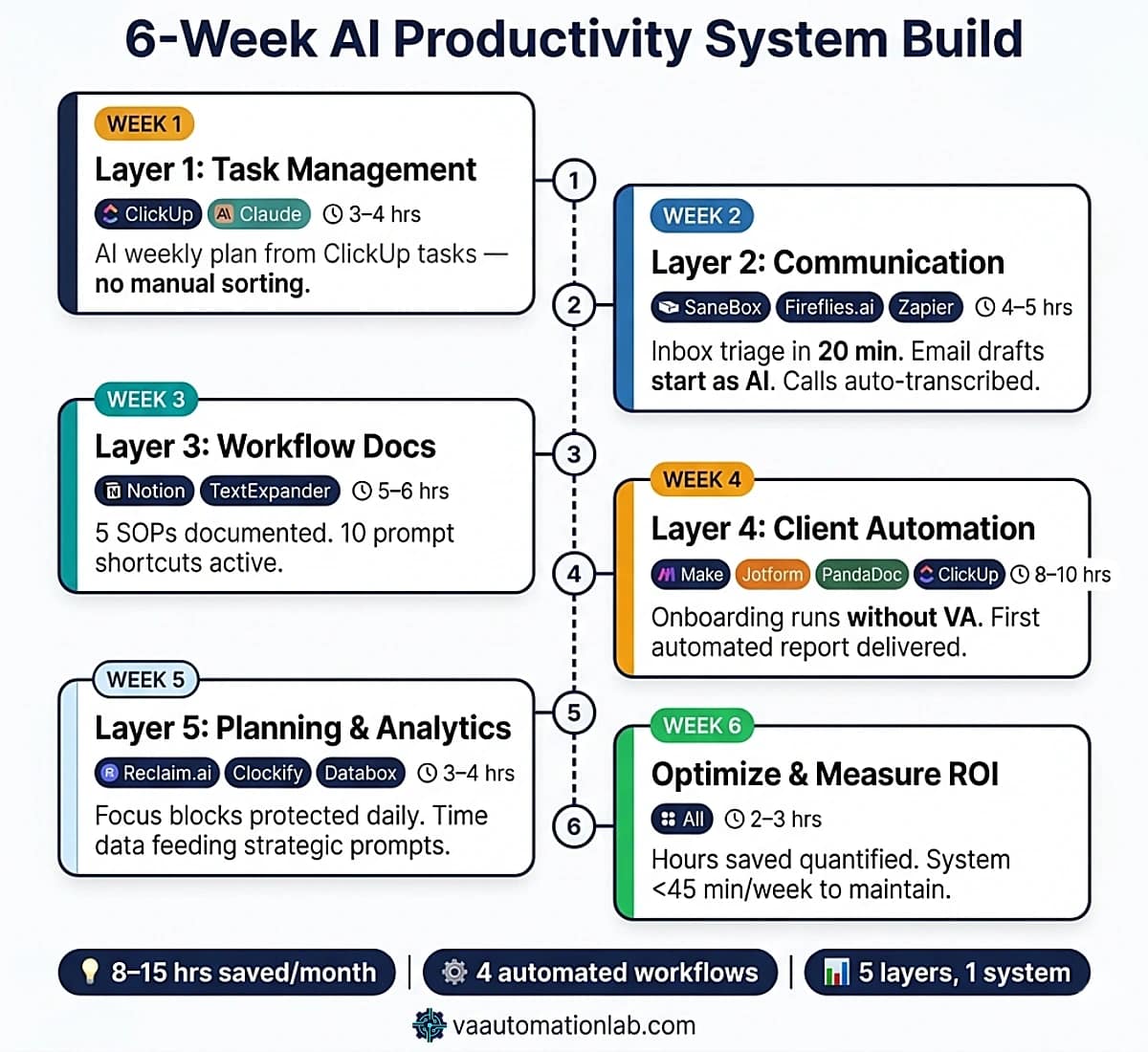
Week 1 — Layer 1: Task Management
Goal: Replace manual task list creation and Monday planning with AI-generated outputs.
Tools to set up this week:
ClickUp — create your workspace with one Space per active client + one Admin & Operations space. Upgrade to Unlimited ($7/month) to unlock unlimited Spaces and native time tracking.
Claude Pro or ChatGPT Plus — your primary AI generation tool.
A Notion page or ClickUp Doc titled “Prompt Library” — this is where every working prompt gets saved.
What to build:
Configure ClickUp: create Spaces for each active client, a template task list for new clients, and a recurring Monday task titled “Weekly Planning.”
Build the AI task list generation prompt (Section 4) and test it with one real active client project.
Build the AI weekly prioritization prompt (Section 4) and run it manually this Monday.
Save both prompts in the Prompt Library with use-case labels.
Time investment: 3–4 hours across the week.
Success criteria: By Friday of Week 1, you can generate a prioritized weekly plan from your ClickUp task list in under 5 minutes, without manually sorting tasks. The AI output requires fewer than 3 corrections per week.
Do not automate this yet. Run manually for two weeks to identify the edge cases before embedding them in automation logic.
Week 2 — Layer 2: AI-Enhanced Communication
Goal: Eliminate blank-page writing for all client-facing communication. Process the daily inbox in under 20 minutes.
Tools to set up this week:
SaneBox — connect to your Gmail account. Let it run for 3 days before adjusting filters. The Snack plan ($6/month) covers 1 email account and 2 features, sufficient for most solo VAs.
Fireflies.ai — connect to your Google Calendar. The Free plan transcribes unlimited meetings (2-hour recording limit per meeting, 800 minutes storage). Upgrade to Pro ($10/month) for unlimited storage and downloadable transcripts.
Make Core ($9/month) — set up Workflow 1 (Inbox to Task Pipeline) from Section 9.
What to build:
Configure SaneBox: verify the SaneLater and SaneBlackhole folders are working correctly after 3 days of training.
Set up Fireflies.ai: invite the bot to your next 3 client calls and verify the transcript quality. Build the meeting summary prompt from Section 5 and apply it to the first Fireflies transcript.
Build the email drafting prompt, weekly update prompt, and inbox triage prompt. Test each with 5 real emails before saving to the Prompt Library.
Configure Workflow 1 in Make. Test with one real email. Verify the ClickUp task is created with the correct priority and description.
Time investment: 4–5 hours across the week.
Success criteria: Daily inbox processing takes under 20 minutes. All client-facing emails start as AI drafts. Workflow 1 is creating ClickUp tasks correctly from 90%+ of filtered emails.
Week 3 — Layer 3: Workflow Organization
Goal: Document your 5 most-used processes as reusable SOPs. Make every prompt accessible in under 10 seconds.
Tools to set up this week:
Notion Plus ($10/month) — if not already using Notion, this is the week to set it up as your documentation hub. Create a database called “SOPs & Processes” and a linked “Prompt Library” database.
TextExpander Individual ($3/month) — install the desktop app. Configure abbreviation shortcuts for your 10 most-used prompts (e.g., ;email expands to the full AI client email prompt, ;sop expands to the SOP generator prompt).
What to build:
List your 5 highest-frequency processes (e.g., new client onboarding, weekly report delivery, content approval, invoice generation, meeting prep). Run each through the AI SOP Generator prompt (Section 6).
Store all 5 SOPs in the Notion SOP database with tags (client type, service type, automation status).
Build the project plan template prompt and test it on a current client.
Configure TextExpander with 10 abbreviations pointing to your most-used prompts. Test all 10.
Link each SOP to the ClickUp recurring task that triggers it.
Time investment: 5–6 hours across the week.
Success criteria: All 5 SOPs exist as Notion documents and are linked from the relevant ClickUp tasks. Any prompt in the library is accessible in under 10 seconds via TextExpander. When you start a new project, you can generate the task list and project plan in under 15 minutes.
Week 4 — Layer 4: Client Operations Automation
Goal: Automate client onboarding end-to-end. Run the first automated weekly report.
Tools to set up this week:
Make Core ($9/month) — create your account and activate the Core plan. The free tier’s 15-minute execution interval and 1,000 credits/month are insufficient for production use.
Jotform — create or migrate your client intake form. Free plan covers 5 forms and 100 submissions/month, sufficient for most VAs. Bronze ($39/month) for higher volume.
PandaDoc Starter ($19/month) — create your standard VA contract template with fields that match the Jotform intake fields (client name, service type, start date, rate, deliverables).
Claude API key — create an account at console.anthropic.com. The HTTP module in Make calls this directly. Typical API cost for the onboarding scenario: $0.05–$0.15 per new client intake.
What to build:
Build Workflow 2 (Client Onboarding Pipeline) from Section 9 step by step. Test with a simulated intake submission.
Verify: Google Drive folder created, ClickUp list created from template, PandaDoc contract sent, welcome email delivered with AI-personalized opening.
Fix any module errors before treating the scenario as live. Common issues: JSON parsing from Claude response (wrap in Router if error handling is needed), PandaDoc field mapping.
Activate Workflow 4 (Reporting Pipeline) for one client. Run the first automated report. Review the Claude-generated narrative against what you would have written manually. Note any structural gaps and refine the prompt.
Time investment: 8–10 hours across the week (Workflow 2 build is the heaviest session in the 6-week sequence).
Success criteria: A test intake form submission triggers the full onboarding scenario without manual intervention. The first automated client report is sent and approved by the client without structural corrections.
Week 5 — Layer 5: Decision-Making & Planning
Goal: Protect focus time automatically. Feed real time-tracking data into strategic prompts. Build the first automated weekly plan.
Tools to set up this week:
Reclaim.ai Starter ($10/month) — connect to Google Calendar. Configure: 3 Habits (daily focus block 90 min, weekly review 30 min, admin block 60 min), 3 Scheduling Links (30-min, 60-min, 90-min calls), Smart Meetings for all recurring client calls.
Clockify Standard ($6/month) or Toggl Track Starter ($10/month) — activate time tracking. Create projects for each active client. Start tracking all work this week.
Databox Free — connect Google Analytics (first data source) + a Google Sheet with your weekly task log (second data source). Build one dashboard per client.
What to build:
Activate Reclaim.ai: let it optimize the first week and check that focus blocks are not being compressed by meetings. Adjust Habit timing if needed.
Start time tracking in Clockify/Toggl. Track for the entire week without changing anything else, this is the data baseline.
Build Workflow 3 (Weekly Planning Automation) in Make. Activate it for the following Monday.
Run the bottleneck detection prompt (Section 8) against your task logs from Weeks 1–4. Implement the first recommended fix.
Time investment: 3–4 hours across the week.
Success criteria: Reclaim.ai is protecting at least one 90-minute focus block per day in Google Calendar. Time tracking data exists for all client work. Workflow 3 delivers the Monday plan to ClickUp automatically on Week 6 Monday.
Week 6 — Optimization and ROI Measurement
Goal: Audit the system, quantify the return, and identify the next improvement.
What to do this week:
Run the monthly strategic review prompt (Section 8) against the last 5 weeks of task data.
Audit all Make scenario execution logs. Check for failed modules, parsing errors, or Claude outputs that required manual correction. Refine any prompts that produced inconsistent formatting.
Measure hours recovered: export your Clockify/Toggl data. Estimate time spent on the same task categories before the system was operational (email, onboarding, reporting, planning). The gap is your monthly ROI.
Identify the single highest-impact gap remaining and schedule it as the Week 7 build.
Time investment: 2–3 hours.
Success criteria: You can quantify hours saved per month with actual data, not estimates. At least one Make scenario is running without any manual intervention for 5+ consecutive runs. The system requires less than 45 minutes of maintenance in a typical week.
What to Build First If You Have Only One Hour
If the six-week sequence feels too large to start today, the single highest-ROI investment is the email-to-task (Workflow 1) combined with the weekly prioritization prompt (Layer 1 Prompt Library). Together they take under 90 minutes to configure and produce an immediate, visible result: emails become ClickUp tasks automatically, and Monday morning planning goes from 30 minutes of manual sorting to 5 minutes of reviewing an AI-generated priority list.
👉 How to Automate Repetitive Tasks as a Virtual Assistant — foundational automation layer that connects with all five system layers.
15. Conclusion
An AI powered productivity system for virtual assistants is not a feature of the VA business, it is the operational infrastructure that determines how much of the VA’s time goes to mechanical execution versus strategic work. The five-layer framework in this guide covers the complete stack: task management, communication, documentation, client operations, and strategic planning.
The system produces its most visible return in the first two weeks, the email-to-task automation and the AI-drafted communication layer reduce daily manual work immediately. The compounding return comes from layers 3-5: documented processes that eliminate rebuilding, client operations that run without manual triggering, and strategic planning informed by system-generated data rather than memory.
The six-week build sequence in this guide is designed so that every step produces a working output before the next step begins. Start with Layer 1 this week. Build one prompt template, use it three times, refine it. That is the correct unit of progress, and the one that compounds.
Ready to Build the Automation Layer?
Make Core at $9/month is the tool that connects Layers 4 and 5, onboarding pipelines, automated reporting, weekly planning automation, and Claude API calls inside your scenarios.
Start on the free plan: test one scenario end-to-end before upgrading.
The Core plan unlocks unlimited scenarios and API access when you’re ready to run the full system.
Frequently Asked Questions About AI Powered Productivity System for Virtual Assistants
Do I need technical skills to build this AI productivity system?
No, all components in this guide are no-code. The prompt templates require only a Claude or ChatGPT account and the ability to copy, edit, and paste text. The Make scenarios are more complex but still no-code, the HTTP module for Claude API calls requires copying a URL and a JSON body, not writing programming code.
The most technical component is the Make scenario in Workflow 2 (client onboarding), which takes 3-4 hours to build for a VA with no prior Make experience.
The six-week implementation sequence is designed specifically so that each layer builds technical confidence before the next, more complex layer is added.
Which AI tool should I use — Claude or ChatGPT?
Both are useful for different purposes within this system. Claude produces more consistently structured outputs for complex prompts with multiple requirements, it is the better choice for the production prompts embedded in Make scenarios (onboarding brief, report generation, SOP creation). ChatGPT is more useful for interactive session work where you iterate through several versions of an output, email drafting, content ideation, and quick triage analysis.
The practical approach: use Claude as the default for any prompt saved in the Prompt Library, and ChatGPT for exploratory, conversational use cases.
How long does it take to see results from an AI productivity system?
Layer 1 and Layer 2 produce measurable time savings within the first week, the email
triage scenario and the AI email drafting prompts reduce daily communication time by 30-60 minutes from the first day they are operational.
Layer 4 (client operations automation) produces the most significant time saving but requires 3-4 weeks of build time before it is operational.
The full five-layer system, built over six weeks, produces 8-15 hours per month of recovered time for a VA managing 3-4 active clients, a return that compounds as automation volume grows and prompt quality improves.
Can I use Notion instead of ClickUp as the primary hub?
Yes. The system architecture works with either tool. Notion is the stronger choice for Layer 3 (workflow organization and documentation) because Notion AI integrates directly with the documentation workspace and the Ask Notion feature can query across all client documentation. ClickUp is the stronger choice for Layer 1 (task management) and Layer 4 (client operations automation) because its native automation capabilities handle recurring tasks, status-based triggers, and dashboard widgets more robustly. The most effective combination: ClickUp for task management and operations, Notion for documentation and knowledge base. See the full breakdown at Notion vs ClickUp for Virtual Assistants.
What is the difference between using AI tools and having an AI productivity system?
The distinction between using AI tools and having an AI powered productivity system for virtual assistants starts with architecture, asking Claude to generate a task list when starting a new project, and using Notion AI to clean up meeting notes. Each interaction saves time in isolation but requires manual triggering, manual output review, and manual transfer of the output to the next tool.
An AI system means the AI is embedded in automated workflows, the form submission triggers the Claude API call which generates the client brief which populates the ClickUp workspace which sends the welcome email, without the VA manually initiating any step after the initial form submission. The system works while the VA is doing other things.
How do I know which processes to automate first?
Use the bottleneck detection prompt in Layer 5 (section 8) on your last two weeks of task logs. It identifies which processes consume the most time relative to their complexity and flags which ones are automatable. If you have not yet been tracking task time, the three highest-ROI automation targets in any VA operation are: client onboarding (2-3 hours saved per client), weekly reporting (1-2 hours per client per month), and email-to-task conversion (15-25 minutes per day).
Build automations for these three first before evaluating any other process for automation.
Can I use this system if I only have 1–2 clients right now?
Yes, but prioritize Layers 1 and 2 first. With 1–2 clients, the ROI of building the full Layer 4 automation (onboarding scenario) is lower because onboarding frequency is lower. The highest value at 1–2 clients is the AI communication layer (Layer 2) and the prompt library (Layer 3), both produce immediate daily time savings and scale linearly as you add clients. Build Layers 4 and 5 when you are consistently onboarding new clients (Layer 4) or when you are managing enough operational complexity to need data-driven planning (Layer 5).
What happens when an AI model updates and breaks my Make scenarios?
This is the model version drift problem covered in Section 13. The practical protection: in every Make HTTP module that calls Claude, set the Claude output format explicitly in the system prompt, tell it exactly what JSON structure to return and include an example. This significantly reduces format drift between model versions. Check Make execution logs quarterly after any announced Claude model update. If a module starts producing parsing errors, the fix is almost always a prompt update, not a scenario rebuild.
How do I handle client data privacy when using AI in automation scenarios?
This is a real operational risk that belongs in your client agreements. The three practical steps:
1. Never include full client names, email addresses, or payment data in Claude API prompts, use pseudonyms or generic labels
2. Add a data processing clause to your standard contract (PandaDoc Starter makes this easy to template)
3. Use Make’s data mapping to extract only the fields needed for the AI step, not the entire form submission.
For clients in regulated industries (healthcare, finance, legal), verify Claude’s and Make’s data processing agreements before using them in any workflow that handles sensitive information.
Does the system work for executive assistants or is it specific to online VAs?
The five-layer framework applies to any VA model, but the Layer 4 tools are most directly mapped to online VAs managing multiple clients with recurring deliverables. Executive assistants typically get the most value from Layer 2 (communication drafting, meeting summaries via Fireflies.ai), Layer 3 (SOPs and project plans), and the Reclaim.ai focus scheduling in Layer 5. The client onboarding automation in Layer 4 is less relevant if you are supporting a single executive, replace it with a project intake automation for recurring assignments instead.
What should I do if my Make scenario fails mid-execution?
Make logs every module execution. When a scenario fails, open the execution history, click the failed run, and locate the first red module, that is the failure point. Common causes: Claude API timeout (increase the HTTP module timeout from the default 30 seconds to 60–90 for complex prompts), JSON parse error (the Claude response format changed, update the parse instruction in the prompt), or an upstream module returning an empty value (add an error handler or filter to stop the scenario if a required field is empty). After any fix, always run the scenario in test mode with a real input before re-activating.
Glossary: Key AI and Productivity Terms for Virtual Assistants
AI Powered Productivity System: A structured framework that connects AI tools, automation platforms, and project management tools into a unified operational system, not individual tools used in isolation, but a connected architecture where each component feeds the next.
Prompt Template: A reusable prompt structure with variable fields that can be filled for each specific use case. The building block of an AI productivity system that produces consistent outputs without starting from scratch each time.
Prompt Library: A centralized collection of tested prompt templates organized by use case, stored in Notion or ClickUp Docs, updated when output quality changes, and shared across all AI tools in the stack.
AI First Draft: The operating principle that every text output (emails, SOPs, reports, plans) starts as an AI-generated draft refined by the VA, rather than a blank page filled from scratch. Reduces time while maintaining the VA’s judgment in the output.
HTTP Module (Make): The Make module that sends API requests to external services, used to call the Claude or OpenAI API directly within a Make scenario, enabling AI to be embedded as a step in complex multi-tool automation sequences.
Cognitive Load: The mental effort required to process and manage information during task execution. Reducing cognitive load (through automation, prompt templates, and AI-generated structure) is one of the primary mechanisms by which AI tools for VA productivity produce sustained capacity increases.
Automation Trigger: The event that initiates an automated sequence, a form submission, status change, scheduled time, or API webhook. In the five-layer system, triggers connect the AI layer to the automation layer without manual intervention.
Structured Prompt: A prompt with explicitly defined parameters (context, output format, word count, tone, required sections) that consistently produces usable AI output without requiring extensive rewriting.
Model Version Drift: The change in AI output quality or format that occurs when an AI model is updated. A prompt that produced correctly structured JSON in one Claude version may produce differently formatted output after an update, breaking automation scenarios that parse the output. Requires quarterly prompt auditing.
Focus Block: A protected time slot in a calendar system reserved for deep, uninterrupted work. Reclaim.ai automatically creates and defends these blocks against meeting scheduling, ensuring the VA’s highest-attention capacity is preserved daily.
About the Author
Alex Stratton has spent the better part of a decade working at the intersection of virtual assistance and operational systems, first as a VA supporting founders and small business owners, then as a workflow consultant helping remote teams reduce the manual overhead that accumulates when businesses grow faster than their processes. The tools and workflows here reflect decisions made repeatedly in real client contexts, where the wrong choice costs hours, not minutes. Learn more about VA Automation Lab → About.