
6 Best Calendly Alternatives for Virtual Assistants (2026)

Disclosure: This article contains affiliate links. If you purchase through them, VA Automation Lab earns a commission at no additional cost to you. All tools are evaluated independently.
Six Calendly alternatives matched to the two scheduling jobs a VA runs — your own bookings and your clients’ calendars — with 2026 pricing, a switch plan that protects every booked call, and the cases where Calendly still wins.
On August 19, 2026, Calendly launched two AI features: Notetaker and the Callie assistant. Both are add-ons rather than new plans, with no price on the pricing page. One rule stayed where it was. Every user in a Calendly account needs a paid seat, including the assistant who manages it. For a VA booking calls for three clients, that rule shapes the decision more than any feature list.
This guide compares Calendly alternatives for virtual assistants against the work a VA does with a scheduler. That work splits into two jobs. The first is your own business: discovery calls, onboarding sessions, weekly check-ins. The second is scheduling for clients, inside their accounts and on their calendars. A tool can handle the first job well and the second one badly.
👉 AI Tools for Virtual Assistants: The Complete Stack Guide — the full map of the VA tool stack, with scheduling as one of its fifteen workflow areas.
👉 Productivity Systems for Virtual Assistants: The Complete Guide — how scheduling fits into the time and attention system behind a multi-client practice.
Get the Free AI Toolkit for Virtual Assistants
If you’re rebuilding your scheduling setup, the Free AI Toolkit gives you tool picks, prompt templates and a step-by-step setup sequence for VA operations, without the trial and error.
Table of Contents
1. What Are the Best Calendly Alternatives for Virtual Assistants?
The best Calendly alternatives for virtual assistants are SavvyCal, Reclaim.ai, Cal.com, TidyCal, Zoho Bookings and SimplyBook.me. Pick SavvyCal for client scheduling with assistant access, Reclaim.ai for juggling client calendars, Cal.com for the strongest free plan, TidyCal for a one-time payment, Zoho Bookings for low per-user pricing, or SimplyBook.me for a client’s service-business bookings.
Each of these Calendly competitors fixes a different Calendly limitation, so start from the situation that sent you looking.
If you need to… | Pick | What it fixes vs Calendly | Paid from (billed annually) |
Manage client scheduling without a seat in every client’s account | A client delegates their account to you; you don’t need a paid plan | $10/user/month | |
Stop several client calendars from double-booking you | Unlimited calendar sync on paid plans, plus links that respect protected time | $10/seat/month (free Lite plan) | |
Spend nothing | Cal.com | Unlimited event types and calendars on the free plan | $12/user/month (Teams) |
Avoid another subscription | TidyCal | One-time license with 10 calendar connections | $29 one-time |
Stay inside Zoho, or pay the least per user | Free for one user, paid plans from $6 per user | $6/user/month | |
Run bookings for a client’s service business | Priced by bookings, not seats; extra users cost nothing | $11.90/month (free up to 50 bookings) | |
Work for a client who already runs Calendly | Keep Calendly | You work inside their account | $10/seat/month |
This guide judges each tool as a replacement for Calendly. For the complete scheduling stack, including focus-time protection, post-booking automations and multi-client calendar setup, see 👉 Best AI Scheduling Tools for Virtual Assistants.
2. Why Virtual Assistants Outgrow Calendly
Two Calendly rules push multi-client VAs toward alternatives: a paid seat for every user, and a six-calendar cap. As scheduling software, Calendly does its core job well: a clean booking page, reliable conflict checks, and the brand most invitees already recognize. The friction for a VA is structural. It shows up in three places: who needs a seat, how many calendars count, and what the new plans charge for.
The Seat Problem: Managing a Client’s Calendly Account
Four rules from Calendly’s help center decide how a VA can work inside a client’s account:
- Every user in a Calendly organization needs a paid seat, whatever their role.
- All users in one organization must be on the same plan.
- A user can belong to only one organization at a time.
- On Standard and above, event type permissions let one user edit someone else’s event types.
Calendly’s rules leave a VA two routes. You can log in with the client’s credentials, which puts their password in your hands and ties every change you make to their identity. Or the client adds you as a user: you get your own login and permission to edit their event types, and the client pays for your seat.
The second route has a catch for multi-client VAs. A user belongs to one organization at a time. Join Client A’s account with your email, and you can’t join Client B’s with the same address. Three Calendly clients means three logins, three email addresses and three paid seats, one on each client’s bill.
Worked example. A client on Calendly Standard who adds you as a user pays for two seats: $20 a month billed annually, or $240 a year. The same client on SavvyCal Premium pays $17 a month billed annually, or $204 a year. Your delegate access costs nothing, because SavvyCal doesn’t require delegates to hold a paid plan. The client spends less, and you work from your own login.
If a client insists on sharing credentials anyway, move them out of email and Slack: 1Password Individual (from $3.99/month billed annually) includes secure item sharing with anyone. The setup is in 👉 1Password for Virtual Assistants: Manage Client Logins.
Whatever tool you choose, build client-facing scheduling on the client’s account and operate it through delegated access. When the contract ends, the client revokes your access and their booking links keep working.
What Changed in Calendly’s Pricing in 2026
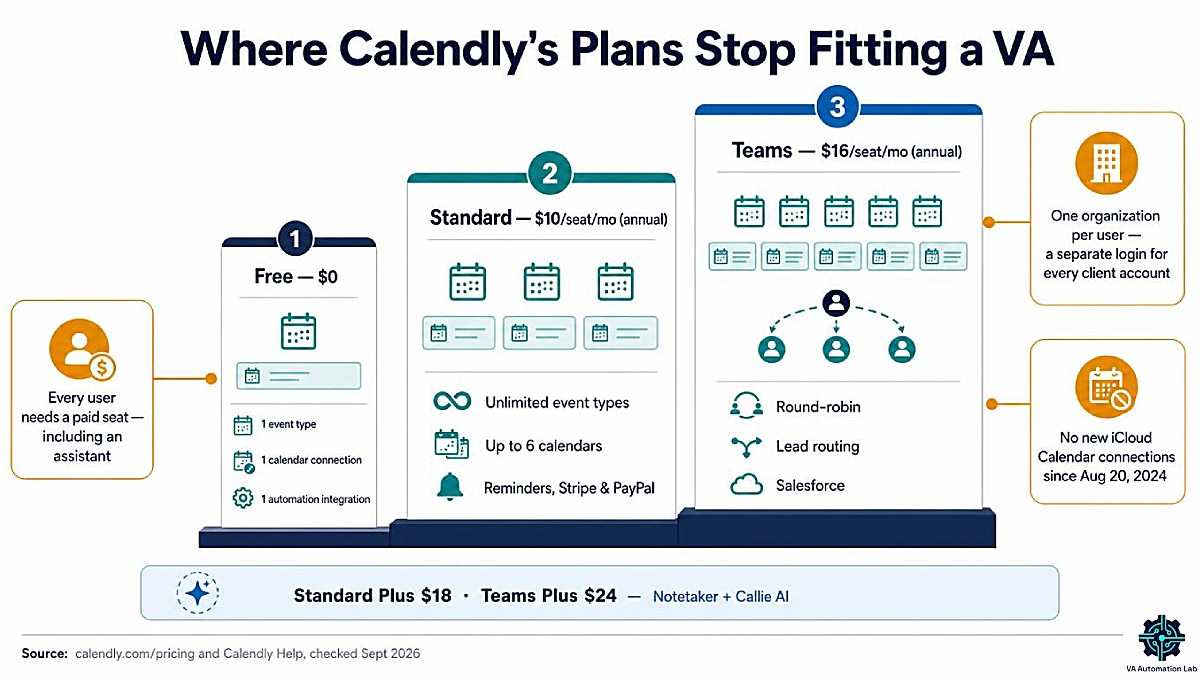
Calendly’s free plan allows one event type, one calendar connection and one automation integration. That covers a single discovery-call link. An onboarding session or a weekly check-in needs a second event type, which means Standard at $10 per seat per month billed annually. Standard adds unlimited event types, reminders, Stripe and PayPal payments, and up to six connected calendars. Teams at $16 adds round-robin, lead routing and Salesforce. Enterprise starts at $15,000 a year.
The August 2026 relaunch left those scheduling features unchanged. It added two AI tools. Notetaker records calls and writes recaps. Callie is an assistant you copy on an email thread to find a time and book the meeting. Both are add-ons with no price on the pricing page, and both work in English only for now.
Two limits matter more to a VA than the new AI. The first is the six-calendar cap. A VA who checks seven calendars (their own, their business calendar and five clients’) runs out of connections on every Calendly plan. The second is that connected calendars apply to every event type. From one account, Calendly can’t write a Client A booking to Client A’s calendar and a Client B booking to Client B’s.
One more for clients who live in Apple Calendar: Calendly hasn’t accepted new iCloud Calendar connections since August 20, 2024.
What to look for in a replacement
- Assistant access without a paid seat in each client’s account
- Enough calendar connections for every calendar you check
- Separate links per client, each writing to the right calendar
- Reminders and payments on the plan you would buy
- A booking trigger for Make or Zapier
- The real cost at one or two seats, not at team scale
For the operating system behind multi-client calendars, see 👉 How to Manage Multiple Clients as a Virtual Assistant Using AI.
3. SavvyCal: Best Calendly Alternative for Managing Client Scheduling
SavvyCal solves Calendly’s seat problem for VAs: on the Premium plan, a client grants delegated access to their account. As the delegate, you register for a SavvyCal account without needing a paid plan, then switch into the client’s account from the sidebar. From there you manage their availability, scheduling links and account settings under your own login. The client controls that access from the Delegated Access section of their settings.
A second SavvyCal feature covers the executive-assistant side of the job. SavvyCal’s book-on-behalf interface lets admins and assistants create a meeting directly and choose any time slot, including slots that aren’t shown publicly. When a client says “fit Maria in on Thursday,” you don’t send Maria a link. You book it.
What else VAs use it for
- Calendar overlay. Invitees lay their own calendar over yours before choosing a time, which cuts the back-and-forth with invitees in other time zones.
- Per-link calendar routing. Each scheduling link can send its bookings to a different calendar, which is the per-client setup Calendly can’t do from one account.
- Unlimited calendars and links on Basic, with native iCloud support alongside Google and Outlook.
- Ranked availability and frequency limits. Highlight the times you prefer and cap bookings per day or week.
- Reminders, workflows, Zapier, API and webhooks from the Basic plan up.
- Meeting polls. Unlimited on both plans, for finding a time with a group instead of sending a booking link.
Pricing (billed annually): Basic costs $10 per user per month and includes unlimited calendars, unlimited links and team scheduling. Premium costs $17 and adds delegate access, custom domains, branding removal and paid bookings through Stripe. There’s no standing free plan for sharing links: you can set the account up before paying, and SavvyCal backs the first month with a 30-day money-back guarantee. Use Basic for your own business and Premium on the account of any client whose scheduling you manage.
Where SavvyCal falls short: it has fewer native integrations than Calendly, so more connections run through Zapier or webhooks. Paid bookings and branding removal sit on Premium only. And without a free plan for live links, there’s no zero-cost version to leave running for a light user.
SavvyCal vs Calendly for Virtual Assistants
SavvyCal wins on the things that make a VA’s week harder in Calendly. A client can delegate their account without paying for your seat. You can connect unlimited calendars against Calendly’s six, route each link to its own calendar, and add iCloud. Invitees also get a booking page that shows their own calendar next to yours.
Calendly wins on reach. It has more native integrations and, on Teams, routing forms and round-robin built for sales teams. It keeps a free plan you can leave running indefinitely. And almost every invitee has used its booking page before.
Entry prices match: Calendly Standard and SavvyCal Basic both cost $10 per seat per month billed annually. SavvyCal Premium, at $17, costs more than Calendly Standard ($10).
The decision rule is simple. If you manage scheduling inside clients’ accounts, choose SavvyCal. If your client’s sales team routes inbound leads across reps, their Calendly Teams account is doing a job SavvyCal isn’t built for.
Manage Your Clients’ Scheduling Without Taking a Paid Seat
On SavvyCal Premium, a client grants you delegated access, and you run their availability, links and settings from your own login. You don’t need a paid SavvyCal plan of your own. Basic at $10/month billed annually covers your own booking links, with unlimited calendars.
Set everything up before you pay. The first month is covered by a 30-day money-back guarantee.
4. Cal.com: Best Free Calendly Alternative
Cal.com’s free Individuals plan is the most generous in this guide. It includes unlimited event types and calendar connections, email and SMS notifications, Stripe and PayPal payments, a mobile app, and a one-click import for Calendly events. It connects to Google Calendar, Outlook and iCloud. For a VA running their own discovery and onboarding calls, it replaces a paid Calendly Standard seat at no cost.
Cal.com’s paid plans start where teamwork does. Teams costs $12 per user per month billed annually and adds round-robin, routing forms, managed and collective event types, and removal of Cal.com branding. Organizations, at $28, adds domain-wide delegation for scheduling on behalf of colleagues, SAML SSO, and SOC 2, HIPAA and ISO 27001 compliance.
Cal.com is also open source and can be self-hosted. That matters to developers. For a VA, self-hosting turns backups, updates and uptime into your job, so the hosted plan is the sensible default.
Where Cal.com falls short: Cal.com branding stays on free booking pages, which looks unfinished once the link goes out under a client’s name. The interface exposes more settings than Calendly’s, so the first setup takes longer. And the delegation features built for assistants sit on the $28 Organizations plan, not on anything a solo VA would buy.
Cal.com vs Calendly: Is the Free Plan Enough for a VA?
Side by side, the Calendly and Cal.com free plans aren’t close. Calendly Free gives you one event type, one calendar connection and one automation integration. Cal.com Free gives you unlimited event types and calendars, notifications, payments and a mobile app.
For your own business, where one person books every call, Cal.com’s free plan covers discovery calls, onboarding sessions and check-ins without a subscription. The upgrade trigger is branding. Once the link sits in a proposal carrying your logo, $12 a month removes Cal.com’s.
For client work, the answer changes. Managing a client’s booking page means either using their login or getting delegated access, and Cal.com’s delegation lives on the Organizations plan. For that job, SavvyCal’s delegate access, which costs you nothing, is the better fit.
5. Reclaim.ai: Best Calendly Alternative for Juggling Client Calendars
Reclaim.ai, part of Dropbox since 2024, stops several client calendars from double-booking a VA, a problem Calendly doesn’t try to solve. A VA’s availability is split across several calendars: a personal one, a business one and one for each client. Reclaim syncs them so a meeting on one blocks the time on the others. It defends the recurring blocks you set, such as a daily deep-work window. Its Scheduling Links offer only time that’s free across all of them.
Plans (billed annually):
- Lite (free): 1 Scheduling Link, 1 Habit, 1 personal calendar sync, and a one-week scheduling range for everything except Scheduling Links
- Starter, $10 per seat per month: 3 Scheduling Links, unlimited calendar sync, unlimited habits and integrations
- Business, $15: unlimited Scheduling Links, Delegated Access and webhooks
The upgrade trigger is your second client calendar, because Lite syncs only one.
Reclaim is the tool for managing your own calendar, not for operating a client’s account. Its Delegated Access requires Business or Enterprise, and the delegate must sit on the same Reclaim team as the person they manage. That model fits an in-house executive assistant, not a freelancer with five separate clients.
Where Reclaim.ai falls short: its booking page is plainer than SavvyCal’s. It connects to Google Calendar and Outlook only, with no iCloud. And there’s no native mobile app.
Reclaim.ai vs Calendly: Calendly shows invitees the time you left open. Reclaim decides which time stays open in the first place. The practical setup is to keep a booking tool for client-facing links and add Reclaim, so every link you share reflects the whole week.
For habits, focus time and the full setup, see 👉 Reclaim.ai for Virtual Assistants: Complete Guide & Setup.
Stop Juggling Client Calendars by Hand
Reclaim.ai syncs your personal, business and client calendars so a meeting on one blocks the others. It defends the focus time you set and shares Scheduling Links that only show time that’s free everywhere.
Lite is free with one calendar sync and one Scheduling Link. Starter at $10/month billed annually is the upgrade at your second client calendar, with unlimited calendar sync.
6. TidyCal: Best Calendly Alternative With a One-Time Payment
TidyCal, built by AppSumo, sells scheduling the way few tools do: once. The Individual Lifetime license costs $29 one time. Over the free plan, it adds 10 calendar connections, a separate calendar per booking type, group bookings, custom emails and automatic Zoom, Meet and Teams links. For comparison, two years of Calendly Standard for one seat costs $240.
TidyCal’s free plan is broader than Calendly’s. It includes unlimited bookings and booking types, paid bookings through Stripe and PayPal, and recurring and package bookings. Its one calendar connection works with Google, Office 365 or Apple Calendar.
For teams, TidyCal’s Agency Lifetime ($79 one time) adds round-robin, collective meetings and a team booking page. Pro is the only subscription, at $99 a year (or $12 month to month). It’s also the only plan that removes TidyCal branding, adds a custom domain, lifts calendar connections to unlimited and drops the platform fee.
TidyCal fits a VA in the first months of business who wants a professional booking page without adding another subscription.
TidyCal vs Calendly: TidyCal’s free plan already covers two things Calendly Free doesn’t — unlimited booking types and paid bookings — and the $29 license connects 10 calendars against the six on Calendly’s paid plans. Calendly keeps the edge on integrations and on team features such as routing and Salesforce sync.
Where TidyCal falls short: every plan except Pro charges a 1% platform fee on payments processed through Stripe, on top of Stripe’s own fees. There’s no delegated access for managing someone else’s account, and Zapier isn’t available on the free plan. Lifetime terms can also change for new buyers: Agency Lifetime licenses bought from September 1, 2026 carry lower team and calendar caps than earlier ones.
7. Zoho Bookings: Best Low-Cost Calendly Alternative for Zoho Users
Zoho Bookings is free for one user with one event type and one calendar. Paid plans are priced per user: Basic at $6 and Premium at $9 per user per month, billed annually.
The line between Zoho Bookings’ two paid plans is sharper than the price gap suggests. Basic unlocks unlimited event types, two calendar connections per user, collective and round-robin bookings, email workflows and Zapier. Premium is where the client-facing features live: online payments through Stripe, PayPal, Razorpay and others, routing forms, SMS reminders, a custom domain and branding removal. It also raises calendar connections to six per user, includes three workspaces and adds the Zoho CRM integration.
The Zoho CRM integration decides who should pick Zoho Bookings. If a client already runs Zoho CRM, Bookings Premium syncs appointments into it natively. And if the client pays for Zoho One, the Premium plan of Bookings is already included. For the CRM side of that decision, see 👉 Best CRM for Virtual Assistants.
Every Zoho Bookings plan, including Free, lets an admin schedule appointments on a customer’s behalf from the Bookings dashboard. Paid plans add user roles with individual logins, so the client can add you and you work from your own credentials. Zoho prices per user, though, so adding you costs the client one more user.
Zoho Bookings vs Calendly: Zoho costs less per user on both paid tiers ($6 and $9, against Calendly’s $10 Standard and $16 Teams), and its free plan matches Calendly Free at one event type and one calendar. Premium also includes routing forms, which Calendly keeps on Teams. Pick Calendly instead when the client works outside Zoho and needs Calendly’s wider integration list.
Where Zoho Bookings falls short: calendar sync covers Zoho Calendar, Google and Microsoft 365/Outlook, with no iCloud. Payments, SMS reminders, branding removal and the Zoho CRM sync all require Premium. Outside the Zoho ecosystem, the value per dollar drops.
8. SimplyBook.me: Best Calendly Alternative for Clients’ Service Businesses
SimplyBook.me is appointment scheduling software for a client’s service business, not for a VA’s own discovery calls. It runs the client’s appointment operations: a coach with three session types, a clinic with five practitioners, a studio selling classes.
SimplyBook.me’s pricing model is what sets it apart. Plans are defined by monthly bookings and providers, not seats (billed annually):
- Free: 50 bookings a month, 1 provider, 1 custom feature
- Basic, $11.90/month: 100 bookings, 5 providers, 3 custom features, plus payments, deposits and tips
- Standard, $24.90/month: 500 bookings, 15 providers, 8 custom features, a branded client app and HIPAA
- Premium, $49.90/month: 2,000 bookings, 30 providers and unlimited custom features
Extra SimplyBook.me users cost nothing. The client can add you as an administrator, or as a senior employee who manages bookings and schedules for every provider without touching company settings. Either way, you work from your own login on their account.
SimplyBook.me vs Calendly: Calendly charges per seat, so a clinic with five practitioners pays for five Standard seats, or $50 a month billed annually. SimplyBook.me Basic costs $11.90 a month billed annually and covers up to five providers and 100 bookings a month. Calendly stays the better fit for one-on-one meetings and sales calls; SimplyBook.me is built for service catalogs, classes and staff schedules.
Plan the custom features before you pick a tier. They’re SimplyBook.me’s add-on model, and each plan includes a fixed number of slots. Two-way sync with Google or Outlook calendars is itself a custom feature, so on Basic it takes one of your three.
SimplyBook.me or Acuity Scheduling? Acuity, owned by Squarespace, is the other online booking system VAs hear about for service businesses. It has no free plan, only a 7-day trial. It costs $16, $27 or $49 a month billed annually, priced by calendars (1, 6 or 36). It signs a HIPAA business associate agreement only on its top plan. Choose Acuity when the client’s website runs on Squarespace and they want the simplest setup. Choose SimplyBook.me when you need a free starting tier, more providers per dollar on the entry and middle plans, or pricing that grows with bookings rather than calendars.
Where SimplyBook.me falls short: calendar sync covers Google and Outlook only. The custom-feature slots make a tier’s real cost harder to predict. And the admin interface carries far more settings than a VA’s own meeting scheduler needs.
9. Calendly Alternatives You May Already Be Paying For
Several apps like Calendly already ship inside tools you or your client may pay for: Google Workspace, Microsoft 365, Dubsado, HubSpot and Pipedrive. Check the stack before adding a subscription.
Google Calendar appointment schedules. Every Google account can publish one booking page. On Google Workspace Business Standard and above, you get unlimited booking pages, Stripe payments, email reminders, verified bookings and conflict checks across several calendars. That can cover a Workspace client’s inbound calls without another tool.
Microsoft Bookings. Bookings comes with Microsoft 365 Business Basic, Business Standard and Business Premium and isn’t sold on its own. It adds Teams meeting links to appointments and suits clients who already live in Outlook and Teams.
Dubsado’s scheduler. If you run your business on Dubsado, its scheduler books discovery and onboarding calls inside the same system as your proposals and workflows. Scheduling is included on the Premier plan ($525/year), not on Starter. The full setup is in 👉 Dubsado for Virtual Assistants: Review & Setup Guide.
HubSpot Meetings. HubSpot’s free CRM includes a meeting scheduler that syncs with Google and Office 365 calendars. The free version carries HubSpot branding; removing it, and adding team scheduling, requires a paid Sales Hub plan.
Pipedrive’s meeting scheduler. Pipedrive includes a meeting scheduler from the Growth plan ($39/month billed annually), alongside full email sync and automations. Use it when a business-development client already runs their pipeline in Pipedrive. It doesn’t justify the upgrade on its own.
10. Calendly Alternatives for Virtual Assistants Compared: Features and Pricing
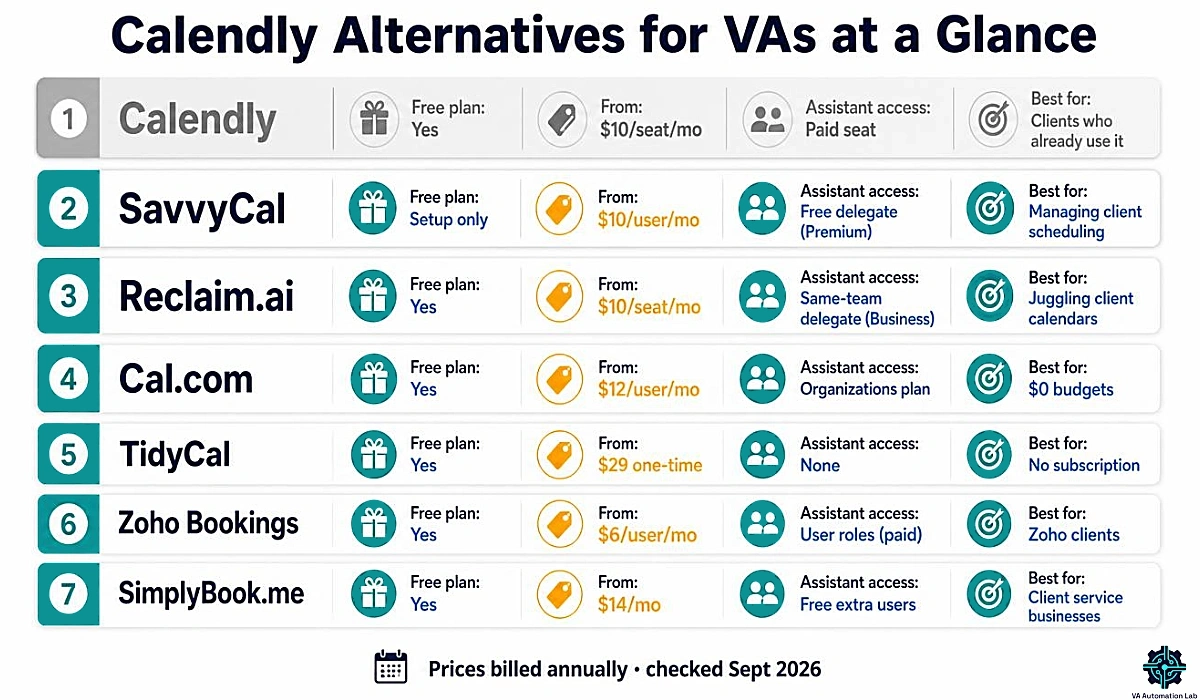
The matrix puts Calendly next to the six alternatives on the variables that decide a VA’s choice. Prices are billed annually.
Tool | Free plan | Paid from | Pricing model | Calendar connections | Assistant access | Apple iCloud | Payments at booking |
Calendly | 1 event type, 1 calendar | $10/seat/mo | Per seat | 1 free · 6 paid | Paid seat in the client’s account | No new connections since Aug 2024 | Standard and up |
Setup only; live links need Basic | $10/user/mo | Per user | Unlimited | Premium: delegate needs no paid plan | Yes | Premium | |
Lite: 1 Scheduling Link | $10/seat/mo | Per seat | 1 on Lite · unlimited on paid | Business: delegate on the same team | No | Not listed on plans | |
Cal.com | Unlimited event types and calendars | $12/user/mo | Per user | Unlimited | Domain-wide delegation (Organizations) | Yes | Free plan and up |
TidyCal | Unlimited bookings, 1 calendar | $29 one-time | One-time, or Pro subscription | 1 free · 10 lifetime · unlimited Pro | No delegate feature | Yes | All plans (1% fee except Pro) |
1 user, 1 event type | $6/user/mo | Per user | 1 free · 2 Basic · 6 Premium | User roles on paid plans | No | Premium | |
50 bookings/mo, 1 provider | $11.90/mo | Bookings and providers | Google or Outlook sync (custom feature) | Free extra users (admin, senior employee) | No | Basic and up |
For client work, one column decides: assistant access. SavvyCal and SimplyBook.me are the two tools here that give you access to a client’s account without the client paying for your seat. Of the two, SavvyCal is the one built for meeting scheduling. For your own business, price decides, and Cal.com’s free plan or TidyCal’s one-time license beats Calendly Standard on cost at one seat. Calendar connections break the tie for VAs who juggle many calendars. Calendly stops at six, while SavvyCal, Cal.com, Reclaim.ai’s paid plans and TidyCal Pro don’t cap them.
11. How to Switch From Calendly Without Losing Client Bookings
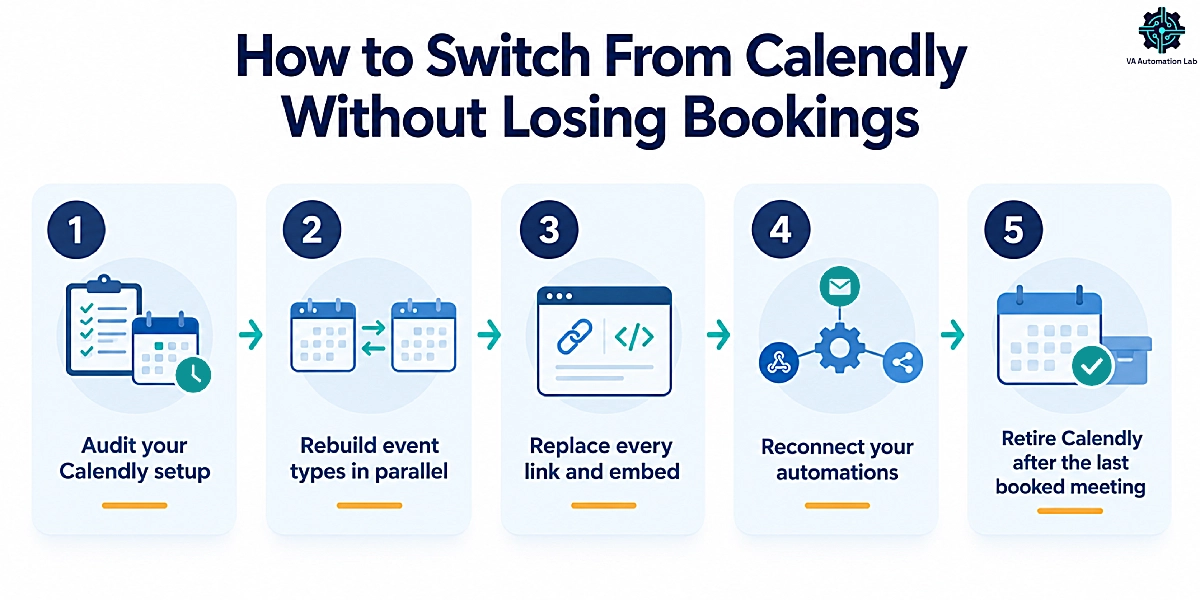
A switch from Calendly fails in two places: links you forgot existed, and automations that stop firing without an error message. Run it in this order, and keep Calendly live until the last booked meeting has taken place.
Step 1 — Audit Your Calendly Setup
List every event type with its duration, buffers, booking questions, reminders and connected integrations. Calendly’s Export button downloads your meetings as a CSV file, but not your event type settings, so screenshot each event type before you rebuild it.
Step 2 — Rebuild Your Event Types in Parallel
Cal.com offers a one-click import for Calendly events on its free plan. With the other tools, rebuild each event type by hand, which for a typical VA setup means a handful of links. Connect every calendar, then book a test meeting from a second email address and check that the confirmation shows the invitee’s time zone.
Step 3 — Replace Every Link and Embed
Booking links hide in more places than your website: email signatures, proposal and contract templates, onboarding documents, link-in-bio pages, client welcome emails and saved text snippets. If you keep booking links in TextExpander, update the snippet once and every future message carries the new link. See 👉 TextExpander for Virtual Assistants: Complete Guide to Templates, Snippets & Productivity Workflows.
Step 4 — Reconnect Your Automations
Any Zapier or Make scenario triggered by a Calendly booking stops running when bookings stop arriving there. List them, then rebuild each trigger on the new tool: CRM contact creation, onboarding sequences, prep tasks. Make‘s free plan runs two active scenarios, enough for the first rebuild. The walkthrough is in 👉 Make for Virtual Assistants: The Beginner Setup Guide. For the booking-to-onboarding sequence, see 👉 How to Automate Client Onboarding for Virtual Assistants. Still on Zapier? 👉 4 Best Zapier Alternatives for Virtual Assistants compares the options.
Step 5 — Retire Calendly After the Last Booked Meeting
Downgrade instead of deleting. When you cancel a paid plan, booked events stay on the account and one event type remains active on Free. Edit that event type’s description to point to your new link, and keep the free account until the last meeting booked through Calendly has taken place.
Build Your New Booking Links Before You Cancel Calendly
Step 2 starts here. Rebuild your event types in SavvyCal, connect every calendar, including iCloud, and test with a second email address while Calendly keeps taking bookings.
SavvyCal’s help center includes a migration checklist for moving from another scheduling tool.
12. When a Virtual Assistant Should Keep Calendly
Switching isn’t always the right call. Keep Calendly when:
- The client owns and pays for it. Work inside their account. Migrating a client’s scheduling is a project to propose, not a default.
- They need what Teams does best. Routing forms that qualify leads, round-robin across reps and Salesforce sync are Calendly’s strongest ground.
- Their invitees book dozens of meetings a week from a page they already trust.
- They’d pay for a meeting recorder anyway. Calendly offers Notetaker and Callie as add-ons, with no price on the pricing page, so compare them with Fireflies.ai Pro ($10 per seat per month billed annually) before adding a separate recorder.
A workable hybrid: keep the client’s Calendly for the client’s bookings, and run your own business on the tool you picked above.
13. Our Recommendation for Most Virtual Assistants
For most VAs, the best of these Calendly alternatives for virtual assistants is SavvyCal. Use Basic at $10 a month billed annually for your own business, and Premium on the client’s account when you manage their scheduling. Delegate access is the one feature that removes Calendly’s seat problem. SavvyCal is the only meeting scheduler in this guide that offers it without charging for your seat.
Three exceptions change the pick:
- Your calendar is the problem, not your booking page: Reclaim.ai.
- Your budget is $0: Cal.com’s free plan.
- You run a client’s service business: SimplyBook.me.
Whichever you choose, run the switch in parallel and keep Calendly on the free plan until the last booked call has happened.
For head-to-head verdicts across every tool category, see 👉 Best Tools for Virtual Assistants: The Complete Comparison Guide.
Frequently Asked Questions About Calendly Alternatives for Virtual Assistants
Is There a Free Alternative to Calendly for Virtual Assistants?
Yes. Cal.com’s free plan includes unlimited event types and calendar connections, payments and a mobile app, which covers a VA’s own discovery and onboarding calls. TidyCal’s free plan offers unlimited bookings with one calendar, Zoho Bookings is free for one user and one event type, and every Google account can publish one appointment booking page.
Can a Virtual Assistant Manage a Client’s Calendly Without Their Password?
Yes, if the client adds you as a user in their Calendly account. You get your own login and permission to edit their event types. But Calendly requires a paid seat for every user, and a user can belong to only one organization at a time. SavvyCal Premium avoids both limits because delegates don’t need a paid plan.
Is SavvyCal Better Than Calendly?
For VAs who manage clients’ scheduling, yes. SavvyCal Premium lets a client delegate their account to you without paying for your seat, connects unlimited calendars and supports iCloud. Calendly is better for teams that route leads with forms and round-robin, and it keeps a free plan. Entry prices match at $10 per seat per month billed annually.
Is Calendly or Acuity Better for Virtual Assistants?
Calendly fits one-on-one meetings and sales calls, with a free plan and Standard at $10 per seat per month billed annually. Acuity fits service businesses that sell appointments: it prices by calendars (1, 6 or 36) from $16 a month billed annually and has no free plan. For a client’s service bookings, compare SimplyBook.me too, free up to 50 bookings a month.
Does Google Calendar Have a Built-In Calendly Alternative?
Yes. Appointment schedules in Google Calendar let any Google account publish one booking page. Google Workspace Business Standard and higher unlock unlimited booking pages, Stripe payments, email reminders, verified bookings and conflict checks across several calendars. Appointment schedules suit one person taking one or two kinds of meeting.
What Is the Cheapest Calendly Alternative?
Cal.com’s free plan is the most complete option at $0. Among paid options, TidyCal’s Individual Lifetime license costs $29 once, against $120 a year for one seat of Calendly Standard. Zoho Bookings Basic costs $6 per user per month billed annually. For service businesses, SimplyBook.me is free up to 50 bookings a month.
Does Calendly Still Work With Apple iCloud Calendar?
Only for accounts that connected iCloud before August 20, 2024. Calendly no longer accepts new iCloud Calendar connections. Among the alternatives in this guide, SavvyCal, Cal.com and TidyCal connect to iCloud, while Reclaim.ai, Zoho Bookings and SimplyBook.me sync with Google and Microsoft calendars instead.
Can I Move My Calendly Event Types to Another Tool?
Cal.com offers a one-click import for Calendly events on its free plan. With most other tools, you rebuild event types by hand. Calendly exports meetings to CSV but not event type settings, so screenshot each one first. Then run both tools in parallel until your last Calendly booking has taken place.
Is Calendly Still Free in 2026?
Yes. The free plan includes one event type, one calendar connection, one-on-one scheduling, a customizable booking page and one automation integration. A second event type, reminders or payments require Standard at $10 per seat per month billed annually. The AI features launched in August 2026, Notetaker and Callie, are add-ons with no price on the pricing page.
Glossary: Key Terms for Comparing Scheduling Tools
Event type: A reusable meeting template (duration, availability, questions, location) that produces one booking link. Calendly’s free plan allows one active event type.
Paid seat: A billable license for one user. In Calendly, every user in an account occupies one, including admins and assistants.
Delegated access: Permission for another person to operate your scheduling account from their own login. SavvyCal offers it on Premium without charging the delegate.
Scheduling link: The URL an invitee opens to see your available times and book a meeting. Calendly calls the underlying template an event type; SavvyCal and Reclaim.ai call the link itself a scheduling link.
Calendar connection: A calendar the tool checks for conflicts and writes new bookings to. Most plans cap how many you can connect.
Round-robin scheduling: Distributing bookings across several hosts by availability or rotation, so no single person takes every call.
Lifetime deal: A one-time payment for permanent access to a plan, such as TidyCal’s Individual Lifetime license. Terms can differ for later buyers.
Booking-volume pricing: Pricing based on how many appointments you take each month rather than how many users you add. It’s SimplyBook.me’s model.
About the Author
Alex Stratton has spent the better part of a decade working at the intersection of virtual assistance and operational systems, first as a VA supporting founders and small business owners, then as a workflow consultant helping remote teams reduce the manual overhead that accumulates when businesses grow faster than their processes. The tools and workflows here reflect decisions made repeatedly in real client contexts, where the wrong choice costs hours, not minutes. Learn more about VA Automation Lab → About.