
Zapier vs Make for Virtual Assistants: The Complete Comparison Guide (2026)
Disclosure: This article contains affiliate links. If you purchase through them, VA Automation Lab earns a commission at no extra cost to you. We only recommend tools we have researched and believe are genuinely useful for virtual assistants.
The complete Zapier vs Make comparison for virtual assistants: how each platform structures automation, where each one breaks down, the pricing reality at VA scale, six real-world workflows implemented step by step, recommended automation stacks for every VA stage, the best alternatives when neither tool fits, and a decision framework that tells you exactly which tool to use based on your service type and workflow complexity.
For a virtual assistant building an automation-driven operation, choosing between Zapier and Make is not a trivial preference decision, it is a foundational infrastructure choice that affects every workflow you build, every client system you maintain, and the total operational cost of your automation layer for as long as you run your business.
The core difference is not about which tool has more integrations or a better interface. It is about workflow architecture. Zapier is built on a linear model: one trigger, a sequence of actions, done. Make is built on a visual, modular model: triggers, branches, routers, data transformations, and conditional paths that can handle logic no linear tool can express. These two approaches produce different results, serve different workflow types, and scale at dramatically different cost curves.
This guide gives you the specific information needed to make the right choice: not a feature list, but an operational analysis of how each platform performs on the tasks that appear most frequently in VA work, with the actual pricing, the real workflow examples, and the honest assessment of where each tool fails.
Who this is for: VAs who are evaluating their first automation tool, VAs already on one platform wondering whether to add the other, and VAs who manage multiple clients and need to understand the real cost and capability ceiling of each option.
What this guide covers:
- What Zapier and Make actually do differently
- Strengths and real limitations of each platform
- Pricing at every scale, with actual numbers
- Which plan is right for each VA type
- Best use cases for Zapier for virtual assistants
- Best use cases for Make for virtual assistants
- Six real workflow examples, implemented
- How to use both tools together strategically
- The decision framework for your specific VA type
Quick answer: For virtual assistants, Zapier is the better choice for simple, linear automations and fast client-facing wins; Make is better for branching logic, bulk data processing, and multi-step client systems at lower cost. Most multi-client VAs run both — Zapier for quick wins, Make ($9/mo) for complex workflows.
Zapier vs Make at a Glance
Zapier | Make | |
Model | Linear (trigger → actions) | Visual canvas (modules, branches) |
Learning curve | Low | Medium |
Pricing unit | Tasks | Credits |
Entry paid plan | $20/mo Professional | $9/mo Core |
Integrations | 9,000+ | 3,000+ |
Best for | Quick, linear wins | Branching systems, scale |
👉 AI Tools for Virtual Assistants: The Complete Practical Guide — the full reference for every tool category in VA work.
Whichever automation platform you choose, it functions as one layer in a broader operational stack, the Complete Comparison Guide to the Best Tools for Virtual Assistants shows how Make fits alongside CRM, scheduling, and billing tools at every experience level.
Want to Start Automating Tasks the Right Way?
If you’re building your first automation stack, this free toolkit includes workflow templates for both Zapier and Make — plus a tool selection checklist mapped to your VA service type.
It contains the exact resources referenced throughout this guide.
Table of Contents
1. What Zapier and Make Do and How They Differ
Both Zapier and Make are no-code automation platforms that connect apps, move data automatically, and execute multi-step workflows without programming. A VA who has configured neither will produce the same basic result in either platform: a trigger in one app causes an action in another. But this surface similarity obscures a fundamental architectural difference that becomes the deciding factor for every non-trivial workflow.
The Core Difference: Linear vs Visual
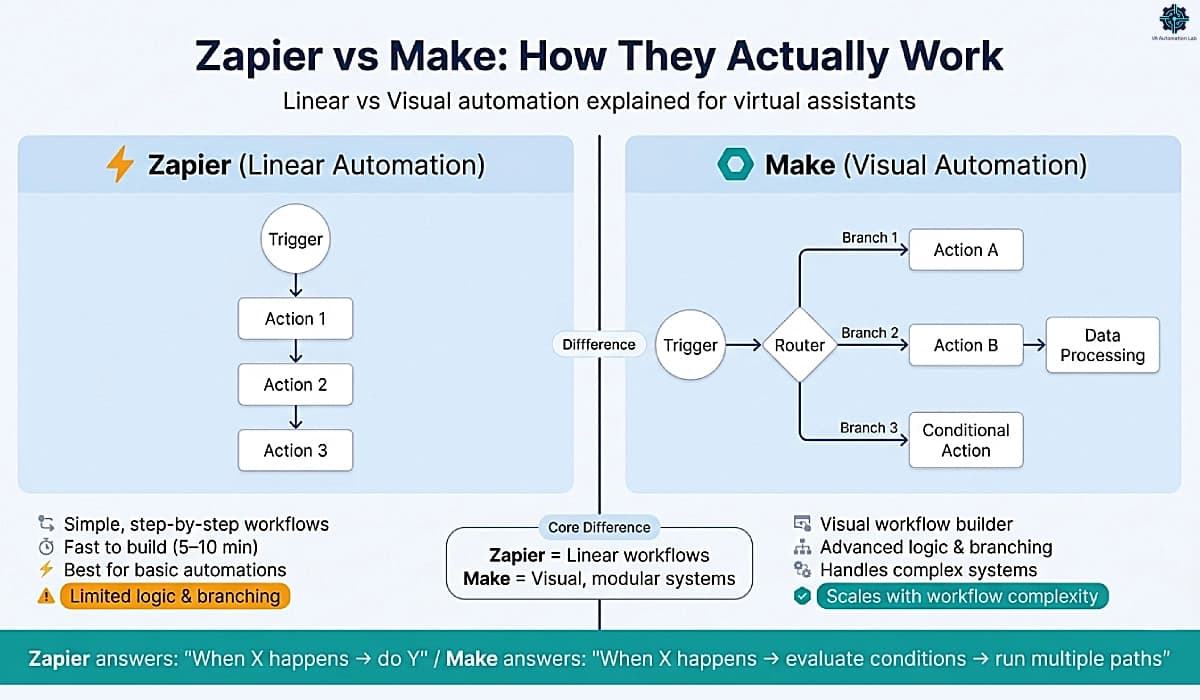
Zapier operates on a strictly linear model. Every automation, called a Zap, has one trigger and a sequence of actions that execute in order, top to bottom. There are no branches, no parallel paths, no visual representation of the workflow. The interface is a form: choose trigger app, choose trigger event, choose action app, choose action event, repeat. The simplicity is genuine and deliberate, a basic Zapier workflow takes under five minutes to build.
Make operates on a visual, modular model. Every automation, called a Scenario, is built on a canvas where each step is a module connected by lines. The canvas can branch into multiple paths via Routers, loop through arrays with Iterators, aggregate multiple data sources, transform data with custom functions, and handle errors without stopping the workflow. The visual representation means any scenario, however complex, is legible at a glance.
What This Means in Practice
The architectural difference translates into a practical constraint that every VA encounters eventually: Zapier handles the question “when X happens, do Y.” Make handles the question “when X happens, evaluate conditions A, B, and C, then do Y or Z or both, and if an error occurs, do W.”
For VA operations, this distinction maps directly to workflow complexity:
Workflow Type | Zapier | Make |
New form submission → add to CRM | ✅ Ideal | ✅ Works |
New client → create folder + tasks + send welcome email | ✅ Works | ✅ Ideal |
New client → route based on service type → different onboarding path per type | ⚠️ Limited | ✅ Ideal |
Bulk process 200 CRM records + transform data + generate report | ❌ Not designed for this | ✅ Built for this |
Weekly report → pull from 4 apps → format → send | ⚠️ Possible but expensive | ✅ Ideal |
Rapid prototyping during a client call | ✅ Ideal | ⚠️ Slower |
The best automation tool for virtual assistants is not a universal answer, it is the tool whose architecture matches the complexity of the workflow you are trying to build.
2. Zapier for Virtual Assistants: Strengths and Limitations
Zapier is the most widely used automation platform among non-technical users for a reason: it removes every possible obstacle between having an automation idea and having a working automation. For a VA who needs to connect Gmail to ClickUp or sync a contact form to a CRM, Zapier produces a functional result in minutes with no technical knowledge required.
Strengths
Speed of implementation. A first Zapier workflow typically takes 5-10 minutes from opening the platform to a live, tested automation. For VAs delivering quick wins to clients, “I’ll have that automated for you by end of day”, this speed is a genuine competitive advantage. No other platform in this category matches Zapier’s time from idea to working automation.
Integration library depth. Zapier supports 9,000+ integrations including virtually every mainstream tool in VA work: Gmail, Google Calendar, Slack, ClickUp, Notion, Airtable, HubSpot, Calendly, Typeform, Stripe, and hundreds more. When a client uses an obscure industry-specific tool, Zapier is statistically the most likely platform to support it natively without custom API configuration.
Client familiarity. Many clients have heard of Zapier, some already use it, and most can understand an explanation of how it works without a technical background. This reduces the friction of proposing automation to clients who are skeptical of complexity.
Reliability on mainstream tools. Zapier’s trigger reliability on high-volume apps (Gmail, Slack, Google Sheets, Calendly) is consistently strong. For client-facing workflows where a missed trigger has visible consequences, this reliability is a real operational consideration.
Unified plan with Tables, Forms, Agents, and MCP. Zapier includes Tables, Forms, Zapier Agents, and Zapier MCP in all plans, not as add-ons. The free plan even includes Zapier Agents (with limits). For VAs who use these ancillary tools, consolidation reduces the total tool count and management overhead.
Limitations
Pricing escalation at scale. Zapier’s pricing is task-based, each action step in a Zap counts as a separate task. A five-step Zap triggered 200 times per month consumes 1,000 tasks. At the Professional plan ($20/month), the monthly task allowance runs out faster than most VAs managing 3+ clients expect. The Zapier cost curve is steep for multi-client VA operations with daily automations. (Specific pricing in section 4.)
No conditional routing. Zapier has a “Paths” feature that allows basic if/then branching, but it is limited in logic depth and available only on paid plans. A workflow that needs to route clients differently based on three or more conditions becomes unwieldy in Zapier and straightforward in Make.
Linear architecture constraints. The top-to-bottom linear structure that makes Zapier easy for simple workflows becomes a genuine constraint for complex ones. Workflows that need to process arrays of data, loop through multiple records, or aggregate outputs from multiple steps require workarounds in Zapier that Make handles natively.
Data manipulation limitations. Zapier passes data cleanly between apps but offers limited control over how that data is transformed in transit. Reformatting dates, cleaning strings, parsing JSON, or performing calculations requires either a “Formatter” step (adds task count) or a Code step (requires JavaScript knowledge).
Bottom Line on Zapier
Zapier is the correct choice for virtual assistants when the workflow is linear, the apps are mainstream, the trigger frequency is moderate, and speed of implementation matters more than logic depth. It is the wrong choice when any of those conditions does not apply.
👉 How to Automate Repetitive Tasks as a Virtual Assistant — the foundational workflow guide that applies to both platforms.
3. Make for Virtual Assistants: Strengths and Limitations
Make approaches automation from the opposite philosophy: maximum flexibility and logic depth, at the cost of a steeper initial learning curve. For virtual assistants who build systems rather than individual automations (client onboarding architectures, multi-step reporting pipelines, content production workflows) Make is the platform that removes the ceiling Zapier imposes.
Strengths
Visual scenario builder. Make’s canvas interface makes complex workflows legible in a way that Zapier’s linear structure cannot replicate. A scenario with 15 modules, two Router branches, and an Iterator is visible as a single diagram. When a workflow breaks, and they do break, the visual structure makes debugging significantly faster than tracing through a linear action list.
Router and conditional logic depth. Make’s Router module splits a scenario into multiple parallel paths based on filter conditions. Each path can have its own sequence of modules, its own error handling, and its own output. A client onboarding scenario can route to a different workflow for each service type, each client tier, or each geographic region, in a single scenario, without duplication.
Bulk data processing. Make’s Iterator and Aggregator modules process arrays of data natively, looping through every row in a spreadsheet, every record in a CRM segment, or every item in an API response in a single scenario run. Zapier handles one record per trigger; Make handles hundreds.
Cost efficiency at scale. Make charges per credit, each module execution consumes one credit for standard (non-AI) apps. A 10-module scenario that processes 50 records consumes 500 credits. At Make’s Core plan ($9/month for 10,000 credits), this is dramatically more cost-effective than Zapier for the same workflow volume. Note: Make’s built-in AI features may consume more than 1 credit per action depending on token and resource usage, for AI-heavy workflows, connecting your own AI provider (OpenAI, Claude) via HTTP module keeps credit consumption predictable at 1 credit per call.
Native AI integration. Make connects directly to ChatGPT, Claude, and other AI providers as first-class modules. Building an AI-assisted workflow, a scenario that drafts a response, classifies incoming data, or generates a summary, requires no third-party bridge.
Error handling and logging. Make includes native error handling routes, if a module fails, the scenario can follow a designated error path rather than stopping silently. Combined with Make’s execution log, which shows every module’s input and output for every run, debugging is significantly faster than in Zapier.
Limitations
Steeper learning curve. Make’s power requires understanding its conceptual model: modules, operations, bundles, iterators, aggregators, routers, filters. A VA familiar with Zapier will typically spend 3-5 hours building and debugging their first meaningful Make scenario before the interface becomes intuitive. The investment pays back quickly, but it is a real initial cost.
Some integrations require custom setup. Make’s integration library (3,000+ apps) is smaller than Zapier’s. For less common tools, Make often requires using the HTTP module with custom API calls, which requires reading API documentation and constructing requests manually. This is manageable for a technically comfortable VA but is a genuine barrier for beginners.
Free plan limitations. Make’s free plan allows only 1,000 credits per month, a maximum of 2 active scenarios, and runs on a minimum 15-minute schedule. For testing and learning, this is sufficient. For any production workflow with even moderate frequency, the free plan is quickly outgrown.
Bottom Line on Make
Make is the correct choice for virtual assistants when the workflow requires branching logic, data transformation, bulk processing, or cost efficiency at scale. The learning investment is front-loaded and real, but Make is the platform that VA automation does not outgrow.
👉 Make for Virtual Assistants: The Beginner Setup Guide — the step-by-step Make setup guide for VAs covers workspace configuration, the core concept orientation, and five ready-to-activate scenarios.
Start Building on Make — Free Plan Available
Make is the automation platform for VAs who need conditional routing, bulk data processing, and direct AI integration, capabilities Zapier’s linear model can’t handle cleanly.
The free plan includes 1,000 credits per month, enough to build and fully test your first three VA scenarios. The Core plan at $9/month (annual) unlocks 1-minute scheduling intervals, 10,000 credits, and custom AI provider connections (Claude, ChatGPT), everything needed to run production automations across multiple clients.
4. Pricing Comparison — With Actual Numbers
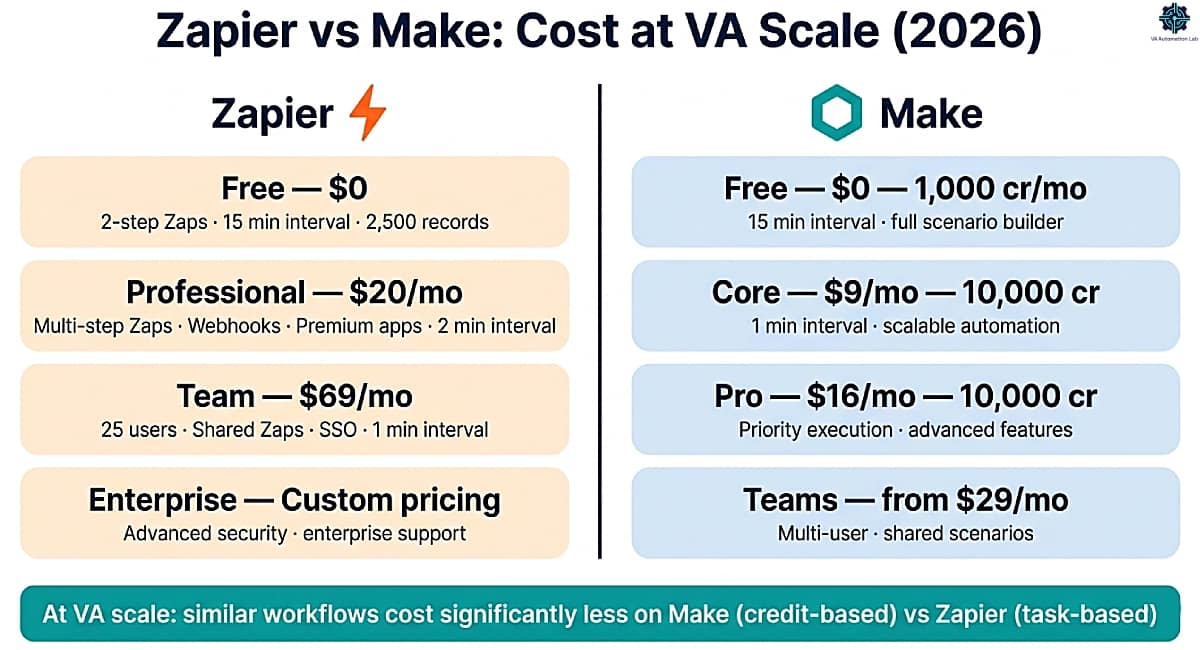
Pricing in this category requires understanding two different consumption models before comparing numbers. Zapier’s task model and Make’s credit model measure usage differently, and a direct monthly price comparison without this context produces a misleading picture.
How Consumption Is Calculated
Zapier — Tasks: Each action step in a Zap counts as one task. A Zap with a trigger + 4 action steps consumes 4 tasks per run. A Zap that runs 100 times per month consumes 400 tasks. Multi-step workflows at moderate frequency exhaust task allowances faster than most users expect.
Make — Credits: Each module execution consumes one credit for standard (non-AI) apps. A scenario with 8 modules consumes 8 credits per run. Make’s built-in AI features may consume more credits per action based on token usage, for AI modules, costs vary. Because Make’s credit price per unit is lower than Zapier’s task price, the same workflow volume typically costs significantly less on Make at any paid tier.
Plan Comparison
Free Plans:
Zapier Free | Make Free | |
Monthly allowance | Unlimited Zaps (Two-step only) | 1,000 credits |
Multi-step workflows | ❌ (2-step only) | ✅ |
Minimum run interval | 15 minutes | 15 minutes |
Active workflows | Unlimited Zaps | 2 active scenarios max |
Verdict for VAs | Enough for 1–2 simple two-step tests | Enough for learning; hits scenario cap fast |
Entry Paid Plans:
Zapier Professional ($20/mo) | Make Core ($9/mo) | |
Monthly allowance | Unlimited Zaps + pay-per-task billing | 10,000 credits |
Multi-step workflows | ✅ | ✅ |
Minimum run interval | 2 minutes | 1 minute |
Cost model | Base $20/mo + task consumption billed on top | Flat $9/mo — all credits included |
Practical VA workflow count | 3–5 Zaps (monitor task spend) | 10–15 moderate scenarios |
Mid-Tier Plans:
Zapier Team ($69/mo) | Make Pro ($16/mo) | |
Monthly allowance | Unlimited Zaps + pay-per-task + 25 users | 10,000 credits + priority execution |
Advanced features | Shared Zaps/folders, SAML SSO, 1 min polling | Full router/iterator/aggregator + custom variables |
Practical VA workflow count | Multi-user VA team | 20–30 complex scenarios |
Make Teams ($29/mo): Adds team roles, shared scenario libraries, and higher credit allowances, the infrastructure for a VA operation with multiple team members or a large client portfolio.
Real-Cost Example for a VA Managing 3 Clients
Typical monthly workflow volume for a VA with 3 retainer clients:
- 3 weekly client update workflows (trigger + 5 steps, 4 runs/week) = 240 tasks/month
- 3 client onboarding workflows (trigger + 8 steps, 2 runs/month each) = 48 tasks/month
- Daily task sync across tools (trigger + 3 steps, 30 runs/month) = 90 tasks/month
- Content scheduling (trigger + 4 steps, 20 runs/month) = 80 tasks/month
Total: ~458 Zapier tasks/month → Zapier Professional ($20/mo base) + variable pay-per-task charges on top
Same workflows on Make:
- Same scenarios structured as 6–10 module scenarios
Total: ~600–800 Make credits/month = Make Core ($9/month flat — all included)
Key difference: Make Core at $9/month covers this entire workload at a known, fixed cost. Zapier Professional at $20/month is the base, actual spend depends on task volume and Zapier’s per-task rate, which can make total cost harder to predict as automation volume grows.
Pricing Verdict
For simple, two-step automations: Zapier Free is sufficient and costs nothing. For a VA managing 3+ clients with multi-step daily automations, Make Core at $9/month flat is more predictable and typically lower cost than Zapier Professional’s base + pay-per-task model. The cost advantage for Make is real: not only is the base price lower ($9 vs $20), but Make’s credit pricing is fixed, you know exactly what you pay before the month ends.
5. Which Plan Should You Choose?
The right plan depends on three variables: automation frequency (how many times per month your workflows run), workflow complexity (how many steps per workflow), and client volume (how many separate clients have active automations).
Summary Decision Table
Your Situation | Recommended Plan | Monthly Cost |
Just starting, learning automation | Zapier Free or Make Free | $0 |
1–2 clients, simple two-step workflows | Zapier Free (two-step limit) or Make Free | $0 |
3-5 clients, daily automations | Make Core | $9/mo |
Complex systems, advanced logic | Make Pro | $16/mo |
Automation as a paid service | Make Pro | $16/mo |
VA agency or team | Make Teams | $29/mo |
Client requires Zapier specifically | Zapier Professional | $20/mo + pay-per-task |
Beginner VA — First Automations
Start with: Zapier Free or Make Free.
Zapier Free is the faster path to a first working automation, the interface requires no explanation and the two-step workflow limit is sufficient for learning the trigger-action model. Make Free is the better choice if you want to understand visual workflow building from the start and are willing to invest an extra hour in the learning curve.
Upgrade trigger: when you need more than 2 steps in Zapier, or when Make Free’s 1,000 operations per month are consistently exhausted.
VA Managing 2-3 Clients with Recurring Tasks
Recommended: Make Core ($9/month).
At this volume, Make Core’s 10,000 monthly credits cover all standard VA automation workflows with significant headroom. Zapier is worth maintaining only if specific clients use Zapier-exclusive integrations or if client collaboration requires Zapier account sharing.
Upgrade trigger: when scenarios consistently require sub-minute run intervals or when Make Core’s operation count is regularly exceeded.
VA Building Multi-Step Systems or Offering Automation as a Service
Recommended: Make Pro ($16/month).
Make Pro’s increased operation speed (minimum 1-minute intervals) and advanced features support production-grade automation systems. At $16/month, it remains significantly more cost-effective than Zapier Professional at equivalent workflow volume.
If you offer automation as a billable service, the platform cost is a business expense offset by the revenue it generates, the $16/month Make Pro investment has a straightforward ROI calculation at VA billing rates.
High-Volume VA or VA Agency
Recommended: Make Teams ($29/month).
Make Teams adds multi-user access, shared scenario libraries, and higher operation allowances, the infrastructure for a VA operation with multiple team members or a large client portfolio. At this scale, Zapier’s equivalent tier ($69/month+) is difficult to justify against Make’s cost per operation.
6. Best Use Cases — Zapier vs Make for Virtual Assistants
Understanding which platform to use for which workflow type eliminates the most common automation mistake: choosing one tool and forcing all workflows into its architecture regardless of fit.
Workflows Where Zapier for Virtual Assistants Is the Right Choice
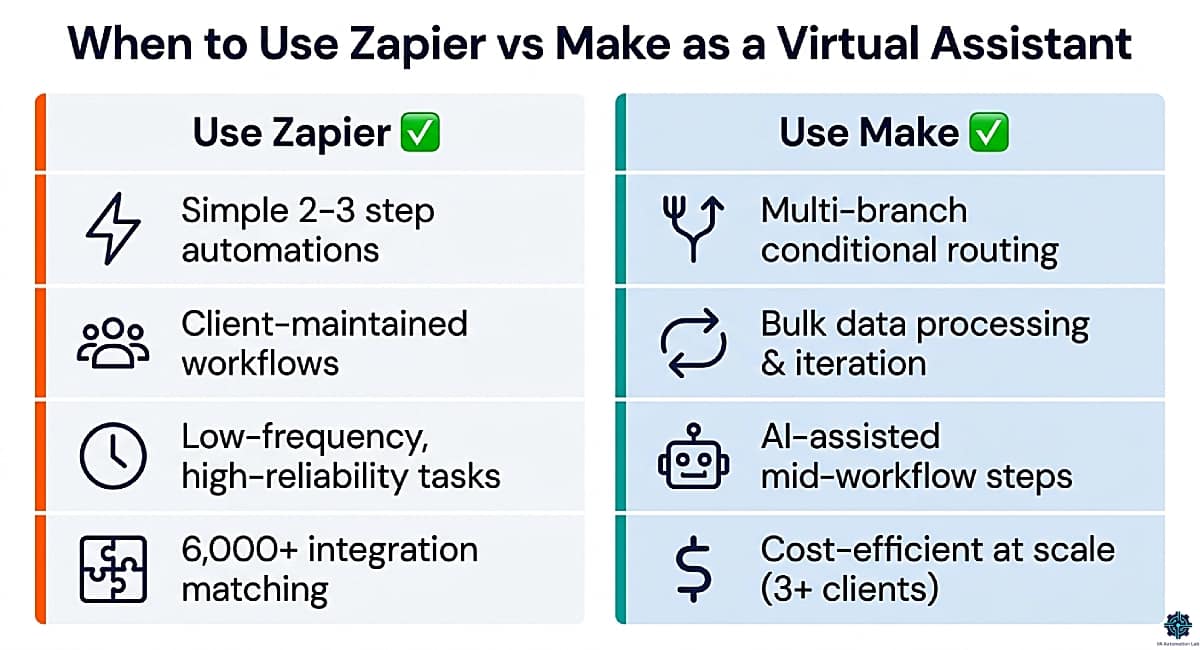
1. Mainstream app connections with simple linear logic. Gmail → ClickUp task creation. Calendly booking → CRM contact. Typeform submission → Google Sheets row. Slack message → ClickUp task. These are trigger-action pairs with no branching, no data transformation, and no iteration. Zapier builds them in 5 minutes and runs them reliably indefinitely.
Concrete example: New Jotform inquiry submission → Zapier → create contact in Folk CRM → send acknowledgment email via Gmail. Three steps, zero logic, 8 minutes to build.
2. Client-facing workflows where the client may need to maintain the automation. If a client asks to occasionally modify an automation themselves, Zapier’s familiar interface is the right choice. Handing a Make scenario to a non-technical client for maintenance is a support commitment; handing them a Zapier Zap is often manageable independently.
3. Rapid prototyping and quick wins. When a client asks “can we automate this?” during a call, Zapier allows you to build and test a working proof-of-concept within the call. This demonstrates automation value immediately before more sophisticated systems are proposed.
4. Low-frequency, high-reliability automations. Monthly invoice reminder. Quarterly report trigger. Annual contract renewal notification. These low-frequency automations that must execute reliably without active monitoring are well-served by Zapier’s straightforward model.
5. Zapier-exclusive integrations. When a client uses a niche SaaS tool only supported natively by Zapier, this is not a choice, it is a constraint. Use Zapier for that integration; build everything else in Make.
Workflows Where Make for Virtual Assistants Is the Right Choice
1. Multi-branch client onboarding. Different service types require different onboarding sequences. In Make, a single Router module handles this with one scenario, each branch executes its own modules based on filter conditions. In Zapier, this requires building a separate Zap for each condition, multiplying maintenance overhead.
Concrete example: New client form submission → Router branches by service type (Social Media VA / Admin Support / Executive Support) → each branch creates the appropriate ClickUp task list from template, generates Google Drive folder structure, logs to Folk CRM, and sends a service-type-specific welcome email, all in one scenario.
2. Bulk data operations. Processing a month’s CRM records to generate a performance report. Updating 50 tasks in ClickUp based on a spreadsheet export. Syncing a product catalog across platforms. Make’s Iterator handles these natively in a single scenario run. Zapier requires either a manual trigger per record or third-party workarounds.
Concrete example: Every Monday at 8 AM, Make’s Iterator loops through all Pipedrive deals updated in the past week, extracts stage changes and next actions, feeds the data to an Aggregator, and posts a formatted weekly pipeline summary to Slack and sends a PDF to the client, one scenario, zero manual work.
3. End-to-end content pipelines. Brief creation → client review notification → approval detection → scheduling → platform posting → analytics capture. A content pipeline for a single client can involve 10–15 steps across 5–6 apps with conditional logic at each approval stage.
Concrete example: Approved Notion content brief → Make → routes by platform → Buffer for Twitter/Facebook → Later for Instagram → separate path for LinkedIn, with status updates written back to Notion and a Slack notification when each post is scheduled.
4. Automated reporting for multiple clients. Pulling data from ClickUp, Databox, and social analytics into a consolidated report, formatted and delivered every Friday. The data aggregation and formatting steps that make this report useful require Make’s Aggregator and transformation modules, not achievable cleanly in Zapier.
5. AI-assisted workflows. Classification, drafting, summarization, or data enrichment mid-workflow. Make integrates directly with ChatGPT and Claude as native modules. Examples: auto-classify incoming client emails by urgency and route accordingly; draft a meeting summary from raw notes and post to Folk CRM; generate a week’s worth of social captions from a content brief.
6. Lead capture to CRM + email sequence. New lead captured via Jotform → enrichment via Make HTTP module → create contact in ActiveCampaign → tag by service interest → trigger onboarding email sequence → log to Pipedrive as a new deal, all in one Make scenario, triggered instantly via webhook.
👉 Best Automation Workflows for Virtual Assistants: Beginner to Advanced — practical workflow implementations across both platforms.
7. Six Real Workflow Examples — Implemented
These are the highest-frequency automation scenarios in VA operations. Each is documented at the implementation level, with the specific steps and the rationale for platform choice.
Workflow 1 — Multi-Branch Client Onboarding (Make)
Complexity: Medium-high
Platform: Make
Time saved: 45–60 min per new client
What it does: Converts a new client form submission into a complete onboarding sequence (CRM record, Google Drive folder, welcome email, ClickUp task list, and team notification) in a single automated run, with different paths per service type.
TRIGGER: Jotform / Typeform — New submission received
↓
MODULE 1: Google Drive — Create folder
  /Clients/[Client Name]/
  Subfolders: Contracts | Deliverables | Notes
↓
MODULE 2: Folk CRM — Create contact
  Name, email, company, service type from form fields
↓
MODULE 3: Router — Branch by Service Type
  ├── Branch A (Social Media VA)
  │   MODULE 4a: ClickUp — Create List from Template
  │     Template: "Social Media Client Setup"
  │     Tasks: onboarding call, content audit, brand kit review,
  │            monthly planning session, weekly check-in recurring
  │   MODULE 5a: Gmail — Send welcome email (variant A)
  │
  ├── Branch B (Admin Support VA)
  │   MODULE 4b: ClickUp — Create List from Template
  │     Template: "Admin Client Setup"
  │     Tasks: tool access setup, SOP documentation, inbox rules,
  │            calendar sync, weekly priorities recurring
  │   MODULE 5b: Gmail — Send welcome email (variant B)
  │
  └── Branch C (Executive VA)
      MODULE 4c: ClickUp — Create List from Template
        Template: "Executive VA Setup"
        Tasks: delegation protocol, meeting prep workflow, comms audit
      MODULE 5c: Gmail — Send welcome email (variant C)
↓
MODULE 6: Slack — Post to #new-clients
  "[Client Name] onboarded — [Service Type] — Drive + ClickUp ready"
↓
MODULE 7: Error Handler — If any module fails
  Gmail — Alert VA: "Onboarding error for [Client Name] — check Make log"
Why Make over Zapier: The Router branch by service type is the deciding factor. Zapier requires a separate Zap per service type, triple the maintenance. Make handles all three in one scenario.
Build time: 90–120 minutes first build. 15 minutes to add each subsequent service type.
👉 How to Automate Client Onboarding for Virtual Assistants: Complete Workflow Guide — for the complete scenario sequence.
Workflow 2 — Weekly Client Report Automation
Complexity: Medium
Platform: Make
Time saved: 20–30 min per client per week
What it does: Pulls completed task data from ClickUp, formats it into a structured weekly update, and delivers it via email every Friday afternoon, no manual compilation.
TRIGGER: Schedule — Every Friday at 4:00 PM
↓
MODULE 1: ClickUp — Search tasks
  Filter: Status = Done | Date completed = this week
  List: [Client Name]
  Fields: task name, completion date, assignee, time tracked
↓
MODULE 2: Iterator — Loop through each completed task
  Extracts: name, date, hours logged
↓
MODULE 3: Text Aggregator — Compile into formatted list
  Output: "• [Task Name] — Completed [Date] — [Hours] hrs"
↓
MODULE 4: Databox (optional) — Push KPIs to client dashboard
  Metrics: tasks completed, hours logged, completion rate
↓
MODULE 5: Gmail — Send weekly update email
  To: [client email]
  Subject: "Weekly Update — [Client Name] — Week of [Date]"
  Body: formatted task list + upcoming priorities
        + link to Databox dashboard (if enabled)
Why Make over Zapier: The Iterator + Aggregator combination is required to process multiple task records and compile them into one email. Zapier sends one email per task, not one email summarizing all tasks.
Build time: 60–75 minutes.
👉 How to Automate Client Reporting as a Virtual Assistant — for the complete scenario sequence.
Workflow 3 — New Booking to Preparation Task
Complexity: Low
Platform: Zapier
Time saved: 10–15 min per new booking
What it does: When a meeting is booked via a scheduling tool, creates a preparation task in ClickUp and sends a pre-call questionnaire to the client.
TRIGGER: Calendly / SavvyCal — New event scheduled

ACTION 1: ClickUp — Create task
  Name: "Prepare for call — [Invitee Name] — [Event Date]"
  List: [relevant client list]
  Due date: 2 hours before event start time
  Priority: High
  Description: Event type, invitee email, agenda notes

ACTION 2: Gmail — Send email to invitee
  Subject: "Quick questions before our call"
  Body: [pre-call questionnaire template — 3–5 questions]
Why Zapier over Make: Two sequential actions, no branching, no data transformation, no iteration. Zapier builds this in 8 minutes and runs it with complete reliability. Make would produce the same result with more setup time and zero functional advantage.
Build time: 8–10 minutes.
Workflow 4 — Content Pipeline Automation
Complexity: High
Platform: Make
Time saved: 45–60 min per client per week
What it does: Manages the full content approval and publishing cycle, from approved brief to scheduled post to analytics capture, across a client’s content stack, automatically routing by platform.
TRIGGER: Notion / Airtable — Status changes to "Approved"
↓
MODULE 1: Get record details
  Fields: content type, caption, image URL, publish date, platform tags
↓
MODULE 2: Router — Branch by platform
  ├── Branch A (Instagram)
  │   MODULE 3a: Later — Schedule post with image
  │   MODULE 4a: Notion — Update status to "Scheduled"
  │   MODULE 5a: Slack — Notify #content: "Instagram post scheduled [date]"
  │
  ├── Branch B (Twitter/X + LinkedIn)
  │   MODULE 3b: Buffer — Schedule with platform-specific formatting
  │   MODULE 4b: Notion — Update status to "Scheduled"
  │
  └── Branch C (Newsletter)
      MODULE 3c: ActiveCampaign — Create email campaign draft
      MODULE 4c: Gmail — Notify client for final review
↓
MODULE 6: Google Sheets — Log scheduled content
  Columns: date, platform, post title, scheduled time, status
Why Make over Zapier: Three platform branches from a single trigger, each with different downstream actions. Zapier requires three separate Zaps with identical triggers, triple the monitoring overhead. Make handles all three in one scenario with a single maintenance point.
Build time: 2–3 hours for the full scenario.
👉 How to Automate Social Media as a Virtual Assistant — for the complete scenario sequence.
Workflow 5 — Lead Capture to CRM + Email Sequence
Complexity: Medium-high
Platform: Make
Time saved: 25–40 min per new lead
What it does: Captures a lead from a contact form, enriches the record, creates deals in both a CRM and a pipeline tool, tags the lead by service interest, and immediately triggers a tailored email sequence, without any manual intervention.
TRIGGER: Jotform — New form submission (webhook, instant)
↓
MODULE 1: Filter — Check submission completeness
  Condition: Email field not empty AND service interest not empty
  (If fails → Skip to error handler)
↓
MODULE 2: HTTP Module — Enrich contact data (optional)
  API: Clearbit or Hunter.io
  Output: company name, industry, LinkedIn URL
↓
MODULE 3: ActiveCampaign — Create/update contact
  Tags: service-interest:[Social Media | Admin | Executive]
  List: "New Leads"
  Custom fields: source (Jotform), enrichment data
↓
MODULE 4: Folk CRM — Create contact + deal
  Pipeline: "Inbound Leads"
  Stage: "New"
  Notes: form answers + enrichment data
↓
MODULE 5: Router — Branch by service interest
  ├── Branch A (Social Media)
  │   ActiveCampaign — Trigger email sequence: "Social Media VA Intro"
  │   (3-email sequence: intro → case study → discovery call CTA)
  │
  ├── Branch B (Admin Support)
  │   ActiveCampaign — Trigger sequence: "Admin VA Intro"
  │
  └── Branch C (Executive VA)
      ActiveCampaign — Trigger sequence: "Executive VA Intro"
↓
MODULE 6: Slack — Notify #leads
  "New lead: [Name] | [Company] | Interest: [Service] | Source: Jotform"
Why Make over Zapier: Routing by service interest into three different email sequences from a single trigger, plus data enrichment via HTTP module, requires Make’s Router and HTTP capabilities. Zapier would need three separate Zaps and a paid Formatter step for each data transformation.
Build time: 2–3 hours including sequence setup in ActiveCampaign.
Workflow 6 — Invoice Follow-Up and Payment Confirmation
Complexity: Low
Platform: Zapier
Time saved: 10–20 min per invoice cycle
What it does: When an invoice is paid in the VA’s invoicing tool, automatically marks the associated project complete in ClickUp, sends a thank-you receipt email, and logs the payment to a Google Sheet tracker, requiring zero manual handling.
TRIGGER: InvoiceNinja / Dubsado — Invoice marked as "Paid"

ACTION 1: ClickUp — Find and update project task
  Task name contains: [client name]
  Update status: "Payment Received"
  Add comment: "Invoice [#] paid [date] — [amount]"

ACTION 2: Gmail — Send payment confirmation to client
  Subject: "Payment received — thank you"
  Body: [personalized receipt template with invoice number and amount]

ACTION 3: Google Sheets — Log payment
  Sheet: "Payment Tracker [Year]"
  Row: client name | invoice # | amount | date | service period
Why Zapier over Make: Three sequential, linear actions triggered by a single status change event. No branching, no bulk processing, no data transformation beyond basic field mapping. Zapier builds this in 12 minutes. The trigger reliability is consistently strong for payment events, which is critical for client-facing financial workflows.
Build time: 12–15 minutes.
8. Recommended Automation Stack for Virtual Assistants
Most automation guides answer “Zapier or Make?”, but the more useful question for a working VA is: what does my full automation infrastructure look like at each stage of my business, and what does it cost?
This section maps the complete recommended stack for each VA growth stage: the core automation platform, the supporting tools that integrate with it, and the total monthly investment.
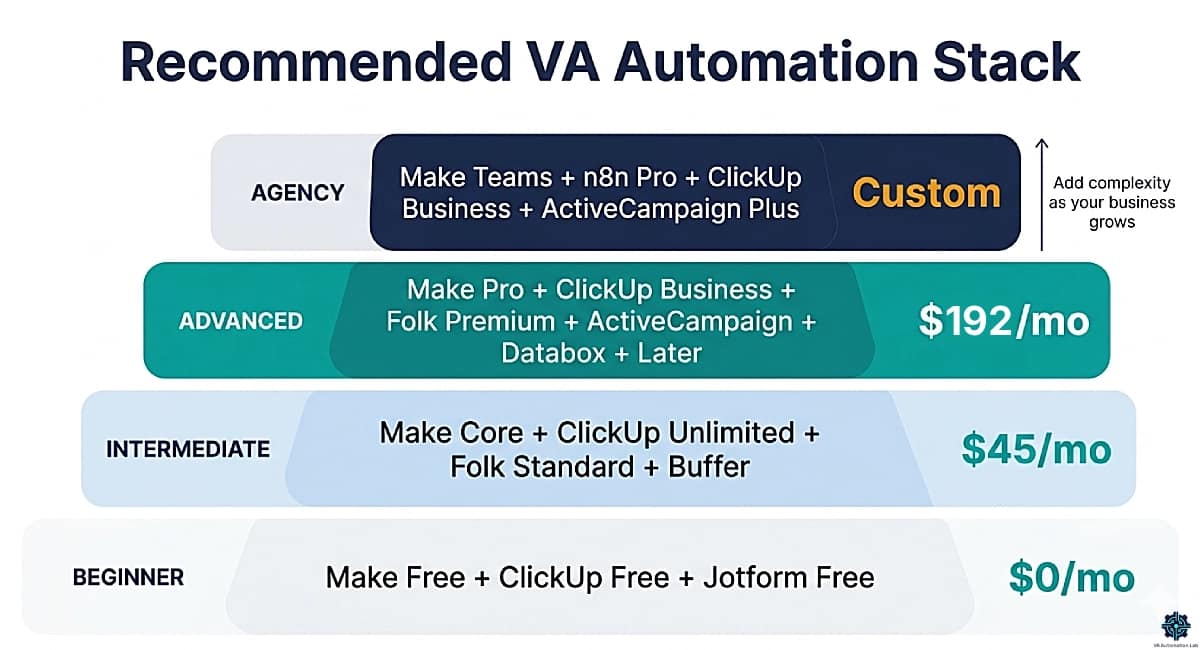
Beginner Stack — Solo VA, 1–2 Clients, First Automations
Goal: Learn automation fundamentals, build 3–5 reliable workflows, reduce manual task volume without complexity.
Start with these three scenarios:
- Jotform new submission → ClickUp task + Gmail confirmation
- Calendly/SavvyCal booking → ClickUp prep task + pre-call email (use Zapier Free if Make’s 15-min interval is too slow for this one)
- Weekly schedule trigger → Gmail summary of this week’s ClickUp tasks
Upgrade trigger: When Make Free’s 1,000 credits/month are consistently exhausted, when you need more than 2 active scenarios, or when you need more than 1-minute scheduling intervals for client-facing workflows.
Intermediate Stack — 3–5 Clients, Daily Automations, Growing Revenue
Goal: Full automation coverage across all client workflows, time tracking, and basic reporting, without paying for complexity you don’t need yet.
Core scenarios to build at this stage:
- Multi-branch client onboarding (Workflow 1 above)
- Weekly client report compilation (Workflow 2 above)
- Lead capture + CRM entry + acknowledgment
- Content approval → platform scheduling → Slack notification
Upgrade trigger: When you need advanced reporting for clients, team collaboration, or complex multi-step approval workflows.
Advanced Stack — 5+ Clients, Automation as a Service, System-Level Work
Goal: Production-grade automation infrastructure that can be replicated across clients, demonstrated to prospects, and billed as a service offering.
Note: The Databox Analyst investment ($64/mo) is justified when client reporting is a billable deliverable. If you’re not charging for reports, use Google Sheets + Make’s Aggregator at zero additional cost.
Advanced scenarios to build at this stage:
- Full content pipeline with AI caption generation (Workflow 4 above)
- Lead capture → enrichment → CRM + email sequence → Slack alert (Workflow 5 above)
- Automated Databox dashboard population from ClickUp + social + email data
- Client onboarding with Pandadoc contract trigger
Agency Stack — VA Team, Multiple Clients, Shared Infrastructure
Goal: Shared scenario libraries, multi-user access, centralized client management, and consistent delivery across team members.
Tool | Purpose | Plan | Monthly Cost |
Core automation platform | Teams | $29 | |
Workspace management | Business | $12/user | |
Complex custom workflows | Pro | $58 | |
Client email automation | Plus | $37 | |
Multi-client reporting | Growth | $399 |
Why add n8n at the agency stage: n8n‘s self-hosting option and advanced branching make it the right complement when you’re building complex custom automations for clients with specific data privacy requirements, or when you need unlimited workflow executions without per-operation billing.
9. Zapier vs Make: Alternatives for Virtual Assistants
Zapier and Make cover the majority of VA automation use cases, but they are not the only options. Three alternatives are worth understanding: one for technically advanced VAs, one for budget-conscious VAs, and one built-in option for teams already on specific project management platforms.
n8n — Best for Technical VAs and Complex Custom Workflows
n8n is a workflow automation platform that offers both a cloud-hosted version and a self-hosted open-source option. The interface is visual and modular, similar to Make, but with deeper developer customization: custom JavaScript/Python nodes, native API integrations, and self-hosting for full data control.
Where n8n outperforms Make:
- Self-hosted version = unlimited executions, zero per-operation cost
- Custom code nodes: write JavaScript or Python directly within any workflow step
- Data privacy: for clients with GDPR requirements or sensitive data, self-hosted n8n keeps all data on your own server
- HTTP and webhook flexibility: more granular API control than Make’s HTTP module
Pricing (cloud-hosted, billed annually):
- Starter: $23/month (2,500 workflow executions, 1 shared project)
- Pro: $58/month (10,000 executions, 3 shared projects, admin roles, global variables)
- Self-hosted: free (requires a server, a $5–10/month VPS is sufficient)
Who should use n8n: VAs who are comfortable with basic coding (or willing to learn), who build automation as a billable service, or whose clients have data residency requirements that cloud platforms cannot meet. Not recommended as a first automation tool.
👉 try n8n
Want more flexibility than Make or Zapier? Learn how n8n automates complex workflows with AI, self-hosting, and 500+ integrations, in n8n for Virtual Assistants: Complete Guide, AI Workflows & Automation.
Pabbly Connect — Best Value for Budget-Conscious VAs
Pabbly Connect is a workflow automation platform that competes directly with Make on price, with a lifetime deal option that makes it attractive for VAs who prefer one-time purchases over monthly subscriptions.
Where Pabbly Connect stands out:
- Unlimited workflows on all paid plans (not capped per tier)
- Internal tasks (steps that don’t involve external apps, like formatters or delays) are free, they don’t count toward your monthly task limit
- Instant webhooks on all plans
- The $349 lifetime deal is the most cost-effective option for a VA with steady, predictable automation volume
Pricing (billed annually):
- Free: $0 — 100 tasks/month, unlimited workflows
- Standard: $16/month — 10,000 tasks/month
- Unlimited: $69/month — unlimited tasks + JavaScript/Python module + AI Assistant + MCP servers
- Lifetime: $349 one-time — unlimited tasks, all features
Where Pabbly Connect falls short: Smaller integration library than Make or Zapier. Less robust error handling. Slower trigger polling on some app connections. Not ideal for workflows requiring sub-minute execution intervals.
Who should use Pabbly Connect: Budget-conscious VAs with predictable, moderate-volume automation needs who want to avoid monthly subscription costs long-term. The lifetime deal is particularly compelling at the Intermediate Stack stage if you are confident you will stay at that automation volume.
ClickUp Automations — Best Built-In Option for ClickUp-Heavy Operations
If your VA operation already runs on ClickUp, its built-in Automations feature handles a significant subset of VA workflows without requiring an additional tool.
What ClickUp Automations does well:
- Status-change triggers within ClickUp (task moves to Done → notify client)
- Recurring task creation
- Automatic assignee changes based on status
- Due date shifts when tasks move between stages
- Simple integrations with Slack, Gmail, and HubSpot
Where ClickUp Automations falls short:
- Cannot trigger from external apps (no form submission trigger, no payment trigger)
- No cross-workspace automation
- Limited data transformation capabilities
- No visual canvas, action rules only
Who should use ClickUp Automations: VAs whose workflows are almost entirely internal to ClickUp (task management, status changes, notifications). Use it to complement Make or Zapier, not replace them.
ClickUp Business plan ($12/month) includes 5,000 Automations/month, sufficient for most VA operations.
Make | Zapier | n8n | Pabbly | ClickUp Automations | |
Learning curve | Medium | Low | High | Low-Medium | Low |
Logic depth | ★★★★★ | ★★★☆☆ | ★★★★★ | ★★★☆☆ | ★★☆☆☆ |
Integration count | 3,000+ | 9,000+ | 400+ | 1,000+ | 50+ |
Cost at scale | ★★★★★ | ★★☆☆☆ | ★★★★★ | ★★★★★ | ★★★★☆ |
Visual builder | ✅ | ❌ | ✅ | ✅ | ❌ |
Best for | Most VAs | Quick wins | Technical VAs | Budget VAs | ClickUp-only |
Need the full cost picture before you switch? 4 Best Zapier Alternatives for Virtual Assistants prices one identical VA workflow across five platforms, covers Zoho Flow for clients already inside the Zoho ecosystem, and gives the migration sequence for moving client automations off Zapier without breaking them.
n8n: Advanced Automation for VAs Who Want More Control
n8n’s cloud-hosted Pro plan includes 10,000 workflow executions per month at $58/month, and its self-hosted open-source version is free with unlimited executions. For VAs building complex custom automations or working with clients who have data privacy requirements, n8n provides the control that Zapier and Make’s cloud infrastructure cannot.
10. Using Zapier and Make Together
The Zapier vs Make comparison frames the decision as binary, one or the other. In practice, the most effective automation setup for a VA managing multiple clients at different workflow complexity levels uses both platforms simultaneously, each doing what it does best.
This is not tool accumulation for its own sake. It is a deliberate infrastructure decision based on a simple principle: use the minimum complexity required for each workflow. Deploying Make for a two-step SavvyCal-to-ClickUp automation is unnecessary overhead. Deploying Zapier for a multi-branch client onboarding system is an architectural constraint. Each tool has a domain where it produces results faster, more reliably, and at lower cost.
The Recommended Split
Use Zapier for:
- All simple, linear automations (trigger + 1-3 actions)
- Workflows that clients may need to view or maintain
- Rapid prototyping during client calls
- Mainstream app connections with no data transformation
- Low-frequency, high-reliability automations
- Zapier-exclusive integrations not available in Make
Use Make for:
- All workflows with branching logic or conditional paths
- Bulk data processing and iteration
- End-to-end multi-app pipelines
- Automated reporting and data aggregation
- Any workflow where Zapier’s task cost becomes prohibitive at the required run frequency
Monthly Cost at Scale with Both Platforms
Platform | Plan | Monthly Cost | Covers |
Zapier | Professional | $20/mo + pay-per-task | 10-15 simple Zaps for client-facing quick wins |
Make | Core | $9/mo | 15-20 complex scenarios for system-level automation |
Combined | $29/mo base | Full automation stack for 4-5 clients |
The combined Zapier Professional + Make Core stack at $29/month base provides more total capability than either platform alone. Zapier’s pay-per-task billing means actual Zapier spend will exceed $20/month depending on task volume, monitor this in the first month to calibrate. For most multi-client VAs, Make Core’s $9 flat rate handles the complex workflows while Zapier Professional covers quick-win linear automations where clients require it.
Transition Strategy
If you currently use only Zapier and are approaching its cost or complexity limits:
- Keep all existing Zapier automations running, do not rebuild what works.
- Build the next complex workflow in Make. Learn Make on a real workflow, not a tutorial.
- When a Zapier automation requires logic it cannot handle cleanly, migrate it to Make.
- After 60-90 days, audit your Zapier task consumption, migrate the highest-frequency multi-step Zaps to Make to reduce cost.
The goal is not to replace Zapier with Make, it is to use each platform for the workflow type it handles optimally.
👉 ClickUp for Virtual Assistants: Setup Guide & Templates — connecting Zapier and Make automations to your ClickUp workspace.
11. Which Tool Is Right for Your VA Type?
The Zapier vs Make comparison ultimately resolves at the level of your specific service type and workflow pattern. The framework below maps each VA profile to the right platform and the right entry point.
VA Type Decision Framework
VA Type | Primary Work | Best Platform | Entry Point |
Administrative VA | Email, calendar, CRM, recurring tasks | Zapier | Zapier Professional |
Social Media / Content VA | Content pipelines, scheduling, analytics | Make | Make Core |
Executive VA | Inbox management, meeting prep, high-touch support | Zapier | Zapier Professional |
Systems-Building VA | Onboarding, dashboards, workflow design | Make | Make Pro |
Multi-Client VA | Mixed workflows across diverse client stacks | Both | Make Core + Zapier Professional |
Automation-Specialist VA | Automation as a service, complex systems | Make + n8n | Make Pro + n8n Starter |
Beginner VA | First automations, learning the basics | Zapier or Make | Zapier Free or Make Free |
The Administrative VA
Your highest-frequency automations are linear and predictable: form submissions create CRM records, calendar events trigger preparation tasks, completed tasks send client notifications. These are Zapier’s optimal use case. Start with Zapier‘s free plan, upgrade to Professional when you need multi-step workflows, and add Make Core only when a specific workflow requires branching logic Zapier cannot handle cleanly.
The Content and Social Media VA
Your workflows are multi-step by nature. Content moves through stages (brief → draft → review → approved → scheduled → published) across multiple apps, each stage potentially triggering different actions depending on content type or platform. Make’s Router handles this natively. Start with Make Core, build the content pipeline scenario for one client using Buffer or Later, then replicate the pattern for each subsequent client.
The Systems-Building VA
You are building automation infrastructure for clients, not just running automations for yourself. Make is the platform that produces systems worth billing for, visually clear, logically sophisticated, and maintainable. Learn Make at the Pro level. Maintain Zapier Professional for clients who specifically require it. Price your Make-built systems with the complexity and value they represent. Add n8n as your third tool when clients need self-hosted data control or custom code nodes.
The Multi-Client VA
You support clients across diverse service types and tool stacks. Some clients have simple workflows that Zapier handles in 10 minutes. Others have complex onboarding systems and content pipelines that belong in Make. The right infrastructure is both platforms: Make Core ($9/month) for system-level work, Zapier Professional for quick wins and client-facing simplicity.
12. Conclusion
The Zapier vs Make comparison for virtual assistants does not have a universal answer. The correct answer depends on workflow complexity, client volume, run frequency, and how much of your service offering involves building automation systems versus running them.
The practical conclusion for most VAs in 2026:
- Start with Make Free or Zapier Free for your first automations
- Move to Make Core ($9/month) when you have 3+ clients with recurring automations
- Add Zapier Professional for quick wins and client-facing workflows where Zapier is a better fit
- Upgrade to Make Pro ($16/month) when you begin building complex systems or offering automation as a paid service
- Add n8n when clients require self-hosted data control or advanced custom logic
The combined cost of Make Core + Zapier Professional covers the full automation infrastructure for a multi-client VA operation. The skill investment in learning both platforms, and understanding when to deploy which, is one of the highest-ROI capabilities a VA can develop in 2026.
The best automation tool for virtual assistants is not a single platform. It is the combination that removes every constraint from building the workflows your clients need.
See the full automation framework: Automation for Virtual Assistants: The Complete Guide — covering every automation category in VA work.
The Automation Platform Built for VA Operations
Make‘s visual scenario builder, conditional routing, and operation-based pricing make it the right foundation for a multi-client VA automation stack.
Free plan covers testing and learning. Core at $9/month covers 3–5 clients with daily automations. Pro at $16/month handles everything a systems-building VA needs.
Frequently Asked Questions About Zapier Vs Make for Virtual Assistants
Is Make harder to learn than Zapier for virtual assistants with no technical background?
Make has a steeper initial learning curve. The interface, terminology (modules, operations, routers, iterators), and visual canvas require more orientation time than Zapier’s form-based linear builder. A VA with no prior automation experience will typically build a first working Zapier automation in 10–15 minutes; the equivalent Make scenario takes 45–60 minutes including orientation. The difference narrows quickly, after building 3–4 Make scenarios, the visual model becomes intuitive and the logic depth starts producing workflows Zapier could not have handled. For VAs who plan to offer automation as a service, the Make learning investment pays back within the first client engagement.
Can I use both Zapier and Make at the same time?
Yes, and this is the recommended approach for most VAs managing multiple clients beyond the beginner stage. Zapier handles simple, linear automations efficiently. Make handles complex, multi-step workflows at better cost efficiency. Running both simultaneously provides more total capability than either platform alone, often at lower combined cost than Zapier Professional alone for equivalent workflow volume. The split described in section 10 of this guide explains which workflow types belong on each platform.
Which platform is better for automating client onboarding?
Make is the better platform for client onboarding automation in most VA scenarios. A complete onboarding workflow, form submission to folder creation to CRM record to welcome email to task generation, involves 6–10 steps with potential branching based on service type or client tier. Make’s Router module handles this in a single scenario. Zapier can build the same workflow but requires separate Zaps for each branch condition, creating maintenance overhead that Make avoids. The specific Make onboarding scenario is documented in full in Workflow 1 of this guide.
Does Make integrate with ClickUp and Notion?
Yes, both are supported natively in Make with dedicated modules covering the most common operations: creating tasks, updating statuses, reading database entries, creating pages, and triggering workflows on record changes. For operations not covered by native modules, both ClickUp and Notion have well-documented APIs accessible through Make’s HTTP module. Zapier also supports both tools natively and is generally considered to have slightly more reliable ClickUp trigger handling based on the breadth of its integration testing.
What happens if I exceed my monthly task or credit limit?
On Zapier, exceeding the monthly task limit pauses all Zaps until the billing period resets or you upgrade your plan. Zapier sends a warning email when you approach the limit, but the hard stop can interrupt client-facing automations if the warning is missed. On Make, exceeding the monthly credit limit also pauses scenarios, but Make’s credit consumption is more predictable and easier to monitor through the execution dashboard, you can see credit usage per scenario in real time. For production workflows supporting active clients, monitor consumption weekly in both platforms during the first month to calibrate whether the current plan tier is adequate.
Is Zapier or Make better for a VA who wants to offer automation as a paid service?
Make is the stronger platform for automation as a service. The visual scenario builder produces deliverables that can be shown to clients during review, a Make scenario canvas demonstrates the logic and architecture of the system clearly. Make’s depth also allows building systems complex enough to justify premium pricing: multi-branch onboarding workflows, automated reporting pipelines, and bulk data processing systems. For clients with advanced needs, adding n8n as a third tool unlocks self-hosting and custom code execution. Maintain Zapier Professional as a secondary tool for clients who specifically require it or for simple quick-win workflows.
Is Pabbly Connect a realistic alternative to Make for VAs?
Pabbly Connect is a realistic alternative for VAs with moderate, predictable automation volume who prioritize cost efficiency. Its Standard plan at $16/month includes 10,000 tasks/month with unlimited workflows, competitive with Make Core. The $349 lifetime deal is the most compelling case: it eliminates monthly subscription costs entirely for VAs confident in their automation volume. Where Pabbly falls short: smaller integration library, slower trigger polling, and less robust error handling than Make. For VAs building automation as a service, Make’s visual canvas and deliverability as a client-facing artifact are worth the ongoing subscription.
Glossary
Zap: A Zapier automation. Consists of one trigger and one or more action steps that execute in linear sequence.
Scenario: A Make automation. Built on a visual canvas with modules connected by lines, supporting branching logic, parallel paths, and data transformation.
Trigger: The event that starts an automation, a new form submission, a status change, a scheduled time, or an incoming webhook.
Action: A step that executes in response to a trigger, creating a task, sending an email, updating a CRM record, or posting to a platform.
Task (Zapier): The unit of consumption in Zapier. Each action step in a Zap counts as one task per run. A 5-step Zap consumes 5 tasks every time it fires.
Credits (Make): The unit of consumption in Make. Each module execution counts as one credit per run. Equivalent to a Zapier task but typically lower cost per unit at matching plan tiers.
Module (Make): A single step in a Make scenario, equivalent to a Zapier action. Modules handle specific functions: app connections, data transformations, flow control, and error handling.
Router (Make): A Make module that splits a scenario into multiple parallel branches based on filter conditions, enabling conditional logic and different action sequences for different input types.
Iterator (Make): A Make module that processes arrays of data one item at a time, enabling bulk operations on multiple records in a single scenario run.
Aggregator (Make): A Make module that combines the outputs of an Iterator into a single bundle, used to compile multiple records into one email, one spreadsheet row, or one formatted report.
Webhook: A URL that receives data from an external application in real time, used as a trigger in both Zapier and Make for apps not covered by native integrations or for custom event-based triggers.
Filter: A condition applied to an automation that allows it to continue only when specific criteria are met, available in both platforms, but significantly more powerful in Make where filters can use complex expressions and data comparisons.
Error Handler (Make): A designated route in a Make scenario that executes when a module fails, allowing the workflow to recover gracefully rather than stopping silently.
Workflow Execution (n8n): The n8n equivalent of a Zapier task or Make credit, one complete run of a workflow, billed per execution on cloud-hosted plans.
About the Author
Alex Stratton has spent the better part of a decade working at the intersection of virtual assistance and operational systems, first as a VA supporting founders and small business owners, then as a workflow consultant helping remote teams reduce the manual overhead that accumulates when businesses grow faster than their processes. The tools and workflows here reflect decisions made repeatedly in real client contexts, where the wrong choice costs hours, not minutes. Learn more about VA Automation Lab → About.