
4 Best Zapier Alternatives for Virtual Assistants (2026)
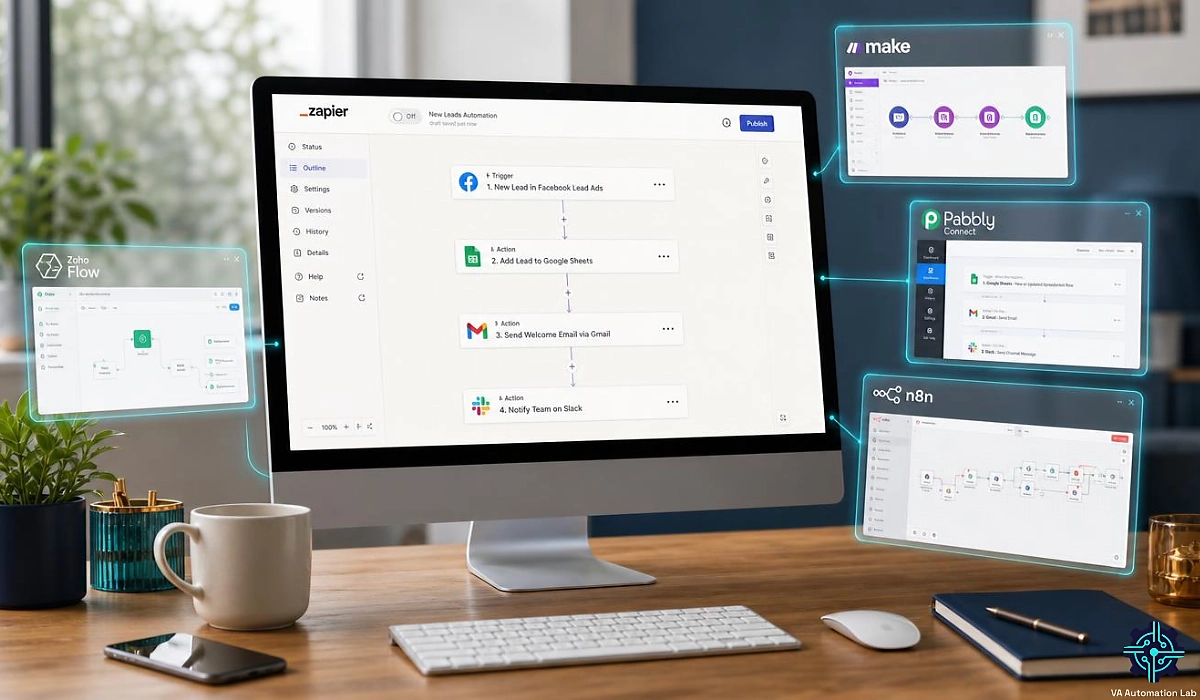
Disclosure: This article contains affiliate links. If you sign up through them, VA Automation Lab earns a commission at no extra cost to you. Recommendations are based on our evaluation of tool fit for VA workflows.
The best Zapier alternative for a virtual assistant depends on one thing: how your automation platform counts what you owe it.
Zapier bills a task for every step that writes to another app, so a workflow touching three tools spends three tasks each time it runs. Multiply that across four client accounts and the invoice grows faster than the work it replaces. For a freelancer who bills by the hour and can’t pass a rising SaaS cost to anyone, that is the moment the search starts.
This guide compares the four Zapier alternatives for virtual assistants that hold up under client work — Make, Pabbly Connect, n8n and Zoho Flow — on what each one charges for the same workload, what breaks when you switch, and which reader should stay on Zapier. Automation is one layer of a wider toolkit, and the full picture sits in Tools for Virtual Assistants: The Complete Stack Guide. If you are still deciding what to automate before deciding where, start with Automation for Virtual Assistants: The Complete Guide.
Key takeaways
- Zapier bills only the steps that call an external app. Filters, Formatter, Paths, Delay, Looping, Sub-Zap, Digest, Storage, Tables and Forms are all free, so what drives your bill is how many apps a workflow writes to.
- Make is the closest replacement for most virtual assistants: $9 a month billed annually for 10,000 credits, branching logic, and an execution log you can show a client.
- Make bills every module including the trigger, so it consumes more units than any platform here — and is still the cheapest to run. Core is $9 a month for 10,000 credits, which makes the four-client example cost 58 cents against Zoho Flow’s $4.00.
- Pabbly Connect is the headroom pick at $16 a month for 10,000 tasks, and like Zapier it doesn’t bill filters, routers or formatters — you can scale twenty times over before upgrading.
- n8n bills per workflow execution instead of per step, and self-hosting removes the meter entirely — at the cost of a real technical learning curve.
- No platform imports Zaps. Every migration is a manual rebuild: audit first, rebuild the least critical workflow first, and run both platforms in parallel for three to five days.
- Below roughly six simple Zaps, staying on Zapier costs less than the unbilled hours a migration takes.
Get the Free AI Toolkit for Virtual Assistants
A weekly breakdown of the tools, workflows and automations that save VAs real hours — plus the free AI Toolkit when you join.
Table of Contents
1. Why Virtual Assistants Outgrow Zapier
Almost nobody leaves Zapier because it stopped working. They leave because the bill stopped matching the value, or because a client workflow needed logic the platform made awkward.
Zapier’s free plan is capped at two-step Zaps — one trigger, one action — and that ceiling is the real constraint, not the task allowance. Nearly every workflow a VA builds for a client has three or more steps: capture the lead, format the data, create the record, notify someone. Add a single formatter and the Professional plan, from $19.99 a month billed annually, becomes mandatory.
How Zapier Task Pricing Works
So what is a task in Zapier? One unit of work that calls an external app. Trigger steps are free, and so is every one of Zapier’s own built-in tools: Filter, Formatter, Paths, Delay, Looping, Sub-Zap, Digest, Storage, Tables and Forms all run without touching your task count, as Zapier’s own task usage documentation confirms. Zapier’s pricing page summarizes this as “every step uses tasks”, which overstates it — the built-in list is exempt, and it is a long list.
That matters more than it sounds. It means you can build conditional logic, reformat data, loop through line items and pause a workflow mid-run without paying for any of it. So a Zap that captures a form submission, formats a phone number, checks a filter, creates a CRM record and posts to Slack spends two tasks a run: the CRM write and the Slack message.
One wrinkle applies anyway. Zapier states that some actions cost more than one task, and that the cost scales with how much reasoning a step requires — a deterministic action is one task, a step calling an AI model costs more, and an agentic step where the model decides what happens next costs more again. If you are automating with AI inside Zapier, the step count stops predicting the bill.
Where the cost really lives is the task ladder. The free plan gives you 100 tasks a month and caps Zaps at two steps, so it functions as a trial. Professional and Team then price by the task volume you pick from a menu, and Zapier publishes only their starting prices:
Plan | Price (billed annually) | Tasks per month |
Free | $0 | 100, two-step Zaps |
Professional | From $19.99/mo | Set by a volume menu, no published prices |
Team | From $69/mo | Set by a volume menu, no published prices |
Enterprise | Contact sales | Custom |
Over your tier | Higher per-task rate, not published | Charged on extra tasks |
The task volume sets the price inside each paid plan, but the tiers sit in a drop-down menu with no published prices, so no per-task cost can be worked out from the pricing page. If you exceed the tier you picked, Zapier charges the extra tasks at a higher per-task rate.
The Four Reasons VAs Switch
Work out which of these applies to you before you read the tool sections, because it determines where you should end up.
Cost at volume. You are running the same workflows across several clients and the per-task meter has turned Zapier Professional, from $19.99 a month billed annually, into a real line item. This is the most common trigger, and what you want is a cheaper Zapier alternative that bills the same work differently. It points toward Pabbly Connect or Make.
A complexity ceiling. Your workflows need branching, data transformation, loops or proper error handling, and building them inside a linear step list has become painful. This points toward Make.
Data control. A client works in a field where their data sitting on a US vendor’s cloud is a conversation you would rather not have. This points toward n8n.
Ecosystem gravity. Your client already runs on Zoho CRM, Zoho Books and Zoho Desk, and you are paying a separate connector to link tools that ship with a native connector. This points toward Zoho Flow.
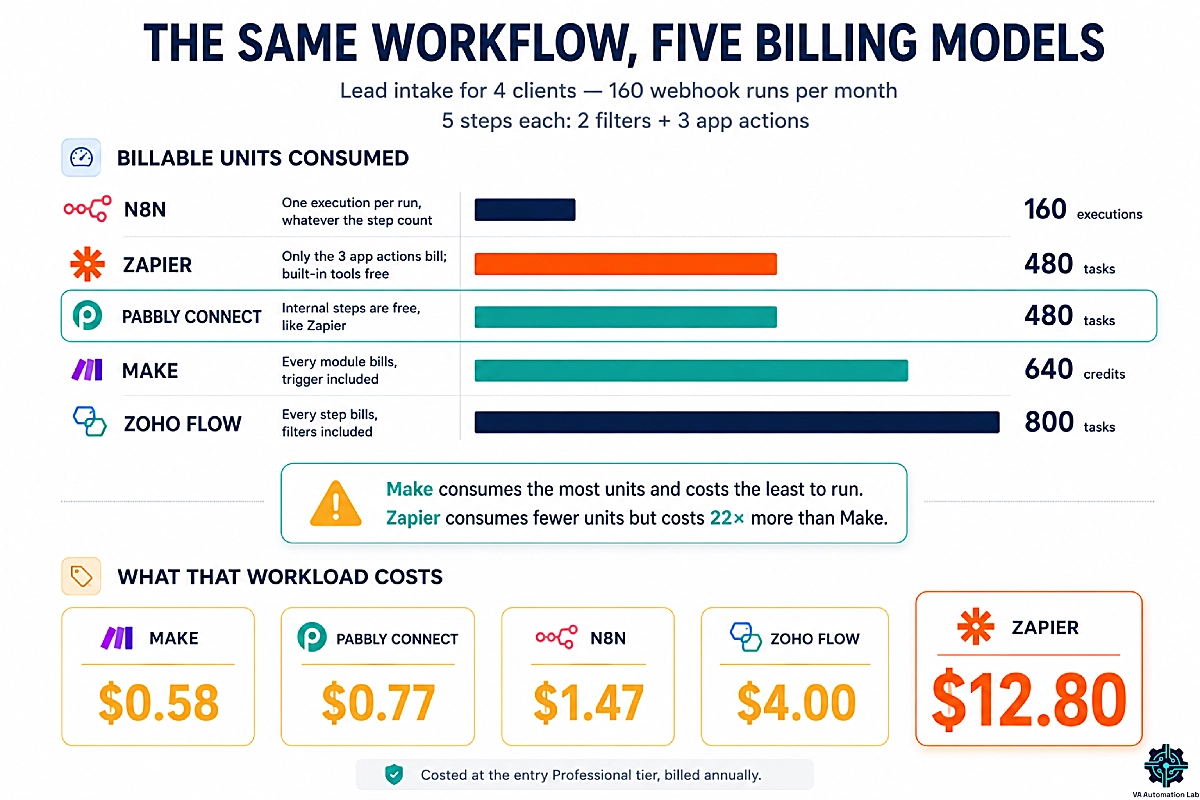
Consider a realistic load. You handle lead intake for four clients. Each client’s form fires a webhook around 40 times a month, and the workflow has five steps: two filters that route the lead to the right pipeline, and three actions that write to the CRM, the project tool and Slack. That is 160 runs a month.
Zapier bills the three app actions and nothing else, because its filters are built-in tools — 480 tasks. Pabbly Connect treats filters, routers and formatters as free internal steps too, so it also bills three per run — 480 tasks.
The other three count differently. Make bills every module that executes, and on Make one operation equals one credit with the trigger counting as a module, so the same workflow costs four credits per run — 640. Routers and filters are free on Make too, which is what keeps that number from climbing further. Zoho Flow counts a task each time a flow executes a step, filters and decisions included, so it bills the full five — 800. n8n bills one execution per run whatever the step count — 160.
Now convert those units into money, which is the step no alternatives list takes. Each entry plan includes a fixed monthly allowance, so dividing the price by the allowance gives a cost per unit, and multiplying that by what the workload consumes gives what the workload is worth in dollars.
Read the second and fourth columns as a pair: the first is what this one workload eats, the second is what the plan gives you for the month. You are not billed the fifth column — you pay the plan price either way. It shows you what a unit costs on each platform, which is the only number that compares across five different billing models.
Platform | Units this workload uses | Entry plan | Units the plan includes | Cost at the plan’s unit rate | Headroom before you upgrade |
Make | 640 credits | Core $9/mo | 10,000 | $0.58 | 15× |
Pabbly Connect | 480 tasks | Standard $16/mo | 10,000 | $0.77 | 20× |
n8n | 160 executions | Starter €20/mo | 2,500 | €1.28 | 15× |
Zoho Flow | 800 tasks | Standard $25/mo | 5000 | $4.00 | 6× |
Zapier | 480 tasks | Professional from $19.99/mo | Not published | — | — |
All plans billed annually. Each platform is costed at its entry tier, and the workload is identical in every row. Zapier publishes no task allowance for its starting price, so its row can’t be costed.
Same work. Same result for the client. Read the last two columns together, because that is where the decision is.
Make consumes the most units of any platform here and is the cheapest to run. 640 credits at Core’s rate costs 58 cents. Pabbly Connect bills fewer units for the same workload, 480 tasks, and they cost 77 cents.
The headroom column is the part that decides when you switch. On Zapier the allowance is the tier you pick, so each new client pushes you up the volume menu, and tasks beyond your tier cost more per task. The same growth on Make Core costs nothing until you are running fifteen times your current volume.
Strip out the different billing units and compare like for like — what 10,000 units a month costs on each platform’s cheapest qualifying plan — and the spread is the whole argument:
Make $9 · Pabbly Connect $16 · Zoho Flow $41 · n8n €50 · Zapier: price not published
Zapier doesn’t publish a price for 10,000 tasks, so at equal volume the comparison stops at the platforms that do, and Make is the cheapest of them.
One caveat on reading that table. n8n’s execution is not the same kind of unit as a task or a credit — it buys a whole workflow run rather than a step, so its higher unit cost reverses the moment your workflows get longer. Ten steps or two, n8n charges the same.
The same arithmetic applies to any repeatable sequence you run per client — the onboarding chain in How to Automate Client Onboarding for Virtual Assistants is typically the second-largest consumer after intake.
2. Zapier Alternatives for Virtual Assistants at a Glance
The best Zapier alternative for most virtual assistants is Make, which starts at $9 a month on Core, which includes 10,000 credits, billed annually and handles branching logic Zapier makes awkward. Choose Pabbly Connect if cost is the deciding factor and you want a one-time license instead of a subscription. Choose n8n if you need self-hosting and full control over client data.
Tool | Best for | Bills by | Entry price (annual) | Integrations | Free tier | Learning curve |
Zapier | Widest app coverage, simplest builder | Task per app action; built-in tools free | From $19.99/mo Professional | 9,000+ | 100 tasks/mo, two-step Zaps | Shallow |
Make | Branching logic, visual debugging | Credit per module, trigger included; routers and filters free | $9/mo Core, 10,000 credits | 3,000+ | 1,000 credits/mo, 2 active scenarios | Moderate |
Pabbly Connect | Task volume per dollar, one-time license | Task, internal steps free | $16/mo Standard, 10,000 tasks | 2,000+ | 100 tasks/mo | Moderate |
n8n | Data control, self-hosting, AI workflows | Workflow execution | €20/mo Starter, 2,500 executions | 500+ | Self-hosted community edition | Steep |
Zoho Flow | Clients already inside Zoho | Task per step executed, filters included | $25/mo Standard, 5,000 tasks | 1,000+ | 5 flows, 100 tasks/mo | Shallow |
Three other categories show up on every generic alternatives list, and only one of them belongs in a VA’s decision.
Enterprise integration platforms — Workato, Tray, MuleSoft — are priced for procurement departments. Microsoft Power Automate makes sense only when a client’s whole operation lives in Microsoft 365 and someone else administers the tenant. Skip both.
AI agent platforms are the category worth understanding. Lindy and Gumloop describe work in plain language and let an agent carry it out, which covers the judgment-based tasks a trigger-action tool was never built for: drafting a reply in context, deciding whether a lead is worth routing, summarizing a thread before it reaches a client.
What they don’t replace is deterministic, high-volume plumbing — moving a form submission into a CRM 40 times a day is cheaper and more reliable on a connector platform, and credit-based agent pricing is harder to forecast than a task allowance. For a VA the practical answer is rarely one or the other. The connector runs the plumbing; an agent handles the work that needs a decision.
3. Make: The Closest Replacement for Most VAs
Make is where most virtual assistants land, and it is the default recommendation here: it does everything Zapier does, starts at less than half the price, and removes the multi-step ceiling that sent you looking in the first place. It also bills more units per run than Zapier — every module counts, the trigger included — which is why the entry price matters more here than the unit count.
Instead of a vertical list of steps, Make gives you a canvas. Modules connect with visible lines; routers split the path; filters sit on the connectors. Once a workflow has more than one possible outcome — new client versus returning client, paid versus unpaid invoice — seeing the branches beats scrolling a list of collapsed steps.
The free plan includes 1,000 credits a month, access to over 3,000 apps, and routers and filters with no upgrade required — but it caps you at two active scenarios, a 15-minute minimum interval between runs, and seven days of execution logs. For client work those three limits bite long before the credits run out.
Core at $9 a month billed annually buys 10,000 credits, drops the interval to one minute, unlocks unlimited active scenarios, extends log storage to thirty days and opens the Make API. Pro at $16 buys the same 10,000 credits and adds priority execution, custom variables and full-text search across execution logs. Teams at $29 for 10,000 credits adds roles and shareable scenario templates. The credit figure scales with the slider on each tier — Core runs up to 300,000 credits a month, Pro up to eight million — and the per-credit cost falls as you climb.
One thing to know before you commit: if you exceed your allowance, extra credits cost 25% more than the credits included in your plan, bought either manually from 1,000 at a time or automatically. Uninterrupted execution once the limit is hit is an Enterprise-only feature. Sizing the plan correctly is cheaper than topping it up.
What Make Does Better Than Zapier for Client Work
Three things matter when the workflow belongs to someone else’s business.
The execution log is a client-facing asset. Every scenario run is stored with the data that passed through each module. When a client asks why a lead did not reach their CRM on Tuesday, you open the run, see which module failed and what it received, and screenshot it. Explaining a failure with evidence is a different conversation from explaining it with an apology.
Error handling is built in, not bolted on. You can attach an error route to any module, so a failed API call sends you a notification instead of stopping silently. Automations that fail silently are how VAs lose clients — the workflow stopped in week two and nobody noticed until week six.
Branching is native. Routers let one trigger feed several paths with different conditions on each. Rebuilding that on a linear platform means duplicating the whole workflow once per condition, which multiplies both your maintenance burden and your task consumption.
For a full head-to-head on features, pricing tiers and migration specifics between the two platforms, see Zapier vs Make for Virtual Assistants: The Complete Comparison Guide.
Where Make Falls Short
The first week is slower than Zapier. Make thinks in modules and data structures, and if your habit is a linear step list, mapping data between modules will feel fiddly before it feels powerful. Budget a few evenings, not an afternoon.
The native app library is smaller than Zapier’s. For mainstream VA tooling — Gmail, Google Sheets, Slack, Notion, ClickUp, Airtable, Stripe — coverage is complete. For a client’s niche industry software, check before you commit. Make has a generic HTTP module that connects to any API, but “you can build it yourself with HTTP” is a real cost in unbilled hours.
Support is email and community forum. No phone line. For a solo VA this rarely matters, but it is worth knowing before a workflow breaks on a Friday afternoon.
New to the scenario builder? Start with Make for Virtual Assistants: The Beginner Setup Guide
Try Make Free Before You Rebuild Anything
Make’s free plan includes 1,000 credits a month, routers and filters, so you can rebuild one Zap as a scenario and compare the two side by side before touching your Zapier subscription.
Paid plans start at $9 a month on Core, which includes 10,000 credits, billed annually.
4. Pabbly Connect: The Budget and Lifetime-Deal Option
Pabbly Connect is the cheapest credible Zapier replacement for a virtual assistant, and it gets there two different ways: a larger task allowance per dollar, and a billing rule that stops charging you for the steps that make a workflow well built.
The first is the task allowance. The Standard plan is $16 a month billed annually and includes 10,000 tasks — $3.99 less than Zapier Professional’s starting price of $19.99 a month, with an allowance stated up front rather than picked from a menu. The Unlimited plan at $69 a month removes the task cap entirely and adds an AI assistant, MCP servers, custom variables, JavaScript and Python modules and automatic re-executions.
The second is the billing rule: internal steps do not count. Filters, routers, iterators and formatters are free on every plan, including the free one. Zapier exempts its built-in tools too, so this is not where Pabbly beats Zapier — it is where Pabbly beats Make, which bills every module that executes. In the four-client example above, Pabbly bills 480 tasks against Make’s 640 for identical work. The gap widens with every filter, router and formatter you add, which is to say it widens as your workflows get better.
What that gap does not do is make Pabbly cheaper to run. Both plans include 10,000 units a month, so Make’s 640 credits cost 58 cents against Pabbly’s 77 cents for 480 tasks. Pabbly’s advantage is headroom rather than price: at 10,000 tasks you can scale that workload twenty times over before the plan runs out, against fifteen on Make.
Even the free plan is unusually generous in structure rather than volume: 100 tasks a month, but with unlimited workflows, multi-step workflows, instant webhooks, path routers, premium apps and email parsing all included. Most platforms gate those behind a paid tier. Pabbly gates only the volume.
The trade-offs are real. The interface is plainer than Make’s and considerably plainer than Zapier’s — functional, dated, no visual canvas to speak of. The app library is narrower, so a client’s specialist tool is less likely to have a native connector. Documentation is thinner, which means more time in community threads when something behaves unexpectedly. And there is no month-to-month option on paid plans, so you commit for a term.
Is the Pabbly Lifetime Deal Worth It for a VA?
Pabbly offers a one-time $349 lifetime license. That is the sort of number that either solves a problem or creates one, so work it out rather than reacting to it.
Against Zapier Professional at its starting price, $19.99 a month billed annually, or $239.88 a year, the lifetime license breaks even a little past seventeen months and costs nothing after that. Against Pabbly’s own Standard plan at $16 a month, $192 a year, break-even lands around twenty-two months. The two aren’t equal in volume, though: the $349 Standard Lifetime license gives 3,000 tasks a month, against 10,000 on the Standard subscription. Either way you are looking at under two years, and a VA business is usually a multi-year proposition.
The case against is narrower but worth taking seriously. A lifetime license fixes your task allowance permanently — if your client roster doubles and you outgrow the tier, you buy another license or move to a monthly plan, and the original purchase does not convert. It also assumes both that the vendor is still operating in five years and that your automation needs stay roughly where they are. If you are eighteen months into building a VA practice and your workflow requirements change every quarter, a $16/month plan billed annually that you can leave is the lower-risk choice.
Buy the lifetime license when your workflows are stable and repeatable. Stay monthly when they are still being invented.
Run the Numbers on Pabbly Connect
The free plan gives you 100 tasks a month with unlimited workflows and free internal steps — enough to test whether the task math works for your client load.
Standard runs $16 a month billed annually for 10,000 tasks, and the lifetime license is a one-time $349.
5. n8n: For VAs Who Want Control and No Task Meter
n8n is the Zapier alternative for virtual assistants who need control over where client data lives and how much a complex workflow costs to run.
It bills per workflow execution rather than per step. One run of a twenty-step workflow costs the same as one run of a two-step workflow: a single execution. The Starter plan at €20 a month billed annually (n8n prices in euros) includes 2,500 workflow executions, one shared project, five concurrent executions, unlimited users and 50 AI workflow-builder credits. Pro at €50 raises that to 10,000 executions, three shared projects, twenty concurrent executions, workflow history and execution search.
For complex multi-step client automations, that billing model is transformative. The four-client lead intake example bills 160 executions rather than 480 tasks on Zapier or 640 credits on Make, and adding two more steps to improve the workflow costs nothing extra.
The community edition is open source and self-hostable. Run it on your own server and there is no per-execution meter at all. Client data never leaves infrastructure you control, which is a concrete selling point in a pitch — a VA who can tell a bookkeeping or healthcare-adjacent client that their data stays on a private instance has an answer most competitors don’t.
Two things to weigh before you commit. The app library is the smallest here at around 500 integrations, against 3,000 on Make and 9,000 on Zapier — n8n covers mainstream tools well and expects you to reach for its HTTP node beyond them. And it is the technical option on this list. Self-hosting means Docker, a server, updates and being your own support desk.
If you have never opened a terminal, the n8n cloud plan is the realistic entry point, and even there the node-based builder assumes more comfort with data structures and APIs than Make does. The AI capabilities are the strongest of any platform here, which is why it is worth the climb for some readers and not for others.
If n8n’s learning curve is the problem rather than its price, Activepieces is the open-source alternative worth knowing. Its Community Edition ships under an MIT license, so you can self-host it free with no run limits and no per-task fee, and its drag-and-drop builder is closer to Zapier’s than n8n’s node canvas — which is why non-developers pick it up faster. The trade-off is a smaller integration library and a younger ecosystem, so documentation and community answers are thinner when something breaks.
The full walkthrough — setup, AI workflows and the automations worth building first — is in n8n for Virtual Assistants: Complete Guide, AI Workflows & Automation.
6. Zoho Flow: The Ecosystem Option for Zoho-Based Clients
Zoho Flow is a task-based connector platform priced per organization rather than per user, and it is the right Zapier alternative for one specific virtual assistant: the one whose clients already run on Zoho. It rarely appears on generic alternatives lists, for a reason those lists would not notice — many small businesses run on Zoho, and their VA is paying a third-party connector to link apps that already talk to each other natively.
Zoho Flow prices per organization, not per user, which is unusual and useful. The free tier gives five flows and 100 tasks a month with logic features included. Standard is $25 a month billed annually for 5,000 tasks, 60-day flow history, custom functions, unlimited flows and Zia, Zoho’s AI layer. Professional is $41 a month for 10,000 tasks, adding five-minute polling, premium apps, on-premise integration and automatic re-execution of failed flows.
Two things make it a strong fit for the right VA. Automatic re-execution means a flow that fails on a transient API error retries itself instead of waiting for you to notice — a real operational advantage on client work. And per-organization pricing means adding people to the account costs nothing, which matters if you eventually bring on a subcontractor.
Three things limit it. Zoho counts a task every time a flow executes a step — filters and decision steps included — which is the least forgiving billing rule of any platform here. Combined with the smallest allowance on the list, 5,000 tasks against Pabbly’s and Make’s 10,000, it makes Zoho Flow roughly seven times more expensive to run than Make for the same workload. Second, third-party connections outside the Zoho ecosystem work but feel slower and thinner than the equivalents on Zapier or Make, and the app library is the smallest here at around a thousand. Third, at $25 it is the most expensive entry point on this list.
All three are survivable when the Zoho-native depth is doing real work for you, and none of them is when it isn’t. If your clients are not on Zoho, this is not your tool. If they are, the 15-day trial opens every premium feature without a card, which is the cheapest way to find out.
7. When the Best Zapier Alternative Isn’t Another Automation Platform
The cheapest Zapier alternative for a virtual assistant is often no connector platform at all: a native automation inside a tool you already pay for, or a purpose-built tool that removes the workflow entirely. Every alternatives list assumes the answer is another connector. Frequently it isn’t, and this is where a VA saves the most money.
A large share of Zaps exist because someone didn’t know the destination tool automates natively, or because a purpose-built tool would remove the workflow entirely. Before you migrate a workflow, ask whether it should survive the move at all. Every Zap you delete is cheaper than every Zap you rebuild.
Task and project workflows. If you are using a connector to move information between apps and a project tool, check the project tool first. ClickUp includes automation rules on every plan, including the free one, and the Unlimited plan at $7 a month billed annually raises that to 500 active rules and 1,000 monthly executions. Status changes, assignments, recurring task creation and due-date logic run inside the workspace, with no connector and no task meter. See ClickUp for Virtual Assistants: Setup Guide, Templates & Workflows for the setup.
Calendar and scheduling. Zaps that shuffle meetings, defend focus blocks or move tasks around availability are recreating what a scheduling tool does natively. Reclaim.ai does this as its core function, with a free tier and a Starter plan at $10 a month billed annually.
Email triage. Rules that sort, filter and defer mail are among the most common Zaps and among the worst uses of a connector, because the volume is high and every message is a task. SaneBox handles triage at the mail-server level from $5.42 a month billed annually, with no per-message billing at all.
Social posting. Chains that push content from a spreadsheet to several platforms burn tasks on every post to every channel. SocialBee does category-based scheduling and evergreen recycling natively, starting at $24 a month billed annually for five profiles.
Intake and onboarding forms. A form that fires a connector that sends an email that creates a record is three billable steps for something the form builder can do alone. Jotform includes conditional logic, notifications and payment handling, with a free Starter tier and Bronze at $34 a month billed annually.
The pattern holds broadly: connector platforms are for moving data between tools that have no relationship. When a tool can do the job inside its own walls, let it. For a wider view of which tasks are worth automating in the first place, see How to Automate Repetitive Tasks as a Virtual Assistant.
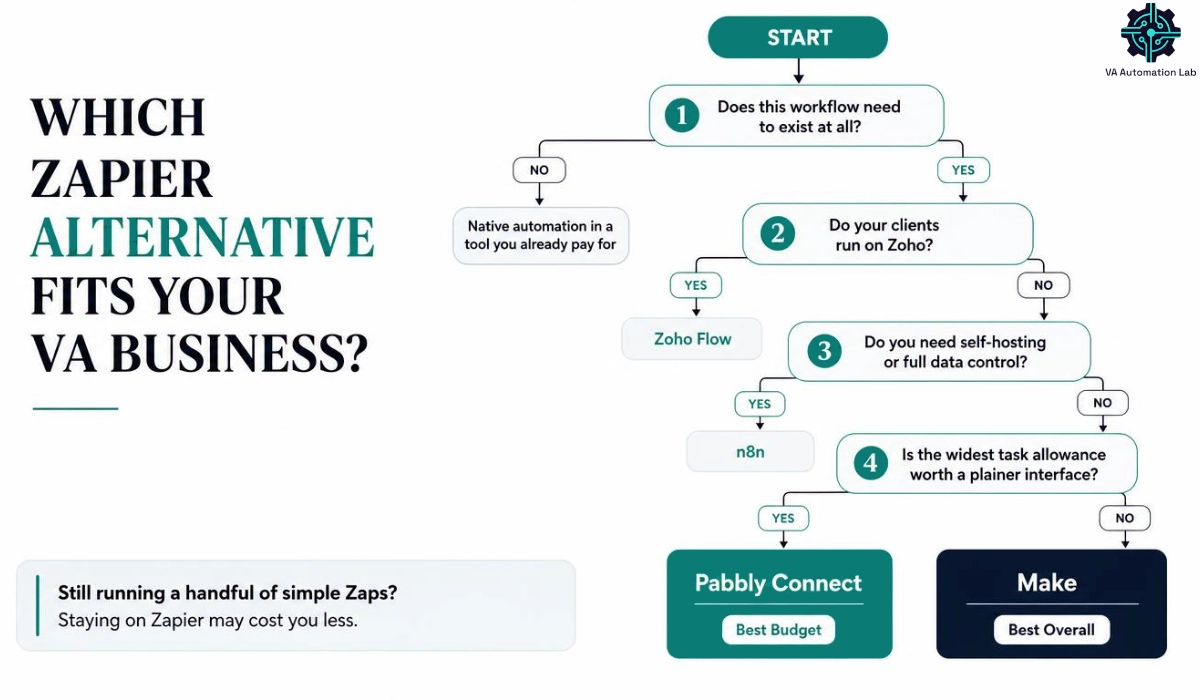
8. How to Choose the Right Zapier Alternative
Route by the diagnosis, not by the feature list.
If the workflow shouldn’t exist, delete it and use native automation in a tool you already pay for. This is the cheapest outcome available and the one nobody sells you.
If your clients run on Zoho, use Zoho Flow. The native depth and automatic re-execution outweigh the higher entry price, and you stop paying a middleman to connect apps that ship connected.
If you need self-hosting or full data control, use n8n. Accept that the setup cost is real and that per-execution billing rewards you most when workflows are long.
If cost per task is the deciding factor, use Pabbly Connect. Free internal steps and a 10,000-task allowance at $16 a month make it the widest allowance for the money on this list, and the $349 lifetime license removes the line item permanently if your workflows are stable.
Otherwise, use Make. Branching logic, a visual canvas, real error handling and a $9 entry price on Core, which includes 10,000 credits, cover the widest range of VA work, and it is the platform that scales with a growing client roster without a rebuild.
Pick One and Rebuild a Single Workflow This Week
Most VAs land on one of two platforms.
Choose Make if you want branching logic and a visual canvas from $9 a month on Core, which includes 10,000 credits.
Choose Pabbly Connect if you want the widest task allowance for the money, or a one-time license instead of a subscription line item.
9. How to Migrate Off Zapier Without Breaking Client Workflows
Everyone asking how to migrate from Zapier wants a button, so start with the fact that determines everything else: no platform imports Zaps. Zapier offers no export-to-competitor function, and every migration is a manual rebuild. Third-party conversion services exist, but for the five to ten workflows a typical VA runs, rebuilding by hand is faster than validating someone else’s conversion.
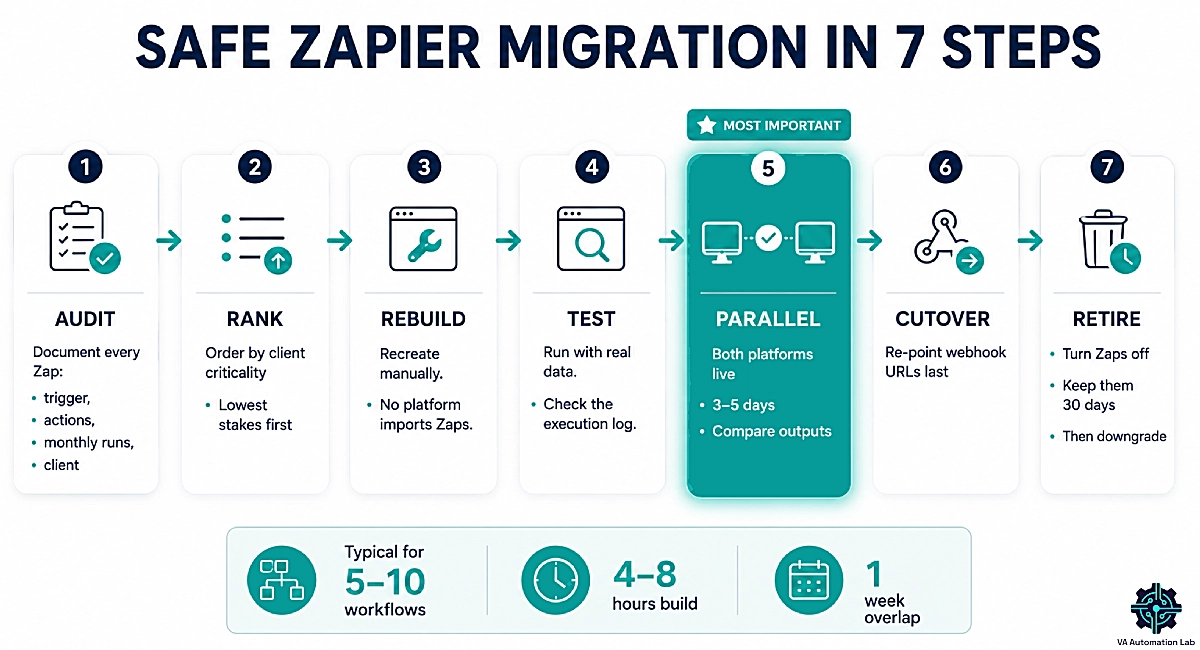
Budget four to eight hours of build time for that volume, plus a week of overlap. Then work in this order.
Step 1 — Audit
List every active Zap with its trigger, each action, how often it runs per month and which client it belongs to — before you open the new platform. Migrations stall when someone rebuilds before knowing what exists, and a third of the list usually turns out to be dead or duplicated.
Step 2 — Rank by client criticality
Sort by what breaks worst if it fails, then rebuild the least critical workflow first so your learning curve happens somewhere harmless.
Step 3 — Rebuild, don’t replicate
Learn the vocabulary shift first, then improve as you go. Several interconnected Zaps are often one cleaner scenario with a router.
Step 4 — Test with real data
Fire the trigger with a live submission, not a sample payload, and read the execution log at every step. Watch for empty fields, unusual characters and anything the old Zap was silently formatting.
Step 5 — Run both platforms in parallel for three to five days
Old and new live at once, outputs compared daily. Duplicate records during the overlap are a smaller problem than a gap. This is the step people skip and the one that protects client work.
Step 6 — Re-point webhooks last
Any workflow triggered by a webhook needs the source system updated to the new URL, and that is the moment the old Zap stops receiving anything. Do it after everything else is verified.
Step 7 — Retire, don’t delete
Turn the Zaps off and leave them in the account for thirty days as documentation. Then downgrade or cancel the plan.
Three failure points cause most of the trouble. Stale webhook URLs left pointing at Zapier. App credentials that need reconnecting one by one, which is tedious and easy to leave half-finished. And Zapier’s Paths logic, which does not map one-to-one onto a router — branching workflows need more time than their step count suggests.
Platform | The automation | A single step | Branching | Billing unit |
Zapier | Zap | Step | Paths | Task — per app action; built-in tools free |
Make | Scenario | Module | Router | Credit — per module, trigger included |
Pabbly Connect | Workflow | Action step | Path router | Task — per action; internal steps free |
n8n | Workflow | Node | IF node | Execution — one per run, any step count |
Zoho Flow | Flow | Step | Decision, or If-Else for two paths | Task — per step, no exemptions |
Note the gap between columns three and five. On Zapier, Pabbly Connect and Make a step and a billable unit are different things; on Zoho Flow they are the same thing. That single distinction explains most of the cost surprises people hit in their first month on a new platform.
What to Tell Clients Before You Switch
Competing guides skip this entirely, and it is the part that protects the relationship.
Tell the client before the parallel run starts, not after. The message is short: you are moving their automation to a platform that costs less and handles errors better; there will be a brief overlap where a notification might arrive twice; nothing will stop working. Settle three questions while you are there.
- Whose account does it run under? Building in your own account is simpler and makes you the single point of failure; building in theirs means they keep the automation if the engagement ends, which is often the more professional position.
- Who pays for the platform? If the automation exists solely for one client, the subscription is a pass-through cost, not your overhead.
- What happens at the end? Agree now whether you hand over the workflows or switch them off — it is a five-minute conversation today and a difficult one later.
If you run automations across several client accounts, the operational side of that is covered in How to Manage Multiple Clients as a Virtual Assistant Using AI.
10. When Staying on Zapier Is the Right Call
Before you move anything, ask the question in reverse: is Zapier worth it at your current volume? Migration is not free. It costs unbilled hours, and below a certain volume those hours never come back.
Stay if you run a handful of simple workflows. Four to six two-or-three-step Zaps on Zapier Professional cost from $239.88 a year, that is $19.99 a month billed annually. Moving them to Make Core at $108 a year saves you at least $131.88 — a poor return on six hours of rebuilding at any VA billing rate. The savings only justify the work once the task meter is a monthly irritation rather than a rounding error.
Stay if a client’s niche software has a Zapier integration and nothing else. Zapier’s app library is the largest in the category, and that advantage is concentrated exactly where it hurts to lose it — industry-specific tools that never built a connector anywhere else.
Stay if the workflows run inside the client’s own Zapier account. You do not get to migrate someone else’s subscription, and proposing it puts you in a procurement conversation for a tool you don’t control.
Stay while you are onboarding a client. Migrating and onboarding at the same time means two sources of failure and no way to tell which one broke.
Everyone else should be looking at the platforms above. But the reason to trust this page over a vendor’s own alternatives list is that a vendor cannot write this section.
11. Your Next Move After Zapier
The decision comes down to how the platform counts, not which logo you prefer. Zapier bills only the steps that call an external app, but prices them by a volume tier it doesn’t publish. Make bills every module including the trigger and charges 90 cents per thousand — the lowest published unit price here, which is why it consumes the most and costs the least. Pabbly Connect matches Zapier’s free internal steps and gives you the most headroom for the money. n8n bills the run rather than the steps. Zoho Flow bills every step against the smallest allowance here, which only pays off when its Zoho-native depth is doing real work.
For most virtual assistants evaluating Zapier alternatives, the right move is narrow and immediate: pick one platform, rebuild a single low-stakes workflow this week, and compare the two side by side before touching your subscription. Make is the safest starting point, and its free plan is enough to run that test.
For the wider tool decisions around this one, see Best Tools for Virtual Assistants in 2026: The Complete Comparison Guide.
Frequently Asked Question About Zapier Alternatives
What is the best Zapier alternative for virtual assistants?
Make, for most VAs. It starts at $9 a month on Core, which includes 10,000 credits, billed annually, handles branching logic and error routes Zapier makes awkward, and its execution log makes client troubleshooting straightforward. Pabbly Connect is the better pick when cost per task is the deciding factor, and n8n when you need self-hosting.
Is there a free Zapier alternative?
Several, and they are structured differently. Make’s free plan includes 1,000 credits a month with routers and filters. Pabbly Connect’s free plan gives 100 tasks but includes unlimited workflows, multi-step logic and premium apps. Zoho Flow’s free tier allows five flows and 100 tasks. n8n’s community edition is open source and free to self-host with no execution limit at all. Zapier’s own free plan is capped at two-step Zaps, which is the tightest restriction of the group.
Is Make cheaper than Zapier?
Substantially, yes. Make Core is $9 a month for 10,000 credits billed annually, while Zapier Professional starts at $19.99 a month billed annually and Zapier doesn’t publish what 10,000 tasks cost. On units consumed Make is the heavier of the two, because it bills every module including the trigger while Zapier exempts its built-in tools. Make wins on price, not on efficiency: 90 cents per thousand credits is the lowest published unit price in this comparison.
Can I export my Zaps to another platform?
No. Zapier offers no export-to-competitor function, and no alternative platform imports Zaps. Every migration is a manual rebuild, so plan four to eight hours for five to ten workflows plus a week of parallel running. Third-party conversion services exist, but at that volume rebuilding by hand is faster than validating someone else’s conversion.
What is the best open-source Zapier alternative?
n8n and Activepieces. n8n is the more powerful of the two and the better fit for AI workflows, but its node canvas assumes comfort with data structures and APIs. Activepieces ships under an MIT license with a drag-and-drop builder closer to Zapier’s, which non-developers pick up faster. Both self-host free with no per-task fee.
Can an AI agent replace Zapier for a virtual assistant?
Partly. AI agent platforms like Lindy and Gumloop handle judgment-based work a trigger-action tool was never built for — drafting a contextual reply, qualifying a lead, summarizing a thread. They don’t replace deterministic high-volume plumbing, which stays cheaper and more predictable on a connector platform. Most VAs end up running both.
Is the Pabbly Connect lifetime deal worth it?
Against Zapier Professional at its starting price of $19.99 a month billed annually, the $349 Pabbly license breaks even a little past seventeen months. It is a good buy when your workflows are stable and repeatable. It is the wrong buy when your needs are still changing, since the task allowance is fixed permanently and does not convert if you outgrow it.
Do I need coding skills to use n8n?
Not for the cloud version, though you need more comfort with data structures and APIs than Make requires. Self-hosting is a different matter — Docker, a server and your own maintenance. If you have never used a terminal, start on the cloud plan or choose Make instead.
What happens if I go over my monthly limit?
It depends on the platform, and the difference matters when a client’s automation is running. Zapier charges tasks beyond your tier at a higher per-task rate. Make sells extra credits at 25% above the price of those in your plan, manually from 1,000 at a time or automatically, and uninterrupted execution at the cap is Enterprise-only. Zoho Flow keeps flows running on separately-tracked overage tasks. Nobody stops your automations without warning, but all three bill you for the privilege.
Should I run client automations from my account or theirs?
Their account is usually the more professional choice: they keep the automation if the engagement ends, and the platform cost is theirs rather than your overhead. Your own account is simpler to build in but makes you a single point of failure. Decide before you build, not at handover.
How long does it take to migrate off Zapier?
For five to ten workflows, budget four to eight hours of build time plus three to five days of running both platforms in parallel. Branching workflows take longer than their step count suggests, because Zapier’s Paths logic does not map one-to-one onto a router.
Glossary
API — The interface a piece of software exposes so other software can read and write its data. Connector platforms use APIs to talk to your apps.
Credit — Make’s billing unit. One credit per module execution for non-AI apps, including the trigger module. Routers and filters don’t consume credits. Extra credits beyond your plan cost 25% more than the ones included in it.
Execution — One complete run of a workflow, regardless of how many steps it contains. n8n’s billing unit.
Filter — A condition that stops a workflow when it isn’t met. Free on Zapier, Pabbly Connect and Make; it is the app calls around it that bill.
iPaaS — Integration Platform as a Service. The category Zapier, Make, n8n, Pabbly Connect and Zoho Flow all belong to.
Module / Node / Step — One unit of work inside an automation. Make calls it a module, n8n a node, Zapier a step.
Overage — Units consumed past your monthly allowance. Make sells extra credits at 25% above the price of the ones in your plan. Zoho Flow keeps flows running on separately-tracked overage tasks.
Polling interval — How often a platform checks a connected app for new data. Zapier’s free plan polls every 15 minutes; Professional every two minutes.
Router — A branch point that splits one workflow into several conditional paths.
Self-hosting — Running the software on your own server rather than the vendor’s, giving you full control over data and no per-run billing.
Task — One completed action step. The billing unit on Zapier, Pabbly Connect and Zoho Flow, but each counts differently: Zapier and Pabbly Connect exclude internal steps like filters and formatters, while Zoho Flow counts a task every time a flow executes any step.
Trigger — The event that starts an automation. Not billable on any platform on this list.
Webhook — A URL that receives data pushed from another app the moment something happens, instead of waiting for a polling check.
About the Author
Alex Stratton has spent the better part of a decade working at the intersection of virtual assistance and operational systems, first as a VA supporting founders and small business owners, then as a workflow consultant helping remote teams reduce the manual overhead that accumulates when businesses grow faster than their processes. The tools and workflows here reflect decisions made repeatedly in real client contexts, where the wrong choice costs hours, not minutes. Learn more about VA Automation Lab → About.