
How to Become a Virtual Assistant with AI Tools (Starting from Zero)

The practical, step-by-step guide for anyone asking how to become a virtual assistant with AI tools, without overcomplicating everything before they’ve even started.
If you’re trying to figure out how to become a virtual assistant but don’t know where to begin, this is your starting point. Not a list of tips. Not a motivational overview. A real system: the tools, the workflows, and the structure that actually work when you’re working alone, on a limited budget, with limited time.
Built from real experience. Simplified on purpose. AI-first by design.
Everything here is built around one goal: show you how to become a virtual assistant with AI tools, without fluff, tool overload, or a $500/month stack before you’ve earned your first invoice.
Want to Start Using AI Tools the Right Way?
If you’re a virtual assistant and feel confused by too many AI tools, this free starter toolkit shows you exactly where to begin, without tech overwhelm.
Table of Contents
1. Before You Scroll, Read This First
This page was written for a very specific person. Not every beginner. Not every aspiring VA. If you recognize yourself in what follows, you’re in exactly the right place and everything ahead was built with you in mind.
You’re in the right place if…
- You’ve been thinking about how to become a virtual assistant with AI tools for a while now, but every time you search for guidance, you either find vague inspiration that doesn’t tell you what to actually do, or a 47-step system that assumes you already have three clients and a team.
- You’re starting with a clean slate: no established workflows, no client base, no systems in place. Maybe you have some transferable skills from a previous job (writing, scheduling, admin, social media) but you’ve never packaged them as a service. You’re not sure what to charge, where to start, or which tools you actually need.
- You’re drawn to the idea of working with AI tools from day one, not because it sounds trendy, but because you understand intuitively that a virtual assistant setup for beginners built around smart automation will get you further, faster, than one built around manual everything.
- You want a real system. Not a mood board. Not a highlight reel. A clear, grounded starting point that respects your time, your budget, and your intelligence.
This is not the right page if…
- You’re already working with multiple clients and looking to scale an existing operation, the Automation Workflows section will serve you better.
- You’re looking for a get-rich-quick roadmap. Building sustainable virtual assistant workflows for beginners, and the client base that depends on them, takes focused effort, particularly in the first 60 to 90 days. This guide accelerates that process, it doesn’t shortcut it.
- You want a tool review site. This page is about the system first, tools second. There are no affiliate-driven rankings here, just an honest assessment of what a beginner VA’s AI stack actually needs to look like when you’re starting with a small budget and limited time.
If the first block sounds like you, keep reading. Everything from here is structured to take you from zero to a functional, professional virtual assistant setup for beginners in the most direct way possible: a lean system, the right AI tools, and the virtual assistant workflows for beginners that keep your days structured without requiring you to manage the tools all day.
2. Why Most Beginners Never Actually Start (And How to Avoid That Trap)
Here’s something that rarely gets said in beginner guides: the biggest obstacle to starting as a virtual assistant isn’t lack of skills. It isn’t lack of clients. It isn’t even lack of confidence. It’s a set of very specific, very avoidable mistakes that stall momentum before it ever builds, and they almost always fall into one of three patterns.
Mistake #1 — Building the Perfect Setup Before Landing the First Client
The most common trap. It looks like productivity but it’s actually avoidance.
It goes like this: you spend the first two weeks choosing between Notion and Asana. Then another week designing your client folder structure in three different color-coded variations. Then you find a YouTube rabbit hole about the best invoicing tools for freelancers, which leads to a Reddit thread about contracts, which leads to a course about how to price your services, which you bookmark but never start.
Three weeks in, you have a beautiful system and zero clients.
The hard truth is that no setup survives first contact with a real client unchanged. Your workflows will shift. Your tools will get simplified. Your pricing will get adjusted. None of that is a problem, it’s how a functional virtual assistant setup for beginners actually develops. The mistake is waiting for perfection before starting, because perfection doesn’t exist at week one. It gets built through the work.
The fix: build a minimum viable virtual assistant setup for beginners (communication, task management, file storage, invoicing) and start outreach in parallel. Refine as you go, not before you go.
Mistake #2 — Treating AI Tools as an Add-On Instead of a Foundation
Most beginner guides mention AI tools as a bonus section near the end. “Oh, and you could also try ChatGPT for some tasks.” This completely misses the point of what it means to learn how to become a virtual assistant with AI tools today.
The right beginner AI tools for virtual assistants are not productivity accessories bolted onto an existing workflow. Used correctly from day one, they fundamentally change your capacity as a solo operator, compressing hours of manual work into minutes without sacrificing quality. They build workflow documentation, research unfamiliar topics, and produce consistent deliverables. A beginner who integrates beginner AI tools for virtual assistants into their core workflow from the start can operate with the output quality of someone with significantly more experience.
The mistake is learning the manual way first and “graduating” to AI later. By the time you do, you’ve spent months building habits and systems that need to be rebuilt.
The fix: treat beginner AI tools for virtual assistants as infrastructure, not shortcuts. They go in the setup on day one, alongside your task manager and your email, not after them. The VA who builds this habit in week one operates at a fundamentally different level than the one who discovers AI tools in month four.
Mistake #3 — Skipping Workflows and Running on Reaction
Without documented virtual assistant workflows for beginners, every client interaction becomes improvised. Every onboarding call covers different ground. Every deliverable gets formatted differently. Every invoice goes out on a different day with a different level of detail.
This isn’t just inefficient, it’s exhausting. Running entirely on reaction is the fastest path to burnout in a solo VA business, typically hitting somewhere between months two and four when the novelty has worn off and the volume of small decisions starts accumulating.
Workflows don’t need to be complicated. They don’t need to be built in a fancy tool. They need to exist, be consistent, and be followed. Three simple, documented processes, onboarding, weekly task management, and task delivery, will carry you through your first year with more stability than any tool you could buy.
The fix: before your first client, document your virtual assistant workflows for beginners in rough draft form, client onboarding, weekly task management, and task delivery. They don’t need to be perfect. They need to exist so that when things get busy, you’re executing a system, not reinventing one under pressure.
These three mistakes aren’t character flaws. They are structural, and they’re fixable with the right starting point. The clearest path to understanding how to become a virtual assistant with AI tools runs directly through avoiding all three: build lean, integrate AI from day one, and document before you need to. What follows is exactly that: the system, the tools, and the workflows that sidestep all three from day one.
3. The Virtual Assistant Setup for Beginners That Actually Works
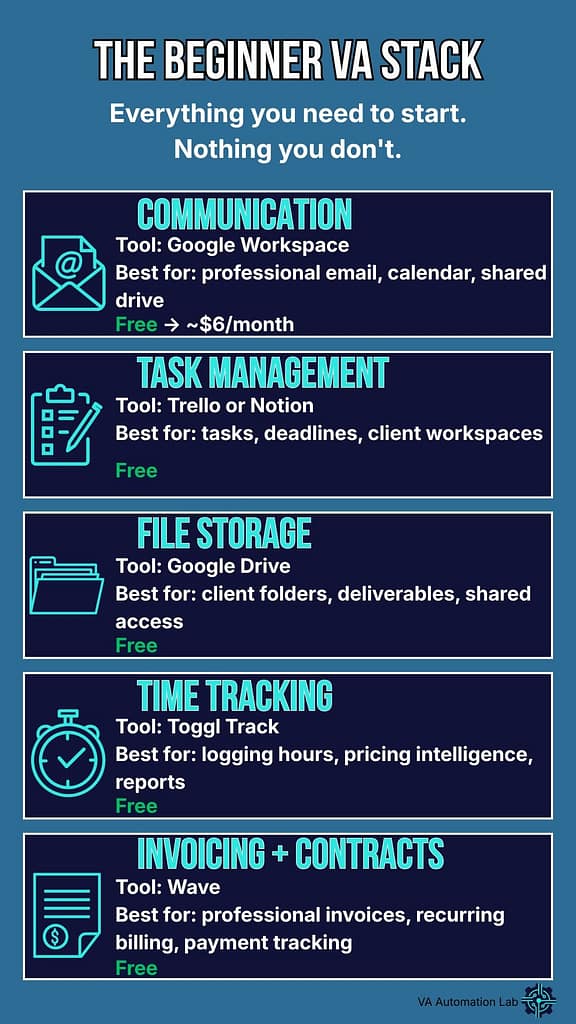
A functional VA setup isn’t measured by how many tools it includes, it’s measured by how consistently it supports your work without requiring you to manage it constantly. Whether you’re figuring out how to become a virtual assistant with AI tools or rebuilding a setup that stopped working, the system below applies equally: five categories, one tool each, zero unnecessary complexity.
One tool per category. One job per tool. That’s the rule.
Communication
The job: give every client a reliable, professional way to reach you, and give yourself a consistent way to respond.
At the beginner level, this means three things: a dedicated professional email address, a clear response-time policy communicated upfront, and one agreed messaging channel per client. Some clients prefer email. Some prefer Slack. Some will ask for WhatsApp. The channel matters less than the consistency, pick one per client and don’t let it fragment across three.
Recommended starting point: Google Workspace at the entry tier covers professional email, shared drive, and calendar in one subscription. If budget is tight, a free Gmail with a custom domain forwarding is a workable interim solution.
AI leverage point: use Claude or ChatGPT to draft professional responses to difficult client messages, write clear project update summaries, or create your first email templates for recurring communication types, follow-ups, status updates, deadline reminders. Build the template library in week one. Use it for the next twelve months.
Task and Project Management
The job: create one single place where every task, deadline, and client deliverable exists in written form.
Not your inbox. Not a running notes app. Not your memory. One tool, used consistently, that shows you at any moment what is open, what is due, and what is blocked.
For a solo VA at the beginner stage, the best options are Notion and Trello, both have genuinely functional free tiers, both are visual enough to make your workload readable at a glance, and both are flexible enough to adapt as your client mix evolves. Notion has a steeper initial learning curve but more long-term flexibility. Trello is faster to set up and immediately intuitive.
Recommended starting point: Trello if you want to be operational in under an hour. Notion if you’re willing to invest two to three hours upfront for a more powerful long-term workspace.
AI leverage point: describe your typical weekly task mix to an AI tool and ask it to generate a starter board structure. You’ll get a working template in minutes rather than spending an afternoon designing one from scratch, time better spent on actual client work.
File Management and Storage
The job: ensure that every client file has a permanent, organized, accessible home, and that you can find anything in under thirty seconds.
File chaos is one of the most underestimated sources of stress for anyone learning how to become a virtual assistant, it seems manageable until you have three clients, four active projects, and a client asking for a file you delivered six weeks ago that you can no longer locate.
The solution isn’t a sophisticated tool, it’s a consistent naming convention applied from day one. Create a top-level folder per client. Inside each: Active Projects, Delivered, Reference, Admin. Name every file with a date prefix and a clear descriptor. Never again save anything to your desktop as a temporary measure.
Recommended starting point: Google Drive for its integration with Google Workspace and ease of client sharing. Dropbox is equally solid if you or your clients already use it.
AI leverage point: One practical way to learn how to become a virtual assistant with AI tools from day one is to use them for setup tasks before client work begins. Ask Claude to generate a complete folder naming convention and file taxonomy for a solo VA managing multiple clients, implement it before your first client, not after.
Time Tracking
The job: tell you exactly where your working hours are going, so your pricing stays sustainable and your capacity stays visible.
This category gets skipped by most beginners because it feels like overhead. It is the opposite. Time tracking in the first six months reveals patterns you cannot see otherwise: which task types take twice as long as you estimated, which clients generate the most revision cycles, and whether your hourly effective rate is actually what you think it is.
Even on flat-rate project pricing, track your time. The data will inform every pricing decision you make in year one.
Recommended starting point: Toggl Track. The free tier is comprehensive for a solo operator, the interface takes less than five minutes to learn, and the weekly reports are clear enough to act on immediately.
AI leverage point: export your Toggl data weekly and ask an AI tool to identify patterns, flag inefficiencies, or suggest where your time allocation is misaligned with your revenue. Fifteen minutes of analysis per week compounds significantly over three months.
Invoicing and Contracts
The job: get paid professionally, on time, with a paper trail, and protect both yourself and your client with a clear written agreement before work begins.
No exceptions to the contract rule. Not for small projects. Not for people you know. Not for “just this once.” One of the most overlooked steps in learning how to become a virtual assistant is understanding that the contract is not bureaucracy, it is the foundation of every professional client relationship you will build. A simple, clear service agreement sets expectations, defines deliverables, establishes payment terms, and removes ambiguity from the relationship before ambiguity becomes a problem.
Invoicing should be equally systematic: same format every time, sent on the same day, with clear payment terms and a late payment clause that you actually enforce.
Recommended starting point: Wave for invoicing, genuinely free, professional output, and handles recurring invoices cleanly. For contracts, a well-drafted starter template reviewed once by a legal professional is a one-time investment that protects every subsequent client relationship.
AI leverage point: use Claude to draft your first service agreement based on your specific services, rates, and working conditions. Be specific in your prompt, include your deliverable types, revision policy, payment terms, and cancellation conditions. Then have it reviewed by a professional before use. You’ll arrive at that review with a document that already covers 80% of what it needs to, which reduces the time and cost of the review itself.
Category | Tool | Cost to Start |
Communication | Google Workspace | Free / ~$6/mo |
Task Management | Trello or Notion | Free |
File Storage | Google Drive | Free |
Time Tracking | Toggl Track | Free |
Invoicing + Contracts | Wave + template | Free |
This is your complete virtual assistant setup for beginners, total starting cost $0, scaling to under $10/month with a professional email domain. Everything else can wait until your first client tells you otherwise.
This system covers the operational foundation. What it doesn’t yet include is the layer that separates a beginner VA from a beginner VA who moves twice as fast with half the effort: AI tools integrated directly into the workflow. That’s the next section.
4. Beginner AI Tools for Virtual Assistants: The Short List That Changes Everything
Most beginner guides approach AI tools one of two ways: either they ignore them entirely, or they list forty-seven options across every possible category until the reader gives up and closes the tab. This section does neither.
What follows is a deliberately short list, five tools, each chosen for a specific reason. Not because they’re the most popular, the most-reviewed, or the highest-ranked on affiliate comparison sites. Because they are the beginner AI tools for virtual assistants that deliver real, immediate value with a minimal learning curve, a sustainable cost structure, and a direct connection to the actual work a VA does every day.
One important clarification before the list: learning how to become a virtual assistant with AI tools does not mean replacing skill, judgment, or client relationships with automation. AI tools are a force multiplier, they amplify what you bring to the work, they don’t substitute for it.
Claude (Anthropic)
Best for: writing, client communications, research synthesis, documentation, SOPs
Claude is the tool you reach for when the quality of the output matters most. Its particular strength is nuanced, contextually aware writing, the kind that doesn’t sound like it came from a template or a bot. For virtual assistants whose work touches client communications, content drafting, internal documentation, or knowledge management, this translates directly into deliverables that require fewer revision cycles and create stronger client confidence.
Practical use cases for a beginner VA:
- Drafting professional responses to difficult or ambiguous client messages
- Writing first-draft SOPs for recurring tasks as you document your workflows
- Summarizing long briefs, documents, or meeting transcripts into clear action points
- Creating onboarding documents, welcome guides, and client-facing templates
- Researching unfamiliar industries or topics before a new client engagement
Learning curve: low, which is exactly why Claude belongs at the top of any list of beginner AI tools for virtual assistants. It responds well to plain-language prompts and produces usable output from the first session, without requiring prompt engineering knowledge. Quality improves as you learn to give it more context, but the baseline is immediately usable.
Cost to start: free tier available. Claude Pro at $20/month unlocks higher usage limits and access to more capable models, worth the investment once you’re actively using it daily across client work.
ChatGPT (OpenAI)
Best for: brainstorming, structured list generation, quick research, general-purpose drafting
Where Claude tends to excel at depth and nuance, ChatGPT excels at breadth and speed. For a VA supporting clients across varied industries and task types, that generalist capability is genuinely useful, particularly in the early months when your client mix is unpredictable and your task range is wide.
Practical use cases for a beginner VA:
- Generating service package ideas, pricing structures, or positioning options
- Brainstorming content ideas for a client’s social media or newsletter
- Creating structured checklists or frameworks for new task types you haven’t done before
- Quick factual research to orient yourself before diving into unfamiliar client territory
- Drafting first versions of repetitive content: social captions, product descriptions, email sequences
Learning curve: low to medium. ChatGPT’s interface is intuitive from day one, but getting consistently high-quality output requires learning how to prompt with specificity. The gap between a vague prompt and a detailed one is significant, invest thirty minutes early on learning the basics of effective prompting and the tool becomes measurably more useful.
Cost to start: free tier available. ChatGPT Plus at $20/month provides access to higher usage limits. As with Claude, the free tier is a legitimate starting point, upgrade when you’re hitting its limits regularly.
Notion AI
Best for: meeting note summaries, task list generation from briefs, knowledge base management
One decision that shapes how to become a virtual assistant who works efficiently rather than reactively is choosing tools that talk to each other. If you’ve chosen Notion as your workspace, Notion AI earns its place on this list for exactly that reason: it removes context-switching entirely. Instead of copying content from Notion into a separate AI tool, processing it, and copying the result back, Notion AI operates directly inside your workspace.
For a solo VA managing multiple clients in a single Notion environment, this integration compounds over time in ways that are difficult to appreciate until you’re living inside the workflow.
Practical use cases for a beginner VA:
- Auto-summarizing meeting notes into structured action items immediately after a client call
- Generating a task list from a client brief pasted directly into a Notion page
- Writing first-draft content blocks inside client workspaces without leaving Notion
- Asking questions about your own documentation (“what did we decide about X client’s revision policy?”)
Learning curve: very low if you already use Notion. The AI features are embedded in the existing interface with minimal additional setup.
Cost to start: Notion AI is an add-on to any Notion plan at $10/month per member. Evaluate after your first month of active Notion use, if you’re living in the tool daily, the add-on pays for itself quickly.
Zapier or Make (formerly Integromat)
Best for: automating repetitive multi-step tasks between tools without writing code
Strictly speaking, Zapier and Make are automation platforms rather than AI tools in the traditional sense. They belong on this list for a different reason: they are the infrastructure that makes your AI tool usage scalable. Once you understand your core workflow, these platforms let you connect your tools so that repetitive sequences happen automatically, without you initiating each step manually.
This is where the concept of virtual assistant workflows for beginners moves from documented processes to partially automated ones, a transition that significantly increases your effective capacity as a solo operator.
Practical automation examples for a beginner VA:
- New client inquiry via contact form → task created in Trello → notification sent to your email
- Completed task marked in Trello → automatic status update email sent to client
- New invoice paid in Wave → client folder updated and follow-up task created
- Weekly time report from Toggl → summary automatically compiled in Notion
Which to choose: Zapier is more beginner-friendly with a larger library of pre-built templates. Make has a steeper learning curve but more flexibility for complex, multi-step automations. Start with Zapier’s free tier, it covers two-step automations across most major tools and is enough to handle your first three to four workflows.
Learning curve: medium. The logic is intuitive once you grasp the trigger-action structure, but building your first automation takes longer than expected. Budget two hours for your first Zapier workflow. The second one takes twenty minutes.
Cost to start: Zapier free tier covers 100 tasks/month across unlimited two-step zaps. Make’s free tier covers 1,000 operations/month. Both are sufficient for a solo VA in the first three to six months.
Otter.ai or Fireflies.ai
Best for: transcribing client calls, generating meeting summaries automatically
If you attend, facilitate, or take notes during client calls, and most VAs do, an AI transcription tool is one of the highest-return additions to your beginner stack. The manual alternative is spending twenty to forty minutes after every call writing up notes from memory or audio playback. AI transcription eliminates that entirely and produces a searchable, shareable record of every conversation.
The downstream effect is significant: clients who receive a clean, structured meeting summary within an hour of a call experience a level of professionalism that most VAs, including experienced ones, don’t deliver. It creates a perception of operational maturity that is disproportionate to the effort required.
Otter.ai vs Fireflies.ai: both transcribe accurately and integrate with Zoom and Google Meet. Otter.ai has a slightly cleaner interface and is faster to set up. Fireflies.ai has stronger CRM integrations and more detailed analytics, more relevant once you’re managing a larger client base. Start with Otter.ai.
Practical use cases for a beginner VA:
- Auto-transcribing onboarding calls so no client instruction gets missed
- Generating structured meeting summaries to send clients within the hour
- Capturing exact client feedback during review calls, no more “I thought you said X”
- Building a searchable archive of every client conversation for future reference
Learning curve: very low. Both tools integrate with your video call platform in under ten minutes. The output requires light editing but is usable immediately.
Cost to start: Otter.ai free tier covers 300 monthly transcription minutes with basic summary features, sufficient for a beginner VA with two to three active clients. Paid plans start at $16.99/month when you need more.
Tool | Primary Use | Cost to Start |
Claude | Writing, comms, documentation | Free / $20 mo |
ChatGPT | Brainstorming, drafting, research | Free / $20 mo |
Notion AI | In-workspace summarizing, task gen | $10 mo add-on |
Zapier | Workflow automation between tools | Free tier |
Otter.ai | Call transcription, meeting summaries | Free tier |
Total starting cost: $0, scaling to $20/month when you begin using one primary AI writing tool daily. The full stack at paid tiers runs under $70/month, an investment that should be recovered within the first two to three client invoices.
A note on tool overload: Five tools is already more than some experienced VAs use. As a set of beginner AI tools for virtual assistants, this stack is intentionally capped, adding more before you’ve integrated these defeats the purpose entirely. Resist the pull to add more before you’ve integrated these. The goal is not a comprehensive AI toolkit, it is a lean set of tools you use so consistently that they become invisible infrastructure. Add a new tool only when you have a specific, recurring problem that your current stack cannot solve. Not before.
Tools create capacity. Workflows create consistency. And consistency, more than any single tool or skill, is what builds client trust over time. The next section gives you the three core workflows every beginner VA needs before their first client, built around the system and tools covered above.
5. Virtual Assistant Workflows for Beginners: The Three You Need Before Your First Client
A workflow is not a productivity hack. It is not a template you download and forget. It is a documented, repeatable process that removes the need to make the same decision twice, and in a solo VA business, where every decision costs time you don’t have to spare, that matters more than almost anything else in your setup.
The three workflows below cover the situations that generate the most friction, inconsistency, and mental overhead for beginner virtual assistants: bringing on a new client, managing a working week, and delivering completed work. Get these three right before you start, and you eliminate the most common sources of early burnout. Leave them undocumented, and every client interaction becomes a partially improvised performance, functional, perhaps, but exhausting and impossible to scale.
These are not aspirational frameworks. They are the minimum operational structure a professional VA needs from day one.
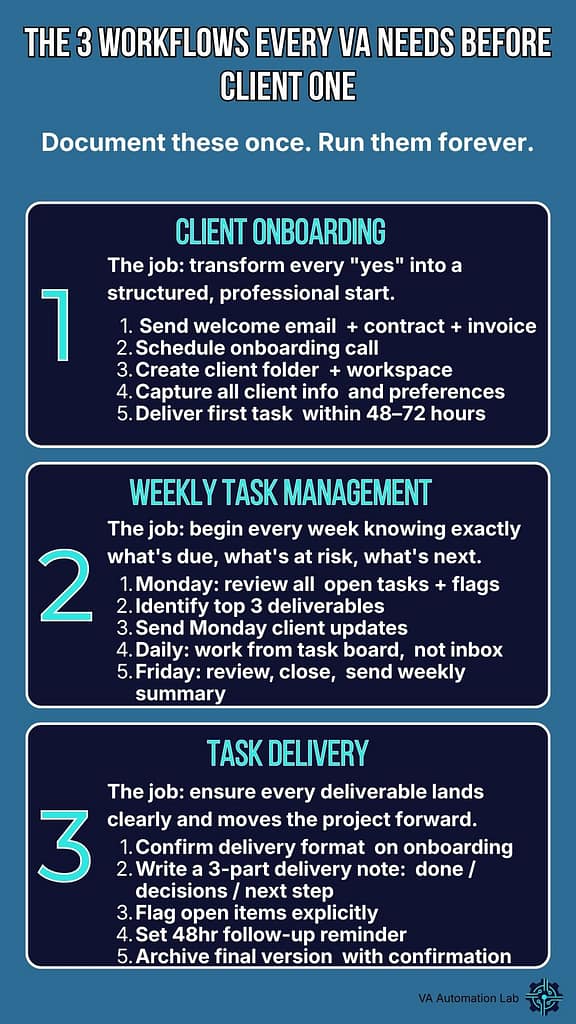
Workflow #1 — Client Onboarding
The job: transform a new “yes” into a structured, professional start, every single time, without having to think through the steps from scratch.
The moment a client confirms they want to work with you, a process should activate. Not a feeling of excitement followed by a flurry of improvised emails. A sequence. The same sequence, every time, that covers every essential step between signed contract and first deliverable, and that communicates professionalism before you’ve done a single hour of work.
The workflow, step by step:
Send the welcome email within 24 hours of confirmation, include the contract, the invoice for the first payment, and a clear next step. Don’t wait until everything is perfect. Send it.
Once the contract is signed, schedule the onboarding call. This call has one job: gather every piece of information you need to work effectively: brand voice, tools the client uses, communication preferences, recurring tasks, deliverable formats, feedback cycles, and access credentials. Document everything during or immediately after the call.
Create the client folder structure in Google Drive before the onboarding call, not after. Share it during the call and walk the client through it, this alone signals organizational maturity that most new VAs don’t demonstrate.
Set up the client workspace in your task management tool. Create a board or a dedicated section in Notion with every known task, deadline, and recurring item captured from the onboarding call.
Deliver the first small task within 48 to 72 hours of the onboarding call. Not because it’s urgent, because establishing delivery rhythm early sets the tone for the entire working relationship.
Send a brief end-of-week summary after the first week. Two to three sentences: what was completed, what is in progress, what is coming next. Clients who receive this without asking for it almost universally comment on it.
AI integration: use Claude to generate your welcome email template, onboarding call agenda, and first-week summary format. Do this once, refine after your first two clients, then run the same templates indefinitely. The setup investment is two hours. The return is every onboarding for the life of your business.
Where it lives: document this workflow in Notion or Trello as a checklist template. Duplicate it for every new client. Mark items complete as you go. Never rely on memory for a process this consequential.
Workflow #2 — Weekly Task Management
The job: begin every week knowing exactly what is due, what is at risk, and what needs client input, and end every week with a clear record of what shipped.
One of the things nobody explains when you’re figuring out how to become a virtual assistant is that time management is not instinctive, it requires a deliberate weekly rhythm, or time simply disappears. Tasks that seemed manageable on Monday become urgent on Thursday. Client expectations that were clear two weeks ago become ambiguous. Deliverables that were almost done get buried under reactive work and never quite finish.
The weekly task management workflow creates a container for the week, a defined start, a defined end, and a structure that keeps your work visible and your clients informed without requiring constant check-ins.
Monday — Weekly Open (30 minutes):
Review every open task across all active clients. Flag anything blocked, waiting on client feedback, missing access, unclear brief. Send a single, brief message to any client whose input you need to unblock work: specific, one question per message, with a clear deadline for their response.
Identify the three most important deliverables for the week, not the most urgent, not the most interesting, the most important relative to client expectations and upcoming deadlines. These three anchor your week. Everything else fills around them.
Send a Monday update to each active client. One to three sentences: what you’re working on this week, any items you’re waiting on from them, and one thing you need their input on if applicable. Proactive communication of this kind prevents the “just checking in” emails that interrupt your focus mid-week.
Daily — Task Execution:
Work from your task board, not your inbox. Reactive work, responding to messages, handling quick requests, gets batched into two defined windows per day, typically morning and late afternoon. The hours between those windows are protected for focused, high-quality output.
Log time against every task in Toggl. Not approximately, accurately. The data compounds over weeks and months into pricing intelligence you cannot get any other way.
Friday — Weekly Close (20 minutes):
Review what shipped this week against what was planned. Note the gap without judgment, understanding why it exists is more useful than feeling bad about it. Did tasks take longer than estimated? Did reactive work crowd out planned work? Did a client add scope mid-week? Each answer informs next week’s planning.
Send a Friday summary to each active client: what was completed, what carries into next week, and any outstanding items that need their attention before Monday. Keep it short. Clients don’t read long updates, they scan them for their name and their items.
Archive completed tasks. A clean board at the end of the week is not just aesthetically satisfying, it is a psychological signal that the week closed properly, which matters more than it sounds after six months of solo operation.
AI integration: use an AI tool to draft your Monday and Friday client update templates. Give it your typical week structure and ask for three variations at different levels of formality, you’ll match the tone to each client relationship. Once drafted, these templates require only light customization per client per week.
Workflow #3 — Task Delivery and Follow-Up
The job: ensure that every completed deliverable lands professionally, creates clarity, and moves the project forward without requiring a follow-up call to explain it.
How you deliver work is not a soft consideration. It is a core professional signal, and it is one of the clearest differentiators between beginner VAs who build strong client retention and those who struggle to get repeat work despite doing technically competent work.
Clients remember how it felt to receive your work. They remember whether it was clear, whether it was complete, and whether it made their life easier or generated more questions. A strong delivery workflow ensures the answer is consistently the former.
The workflow, step by step:
Before delivery, confirm the format. Not every client wants a Google Doc. Not every client wants a PDF. Not every client checks their Drive folder. Confirm the delivery format and channel during onboarding and document it, then use it every time without asking again.
Write a delivery note for every deliverable, regardless of size. Not a lengthy explanation, a structured three-part summary: what was done, any decisions made or assumptions taken during the work, and what the logical next step is. Four to eight sentences. This single habit eliminates the majority of “I wasn’t sure what this was” or “I didn’t know what to do with this” client responses.
Flag open items explicitly. If the deliverable has dependencies, waiting on client approval, requires their input before the next step can proceed, or contains a section left intentionally incomplete, state this clearly and specifically in the delivery note. Don’t leave clients to discover it by reading the document.
Set a follow-up reminder for every deliverable that requires client feedback. If you haven’t received a response within 48 hours, send a single, direct follow-up: “Just checking you received this, let me know if you have any questions or if there’s anything you’d like adjusted.” One follow-up. Then wait.
After feedback is received and revisions are complete, close the task with a brief confirmation and note the final version location in the shared folder. Every project should have a documented trail from brief to final delivery.
AI integration: use Claude to write your delivery note templates for different deliverable types, content drafts, research summaries, admin task completions, social media assets. The structure is the same each time; the language adapts to the deliverable and the client. Build five templates in week one and you’ll cover ninety percent of your delivery scenarios for the foreseeable future.
These virtual assistant workflows for beginners need to exist somewhere written before your first client, not as polished, comprehensive SOPs, but as rough checklists you can follow under pressure. The polish comes with repetition. What matters on day one is that the process exists in written form so that when your first client onboarding happens at the same time as a deliverable deadline and an invoicing question, you are executing a system rather than improvising under stress.
Document them now. Refine them after client three. By client five, they will run themselves.
System, tools, workflows, the infrastructure is in place. What determines whether that infrastructure actually sustains you through the first six months isn’t the quality of the tools or the elegance of the workflows. It’s the habits that govern how you show up to the work every day. That’s the next section, and it’s the one most beginner guides skip entirely.
6. Your First 30 Days as a Virtual Assistant: A Week-by-Week Action Plan
Everything covered in this guide so far is infrastructure. The system, the tools, the workflows, they exist to support the work, not replace the decision to start it. This section is where infrastructure becomes action.
The plan below is not a content calendar. It is not a vision board exercise. It is a week-by-week sequence of specific, concrete actions that move you from zero to operational, with a functional setup, a clear positioning, and active outreach, in thirty days. It assumes limited hours per week, a minimal budget, and no existing client base. It is designed to be executed alongside other commitments, not instead of them.
Follow the sequence. Resist the pull to jump ahead to week three before week one is complete. The order is deliberate.
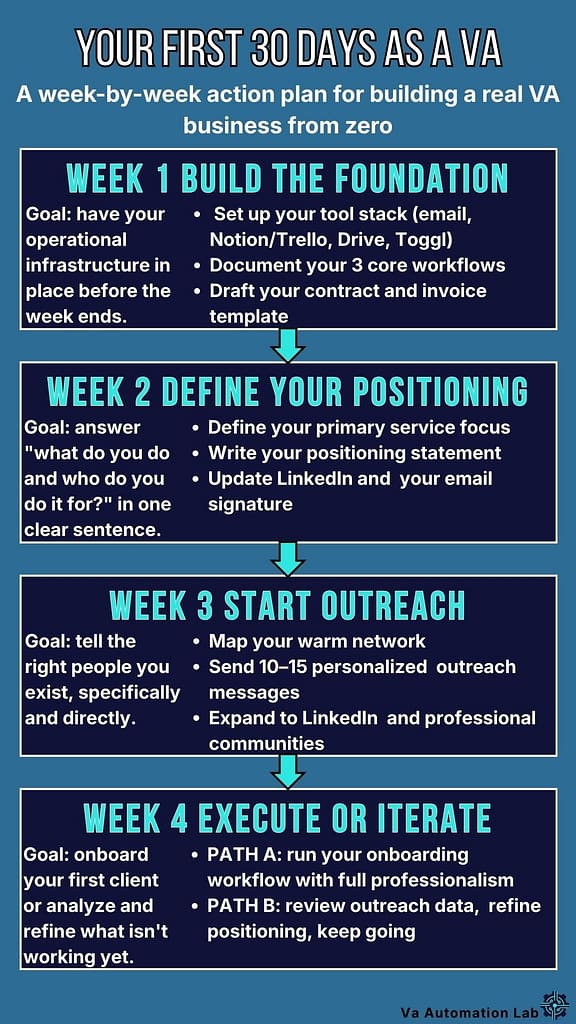
Week 1 — Build the Foundation
The goal: have your operational infrastructure in place and your three core workflows documented before the week ends.
This week is not about clients. It is not about positioning, social media, or personal branding. It is about building the system that will support everything that comes after, the operational foundation that makes learning how to become a virtual assistant with AI tools a practical, day-by-day process rather than an abstract goal.
Day 1 to 2 — Set up your operational stack: Create your professional email address. Set up your task management tool, Trello or Notion, and build a basic structure: one section or board per active client, one for admin, one for business development. Set up your Google Drive folder structure with a template client folder you can duplicate for every new engagement. Create your Toggl account and run your first time entry, even if it is just tracking this setup work.
Day 3 — Set up your AI tools: Create accounts for the beginner AI tools for virtual assistants you identified in Section 5, starting with Claude and ChatGPT. Do not spend this day reading about them. Use them. Give each one a real task from your setup week: ask Claude to draft your welcome email template, ask ChatGPT to generate a starter list of VA services you could offer based on your existing skills. Spend sixty to ninety minutes using both tools on practical tasks. This is your orientation.
Day 4 — Document your virtual assistant workflows for beginners: client onboarding, weekly task management, and task delivery, as rough checklists. Solid virtual assistant workflows for beginners do not need to be polished on day one. They need to exist in written form so that when the pressure of real client work arrives, you are executing a system, not building one from scratch under stress. Budget two hours. Use the workflow structures from Section 5 of this guide as your starting template and adapt them to your specific situation.
Day 5 to 7 — Contracts, invoicing, and your service menu: Set up Wave and create your first invoice template. Draft your service agreement, use Claude to generate a first version based on your specific services, then review it carefully and flag anything that needs professional input. Write a simple service menu: two to three service offerings, each with a clear description and a starting rate. You will refine this in week two, for now, having something written is what matters.
End of week 1 checkpoint: By Sunday of week one, you should have a functional email, a task management workspace, a folder structure, documented workflows, an invoice template, a draft contract, and a service menu. Your virtual assistant setup for beginners is only as strong as its weakest element. If any of these are missing at the end of week one, week two starts with completing them, not skipping them.
Week 2 — Define Your Positioning
The goal: be able to answer “what do you do and who do you do it for?” in one clear sentence, and have the supporting materials to back it up.
Positioning is not branding. Part of learning how to become a virtual assistant is understanding that a logo, a color palette, and a personal brand strategy are not what land your first client. Clarity of offer is. You need clarity on what you offer, who you offer it to, and why someone should hire you over another VA, expressed in plain, direct language.
Day 8 to 9 — Define your service focus: Look at your service menu from week one and ask a harder question: which of these services do you do best, and which type of client benefits most from them? You do not need a rigid niche at this stage, but you do need a primary direction. A VA who “does everything for everyone” is harder to refer, harder to remember, and harder to price confidently than one who has a clear primary offer.
Use an AI tool to pressure-test your positioning: describe your skills and experience to Claude and ask it to identify the two or three most compelling service offerings based on what you’ve described. Compare its output to your instinct. The combination is usually more useful than either alone.
Day 10 to 11 — Write your core positioning statement: One sentence. “I help [type of client] with [specific outcome] so they can [result that matters to them].” This is not your elevator pitch, it is your internal compass. Every outreach message, every service description, every client conversation should be consistent with it.
If you find the sentence impossible to write, the positioning isn’t clear yet. Spend another day on it. This is not a step to skip or approximate, vague positioning produces vague outreach, which produces no clients.
Day 12 to 14 — Update your materials: Revise your service menu with your refined positioning. Update your email signature with your professional title and primary service. If you have a LinkedIn profile, update the headline and about section to reflect your positioning clearly. If you don’t have a LinkedIn profile, create one, it is the single highest-return professional presence for a VA at the beginning stage, and it takes less than two hours to build a functional one.
End of week 2 checkpoint: By Sunday of week two, you should have a clear positioning statement, a refined service menu with rates, a professional email signature, and an updated or newly created LinkedIn profile. Outreach begins next week, these materials need to be in place before it does.
Week 3 — Start Outreach
The goal: tell the right people that you exist, specifically and directly, and begin building a pipeline of potential first clients.
This is the week most beginners delay indefinitely, including those who spent weeks researching how to become a virtual assistant with AI tools and built a perfect system they haven’t yet shown to a single potential client. The setup isn’t quite finished. The positioning could be sharper. The website isn’t ready yet. These are legitimate concerns used as illegitimate reasons to avoid the discomfort of putting yourself in front of people.
The website can wait. The outreach cannot.
Day 15 to 16 — Map your warm network: Before any cold outreach, identify every person in your existing network who either fits your ideal client profile or is likely to know someone who does. Former colleagues, managers, clients from previous roles, professional contacts, people you’ve collaborated with in any capacity. Write the list without filtering, you can prioritize later.
Warm outreach converts at a significantly higher rate than cold outreach, particularly in the first ninety days. Your existing network has context for who you are and some baseline of trust. Strangers have neither. Start warm.
Day 17 to 19 — Send your first outreach messages: Write personalized outreach messages to your top ten to fifteen warm contacts. Not a broadcast email. Not a copy-paste template sent to everyone simultaneously. Individual messages that acknowledge your relationship, state clearly what you’re doing now, describe specifically the kind of client you’re looking for, and include a direct, low-friction ask, typically a referral, an introduction, or a conversation if they or someone they know might be a fit.
Use Claude to help you draft the first two or three messages, then adapt the tone and language to each relationship yourself. The AI handles the structure; you handle the human element.
Day 20 to 21 — Expand to secondary outreach: After warm outreach is sent, expand to secondary channels: relevant LinkedIn connections you haven’t contacted directly, professional communities or groups where your ideal clients are present, and any industry-specific forums or Slack groups where you can add value and build visibility over time. This is longer-term pipeline work, don’t expect immediate responses. Do it consistently.
End of week 3 checkpoint: By Sunday of week three, a minimum of ten outreach messages should be sent and logged in your task management tool with follow-up reminders set. Responses will vary. Some contacts will reply immediately. Many will not reply at first. The pipeline is not a switch, it is a process that begins in week three and continues indefinitely.
Week 4 — Execute or Iterate
The goal: if a first client has expressed interest, execute your onboarding workflow with full professionalism. If not, analyze what isn’t working and adjust with specificity.
This week splits into two paths depending on where your outreach has landed.
Path A — You have a first client or a warm lead: Run your client onboarding workflow exactly as documented in week one. Do not improvise. Do not skip steps because the client seems informal or the project seems small. Run the workflow. Note what works and what needs adjustment. Deliver your first task on time, with a clear delivery note, in the agreed format.
After the first week of working together, send a brief check-in: “We’re one week in, is everything working well on your end? Anything you’d like to adjust?” This single message, sent proactively, generates more client confidence than almost any other action in the first month.
Path B — No client yet: This is normal. Most first clients arrive between weeks three and eight, not week one. The absence of a client at week four is not a signal to rebuild your positioning from scratch or add ten new tools to your stack.
Analyze your outreach with specificity: how many messages were sent, how many received responses, what the responses said. If response rates are low, the positioning or the message may need refinement. If responses were positive but didn’t convert to conversations, the ask may need to be more specific or lower-friction.
Use Claude to review your outreach messages and identify where they could be stronger, give it the message and the context and ask for honest, specific feedback.
Continue outreach. Expand to new contacts. Add value in professional communities. Refine one variable at a time and track what changes.
End of week 4 checkpoint: By the end of week four, you have a functional setup, a clear positioning, active outreach in progress, and either a first client engagement underway or a specific, evidence-based iteration plan for weeks five and six. Both outcomes are valid. Only one thing is not acceptable at week four: having stopped.
Thirty days is enough time to build a real foundation. It is not enough time to build a full client roster, a polished brand, or a completely refined system. What it is enough time for is to create the conditions in which those things become possible, and to do so without the false starts, tool overload, and positioning confusion that slow most beginners down for months before they find their rhythm.
The system is built. The tools are in place. The outreach has started. Everything from here is iteration.
A strong first thirty days creates momentum. What sustains that momentum, and prevents it from collapsing under the weight of real client work, is a set of daily and weekly habits that most guides don’t cover because they’re not as interesting to write about as tools and frameworks. They are, however, the difference between a VA business that grows steadily and one that stalls at month three.
7. The Habits That Separate Virtual Assistants Who Grow from Those Who Burn Out
Tools can be replaced. Workflows can be refined. Habits are the one component of a VA business that cannot be outsourced, automated, or fixed retroactively once they’ve caused damage.
Burnout in a solo VA business rarely arrives as a single breaking point. It accumulates. It looks like a calendar that has no white space. A task list that grows faster than it shrinks. A creeping sense that you are managing your business rather than doing the work you were hired to do. And then, somewhere between month two and month five, a Sunday evening that feels indistinguishable from a Monday morning, and the realization that something needs to change.
The habits below are not productivity hacks. They are structural decisions about how you work, and they apply whether you are just beginning to figure out how to become a virtual assistant with AI tools or you are three months in and starting to feel the weight of an unexamined schedule.
Habit #1 — Protect Your Deep Work Time Like a Client Commitment
Reactive work feels productive. Answering messages, responding to quick requests, clearing the inbox, all of it generates a sense of momentum that is almost entirely illusory. Reactive work keeps you busy. It does not move the work forward.
The single most important structural habit for a solo VA is the deliberate separation of reactive and focused work time. Not as an aspiration, as a daily, non-negotiable practice.
In practical terms: identify the two to three hour block in your day when your focus is naturally at its highest. For most people this is mid-morning. Protect that block for the work that requires genuine concentration, the deliverables, the complex tasks, the work that actually generates the value your clients are paying for.
Email and messages get checked and answered in two defined windows, typically early morning and mid-afternoon, and not in between.
This is not about being unresponsive. It is about being honest with yourself that no meaningful work has ever been produced in the gaps between notifications. Set your response time expectations with clients during onboarding, “I check and respond to messages twice a day, typically by 10am and 4pm”, and then honor it. Clients who understand your working structure respect it. Clients who don’t are a separate problem that no productivity habit can solve.
The AI connection: use an AI tool to batch-process your reactive work efficiently during your designated windows. Draft five client update messages in thirty minutes instead of one every hour throughout the day. Reactive work done in batches is reactive work that doesn’t colonize your entire schedule.
Habit #2 — Underpromise Consistently, Then Overdeliver Deliberately
The temptation to say yes to everything is highest when you’re building a client base and every opportunity feels fragile. Anyone learning how to become a virtual assistant eventually hits this wall, and how you respond to it determines whether your first six months build momentum or drain it. The irony is that overpromising, committing to more than you can deliver well, in the time available, at your current capacity, is the fastest route to the outcome you’re trying to avoid: losing client confidence.
Underpromising is not about being conservative or managing expectations downward. It is about being accurate. Accurate about how long tasks take. Accurate about your current capacity. Accurate about what you can commit to without compromising the quality of everything else on your plate.
The operational version of this habit is simple: when a client asks for a deliverable by Thursday, and Thursday is achievable but only just, say Friday. Then deliver Thursday. The client’s experience, receiving work a day ahead of the promised date, is disproportionately positive relative to the effort. That experience becomes trust. Trust becomes retention. Retention, for a solo VA, is the single highest-leverage business outcome there is.
Conversely: deliver consistently late, even slightly, and no tool, workflow, or AI stack will compensate for the erosion of confidence that follows. Timeline reliability is the foundation on which everything else in a client relationship is built.
The practical rule: add twenty percent to every time estimate you give a client for the first three months. As your time tracking data accumulates and your estimates become more accurate, you can tighten that buffer. Until then, it is insurance.
Habit #3 — Document as You Go, Not as You Plan
Most beginners who are learning how to become a virtual assistant with AI tools intend to document their processes. They plan to write SOPs. They bookmark articles about knowledge bases. And then real client work begins; documentation moves permanently to the bottom of the list, where it stays until the day they need to hand off a task, onboard a subcontractor, or explain to a new client how a recurring process works, and realize they have nothing written down.
The habit that prevents this is not a documentation sprint. It is a documentation reflex, the practice of capturing process as you execute it, not after.
In practical terms: the first time you do any recurring task for a client, open a Notion page alongside it and write the steps as you perform them. Not a polished SOP, a rough list of what you did, in order, with any decision points or variations noted. It takes an additional ten to fifteen minutes. It produces a document that, over three or four iterations, becomes a genuine SOP without ever requiring a dedicated documentation session.
By month six, this habit produces an operational knowledge base that makes you more consistent, easier to scale, and significantly more valuable to clients who are thinking about longer-term engagements. It also makes your business more resilient, a documented process can survive a bad week, a health issue, or a capacity crunch in ways that a process that only exists in your head cannot.
AI integration: after completing a new task type for the first time, describe what you did to Claude and ask it to structure your rough notes into a clean SOP format. You provide the raw process knowledge, the AI provides the structure and language. The result is a professional document in a fraction of the time a manual write-up would require.
Habit #4 — Review and Simplify Your Stack Every 90 Days
Tool sprawl is the slow, silent drain that catches almost everyone learning how to become a virtual assistant, it doesn’t feel like a problem until you’re paying for eight tools when five would cover everything, and spending thirty minutes a week managing them instead of using them. It accumulates in small increments: a new tool tried for one project, a subscription started during a free trial that never got cancelled, a platform adopted because a client preferred it that is now running in the background serving no one.
Three months in, the accumulation is already visible in your subscriptions. A year in, you have forgotten what half of them do.
The 90-day review is a simple, structured habit: at the end of every quarter, open your subscriptions, your browser bookmarks, and your task management workspace and ask one question about every tool in your stack, is this actively saving me time or directly serving a client need right now? If the answer is not an immediate yes, remove it. Not “maybe when things get busier.” Remove it.
This habit does three things. It keeps your overhead low, which matters when you’re in the early months and every subscription is a line item against revenue you’re still building. It keeps your cognitive load manageable, because every tool in your stack is a system you have to maintain a mental model of. And it forces the discipline of simplicity that is, ultimately, what makes a beginner VA setup sustainable over time.
The rule: add a new tool to your stack only when you have a specific, recurring problem that your current stack demonstrably cannot solve. Not because it looks useful. Not because someone recommended it in a Facebook group. Because you have a real gap and this tool closes it.
Habit #5 — Separate Your Business Brain from Your Delivery Brain
This is the habit that most solo operators discover late, after the cost of not having it is already visible in their work quality and their mental state.
As a VA, you are simultaneously a service provider and a business owner. The delivery brain does the work, it executes tasks, serves clients, produces deliverables. The business brain manages the operation, it tracks revenue, evaluates clients, makes pricing decisions, reviews workflow efficiency, and thinks about where the business is going.
These two modes of thinking require different mental states and different types of time. Mixing them, trying to think strategically about your business in the same hours you’ve committed to client work, produces neither good client work nor good business thinking. It produces a low-grade background anxiety that is one of the most consistent early indicators of approaching burnout.
The practical solution, one that belongs in every virtual assistant setup for beginners from month two onwards, is a weekly business review, separate from client work time, that gives the business brain a defined container and replaces background anxiety with structured awareness. Thirty to forty-five minutes, same day every week, Friday afternoons work well because the working week is visible in its entirety.
In that window: review your revenue against your targets, evaluate how your client relationships are tracking, assess whether your pricing still reflects your actual capacity and output quality, and identify one thing you want to improve in the coming week.
That single habit, a weekly business review, protected and consistent, replaces the background anxiety of an unexamined business with the grounded awareness of one you actually understand.
None of these habits are dramatic. None of them will feel transformative on day one. What they do, practiced consistently from the beginning, is prevent the accumulation of the small structural problems, overcommitment, tool sprawl, undocumented processes, reactive work patterns, that compound quietly until the business feels harder than it should.
The most sustainable VA business is not the one with the best tools or the most sophisticated workflows. It is the one run by someone who has learned how to protect their time, their energy, and their standards, consistently, before they need to.
The system is complete. You have the setup, the AI tools, the workflows, the action plan, and the habits that make it sustainable. What remains is knowing where to go from here, the resources on this site that expand each component of this guide into the depth it deserves.
8. What to Explore Next: Your Complete Resource Map
This guide gives you the foundation for how to become a virtual assistant with AI tools from the ground up. Everything below expands one specific component of that foundation into the depth it deserves, practical, specific, and built around the same AI-first approach that runs through everything on this site. Use this as your map: return to it as you progress through your first weeks and months, and follow the links that match where you are right now.
If you want the complete picture first
AI Tools for Virtual Assistants: The Complete Practical Guide (2026) The pillar resource this site is built around. If the AI tools section of this guide gave you a starting point, this guide gives you the full landscape, every tool category, every use case, and a framework for deciding what belongs in your stack at each stage of your VA business.
Read this when: you’ve completed your week one setup and want to evaluate whether your tool choices are optimal for your specific service mix.
AI Tools
How Virtual Assistants Can Start Using AI Without Technical Skills
The practical entry point for anyone who understands conceptually how to become a virtual assistant with AI tools but finds the technology unfamiliar in practice. No jargon, no assumed knowledge, just a clear path to AI fluency from zero.
Read this when: you’ve set up Claude or ChatGPT but aren’t yet getting consistently useful output from either.
AI Tools
Best AI Tools for Managing Emails as a Virtual Assistant
Email is where most VA hours quietly disappear. Among the most immediately useful beginner AI tools for virtual assistants are those that tackle it directly, applied to both your inbox and your clients’.
Read this when: communication management is taking more time than it should and you want a specific solution.
AI Tools
Best AI Scheduling Tools for Virtual Assistants
Scheduling is one of the most automatable tasks in a VA workflow and one of the most commonly done manually. This guide covers the tools that eliminate the back-and-forth and return the hours to work that actually requires your judgment.
Read this when: calendar management is a recurring part of your client work and you’re still handling it manually.
AI Tools
Notion AI for Virtual Assistants: Complete Guide
If you’ve chosen Notion as your primary workspace, this guide is the natural next step, a complete walkthrough of how to integrate Notion AI into your daily workflow for maximum output with minimum overhead.
Read this when: you’re actively using Notion and want to move from basic task management to a fully AI-assisted workspace.
Workflows
Best Automation Workflows for Virtual Assistants (Beginner → Advanced)
Starts where virtual assistant workflows for beginners should start, your first Zapier automation, and scales through to multi-step systems that run your most repetitive processes entirely in the background. Structured as a progression so you can enter at your current level.
Read this when: your three core workflows are documented and you’re ready to start automating the steps that repeat most often.
Workflows
How to Automate Client Onboarding for Virtual Assistants: Complete Workflow Guide
A deep dive into the client onboarding workflow introduced in Section 6 of this guide, with full automation sequences, tool integrations, and templates you can implement immediately.
Read this when: you’ve completed your first two or three manual onboardings and are ready to systematize the process.
Workflows
How Virtual Assistants Can Automate Repetitive Tasks (2026 Guide)
The strategic guide to identifying which tasks in your workflow are worth automating, which tools handle each category best, and how to build automation incrementally without breaking the work you’re already delivering.
Read this when: you’re past the beginner stage and starting to feel the ceiling of manual-only operation.
Workflows
Zapier vs Make for Virtual Assistants: The Complete Comparison Guide
If you’re ready to move beyond Zapier’s free tier or want to understand whether Make is a better fit for your automation needs, this guide walks through both platforms in direct comparison, with VA-specific use cases for each.
Read this when: you’ve built your first Zapier automations and want to evaluate whether to stay or switch.
Productivity
How to Manage Multiple Clients as a Virtual Assistant Using AI
The transition from one client to three is where most VA systems break. This guide covers how to use AI tools to maintain quality, communication, and sanity when your workload multiplies without your hours expanding proportionally.
Read this when: you have two or more active clients and are starting to feel the strain of context-switching between them.
Productivity
AI Powered Productivity System for Virtual Assistants
A complete, integrated productivity system built specifically for solo VA operators, combining task management, AI tools, and time blocking into a daily structure that scales without requiring more hours.
Read this when: your setup is functional but your days still feel reactive and fragmented.
Productivity
ClickUp for Virtual Assistants: Setup Guide & Templates
If you’ve outgrown Trello and want a more powerful project management environment without the learning curve of a full enterprise tool, this guide walks through ClickUp’s setup for a solo or small VA operation, with templates you can import directly.
Read this when: your client roster has grown and your current task management tool is showing its limits.
Everything else on this site
Blog — Practical guides, tool updates, and workflow insights published regularly. Filtered for relevance to working VAs, not general productivity content.
About — The experience and perspective behind this site, and why an AI-first approach to virtual assistant work matters more today than it ever has.
Affiliate Disclosure — Full transparency on how this site works, which links are affiliate links, and how that relationship affects, and does not affect, the recommendations on these pages.
You don’t need to read everything here before you start. You need to start, then return to the resources that match the specific problem or opportunity you’re facing at each stage. The guide you need at week one is different from the one you need at month three. Use this map accordingly.
9. Frequently Asked Questions About How to Become a Virtual Assistant with AI Tools
Do I need experience to become a virtual assistant?
No, but you need transferable skills. Experience as a VA specifically is not a prerequisite for landing your first client. What clients hire for is the ability to execute tasks reliably and communicate professionally. If you have a background in admin, customer service, writing, social media, project coordination, or any role that required organization and communication, you already have the foundation.
The honest answer is that most clients hiring a beginner VA are not looking for a seasoned professional, they are looking for someone organized, responsive, and capable of learning their systems quickly. What matters is how you present your skills, how professionally you operate from day one, and whether your setup signals that you know what you’re doing. This guide exists to help you build exactly that signal, and to show you how to become a virtual assistant with AI tools in a way that makes your professionalism visible from day one, regardless of your starting point.
How much can I charge as a beginner virtual assistant?
Beginner VA rates today typically range from $15 to $35 per hour depending on the services offered, the market you’re targeting, and the complexity of the work. General admin tasks sit at the lower end of that range. Specialized services, social media management, content creation, email marketing support, or anything requiring platform-specific expertise, command higher rates from the start.
A few principles worth internalizing early: your rate is not just a reflection of your experience, it is a signal of your professionalism. Rates that are too low attract clients who will treat your work accordingly.
Set a rate you can deliver on with confidence, communicate it without apology, and raise it as your results and client base grow. Many VAs move to project-based or retainer pricing within the first six to twelve months, which is significantly more predictable than hourly billing for both parties.
What services should I offer as a beginner virtual assistant?
The most effective answer to this question, for anyone learning how to become a virtual assistant with AI tools, is the same: start with services that map directly to skills you already have. The beginner VA mistake is offering everything to everyone in an attempt to maximize appeal, the actual effect is the opposite. A VA with a clear, specific offer is easier to refer, easier to price, and easier for a potential client to evaluate.
Common starting services for beginner VAs include email and calendar management, research and data entry, social media scheduling, content editing, client communication support, and basic project coordination. If you have a background in a specific industry (healthcare, legal, real estate, e-commerce) that context is itself a differentiator worth positioning around.
Choose two or three services you can deliver well right now. Expand from there as you build confidence and client relationships. A focused beginner beats an unfocused generalist every time.
How do I get my first client as a virtual assistant?
Warm outreach, telling people in your existing network that you are now available as a VA, converts significantly better than cold outreach or platform-based job hunting for most beginners. Former colleagues, managers, clients from previous roles, and professional contacts all represent potential clients or referral sources who already have some basis for trusting you.
The process is straightforward: identify ten to fifteen people in your network who either fit your ideal client profile or are likely to know someone who does. Write a personalized message, not a broadcast email, that explains specifically what you now offer and what kind of client you are looking for. Include a clear, low-friction ask: a referral, an introduction, or a conversation if they or someone they know might be a fit.
Most first VA clients come through personal referrals within the first sixty to ninety days. Before expanding to platforms, make sure your virtual assistant workflows for beginners are documented and ready, a client acquired through Upwork or Fiverr who receives a disorganized onboarding experience rarely becomes a repeat client.
Freelance platforms are viable but slower, and they reward operational maturity from the first interaction. They require building a reputation from zero in a competitive environment. Start with your network, then expand to platforms once you have at least one client relationship and one testimonial to anchor your profile.
Do I need a website to start as a virtual assistant?
No, a website is useful but not required to land your first client. Many VAs build a functional client base before building a website, relying instead on LinkedIn, direct outreach, and referrals. A professional LinkedIn profile with a clear headline, a specific service description, and a visible way to contact you serves the same function as a basic website for most early-stage outreach.
That said, a simple one-page website becomes a natural extension of your virtual assistant setup for beginners once you begin generating inbound interest, it gives referrals a professional destination and your services a permanent home. It does not need to be elaborate. A clear homepage, a services page, and a contact form cover everything a beginner VA needs online.
Build it when you have the time to do it properly. One of the clearest signs that you understand how to become a virtual assistant is that you start outreach before your website is ready. Don’t let its absence stop you.
What AI tools do I need as a beginner virtual assistant?
The beginner AI tools for virtual assistants that deliver the most immediate value with the least learning curve cover five categories: an AI writing tool, an in-workspace AI layer, a call transcription tool, an automation platform, and a task-integrated AI assistant.
You do not need all five from day one. Start with one AI writing tool, Claude or ChatGPT, and use it consistently across your real work for the first two to three weeks before adding anything else. The goal is building fluency with one tool before expanding the stack. An AI tool you use well is worth ten tools you use occasionally.
The full breakdown of each tool, its specific use cases for VA work, and its cost structure is covered in the Beginner AI Tools section of this guide.
How long does it take to get clients as a new virtual assistant?
Most beginners land their first client between weeks three and eight from starting active outreach, not from starting research or setup. This timeline varies based on how targeted and consistent your outreach is, how clear your positioning is, and whether you are starting from a warm network or entirely cold.
The variables that most reliably accelerate this timeline: a specific, clear service offer rather than a generic “I do everything” positioning; outreach that starts with warm contacts rather than cold platforms; and a professional setup, contract, invoice template, onboarding workflow, that signals you are ready to start the moment a client says yes.
Waiting for the perfect setup before starting outreach is the single most common reason this timeline extends to months rather than weeks. The setup, the virtual assistant workflows for beginners, and the outreach should all run in parallel from week one, not sequentially.
Do I need to pick a niche to start as a virtual assistant?
Not immediately, and this is true whether you are at day one of learning how to become a virtual assistant with AI tools or three months into your first client relationships. Direction matters even if a defined niche doesn’t. You don’t need to position yourself as a “VA for SaaS companies” or a “VA for health coaches” on day one. You do need to be able to articulate clearly what you offer and who benefits most from it.
The practical reason to develop a niche over time is economic: specialized VAs command higher rates, receive more targeted referrals, and build authority in a specific area faster than generalists. A VA known for a specific thing is more referable than a VA known for everything.
The realistic path for most beginners: start with your strongest transferable skills and a general positioning, take the clients that come from your initial outreach, and pay attention to which types of work and which types of clients energize you most. Your niche often emerges from the first three to five clients rather than being chosen in advance.
Can I use AI tools as a virtual assistant without technical skills?
Yes, and this is one of the most significant shifts in the VA landscape today. Part of what makes this an ideal moment to learn how to become a virtual assistant is that the leading AI tools are now designed for plain-language interaction, no technical background required. You do not need coding knowledge, technical training, or prior experience with AI to get useful output from Claude, ChatGPT, or Notion AI.
What you do need is the ability to give clear, specific instructions, which is a skill every VA already uses with clients. The same communication clarity that makes you effective at interpreting a client brief makes you effective at prompting an AI tool. The learning curve is real but short: most VAs reach a functional level of AI fluency within two to three weeks of consistent daily use.
The guide How Virtual Assistants Can Start Using AI Without Technical Skills walks through this process in detail if the technology still feels unfamiliar.
Is the virtual assistant market too saturated to start in 2026?
No, but the undifferentiated middle of the market is crowded. VAs who offer generic admin services at low rates to any client who will hire them face significant competition. VAs who bring a specific skill set, operate with documented systems, and integrate AI tools into their workflow from the start occupy a different position in the market entirely.
The demand for professionals who know how to become a virtual assistant with AI tools, and who actually operate that way daily, is growing faster than the supply of people who fit that description.
The question is whether you are entering it as a commodity or as a professional with a clear offer, a virtual assistant setup for beginners that signals operational maturity, and the tools to back it up. This guide is designed to make the answer to that question obvious.
10. You Have Everything You Need to Start. Start.
The gap between knowing how to become a virtual assistant and actually working as one is almost never a skills gap. It is not a tools gap, a confidence gap, or a market gap. It is a starting gap, the space between having a plan and executing the first step of it.
This guide has given you the complete answer to how to become a virtual assistant with AI tools: the system, the stack, the workflows, and the habits. What it cannot give you is the decision to act on it.
Here is what is true about the virtual assistant market today: the demand for skilled, organized, AI-literate VAs is growing faster than the supply of professionals who fit that description. Businesses of every size are looking for support that goes beyond task execution, they want VAs who understand how to use AI tools to work smarter, who bring documented workflows to the relationship from day one, and who operate with the reliability and professionalism of someone who has built a real system around their work.
That is exactly the profile this guide has helped you build.
You now understand how to become a virtual assistant with AI tools in practice, not in theory. You have a functional virtual assistant setup for beginners that covers every operational category without unnecessary complexity. You have a curated stack of beginner AI tools for virtual assistants that changes your effective capacity from day one. You have three core virtual assistant workflows for beginners that bring consistency to your client relationships before those relationships begin. You have a 30-day action plan with a specific sequence and weekly checkpoints. And you have the habits that will determine whether the momentum you build in month one compounds into something sustainable or quietly collapses under the weight of avoidable mistakes.
None of it works until you start.
The only question that matters now:
Not “is my setup perfect?” It isn’t, and it doesn’t need to be. Not “do I have enough experience?” You have enough to deliver value to a first client. Not “what if it doesn’t work?” It won’t work exactly as planned. It will work better than not starting.
The question is: what is the first action from Week 1 of the 30-day plan that you can complete today?
Not this week. Today.
If the answer is “set up my professional email”, do that. If it is “open Notion and build my first board”, do that. If it is “spend sixty minutes actually using Claude on a real task”, do that.
Small, specific, today. That is how a VA business starts. Not with a perfect launch, but with a first step taken before the second-guessing begins.
You’ve read the complete guide on how to become a virtual assistant with AI tools. Now build the system.
→ Start with the AI Tools Guide The complete resource for choosing and integrating the right AI tools into your VA workflow from day one.
→ Explore the Automation Workflows When your core system is in place, this is where you go to make it faster, more consistent, and less dependent on manual effort.
→ Read the Blog Practical, specific, regularly updated, built for VAs who are in the work, not just thinking about it.