
Best AI Writing Tools for Virtual Assistants (2026)
Disclosure: This article contains affiliate links. If you purchase through them, VA Automation Lab earns a commission at no additional cost to you. All tools are evaluated independently.
Virtual assistants who handle writing-heavy work (client emails, SOPs, proposals, newsletters, social copy) now operate with a clear competitive advantage over those who don’t use AI writing tools. The advantage is not marginal. A VA who uses the right AI tools consistently produces polished first drafts in two to five minutes per document. The same VA without them spends fifteen to thirty minutes writing from scratch, and still has to self-edit.
The problem is not a shortage of options. It is noise: too many tools marketed to too many audiences, with pricing that changes quarterly and capabilities that shift with every model update. Most “best AI writing tools” roundups are outdated within six months and were never calibrated for VA-specific work types in the first place.
This guide fixes that. Every AI writing and content tool that earns a place in a VA workflow — reviewed and grouped by the job it does, from premium drafting to budget generation, SEO content, writing automation, and bulk image work. A task routing table that tells you exactly which tool to use for each writing task. And a practical guide to building a writing stack that covers the complete VA workflow without unnecessary cost.
What this guide covers:
- The five categories of AI writing and content tools, and why the distinction matters before you spend anything
- The best AI writing tools for VAs — premium, budget, SEO content, automation, and content ops — reviewed for VA-specific use cases
- Verified pricing comparison table
- Task routing table: which tool for which writing task
- How to build a VA writing stack
- Four prompt templates for the highest-frequency VA writing tasks
- Step-by-step setup workflow
Quick Answer: The Best AI Writing Tools at a Glance
The best AI writing tools for virtual assistants in 2026 fall into five categories: generative writers (Claude and ChatGPT for quality, Rytr for budget), SEO content tools (Frase), quality and readability review (Grammarly, Hemingway), writing automation and content ops (TextExpander, AltText.ai), and embedded workspace AI (Notion AI). Most VAs start with one generative tool plus Grammarly, then add a specialist tool — SEO, automation, or content ops — to match their specific client work.
In this article, we compare the top AI writing tools for virtual assistants so you can find the right fit for your workflow — for the full system covering workflows, brand voice management, and service packaging, see the Complete AI Writing and Content Creation Guide for Virtual Assistants.
For a complete overview of the best AI tools for Virtual Assistants, you can read the main guide: Tools for Virtual Assistants: The Complete AI Systems & Software Guide
Get the Free AI Toolkit for Virtual Assistants
This guide covers the best AI writing tools worth knowing, the free toolkit gives you the pre-formatted and ready to use prompt templates, plus the complete task routing guide that maps every VA writing task to the right tool.
One download. Every writing decision already made.
Table of Contents
1. What AI Writing Tools Do for VAs
The practical benefit of AI writing tools for virtual assistants is not that they write better than you. It is that they eliminate the blank-page step, the most time-consuming part of any writing task, and replace it with a usable first draft you edit rather than create.
Applied consistently, the time savings are substantial: a client update email that takes fifteen minutes to write from scratch takes two to three minutes to prompt, review, and send. A 1,500-word SOP that takes an hour to draft manually takes ten to fifteen minutes with AI assistance. Across a full client week, the compounded time recovered is measured in hours, not minutes.
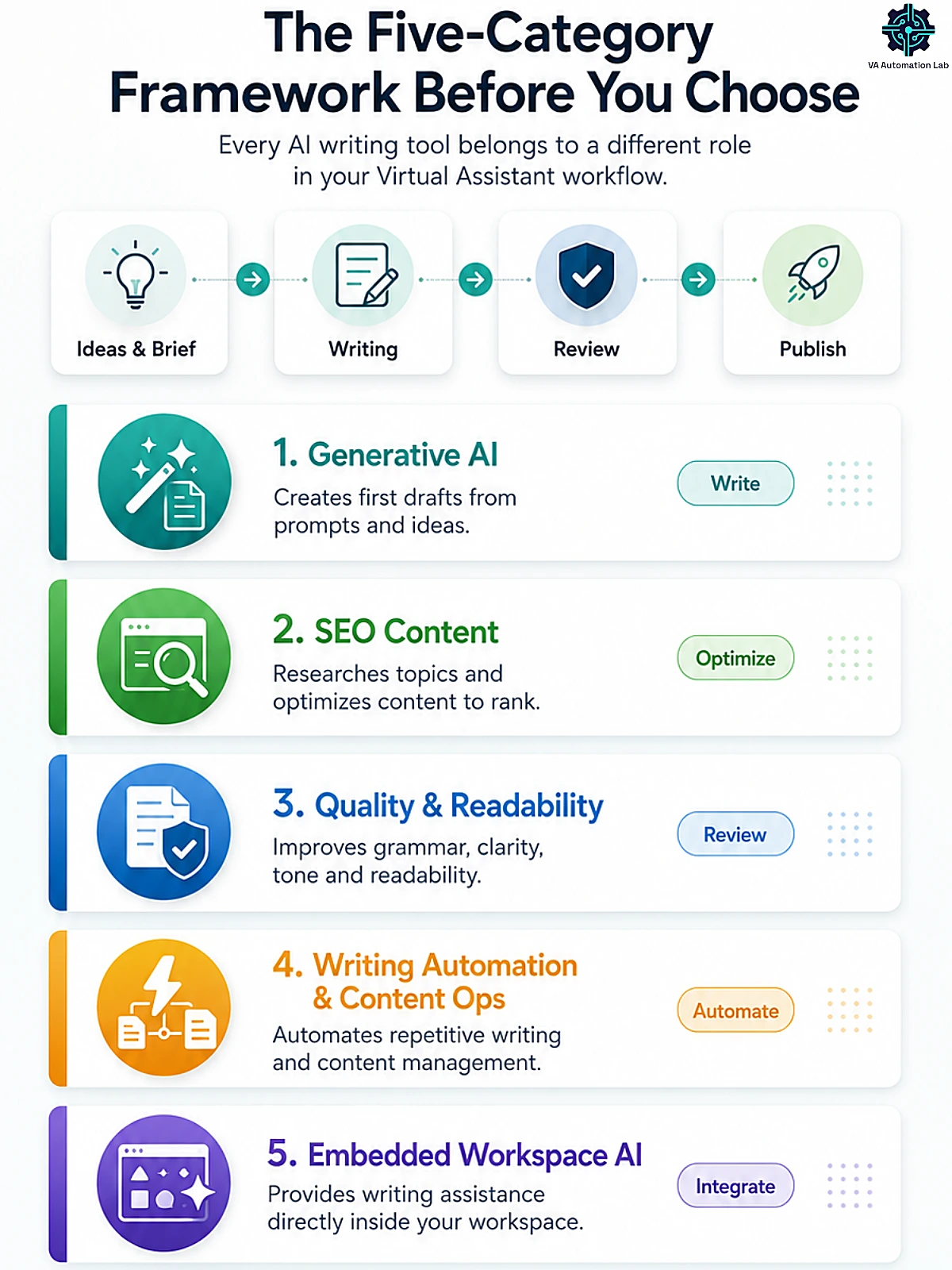
AI writing and content tools fall into five categories, and understanding the difference before choosing any of them is the most important step in this guide. Three are foundational:
Generative AI writing assistants (Claude, ChatGPT, Jasper, Rytr) take a prompt, a description, brief, or bullet points, and generate text output. They solve the blank-page problem. These are the tools that write the first draft.
Quality review tools (Grammarly, Hemingway Editor) do not generate content. They analyze existing text and flag issues: grammar errors, tone inconsistencies, sentence complexity, passive voice overuse. They function as a quality layer applied after generation, and they are what separates AI-assisted content that reads as professional from content that reads as AI-assisted.
Embedded workspace AI (Notion AI) operates inside a productivity platform where the VA already works. Writing assistance, summarizing pages, generating SOP drafts, filling templates, happens without switching to a separate tool. The advantage is tight integration; the constraint is that AI quality is lower than standalone LLMs, and full AI access now lives on the Notion Business plan.
Two further categories matter for specific VA work. SEO content tools (Frase) don’t just write — they research what’s already ranking, build a data-driven brief, and score your draft so the content ranks; essential for VAs producing client blog content. Writing-automation and content-ops tools (TextExpander, AltText.ai) remove repetitive writing and manual content tasks entirely — expanding canned responses with a keystroke, or generating image alt text in bulk.
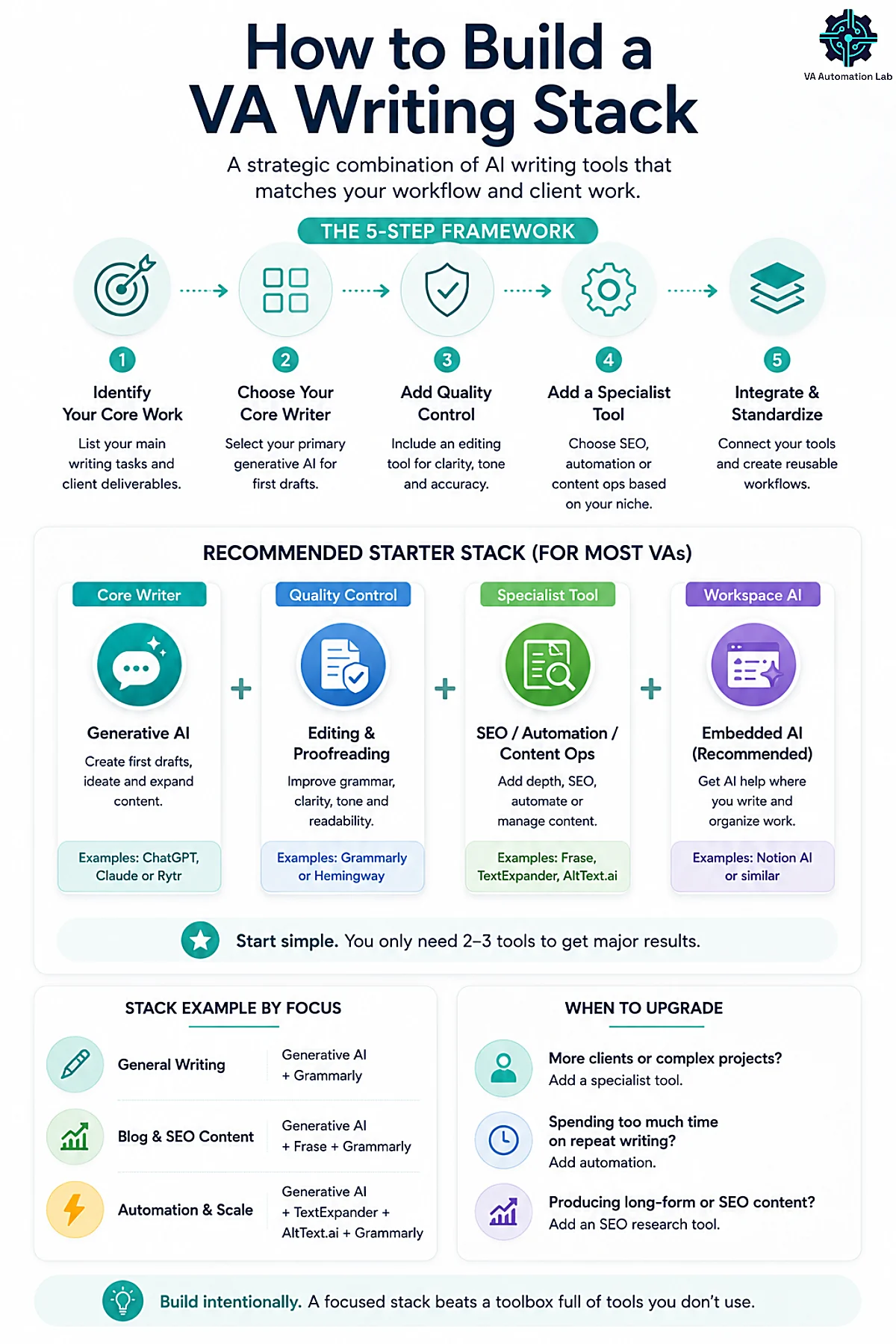
Most effective VA writing stacks start with one generative tool and one quality-review tool, adding an embedded tool if Notion is the primary workspace — and a specialist (SEO, automation, or content ops) only when a specific job demands it. Understanding this framework before selecting tools prevents the most common mistake: stacking three generative AI tools that solve identical problems while skipping the quality-control layer entirely.
New to AI writing tools entirely? Start with the foundations: How to Start Using AI as a Virtual Assistant (Without Technical Skills).
2. The Five-Category Framework Before You Choose
Category | What It Does | Best Tools | Cost |
Generative | Writes first drafts from your brief or prompt | Claude, ChatGPT, Jasper | $0–$59/mo |
SEO Content | Researches, writes & optimizes content to rank | Frase | $0 trial → $39/mo |
Quality & Readability | Reviews and improves existing text | Grammarly, Hemingway | $0–$30/mo |
Writing Automation & Content Ops | Removes repetitive writing & manual content tasks | TextExpander, AltText.ai | Free, then from $5/mo |
Embedded Workspace | AI writing inside your existing workspace | Notion AI | $20/mo (Business) |
Most VAs start with one generative + one quality-review tool and grow from there. Add an SEO content tool if you write client blog posts, a writing-automation tool the moment you notice yourself retyping the same replies, a content-ops tool when image work piles up, and an embedded tool only if Notion is already your primary workspace. The framework matters because the most common mistake is stacking three generative tools that solve the same problem while ignoring the categories that save the most time.
👉 Notion AI for Virtual Assistants: Complete Guide (2026)
3. The Best AI Writing Tools for Virtual Assistants
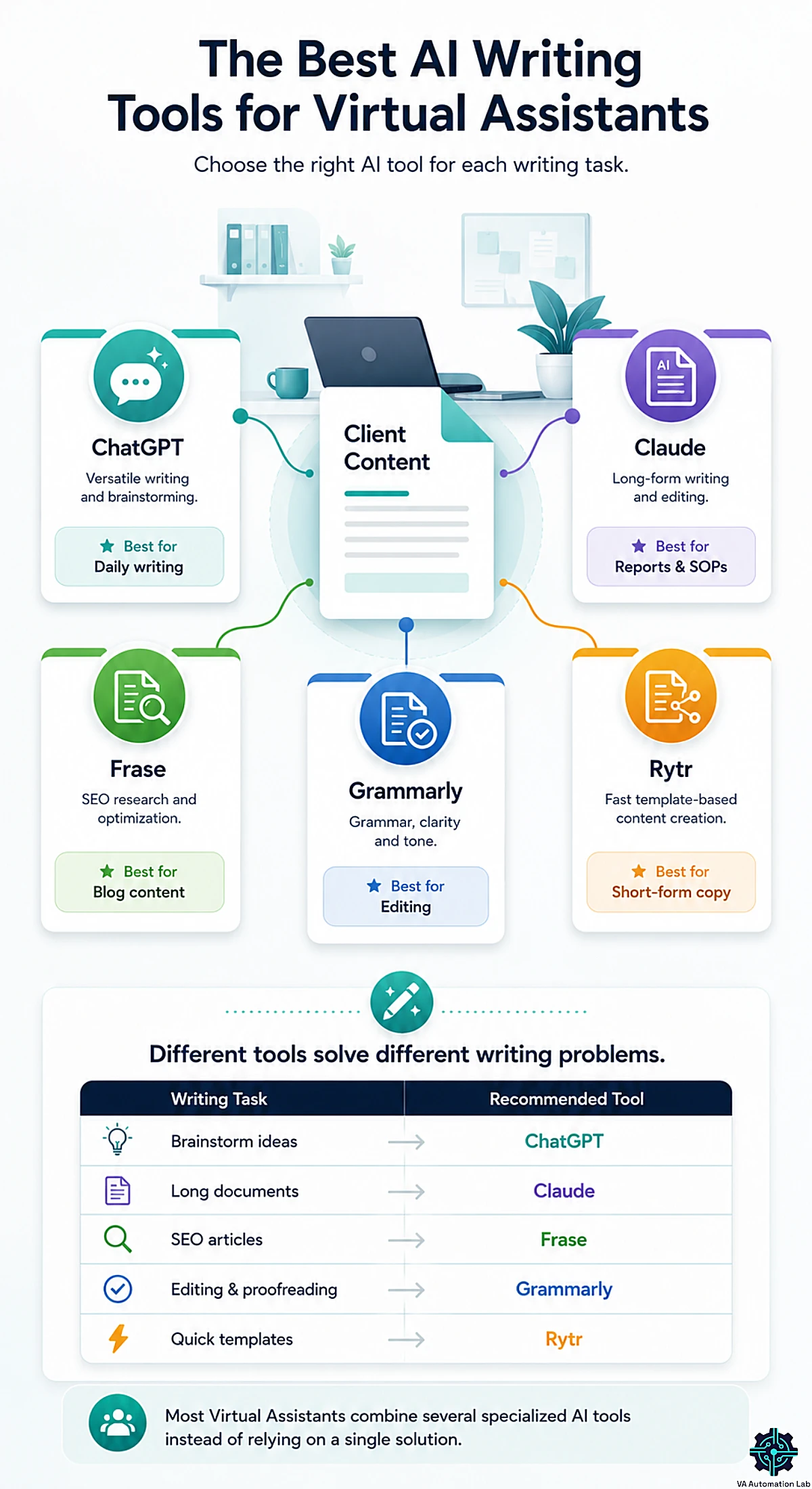
Claude — Best for Long-Form Writing & Client Documentation
Best for: Client proposals, SOPs, onboarding documentation, multi-section reports, complex email drafting, research synthesis.
Plans: Free (Claude Sonnet, lower usage limits than the paid plans) / Pro at $17/month billed annually (Claude Opus, higher limits, Projects, Google Workspace integration, Cowork agentic tasks)
Claude is the AI writing tool that produces the most consistent output quality for the writing tasks VAs charge the most for, long-form client documentation, polished proposals, nuanced client communication, and research synthesis across large document sets.
The distinguishing capability for VA work is instruction-following precision. A prompt that specifies eight requirements simultaneously (specific tone, format, length, audience, structure, exclusions, examples, and CTA) produces output that satisfies all eight from Claude more reliably than from any other general-purpose LLM currently available. For VAs managing clients with detailed brand voice requirements or strict format specifications, this directly reduces revision cycles.
The second capability that sets Claude apart is the 200K token context window, approximately 150,000 words. This allows a VA to paste an entire client document library, a full project history, or a set of meeting transcripts into a single Claude conversation and receive synthesis that accounts for all of it simultaneously.
What it does well for VAs:
- Long-form documents that maintain structural and tonal coherence across 2,000–5,000+ words
- SOP drafts from rough workflow descriptions or Loom transcripts
- Sensitive or high-stakes client communications where tone management matters
- Research synthesis from multiple uploaded documents in a single pass
- Proposals and scope-of-work documents requiring persuasive framing
Limitations:
- No native image generation
- Free plan usage limits are restrictive for full-day professional use, typically exhausted within 1–2 hours during peak VA work
- Slower for rapid brainstorming than ChatGPT’s response cadence
The verdict for VAs: Claude Pro at $17/month billed annually is the right choice if your VA service scope includes significant client-facing documentation, proposals, or nuanced communication work. For VAs whose primary use is fast, varied drafting tasks, ChatGPT may be the better default, with Claude as the specialist tool for high-stakes outputs.
Full guide: Claude AI for Virtual Assistants: The Complete Guide (2026)
ChatGPT — Best for Versatile Daily Writing & Rapid Drafting
Best for: Email templates, meeting summaries, social media captions, task checklists, content briefs, fast turnaround drafts across any topic.
Plans:
- Free: the everyday model — up to 10 messages per 5-hour window, then falls back to a lighter model
- Go: $8/month — unlimited text chats; no advanced reasoning models
- Plus: $20/month — the full model line with advanced reasoning (up to 3,000 messages/week), advanced voice
ChatGPT‘s primary advantage for VAs is breadth and immediacy. It handles the full range of text-based VA tasks, from a 30-second email response to a structured project brief, without configuration, switching tools, or meaningful learning curve. A VA who opens ChatGPT for the first time can produce a usable client email draft in under two minutes, from a prompt as simple as: “Write a follow-up email to a client who hasn’t responded in a week. Professional, not pushy. Under 80 words.”
That accessibility, combined with the instruction following of its advanced reasoning models, makes ChatGPT the correct starting point for VAs building their AI workflow from zero.
The Projects feature is particularly valuable for multi-client VAs: a project per client, with that client’s brand voice, communication guidelines, and preferred formats in its instructions and files, produces on-brand outputs without manually specifying context in every prompt. For high-volume client communication work, this saves thirty to sixty minutes per week over manual context-setting alone.
What it does well for VAs:
- Fast drafting of any written format: emails, summaries, updates, templates, agendas
- Content repurposing, turning long-form content into multiple short-form formats
- Brainstorming: service packages, content calendars, process improvements
- Structured output generation: task lists, checklists, template frameworks, SOPs in checklist format
- Projects set up per client or recurring task type, each with its own instructions and files
Limitations:
- Quality degradation on very long documents (2,500+ words) compared to Claude
- Tends toward predictable, formulaic framing on nuanced communication tasks
- Free tier is rate-limited enough to interrupt a full professional workday
The verdict for VAs: ChatGPT is the most versatile AI writing tool in a VA stack and the correct starting point for VAs not yet using AI writing tools systematically. The free tier is a valid entry point for testing. The Go plan ($8/month) suits VAs who need unlimited access to a capable model without the full Plus price. Plus ($20/month) is justified when the deeper reasoning of the advanced models becomes necessary for complex client work. OpenAI has announced that it will test ads on the Free and Go plans in the US; Plus, Pro, Business and Enterprise remain ad-free.
Full guide: ChatGPT for Virtual Assistants: Complete Guide to Use Cases, Prompts & Workflows (2026)
Rytr — Best Budget Generative Tool for Cost-Conscious VAs
Best for: VAs who want unlimited everyday drafting — emails, captions, product blurbs, short copy — without a $20/month commitment, or who are testing paid AI writing for the first time.
Plans: (billed annually)
- Free: $0 — 10,000 characters/month, 1 language, no tone match or plagiarism check
- Unlimited: $7.50/month — unlimited generation, 1 tone match, 50 plagiarism checks/mo — the plan most solo VAs land on
- Premium: $24.16/month — multiple tone matches, 100 plagiarism checks/mo, higher-end models
Rytr is the budget-tier generative writer. It will not match Claude on a 4,000-word SOP or ChatGPT on breadth — and this guide won’t pretend otherwise. What it does is occupy a real gap the premium tools leave open: unlimited, no-friction drafting at well under half the price of a Plus subscription. For a VA whose AI use is high-volume but low-complexity — dozens of short emails, social captions, product descriptions, listing blurbs — Rytr covers the workload for about $7.50/month, and the free tier with no card is a way to test the habit before spending anything.
The interface is deliberately simple: pick a use case, drop in your inputs, get output. There is no prompt-engineering learning curve, which makes it a low-intimidation on-ramp for VAs who find a blank ChatGPT box daunting.
What it does well for VAs:
- Unlimited short-form drafting (emails, captions, blurbs, descriptions) at a low flat price
- Use-case templates that remove the blank-page step without prompt skill
- A free tier (no credit card) for testing AI writing before committing
- Tone presets for quick on-brand variation on routine copy
Limitations:
- Output quality and instruction-following trail Claude and ChatGPT on long-form, nuanced, or multi-requirement work
- Not the tool for proposals, SOP libraries, or sensitive client communication
- Best treated as a volume tool, not a quality-ceiling tool
The verdict for VAs: If budget is the binding constraint and your writing is high-volume/low-complexity, Rytr’s Unlimited plan ($7.50/month) is the most cost-effective dedicated generative tool in this list — and a better daily experience than the rate-capped ChatGPT free tier. Step up to Claude or ChatGPT Plus when documentation, nuance, or complex instruction-following become part of your service scope.
Full guide: Rytr for Virtual Assistants: Complete Guide, Features, Use Cases & AI Writing Workflows
Grammarly — Best for Quality Control & Professional Polish
Best for: Final-pass editing on all client-facing output, tone consistency across multiple clients, catching AI-generated errors before delivery.
Plans:
- Free: write mistake-free, see your writing tone, generate text with 100 AI prompts/month
- Pro: $12/month — full-sentence rewrites, tone adjustment, unlimited personalized suggestions, plagiarism + AI-text detection, 2,000 AI prompts/month, plus light team features (2 user groups, 1 style guide, 1 brand tone, team analytics)
- Enterprise: custom pricing — proactive AI everywhere, admin controls, BYOK encryption, data loss prevention, unlimited prompts and brand tones
- 7-day free trial
Grammarly is the quality review layer that separates professional AI-assisted content from content that reads as AI-assisted. It does not generate text, it reviews text and flags the specific issues that erode professional credibility: grammar errors, awkward sentence constructions, tonal inconsistencies between sections, passive voice clusters, and clarity problems.
The practical problem Grammarly solves: AI-generated text passes a fast human read, but it contains characteristic patterns that register as subtly off to a native English reader or to a client accustomed to a specific communication style. Grammarly’s algorithms are trained to catch these patterns, and the tool flags them with enough context that a VA can apply corrections in under two minutes per document.
For VAs who manage multiple clients with different communication styles, formal for a legal services client, conversational for a lifestyle brand, the tone analysis and adjustment suggestions (Pro) identify when a draft is misaligned with the intended register and suggest specific fixes, without requiring a full re-read with this lens.
Grammarly’s built-in generative AI (2,000 prompts/month on Pro) allows basic content generation within the Grammarly interface, which is useful for short-form drafts and rewrites. For complex VA writing tasks, however, Claude or ChatGPT will produce superior output — Grammarly’s primary value remains the review layer, not generation.
What it does well for VAs:
- Grammar, spelling, and punctuation on all client-facing output, especially AI-generated content that has been lightly edited
- Tone analysis, identifying mismatches between intended and actual tone
- Clarity scoring, flagging overly complex or run-on sentences before client delivery
- Plagiarism detection (Pro), relevant for VAs delivering publishable content
- Inline browser and Google Docs integration, works inside existing tools
Limitations:
- Does not generate content at the level of Claude or ChatGPT
- Some Grammarly suggestions are overly conservative and should be selectively accepted, not all suggestions are improvements
- Full tone adjustment and sentence rewrites require Pro; the free tier covers grammar, spelling, tone detection, and 100 AI prompts/month
The verdict for VAs: Grammarly Pro ($12/month) belongs in every VA writing stack that produces client-facing content at scale. The cost is justified against a single criterion: if it prevents one revision request or one professional error per month, it has paid for itself. The free tier is a viable starting point, better than no quality layer at all, with the option to upgrade once the volume of client-facing output makes tone adjustment consistently relevant.
PRO TIP: Run every AI-generated document through Grammarly before client delivery, especially longer outputs from Claude or ChatGPT that have been lightly edited. AI models occasionally introduce tonal inconsistencies or syntactic awkwardness in section transitions that passes a fast read but registers as slightly off to a careful reader.
Jasper — Best for High-Volume Marketing Copy
Best for: Marketing copy, blog posts, ad copy, email campaigns, brand voice-consistent content production at scale.
Plans:
- No free plan, 7-day free trial available
- Pro: $59/month (billed annually) — 1 seat, Canvas platform, Essential Agents, 2 Brand Voices, 5 knowledge assets, 3 audiences
- Business: custom pricing — adds Advanced Agents, GEO optimization, no-code AI App Builder, Jasper Grid, unlimited customization, API access, and enterprise governance
Jasper is the AI writing tool built specifically for marketing content production, and it shows in the feature set. The Brand Voice feature stores a client’s brand guidelines, tone descriptors, and writing style in the platform, and all Jasper outputs reference that stored context by default. For VAs supporting marketing-focused clients who require consistent brand voice across high-volume output, this produces more on-brand first drafts than a general-purpose LLM like ChatGPT, which requires manual context inclusion in every prompt.
Jasper has evolved significantly in 2025–2026, building out its Canvas content platform and AI Agents — structured, end-to-end workflows that move content from brief to publication across formats and channels. For VAs who manage content operations at scale (20+ pieces per month per client), these workflow features reduce setup time and maintain consistency without per-session manual configuration.
What it does well for VAs:
- Marketing copy across channels, ads, landing pages, email campaigns, social content
- Brand Voice storage applied consistently across all outputs for a given client
- High-volume content production using template-structured workflows
- Blog post and article drafts with built-in SEO mode
- Canvas platform and AI Agents for structured, repeatable multi-format content production
Limitations:
- Higher cost than Claude Pro or ChatGPT Plus for comparable generative capability on non-marketing tasks
- Not the right tool for internal documentation, SOPs, proposals, or operational writing
- No free tier, the trial requires committing to evaluate within 7 days
The verdict for VAs: Jasper’s $59/month annual price is justified if you support marketing-focused clients with high-volume, brand-voice-consistent content requirements and produce 20+ pieces per month. For most solo VAs, Claude and ChatGPT cover the same content needs at a lower cost. Jasper’s value proposition becomes clear specifically when brand voice consistency at scale is the primary delivery metric, not when you’re producing occasional blog posts or social content.
Frase — Best for SEO Content & Articles That Rank
Best for: VAs who write or manage client blog content and need it to rank — content VAs, blog managers, and anyone delivering SEO articles rather than just internal documents and emails.
Plans: (billed annually)
- 7-day free trial, no credit card
- Starter: $39/month — 10 AI-optimized articles/mo, AI-visibility tracking (2 platforms), 1 domain, 1 seat
- Professional: $103/month — 40 articles, 3 seats, 5 domains, AI-visibility (3 platforms)
- Scale: $239/month — 100 articles, 5 seats, 10 domains, AI-visibility (5 platforms)
This is the gap the premium chat tools leave wide open. Claude and ChatGPT write well, but neither tells you what to write to rank — there’s no built-in SERP analysis, no competitor topic coverage, no optimization scoring. That’s exactly Frase‘s job. It pulls the top-ranking results for your target keyword, builds a data-driven content brief (headings, questions, entities competitors cover), and scores your draft in real time against what’s ranking — then helps you write and optimize in one workflow.
For a VA producing blog content for clients, this collapses a multi-tool, multi-hour process — keyword research, SERP analysis, brief building, drafting, on-page optimization — into a single platform. The 2026 addition worth knowing: Frase now bundles GEO (Generative Engine Optimization) tracking into all plans, monitoring whether your client’s content surfaces in AI answers across ChatGPT, Perplexity, and Google AI Overviews — increasingly the conversation clients are starting to have.
What it does well for VAs:
- SERP-driven content briefs (what to cover to rank) competitors’ general LLMs can’t produce
- Real-time on-page optimization scoring as you write
- Research + brief + draft + optimize in one workflow instead of four tools
- Built-in GEO/AI-search visibility tracking (2026-relevant client deliverable)
Limitations:
- A specialist SEO tool — overkill if you don’t produce ranking content for clients
- Entry price ($39/mo) is a real commitment vs general writers; justify it with billable SEO work
- AI draft quality still needs human editing — Frase’s strength is research + optimization, not finished prose
The verdict for VAs: If “SEO blog content” appears anywhere in your client deliverables, Frase is the tool the general AI writers can’t replace — it turns content writing into content that ranks, and packages SEO + GEO into a service you can charge for. Start on the 7-day free trial against one real client article; if the brief and optimization stages save you the research hours, Starter pays for itself with a single ranking post.
Full guide: Frase.io for Virtual Assistants: Complete Guide, Features, Pricing & Review
Notion AI— Best for Embedded Workspace Writing
Best for: VAs who already use Notion on the Business plan and want AI writing assistance without switching tools.
Pricing:
- Notion Free / Plus plans: limited trial only, approximately 20 AI responses before access is cut off
- Notion Business: $20/user/month (billed annually) — includes the Notion Agent, AI Meeting Notes, and Enterprise Search (a separate Custom Agents add-on is ~$10/month for 1,000 credits)
- Notion Enterprise: custom pricing, AI included
For VAs who are already on Notion Business, typically those managing teams or using Notion for client workspace delivery, Notion AI’s tight integration offers workflow value: writing tasks that require context from the workspace (summarizing a project page, generating an update from a task database, drafting an SOP from workspace notes) happen without switching to an external AI tool and pasting output back.
For VAs on Notion Free or Plus, the practical reality in 2026 is that Notion AI is not meaningfully available, 20 trial responses do not constitute a working writing tool. Claude or ChatGPT produce better output for all the same tasks, and at a lower total cost.
What it does well (for Business plan users):
- Summarizing Notion pages and database entries within the workspace
- Generating SOP drafts from rough notes already in the workspace
- Creating structured meeting note summaries from existing content
- Ask Notion (workspace Q&A across all pages, connected Google Drive, Slack)
The verdict for VAs: Notion AI belongs in the stack only for VAs already on Notion Business, it is an included feature that provides workflow value without additional cost in that context. For all other VAs, it should not be purchased as a standalone AI writing tool. The Business plan cost ($20/user/month) is high for a solo VA who wants AI features and is not already using Notion for other Business-plan-specific functions.
Full guide: Notion AI for Virtual Assistants: Complete Guide (2026)
Hemingway Editor — Best for Readability Review
Best for: Final-pass readability review on content aimed at broad audiences, newsletters, blog posts, client onboarding guides, educational content.
Plans:
- Free (web app): readability scoring + issue highlighting (wordy sentences, passive voice, complex words) — no AI rewrites
- Hemingway Editor Plus (subscription): adds AI-powered sentence rewrites and an advanced grammar checker — $8.33/month billed annually ($100/year)
- 2-week free trial (ends automatically, no charge)
Hemingway Editor does one thing precisely: it tells you when your writing is too complex to read easily, and exactly which sentences are the problem. It color-codes text by complexity level (green for clear, yellow for complex, red for very complex) and flags passive voice, adverb overuse, and excessive sentence length. The output is a readability grade level and a set of specific, sentence-level suggestions.
For VAs producing AI-assisted content, Hemingway solves a specific and common problem: AI models, particularly when given detailed prompts, tend toward longer sentences and more formal constructions than equivalent human writing. The output passes a grammar check and reads acceptably on a fast scan, but it grades two to three levels above the target readability for a general audience. Hemingway identifies exactly which sentences are the problem, so revision is targeted rather than speculative.
What it does well for VAs:
- Identifying overly complex sentences in AI-generated drafts before client delivery
- Improving scannability on long documents, particularly newsletters and long-form blog content
- Passive voice flagging on documents where an active, direct register matters
- Readability grading for content that needs to reach a broad audience
Limitations:
- The free version flags issues but doesn’t rewrite them; AI auto-rewrites require the paid Editor Plus subscription
- Less comprehensive than Grammarly for overall grammar and tone analysis
- Less relevant for VAs whose output is primarily formal professional correspondence (where complex sentence construction is contextually appropriate)
The verdict for VAs: Hemingway’s free web version handles the core job — readability scoring and issue highlighting — at no cost, which makes it a low-friction addition for VAs who produce newsletters, blog posts, or educational content where readability grade matters. Editor Plus (from $8.33/month billed annually) is optional, worth it only if you want AI to rewrite the flagged sentences for you. For VAs whose output is primarily professional correspondence, proposals, and internal documentation, Grammarly is the more consistently useful quality tool.
TextExpander — Best for Eliminating Repetitive Writing
Best for: VAs who type the same things over and over — canned email replies, FAQ answers, onboarding messages, status updates, booking confirmations, common client responses across multiple accounts.
Plans: (billed annually)
- Free: $0 — 5 active Snippets (unlimited total), sync across devices
- Pro: $5/month per user — no cap on active Snippets
- Business: $10/month per user — shared snippet libraries, fill-in fields, team sharing
- 30-day free trial (no perpetual free tier)
This is the tool that delivers what most “AI writing” roundups skip: writing automation. TextExpander stores reusable text as “snippets” triggered by short abbreviations. Type a few characters and a full, formatted message expands instantly — a complete onboarding email, a polished “thanks for your patience” reply, a standard project-update template, a booking-confirmation block.
For a VA, the math is direct. If you send the same fifteen-to-thirty messages dozens of times a week across several clients, snippets convert each from a 30–90 second retype into a two-keystroke insert — while guaranteeing the wording stays consistent and typo-free every time. Fill-in fields let you keep the personal touches (name, date, project) while automating everything around them, so canned responses never read as canned.
It pairs naturally with the generative tools above: use Claude or ChatGPT once to draft the perfect version of a recurring message, then save it as a TextExpander snippet so you never re-prompt for it again.
What it does well for VAs:
- Turns high-frequency canned responses into two-keystroke inserts across every app
- Fill-in fields keep personalization while automating the boilerplate
- Guarantees wording consistency and zero typos across multiple client voices
- Shared snippet libraries standardize replies if you grow into a small team
Limitations:
- Not a writer — it stores and expands text you’ve already created
- Real payoff scales with repetition; low-variety workloads see less benefit
- Snippet libraries take a short setup investment to organize well
The verdict for VAs: At just $5/month, TextExpander is one of the highest-ROI tools in this entire list for any VA with a high-repetition inbox. It does not generate — it removes the rote-typing tax that AI drafting alone doesn’t touch. Set it up once, save your twenty most-repeated messages, and it pays for itself in recovered time within the first week.
Full guide: TextExpander for Virtual Assistants: Complete Guide to Templates, Snippets & Productivity Workflows
AltText.ai — Best for Image Alt Text & Content Ops at Scale
Best for: VAs who manage client blogs, WordPress sites, or e-commerce catalogs and have to write alt text for dozens or hundreds of images — for SEO and for accessibility compliance.
Plans: (billed monthly)
- Free trial: 25 image credits, no credit card (1 credit = 1 image)
- Bronze: $5/month — 100 credits (~5¢/image)
- Silver: $19/month — 500 credits (~4¢/image) · Gold: $59/month — 2,000 credits
- Higher tiers to $229/month (10,000 credits)
Writing alt text is one of those invisible content tasks that eats hours. A single client blog migration or a product catalog can mean hundreds of images, each needing a concise, descriptive, keyword-aware alt attribute — for Google Image search and for WCAG accessibility (now legally required for many sites). Done by hand it is slow, repetitive, and easy to skip; skipped, it’s a real SEO and compliance gap.
AltText.ai generates contextual, WCAG-aware alt text in bulk and writes it straight into the media library. For VA Automation Lab’s own stack this is the relevant detail: it has native WordPress integration that works alongside SEO plugins like Rank Math and Yoast, so a content VA can bulk-generate alt text for an entire library without leaving the CMS. It supports 130+ languages and lets you feed target keywords so descriptions stay SEO-aligned rather than generic.
What it does well for VAs:
- Bulk alt-text generation written directly into WordPress (works with Rank Math / Yoast)
- Keyword-aware descriptions that serve image SEO, not just accessibility
- Helps deliver WCAG / accessibility compliance clients increasingly require
- Credits pool across multiple client sites under one account
Limitations:
- A narrow, specialist tool — only earns a place if image-heavy content is part of your work
- AI descriptions should still be spot-checked for context on important images
- Advanced image formats consume extra credits
The verdict for VAs: For a general VA, this is a skip. For a content or e-commerce VA handling image-heavy client sites, AltText.ai (from $5/month, free 25-image trial) converts an hours-long manual chore into a few clicks — and turns “image SEO + accessibility” into a billable deliverable you can offer clients rather than a task you dread.
Unlimited AI Drafting on a Budget
Test Rytr on your highest-volume writing task this week.
The free tier needs no credit card, and Unlimited runs about $7.50/month — well under half a Plus subscription — for unlimited emails, captions, and short copy.
4. Pricing Comparison Table
Tool | Free Tier | Paid Plan | Price | Best Use Case for VAs |
Claude | Yes (usage limits) | Pro | $17/mo billed annually | Long-form docs, proposals, SOPs, nuanced comms |
ChatGPT | Yes (usage limits) | Plus | $20/mo | Versatile daily writing, rapid drafts |
Rytr | Yes (10k chars/mo) | Unlimited | $7.50/mo | Budget unlimited short-form drafting |
Frase | 7-day trial | Starter | $39/mo annual | SEO blog content that ranks (+ GEO tracking) |
Grammarly | Yes (grammar, spelling, tone) | Pro | $12/mo | Quality control, tone review, client-facing output |
Hemingway | Yes (web, full readability) | Editor Plus (AI) | $8.33/mo annual | Readability review on broad-audience content |
TextExpander | Yes (5 active Snippets) | Pro | $5/mo per user annual | Automating repetitive canned responses |
AltText.ai | Trial (25 images) | Bronze | $5/mo | Bulk image alt text / content ops |
Jasper | 7-day trial | Pro | $59/mo annual | Marketing copy, brand voice at scale |
Notion AI | Trial only (~20 responses) | Business (+ Agents) | $20/mo (+$10 add-on) | Embedded writing for Notion users |
Minimum effective VA writing stack: Claude Pro ($17/mo billed annually) + Grammarly Pro ($12/mo). Covers the complete VA writing workflow from generation to quality review.
Budget paid stack: Rytr Unlimited ($7.50/mo) + Grammarly free = ~$7.50/month. Unlimited dedicated drafting plus a basic quality layer — a better daily experience than the rate-capped ChatGPT free tier, for VAs who want paid reliability without the $20 Plus commitment.
Zero-cost entry point: ChatGPT free + Grammarly free = $0/month. Functional for testing, but both are usage-capped — a starting point, not a working setup.
5. Task Routing Table — Which Tool for Which Writing Task
Writing Task | Primary Tool | Quality Layer | Notes |
Client proposals & SOW | Claude | Grammarly Pro | Claude for structure + nuance; Grammarly final pass |
SOP creation (from notes or transcript) | Claude | — | Claude’s instruction-following handles complexity |
Quick email drafts | ChatGPT | Grammarly | Speed priority; Grammarly catches tone issues |
Sensitive client communication | Claude | Grammarly | Tonal precision matters; always final-check |
Meeting summaries | ChatGPT | — | Fast; brief prompt; low stakes |
Newsletter drafts | Claude | Hemingway + Grammarly | Long-form consistency + readability check |
Social media captions | ChatGPT | — | Multiple variation prompt; fast turnaround |
Blog post drafts | Claude | Hemingway | Long-form quality + readability review |
Research synthesis (multi-doc) | Claude | — | Context window advantage essential for multi-doc |
Email subject line variants | ChatGPT | — | Request 5+ options per prompt |
Marketing copy (brand-voice heavy) | Jasper | Grammarly | Jasper only if 20+ pieces/month per client |
Product descriptions (e-commerce) | ChatGPT or Jasper | Grammarly | Jasper for brand voice-critical clients |
Client onboarding documentation | Claude | Grammarly | Documentation quality = client first impression |
Internal process notes | ChatGPT or Notion AI | — | Notion AI only if already on Business plan |
Readability review (newsletters, blogs) | — | Hemingway | Use on any content targeting a broad audience |
Budget short-form drafting (high volume) | Rytr | Grammarly | Unlimited drafting at $7.50/mo; speed over nuance |
SEO blog posts / ranking content | Frase | Grammarly | Frase for brief + optimization; final polish pass |
Repetitive canned responses / FAQs | TextExpander | — | Snippet automation; not generation — set up once |
Bulk image alt text (blogs, stores) | AltText.ai | — | Writes alt text into WordPress; Rank Math / Yoast friendly |
How to read this table: Primary tool = where the draft is generated. Quality Layer = review tool applied before client delivery. “—” means no additional quality pass is typically required beyond the VA’s own read.
Hundreds of Images, Zero Manual Alt Text
If bulk image alt text is on your plate, this is the shortcut.
AltText.ai writes SEO-and-accessibility-ready descriptions straight into WordPress — Rank Math and Yoast friendly — for an entire media library in minutes.
First 25 images free, no credit card.
6. How to Build a VA Writing Stack
The most common VA writing stack mistake is horizontal expansion, adding a fourth and fifth tool before the first two are producing consistent results. A two-tool stack used well outperforms a five-tool stack used inconsistently.
The Minimum Effective VA Writing Stack
Layer 1 — Generation: One primary generative AI tool.
- Heavy documentation, proposals, nuanced communication → Claude Pro ($17/month billed annually)
- Fast drafting, varied daily tasks, starting from zero → ChatGPT (free to Plus depending on usage)
- Budget-conscious, high-volume short-form → Rytr (~$7.50/month for unlimited drafting)
Layer 2 — Quality: Grammarly (free to start; Pro at $12/month once client-facing volume warrants tone adjustment).
That is the baseline. Two tools at Pro level cover the complete writing workflow for the majority of VA service types.
When to Expand the Stack — Match the Tool to the Job
Add a specialist tool only when a specific task type isn’t being served by your baseline. Each addition below maps to a real, recurring VA job:
- Budget is the constraint, volume is high → swap or add Rytr ($7.50/mo) for unlimited short-form drafting instead of paying for Plus.
- You write client blog / SEO content → add Frase (from $39/mo). General AI writers can’t tell you what to write to rank; Frase handles the research, brief, and optimization — and it’s the one you can bill back to clients.
- You retype the same replies constantly → add TextExpander ($5/mo per user). The highest-ROI add-on for a high-repetition inbox; it automates the rote typing AI drafting doesn’t touch.
- You manage image-heavy blogs or stores → add AltText.ai (from $5/mo) to bulk-write alt text into WordPress for SEO + accessibility.
- 20+ brand-specific marketing pieces/month → add Jasper.
- Newsletters/blogs where readability grade matters → use Hemingway (free web version; Editor Plus from $8.33/mo billed annually adds AI rewrites).
- Already on Notion Business → Notion AI is included; use it as a complement, not a replacement.
The principle holds: build the workflow first, prove the baseline, then add the one tool that closes a measurable gap — not the one with the best marketing.
Cost benchmark: Any added tool should save at least one billable hour per month to justify its subscription. At $30–60/hour billing, a $12/month Grammarly Pro subscription pays for itself after one prevented revision cycle.
Type It Once, Use It Forever
TextExpander turns your most-repeated messages — onboarding emails, FAQ replies, status updates — into a two-keystroke insert.
Starting at $3/month with a 30-day trial, it’s the fastest payback of any tool in this stack.
7. Prompt Library: 4 Templates for VA Writing Tasks
Four prompt templates for the highest-frequency VA writing tasks. Copy directly, replace bracketed fields with your specifics.
Template 1 — Client Proposal (Claude)
Write a service proposal for [CLIENT NAME], a [TYPE OF BUSINESS] looking to hire a virtual assistant for [SCOPE OF WORK].

Structure:

- Opening (2–3 sentences: acknowledge their specific situation)
- What I offer — [LIST 3–4 SPECIFIC SERVICES]
- How I work — process in 3 bullet points, action-verb first
- Investment — [RATE STRUCTURE]
- Next step — one CTA sentence

Tone: professional but warm, not corporate.
Length: 350–450 words.
Avoid: filler phrases ("I'm reaching out", "I hope this finds you well"), passive voice, generic language, bullet points in the opening.
Template 2 — Follow-Up Client Email (ChatGPT or Claude)
Write a follow-up email to [CLIENT NAME / ROLE].

Context: [SITUATION — e.g., "I sent a proposal 5 days ago and haven't heard back"].

Requirements:

- Professional but not stiff
- Not pushy — assume positive intent throughout
- Under 80 words
- One clear ask or next step in the final sentence
- No subject line needed in the output

Output: email body only.
Template 3 — SOP from Workflow Notes (Claude)
Create a standard operating procedure (SOP) based on this workflow description: [PASTE YOUR NOTES OR PROCESS DESCRIPTION]

Format:

- Title: [SOP NAME]
- Purpose: 1 sentence
- Trigger: what event starts this process
- Steps: numbered list, action-verb first ("Open…", "Check…", "Send…")

Notes / Edge Cases: any exceptions or variations

Owner: [ROLE]

Tone: clear, direct, no jargon.
Assume the reader is a VA with no prior context on this workflow.
Length: as long as needed to cover all steps — prioritize completeness.
Template 4 — Client Newsletter Draft (Claude)
Write a newsletter draft for [CLIENT NAME], a [TYPE OF BUSINESS].

Topic this week: [TOPIC OR CONTENT BRIEF]
Audience: [SUBSCRIBER DESCRIPTION]
Tone: [BRAND VOICE — e.g., "friendly expert, conversational, no technical jargon"]

Format:

- Subject line: 3 options (each under 50 characters)
- Preview text: 1 option (under 90 characters)
- Intro: 2–3 sentences (hook only — do not summarize what's coming)
- Main body: 3 sections with short headers
- CTA: one ask, specific and direct

Length: 450–600 words body copy.
Do not use: "In today's newsletter…", "Hope you're well", "I wanted to share…", or any other filler openings.
8. How to Set Up Your AI Writing Workflow — Step by Step
Step 1: Audit Your Current Writing Tasks
Before choosing tools, spend 20 minutes listing every writing task you complete in a typical client week. Group by: frequency (daily / weekly / occasional) and format length (short-form under 300 words / long-form over 300 words). This audit determines which tools belong in your stack before any money is spent.
Step 2: Choose Your Primary Generative Tool
Match the audit result to the routing table. If your highest-frequency tasks are documentation-heavy (SOPs, proposals, reports over 500 words), start with Claude Pro. If they are varied and fast-paced (daily email drafts, short updates, mixed quick tasks), start with ChatGPT, free tier first, upgrade only after hitting usage limits consistently. If your work is high-volume short-form and budget is tight, Rytr’s Unlimited plan covers it for less.
Step 3: Add Grammarly as Your Quality Layer
Install the Grammarly browser extension (free, takes two minutes). Apply it to every piece of client-facing writing for one week. Review what it catches, accept corrections that improve the output, reject overrides to intentional style choices. After one week, assess whether free-tier suggestions are sufficient or whether Pro’s tone analysis would meaningfully improve the quality of your specific output types.
Step 4: Build Your Prompt Library
Use the four templates above as starting points. After generating your first ten documents with your primary tool, note which prompt elements produced the cleanest output. Standardize those elements into your own prompt library. A working library of seven to ten prompt templates covers the majority of a typical VA’s writing workflow without requiring re-prompting from scratch each session. For the messages you send most often, save the best version as a TextExpander snippet so you never re-prompt for it again.
Step 5: Establish a Two-Pass Review Routine
Before every client deliverable: first pass for accuracy and context (read for anything the AI got factually wrong, tonally off, or contextually misaligned); second pass via Grammarly for grammar, tone, and clarity. This routine takes two to four minutes per document and is non-negotiable for maintaining professional quality in AI-assisted output.
Step 6: Expand Only When You Have a Specific Gap
After four to six weeks, if a specific task type is consistently underserved by the two-tool baseline, evaluate one specialist tool against the routing table. Do not add tools proactively, add them when a clear, measurable gap exists.
9. Common Mistakes VAs Make with AI Writing Tools
Skipping the quality layer
The most frequent and most consequential mistake. AI-generated text looks correct and reads fluently at a fast scan, but it contains pattern-specific errors (tonal inconsistencies, slightly awkward sentence constructions, passive voice clusters) that a professional reader notices. Grammarly is not optional for VAs producing client-facing content at scale.
Publishing without a context check
AI tools do not know your client’s situation, relationship history, recent conversations, or specific sensitivities. A ChatGPT-drafted email may be technically correct and professionally worded but contextually wrong for the specific situation. Every AI-generated client communication requires a human read before delivery.
Using the same tool for every task
Claude is not the best tool for quick social media captions. ChatGPT is not the best tool for a 4,000-word SOP library requiring tight multi-part instruction following. The routing table exists to prevent this.
Treating prompt quality as optional
Vague prompts produce vague output. “Write an email to my client” produces a generic draft requiring substantial rewriting. A prompt with specific length, tone, purpose, and constraint requirements produces something close to deliverable. Prompt quality is the primary lever on AI writing output quality, improving it is learnable and measurable.
Building a stack before building a workflow
A VA with four AI tools and no structured workflow for when to use each one will use none of them consistently. Build the workflow first (audit → choose primary → add quality layer → build prompt library → establish review routine), then expand the stack once the workflow is stable.
Relying on outdated information
AI platform model availability and pricing change frequently. Build a quarterly habit of checking the official pricing and plan pages for every tool in your stack, before a client conversation about costs, and before any renewal decision.
Writing Well ≠ Ranking Well
Every fix above improves how a draft reads — none of them tell you whether it’ll rank.
Frase builds the SEO brief and scores your draft against the competition as you write, with AI-search visibility tracking included.
Try it free for 7 days, no credit card.
10. Conclusion
The right AI writing tools do not replace a VA’s judgment, relationship management, or contextual understanding. They handle the mechanical production layer (the first draft, the structure, the format) so that a VA’s attention goes to the parts of the work that require those things.
The effective starting stack is simpler than the market makes it appear:
- One generative tool — Claude Pro for documentation-heavy work; ChatGPT for versatile daily drafting; Rytr if budget is the priority
- Grammarly as the quality layer on all client-facing output
These two tools, used consistently with a structured prompt library and a two-pass review routine, cover the complete writing workflow for the majority of VA service types.
Specialist tools — Frase for SEO content that ranks, Jasper for high-volume brand-specific marketing content, TextExpander for automating repetitive writing, AltText.ai for bulk image work, and Hemingway for readability review — add value when a specific task type in your client work warrants the additional cost. They belong in a second expansion phase, after the baseline is producing consistent results.
The single highest-leverage action in any AI writing workflow is not the tool selection. It is the prompt. A clear, specific, structured prompt from a $20/month subscription produces better output than a vague prompt from the most expensive tool available. Build the prompt library first. Master two tools completely before evaluating a third.
Ready to start? Both Claude and ChatGPT offer free tiers with no credit card required. Grammarly’s browser extension installs in two minutes and is free. Test your highest-frequency writing task with each one this week, the routing table above will guide which tool to use going forward.
AI writing tools are one category of a complete VA stack. For a full quick reference covering every other tool area — scheduling, automation, project management, CRM, and more — the VA resource hub maps them all in a single table organized by use case.
Ready to Build Your AI Writing Stack?
Every tool here solves a real problem — but the right one to start with is whichever removes the most friction.
Rytr‘s free tier needs no credit card, and Unlimited drafting runs $7.50/month once you’re ready to commit.
The best AI writing stack is the one you start using.
Frequently Asked Questions about AI Writing Tools for VAs
What is the best AI writing tool for a virtual assistant just starting out?
ChatGPT is the correct starting point for most VAs. It handles the full range of VA writing tasks, requires no configuration, and the free tier (the everyday model) covers basic daily use. After two to four weeks of consistent use, add Grammarly (free tier) as a quality layer. This two-tool baseline is sufficient for the majority of VA writing workflows at zero cost.
What’s the best budget AI writing tool for virtual assistants?
For cost-conscious VAs, Rytr is the most practical budget pick — its Unlimited plan runs $7.50/month for unlimited short-form drafting, well under half the price of ChatGPT Plus, with a free tier (no credit card) to test first. It won’t match Claude or ChatGPT on long-form or nuanced work, so treat it as a high-volume drafting tool for emails, captions, and short copy, and step up to a premium tool when documentation or complex instruction-following enters your scope.
Do I need both Claude and ChatGPT?
Not necessarily, it depends on your service scope. If your VA work includes significant long-form documentation, proposals, or nuanced communication work, Claude’s quality advantage on those tasks justifies $17/month billed annually alongside ChatGPT. If your primary AI use is fast drafting and general-purpose writing tasks, ChatGPT alone covers most workflows. Many experienced VAs use both and route specific task types to whichever tool produces the best output for that category.
What AI tool is best for writing SEO blog content for clients?
General AI writers like Claude and ChatGPT produce good prose but don’t tell you what to write to rank — there’s no built-in SERP analysis or optimization scoring. Frase fills that gap: it builds a data-driven content brief from the top-ranking results, scores your draft in real time, and now includes GEO tracking for AI-search visibility. For VAs delivering blog content, it turns “writing” into “writing that ranks” — and it’s a service you can charge clients for. Start on the 7-day free trial against one real article.
Is Grammarly Pro worth the cost for VAs?
For VAs producing client-facing written communication at scale, yes. The free tier covers grammar, spelling, and tone detection. Grammarly Pro ($12/month) adds full-sentence rewrites, tone adjustment, and plagiarism detection, most valuable for VAs managing multiple client communication styles or producing formal documentation, newsletters, or publishable content regularly. The cost is justified if it prevents one revision request per month.
How do I maintain my clients’ brand voice when using AI writing tools?
The same setup works in both tools. For ChatGPT users: create a project per client, with their brand voice guidelines and preferred tone descriptors in the project instructions and their writing examples as project files, so all subsequent outputs in that project default to the stored voice without manual re-specification. For Claude Pro users: create a Project per client and store brand voice documentation in the Project instructions. Either way, this eliminates the per-prompt overhead of manual context specification for recurring clients.
Can AI writing tools be used directly for social media content?
Yes. ChatGPT is the most practical tool for social media copy production, a single structured prompt generates five to ten caption variations across different tones and angles, giving clients options to choose from. For VAs managing social accounts for multiple clients where brand voice consistency matters, a ChatGPT project per client produces more on-brand output than generic prompting. For the complete system, see Social Media Automation for Virtual Assistants.
Is Copy.ai a good choice for a solo virtual assistant?
Not in 2026. Copy.ai has repositioned as a go-to-market (GTM) AI platform for enterprise sales and marketing teams: its free tier (2,000 words/month) is too limited for professional use, and its paid plans are team-priced (multiple seats) rather than built for solo users. For the short-form copy a solo VA needs — social captions, email variations, product blurbs — ChatGPT Plus covers the same ground at $20/month, and Rytr covers it for less. Operating inside a client’s existing Copy.ai account is a different scenario, but as a tool a solo VA buys, it no longer makes the list.
How can a VA write alt text for hundreds of client images quickly?
Writing alt text by hand for an image-heavy blog or product catalog is slow and easy to skip — but it matters for image SEO and accessibility compliance. AltText.ai bulk-generates contextual, keyword-aware alt text and writes it directly into WordPress, with native Rank Math and Yoast support, so a content VA can clear an entire media library without leaving the CMS. It starts free with 25 images, with paid plans from $5/month.
What AI writing tools are best for VAs whose first language is not English?
Grammarly Pro is particularly high-value in this context, it identifies grammar and construction patterns that non-native speakers are statistically more likely to miss on self-review. For generation, Claude’s instruction-following produces more grammatically consistent output for complex, multi-requirement prompts than ChatGPT, which reduces the correction burden on review. The combination of Claude for generation and Grammarly Pro for review produces professional-quality output regardless of the VA’s first language.
About the Author
Alex Stratton has spent the better part of a decade working at the intersection of virtual assistance and operational systems, first as a VA supporting founders and small business owners, then as a workflow consultant helping remote teams reduce the manual overhead that accumulates when businesses grow faster than their processes. The tools and workflows here reflect decisions made repeatedly in real client contexts, where the wrong choice costs hours, not minutes. Learn more about VA Automation Lab → About.