

Productivity Systems for Virtual Assistants: The Complete Guide (2026)

Disclosure: This article contains affiliate links. If you purchase through them, VA Automation Lab earns a commission at no additional cost to you. All tools are evaluated independently.
Most virtual assistants have tools. Very few have a system. The difference shows up in the hours that disappear every week to tasks that should run automatically.
Task management lives in one platform. Scheduling happens through email threads. Time tracking is inconsistent or absent. Client credentials share a password spreadsheet. Reporting gets assembled manually from four different tools before every client meeting. None of it connects.
Productivity systems for virtual assistants solve a different problem than productivity tools do. A tool handles one task. A system eliminates the overhead between tasks, the coordination, the context-switching, the things that fall through the gaps because no one designed the connections between them.
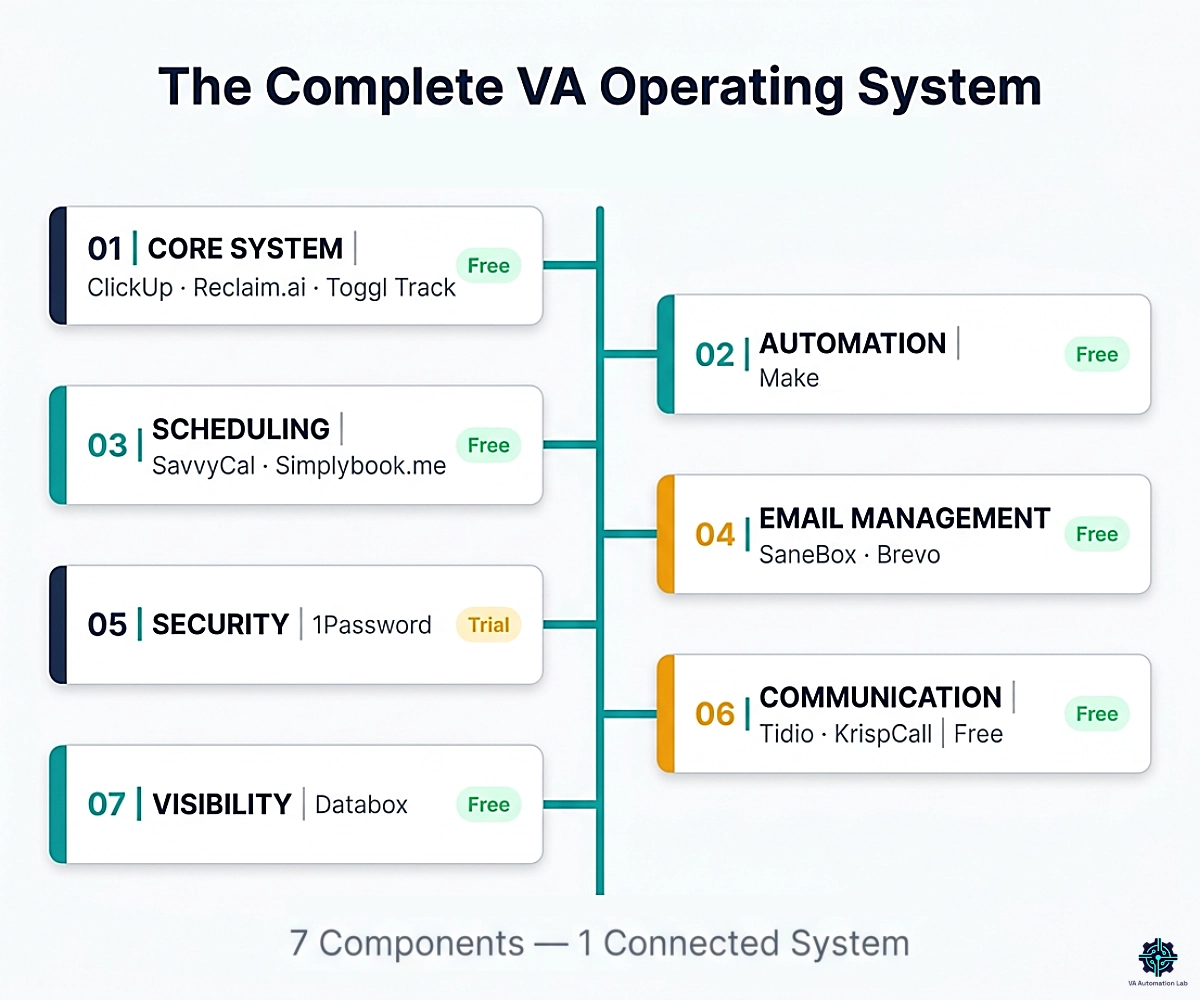
This guide builds a complete VA operating system across seven functional components: the core workflow, the automation that connects it, the scheduling and communication that face clients, the security that protects them, and the reporting that demonstrates value delivered. Each component has the right tool, the right price point, and a note on who it is for.
What this guide covers:
- The 7 components every complete VA operating system needs
- The right tool for each component, with verified pricing and fit assessment
- A recommended build order based on what returns value fastest
- A 4-week implementation plan from zero to functional system
- The mistakes that make these systems fail before they produce results
This guide focuses specifically on productivity systems and time management frameworks. For a full map of the tools and resources covering every operational area of a VA business — automation, client management, AI writing, and comparisons — the VA resource hub is the central reference point.
👉 AI Tools for Virtual Assistants: The Complete Practical Guide — for a complete overview of the best AI tools for Virtual Assistants.
Want to Start Using AI Tools the Right Way?
If you’re a Virtual Assistant and feel confused by too many AI tools, this free starter toolkit shows you exactly where to begin, without tech overwhelm.
Ready-to-use prompts and workflow templates.
No research required: download it and start the first workflow today.
Table of Contents
1. What Is a VA Productivity System
A productivity system for a virtual assistant is a structured set of tools organized by function (core operations, automation, scheduling, email management, security, communication, and reporting) connected so that information flows between components without requiring constant manual coordination.
A tool stack is a list. A productivity system is architecture. With a tool stack, every transition between tools is a manual step. With a system, the connections are built once and run automatically: a completed task triggers a client update, a new booking creates an onboarding sequence, a weekly time report formats and delivers itself. The VA’s attention goes to client work, not to the infrastructure meant to support it.
Within that architecture, time management for a VA is not a single habit — it is three connected functions working together: protecting focus time (so deep work survives the calendar), blocking and auto-scheduling tasks (so deadlines find slots before the week fills), and tracking time (so the data informs pricing and capacity). The core system below handles all three.
For a solo VA managing two to four clients simultaneously, the gap between deliberate system architecture and an accumulated tool list is typically three to five hours per week. At scale, it grows. Most of that time is not lost to any single task, it is lost to the coordination between tasks that a well-built system handles automatically.
How much does a productivity system for a virtual assistant cost?
A complete VA productivity system runs $0 to start and $28–$50 per month at professional tiers for a solo virtual assistant. The free-tier core — task manager, AI calendar, and time tracker — costs nothing. A paid solo stack that adds automation, inbox triage, and scheduling lands near $34/month. A full multi-client system with reporting and communication reaches roughly $100–$200/month.
2. The Real Cost of Working Without a System
Before choosing a single tool, it helps to quantify what the current setup costs. The overhead between disconnected tools is not a rounding error — for a working VA, it is the difference between billable capacity and unpaid administrative drag. Virtual assistant productivity is rarely lost to slow work; it is lost to the friction between tools that were never designed to connect.
Asana’s Anatomy of Work Index found that knowledge workers spend the majority of their day — around 60% — on “work about work”: communicating about tasks, searching for information, switching between apps, and chasing status, rather than the skilled work they were hired to do. The research puts hard numbers on each leak.
Time lost switching between tools
A 2022 Harvard Business Review study found the average digital worker toggles between applications roughly 1,200 times a day, spending just under four hours a week — about 9% of work time, or five working weeks a year — simply reorienting after each switch. The American Psychological Association estimates chronic context-switching can consume up to 40% of productive capacity, and Microsoft’s 2025 Work Trend Index found knowledge workers are interrupted every two minutes — about 275 times a day — by a meeting, email, or message. For a VA running tasks, calendar, email, and client tools as separate islands, that tax is paid every single day.
Work that falls through the gaps
When active work is not visible in one place, deadlines slip. In Asana’s research, 88% of knowledge workers said time-sensitive projects or major initiatives had fallen behind or slipped through the cracks because of the sheer volume of tasks on their plate. A missed client deadline rarely costs an hour — it costs trust, and sometimes the retainer.
Scheduling friction
Every client call preceded by a three-email exchange, every reschedule, every timezone misfire is unbillable coordination. Microsoft found that 57% of meetings are now called ad hoc, with no calendar invite — a fair proxy for how much scheduling happens reactively. A VA managing four clients with weekly touchpoints can lose 30–60 minutes a week to booking logistics alone — friction that one scheduling link eliminates permanently.
Reporting and data-gathering overhead
Assembling a client report by hand from four tools is the most time-expensive recurring deliverable most VAs carry — and it is exactly the “searching for information and chasing status” that Asana’s research counts inside that 60%. Knowledge workers in the same study estimated they could save nearly five hours a week with better processes. A self-updating dashboard converts that recurring scramble into a one-time setup.
Inbox management
Email is where attention goes before it reaches client work. Microsoft’s 2025 data found the average employee now receives 117 emails a day — most skim-read in under a minute. Triage that protects the primary inbox reclaims a meaningful share of that attention directly.
The ROI, stated plainly
A solo VA managing two to four clients typically loses three to five hours a week to this coordination overhead — close to the nearly five hours Asana’s respondents said better processes would return — time that is not billable and not recoverable without a system. At a conservative $30/hour, five recovered hours a week is roughly $600 a month in restored capacity. The professional-tier stack that recovers it costs $27–$50 a month. The system pays for itself in the first week it runs; every month after that is margin.
3. The 7-Component VA Operating System
A complete VA operating system covers seven distinct functions. Most VAs are strong on one or two, usually tasks, sometimes scheduling, and missing the others entirely. Understanding the full architecture before choosing tools prevents the most common mistake: adopting tools that duplicate one area while leaving others completely unaddressed.
For a complementary model of the same problem — organized as five layers rather than seven components — see AI-Powered Productivity System for Virtual Assistants: 5-Layer Framework.
Component | Function | What Breaks Without It |
Core System | Tasks, calendar, time tracking | Work falls through gaps; time is invisible; priorities are reactive |
Automation Layer | Tool-to-tool data flow | Manual handoffs consume hours daily; errors accumulate |
Scheduling | Client bookings, meeting links | Email back-and-forth; calendar conflicts; timezone errors |
Email Management | Inbox triage, client email sequences | Primary inbox is noise; follow-ups slip; no client nurturing |
Security | Password management, access control | Client data exposed; credential chaos; unprofessional handoffs |
Communication | Website chat, business phone | Missed inquiries; personal number used professionally |
Visibility | KPI dashboards, automated reporting | No data to demonstrate value; decisions made without evidence |
4. Component 1 — Core System
The core system is the foundation everything else builds on. It covers three functions: centralized task management, intelligent calendar protection, and time visibility. Get this component wrong and the other six cannot compensate for it. Get it right and the rest of the system amplifies the foundation.
ClickUp — Task and Project Hub
Best for: VAs managing multiple simultaneous clients who need all active work visible, organized, and prioritized in one place
ClickUp is the task management foundation of the core system. It handles tasks, subtasks, due dates, priorities, embedded documents, time estimates, and native time tracking, all in one interface. The feature that makes it specifically suited to multi-client VA work is Spaces: top-level organizational units that create a clean structural separation between clients without requiring separate accounts or workspaces.
Each client lives in their own Space, with their own task lists, status views, and priorities. From the outside, the VA manages one ClickUp account. From the inside, each client has their own organized environment. Switching from Client A’s project board to Client B’s takes one click.
Practical use cases:
- Centralizing all incoming task requests from email, Slack, and client calls before processing any of them
- Managing recurring deliverables (weekly reports, monthly newsletters, social content schedules) with template tasks that repeat automatically
- Connecting to Reclaim.ai so tasks with deadlines auto-schedule into the calendar, eliminating the need to manually block time for each deliverable
- Generating client-specific status views for weekly updates without assembling progress manually
Cost (annual billing):
- Free: Unlimited tasks, collaborative docs, kanban boards, calendar view, 60MB storage — covers a solo VA’s core task management needs entirely
- Unlimited ($7/user/month): Unlimited integrations, native time tracking, goals, resource management — the upgrade that connects ClickUp to Make and Reclaim.ai across the full stack
- Business ($12/user/month): Unlimited dashboards, 5,000 automations/month, webhooks — relevant for VAs running complex multi-client reporting
The Free plan is the starting point. The Unlimited plan is the practical upgrade for anyone building the full operating system described in this guide.
For setup templates and workflow structure, see ClickUp for Virtual Assistants: Setup Guide, Templates & Workflows.
Reclaim.ai — AI Calendar Intelligence
Best for: VAs who lose focus time to meetings, need tasks auto-scheduled around a packed calendar, and want their week to reflect their priorities, not whatever arrived last in their inbox
Reclaim.ai is the AI layer that turns a passive calendar into an active system. It does not replace your calendar, it makes it intelligent. Instead of your week filling with whatever gets booked, Reclaim defends your focus time, auto-schedules tasks from ClickUp, and continuously reorganizes around meetings as the week changes.
The three features that most change VA workflow:
Focus Time — Set a weekly goal (e.g., 15 hours of focused output per week). Reclaim finds available time and blocks it, then defends those blocks against meeting requests. When a meeting is booked over a Focus block, Reclaim reschedules the block to the next available window automatically. Your focus time is never cancelled, it is rescheduled.
Habits — Recurring flexible blocks (morning deep work, lunch, end-of-day admin, weekly review) that Reclaim schedules around meetings rather than at a fixed time. A VA who wants deep work every morning will see that block find the best available morning window each day, not disappear when an 8am call gets booked.
Task Auto-Scheduling — Connect Reclaim to ClickUp. Add a deadline and time estimate to any task. Reclaim schedules it into your calendar during available working windows. When the week shifts, Reclaim reschedules automatically. Tasks with deadlines stop competing with meetings for attention, they find their own slots.
Reclaim.ai’s own data reports users save an average of 7.6 hours per week through smarter AI scheduling, with 60,000 + companies actively relying on the platform.
Integrations: Google Calendar, Outlook, ClickUp, Asana, Todoist, Linear, Jira, Google Tasks, Slack, Zoom, Google Meet
Cost (annual billing):
- Free (Lite): 1 habit, 1 scheduling link, 1 calendar sync — useful for testing, not for multi-client VA work
- Starter ($10/seat/month): Unlimited habits, 3 scheduling links, 3 smart meetings, unlimited calendar sync, unlimited task integrations — the right plan for most solo VAs
- Business ($15/seat/month): Unlimited scheduling links and smart meetings, delegated calendar access, webhooks — relevant for VAs offering calendar management as a client service
An alternative — Motion
Motion covers similar ground (AI calendar plus task auto-scheduling) and layers in heavier project-management features, but it has no free tier and starts at $29/month billed annually (Pro AI, Individuals) — which makes Reclaim.ai the lower-risk entry point for most solo VAs. If AI project management and scheduling in a single tool is the priority and budget is not the constraint, Motion is worth evaluating.
For the full setup walkthrough, see Reclaim.ai for Virtual Assistants: Complete Guide & Setup.
Toggl Track — Time Visibility
Best for: VAs billing hourly or by project who need accurate, client-ready time records with minimal daily friction
Time tracking serves two functions in the operating system. It produces the billing record clients receive, and it produces visibility into where hours go, the data that makes pricing, capacity, and workflow decisions concrete rather than intuitive.
Most VAs who start tracking time discover they have been undercharging for at least one client and overestimating available capacity across the week. Starting time tracking consistently is one of the highest-return changes a VA can make, because the data it produces is immediately actionable.
Toggl Track is the cleaner, faster option for solo VA billing. One-click timer from browser extension, desktop, or mobile. Tag by client and project. Weekly summary reports ready to share with clients. The free plan covers unlimited tracking with no user cap. Upgrade to Starter ($9/user/month, annual) for billable rates per project, project time estimates with alerts, and revenue analysis reports.
Full guide: Toggl Track for Virtual Assistants: Complete Guide, Time Tracking & Productivity Workflows
Clockify is the alternative when tracking needs to extend to a subcontractor or a client’s team. The free plan is unlimited, unlimited users, unlimited projects, unlimited entries, no per-seat cost. Upgrade to Standard ($5.49/user/month, annual) for invoicing, timesheet approvals, and attendance tracking.
Decision guide:
- Solo VA, hourly billing: Toggl Track free tier
- VA needing project-level billing rates and estimates: Toggl Track Starter ($9/month, annual)
- VA managing a subcontractor or client-side team: Clockify free tier
- VA generating invoices inside the time tracker: Clockify Standard ($5.49/month, annual)
ClickUp: The Foundation Every Other Tool Builds On
The Free plan handles unlimited tasks, collaborative docs, kanban boards, and calendar view, everything a solo VA needs to centralize client work immediately.
The Unlimited plan adds the integrations that connect ClickUp to Make and Reclaim.ai across the full stack.
5. Component 2 — Automation Layer
The automation layer is what turns a collection of separate tools into a connected system. Without it, every tool handoff is manual: a completed ClickUp task requires a manual status update email; a new inquiry form requires manual CRM entry; a weekly time export requires manual formatting before delivery. The automation layer eliminates those steps.
For the complete automation playbook beyond this layer, see Automation for Virtual Assistants: The Complete Guide.
Make — Automation Hub
Make builds the connections. It handles multi-step, conditional workflows, where an event in one tool triggers a sequence of actions across multiple other tools, with different logic depending on the data involved.
Practical VA automations in Make:
- New client intake form → ClickUp project created + Google Drive folder created + SavvyCal scheduling link sent automatically
- ClickUp task marked complete → client status email sent + time entry logged to reporting sheet
- Weekly Toggl Track export → formatted report → delivered to client inbox automatically
- New Simplybook.me booking → Brevo welcome email sent + ClickUp onboarding task created
Each of these saves 15–30 minutes per occurrence. Across a week of recurring triggers, the total is typically three to five hours recovered from pure coordination overhead.
The correct implementation order: Do the process manually first. Document every step. Identify what the stable inputs and outputs are. Then automate. Make scenarios built on documented processes run indefinitely. Scenarios built on undocumented processes break at the edges and require constant maintenance. See How to Automate Repetitive Tasks as a Virtual Assistant for the correct sequence.
Cost (annual billing):
- Free — 1,000 credits/month, 15-minute minimum interval between scenario runs
- Core $9/month for 10,000 credits — unlimited active scenarios, API access, scheduled runs down to the minute
- Pro $16/month for 10,000 credits — custom variables, full execution log search
For a complete setup guide, see Make for Virtual Assistants: The Beginner Setup Guide.
Supporting Layer — Documentation, SOPs & File Sharing
Automation only runs reliably on processes that are written down, and a system only survives delegation when knowledge lives somewhere other than one person’s memory. Two functions sit underneath the seven components as shared infrastructure.
Documentation and SOPs. Before a workflow becomes a Make scenario, it should exist as a documented SOP. A single Notion workspace is enough for a solo VA to hold every client SOP, checklist, and reference doc in one searchable place; for VAs onboarding subcontractors, Trainual turns those SOPs into trackable training modules.
File sharing and document collaboration. Client files, deliverables, and shared assets need one organized home with controlled access — typically Google Drive or Dropbox — connected into the automation layer so new client folders and document routing happen without manual setup.
6. Component 3 — Scheduling
Scheduling overhead is one of the most disproportionate time costs in VA work. The three-email exchange that precedes every client call, the back-and-forth when availability shifts, the timezone confusion across international clients, all of it is eliminable with one-time setup of the right scheduling tools.
For a full head-to-head of the scheduling and AI-calendar options, see Best AI Scheduling Tools for Virtual Assistants. For a wider comparison of tools that replace Calendly, see 6 Best Calendly Alternatives for Virtual Assistants.
SavvyCal — Link-Based Scheduling
Best for: VAs who send scheduling links for their own client meetings, check-ins, discovery calls, strategy sessions
SavvyCal’s differentiating feature is the recipient calendar overlay: when a client opens a SavvyCal link, they see your availability with their own calendar events displayed on top of it. No tab-switching, no cross-referencing two views. They spot a mutual opening and book in seconds.
For VAs managing multiple clients with different meeting types, SavvyCal’s link model allows separate links per meeting type, each with its own duration, availability windows, buffer time, and confirmation message. A VA might run three separate links: a 15-minute weekly check-in (Tuesday/Thursday only), a 60-minute strategy session (Mondays, limited to 2 per week), and a 30-minute discovery call (any weekday, protected by Reclaim.ai availability).
Cost (annual billing):
- Free: 1 scheduling link, 1 calendar connection, calendar overlay for recipients, basic scheduling — a starting point for a single meeting type
- Basic ($10/user/month): Unlimited calendars, unlimited scheduling links, team scheduling
- Premium ($17/user/month): Custom domain, delegate access to an assistant, paid bookings via Stripe
Simplybook.me — Client Booking Pages
Best for: VAs managing bookings for a client’s service business, coaches, therapists, consultants, wellness studios, fitness professionals
The distinction between SavvyCal and Simplybook.me is the relationship the tool is designed for. SavvyCal creates scheduling links for people who already know they want to meet with you. Simplybook.me creates a complete, branded public booking website where new clients discover, select, and pay for services independently, without requiring any communication with the VA first.
A VA managing a client’s coaching practice or therapy clinic uses Simplybook.me to run the entire client-facing booking operation. The VA configures and maintains the system. The client’s customers interact with it directly.
Cost (annual billing):
- Free: 50 bookings/month, 1 provider — for testing
- Basic ($11.90/month): 100 bookings, 5 providers, 3 custom features — includes payments, deposits, client app
- Standard ($24.90/month): 500 bookings, 15 providers, 8 custom features — adds branded app, HIPAA, SAML SSO
- Premium ($49.90/month): 2,000 bookings, 30 providers, unlimited features — adds advanced payments, QuickBooks/Xero/FreshBooks, white label
All paid plans include a 14-day free trial.
7. Component 4 — Email Management
Email is where VA attention goes before it reaches client work. Component 4 has two distinct functions: inbox triage (filtering and structuring incoming mail to protect attention) and client email automation (outbound sequences, campaigns, and onboarding flows).
For the complete inbox-to-automation email workflow, see AI Email Management for Virtual Assistants: Best Tools and Workflows.
SaneBox — Inbox Triage
Best for: VAs whose primary inbox is a source of distraction rather than organized communication; VAs managing multiple client email accounts
SaneBox routes email by predicted importance before messages reach the primary inbox. It learns from behavior (which senders you respond to, which threads you engage with) and routes everything else to secondary folders reviewed at scheduled times rather than on every notification.
The three SaneBox features that most change daily email workflow:
- @SaneLater: Non-urgent email (newsletters, automated notifications, low-priority vendors) arrives here instead of the primary inbox. Reviewed in a dedicated window, not continuously.
- @SaneBlackHole: One drag to permanently route a sender away from your inbox. One action, never see that sender again.
- @SaneReminders: Forward any email to a future date (e.g., 3days@sanebox.com) and it reappears in the inbox at exactly the right moment. Eliminates manual follow-up tracking.
Cost (annual billing):
- Snack ($5.42/month): 1 email account, 2 SaneBox features — solo VA entry point
- Lunch ($9.08/month): 2 email accounts, 6 SaneBox features — right for a VA managing their own inbox plus one client inbox
- Dinner ($26.58/month): 4 email accounts, all features, phone support — for VAs managing multiple client inboxes simultaneously
14-day free trial available.
Full guide: SaneBox for Virtual Assistants: Review & Setup Guide
Brevo — Client Email Automation
Best for: VAs managing email marketing campaigns, client onboarding sequences, or newsletters; VAs growing their own email list
Brevo handles outbound email sequences: client onboarding flows, newsletter campaigns, follow-up automation, and transactional email delivery. It also includes a basic CRM, contact segmentation, and a drag-and-drop email editor, all in one platform at pricing significantly more accessible than alternatives.
The key structural difference from most email platforms: Brevo prices by emails sent, not by contacts stored. A VA managing a client’s list of 15,000 contacts who sends monthly newsletters pays for 15,000 sends per month, not for storing 15,000 contacts. This model is meaningfully cheaper for VAs managing large but infrequently contacted lists.
Cost (annual billing):
- Free: 300 emails a day, up to 100,000 contacts stored, automation limited to 2,000 contacts, drag-and-drop editor — sufficient for testing and very low-volume clients
- Starter (from $8.08/month): Removes daily cap, covers 5,000 emails a month and scales up to 100,000 — right for VAs managing regular but not high-frequency client campaigns. Note: Brevo branding appears on emails
- Standard (from $16.17/month for 5,000 emails): Adds landing page builder, A/B testing, no Brevo branding
Supporting Tool — Text Expansion
Across email replies, client messages, onboarding instructions, and SOP snippets, VAs type the same things repeatedly. A text-expansion tool replaces those repeated blocks with short abbreviations — type a few characters and a full saved response, signature, or instruction set appears. For a VA handling high-volume client communication, it removes one of the most invisible recurring time costs in the workflow.
TextExpander stores shared, searchable snippet libraries that work across every app — useful when standard replies, booking instructions, or status-update templates need to stay consistent across clients. It is not a core component, but for communication-heavy VA work it pays back quickly.
Cost (billed annually): Free $0 (5 active Snippets) · Pro $5/month per user · Business $10/month per user (shared team snippets). 30-day preview of paid features for new accounts.
Full guide: TextExpander for Virtual Assistants: Complete Guide to Templates, Snippets & Productivity Workflows
Stop Letting Your Inbox Control Your Day
Most productivity systems break down in the inbox.
Important client emails compete with newsletters, notifications, and low-priority messages, creating constant context switching and distraction.
SaneBox automatically sorts incoming email by importance, helping you focus on client work instead of managing your inbox all day.
As a VA, even saving 15–20 minutes per day compounds into dozens of hours recovered over a year.
Get started with SaneBox and claim $15 in account credit.
8. Component 5 — Security
Security is the component most VAs delay indefinitely and the one that carries the highest risk if skipped. The typical approach — a shared credential spreadsheet, passwords reused across client platforms, login details sent via email — is a liability that compounds with every new client relationship added.
1Password — Secure Password Management for Teams & Clients
1Password is the professional solution. It stores passwords, API keys, secure notes, credit card information, and sensitive documents in an encrypted vault, accessible only through a master password and Secret Key. For a VA managing credentials across dozens of client platforms simultaneously, it means one secure vault, zero credential chaos, and a professional-grade answer to how client login security is handled.
The feature that matters most for VA work is secure sharing. A client who grants a VA access to their platforms does not need to reveal the actual password, 1Password allows shared vault access without the underlying credential ever being visible in plain text. When an engagement ends, access is revoked in seconds. No password changes required.
Practical use cases:
- Storing all client-platform credentials securely, accessible from any device
- Sharing specific credentials with subcontractors without exposing the rest of the vault
- Generating unique strong passwords for every new client platform — no reuse
- Storing secure notes with 2FA backup codes, API keys, and sensitive client documentation
Cost (annual billing):
- Individual ($3.99/month): 1 user — covers a solo VA’s own credentials and client vault
- Families ($5.99/month for 5 users): Shared vaults for a VA partnership
- Teams Starter Pack ($24.95/month for 10 users): Secure sharing, admin controls — for a small VA team
- Business ($8.99/user/month): Custom roles, event reporting, identity provider integrations
No free plan. 14-day free trial.
9. Component 6 — Communication
Client-facing communication tools establish the professional contact layer of the operating system, the channels through which clients, their customers, and prospects reach a VA or the business the VA manages.
Tidio — Website Chat
Best for: VAs managing a client’s website who need a live chat and chatbot layer for visitor engagement, lead capture, or first-response customer support
Tidio places a chat widget on a client’s website that allows visitors to initiate conversations, interact with automated chatbot flows, and receive AI-powered answers to common questions. For a VA managing a client’s web presence, it handles first-contact communication without requiring the VA to monitor a live inbox continuously.
The Lyro AI agent answers common visitor questions automatically, drawing from the client’s support content. Routine inquiries (pricing, service availability, booking instructions) get resolved without human involvement. More complex requests escalate to the live chat queue.
Note on Tidio’s pricing model: Tidio charges by conversations, not by seats. The free plan includes 50 billable conversations. Starter is $24.17/month for 100 conversations/month, billed annually. Lyro AI ($32.50/month for 50 AI conversations) and Flows automation ($24.17/month for 2,000 visitors reached), both billed annually, are charged separately, which means real-world costs are typically 2–3× the base plan price. Evaluate expected monthly conversation volume carefully before committing to a paid plan.
KrispCall — Business Phone
Best for: VAs who need a dedicated professional business number separate from their personal mobile; VAs handling client-facing phone communication
KrispCall is a cloud-based business phone system that provides virtual numbers across 100+ countries, manages calls and SMS from a unified dashboard, and integrates with CRM tools including HubSpot, Pipedrive, Zoho, and Zapier. For a VA operating as a solo professional business, it creates a clean separation between personal and client-facing communication, with call recording, voicemail transcription, and CRM logging built in.
Practical use cases:
- A dedicated business number for client calls, professional, separate from a personal mobile
- Managing inbound calls when the VA handles a client’s customer support or reception function
- Call recording for quality review, SOP documentation, or dispute resolution
- SMS for appointment reminders and short-form client communication
Cost (annual billing):
- Essential ($12/user/month): Unified callbox, global calling, business SMS, voicemail transcription, call recording, basic CRM integrations via Zapier — covers most solo VA use cases
- Standard ($32/user/month): Power dialer, call monitoring, whisper coaching, direct CRM integrations (Salesforce, HubSpot, Zoho), call routing — relevant for VAs handling client-side sales support
No free plan. 14-day money-back guarantee.
10. Component 7 — Visibility
Visibility is the reporting layer of the operating system. It answers the question “is this working?” — for both the VA’s own operations and for clients who need to see the value being delivered.
For the end-to-end reporting build, see How to Automate Client Reporting as a Virtual Assistant.
Databox — Real-Time Analytics Dashboards & KPI Tracking
Databox connects to the tools in the stack (ClickUp, Toggl Track, Brevo, Simplybook.me, Google Analytics, social media platforms) and consolidates the metrics that matter into shareable, real-time dashboards. Instead of assembling a weekly client report manually from five different platforms, a VA builds the dashboard once, connects the relevant data sources, and the report updates itself.
For a VA offering reporting as part of their service package, Databox turns a time-consuming deliverable into a one-time setup. Client review meetings become conversations about what the data shows rather than exercises in data gathering.
Note on fit: Databox is not the right starting tool for a VA building from scratch or managing clients who do not require formal performance reporting. The free plan (3 data sources) gives a clear sense of the platform before any financial commitment. Paid plans start at $71/month (Analyst, annual), so cost is not the barrier: the limit is data sources and clients. Analyst covers 5 data sources; past that, Agency, from $79/month (annual), brings 20 plus $20/month per client pack (annual).
Cost (annual billing):
- Free: 3 data sources, 1 dashboard — evaluation starting point
- Analyst ($71/month, annual): 5 data sources, hourly data refresh, 150 AI credits/month
- Agency (from $79/month, annual): unlimited users, 20 data sources, plus $20/month per client pack
- Team Core ($199/month, annual): 3 users, 10 data sources, 500 AI credits/month
11. Full Stack Overview and Recommended Build Order
Not every component is equally urgent or equally accessible. The table below shows the complete stack with priority level, recommended build order, and entry cost (prices billed annually).
Priority | Component | Tool | Free Tier | Entry Paid |
🔴 First | Core — Tasks | ClickUp | ✅ Unlimited | Unlimited $7/user/mo |
🔴 First | Core — Calendar | Reclaim.ai | ✅ Lite | Starter $10/seat/mo |
🔴 First | Core — Time | Toggl Track | ✅ Unlimited | Starter $9/user/mo |
🟠 Second | Automation | Make | ✅ 1,000 credits | Core $9/mo (10k credits) |
🟡 Third | Scheduling — Links | SavvyCal | ✅ 1 link | Basic $10/user/mo |
🟡 Third | Scheduling — Pages | Simplybook.me | ✅ 50 bookings | Basic $11.90/mo |
🟡 Third | Email — Triage | SaneBox | ❌ 14-day trial | Snack $5.42/mo |
🟡 Third | Email — Automation | Brevo | ✅ 300/day | Starter $8.08/mo (5k emails) |
🔵 Fourth | Security | 1Password | ❌ 14-day trial | Individual $3.99/mo |
🔵 Fourth | Comms — Chat | Tidio | ✅ 50 conversations | Starter $24.17/mo |
🔵 Fourth | Comms — Phone | KrispCall | ❌ Money-back | Essential $12/user/mo |
🔵 Fourth | Visibility | Databox | ✅ 3 sources | Analyst $71/mo billed annually |
Minimum viable operating system at entry paid tiers: ClickUp Free + Reclaim.ai Starter $10 + Toggl Track Free + Make Core $9 (10k credits) + SavvyCal Free + SaneBox Snack $5.42 + Brevo Free + 1Password Individual $3.99 = $28.41/month for a complete core, automation, scheduling, email management, and security stack. Add communication and visibility tools as client relationships reach the stage where each component earns its cost.
Productivity System Maturity Levels
Not every VA needs every component on day one. The right stack is the one that matches the stage of the business. These four levels map the natural progression — add the next layer once the current one is stable and the next is clearly earning its cost.
Level 1 — Solo Beginner VA. The zero-cost core: ClickUp (tasks), Reclaim.ai (AI calendar and focus protection), and Toggl Track (time). Everything visible, time protected, hours tracked — all on free tiers. Typical cost: $0/month.
Level 2 — Growing VA. With two or more steady clients, the leaks move to coordination and inbox. Add Make to automate the first repetitive handoffs, SaneBox to triage the inbox, and SavvyCal to end scheduling back-and-forth. Typical cost: $25–$50/month as the core moves to paid tiers.
Level 3 — Advanced VA. Now the business faces clients who expect reporting and professional contact channels. Add Databox for self-updating dashboards, KrispCall for a dedicated business line, and Tidio when managing a client’s website chat. Typical cost: $85+/month.
Level 4 — Agency VA. Running subcontractors and multiple client operations means the full stack on team tiers, plus shared 1Password vaults and documented SOPs so the system survives delegation. Typical cost: $150–$300+/month depending on team size and reporting depth.
The mistake is skipping levels — buying a Level 3 reporting tool while the Level 1 core is still disorganized. Build in order; each level makes the next one work.
Three Example Productivity Systems
The same architecture scales across budgets. Here are three complete configurations at different price points — each a working system, not a partial collection.
System | Stack | Monthly cost |
Budget VA System | ClickUp Free · Reclaim.ai Lite · Toggl Track Free | $0 |
Professional Solo VA | ClickUp Unlimited · Reclaim.ai Starter · Make Core · SaneBox Lunch | ~$35 (≈$45 with a paid SavvyCal Basic scheduling tier) |
Premium Multi-Client VA | Full operational stack: core + Make + SavvyCal + SaneBox + Brevo + 1Password + Tidio + KrispCall | ~$100–$110 (Databox Analyst reporting adds $71/month billed annually when reporting is a billable deliverable) |
The Budget system proves the architecture with zero financial risk. The Professional Solo system is the practical target for most full-time solo VAs. The Premium system is for multi-client operators where every component is already earning its cost — and where Databox reporting is itself a billable line item.
For category-by-category tool comparisons with pricing, see Best Tools for Virtual Assistants in 2026.
Reclaim.ai: Start Free, Upgrade When You’re Ready
The free Lite plan lets you test habits and scheduling links with no credit card required.
The Starter plan ($10/seat/month, billed annually) is where the full productivity system kicks in, unlimited habits, task scheduling from ClickUp, and scheduling links that protect your calendar automatically.
12. How to Build This Operating System in 4 Weeks
The most common reason productivity systems fail is implementation scope. A VA researches ten tools, attempts to configure all of them in one weekend, and returns to the old workflow Monday morning because nothing is ready to use yet. The system never gets built.
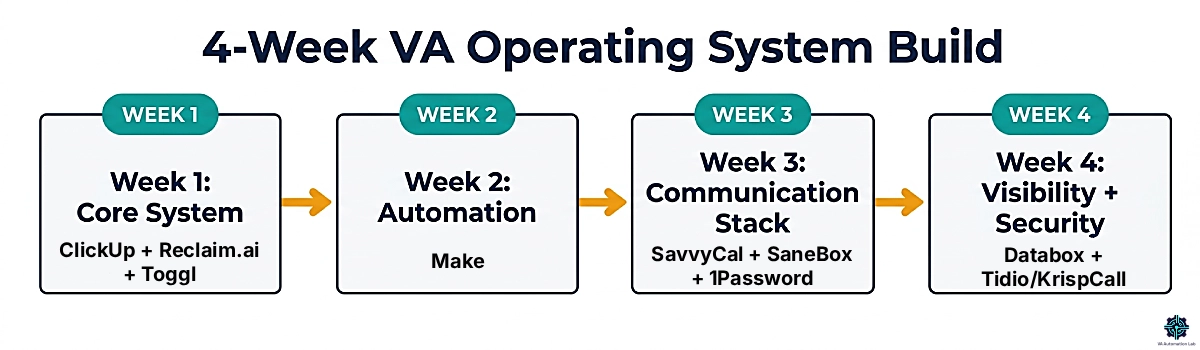
A four-week build, one component group per week, avoids that failure mode. Each week has one clear deliverable. Each deliverable produces a measurable change before the next one begins.
Week 1 — Build the Core System
Deliverable: All active client work centralized in ClickUp; calendar defending focus time in Reclaim.ai; time tracking running for every session.
Set up ClickUp with one Space per active client. Import all current tasks from email, notes, and memory into the correct Space with due dates.
Set up Reclaim.ai: connect your calendar, configure 3 habits (morning deep work, midday buffer, end-of-day admin), set a weekly Focus Time goal, connect ClickUp so tasks with deadlines auto-schedule.
Start Toggl Track: create one project per client. Commit to starting the timer at the beginning of every work session this week.
End-of-week check: Is every active deliverable visible in ClickUp? Did Reclaim protect any focus time? Do you have a time record for every hour worked?
Week 2 — Build the Automation Layer
Deliverable: At least two manual data-transfer steps eliminated by Make automations.
Identify the two most-repeated manual transfers in your current workflow. Common examples: incoming email → ClickUp task; completed task → client status email; weekly Toggl export → formatted report.
Build these as Make scenarios. Start with a simple two-step trigger → action before adding conditional logic.
Test each scenario with a real event before marking it active.
End-of-week check: Did any automation run without you this week? Did it produce the correct output?
Week 3 — Build the Communication Stack
Deliverable: Scheduling links active; inbox triage running; Brevo configured for at least one client; 1Password vault populated.
Set up SavvyCal (for your own meetings) or Simplybook.me (if managing client bookings) and use the link for the next call you need to schedule.
Activate SaneBox on your primary inbox. Let it run 48 hours before adjusting any filters.
Set up Brevo for one client email use case, a welcome sequence, a monthly newsletter, or a follow-up automation.
Migrate all client credentials from wherever they currently live into 1Password and delete the credential spreadsheet.
End-of-week check: Did a client book without an email exchange? Has SaneBox reduced primary inbox volume? Is every client credential in 1Password?
Week 4 — Add Visibility and Communication Tools
Deliverable: One client-facing Databox dashboard built and scheduled for delivery; professional communication channel active where relevant.
Connect Databox to the 2–3 data sources most relevant to your primary client’s reporting needs. Build one dashboard. Schedule one automated report delivery.
Set up Tidio on a client website if chat management is in your scope, or configure KrispCall if a professional business phone is relevant to your client mix.
Review the seven components: which are running? Which need adjustment? What is the first remaining manual process that an automation in week five would eliminate?
For a deeper look at multi-client workflow architecture, see How to Manage Multiple Clients as a Virtual Assistant Using AI.
Make Every Hour Visible
If you’re implementing the 4-week productivity system from this guide, start tracking your time from day one.
Most Virtual Assistants underestimate how much time certain clients, projects, and recurring tasks consume. Without data, it’s difficult to improve pricing, capacity planning, or profitability.
Toggl Track gives you a simple way to measure where your time goes and identify opportunities to work more efficiently.
The free plan is more than enough to build the habit and start collecting valuable productivity data immediately.
13. Common Mistakes VAs Make When Building Productivity Systems
Automating before the core system is stable
Make is the most compelling part of the system to build. It is also the part that produces the least value when the inputs feeding it (tasks, calendar, time) are disorganized. A broken process, automated, is a broken process running faster. Build the core system first.
Treating all seven components as equally urgent
They are not. The core system pays back in week one. Visibility (Databox: Free at $0, Analyst at $71/month billed annually) is cheap to add; what it needs is a client who wants formal automated reporting. Sequence by return on investment, not by comprehensiveness.
Choosing tools by feature count rather than fit
The tool with the most features is rarely the right tool for a solo VA. The right tool is the one that covers its component function with the least setup friction and the most integration with the rest of the stack. Simpler tools adopted consistently outperform comprehensive tools adopted partially.
Adding tools to solve a system problem
When friction appears in the operating system, the reflex is to find a new tool. More often, the friction comes from a missing connection between existing tools or an undocumented process that was automated prematurely. Before adding a new subscription, identify whether the problem is a tool gap or an architecture gap.
Skipping security until something breaks
1Password costs $3.99/month (Individual, billed annually) and takes one afternoon to set up. The alternative (a credential spreadsheet, password reuse, credentials shared via email) is a risk that grows with every client added. This is the component with the lowest cost and the highest stakes.
14. Conclusion: Build the Operating System Once, Run It Indefinitely
The VAs who deliver consistent results across multiple clients are not working harder. They have built systems that handle the coordination overhead automatically, so their attention goes to the work that requires judgment, relationship management, and expertise.
The seven-component operating system in this guide covers every functional area of a professional VA operation. The minimum viable version costs $28.41/month. The full stack at professional paid tiers stays around $100/month for a solo VA. The time it recovers in the first month more than pays for the first year.
The build sequence that produces results fastest:
- ClickUp — make all active work visible. Nothing else improves until you can see everything in one place.
- Reclaim.ai — protect your time. The hours reclaimed in week one pay for the tool in month one.
- Toggl Track — make billable time visible. The data changes how you price and plan.
- Make — automate the first three handoffs you identify. Build on stable processes only.
- SavvyCal + 1Password — eliminate scheduling friction and credential risk. One setup, indefinite benefit.
- Brevo + SaneBox — bring structure to outbound and inbound email.
- Databox + communication tools — add when client relationships warrant formal reporting and professional communication channels.
One component at a time. Four weeks to a functional system. The overhead you are currently managing manually is the capacity being recovered.
Build the System Once. Let It Run for Years.
The biggest productivity gains rarely come from working harder.
They come from eliminating the manual handoffs between tasks, tools, clients, reporting, scheduling, and communication.
That’s exactly what Make allows you to do.
Whether you’re creating automated client onboarding, recurring reporting workflows, task-to-email automations, or multi-client operating systems, Make becomes the layer that connects everything together.
Start with a simple workflow, then expand as your business grows.
Frequently Asked Questions About Productivity Systems for Virtual Assistants
What is the best productivity system for a virtual assistant?
The most complete VA productivity system covers seven components: a core system (ClickUp for tasks, Reclaim.ai for AI calendar management, Toggl Track for time), an automation layer (Make), scheduling (SavvyCal or Simplybook.me), email management (SaneBox + Brevo), security (1Password), communication (Tidio or KrispCall), and visibility (Databox). The minimum viable version at free and entry paid tiers costs $28.41/month. Build the core system first (tasks, calendar, and time) before adding the other six components.
How do I manage my time better as a virtual assistant?
The most effective change is protecting focused work time before the week fills reactively. Reclaim.ai does this automatically: you set a Focus Time goal, and the AI defends those blocks against meeting requests, rescheduling them rather than cancelling them. The second change is tracking time consistently from day one with Toggl Track. Most VAs who start tracking discover they are spending more hours on certain clients than estimated, which directly informs pricing decisions and renegotiation conversations.
What tools do productive VAs use to stay organized?
The most consistently useful tools span three categories. Task management: ClickUp for centralizing all client work in one organized space. Calendar and scheduling: Reclaim.ai for AI time blocking, SavvyCal for scheduling links. Automation: Make for connecting tools and eliminating manual data transfers. Time tracking: Toggl Track for billing accuracy. Email: SaneBox for inbox triage. Security: 1Password for credential management across client platforms. The tools that produce the most operational improvement cover gaps in the current workflow, not the ones with the most features.
How many tools does a VA need to run a complete system?
A complete VA operating system requires one tool per component: one task manager, one AI calendar tool, one time tracker, one automation platform, one scheduling tool, one inbox manager, one password manager, and optionally tools for email campaigns, communication, and reporting. The core stack (ClickUp + Reclaim.ai + Toggl + Make + SavvyCal + SaneBox + 1Password) covers the essential seven functions for under $30/month at entry paid tiers. Add the remaining components as client relationships reach the stage where each earns its cost.
Is Reclaim.ai worth it for a solo VA?
Yes, for any VA managing more than two active clients with recurring weekly commitments. The Starter plan ($10/seat/month, billed annually) provides unlimited habits, 3 scheduling links, 3 smart meetings, unlimited calendar sync, and unlimited task integrations, all the features that matter for multi-client VA work. The direct value: Focus Time goals mean deep work is never displaced by meetings without being rescheduled; task auto-scheduling from ClickUp means deadlines find their own calendar slots automatically. At $10/month billed annually, the tool pays for itself the first time it auto-schedules a task that would otherwise have been done late or forgotten.
What is the difference between a tool stack and a productivity system?
A tool stack is a list of applications. A productivity system is the architecture that connects them. With a tool stack, every transition between tools is a manual decision made by the VA. With a system, the connections are designed once and run automatically: a completed ClickUp task triggers a client update, a new intake form creates a project and sends a welcome sequence, a weekly time export becomes a formatted report. The difference in daily experience is the difference between managing your infrastructure and having your infrastructure manage the workflow.
How does security fit into a VA productivity system?
Security, specifically 1Password, belongs in the operating system because a VA manages credentials for multiple client platforms simultaneously. Reusing passwords, sharing credentials via email, or losing access when a client changes a platform password are risks that compound with every new client added. 1Password eliminates these with encrypted vault storage, secure sharing (clients grant access without revealing actual credentials), and instant revocation when engagements end. It is the lowest-cost, highest-stakes component in the stack. Individual plan at $3.99/month, billed annually. Set up once, never manage credentials manually again.
Glossary: Key Terms for VA Operating Systems
AI Calendar Tool: Software that uses artificial intelligence to automatically protect focus time, schedule tasks, and optimize calendar use. Reclaim.ai is the primary example in the VA context.
Automation Scenario (Make): A single automated workflow built in Make, consisting of a trigger (an event in one tool) and one or more resulting actions in other tools. Scenarios run automatically once active without requiring manual intervention.
Calendar Blocking: Reserving specific time slots for dedicated work sessions, preventing meetings from displacing focused output time.
Credits (Make): The unit of work consumed in Make. Each action within a scenario uses credits. The free plan includes 1,000 credits per month.
Focus Time (Reclaim.ai): AI-protected calendar blocks dedicated to uninterrupted, cognitively demanding work. When meetings are scheduled over a Focus block, Reclaim reschedules the block to the next available window rather than cancelling it.
Habit (Reclaim.ai): A recurring flexible time block, such as daily deep work or end-of-day admin review, that Reclaim auto-schedules around meetings in the best available windows each day.
Inbox Triage: The automated sorting of incoming email by predicted importance before messages reach the primary inbox. SaneBox automates this function, routing non-urgent mail to secondary folders.
Operating System (VA): The complete architecture of tools and workflows covering all functional areas of a VA business (tasks, time, automation, scheduling, email management, security, communication, and reporting) connected so that information flows between components automatically.
Scheduling Link: A personalized URL displaying a user’s availability that allows clients to book meetings directly, eliminating email back-and-forth. SavvyCal generates these with a recipient calendar overlay feature.
SOP (Standard Operating Procedure): A documented step-by-step description of a recurring workflow. SOPs are the prerequisite for reliable automation, you cannot automate a process that has not been defined.
Vault (1Password): An encrypted storage container holding passwords, secure notes, API keys, and sensitive documents. Individual vaults can be shared with specific people with controlled access levels.
About the Author
Alex Stratton has spent the better part of a decade working at the intersection of virtual assistance and operational systems, first as a VA supporting founders and small business owners, then as a workflow consultant helping remote teams reduce the manual overhead that accumulates when businesses grow faster than their processes. The tools and workflows here reflect decisions made repeatedly in real client contexts, where the wrong choice costs hours, not minutes. Learn more about VA Automation Lab → About.