
Automation for Virtual Assistants: The Complete Guide to Tools & Workflows (2026)
Disclosure: This article contains affiliate links. If you purchase through them, VA Automation Lab earns a commission at no additional cost to you. All tools are evaluated independently.
Automation for virtual assistants is the fastest way to take on more clients without working more hours. This guide is practical and no-code from start to finish: which workflows to automate first, which tools to use for each one, what the return looks like, and how to roll everything out over your first 90 days — even if you have never built an automation before.
The volume of VA work has not gone down. Clients expect faster replies, more platforms covered, and consistent output across more hours. Done manually, that ceiling keeps dropping. Automation lifts it — not as a coding project, but as a simple system for removing the repetitive overhead that piles up around every client.
What you’ll find here:
- The 9 VA workflows that produce the clearest return when automated
- The best no-code tool for each workflow, with free tiers and real costs
- A simple framework for deciding what to automate (and what to leave alone)
- The real ROI of automation, with a payback model you can run yourself
- A 90-day rollout plan that builds on itself without adding complexity
If you’re still deciding where automation fits in your broader VA tool stack, the VA resource hub maps every tool category — automation included — across skill levels, so you can identify the right entry point before diving into this guide.
👉 AI Tools for Virtual Assistants: The Complete Practical Guide — for a complete overview of the best AI tools for Virtual Assistants.
Get the Free AI Toolkit for Virtual Assistants
This guide covers the workflows and tools. The free Toolkit gives you the exact setup order, the prompt templates, and the first automation to build — curated for VAs starting from scratch.
Operational in one day, no technical background required.
Table of Contents
1. What Is Automation for Virtual Assistants?
Automation for virtual assistants is the use of no-code tools and workflow software to run repetitive, rule-based tasks on their own. Instead of manually moving data between apps, sending standard emails, or building the same report every week, you set up a sequence once and it runs by itself, triggered by an event you choose.
The key word is repeatable. Automation does not replace your judgment, your client relationships, or your strategic work. It replaces the predictable steps that happen around that work: the setup, the data entry, the handoffs between tools, and the follow-ups that always follow the same pattern. When those steps run on their own, the hours they used to eat become free for work that needs a person.
The Difference From AI Tools and Delegation
These three terms get mixed up, so it helps to separate them. Delegation hands a task to another person. AI tools (like ChatGPT or Claude) generate content — they write, summarize, and draft. Automation moves things — it routes data, triggers actions, and connects your apps. The most powerful VA setups combine the last two: a no-code platform handles the routing, and an AI tool handles the writing inside it. Knowing which job you need saves hours of picking the wrong tool.
The Three Tool Categories That Power VA Automation
Modern automation for VAs runs on three types of no-code automation tools. Integration platforms like Make connect the apps you already use and move data between them automatically. Workflow-specific tools like Reclaim.ai apply intelligence to one job — in that case, protecting and rescheduling your calendar. Document and client-operations tools like PandaDoc automate one part of the client lifecycle, such as contracts and signatures. A working stack combines all three, not any single one.
What Automation Is Not
Automation is not “set it and forget it forever.” Every workflow needs a trigger, a clear rule, and a way to tell you when something breaks. It is also not all-or-nothing. You do not automate your whole business in a weekend — you automate one workflow, confirm it saves time, then add the next. That sequence is the entire game, and the rest of this guide follows it.
2. Why Automation Is No Longer Optional for VAs in 2026
The pressure has sharpened. Industry data now shows what experienced VAs already feel: more than 40% of VAs use AI-powered tools to automate tasks like data entry, scheduling, inbox triage, and client support, and that share is rising. The same research suggests automation can cut manual admin work by up to 40% — time that goes straight back into billable work or extra client capacity.
Those numbers describe the average. The real gap is wider, because automation compounds. A VA who automates onboarding in month one, reporting in month two, and lead intake in month three has built a system that runs alongside their billable work. By month four they handle more clients at a higher standard than they could reach by hand — without proportionally more hours. Three specific pressures make 2026 the moment to act.
Clients Now Expect Instant Responses
Clients who work with tech-forward businesses treat automated confirmations, instant acknowledgments, and real-time status updates as normal. VAs who cannot match that speed lose work — not because of a skill gap, but because of a workflow gap. The fix is rarely “work faster.” It is to let a workflow handle the response the instant the trigger fires.
Tool Fragmentation Is a Hidden Tax
The average VA works across six to ten platforms. Every manual handoff between them — copying data, sending a follow-up, updating a status — is a small tax that adds up across the day. Integration automation removes those handoffs at the category level instead of one task at a time, which is why it pays back faster than any single shortcut.
Automation-Fluent VAs Are Raising the Bar
The market now includes VAs who build and sell automated systems as a premium service. A VA who has not automated their own practice competes at a disadvantage — both in efficiency and in their ability to show clients the automation skills those clients increasingly want. Building your own systems is also the best way to learn the ones you will later sell.
3. The Benefits of Automation for Virtual Assistants
The urgency above is the why now. The benefits below are the what you gain — the concrete, day-to-day improvements automation brings to a solo practice.
You Reclaim Billable Hours and Add Capacity
Every hour an automation absorbs is an hour you get back. You can sell that hour as billable work, or use it to take on another client without burning out. This is the core benefit: automation turns fixed admin time into flexible capacity, which is the only way a solo VA scales revenue without scaling hours one-for-one.
Your Delivery Becomes Consistent and Error-Free
Automations do not forget a step, send to the wrong person, or skip a follow-up because the day got busy. A welcome sequence fires the same way every time. A report goes out every Monday whether or not you remember it. That consistency is something clients notice, and it raises how professional your service feels — without any extra effort from you.
You Build Systems Before the Practice Is Full
Setting up a client-onboarding workflow takes the same time whether you have one client or five. Building it early — before you are fully loaded — means you have a tested, working system ready the moment client two and three arrive. The alternative is building under pressure later, which is exactly when you have the least time to do it well. Starting early is the cheapest version of this investment you will ever make.
4. A Framework for Deciding What to Automate
Most VA automation stalls for one reason: trying to automate too much at once, or automating the wrong thing first. A simple framework prevents both. For the build-order and complexity layers behind each task, the companion guide on How to Automate Repetitive Tasks as a Virtual Assistant goes deeper; this section is about what to choose.
The Frequency × Rule-Clarity Matrix
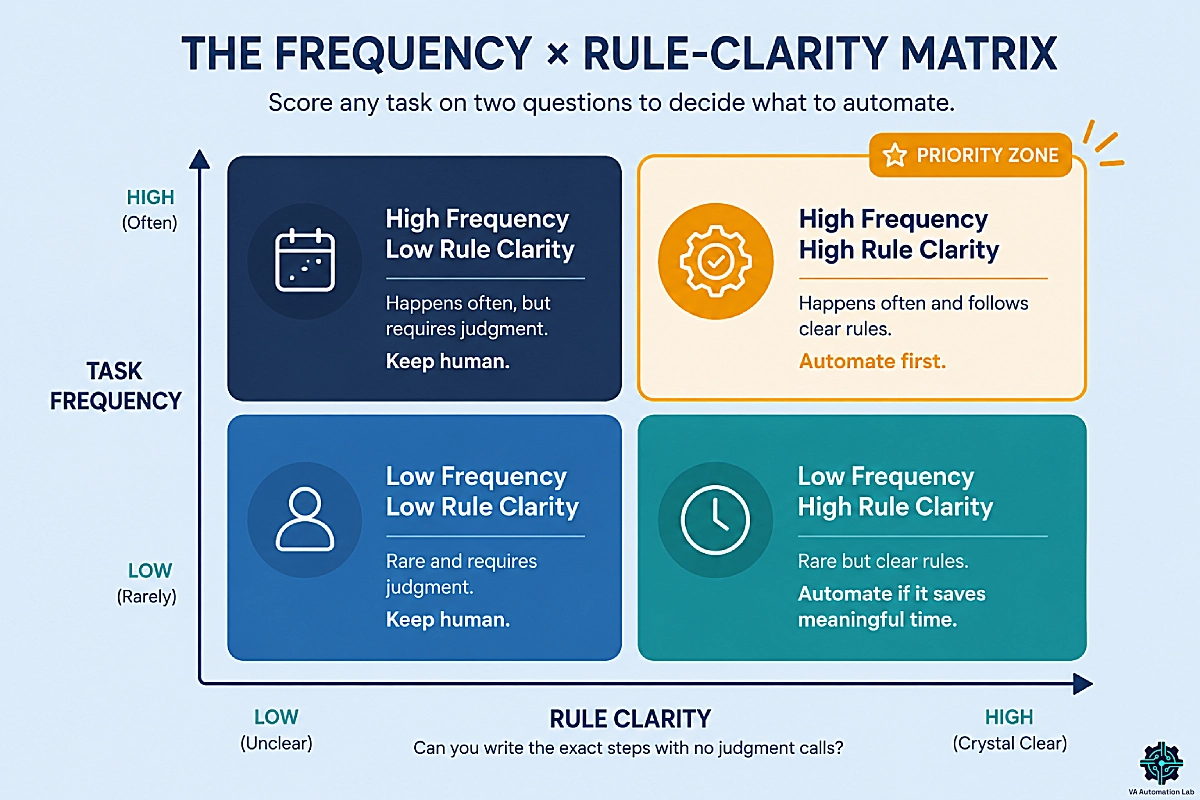
Score any task on two questions. First, how often does it happen? Second, how clear are the rules? — meaning, could you write down the exact steps with no judgment calls? Tasks that are high-frequency and high-rule-clarity are your first automations: they happen constantly and never vary, so the payback is immediate. Tasks that are low-frequency or judgment-heavy stay human. This single filter tells you where to start and what to skip.
The Anatomy of an Automation Workflow
Every automation workflow has the same four parts. A trigger starts it (a new form submission, a signed contract, a set time). A condition decides what happens next (route high-budget leads one way, others another). An action does the work (create a folder, send an email, update a record). And error handling tells you when a step fails, so a silent failure never reaches your client. Understanding these four parts is enough to read or design almost any workflow.
What to Keep Human
The boundary matters as much as the automation. Confirmations, reminders, standard reports, and intake responses are safe to automate — they are structured and predictable. Progress updates, problem-solving, and feedback conversations are not — they are nuanced and relationship-dependent. Automate to clear time for those human moments, never to replace them. Cross that line and clients feel it immediately.
5. The Core VA Workflows to Automate First
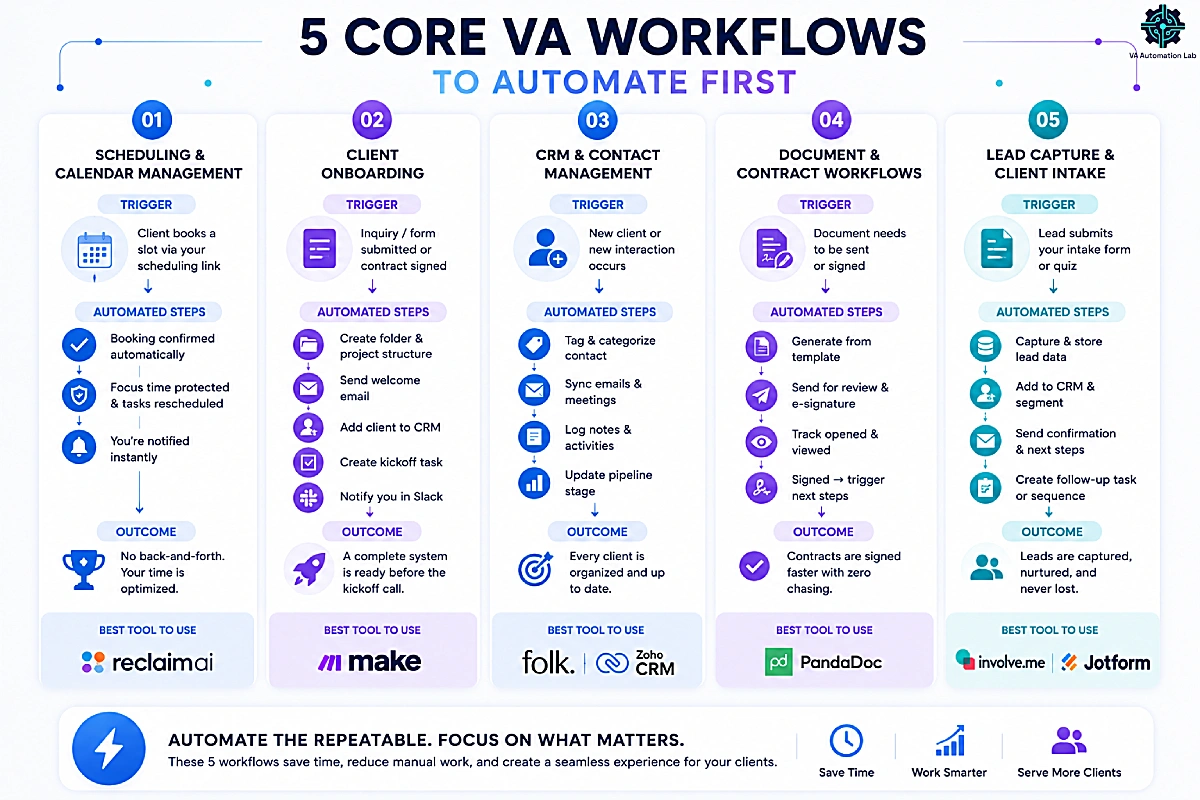
These five workflows are where most solo VAs should start. Each was chosen on one test: the gap between what automation handles and what it costs to set up is most favorable here. This is the practical answer to how to automate tasks as a virtual assistant — start with the foundations below, in roughly this order.
Scheduling & Calendar Management
The problem: Coordinating availability across clients, time zones, and preferences creates a constant stream of back-and-forth email. The average scheduling exchange runs three to five emails and eats twenty to forty minutes — for something that could take zero.
The automation: AI scheduling tools remove the exchange entirely. Reclaim.ai goes beyond a basic booking link: it defends blocks of focus time, auto-reschedules tasks and habits when meetings move, and syncs across Google Calendar and Outlook. For a VA managing their own calendar and scheduling for clients, that dual function is the differentiator.
Practical use case: You add three clients to Reclaim with their working hours and meeting preferences. A prospect picks a slot from your scheduling link; Reclaim books it, protects the focus block before it, and shifts your flexible tasks around it automatically. No email thread, no double-booking.
Cost: Reclaim’s Lite plan is free — 1 user, 1-week scheduling range, 1 scheduling link, 1 habit, unlimited tasks. The Starter plan is $10/month (billed annually) and unlocks an 8-week scheduling range, unlimited focus time and habits, 3 scheduling links, 3 smart meetings, and unlimited integrations — it pays for itself within a week of replacing manual scheduling across two clients.
→ Reclaim.ai for Virtual Assistants: Complete Guide & Setup — full setup walkthrough for VAs, for a wider comparison, see the best AI scheduling tools for virtual assistants.
Client Onboarding
The problem: Every new client triggers the same sequence — welcome email, intake form, project folder, CRM entry, communication channel, kickoff call. Done by hand, it takes thirty to sixty minutes per client and relies entirely on you remembering each step.
The automation: A single Make scenario fires the whole sequence from one trigger — a completed intake form or a signed contract. The scenario creates the folder structure, sends the welcome email, adds the client to the right workspace, creates the kickoff task, and logs everything to your CRM automatically.
Practical use case: New client submits a form via Typeform → Make creates and shares a Google Drive folder → a welcome email goes out via Gmail → the contact is added to your CRM → a kickoff task appears in ClickUp → you get a Slack notification. All of it runs without you touching anything. You step in at the kickoff call.
Cost: Make’s Free plan is $0 (1,000 credits per month, 3,000+ app connectors, routers and filters, 15-minute minimum interval between runs) — enough to build and test this scenario. Make Core at $9/month billed annually, which includes 10,000 credits a month, adds unlimited active scenarios, minute-level scheduling, higher data-transfer limits, and Make API access.
→ How to Automate Client Onboarding for Virtual Assistants — step-by-step automation map for the full onboarding workflow.
CRM and Contact Management
The problem: “Add the client to the CRM” shows up in nearly every workflow above — but a CRM only saves time if your contact data, notes, and pipeline live in one place instead of scattered across inboxes and spreadsheets. Without that hub, every workflow has a weak link.
The automation: A modern CRM becomes the system of record that your other automations read from and write to. Folk is a clean, lightweight option built for solo operators and small teams — it connects to Make, enriches contacts, syncs email and calendar, and keeps every client interaction in one view. If you prefer an all-in-one suite, Zoho CRM is the budget-friendly alternative with a permanently free tier.
Practical use case: A signed contract triggers Make to create a Folk contact with the client’s details, tag them by service type, and log the deal in your pipeline. From then on, every email and meeting syncs automatically, so you open one record and see the entire relationship.
Cost: Folk offers a 14-day free trial, then Standard at $24/month per member (billed annually) — pipeline management, email campaigns, contact enrichment, AI assistants, magic fields, the LinkedIn extension, email/calendar/WhatsApp sync, and 5,000+ integrations. Zoho CRM is free forever for up to 3 users (leads, deals, workflows, reports, mobile app); its Standard plan adds workflow and assignment rules, AI agents, cadences, and sales forecasting.
👉 Explore Folk, or Get Started with Zoho CRM Free
→ Compare the full field in the Best CRM for Virtual Assistants guide.
Document and Contract Workflows
The problem: Every project generates documents — service agreements, proposals, NDAs, statements of work. Sending them by hand, tracking whether they have been opened, and chasing unsigned contracts takes time out of proportion to the task.
The automation: PandaDoc automates the full document lifecycle. Templates with smart fields pull client details from your CRM. Delivery, view tracking, signature requests, and reminders all run on their own. When a contract is signed, a webhook can trigger a Make scenario that creates the project record, sends a confirmation, and kicks off onboarding — no manual step required.
Practical use case: You build a service-agreement template once. For each new client, PandaDoc auto-fills their details, sends the document, tracks when they open it, collects the e-signature, and fires a webhook that starts your onboarding scenario the moment they sign.
Cost: PandaDoc’s Free plan is $0 and includes 60 documents per year, 5 legally-binding e-signatures per month, 5 documents sent per month, and the drag-and-drop editor with real-time tracking — enough to test the template workflow. The Starter plan is $19/month (billed annually) and unlocks unlimited document uploads and unlimited e-signatures; the Business plan $49/month adds CRM integrations, approval workflows, and web forms.
Lead Capture & Client Intake
The problem: Growing a practice means qualifying inbound leads without spending thirty minutes on a discovery email exchange with every prospect. Basic contact forms collect too little; long questionnaires get abandoned. Most VAs lose potential clients in the gap between the two.
The automation: Two tools cover this cleanly, and they complement each other. Involve.me builds multi-step interactive funnels — form fields, conditional logic, quizzes, calculators — that adapt to each answer and route high-value leads to a booking link while sending others a tailored resource. Jotform covers the structured-intake side: clean forms and AI agents that collect and organize client information.
Practical use case: A prospect completes a “Which VA service is right for you?” funnel in Involve.me. High-fit, high-budget answers route to a Calendly booking link; everyone else gets a service guide by email. You receive a completed qualification record for every submission — and unqualified discovery calls drop to near zero.
Cost: Involve.me’s Free plan is $0 — 50 submissions or 500 visits per month. The Start plan is $29/month (billed annually) and adds 5 live funnels, conditional logic, email automations, and 30+ integrations. Jotform’s Starter plan is free — 5 forms, 100 monthly submissions, 100 fields per form, 10 signed documents per month; the Bronze plan is $34/month (billed annually) for 25 forms, 1,000 submissions, and removed branding.
👉 Build your First Funnel with Involve.me, or Get Started with Jotform Free
Start With Your Highest-ROI Workflow
Scheduling is the workflow most VAs should automate first — and Reclaim.ai defends your focus time and auto-reschedules tasks when meetings move, across Google Calendar and Outlook.
The free Lite plan covers most solo VAs; Starter is $10/month.
6. Workflows to Automate as You Scale
Once the core five are running, these four add the most as your client list grows. They tend to need a little more structure in place first — a subscriber base, billable hours to track, or social clients — which is why they come second, not because they matter less.
Client Reporting and Dashboards
The problem: Clients expect regular performance reports. Building them by hand — pulling data from analytics, social, CRMs, and ad accounts, then formatting it — takes several hours per client per month. The data exists; the manual assembly is the cost.
The automation: Databox pulls live data from your connected platforms into dashboards that refresh on a schedule. Reports go out automatically by email, a public link, or a client-ready format — without you opening a spreadsheet. Reporting time drops from hours to minutes per client.
Practical use case: You connect a client’s Google Analytics, Meta, and CRM to one Databox dashboard. It refreshes hourly and emails the client a branded summary every Monday at 8am. You review it for thirty seconds instead of rebuilding it for two hours.
Cost: Databox’s Free plan is $0 — 3 data sources, 1 dashboard, 1 user, daily updates, 10 custom metrics — enough for a single-client pilot. The Analyst plan is $71/month (billed annually) with hourly updates, 5 data sources, and 150 AI credits a month. When you report for several clients, Agency, from $79/month billed annually, brings 20 data sources and unlimited users, plus $20/month per client pack.
→ Read the full Client-reporting Automation Guide.
Email Marketing and Client Nurturing
The problem: VAs offering ongoing services need to nurture relationships, re-engage past clients, and follow up with prospects — without hours of manual drafting and sending.
The automation: ActiveCampaign handles sequences, segmentation, and behavioral triggers in one platform with built-in CRM features. When a lead submits a form, the contact is tagged, entered into a sequence, and routed to a follow-up task only if they don’t respond in a set window. For a lighter, budget-friendly start, Brevo covers the essentials.
Practical use case: A new subscriber enters a five-email welcome sequence automatically. If they click a service link but don’t book, ActiveCampaign tags them as “warm” and creates a task for you to follow up personally — the automation handles the nurture, you handle the close.
Cost: ActiveCampaign’s Starter plan is $15/month (billed annually) for 1,000 contacts, with sequences, segmentation, and behavioral triggers — Plus $49, Pro $79 add deeper automation and CRM. Brevo’s Free plan is $0: it sends up to 300 emails a day and stores up to 100,000 contacts, with only 2,000 contacts able to enter your automations; its Standard plan is $16.17/month (billed annually) for 5,000 emails and adds A/B testing and landing pages.
👉 Start with ActiveCampaign, or Get Started with Brevo Free
→ For inbound inbox sorting rather than outbound nurturing, see AI Email Management for Virtual Assistants.
Time Tracking and Automated Invoicing
The problem: If you bill hourly or run retainers, accurate time tracking tied to each client is the foundation of getting paid correctly. Done in a spreadsheet, it leaks hours and creates a reconciliation chore every month.
The automation: Toggl Track logs time against specific clients and projects, then turns that data into export-ready timesheets and invoice inputs — and it connects to Make so logged hours can flow into your billing workflow. Clockify is the strong free alternative, and its free tier even includes billable rates.
Practical use case: You track time against each client in Toggl as you work. At month-end, the billable hours export straight into your invoicing tool, and a Make scenario sends the invoice and a follow-up reminder if it goes unpaid after seven days — the whole billing cycle runs itself.
Cost: Toggl Track’s Free plan is $0 — time tracking, 100+ integrations, calendar sync, productivity reports; the Starter plan at $9/month (billed annually) adds billable rates, projects and tasks, and revenue analysis. Clockify’s Free plan is $0 and uniquely includes unlimited tracking and billable rates with no user cap; its Standard plan at $5.49/month (billed annually) adds invoicing, recurring invoices, and approvals.
👉 Explore Toggl Track Free, or Start with Clockify Free
Social Media Scheduling and Reporting
The problem: VAs offering social services juggle content approval, scheduling, and analytics across multiple platforms and clients — a constant context-switch that eats the week.
The automation: Buffer handles scheduling and approval: queue approved content once and it posts on schedule across channels. Metricool adds the analytics and reporting layer with cross-platform performance in client-ready reports. For content-heavy clients, SocialBee organizes posts into content categories so a recycling queue stays full automatically.
Practical use case: Content approved in Airtable → a Make scenario schedules it via Buffer → Metricool logs the performance → a monthly report is generated for the client. You approve once and review the numbers; the posting and reporting run themselves.
Cost: Buffer’s Free plan is $0 — 10 scheduled posts per channel, 1 user, AI assistant; the Essentials plan is $5/month (billed annually) per channel for unlimited posts and advanced analytics. Metricool’s Free plan is $0 — 1 brand, 20 posts/month; its Starter plan is $20/month (billed annually) for 10 brands, unlimited publishing, and PDF/PPT reports — note the native Make integration sits on the Advanced plan at $53/month. SocialBee’s Bootstrap plan is $24/month (billed annually) for 5 profiles with unlimited AI content.
👉 Get Started with Buffer, Explore Metricool, or Try SocialBee
→ For the full system, see Social Media Automation for Virtual Assistants.
Turn Tracked Hours Into Paid Invoices
Toggl Track logs time against each client and feeds your billing workflow through Make.
The free plan covers tracking; Starter ($10/month) adds billable rates.
Prefer free with billable rates built in? Clockify‘s free tier has them.
7. Make: The Automation Hub That Connects Your VA Stack
Individual tools handle specific jobs. Make is the layer that connects them into one system — moving data between platforms and triggering sequences across them. It is the operational nervous system for everything above, which is why it sits at the center of the stack.
How Make Works
Make is visual. You build workflows by connecting modules on a canvas, where each module is one action in a connected app. A scenario might watch for a new Typeform response, log it in Google Sheets, send a confirmation via Gmail, then create a task in ClickUp — each step configured by clicking, not coding. If you want a full step-by-step build, the Make Setup Guide for Virtual Assistants walks through your first scenario in detail.
Why Make Outperforms Alternatives for VA Work
Make delivers far more operations per dollar than most task-based platforms, and it handles complexity that simpler tools can’t: conditional routing, data transformation, error handling, and multi-path branching are all available on its entry paid plan. Zapier is slightly easier for very basic automations and has a larger native app library, which is why many VAs start there — its Free plan covers two-step Zaps, and the Professional plan at $19.99/month (billed annually) adds multi-step Zaps and webhooks. But VAs consistently migrate complex workflows to Make to cut cost and gain flexibility.
The full breakdown is in Zapier vs Make for Virtual Assistants. For the budget-conscious, Pabbly Connect takes a different route entirely: a one-time $349 lifetime deal (or $16/month for 10,000 tasks), with unlimited workflows — worth a look for simple, high-volume automations, though its interface is less polished.
n8n: The Advanced Automation Alternative to Make
As your automations grow more technical, n8n becomes the natural step up from Make. It is an automation platform built for power users, and it fits three situations in particular. First, self-hosting: n8n can run on your own server, which matters for VAs handling data-sensitive client work who want full control over where information lives. Second, execution-based pricing: n8n charges per workflow run rather than per action, so high-volume automations that would burn through operations on other platforms can be dramatically cheaper. Third, custom logic: its node editor supports JavaScript and Python steps, so workflows that hit the limits of purely visual builders keep going.
The trade-off is a steeper learning curve — n8n assumes more technical comfort than Make, and the self-hosted option requires basic server setup. For that reason it is not where a non-technical VA should start. But once you are building complex, high-volume, or privacy-sensitive automations — or once a client asks you to — it is the most capable tool in this guide.
Cost: n8n’s Starter plan is €20/month (billed annually; n8n prices in euros) for 2,500 workflow executions, unlimited users, and 5 concurrent executions; the Pro plan at €50/month (billed annually) raises that to 10,000 executions with admin roles, workflow history, and execution search. Self-hosting the community edition is free if you manage your own infrastructure.
Want more flexibility than Make or Zapier? Learn how n8n automates complex workflows with AI, self-hosting, and 500+ integrations, in n8n for Virtual Assistants: Complete Guide, AI Workflows & Automation.
The Make Scenarios VAs Run Most Often
Five scenarios cover most of a solo practice: new client intake (form → CRM → folder → welcome email → kickoff task), weekly report delivery (schedule → data pull → report email → log), contract signed (PandaDoc webhook → Slack → ClickUp task → CRM update), social approval (content in Airtable → approval email → schedule via Buffer), and invoice follow-up (unpaid after X days → reminder → task if no response). Each replaces a recurring manual chore, and together they stay well within Make’s entry-plan limits.
→ For a full library, see the Best Automation Workflows for Virtual Assistants.
Where VA Automation Is Heading: AI Agents
The automation in this guide is rule-based — a trigger fires, conditions route, actions run, the same way every time. The emerging layer is agentic: automations that use a language model to handle judgment and unstructured input instead of only fixed rules. Tools you already use are adding it — Jotform and Zoho CRM now ship AI agents inside their products, and integration platforms including Make and n8n are building agent and AI-node capabilities.
In practice, an agent can read a messy inbound email, decide which workflow it belongs to, and route it — something rigid automation can’t do. For now, treat agents as an enhancement to your rule-based workflows, not a replacement: the foundations in this guide still come first. As the tooling matures through 2026, it’s the skill most worth watching — and the one clients will increasingly ask for.
Build Your First VA Automation — Free
Make‘s free plan covers 1,000 credits a month — enough to build and test every scenario in this guide before paying anything.
Core ($9/month for 10,000 credits) adds unlimited scenarios and minute-level scheduling when you’re ready.
8. The 5-Layer VA Automation Framework
The workflows above are the individual automations. The framework below is how they organize into a complete system. Every solo VA practice runs on five layers, and automating them in order builds a business that scales without adding hours. Think of the decision matrix from earlier as the filter for what to automate inside each layer — this is the map of the layers themselves. For the deeper operating model, the AI-powered productivity system for virtual assistants builds on the same five-layer structure.
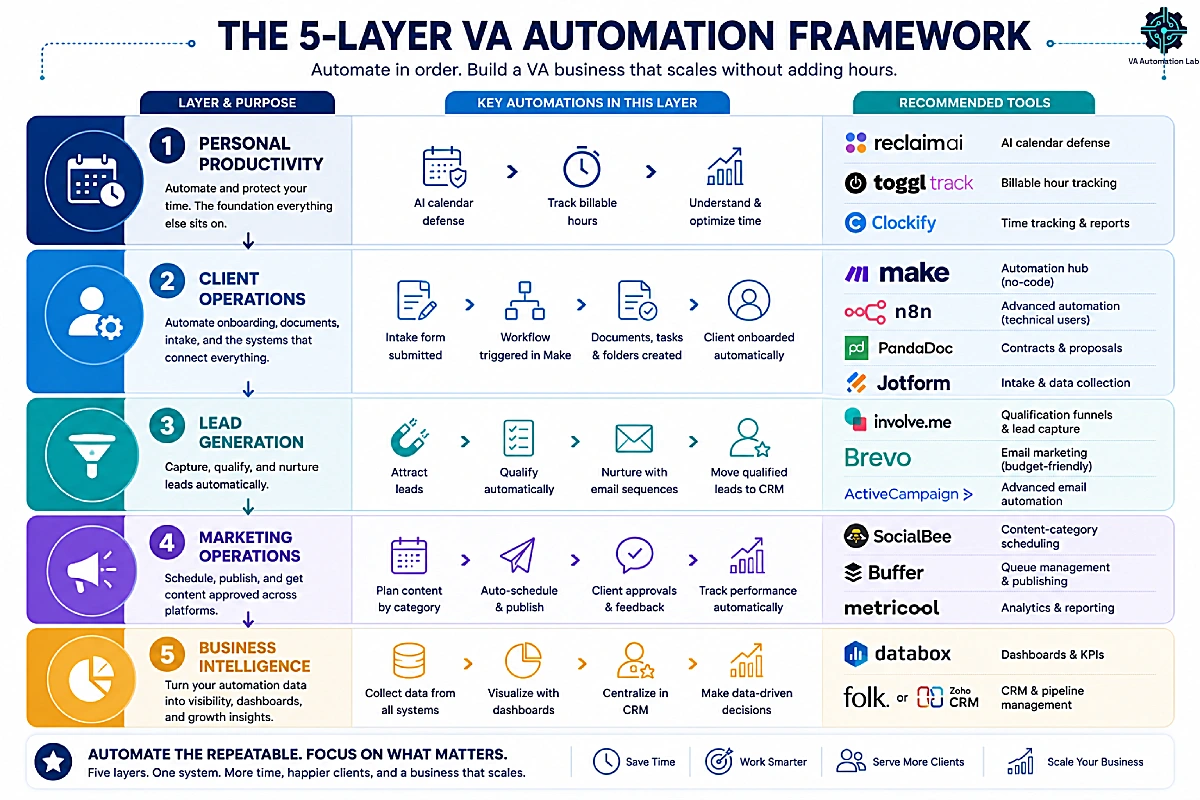
Layer 1 — Personal Productivity
Before you automate client work, automate your own time. This layer protects your calendar and tracks where your hours go — the foundation everything else sits on. Tools: Reclaim.ai for AI calendar defense, plus Toggl Track or Clockify for billable-hour tracking. Automating this layer is what frees the time to build the others.
Layer 2 — Client Operations
This is the core delivery layer: onboarding, documents, intake, and the integration hub that connects them. Tools: Make as the connective tissue (with n8n as the advanced alternative for technical or privacy-sensitive work), PandaDoc for contracts, and Jotform for structured intake forms. Get this layer right and every new client flows through a tested system instead of a manual checklist.
Layer 3 — Lead Generation
Once delivery is automated, automate the top of the funnel: capturing, qualifying, and nurturing leads. Tools: Involve.me for qualification funnels, plus Brevo or ActiveCampaign for nurture sequences. This layer keeps your pipeline full without manual follow-up.
Layer 4 — Marketing Operations
For VAs offering content and social services, this layer handles scheduling, publishing, and approvals across platforms. Tools: SocialBee for content-category scheduling, plus Buffer for queue management and Metricool for analytics. Automating it turns a daily context-switch into a weekly review.
Layer 5 — Business Intelligence
The top layer turns everything below it into visibility: reporting, dashboards, and the CRM that ties client data together. Tools: Databox for dashboards, plus Folk or Zoho CRM as the contact and pipeline hub. This is what lets you — and your clients — see results without building a single report by hand.
9. The Complete VA Automation Stack: Pricing & Features
Most solo VA stacks that produce consistent results contain four to six active tools — you do not need all fifteen at once. The table maps every recommended tool to its layer, verified free tier, paid entry point, and key paid features, so you can build the stack that matches the services you offer. These virtual assistant automation tools are grouped by the five layers above. All pricing reflects annual billing.
Layer | Tool | Free Tier | Paid Entry (annual) | Key Paid Features |
1 · Productivity | Reclaim.ai | Lite (free) — 1-wk range, 1 link, 1 habit | Starter $10/mo | 8-wk range, unlimited focus time & habits, 3 links |
1 · Productivity | Toggl Track | Free — tracking, reports, integrations | Starter $9/mo | Billable rates, projects, revenue analysis |
1 · Productivity | Clockify | Free — tracking + billable rates, no user cap | Standard $5.49/mo | Invoicing, recurring invoices, approvals |
2 · Client Ops | Make | Free — 1,000 credits/mo | Core $9/mo (10k credits) | Unlimited scenarios, minute scheduling, API |
2 · Client Ops | n8n | Community (self-host, free) | Starter €20/mo | 2,500 executions, JS/Python steps, unlimited users |
2 · Client Ops | PandaDoc | Free — 60 docs/yr, 5 eSign/mo | Starter $19/mo | Unlimited docs & eSignatures |
2 · Client Ops | Jotform | Starter (free) — 5 forms, 100 subs/mo | Bronze $34/mo | 25 forms, 1,000 subs, no branding |
3 · Lead Gen | Involve.me | Free — 50 subs/mo | Start $29/mo | 5 funnels, conditional logic, automations |
3 · Lead Gen | ActiveCampaign | 14-day trial | Starter $15/mo | Sequences, segmentation (1,000 contacts) |
3 · Lead Gen | Brevo | Free — 300 emails/day | Standard $16.17/mo (5k emails) | Marketing automation, A/B, landing pages |
4 · Marketing | Buffer | Free — 10 posts/channel | Essentials $5/mo per channel | Unlimited posts/channel, advanced analytics |
4 · Marketing | Metricool | Free — 1 brand, 20 posts/mo | Starter $20/mo | 10 brands, unlimited publishing, reports |
4 · Marketing | SocialBee | 14-day trial | Bootstrap $24/mo | 5 profiles, content categories, unlimited AI |
5 · Intelligence | Databox | Free — 3 sources, 1 dashboard | Analyst $71/mo | Hourly updates, 5 data sources, 150 AI credits/mo |
5 · Intelligence | Folk | 14-day trial | Standard $24/mo | Pipeline, enrichment, AI, 5,000+ integrations |
5 · Intelligence | Zoho CRM | Free — 3 users | Standard (per user) | Workflows, AI agents, forecasting |
The Minimum Viable Stack (First 30 Days)
You do not need all fifteen tools at once. The smallest set that produces results: Make as the hub ($0 to start), Reclaim.ai for calendar control (free Lite), and one free-tier client tool — PandaDoc if you handle contracts, or Zoho CRM if your contact data is scattered. Three tools, all free to begin, covering the workflows that hurt most.
Scaling the Stack (Days 31–90+)
Add tools only when the matching workflow becomes a real bottleneck. Add Involve.me or Jotform once your intake process is documented. Add ActiveCampaign once you have a subscriber base worth nurturing. Add Toggl Track when retainer hours need tracking, and Databox only when you report for two or more clients with structured data.
10. The ROI of Automation for Virtual Assistants
The realistic return is 10–20 hours per week for a VA managing two to four clients with active automations across onboarding, scheduling, reporting, and documents. Understanding the automation ROI for virtual assistants means converting those recovered hours into capacity and revenue — not chasing an inflated number, but running conservative math on your own practice.
The table below breaks the weekly figure down by workflow. These are conservative estimates for a VA managing two to four clients with active automations, not optimistic projections.
Workflow | Monthly time saved |
Scheduling & calendar management | 8–16 hrs |
Client onboarding | 2–4 hrs |
CRM & contact management | 2–4 hrs |
Document & contract workflows | 4–8 hrs |
Lead capture & intake | 2–5 hrs |
Client reporting & dashboards | 8–16 hrs |
Email & client nurturing | 2–4 hrs |
Time tracking & invoicing | 2–4 hrs |
Social scheduling & reporting | 4–8 hrs |
Total | ~34–69 hrs/month |
Converting Recovered Hours Into Billable Capacity
Individual workflows save predictable amounts: client onboarding automation typically saves 30–60 minutes per new client; automated reporting saves 2–4 hours per client per month; scheduling automation saves 2–4 hours per week across active calendars. Stack a few of these and the monthly total reaches the range above — hours you can resell as billable work or invest in landing the next client.
The Payback-Period Math
Run it for your own numbers. Take the hours a workflow saves per month, multiply by your effective hourly rate, and subtract the tool’s monthly cost. Reclaim.ai at $10/month that saves even two hours a week pays for itself many times over within the first month at any professional rate. The point isn’t a universal figure — it’s that almost any single-workflow automation clears its own cost inside the first billing cycle, which is why the order of operations (one workflow, confirmed, then the next) works.
Why It Pays Off With One or Two Clients
The strongest reason to automate early is that you build the system before the practice is full. Setting up onboarding for one client takes the same effort as for five — but doing it now means you have a tested system ready to scale. The two-to-four hours of setup is clearly worth it if the workflow runs for the next two years. Waiting until you “have more clients” means building under pressure and missing the compounding head start.
11. How to Sequence Your Automation Rollout Over 90 Days
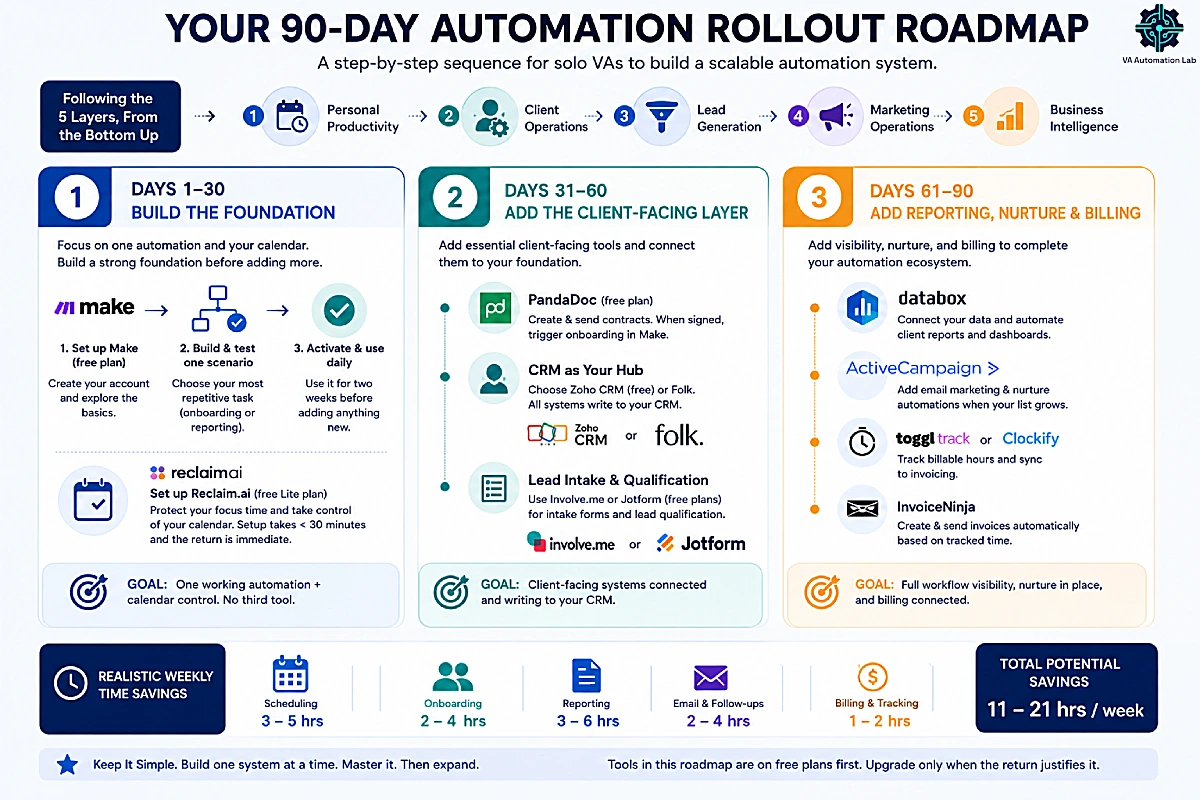
The most common reason automation stalls is doing too much at once. This 90-day sequence is built for a solo VA starting from a manual practice with two or more clients, and it follows the five layers from the bottom up.
Days 1–30: Build the Foundation
Start with Make and one scenario. The scenario to build first is the one connected to your most repetitive manual task, typically client onboarding or weekly reporting. Set up the free plan, build and test one complete scenario, activate it, and use it daily for two weeks before adding anything else.
In parallel, implement Reclaim.ai for calendar management. The setup takes under thirty minutes and the return is immediate, calendar chaos is one of the highest-friction elements of VA work, and fixing it at the start creates the mental space for everything that follows.
Do not add a third tool in the first month. The goal is working systems, not an impressive tool stack.
Days 31–60: Add the Client-Facing Layer
Once the Make scenario is stable and Reclaim.ai is part of your daily workflow, add PandaDoc and connect it to Make so a signed contract triggers onboarding. Set up your CRM — Zoho CRM or Folk — as the hub everything writes to. If you have any inbound lead flow, add Involve.me or Jotform on their free tiers for intake qualification. Each addition plugs into the foundation you already built.
Days 61–90: Add Reporting, Nurture, and Billing
With onboarding and intake running, add Databox for client reporting,ActiveCampaign once your subscriber base justifies it, and Toggl Track or Clockify to tie billable hours into invoicing. Below is the full sequence with realistic weekly time savings.
Rollout summary:
Timeline | Tool | Workflow to build | Weekly time saved |
Days 1–30 | Make | Client intake or onboarding | 3–5 hrs |
Days 1–30 | Reclaim.ai | Calendar + focus time protection | 2–4 hrs |
Days 31–60 | PandaDoc | Contract delivery + signature tracking | 1–2 hrs |
Days 31–60 | Folk / Involve.me | CRM hub + lead qualification funnel | 1–3 hrs |
Days 61–90 | Databox | Automated client reporting | 2–4 hrs |
Days 61–90 | Toggl / ActiveCampaign | Time tracking + nurture | 1–2 hrs |
12. Common Mistakes VAs Make With Automation
Automating Before Documenting
The most reliable predictor of an automation breaking is building it on top of a process that has not yet been written down. If you cannot describe the steps of a workflow clearly enough to configure a Make scenario from memory, the automation will either be incomplete or will fail unpredictably when edge cases arise.
The correct sequence: perform the task manually until it is stable and consistent → write down every step in order → identify which steps are always the same → automate only those steps. Steps that vary based on context or judgment belong to the human side of the workflow; steps that always follow the same logic belong to the automation.
This is not a philosophical point, it is a practical one. Automations built on top of undocumented processes require frequent manual fixes, which eliminates most of the time saving and often exceeds it.
Building Scenarios That Break Silently
An automation that fails without notifying anyone is worse than no automation, because it creates the impression that something is happening when it is not. Welcome emails that never arrive, folders that are not created, reports that are not sent, if the VA does not know the automation failed, the client suffers the consequence.
Every Make scenario should include explicit error handling. At minimum, configure an error notification route: if any module fails, send a Slack message or email to the VA immediately with the error details. This takes an additional five minutes to set up and prevents the most damaging category of automation failure.
Over-Automating Client Communication
Automation handles structured, predictable communication well. It handles nuanced, relationship-dependent communication poorly. VAs who automate follow-ups, check-ins, and status updates as if they were data handoffs often produce communication that clients experience as impersonal or tone-deaf, precisely the opposite of what VA work should deliver.
The practical boundary: automate confirmations, reminders, standardized reports, and intake responses. Keep client relationship communication (updates on progress, problem-solving exchanges, feedback requests) in the human part of the workflow. Automation exists to clear time for these interactions, not to replace them.
Choosing the Wrong Tool Tier for the Stage
Paying for agency-scale reporting while you have two clients wastes money — Databox Analyst covers them at $71/month billed annually; running everything on free tiers that throttle at the wrong moment costs you reliability. Match the tier to your client volume, start on free plans wherever they’re sufficient, and upgrade only when a specific workflow demands it.
13. Conclusion: Automation as a Practice-Level Investment
Automation for virtual assistants is not a technical project with a start and finish date. It is a practice-level investment in how the business runs , one that compounds over time as each automated workflow creates the capacity to handle more work, serve more clients, and deliver more consistent output without proportionally more hours.
The five-layer stack in this guide — Make as the hub, Reclaim.ai for productivity, PandaDoc and Jotform for client operations, Involve.me and ActiveCampaign for lead generation, Buffer and Metricool for marketing, and Databox and Folk for intelligence — is a tested, no-code system you can build one piece at a time. For the wider picture of how it all fits together, the Best Tools for Virtual Assistants comparison is the natural next stop.
The decision point is not whether to automate. The question is whether to start now, with one scenario and one tool, or to continue deferring the investment while competitors who have already started compound their operational advantage further.
If you are starting today: Sign up for Make’s free plan. Build the client intake scenario from section 5. Run it for two weeks. That is all the first step requires.
Make: The Automation Hub for Your VA Practice
Make Core at $9/month (annual) covers unlimited scenarios, 10,000 credits per month, and minute-level scheduling, the integration layer for every automation workflow in this guide.
Start free, upgrade when you need real-time runs.
Frequently Asked Questions About Automation for Virtual Assistants
What is the best automation tool for virtual assistants?
Make is the most practical starting point for VA automation because it covers the integration layer, connecting apps and automating multi-step workflows, that every other tool in the stack depends on. Its Core plan at $9/month (annual) provides 10,000 credits per month, unlimited active scenarios, and minute-level scheduling. For specific workflow categories, the stack expands: Reclaim.ai for scheduling, PandaDoc for documents, Folk or Zoho CRM for contacts, and Databox for reporting.
How much time can automation save a virtual assistant?
The realistic range is 10–20 hours per week for a VA managing two to four clients with active automations across onboarding, scheduling, reporting, and document workflows. Individual scenarios vary: client onboarding automation typically saves 30–60 minutes per new client; automated reporting saves 2–4 hours per client per month; scheduling automation saves 2–4 hours per week across active client calendars. These numbers are conservative estimates based on typical VA workload composition, not optimistic projections.
Does automating VA work require coding?
No. The core tools in this guide use visual, no-code interfaces — you build workflows by connecting modules, not by writing code. Configuration requires knowing what you want the automation to do, not how to program it. The learning curve for a first working scenario is roughly two to four hours. Only n8n, the advanced option, benefits from light technical comfort, and even that is optional.
What is the difference between Make and Zapier for VAs?
Both platforms connect apps and automate workflows. The primary differences relevant to VAs are cost, flexibility, and complexity. Make provides significantly more credits per dollar, approximately 10,000 per month at $9/month versus Zapier’s lower task limit at a higher price point. Make also handles more complex logic: conditional routing, data transformation, loops, and error handling are all available at the Core plan level. Zapier is slightly easier for very basic automations and offers a larger native app library. The typical VA journey is to start on Zapier for simple workflows and migrate complex scenarios to Make as the practice grows. Full comparison: Zapier vs Make for Virtual Assistants.
Which VA workflows should I automate first?
Start with the workflow that consumes the most repeatable time per week. For most VAs, this is either scheduling (if calendar coordination is the primary overhead) or client onboarding (if new client setup consumes significant time each cycle). Both offer high-return automation with low scenario complexity. Document workflows are the fastest to implement and produce immediate results even with a light tool like PandaDoc’s free tier. Reporting automation has the highest monthly time savings per client but requires structured data sources to be already in place.
How do I connect automation tools to each other?
Most tools in the VA automation stack offer native integrations with Make, either through a pre-built module or via webhook. The Make module library includes direct integrations for PandaDoc, Databox, ActiveCampaign, Google Workspace, Typeform, ClickUp, Notion, Slack, and hundreds of other tools VAs use daily. Where a native module is not available, the HTTP module or Webhooks module in Make connects to any tool that offers an API or webhook endpoint. For tools like Involve.me and Reclaim.ai, webhook-based connections to Make provide real-time triggering without polling overhead.
Is it worth automating with only one or two clients?
Yes, with qualifications. The case for automation with one or two clients is primarily about building the system before the practice is fully loaded. Setting up a client onboarding scenario and a document workflow with one client takes the same amount of time as setting it up with five, but doing it with one client means you have a tested, working system ready to scale when client two and three arrive. The cost-benefit calculation changes when you factor in the learning investment: two to four hours of initial setup is clearly worth it if the system will run for the next two years. The alternative, deferring until you “have more clients”, means building under time pressure and missing the compounding advantage of an early start.
Make vs n8n vs Pabbly Connect — which should a VA choose?
For most non-technical VAs, Make is the best default: visual, well-documented, and powerful enough for every workflow here, starting free and $9/month for Core (10,000 credits). Choose n8n (€20/month for 2,500 executions, billed annually, or free self-hosted) if you’re technical, want self-hosting for data-sensitive work, or run high-volume workflows where execution-based pricing is cheaper. Choose Pabbly Connect if you want to avoid a subscription — its $349 lifetime deal is the budget play, with some trade-offs in polish.
Which CRM works best for an automated VA workflow?
Folk is a strong default for solo VAs — lightweight, clean, and easy to connect to Make for automated contact and pipeline updates, starting at $24/month after a 14-day trial. Zoho CRM is the budget-friendly all-in-one alternative, free for up to 3 users, with a paid Standard plan. The right choice depends on how many clients you manage and how much customization you need; the best CRM for virtual assistants guide compares the full field.
What’s the difference between automation and AI agents for VAs?
Rule-based automation follows fixed logic: a trigger fires and predefined actions run identically every time. AI agents add a language model that can handle judgment and unstructured input — reading a messy email and deciding where it goes, for example. For most VA work, rule-based automation (Make, the workflows in this guide) is still the foundation, because it’s predictable and reliable. AI agents are best layered on top for steps that need interpretation, and tools like Jotform and Zoho CRM now include them. Build your rule-based workflows first, then add agents where judgment is needed.
Glossary: Automation Terms for Virtual Assistants
Automation Scenario (Make): A configured sequence of modules in Make that executes automatically when a trigger condition is met. Equivalent to a “Zap” in Zapier.
Credit (Make): The billing unit on Make. Each module action in a scenario consumes one credit. Non-AI app modules: 1 operation = 1 credit.
Conditional Logic: A rule within an automation that routes data or triggers different actions based on specific conditions, for example, routing high-budget leads to a booking link and low-budget leads to a resource page.
eSignature: A legally binding digital signature collected via platforms like PandaDoc, used to execute contracts, service agreements, and intake documents without printing or in-person meetings.
Error Handling: A configured route in an automation scenario that activates when a module fails, typically sending a notification to the VA so manual intervention can occur before the failure causes downstream problems.
Integration Platform: A tool (like Make or Zapier) that connects multiple apps and automates data flows between them without requiring custom code.
Lead Qualification Funnel: An interactive multi-step sequence (typically built with tools like Involve.me) that collects and scores prospect information to determine fit before routing to a booking link or nurture sequence.
Module (Make): A single action block within a Make scenario representing one operation in a connected app, for example, “Watch for new form responses” or “Create a folder in Google Drive.”
No-Code Automation: The use of visual interfaces and pre-built connectors to build automation workflows without writing code, accessible to non-technical users including VAs.
Polling: A method by which an automation platform checks a connected app for new data on a scheduled interval. Contrasted with webhooks, which push data instantly. Polling consumes credits every time it runs, even when no new data is present.
Scenario Template (Make): A pre-built scenario that can be imported and adapted, reducing the time required to build common automations from scratch.
Trigger: The event that starts an automation scenario, for example, a new form submission, a calendar event, a signed document, or a specific date/time.
Webhook: A real-time data transmission method in which an external app pushes data to Make (or another platform) the instant an event occurs, without polling. More efficient than polling for event-driven workflows.
Workflow Automation: A multi-step automated process that connects several tasks or tools to execute an end-to-end workflow, for example, receiving a signed contract, creating a project record, and sending a welcome email, without manual intervention.
AI Agent: A newer type of automation that uses a language model to handle judgment and unstructured input within a workflow, rather than following only fixed rules.
About the Author
Alex Stratton has spent the better part of a decade working at the intersection of virtual assistance and operational systems, first as a VA supporting founders and small business owners, then as a workflow consultant helping remote teams reduce the manual overhead that accumulates when businesses grow faster than their processes. The tools and workflows here reflect decisions made repeatedly in real client contexts, where the wrong choice costs hours, not minutes. Learn more about VA Automation Lab → About.