
AI Email Management for Virtual Assistants: Best Tools and Workflows (2026)

The complete guide to AI email management for virtual assistants: best tools by use case, real workflow examples, and a step-by-step system for managing multiple client inboxes without spending half your day inside Gmail or Outlook.
Email is the highest-volume task in most VA operations and, without the right system, the one that expands to fill whatever time you give it. The average professional handles over 100 emails per day. For a VA managing three clients across different time zones, that number multiplies, and with it, the risk of missed follow-ups, delayed replies, and hours lost to inbox triage every single week.
AI email management for virtual assistants changes that equation. The tools available in 2026 go far beyond templates and canned responses, they analyze message intent, prioritize what requires action, summarize long threads in seconds, draft replies that match your client’s tone, and automate follow-ups without manual intervention. The result is an inbox that works for you instead of against you.
This guide covers which tools produce the best results for VA-specific workflows, how to implement them without technical complexity, and how to build an AI email workflow that scales across multiple clients.
What this guide covers:
- The 5 best AI email tools for virtual assistants, compared by use case, free tier, and workflow fit
- How to use AI for summaries, drafting, follow-ups, and sorting
- A step-by-step system for managing multiple client inboxes
- The AI email workflow that takes under 20 minutes to implement
- Common mistakes that reduce AI email efficiency, and the fixes
👉 Download the Free AI Starter Toolkit— includes email prompt templates ready to use in the first session.
👉 AI Tools for Virtual Assistants: The Complete Practical Guide — the full reference for every AI tool category in VA work.
Table of Contents
1. Why Email Management Is the Highest-ROI Starting Point for AI
Of all the tasks where AI produces measurable results for virtual assistants, email management delivers the fastest return. The reason is simple: email is high-frequency, structurally predictable, and almost entirely composed of text, exactly the conditions where AI tools perform best.
The numbers are consistent across studies. According to research cited by Superhuman, professionals who use AI email tools save an average of 4 hours per week, equivalent to more than one full workday per month recovered from inbox work alone. For a VA managing multiple clients, each with separate inboxes and different communication styles, the compound saving is proportionally larger.
Email also fails in predictable ways for VAs specifically:
Volume scales with client count. Each new client adds not just their emails but the context-switching cost of moving between inboxes, accounts, and communication styles. A VA managing four clients in Gmail and Outlook simultaneously faces a cognitive overhead that no amount of manual organization fully resolves.
Follow-ups fall through the cracks. The most common client complaint about VA communication is not quality, it is timing. A reply that arrives 48 hours late, a follow-up that was never sent, a task buried in thread 47 of a 60-message chain. These are not attention failures. They are system failures, and AI email management for virtual assistants resolves them systematically.
Drafting takes disproportionate time. A professional email reply takes 15-25 minutes to write from scratch when the message requires nuance, accuracy, and the right tone for the specific client relationship. AI reduces that to 3-5 minutes of review and editing. Applied to 10 emails per day across three clients, the saving is 2-3 hours daily.
This is why AI email management for virtual assistants is not an optional upgrade, it is the single most impactful place to start if you want to reduce working hours without reducing output quality.
2. The 5 Best AI Tools for Email Management — Compared
Choosing the right AI email assistant for virtual assistants depends on three factors that most generic roundups ignore: which email provider your clients use, whether you need to manage shared or separate inboxes, and how much setup time you can realistically invest. The five tools below are evaluated specifically for VA workflows, not for enterprise teams or individual executives.
Superhuman (Smart Inbox + Priority Detection)
Superhuman is the benchmark for AI email speed and prioritization. Its AI layer sits on top of Gmail or Outlook and learns which messages require immediate action, which can wait, and which are noise.
Core AI features for VA work:
- Automatic priority detection: surfaces the emails that need a response before you open the inbox
- Thread summarization: condenses a 40-message chain into a 3-sentence summary with key decisions and action items
- Smart reply suggestions: AI-generated replies based on thread context, editable in seconds
- Follow-up automation: schedules reminders when contacts don’t reply within a set window
- Task extraction: identifies commitments and deadlines buried inside emails and converts them to tasks
Best for: VAs managing high-volume inboxes for executives, founders, or sales teams where response speed is a direct client expectation.
Free tier: No, starts at $30/month. The investment is justified for VAs handling 100+ emails per day across premium clients.
Limitation for VAs: Single-account focus. Managing multiple separate client accounts requires switching between Superhuman instances, workable but not seamless.
Gemini for Gmail (Native AI — Google Workspace)
In 2024 Google rebranded Duet AI as Gemini and significantly expanded its capabilities inside Gmail. In 2026 Gemini is the most accessible AI email assistant for virtual assistants who operate primarily in Google Workspace, zero additional setup, no external tool to configure.
Core AI features for VA work:
- Help Me Write: generates full email drafts from a one-sentence description of what the email needs to do
- AI Overviews: summarizes entire email threads including questions, decisions, and unresolved items
- Suggested Replies: context-aware short replies for standard acknowledgments and confirmations
- Natural language search: find emails by describing the conversation rather than remembering exact keywords
- Smart Compose: predictive text that completes sentences in your writing style as you type
Best for: VAs who manage client accounts in Google Workspace and want AI email management without adding another tool to the stack. Beginner-friendly, no learning curve beyond Gmail itself.
Free tier: Available in Google Workspace Business Starter ($6/month per user). For VAs managing client accounts, the client typically provides access.
Limitation for VAs: Limited to Gmail, no cross-platform management for clients using Outlook or other providers.
Microsoft Copilot for Outlook (Microsoft 365)
Copilot is Microsoft’s native AI integration for Outlook, designed for professional and enterprise email environments. For VAs supporting corporate clients, it is often the default tool because it requires no additional purchase, it is included in Microsoft 365 Business subscriptions.
Core AI features for VA work:
- Thread summarization: particularly strong for long enterprise email chains with multiple stakeholders
- Task extraction: identifies action items, deadlines, and decisions across multiple messages automatically
- Draft generation: creates full replies with tone controls (professional, concise, friendly)
- Email coaching: suggests improvements to drafts before sending
- Cross-app integration: email content flows automatically to Teams, To Do, and OneNote
Best for: VAs supporting clients in corporate or Microsoft-based environments, law firms, enterprise companies, consultancies, and any organization standardized on Microsoft 365.
Free tier: Included in Microsoft 365 Business Standard ($12.50/user/month), typically the client’s existing subscription covers access.
Limitation for VAs: Requires Microsoft 365, not useful for Google Workspace clients.
Missive + AI (Collaborative Inbox Management)
Missive is the only tool in this comparison built specifically for managing email on behalf of someone else, the closest thing to purpose-built software for VA email workflows. It provides a shared inbox where a VA and client can collaborate on email responses without forwarding threads or losing context.
Core AI features for VA work:
- Collaborative drafting: VA drafts a reply, client reviews and approves before sending
- Shared workflows: automated rules that apply consistently across the shared inbox
- AI composition: draft generation with tone and context controls inside the interface
- Inbox assignment: routes incoming emails to the right person (VA or client) based on topic or sender
- Multi-account management: handles multiple client inboxes from a single interface
Best for: VAs with ongoing retainer clients who need to manage communication collaboratively, the client stays visible and in control while the VA handles the volume.
Free tier: Free plan available for up to 3 accounts. Paid plans from $14/user/month.
Limitation for VAs: Requires the client to join Missive, adds a tool adoption step that some clients resist.
SaneBox + AI (Inbox Organization and Filtering)
SaneBox is not a drafting tool, it is an AI email management layer that sits above any email provider and handles the organizational work that consumes the first 30 minutes of every inbox session: separating what matters from what doesn’t.
Core AI features for VA work:
- SaneLater: automatically moves low-priority emails out of the main inbox into a review folder, checked once daily
- SaneBlackHole: permanent one-click unsubscribe from any sender
- Follow-up reminders: SaneReminders moves sent emails back to your inbox if no reply arrives within a set window
- Snooze: removes emails from view until a specified time when they’re relevant
- Works with any provider: Gmail, Outlook, Apple Mail, any IMAP account
Best for: VAs whose primary email problem is volume and distraction rather than drafting speed. If 40% of inbox time goes to sorting rather than responding, SaneBox produces the fastest visible result.
Free tier: 14-day trial, then from $7/month.
Limitation for VAs: No drafting or writing capabilities, needs to be combined with Claude or ChatGPT for full AI email management coverage.
AI Tool | Best For | Free Tier | Monthly Cost | VA-Specific Strength |
Superhuman | High-volume executive inboxes | ❌ | From $30 | Speed + prioritization |
Gemini for Gmail | Google Workspace clients | ✅ (Workspace plan) | From $6 | Zero setup, native integration |
Outlook Copilot | Corporate/Microsoft clients | ✅ (M365 plan) | From $12.50 | Enterprise thread management |
Missive + AI | Collaborative client inboxes | ✅ (3 accounts) | From $14 | Built for managing on behalf of others |
SaneBox | Inbox organization + filtering | ❌ (14-day trial) | From $7 | Inbox zero without tool switching |
Want to simplify your email workflow with AI?
If you’re a Virtual Assistant and feel confused by too many AI tools, this free starter toolkit shows you exactly where to begin, without tech overwhelm.
3. How to Use AI for Every Part of Your Email Workflow
AI email management for virtual assistants covers four distinct workflow categories. Each requires a different approach and produces a different type of time saving.
Email Summaries
The use case with the fastest visible result. A VA processing 80 emails per day spends 20-30 seconds per message reading context before responding. For threaded conversations with 15+ messages, that time multiplies.
With Gemini or Copilot: open any thread → click “Summarize” → receive a 3-4 sentence summary with the key question, relevant decisions, and any pending action items. The full thread takes 2 seconds to understand instead of 3 minutes.
With Claude or ChatGPT (for any provider): paste the full thread text with this prompt:
Summarize this email thread. Output:
- Main topic (1 sentence)
- Current status (1 sentence)
- What requires action from me (bullet list)
- Any deadlines mentioned

Thread: [PASTE THREAD]
Time saving benchmark: 15-20 minutes per day for a VA handling 5+ threaded conversations. Applied consistently, this alone recovers 90+ minutes per week.
ChatGPT is one of the most effective tool for AI-first email drafting in VA operations. The generate → review → refine workflow reduces per-email time by 60-75% compared to drafting from scratch. For the complete ChatGPT email prompt library, including client update templates, follow-up sequences, and tone adjustment prompts 👉 see ChatGPT for Virtual Assistants: Complete Guide.
Drafting and Editing Replies
The highest-time-investment email task and the one where AI produces the most dramatic per-message saving.
The workflow:
- Read the incoming email and identify what the reply needs to accomplish, one sentence is enough.
- Write a specific prompt. Include: who is the sender (client, prospect, vendor), what the email asked, what the reply should communicate, the required tone, and any constraints (length, specific information to include or avoid).
- Review the output against the client’s established communication style. Edit tone if needed.
- Send or queue for client approval if required.
Prompt template for client replies:
Write a professional reply to this client email.

Client name: [NAME]
Relationship: [retainer client / new inquiry / vendor]
What they asked: [BRIEF DESCRIPTION]
What my reply should accomplish: [BRIEF DESCRIPTION]
Tone: [formal / warm-professional / concise]
Include: [specific information to include]
Avoid: [anything not to mention]
Length: under [X] words

Original email: [PASTE EMAIL]
Time saving benchmark: A 20-minute drafting task takes 3-5 minutes with a specific prompt and light editing. For 10 emails per day requiring original replies, this recovers 2-3 hours daily.
Follow-Up Automation
The most common VA email failure point, and the most easily resolved with AI email workflow tools.
Three levels of follow-up automation:
Level 1 — Reminder-based (no tool required): Use SaneBox SaneReminders or Gmail’s built-in snooze feature. When you send an email requiring a reply, set a reminder for 48-72 hours. If no reply arrives, the email resurfaces automatically.
Level 2 — Template-based: Build a set of follow-up prompt templates in Notion or a Google Doc, one for each common scenario (no reply to proposal, missed deadline, pending approval, overdue invoice). When a follow-up is needed, open the template, fill the placeholders, paste into Claude or ChatGPT, review, send.
Level 3 — Automated sequences (Zapier + email): For recurring follow-up patterns — weekly client updates, monthly reporting reminders, onboarding sequences, connect Gmail or Outlook to Zapier. Build a workflow that sends a follow-up automatically after a defined period of inactivity on a labeled thread.
Time saving benchmark: Eliminating manual follow-up management recovers 30-45 minutes per week for a VA managing 3+ active clients with ongoing project communication.
Sorting and Prioritization
Inbox triage, deciding what to open, what to defer, and what to ignore, is the invisible time cost of email management. For a VA managing multiple client inboxes, it compounds across every account.
AI-powered sorting approach:
Use SaneBox for automatic first-level triage: urgent messages stay in the main inbox, everything else moves to SaneLater for once-daily review. This alone eliminates reactive email checking throughout the day.
For Gmail users, Gemini‘s AI Inbox filters low-priority messages automatically based on learned patterns, no manual rule configuration required.
Manual rule setup for any provider: create inbox filters that automatically label emails by client, priority level, and type (FYI vs. action required). AI tools can then operate on labeled subsets rather than the full inbox.
The result: a VA who previously opened the inbox 15 times per day to check for urgent messages switches to 2-3 focused inbox sessions, knowing that anything surfaced in the main inbox has been pre-screened as requiring attention.
👉 How to Start Using AI as a Virtual Assistant — the beginner framework for implementing any AI workflow.

4. How to Manage Multiple Client Inboxes with AI
Managing a single inbox with AI is straightforward. Managing multiple client inboxes, each with different providers, communication styles, and urgency levels, requires a system. This is the section most roundups skip because they write for individuals, not for VAs.
The Multi-Inbox Architecture
The foundation of effective AI email management for virtual assistants managing multiple clients is architectural, how the inboxes are organized before AI enters the picture.
Recommended structure:
One Missive account or one Gmail account with separate aliases handles all client inboxes from a single interface. Alternatively, use a browser with separate Chrome profiles, one per client, each logged into the respective client’s email account. This prevents context-switching friction and keeps client data fully separated.
For each client inbox, create:
- A master label system (Action Required / FYI / Waiting for Reply / Delegated / Archive)
- A set of inbox rules that pre-sort incoming messages by sender type (client contacts, vendors, internal team)
- A SaneBox connection (works with any IMAP account) to handle volume filtering automatically
This architecture means AI operates on pre-organized, labeled inboxes, not on undifferentiated noise.
Context Management Across Clients
The critical challenge of managing multiple client inboxes with AI is context: the AI tool has no memory of previous client interactions unless you provide it explicitly. This is the source of the most common VA mistake, sending an AI-generated reply that is factually accurate but contextually wrong for the specific client relationship.
The solution: a Client Context Sheet for each client.
Create a one-page document per client containing:
- Communication style preference (formal / casual / direct / relationship-oriented)
- Key contacts and their roles
- Ongoing projects and current status
- Sensitive topics to avoid
- Standard sign-off and signature format
- Recent decisions or context that informs current emails
When using AI to draft a reply for a specific client, include 2-3 sentences from the Client Context Sheet in the prompt. This takes 30 seconds and produces output that sounds client-specific rather than generic.
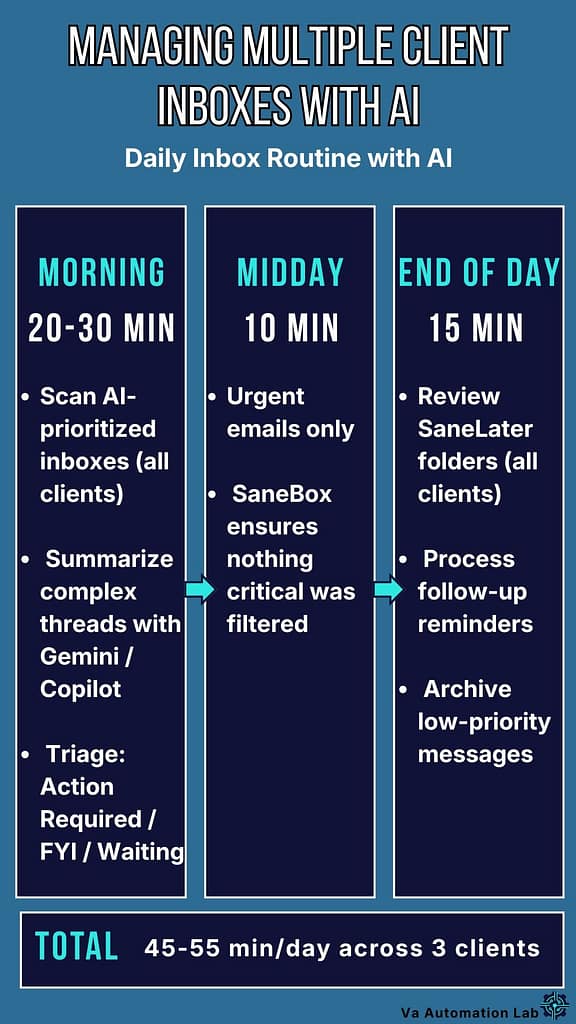
Daily Inbox Routine with AI
With the architecture and context system in place, the daily email management routine for a VA managing three clients with AI looks like this:
Morning session (20-30 minutes total across all clients):
- Open each client inbox in sequence (10-15 minutes). For each: scan AI-prioritized main inbox only, SaneLater and lower-priority labels checked once at end of day. Use Gemini or Copilot to summarize any complex threads from the previous evening.
- Triage: mark each main-inbox email as Action Required, FYI, or Waiting. Do not reply yet.
- Draft replies in batch (10-15 minutes). Use prompt templates from your Client Context Sheet. Review and edit each output, 2-3 minutes per reply.
Midday check (10 minutes): New urgent emails only, SaneBox ensures nothing genuinely urgent was filtered out.
End-of-day session (15 minutes): Review SaneLater folders across all clients. Delete or archive. Process any pending follow-ups with SaneReminders that surfaced.
Total daily email management time: 45-55 minutes across three clients, compared to 3-4 hours without an AI email workflow in place.
👉 AI-Powered Productivity System for Virtual Assistants — building a complete daily system around these workflows.
👉 How to Automate Repetitive Tasks as a Virtual Assistant — extending email automation into full workflow automation.
5. How to Build Your First AI Email Workflow
An AI email workflow is a repeatable sequence that handles a specific, recurring email task without requiring you to start from scratch each time. Building the first one takes one focused session of 20-30 minutes.
Step 1 — Choose One Email Task
Select the email task that occurs most frequently, at least three times per week. For most VAs, this is one of: client update replies, meeting summary emails, follow-up messages after calls, or proposal follow-ups.
Step 2 — Document the Current Manual Process
Before adding AI, write down how you currently handle this task manually:
– What triggers it? (an email arrives, a meeting ends, a deadline passes)
– What information do you need before drafting?
– What does the ideal output look like?
– How long does the manual version take?
– What part is repetitive and predictable?
This step takes 10 minutes and prevents the most common mistake: using AI to automate a process that isn’t yet consistent, which produces inconsistent output at scale.
Step 3 — Build a Prompt Template
Create a reusable prompt with placeholders for the variable elements. Example for a post-meeting summary email:
Write a professional meeting summary email to send to the client after our call. Client: [CLIENT NAME]Meeting date: [DATE]Meeting type: [onboarding / check-in / project review]Main topics covered: [BRIEF LIST]Key decisions made: [LIST]Action items: [WHO does WHAT by WHEN]Next meeting: [DATE AND TIME or TBD]Tone: professional and warm.Length: under 200 words.Format: short intro paragraph + bullet summary + clear next steps.
Save the template in Notion or a Google Doc labeled “Email Workflow Templates.” Every time this task occurs, fill in the placeholders, paste into Claude or ChatGPT, review, edit, send. Prompt writing time drops from 3 minutes to 30 seconds.
Step 4 — Test on Three Real Instances
Run the prompt template on three real occurrences of the task before treating it as established. For each:
– Does the output accurately reflect the situation?
– Is the tone appropriate for this specific client?
– What did you edit and why?
Adjust the template based on what you find. Add context that was consistently missing. Refine the format. After three iterations, the template is stable.
Step 5 — Expand After the First Workflow Works
Once the first AI email workflow produces consistent, minimal-edit output for two weeks, add one adjacent task. The natural sequence: post-meeting email → follow-up reminder → weekly client update → new client onboarding sequence. One at a time, in order of frequency.
Email automation for virtual assistants compounds, each stable workflow frees time to implement the next one.
👉 Best Automation Workflows for Virtual Assistants — connecting email workflows to full no-code automation.
👉 Zapier vs Make for Virtual Assistants — which platform to connect your email workflows to.

6. Common Mistakes That Reduce AI Email Efficiency
Using AI Without Client Context
The most common mistake in AI email management for virtual assistants: drafting a reply with a generic prompt and sending it without checking whether the tone and content match the specific client relationship. AI produces professional, confident text, but professional and confident is not always appropriate. Some clients expect casual and brief. Others require formal and detailed.
The fix: always include 1-2 sentences of client context in the prompt. Reference the Client Context Sheet before drafting any reply that goes beyond a standard acknowledgment.
Sending AI Output Without Factual Review
AI tools generate plausible text, they cannot verify facts they were not given in the prompt. A meeting summary that references the wrong date, a follow-up that cites the wrong project status, or a reply that includes details from a different client’s context (if you paste the wrong email) all damage client trust in ways that take time to repair.
The fix: apply the factual review checklist before sending any AI-generated email: correct date, correct client name, correct project status, correct action items, correct tone for this relationship.
Using AI for Sensitive Communications
AI handles standard, professional email communication well. It handles sensitive communication, difficult feedback, payment disputes, scope conflict, client dissatisfaction, poorly. The output tends toward generic professionalism that misreads the emotional register of the situation.
The fix: use AI for the draft structure only on sensitive emails, then rewrite the critical sentences manually. Or skip AI entirely for communications where relationship nuance is the primary variable.
Managing Multiple Inboxes Without Architecture
Adding AI tools to a disorganized multi-inbox setup produces faster chaos, not organized efficiency. AI email management for virtual assistants only works well when the underlying inbox structure is already clear, separate labels, defined rules, consistent triage logic.
The fix: implement the multi-inbox architecture from section 4 before connecting any AI tool. Fifteen minutes of setup prevents weeks of confusion.
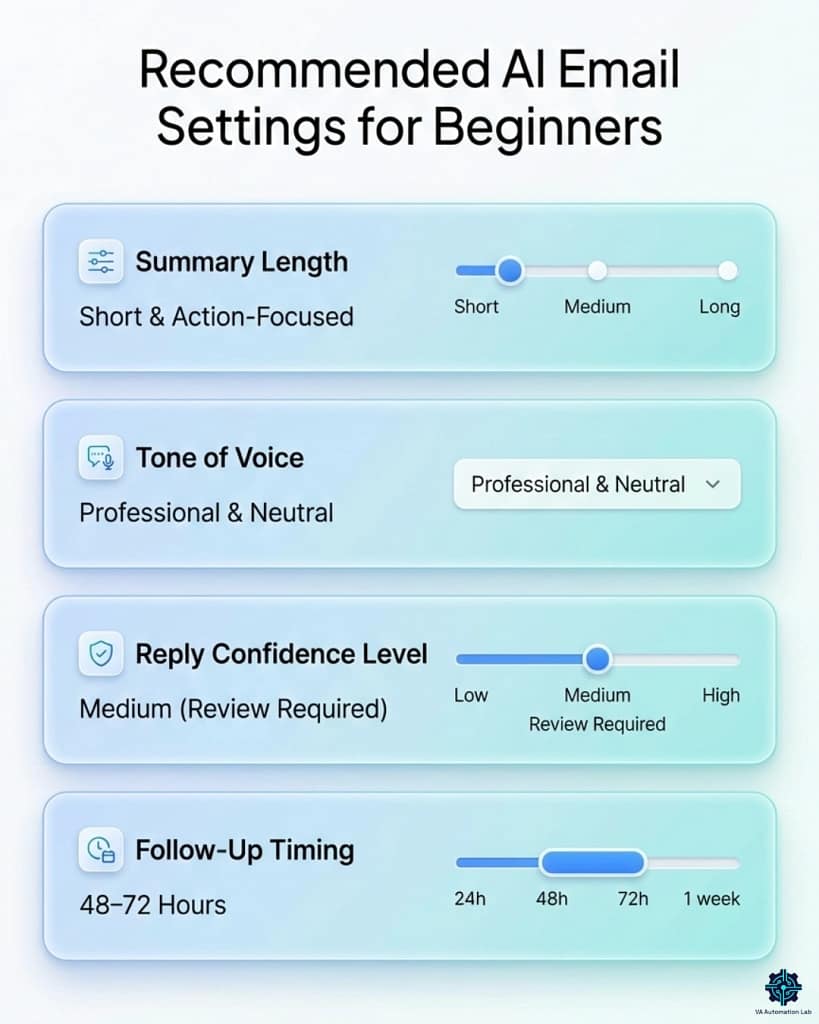
Recommended AI email settings for beginners to help Virtual Assistants manage emails more efficiently and avoid overwhelm.
7. Conclusion
AI email management for virtual assistants in 2026 is not about replacing professional judgment, it is about removing the structural overhead that prevents professional judgment from being applied where it matters. Sorting, summarizing, drafting standard replies, scheduling follow-ups: these are mechanical tasks that consume professional time without producing professional value. AI handles them consistently and at scale.
The practical path is the same one that works for every AI implementation: start with one workflow, build it until it’s stable, then expand. Email is the right starting point because the results are immediate, measurable, and directly visible to clients in the form of faster, more consistent communication.
A VA who recovers 2 hours per day from email management has two hours available for the work that actually grows their business: strategy, client relationships, and higher-value services that no AI tool replaces.
Frequently Asked Questions About AI Email Management for Virtual Assistants
What is the best AI email tool for virtual assistants managing multiple clients?
For multi-client inbox management, Missive with AI is the most purpose-built solution, it handles multiple accounts from a single interface with collaborative drafting capabilities. For VAs primarily in Google Workspace, Gemini for Gmail combined with SaneBox covers most email management needs at minimal cost. Superhuman produces the fastest results for high-volume single inboxes but requires a separate instance per client account. The right choice depends on your client’s email provider and whether you need collaborative or independent inbox management.
How much time can AI save on email management as a virtual assistant?
The time saving varies by email volume and workflow type, but consistent patterns appear across implementations. AI email summarization recovers 15-20 minutes per day for VAs handling 5+ threaded conversations. AI drafting reduces per-email reply time from 15-25 minutes to 3-5 minutes. A full AI email workflow for virtual assistants managing three clients typically recovers 2-3 hours per day compared to fully manual email management, the equivalent of reclaiming one full workday per week.
Are AI email tools safe for managing client communication?
The tools covered in this guide (Gemini for Gmail, Copilot for Outlook, Missive, SaneBox) operate within established enterprise privacy frameworks (Google
Workspace, Microsoft 365) or have explicit SOC 2 compliance. The primary safety consideration for VAs is not platform security but content review: always read AI-generated replies before sending to ensure factual accuracy, correct tone, and appropriate context for the specific client relationship. Never send AI output directly without review.
Can I use Claude or ChatGPT for email management without a dedicated email AI tool?
Yes, and for many VAs it is the most practical starting point. Claude and ChatGPT handle email summarization, drafting, and tone adjustment effectively when given
specific, context-rich prompts. The limitation is integration: you paste email content manually rather than working inside the inbox directly. For VAs processing under 50 emails per day, this manual workflow combined with prompt templates is often sufficient and costs nothing beyond the free tier. Dedicated email AI tools become valuable when volume and multi-inbox complexity make manual pasting inefficient.
Do I need technical skills to set up an AI email workflow?
No. The AI email workflow described in section 5 requires only the ability to write a clear prompt, copy and paste text, and use a basic template document. Gemini for Gmail and Copilot for Outlook require zero setup, they are already inside the email tools your clients use. SaneBox connects to any email provider with a 5-minute guided
setup. The only tool with meaningful configuration complexity is Missive, which requires onboarding the client to the platform as well.
What should I do when AI email output doesn’t match a client’s tone?
Two fixes. The immediate fix: add a tone-correction follow-up prompt, “Rewrite this in a more casual tone, as if the sender has worked with this client for a year.” The systematic fix: update the Client Context Sheet for that client with a more specific tone description and add it to the base prompt template. After two or three iterations, the AI output for that client will consistently match the expected register without requiring manual tone correction.
Glossary: Key Email and AI Terms for Virtual Assistants
AI Email Management The use of artificial intelligence to handle inbox organization, email summarization, reply drafting, follow-up scheduling, and priority detection, reducing manual email workload for virtual assistants.
Thread Summarization AI-generated condensation of a multi-message email conversation into a brief summary of key points, decisions, and pending action items.
Priority Detection AI analysis of incoming emails that identifies which messages require immediate attention based on sender, content, urgency signals, and past behavior patterns.
Smart Reply An AI-generated email response based on the content and context of the received message, editable before sending and typically produced in seconds.
Inbox Triage The process of reviewing incoming emails and categorizing them by urgency and required action. AI automates the first layer of triage, surfacing only what genuinely requires human attention.
Follow-Up Automation AI or rule-based systems that schedule follow-up reminders when a sent email receives no reply within a defined window.
Task Extraction AI’s ability to identify action items, deadlines, and commitments embedded inside email content and convert them into tasks automatically.
Multi-Inbox Management The ability to manage multiple email accounts, typically for different clients, from a single interface, with consistent AI rules applied across all accounts.
Prompt Template A reusable prompt structure with placeholders (such as [CLIENT NAME] and [PASTE EMAIL]) that a VA fills in for each instance of a recurring email task, the foundation of a consistent AI email workflow.
Client Context Sheet A one-page reference document per client containing communication style preferences, key contacts, current project status, and sensitive topics, used to provide AI tools with the context they need to produce client-specific rather than generic output.
Ready to Work Smarter as a Virtual Assistant?
Get the free AI Starter Toolkit and learn how to use simple AI tools and workflows to save time and deliver more value to your clients.
About the Author
Alex Stratton has spent the better part of a decade working at the intersection of virtual assistance and operational systems, first as a VA supporting founders and small business owners, then as a workflow consultant helping remote teams reduce the manual overhead that accumulates when businesses grow faster than their processes. The tools and workflows here reflect decisions made repeatedly in real client contexts, where the wrong choice costs hours, not minutes. Learn more about VA Automation Lab → About.